
AOZBZ Portable Document Scanner
3.8Editor score
900 DPI high resolution
Supports up to 32GB SD
Plug and play compatibility
This guide compares the top ten portable handheld document scanners for mobility, resolution, storage, and software features to help you choose the right
Portable handheld document scanners have revolutionized how professionals manage paper records on the go. These compact devices allow users to digitize receipts, contracts, and photos instantly without bulky equipment. Finding the right model depends on your specific needs for speed, resolution, and connectivity options during daily tasks.
We evaluated ten leading portable scanners based on resolution quality, storage capabilities, and ease of use. Each product was analyzed for its compatibility with various operating systems and its ability to produce clear, editable files. This list covers a range of options from budget-friendly wands to premium wireless models with OCR software.
Every pick highlights key features like battery life, scanning speed, and software integration to guide your decision. Note that product availability and pricing may change frequently on retailer sites. We recommend checking current stock and specifications before purchasing to ensure the device meets your current workflow requirements.
3.8Editor score

4.3Editor score

4.1Editor score
The following table provides a side-by-side comparison of all ten selected portable handheld document scanners to help you quickly identify the model that fits your specific requirements for resolution, connectivity, and form factor.


The AOZBZ Portable Document Scanner stands out as a highly accessible option for users needing a reliable handheld scanning solution. With a solid rating of 3.8 stars, it offers strong performance for basic digitization tasks without the need for expensive equipment or complex setups.
We may earn a commission when you buy through this link, at no additional cost to you.
Its standout feature is the ability to switch between three resolution modes including 300, 600, and 900 DPI allowing users to balance file size and image clarity. The device supports both JPEG and PDF formats and stores scans directly on a Micro SD card which eliminates the immediate need for a computer connection.
While the scanner is efficient, users should be aware that it requires manual movement to scan documents which can be slightly slow compared to automatic feeders. The reliance on AA batteries means you need to keep spares on hand for continuous use during long work sessions.
This model is ideal for students or small business owners who need to digitize receipts and photos on a tight budget. If you prioritize portability and cost over advanced wireless features, this scanner delivers excellent value for everyday document management needs.
Choose from 300 to 900 DPI to optimize file quality for text or images based on your storage needs.
Store files directly to the card for easy transfer to other devices without relying on a computer connection.
We may earn a commission when you buy through this link, at no additional cost to you.
This portable scanner is designed for professionals who need to capture documents in varied settings such as banks or real estate offices. It shares many features with the AOZBZ model but distinguishes itself with immediate usability due to the included memory card.
We may earn a commission when you buy through this link, at no additional cost to you.
The device operates by pressing and holding a scan button to power on which simplifies the user experience. It supports up to 900 DPI resolution and saves files directly to the card making it convenient for travel where laptop access might be limited.
Users should note that AA batteries are not included so you will need to purchase them separately before first use. The manual scanning method requires steady hands to ensure straight lines which might take some practice to master for high quality results.
For travelers and archivists looking for a straightforward tool to digitize papers without software dependencies this scanner is a strong candidate. Its compatibility with older operating systems ensures it works well even on legacy systems commonly found in some businesses.
No drivers or software are required to start scanning making it ready to use right out of the packaging.
Ideal for lawyers and agents needing to keep confidential documents secure and organized without cloud reliance.
We may earn a commission when you buy through this link, at no additional cost to you.
The IRIScan Book 7 offers a premium experience with its high 1050 DPI resolution which is excellent for detailed photos and small text. It comes with Readiris PDF software allowing you to edit and modify documents directly after scanning adding significant value to the purchase.
We may earn a commission when you buy through this link, at no additional cost to you.
One of its key advantages is the rechargeable lithium-ion battery which eliminates the need for constant AA battery replacements. The device scans via USB or SD card giving you flexibility in how you store and transfer your digital files based on your current environment.
Despite the high quality scanning it does not support WiFi connectivity meaning you must connect physically to transfer files wirelessly. This might be a limitation for users who prefer fully wireless workflows but the battery life and resolution often compensate for this trade-off.
This scanner is best suited for professionals who need high fidelity scans and editable documents like legal or medical records. The included PDF editor allows for immediate corrections which streamlines the workflow for users who cannot access external software easily.
Convert scans into Word and Excel files automatically with the included Readiris software for easy editing.
Rechargeable battery supports hundreds of pages per charge reducing operational costs over time.
We may earn a commission when you buy through this link, at no additional cost to you.
The Epson Workforce ES-50 is a top contender for business users who need to digitize long documents quickly. It scans a single page in about 5.5 seconds which is significantly faster than many handheld wands and it can handle documents up to 72 inches in length.
We may earn a commission when you buy through this link, at no additional cost to you.
Its software suite includes Nuance OCR which creates searchable PDFs and editable files instantly. This makes it an excellent tool for accounting and bookkeeping where text accuracy and searchability are critical. The device is USB powered so it draws power from your laptop during use.
While the USB power requirement means you need to be near a computer it ensures you do not have to manage battery charging. The single sheet feeding mode requires you to insert pages one by one but this precision helps avoid jams during critical scans.
If you prioritize speed and software integration over wireless freedom this scanner is a solid investment. It is particularly useful for accountants and researchers who need to manage large volumes of receipts and documents on a laptop.
Capture continuous feed items like receipts or logs up to 72 inches without cutting them apart.
Rapid scanning speed ensures you can process high volumes of paperwork in minutes.
We may earn a commission when you buy through this link, at no additional cost to you.
The Brother DS-640 offers blazing fast scanning speeds of up to 16 pages per minute which is rare for a portable device. It is extremely compact weighing only about 1.5 lbs and measuring less than one foot in length making it easy to store in a purse or pocket.
We may earn a commission when you buy through this link, at no additional cost to you.
It is powered via a micro USB 3.0 cable which allows you to use it with your laptop even if no outlet is available. The iPrint&Scan desktop app supports multiple destinations including email and cloud services making integration with existing workflows seamless.
While it lacks a battery option for standalone use the USB connection ensures it is always ready to scan without charging delays. Automatic image optimization features like color detection and bleed prevention enhance the quality of your scans without manual intervention.
This scanner is perfect for mobile workers who need to scan documents quickly at a desk or while traveling with a laptop. Its speed and software support make it an efficient choice for teams that need to digitize large batches of files daily.
Process color and black white documents at the same speed to keep your workflow uninterrupted.
Send scans directly to email or cloud services using the free desktop application.
We may earn a commission when you buy through this link, at no additional cost to you.
This blue variant of the AOZBZ scanner is designed for those who prioritize extreme portability without sacrificing resolution. Weighing only 0.31 pounds it is one of the lightest options available allowing you to carry it anywhere without burden.
We may earn a commission when you buy through this link, at no additional cost to you.
It offers the same 900 DPI resolution as other models in this line ensuring crisp text and clear images. The device stores files on a Micro SD card which can hold up to 32GB of data providing ample space for long trips or heavy workloads.
Users should be aware that manual operation is required so steady hands are needed to produce straight scans. It also relies on AA batteries which are not included meaning you need to stock up before starting a project.
For students and travelers needing to digitize books and notes on the go this lightweight scanner is a practical tool. Its simplicity and low weight make it ideal for casual use where high volume or wireless connectivity is not a priority.
Weighing just 0.31lb it is incredibly easy to carry in any bag or pocket.
Capture detailed images and text at 900 DPI for clear digital copies.
We may earn a commission when you buy through this link, at no additional cost to you.
The LNKH09 scanner is a straightforward tool for basic digitization tasks with a claim of scanning an A4 page in just three seconds. It is lightweight at 0.32 pounds and comes with a 16GB memory card to store your files directly on the device.
We may earn a commission when you buy through this link, at no additional cost to you.
It supports three resolution modes up to 900 DPI which is sufficient for most document and photo needs. The device is powered by AA batteries and transfers images via a USB cable to your computer for easy access and backup.
However users should note that the scanner cannot scan while connected to the computer which may slow down the workflow. It is best used as a standalone device where you scan first and then transfer files in bulk to avoid interruptions.
For users seeking an affordable and simple device to scan receipts and cards this model offers good value. Its speed and included memory card make it a convenient choice for occasional use where advanced features are not required.
Scan A4 pages in about 3 seconds for rapid digitization of daily documents.
Start scanning immediately with the included memory card for storage.
We may earn a commission when you buy through this link, at no additional cost to you.
The Canon imageFORMULA R10 is designed for users who need to scan multi-page documents efficiently without using a handheld wand. It features an automatic document feeder that can handle up to 20 sheets allowing you to scan stacks of papers continuously.
We may earn a commission when you buy through this link, at no additional cost to you.
Duplex scanning allows you to capture both sides of a page simultaneously which doubles your effective speed. The software included lets you preview and organize scans easily ensuring you straighten or trim files before saving them to your computer.
This device requires a USB connection so it is not truly wireless but this ensures stable power and data transfer. It is optimized for standard documents and cannot scan on photo paper so it is best suited for text and business cards.
For office users or researchers managing large volumes of paper this scanner offers a reliable and efficient solution. The auto feeder and duplex features save significant time compared to manual feeding making it a practical choice for daily use.
Scan up to 20 sheets automatically to save effort on large batches.
Capture front and back of pages simultaneously to reduce scanning time by half.
We may earn a commission when you buy through this link, at no additional cost to you.
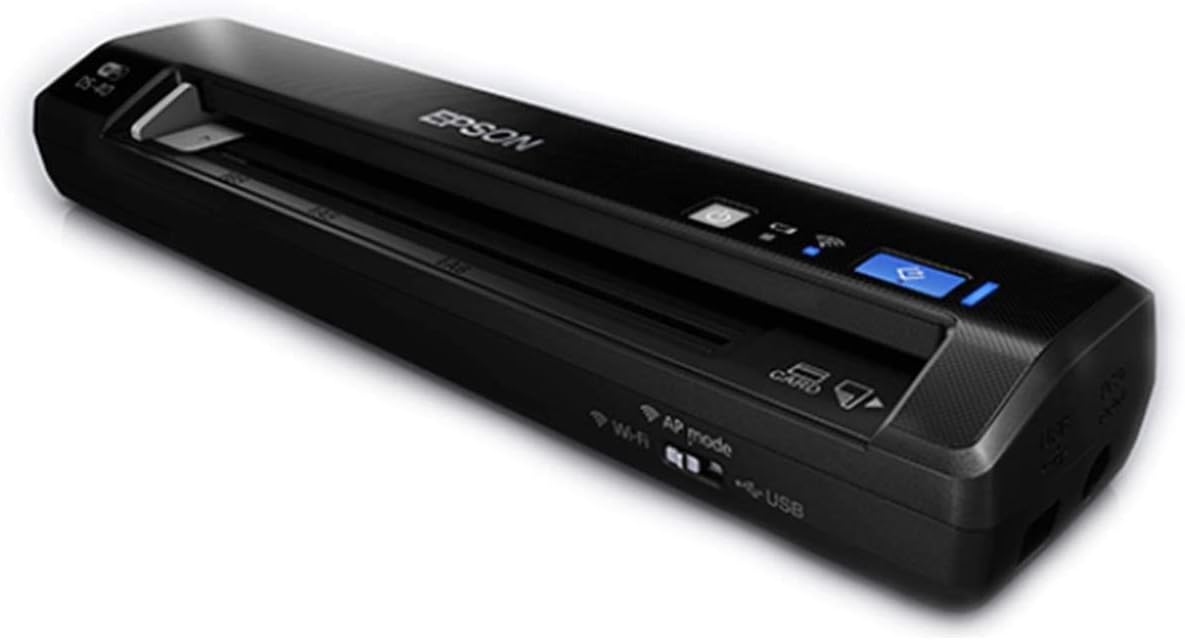
The Epson Workforce ES-60W stands out for its wireless capabilities allowing you to scan directly to mobile devices without a computer. It scans a single page in as fast as 4 seconds and can switch between USB and battery power automatically based on your connection.
We may earn a commission when you buy through this link, at no additional cost to you.
You can send files directly to cloud services like Dropbox and OneDrive or email them instantly which is perfect for remote workers. The LCD display keeps you informed of battery and wireless status ensuring you never face unexpected interruptions during a task.
While the wireless features add convenience you will need to keep the battery charged for optimal performance. The Nuance OCR software helps create searchable files but the device relies on a USB connection when wireless is not an option.
This scanner is ideal for professionals who need to digitize and share documents from anywhere without being tethered to a desk. Its speed and mobile compatibility make it a premium tool for those who manage paperwork on the go frequently.
Connect to any iOS or Android device to scan and share documents without cables.
Upload scans directly to popular cloud services with included software tools.
We may earn a commission when you buy through this link, at no additional cost to you.
The Epson Workforce DS-40 is a lightweight wireless scanner that lets you send documents to cloud services directly from the device. Weighing only 1.1 pounds it is easy to carry and supports both battery and USB power to ensure you stay productive anywhere.
We may earn a commission when you buy through this link, at no additional cost to you.
It integrates with services like Google Drive and Evernote allowing you to organize your digital files automatically. The scanner works with Android devices too making it versatile for users who rely on tablets rather than laptops for their work.
Since it relies on wireless connectivity for cloud uploads it requires an active internet connection to function fully. The design is simple and focused on mobility which may lack some advanced editing tools found in newer models.
For users needing a basic wireless solution to capture receipts and business cards on a tight budget this model offers solid performance. Its compatibility with older operating systems and Android devices ensures it fits into diverse tech environments.
Seamlessly works with Android tablets for scanning while on the move.
Use with battery or USB to ensure continuous scanning regardless of outlet access.
We may earn a commission when you buy through this link, at no additional cost to you.
Selecting the right handheld scanner involves evaluating several factors to ensure the device meets your daily workflow needs.
Resolution determines how clear your scans will look especially for small text or detailed images. Look for devices that offer at least 600 DPI with options to scale up to 900 or 1050 DPI for high fidelity needs.
Higher resolution is better for archival or legal documents but creates larger file sizes so balance quality with storage.
Handheld scanners typically run on AA batteries or rechargeable lithium batteries. Battery operated models offer true freedom but require replacement or charging which adds to operational effort over time.
Rechargeable options are more cost effective and eco-friendly but ensure you check the battery life before purchasing for long trips.
Many portable models store scans on Micro SD cards while others require a computer connection. SD card support allows you to transfer files later which is useful when a computer is not immediately available.
Ensure the device supports large card capacities like 32GB if you plan to store high resolution images for extended periods.
Connectivity ranges from USB cables to wireless options. Wireless scanners allow you to send files directly to phones or clouds but USB models are often more reliable for large transfers.
If you work across different devices check compatibility with Windows Mac iOS and Android to avoid driver issues.
Included software like OCR converts scanned text into editable formats. This feature is critical for users who need to search or edit documents after digitization without third party tools.
Look for scanners that bundle PDF editors or cloud apps to streamline your workflow from scan to save.
Portability is key for handheld scanners so consider the weight and dimensions. Lightweight models under one pound are easier to carry daily but may trade off durability for size.
Choose a device that fits comfortably in your hand and bag to ensure it remains a useful tool during travel.
Speed matters when processing high volumes of documents. Some models scan pages in seconds while others take longer depending on resolution and feed type.
Prioritize faster speeds if you process hundreds of pages weekly but accept slower speeds for occasional use.
Ensure the scanner works with your existing operating system and software. Older models may not support new Mac or Windows versions which can limit their usefulness.
Check the product description for driver support before buying to avoid technical hurdles later.
To begin using your handheld scanner install batteries or charge the device and connect it to a computer if required. Open the scanning software or access the SD card to ensure the device is recognized by your system.
When scanning place the scanner on the document and move it steadily across the surface while the green light is active. Maintain a consistent speed to avoid skewed images and ensure the entire page is captured clearly.
Regularly clean the scanner lens with a soft cloth to prevent dust from affecting image quality. Store the device in a protective case when not in use to avoid damage and keep batteries separate to prevent leakage.
Yes many handheld models can scan directly to Micro SD cards allowing you to save files without a computer. You can transfer the card to a computer later for viewing or editing.
For receipts a resolution of 300 DPI is usually sufficient to capture text clearly. Higher resolutions like 600 DPI may be used if you need to read very small print.
Use a soft dry cloth to gently wipe the glass sensor and body of the scanner. Avoid harsh chemicals and ensure the device is off during cleaning to prevent damage.
Most modern scanners support Mac but check the product specifications for OS version compatibility. Some older models may require specific drivers for newer macOS versions.
Look for scanners that include OCR software which converts images to editable text. This is useful for converting contracts or reports into Word or PDF formats.
Battery life depends on usage and model with some lasting hundreds of scans on a single charge. Keep spare AA batteries on hand for models that require them for uninterrupted work.
We have reviewed ten top portable handheld document scanners ranging from budget friendly wands to premium wireless models. Each option offers unique benefits for mobility resolution and software integration to suit different user needs.
Prioritize resolution and software features if you need editable documents and focus on battery and wireless options for travel. Consider your budget and the frequency of use to find the best fit for your workflow.
Please check current prices and availability before purchasing as these details may change over time. Choosing the right tool ensures efficient and accurate document management on the go.