
Logitech Ergo M575S
4.6Editor score
Wireless trackball design
Three customizable buttons
Long battery life
Discover the top mouse for drafting tools for architects and designers. We compare ergonomic wireless mice and trackballs to help you choose the right
Finding the right mouse for drafting can transform your workflow. Whether you are an architect or a designer, precision and comfort are essential. A good drafting mouse reduces strain and improves accuracy during long sessions of detailed work.
We evaluated ten top-rated options based on ergonomics, precision, and connectivity. Our analysis covers vertical mice, trackballs, and advanced ergonomic designs. Each product was assessed for its ability to handle complex design software efficiently.
Each pick highlights unique features tailored to professional needs. Prices and availability may change over time so check the links for current details. Use this guide to find the perfect companion for your drafting station and boost productivity.
4.6Editor score

4.6Editor score
4.4Editor score
This side-by-side comparison highlights key specs for all ten mice. Look at connectivity, design type, and special features to decide what fits your workflow best.



The Logitech MX Master 3S stands out as a top choice for drafting professionals. With a high rating of 4.6 stars, it offers exceptional precision and comfort. Its 8K DPI sensor ensures accurate cursor movement on any surface, including glass.
We may earn a commission when you buy through this link, at no additional cost to you.
This mouse features Quiet Clicks technology which reduces noise by 90 percent. This is ideal for shared workspaces or late-night drafting sessions. The ergonomic design supports a natural wrist posture reducing strain during long hours.
While it is an investment the customization options are extensive. You can tailor buttons via the Logi Options+ app to suit specific design workflows. The only tradeoff is the lack of a USB receiver as it relies on Bluetooth.
Drafters who value silence and precision should consider this mouse. It balances advanced features with comfort effectively. For those needing reliable wireless performance and app integration this is a highly recommended tool.
Quiet clicks minimize interruptions in collaborative environments allowing you to maintain deep focus on detailed drafting tasks.
The 8K DPI sensor allows for pinpoint accuracy essential for intricate design work on high-resolution displays.
We may earn a commission when you buy through this link, at no additional cost to you.
The Logitech Ergo M575S offers an excellent entry point for ergonomic drafting tools. It holds a strong 4.6 rating and is known for its trackball design. This allows you to move the cursor without moving your hand saving desk space.
We may earn a commission when you buy through this link, at no additional cost to you.
Three customizable buttons and Smart Actions enhance productivity without breaking the bank. The mouse supports both Bluetooth and Logi Bolt USB connections for versatility. It fits most hand sizes and aligns the forearm for better posture.
While it uses AA batteries it lasts long on a single set. The main limitation is the lack of advanced software features found in higher-end models. However for basic drafting needs it provides significant ergonomic benefits at a low cost.
This mouse is perfect for users on a budget who need ergonomic support. It reduces wrist movement and strain effectively. For students or beginners in drafting this trackball mouse is a smart and practical choice.
The trackball lets you navigate without arm movement which is ideal for small desks or mobile workstations.
The shape supports the hand and forearm reducing fatigue during extended periods of computer use.
We may earn a commission when you buy through this link, at no additional cost to you.
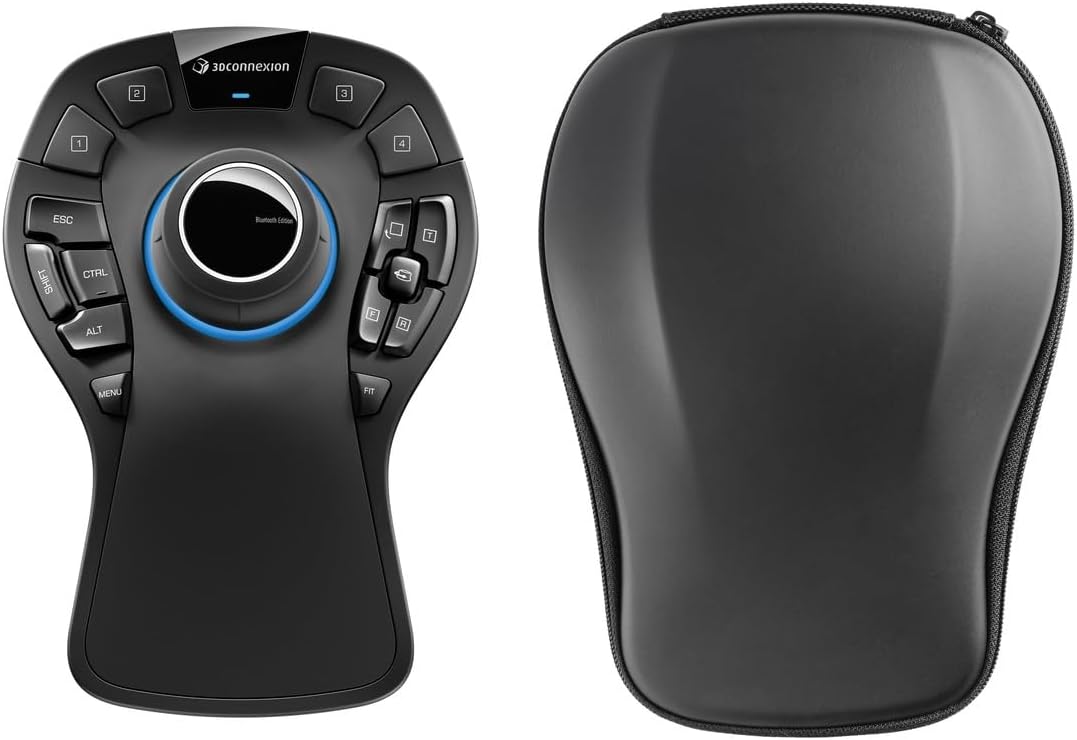
The 3Dconnexion SpaceMouse Pro is a specialized tool for advanced drafting and 3D modeling. It features a 6DoF sensor that allows natural manipulation of 3D views. With a 4.4 rating it is favored by professionals who need precise spatial control.
We may earn a commission when you buy through this link, at no additional cost to you.
Wireless connectivity via Bluetooth ensures a clutter-free workspace. The rechargeable Li-poly battery provides long-term usage without frequent replacements. This device pairs well with CAD software to streamline complex design tasks efficiently.
The high cost is justified for serious professionals needing advanced control. However new users may need time to adapt to the unique interface. It is not a general mouse but a dedicated navigation tool for 3D environments.
For architects and 3D artists this device offers unmatched precision. It enhances workflow speed when working on complex models. Investing in this premium tool can significantly improve productivity for specialized drafting work.
The six-degree-of-freedom sensor enables natural and intuitive manipulation of 3D objects and views.
Bluetooth Low Energy connectivity allows for clean setup without cables on your desk.
We may earn a commission when you buy through this link, at no additional cost to you.
The Logitech MX Master 4 introduces Haptic feedback for enhanced interaction. It features an Actions Ring that adapts to apps for easy tool access. With a 4.3 rating it continues the legacy of ergonomic excellence in the MX series.
We may earn a commission when you buy through this link, at no additional cost to you.
MagSpeed scrolling allows rapid navigation through large documents or long drawings. The Quiet Clicks reduce distraction making it suitable for quiet offices. Connectivity is robust with a USB-C dongle or Bluetooth options.
The learning curve for the Actions Ring may be slight for some users. But once mastered it boosts workflow efficiency significantly. This mouse is built for power users who need speed and precision.
Ideal for professionals managing complex workflows the MX Master 4 delivers. The haptic features add a new layer of feedback for interactions. It is a strong choice for those upgrading their drafting setup.
Tactile feedback provides immediate confirmation on actions improving interaction accuracy and satisfaction.
The Actions Ring provides context sensitive tools so shortcuts are always within reach.
We may earn a commission when you buy through this link, at no additional cost to you.
The Graphite version of the MX Master 4 offers the same power in a sleek finish. It features the Haptic Sense Panel and Actions Ring for productivity. This model is designed for professionals needing speed and comfort in equal measure.
We may earn a commission when you buy through this link, at no additional cost to you.
Scrolling performance is top-notch with the MagSpeed wheel allowing quick navigation. The ergonomic design reduces stress on the hand during extended use. Quiet clicks ensure a professional environment without noise disruption.
Sustainability is also a focus with recycled plastic in the build. While the price is high the durability and features justify the investment. Users should familiarize themselves with the app for full customization.
This mouse is perfect for those who value aesthetics and performance. It supports heavy-duty workflows efficiently. For drafters needing advanced controls and comfort this is an excellent modern tool.
Recycled plastic and cobalt in the battery reduce environmental impact without compromising quality.
Customizable buttons and the Actions Ring streamline access to essential drafting tools.
We may earn a commission when you buy through this link, at no additional cost to you.
The Logitech Lift Vertical helps lift your hand into a natural upright position. With a 57-degree angle it reduces wrist pressure effectively. Rated 4.4 stars it is ideal for small to medium right hands needing ergonomic support.
We may earn a commission when you buy through this link, at no additional cost to you.
Softly textured grip and a snug thumb rest ensure all-day comfort. The SmartWheel provides smooth scrolling for detailed work. Connectivity options include Bluetooth Low Energy and Logi Bolt for versatility.
Transitioning to a vertical mouse takes some time to adjust. However the long-term health benefits make it worthwhile. The compact size fits well on smaller desks or in mobile kits.
Users prone to wrist pain will appreciate this design. It promotes a healthier posture without sacrificing precision. For those seeking relief from strain this vertical mouse is a reliable solution.
Designed and tested with leading ergonomists to ensure safety and comfort standards.
Whisper-quiet clicks allow for focused work in shared or quiet environments.
We may earn a commission when you buy through this link, at no additional cost to you.
The Logitech MX Ergo S offers a modern trackball experience with USB-C charging. It features a 20-degree tilt to improve forearm posture and reduce strain. Rated 4.4 it provides precise control with less hand movement.
We may earn a commission when you buy through this link, at no additional cost to you.
Advanced thumb control allows switching between speed and precision modes. The 80% quieter clicks enhance focus in any environment. Smart Actions and customizable buttons via the Logi Options+ App streamline tasks.
While trackballs have a learning curve the Ergo S is user-friendly. The USB-C charging is convenient for mobile work. This is a great choice for those transitioning from standard mice to trackballs.
Professionals needing ergonomic relief from repetitive motion may find this ideal. The reduced muscle strain makes a difference over time. It combines innovation with comfort for a superior drafting tool.
The 20-degree tilt aligns your forearm naturally to minimize muscle strain during use.
Smart Actions and customizable buttons allow you to automate frequent drafting tasks efficiently.
We may earn a commission when you buy through this link, at no additional cost to you.
The Logitech MX Vertical maintains a natural handshake position to reduce muscle activity. Its 57-degree angle improves wrist posture significantly. With a 4.4 rating it is ergonomist-approved for better health during work.
We may earn a commission when you buy through this link, at no additional cost to you.
A 4000 DPI sensor provides four times less hand movement than standard mice. The cursor speed switch allows quick adjustments for detail or speed. The textured surface ensures a natural grip without slipping.
It is a bit heavier than standard mice which may require adaptation. But the ergonomic benefits are clear and proven. This mouse is designed for those needing serious comfort and precision.
If you spend hours at the desk this vertical design helps. It lowers wrist pressure and strain effectively. For professionals seeking long-term health this mouse is a valuable investment.
The 4000 DPI sensor ensures accuracy for detailed work with reduced hand fatigue.
Designed with criteria from leading ergonomists to ensure comfort and health benefits.
We may earn a commission when you buy through this link, at no additional cost to you.
This mouse is masterfully designed to fit Apple setups perfectly. It features the same Haptic feedback and Actions Ring as the standard model. The Space Black finish matches Mac devices providing a seamless look.
We may earn a commission when you buy through this link, at no additional cost to you.
Scrolling is ultra-fast with the MagSpeed wheel allowing quick file navigation. USB-C charging means you can power it while you work. Logi Options+ functions for macOS ensure full customization and utility.
The Adobe Creative Cloud subscription adds value for creative professionals. The ergonomic design keeps you in flow during complex projects. It balances style and function well for Mac users.
Apple users will appreciate the tailored experience and finishing. The comfort and speed make drafting efficient on macOS. For a premium drafting mouse that fits your tech ecosystem this is a top pick.
Matching Apple finishes ensure the mouse blends beautifully with your existing tech setup.
Logi Options+ functions for macOS optimize workflows specifically for Apple operating systems.
We may earn a commission when you buy through this link, at no additional cost to you.
The White Silver version of the MX Master 4 for Mac offers elegance. It keeps all the high performance features of the standard MX series. This mouse is designed for those who want comfort and style with Apple devices.
We may earn a commission when you buy through this link, at no additional cost to you.
Haptic feedback enhances interaction with shortcuts and actions. The MagSpeed scroll wheel is fast and quiet for smooth navigation. Quiet Clicks make it suitable for focused environments without noise.
It is a bit pricey but built to last with stain resistance. The recycled materials align with modern eco-friendly values. This model supports heavy workflows with ease and efficiency.
Mac users seeking a premium experience should consider this design. It integrates well with your workflow and looks great. For professional drafting and design work this mouse is a strong contender.
Improved stain resistance ensures the mouse stays looking new through years of use.
Advanced performance features ensure fast and reliable connectivity for all your needs.
We may earn a commission when you buy through this link, at no additional cost to you.
Choosing the right mouse requires evaluating several key factors. This guide helps you understand what features matter most for drafting needs.
Ergonomics is crucial for long drafting sessions. Look for mice with a natural hand position to reduce strain. Vertical mice or ergonomic trackballs help maintain healthy posture over time.
Prioritize designs that fit your hand size and support your wrist.
Drafting requires high precision. Higher DPI sensors allow finer cursor control for detailed work. Ensure the mouse supports adjustable sensitivity for different tasks.
A DPI switch lets you balance speed and accuracy easily.
Wireless options offer freedom from cables. Bluetooth or Logi Bolt USB receivers ensure stable connections. Consider battery life or USB-C charging for convenience.
Choose connectivity that matches your computer and workflow needs.
Programmable buttons boost productivity significantly. Look for software support to assign functions to shortcuts. Apps like Logi Options+ enable app-specific profiles for tools.
More customization options mean more efficient workflows.
Smooth scrolling is essential for navigating large drawings. MagSpeed wheels allow rapid movement with precision. Quiet scroll modes help maintain a distraction-free environment.
Test the wheel feel to ensure it suits your style.
Quiet mice reduce distractions in shared spaces. Quiet Clicks technology ensures silent operation without feedback. This helps you focus during detailed design work.
Low noise is a key factor for collaborative offices.
Long battery life ensures uninterrupted work. Rechargeable options reduce waste and cost over time. Consider USB-C charging for universal compatibility.
Check estimated usage time before purchasing.
Ensure the mouse works with your operating system. Support for macOS Windows or Linux is vital. Some mice offer specific features for Mac or Windows.
Verify software compatibility for full functionality.
Start by adjusting the mouse settings to match your preferences. Use the software to program buttons for frequent drafting commands. Ensure the DPI is set correctly for your screen resolution.
Keep the mouse surface clean to maintain tracking accuracy. Use a smooth mousepad for optimal performance and consistent cursor movement. Avoid placing heavy objects on the mouse to prevent damage.
Store the mouse in a dry place when not in use. Protect wireless dongles by keeping them with the mouse or in a safe pocket. Regularly check for firmware updates to ensure best performance.
A good drafting mouse offers high precision and ergonomic comfort. Features like adjustable DPI and customizable buttons help with detailed work. It should reduce strain during long sessions for better productivity.
Vertical mice can reduce wrist strain by promoting a natural posture. However they may take time to adjust to. If you have wrist pain a vertical mouse is worth trying for comfort.
Trackballs are great for saving space and reducing hand movement. They require learning but offer precise control. If you have limited desk space a trackball might be ideal.
Gaming mice can work if they have high DPI and programmable buttons. However ergonomic features may be lacking. It is better to choose an ergonomic mouse designed for comfort.
Use a soft dry cloth to wipe the surface regularly. Avoid liquids that could damage internal components. For buttons a slightly damp cloth can remove dirt gently.
The Logitech MX Master 3S is a top wireless choice. It offers high precision and comfortable ergonomics. For Mac users the MX Master 4 for Mac is excellent.
We have explored ten excellent options for drafting professionals. From the affordable Ergo M575S to the premium 3Dconnexion SpaceMouse there is a choice for everyone. Prioritize ergonomics and precision to enhance your work.
Consider your workflow and budget when making a decision. Features like haptic feedback or tilt angles can improve comfort. The right mouse helps you stay focused and productive.
Check current prices and availability before buying. Deals may change and features can evolve. We hope this guide helps you find the perfect tool for your drafting needs.