
GIGABYTE B650 AORUS Elite AX
4.4Editor score
AMD AM5 Socket Support
DDR5 Memory Compatible
PCIe 5.0 M.2 Slot
Compare the top motherboards with Pci Express 5.0 for gaming and workstations. Find the right AM5 or LGA 1700 board with next gen PCIe speeds today.
Modern computing demands faster data transfer rates for gaming and creative work. Motherboards with Pci Express 5.0 provide the bandwidth needed for next generation graphics cards and storage drives.
We compared ten top rated boards from leading brands like ASUS and GIGABYTE. Our analysis covers power delivery, thermal design, and connectivity features to help you choose wisely.
Each pick shows real specifications and user ratings from verified sources. Prices change frequently so please check current listings before making your final decision on hardware upgrades.
4.4Editor score
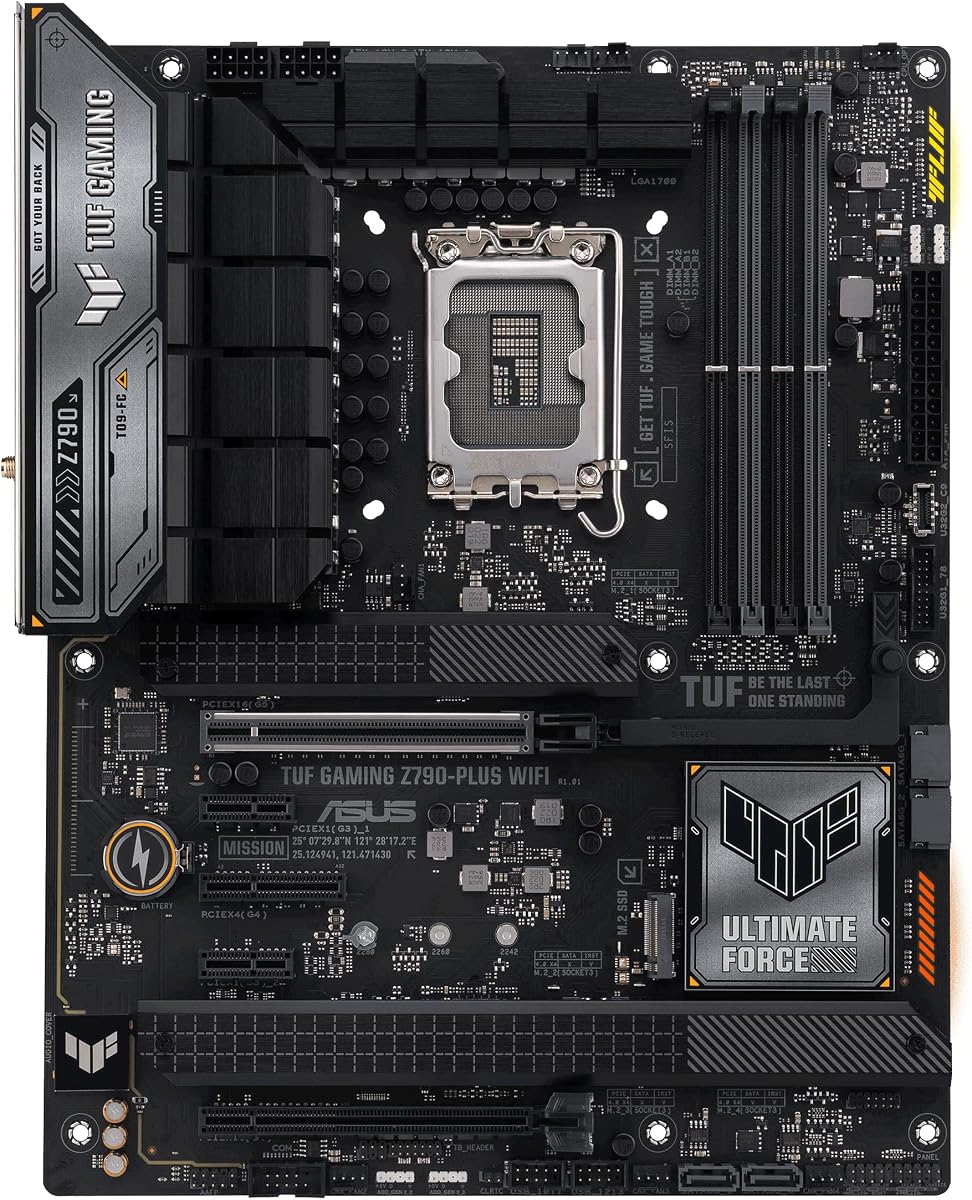
4.5Editor score

4.4Editor score
This side by side comparison highlights key specifications across all ten models. Use this table to quickly identify which board fits your specific CPU socket and feature needs.


This GIGABYTE board offers exceptional value for AMD AM5 users seeking next gen speeds. It holds a solid 4.4 star rating from verified buyers who praise its stability.
We may earn a commission when you buy through this link, at no additional cost to you.
The 14+2+1 power phase design ensures stable performance even under heavy loads. Thermal guards on M.2 slots keep storage speeds consistent during long sessions.
While it lacks premium audio features, the trade-off keeps costs low. Most users find the included features more than enough for standard gaming builds.
Buyers looking for a reliable entry point to PCIe 5.0 will love this board. It balances cost and performance better than most competitors in its class.
The robust VRM ensures consistent power delivery for Ryzen processors.
Front and rear USB-C ports provide modern connection flexibility.
We may earn a commission when you buy through this link, at no additional cost to you.
This ASUS board prepares you for advanced AI PCs with its latest chipset. Users appreciate the forward looking design that supports future software trends.
We may earn a commission when you buy through this link, at no additional cost to you.
The 14+2+1 80A stages deliver reliable power for high end CPUs. Wi-Fi 7 ensures ultra fast wireless speeds for online gaming and downloads.
Cost is higher than basic boards but the features justify the expense. You get better networking and power stability which pays off over time.
Choose this if you want a platform that will stay relevant longer. It is ideal for builders planning to upgrade GPUs without changing motherboards.
AI Ready features help optimize performance for new computing tasks.
Wi-Fi 7 provides significantly lower latency than previous standards.
We may earn a commission when you buy through this link, at no additional cost to you.
The GIGABYTE B850 offers a balanced mix of features at a mid range cost. It carries a strong 4.4 rating from users who value reliability.
We may earn a commission when you buy through this link, at no additional cost to you.
Its 14+2+2 power phase provides headroom for overclocking. The five year warranty shows the manufacturer stands behind its product quality.
Audio is standard but most gamers use external DACs anyway. The thermal design keeps components cool even during extended gaming marathons.
This is a smart pick for those wanting a reliable AM5 experience. The warranty alone makes it worth considering over cheaper alternatives.
Extended warranty reflects high confidence in build quality.
Three M.2 slots allow for extensive SSD capacity.
We may earn a commission when you buy through this link, at no additional cost to you.
This compact board brings PCIe 5.0 to budget Intel builds. It holds a 4.4 rating from users who appreciate its small size.
We may earn a commission when you buy through this link, at no additional cost to you.
DDR4 memory support keeps system costs down significantly. The microATX form factor fits easily into smaller PC cases.
Limited expansion slots mean you must plan storage carefully. However for most casual gamers this is not a major concern.
Buy Intel users needing a small board with future ready specs. It bridges the gap between cost and modern connectivity well.
MicroATX size allows for smaller desktop builds.
DDR4 support keeps overall system budget low.
We may earn a commission when you buy through this link, at no additional cost to you.
This board earns our editor choice award for its balanced feature set. It holds a top 4.5 rating from users needing high performance.
We may earn a commission when you buy through this link, at no additional cost to you.
The 16+1 DrMOS power stages handle demanding workloads easily. Four M.2 slots ensure plenty of room for fast storage expansion.
Thunderbolt 4 support adds versatility for professional workflows. The price is higher but features match the cost effectively.
Intel builders wanting top tier power and connectivity should choose this. It remains one of the most capable Z790 boards available.
High phase count ensures stability during intensive tasks.
Multiple M.2 slots support large fast storage arrays.
We may earn a commission when you buy through this link, at no additional cost to you.
This small board delivers surprising power for its size. It currently holds an impressive 4.6 star rating from early adopters.
We may earn a commission when you buy through this link, at no additional cost to you.
The 12+2+2 phases handle modern Ryzen chips with ease. The five year warranty adds significant peace of mind for builders.
Two M.2 slots might limit extreme storage enthusiasts slightly. Most users will find this sufficient for their needs.
Choose this for small form factor builds needing speed. The rating suggests it performs exceptionally well in real use.
mATX design saves space without sacrificing core features.
Long warranty shows manufacturer confidence in reliability.
We may earn a commission when you buy through this link, at no additional cost to you.
This board brings DDR5 and PCIe 5.0 to mid range users. It earns a strong 4.5 rating from satisfied Intel customers.
We may earn a commission when you buy through this link, at no additional cost to you.
The 12+1+1 power stages support most non-k CPUs well. USB4 support ensures future connectivity for high speed peripherals.
It lacks premium audio features but covers essentials effectively. For most gamers this provides everything needed for gaming.
Select this for a balanced Intel experience without extra cost. It fits well between budget and premium options nicely.
USB4 header allows for fast docking capabilities later.
Three M.2 slots allow good expansion for SSDs.
We may earn a commission when you buy through this link, at no additional cost to you.
This board offers solid AM5 support with strong stability. It holds a 4.5 rating from users who value dependability.
We may earn a commission when you buy through this link, at no additional cost to you.
The 14 power stages handle Ryzen chips efficiently. USB4 support ensures compatibility with modern high speed docks.
WiFi6 is good but not as fast as newer standards. Most users will not notice the difference in real use.
Choose this for a reliable AM5 platform that will last. It balances cost and performance well for typical gamers.
TUF components ensure long term system stability.
USB4 header prepares for next gen peripheral speeds.
We may earn a commission when you buy through this link, at no additional cost to you.
This flagship board pushes the limits of what AM5 can do. It holds a 4.4 rating from enthusiasts who need top specs.
We may earn a commission when you buy through this link, at no additional cost to you.
The 18+2+2 power stages enable extreme overclocking. Five M.2 slots offer massive storage capacity for pros.
AI features simplify tuning but add complexity for some. The price is steep but justified for high end users.
Buy this if you need absolute top tier performance. It is the best choice for workstation and enthusiast builds.
Robust power design allows for stable overclocking.
AI tools simplify complex tuning processes for users.
We may earn a commission when you buy through this link, at no additional cost to you.
This board stands out with a clean stylish look. It has a 4.5 rating from users who appreciate aesthetics.
We may earn a commission when you buy through this link, at no additional cost to you.
The 12+2 power stages support standard Ryzen CPUs well. WIFI 6E offers solid performance for most networks.
Lacking PCIe 5.0 limits future bandwidth potential slightly. But for current hardware this works perfectly fine.
Choose this if looks matter alongside solid performance. It offers a good mix of style and capability for gamers.
Clean look fits well in high end builds.
Meets most gaming needs without premium cost.
We may earn a commission when you buy through this link, at no additional cost to you.
Selecting the right motherboard requires considering socket type, power delivery, and expansion slots. This guide explains key factors to ensure compatibility and performance.
Ensure the motherboard matches your processor type. AM5 is for AMD Ryzen 7000 and newer while LGA 1700 is for Intel 12th to 14th Gen.
Check the manufacturer website for specific CPU support lists before buying.
Strong VRMs ensure stable power for high performance CPUs. Look for boards with high phase counts for better thermal management.
More power phases usually mean better stability for overclocking.
Count how many M.2 slots support PCIe 5.0 speeds. More slots allow for faster storage expansion in the future.
Prioritize boards with at least one PCIe 5.0 M.2 slot.
Check for USB-C and Ethernet speeds. Modern boards should include USB4 or Thunderbolt headers for high speed peripherals.
Ensure you have enough ports for your current devices.
DDR5 is standard for new builds and offers better bandwidth. Ensure the board supports your desired memory capacity.
Look for EXPO or XMP support for easy RAM tuning.
Large heatsinks on VRMs and M.2 slots prevent throttling. Good airflow design helps keep system temperatures low.
Thermal guards are essential for maintaining SSD speeds.
Wi-Fi 6E or 7 provides the fastest wireless connections. Ensure the antenna connectors match your case cutouts.
Ethernet should be at least 2.5G for modern internet speeds.
Check how long the manufacturer guarantees the board. Longer warranties often indicate higher build quality.
Keep the receipt for any potential support claims.
Install the motherboard on a flat non conductive surface. Secure it with standoffs to prevent short circuits.
Apply thermal paste correctly when mounting the CPU cooler. Ensure proper airflow by aligning fans with intake and exhaust zones.
Update the BIOS immediately after installing to support new CPUs. Use a USB drive and follow the BIOS Flashback instructions.
Most current GPUs do not fully utilize PCIe 5.0 bandwidth yet. However using one future proofs your build for next generation cards. It ensures you won't need a new board later.
AM5 offers a clear upgrade path to future AMD CPUs. LGA 1700 is at the end of its life cycle. Choose AM5 if you plan to upgrade soon.
Yes DDR5 requires specific motherboard slots that are different from DDR4. Ensure you buy a board explicitly supporting DDR5 memory.
Prices range from budget friendly options to premium boards. Expect to pay more for high end features like more slots and better audio.
No standard PCIe cables work with PCIe 5.0 slots. However ensure SSDs are specifically rated for PCIe 5.0 speeds.
Often yes newer CPUs may need a BIOS update. Check the motherboard QVL list for supported processor versions.
We reviewed ten top boards offering different features and price points. The ASUS TUF Z790 stands out for Intel users while the GIGABYTE B650 is great for AMD.
Prioritize power delivery and thermal design over extra RGB lighting. These factors directly impact system stability and longevity.
Prices change frequently so check current listings before buying. Always verify compatibility with your specific CPU and memory.