
Samsung 27" Odyssey G5
4.7Editor score
180Hz refresh rate
1ms response time
QHD resolution
Finding the right monitor for World of Warcraft can transform your gaming experience from flat and blurry to vibrant and immersive. Players need sharp visuals to spot enemies in dark dungeons and fast refresh rates to react quickly during PvP battles. This guide helps you navigate the technical specs to find a display that matches your play style and budget.
We have carefully selected ten top-rated monitors that excel in color accuracy, response time, and screen real estate. Each product was chosen based on its ability to handle the demanding graphics of modern expansions and provide comfort during long raid sessions. Our team analyzed performance metrics and user feedback to ensure every recommendation delivers genuine value.
Each pick in this list highlights specific strengths such as OLED clarity or curved immersion tailored for MMORPG gaming. You will find detailed breakdowns of features that matter most for Azeroth adventures. Please note that product availability and pricing can change frequently so verify current offers before making your final purchase decision.
4.7Editor score

4.6Editor score

4.7Editor score
As an Amazon Associate we earn from qualifying purchases.
Explore the side-by-side comparison of our top ten monitors tailored for immersive World of Warcraft gameplay and detailed visual fidelity.




The ASUS ROG XG27AQDMGR stands out as a top choice for players seeking vivid colors and deep contrasts. Its OLED panel delivers true blacks that make dark dungeons in Azeroth feel truly atmospheric. The high refresh rate ensures every frame during raid boss fights remains smooth and clear.
We may earn a commission when you buy through this link, at no additional cost to you.
This monitor features a 240Hz refresh rate and an incredibly fast 0.03ms response time which eliminates motion blur effectively. The glossy screen enhances color vibrancy and sharpness making UI elements and spell effects pop off the display. Advanced OLED Care Pro technology monitors user presence to reduce burn-in risks during long sessions.
While the cost is higher than standard LCD monitors the visual fidelity justifies the investment for serious gamers. You may need to avoid static HUD elements for too long to maintain panel health over time. The included software makes adjusting settings simple without needing to press physical buttons.
Ideal for hardcore raiders and PvP enthusiasts who demand the best visual performance available today. This display transforms the way you perceive game graphics and immersion significantly. If you want top tier clarity and speed this model is a fantastic investment.
The OLED technology provides unmatched contrast ratios making dark areas in Shadowlands or Dragonflight appear incredibly deep and realistic.
With a 0.03ms response time ghosting is virtually eliminated ensuring precise tracking of fast moving enemies and abilities.
We may earn a commission when you buy through this link, at no additional cost to you.
The Samsung 32" Odyssey G55C offers a large curved screen that wraps around your vision for a more immersive experience. Its 1000R curvature matches the natural shape of the human eye helping you focus on gameplay without eye strain. This design is particularly effective for open world exploration in World of Warcraft.
We may earn a commission when you buy through this link, at no additional cost to you.
Players benefit from a 165Hz refresh rate and 1ms response time which deliver smooth motion during combat sequences. AMD FreeSync ensures synchronization with your graphics card preventing screen tearing during intense PvP skirmishes. The QHD resolution provides enough pixel density to see details clearly without costing too much.
The curve can sometimes make straight lines in the UI look slightly bent which might bother some users. However for most players the benefits of immersion outweigh minor distortions. The eye saver mode helps reduce fatigue during long guild nights or extended dungeon runs.
This monitor is perfect for casual players and those who prioritize immersion over extreme speed. It offers a great balance of features and cost for building a comfortable gaming station. If you want a large view without breaking the bank this is a solid option.
The 1000R curvature pulls you into the game world making it feel like you are standing right in Stormwind or Orgrimmar.
Eye Saver Mode minimizes blue light to help you stay focused longer during marathon raiding or questing sessions.
We may earn a commission when you buy through this link, at no additional cost to you.
The Samsung 27" Odyssey G5 delivers impressive performance at a very competitive price point making it a top budget choice. It features an 180Hz refresh rate and 1ms response time which are excellent for competitive play and fast action. The QHD resolution ensures text and icons remain sharp during intricate crafting or map navigation.
We may earn a commission when you buy through this link, at no additional cost to you.
One standout feature is the Black Equalizer which brightens dark areas without overexposing bright spots helping you spot enemies in shadows. The stand allows for height and tilt adjustments ensuring you can find a comfortable viewing angle for long sessions. AMD FreeSync keeps gameplay smooth by syncing the monitor with your GPU refresh rate.
While it lacks the deep blacks of OLED technology it still provides vibrant colors and good clarity for the price. The build quality is solid and the design fits well in most gaming setups. It is an ideal entry point for players upgrading from older full HD displays.
If you need a reliable monitor that handles World of Warcraft well without spending a fortune this is a great match. It balances speed and resolution effectively for both PvE and PvP content. We highly recommend it for budget conscious gamers seeking quality.
You get a high refresh rate and sharp resolution without the premium cost associated with OLED or high-end gaming panels.
The Black Equalizer feature adjusts dark zones to reveal hidden threats and loot in dimly lit caves and dungeons.
We may earn a commission when you buy through this link, at no additional cost to you.
The ASUS TUF Gaming VG27AQM5A is built for speed with a massive 300Hz refresh rate and 0.3ms response time. This makes it an excellent choice for competitive World of Warcraft PvP where split-second reactions determine victory. The Fast IPS panel delivers wide viewing angles and accurate colors for a rich visual experience.
We may earn a commission when you buy through this link, at no additional cost to you.
G-SYNC Compatible technology ensures you play with variable refresh rate support eliminating screen tearing and stuttering seamlessly. ELMB Sync reduces motion blur by combining backlight strobing with variable refresh rates for crystal clear motion. Shadow Boost enhances image details in dark areas helping you see opponents hiding in shadows.
While the 300Hz rate is amazing it might be overkill if your PC struggles to push that many frames in the game. The IPS panel can show some glow in dark scenes compared to VA or OLED panels but it is manageable. The monitor includes built-in speakers for convenient audio without extra peripherals.
This model is best suited for competitive players who have high-end PCs capable of driving high frame rates. It offers robust features to keep gameplay fluid and responsive. If you want raw speed and reliability this is a strong contender.
With a 300Hz refresh rate you see movement faster than standard displays giving you an advantage in arena battles.
ELMB Sync works with G-SYNC to reduce ghosting ensuring that fast moving objects stay sharp during intense moments.
We may earn a commission when you buy through this link, at no additional cost to you.
The Samsung 27" Odyssey OLED G6 features a QD-OLED panel that combines quantum dots with OLED for vibrant and deep visuals. This display offers perfect blacks and infinite contrast making night raids and magical effects look breathtaking. The 240Hz refresh rate and 0.03ms response time ensure smooth and precise gameplay.
We may earn a commission when you buy through this link, at no additional cost to you.
Glare Free Technology keeps the screen clear of reflections from external light sources which is great for well lit rooms. Pantone Validated accuracy ensures colors are reproduced realistically so you see game assets exactly as intended. OLED Safeguard technology actively prevents burn-in through thermal modulation systems.
The premium price means this is an investment for enthusiasts who want the absolute best picture quality available. Careful usage habits are recommended to maximize the panel lifespan over many years. The ergonomic stand allows full adjustment to find the perfect viewing angle for long sessions.
If you want a monitor that elevates your gaming experience to cinematic levels this is the top choice. It delivers unmatched visual fidelity and speed for both solo quests and group raids. Highly recommended for those who prioritize display quality above all.
QD-OLED technology provides a wider color volume making spell effects and environment details look more lifelike and vivid.
The Glare Free coating reduces distractions from window or lamp reflections helping you focus entirely on the game.
We may earn a commission when you buy through this link, at no additional cost to you.
This Dungeon Master Screen is a unique addition for players who enjoy tabletop roleplaying alongside digital gameplay. It features immersive World of Warcraft artwork on the player-facing side to bring Azeroth to life around your table. The DM side includes reference tables for faction renown and encounters to keep the story flowing smoothly.
We may earn a commission when you buy through this link, at no additional cost to you.
The screen is designed for the scale of campaigns in Azeroth allowing Dungeon Masters to hide their notes and plans. It adds a tactile element to gaming sessions that complements digital screens nicely. While not a digital monitor it enhances the storytelling aspect of the franchise significantly.
Since it is a physical accessory it does not replace a computer monitor but adds value to group storytelling. It is a great gift for fans who enjoy board games or roleplaying games. The build quality ensures it stands up during regular use at your gaming table.
For those looking to mix digital and physical gaming experiences this screen offers a creative bridge. It helps maintain immersion and organization during collaborative storytelling. If you run a home campaign this is a fun tool to enhance the experience.
The artwork pulls players into the world instantly making the transition from game to table seamless.
Quick reference tables keep combat and faction details handy so the game never stops for lookup delays.
We may earn a commission when you buy through this link, at no additional cost to you.
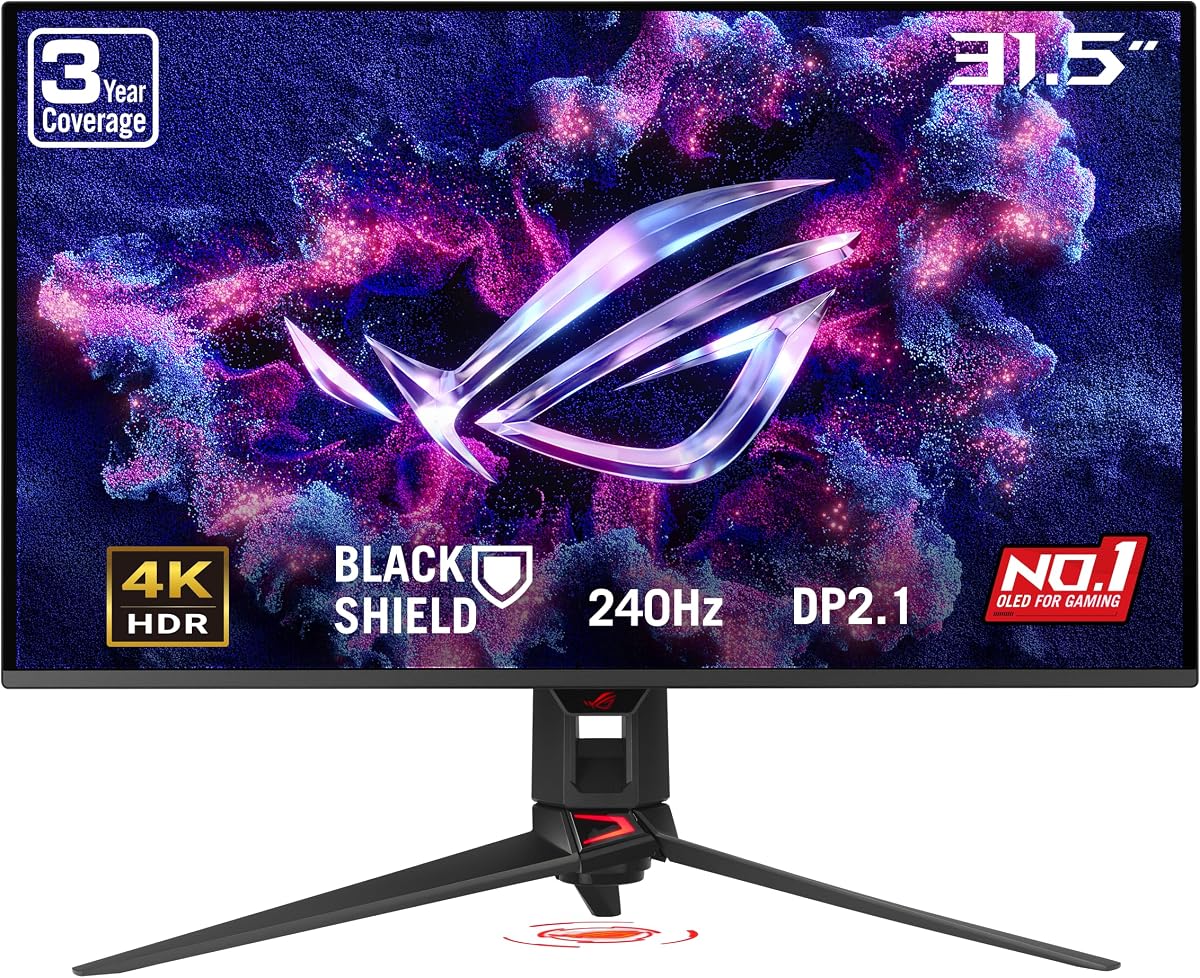
The ASUS ROG PG32UCDM3 delivers stunning 4K resolution on a large 32 inch screen ideal for immersive exploration. Its Tandem OLED technology provides higher peak brightness and better black levels than previous generations. The 240Hz refresh rate ensures smooth motion even when viewing high resolution textures in game.
We may earn a commission when you buy through this link, at no additional cost to you.
Future-proof connectivity includes DisplayPort 2.1 UHBR20 with full bandwidth for next-gen GPUs and consoles. BlackShield Film Technology increases scratch resistance and improves black levels for enhanced durability and visual quality. DisplayWidget Center software makes managing settings easy without physical button presses.
Running this monitor at 4K requires a powerful graphics card to achieve high frame rates in World of Warcraft. The price reflects its premium build and cutting edge technology making it a luxury purchase. However the clarity and immersion it provides are unmatched for detailed game worlds.
This monitor is perfect for users who want the highest resolution and speed in one package. It is ideal for streaming, content creation, and high-end gaming. If you want to see every pixel of Azeroth this is the ultimate choice.
With 4K resolution you can see intricate details on character models and landscapes that lower resolutions hide.
DisplayPort 2.1 ensures you can connect to the latest graphics cards without bottlenecks for optimal performance.
We may earn a commission when you buy through this link, at no additional cost to you.
The ASUS ROG XG32UCWG features Dual Mode Display Technology allowing you to switch between 4K at 165Hz and FHD at 330Hz. This flexibility is great if you want high resolution for story play or high speed for competitive matches. The TrueBlack Glossy panel provides a zero-haze surface and exceptionally sharp imagery for vibrant visuals.
We may earn a commission when you buy through this link, at no additional cost to you.
Professional color accuracy with VESA DisplayHDR 400 compliance ensures great output for editing and gaming alike. G-SYNC Compatible technology keeps the experience smooth and tear-free. OLED Care Pro with Neo Proximity Sensor helps reduce burn-in risk during long periods of use.
The monitor is designed for users who need both visual fidelity and speed in one display. It comes with a three year warranty including burn-in coverage for peace of mind. The glossy screen enhances colors but might reflect light in bright rooms if not positioned correctly.
This is a versatile option for hybrid gamers who also do creative work or streaming. It balances resolution and refresh rates to suit different needs. If you value flexibility and OLED clarity this is a strong recommendation.
Switch between high resolution for cinematic play and high refresh rates for fast PvP action with one click.
The zero-haze surface makes images look sharper and colors more vibrant than matte panels often do.
We may earn a commission when you buy through this link, at no additional cost to you.
The ASUS ROG PG27AQWP-W boasts an incredible 540Hz refresh rate making it one of the fastest monitors available. Tandem OLED technology delivers higher brightness and better color volume than previous WOLED panels for stunning visuals. The 0.02ms response time ensures virtually no ghosting during the most rapid movements.
We may earn a commission when you buy through this link, at no additional cost to you.
This monitor is built for enthusiasts who want the absolute limit of speed and performance. DisplayPort 2.1 UHBR20 ensures you can utilize the full bandwidth required for these speeds. OLED Care Pro with Neo Proximity Sensor protects the panel from burn-in risks during inactivity.
Achieving 540Hz in games like World of Warcraft requires extremely high-end hardware and optimization. The price reflects its status as a cutting edge product for serious competitive gamers. If you want a monitor that pushes boundaries this is the ultimate choice.
Ideal for competitive professionals who need every possible advantage in reaction time and clarity. It delivers unmatched speed and visual fidelity for those willing to invest. If you want the best speed this is the top pick.
The 540Hz refresh rate allows you to see frame updates faster than ever before for maximum reaction advantage.
Tandem OLED improves brightness and color volume providing richer visuals even at high refresh rates.
We may earn a commission when you buy through this link, at no additional cost to you.
The ASUS ROG Strix XG27ACDNG offers a balanced mix of speed and color fidelity with its 360Hz refresh rate and QD-OLED panel. It features a custom heatsink and advanced airflow design to manage heat efficiently during long gaming sessions. The 0.03ms response time ensures quick reaction to gameplay events.
We may earn a commission when you buy through this link, at no additional cost to you.
G-SYNC Compatible technology and AI Gaming features optimize performance for smoother and smarter gameplay. The DisplayWidget Center software simplifies adjusting settings and accessing OLED Care functions. VESA DisplayHDR 400 True Black compliance ensures deep blacks and vibrant colors for immersive viewing.
This monitor is suitable for gamers who want OLED quality with high refresh rates without pushing to the extreme end. The custom cooling helps maintain performance during extended use without throttling. A three year warranty with burn-in coverage adds confidence to the purchase.
If you seek a reliable and capable monitor for World of Warcraft this model delivers consistent quality. It combines speed and color in a practical package. We recommend it for gamers wanting high performance without excessive complexity.
A custom heatsink ensures the panel stays cool which helps maintain brightness and reduces risk of overheating.
AI Gaming features help tune the display settings to your preferences automatically for better visual clarity.
We may earn a commission when you buy through this link, at no additional cost to you.
Selecting the right monitor involves understanding technical specs like refresh rate and resolution to match your play style and hardware capabilities.
For World of Warcraft a high refresh rate ensures smooth motion during fast raids and PvP. Aim for at least 144Hz for a noticeable improvement over standard 60Hz. Response time measures how quickly pixels change color with 1ms or lower preventing blur.
Prioritize monitors with 144Hz or higher refresh rates and sub-millisecond response times for optimal performance.
OLED and QD-OLED panels offer perfect blacks and vibrant colors ideal for the game's art style. IPS panels provide good viewing angles and color accuracy for less cost. Consider how much you value contrast versus budget.
Choose OLED for deep blacks and rich color but IPS for cost effective reliable viewing.
QHD resolution offers sharp text and details without overtaxing your graphics card. Larger screens like 32 inches increase immersion but may require more desk space. Ensure your PC can drive your chosen resolution at high frame rates.
Balance resolution and size to match your hardware and desk space for comfortable long sessions.
Curved screens help draw your eyes into the game world reducing eye strain. Flat screens are easier to work with for productivity outside gaming. Consider your primary use case before deciding on curvature.
Pick curved displays for immersion and flat ones for versatility and ease of setup.
G-SYNC and FreeSync technologies prevent screen tearing by syncing the monitor with your GPU. This ensures smooth visuals during variable frame rate scenarios like open world exploration. Look for compatible certifications on product pages.
Ensure your monitor supports G-SYNC or FreeSync for tear-free gameplay experiences.
Modern monitors should include HDMI and DisplayPort inputs to connect to various devices. USB hubs and audio jacks add convenience for peripherals and headphones. Check cable support to ensure high bandwidth needs are met.
Verify sufficient ports and bandwidth support to connect your PC and accessories easily.
Adjustable stands for height tilt and swivel help reduce neck strain during long play sessions. VESA mount compatibility allows flexible mounting options for clean setups. Look for eye care features to reduce fatigue over time.
Prioritize ergonomic stands and eye care modes to maintain comfort during extended gaming.
OLED panels are sensitive to static elements like HUDs that can cause permanent burn-in. Choose monitors with pixel shift screen off timers and proximity sensors to mitigate risk. Regular maintenance extends the lifespan of premium displays.
Look for built-in burn-in protection features to protect OLED panels from long-term damage.
Set your monitor brightness to a comfortable level to reduce eye strain during extended raids. Use night mode or eye saver features in the late hours to minimize blue light exposure.
Keep your screen clean with a microfiber cloth to avoid scratches on glossy or OLED panels. Avoid harsh chemicals and use only recommended cleaners to protect the display coating.
Adjust in-game UI elements to prevent static images from causing burn-in on OLED displays. Enable pixel shift or screen timeout settings to turn off the monitor when idle.
A refresh rate of 144Hz or higher is recommended for smooth gameplay especially during raids and PvP. This helps you react faster to abilities and movement without motion blur.
OLED monitors provide superior contrast and color making dark scenes and effects pop. They are worth it if you value visual fidelity and have budget flexibility.
Use automatic brightness limiters pixel shift features and screen timeouts to reduce static image display. Also vary your game settings to avoid constant HUD positions.
Curved monitors can enhance immersion by wrapping visuals around your field of view. This helps with tracking fast action and exploring wide game worlds.
A 27 to 32 inch monitor provides ample space for UI and gameplay without overwhelming your desk. This size balances clarity and immersion effectively.
G-SYNC or FreeSync prevents screen tearing by synchronizing the refresh rate with GPU output. It is highly recommended for smooth gameplay especially with high refresh rate monitors.
Our top picks for the best monitor for World of Warcraft include models with OLED clarity and fast refresh rates for ultimate immersion. Each option balances performance with practical features to enhance your gameplay.
When choosing consider your budget and hardware capabilities to find the best match. Prioritize features like refresh rate and panel type based on how you play most.
Remember that product availability and pricing can change quickly. Always verify current offers and specs before making your final purchase decision.