
GameSir X5 Lite Mobile
4.2Editor score
Lightweight Ergonomic Design
Pass-through Charging Support
Hall Effect Sticks
Discover the top mobile gaming controller for Android options in 2026. We compare Hall effect sticks, battery life, and compatibility for immersive gameplay.
Mobile gaming has evolved significantly, offering console-quality experiences on handheld devices. A high-quality controller transforms casual taps into precise inputs, enhancing immersion and competitive edge.
We evaluated ten top-rated controllers based on build quality, connectivity, and game support. Each model offers unique features like Hall effect joysticks and ergonomic designs for comfort.
This guide details specifications and real-world performance for every pick. Prices fluctuate often, so verify current deals before purchasing to ensure you get the best value available today.
4.2Editor score

4.4Editor score

4.2Editor score
This table provides a side-by-side overview of the top ten controllers. Review key specifications like connection type and battery life to find the perfect match for your setup.



The Mocagen MC1 stands out as a top-tier choice for mobile gamers seeking precision and comfort. With a solid 4.4 rating, it delivers reliable performance across a wide range of titles including Call of Duty and Genshin Impact.
We may earn a commission when you buy through this link, at no additional cost to you.
Its Hall Effect joysticks ensure a 5 million-cycle lifespan with zero drift, crucial for competitive play. The ergonomic design features laser-engraved textures that prevent slipping during intense sessions, while dual vibration motors enhance immersion significantly.
While it lacks PS Remote Play compatibility, the broad support for Xbox Game Pass and GeForce NOW covers most cloud gaming needs. The RGB ring adds a stylish touch without being distracting, and the 600mAh battery provides sufficient power for daily use.
This controller is ideal for users who prioritize durability and tactile feedback. Whether you are commuting or relaxing at home, the MC1 offers a console-like experience that elevates mobile gaming to the next level effectively.
The magnetic induction technology ensures smooth movement without physical contact, drastically reducing wear and tear over time.
The shape is scientifically designed to fit natural hand positions, minimizing strain during extended gameplay sessions.
We may earn a commission when you buy through this link, at no additional cost to you.
This controller boasts official Xbox licensing which guarantees seamless integration with Xbox Cloud Gaming services. Its robust build and Hall Effect joysticks provide the precision needed for high-stakes matches on Android devices efficiently.
We may earn a commission when you buy through this link, at no additional cost to you.
The inclusion of two pro back buttons adds extra input options without cluttering the face buttons. Tactile bumpers and a durable D-pad ensure that every press is registered accurately, enhancing your overall gaming experience significantly.
Users may find the price point a bit elevated compared to generic alternatives, but the build quality justifies the cost. The stretchable design fits most phones well, though pairing instructions can be slightly confusing for first-time users.
Ideal for Xbox ecosystem fans, this gamepad bridges the gap between mobile and console gaming. It offers a premium feel and reliable connectivity that makes streaming games a smooth and enjoyable activity everywhere.
Being officially licensed ensures native recognition by Android systems, reducing input lag and compatibility issues.
These paddles allow for quick actions without removing thumbs from joysticks, giving a competitive edge in shooters.
We may earn a commission when you buy through this link, at no additional cost to you.
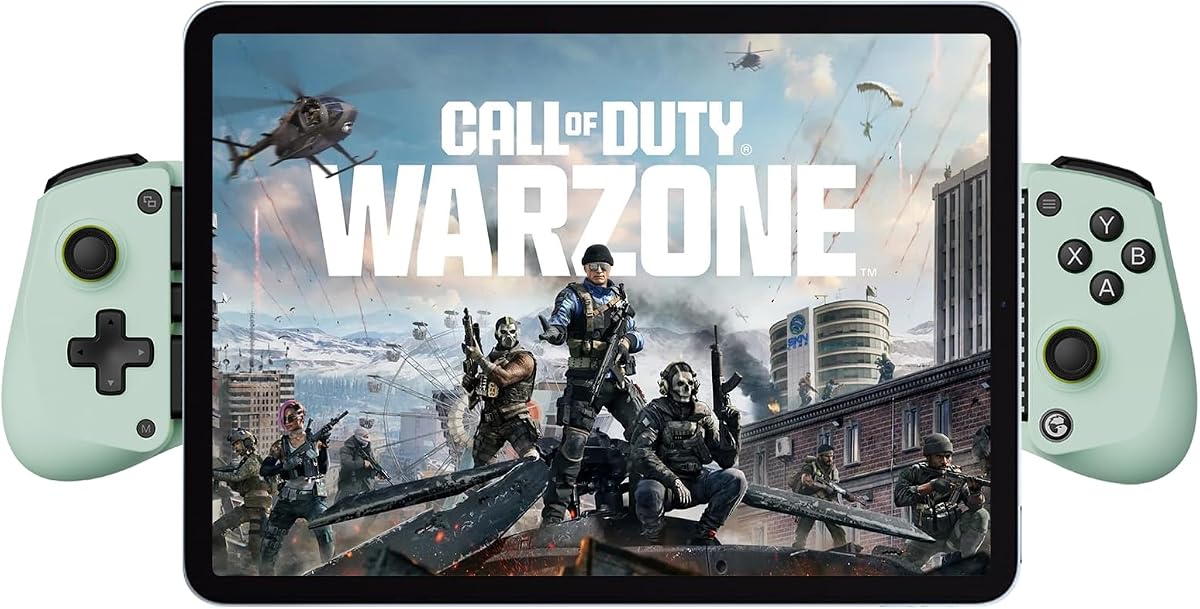
The GameSir X5 Lite delivers exceptional value for gamers on a budget. With Hall Effect joysticks and a lightweight frame, it offers premium features at an accessible price that fits various wallets easily.
We may earn a commission when you buy through this link, at no additional cost to you.
Weighing only 135.4 grams, this controller is incredibly easy to handle for long periods. The USB-C connection ensures a stable link while pass-through charging means you never have to pause gameplay to recharge your device.
Although it is sold as renewed, quality checks ensure functionality. The lack of internal batteries is a plus for weight reduction but means you rely on your phone's power. Turbo customization adds versatility for different game genres.
This model is perfect for casual gamers or those new to mobile gaming accessories. It provides the core tools needed for precise control without the bulk or cost of more complex devices out there today.
This feature allows uninterrupted gaming sessions by charging your phone directly through the controller connection.
The slim profile reduces hand fatigue, making it suitable for travel and extended play sessions comfortably.
We may earn a commission when you buy through this link, at no additional cost to you.
This variation of the X5 Lite offers a distinct Wasabi color that appeals to users wanting style alongside performance. The core specs remain consistent with the standard model, ensuring reliable play for popular titles like Minecraft and Fortnite.
We may earn a commission when you buy through this link, at no additional cost to you.
The cushioned membrane triggers provide comfortable feedback that feels responsive without being too loud. Hall Effect sticks deliver the precision needed for aiming in shooters, while the plug-and-play setup simplifies the start process significantly.
Software customization is limited to Android users which might be a drawback for some. However, on-the-fly button combinations allow quick adjustments without needing an app constantly. The sturdy build ensures it survives daily handling well.
If you appreciate a vibrant design and want a plug-and-play solution, this controller fits the bill. It balances aesthetics with functionality, offering a seamless experience for gamers who value ease of use and visual appeal.
The soft-touch triggers reduce finger fatigue and noise during rapid button presses in competitive games.
Simply connect via USB-C to start gaming immediately without complex pairing or calibration steps required.
We may earn a commission when you buy through this link, at no additional cost to you.
This controller supports both USB-C and Bluetooth connections, offering flexibility for different user preferences. It covers a broad range of games from Call of Duty to Roblox making it a versatile tool for various mobile playstyles.
We may earn a commission when you buy through this link, at no additional cost to you.
The Hall effect joystick provides precise control without drift issues during intense gaming sessions. Vibration intensity can be adjusted to match your preference which adds a personalized touch to the immersion experience significantly for users.
While the mode switch button requires attention during setup, the stability of the connection once paired is reliable. Case removal might be necessary for wired modes which is a minor inconvenience compared to the benefits of dual connectivity options.
Best for those who want options between wired stability and wireless freedom, this gamepad delivers strong value. It ensures you can play almost any supported title without worrying about connection limitations across different devices easily.
Switching between Bluetooth and wired ensures you always have a connection method that suits the environment best.
Compatible with major cloud services like GeForce Now and Xbox Game Pass for high-quality streaming.
We may earn a commission when you buy through this link, at no additional cost to you.
Battery life is a standout feature here with over eight hours of continuous play supported by a high-capacity internal cell. This ensures you can enjoy extended sessions without frequent interruptions for recharging your controller during the day.
We may earn a commission when you buy through this link, at no additional cost to you.
The Hall joystick offers drift-free performance which is crucial for accuracy in precision titles. Turbo speed is adjustable to match your needs allowing you to win action games faster by reducing finger strain significantly over time.
Users should note that cloud gaming requires a stable network for optimal performance. Setup might need a reset if connection issues arise but the provided tips help resolve most non-quality problems quickly and efficiently.
This controller is a solid choice for users who need reliability and endurance. It combines essential features like vibration and adjustable turbo with long battery life to keep you playing all day without worry anywhere.
The 600mAh capacity supports up to eight hours of play reducing the need for frequent charging breaks.
Customize shoot rates to optimize performance in shooter games without needing extra taps from fingers.
We may earn a commission when you buy through this link, at no additional cost to you.
The G8 Galileo brings console-quality features to mobile with Hall Effect triggers and joysticks for smooth control. The inclusion of a 3.5mm audio jack allows you to use wired headphones for clear sound during gameplay sessions.
We may earn a commission when you buy through this link, at no additional cost to you.
Magnetic detachable faceplates let you personalize the look and feel of your setup easily. The movable Type-C port ensures a dependable connection without obstructing buttons making it a versatile choice for daily gaming needs.
It works best without a case or with very thin ones to ensure fit. While the software is Android-only the on-the-fly mappings allow customization instantly without opening apps constantly for adjustments during games.
This premium model is perfect for those seeking the best possible tactile experience. The combination of audio support and customizable aesthetics makes it a top-tier option for enthusiasts who want control and style combined.
Magnetic analog triggers provide smooth linear input ideal for racing and shooting games with precision.
Swap out faceplates to refresh the look or adjust the button layout to your preference instantly.
We may earn a commission when you buy through this link, at no additional cost to you.
This controller expands beyond phones to support larger devices including many 11-inch tablets and Switch 2 systems. Its linear triggers provide high fluidity for racing or shooting games giving you a competitive edge through precise input.
We may earn a commission when you buy through this link, at no additional cost to you.
The ergonomic design fits naturally in the hand reducing discomfort during prolonged use. Programming buttons on the back allow for macro customization that simplifies complex actions in strategy or role-playing games significantly.
Users may need to refer to manuals for specific Bluetooth connection modes across different devices. Some large tablets like the 12.9-inch Pro are not supported which limits its scope for some iPad users looking for full coverage.
Ideal for multi-device households this controller offers great versatility across platforms. It balances tablet support with mobile gaming needs making it a flexible choice for families or users who switch between phone and tablet regularly.
The scalable design supports up to 11-inch screens allowing for a portable gaming experience on larger devices.
Back buttons can be programmed for macros helping you win games with fewer manual inputs required.
We may earn a commission when you buy through this link, at no additional cost to you.
Motion sensing capabilities make this controller stand out for Switch games that require gyro input. The 6-axis gyroscope ensures precise movement tracking allowing for accurate aiming in shooters or steering in racing games effectively.
We may earn a commission when you buy through this link, at no additional cost to you.
Its console-sized sticks and buttons offer a familiar layout that reduces the learning curve for traditional gamers. Interchangeable magnetic components let you adjust the aesthetic and feel keeping the device fresh and personalized over time.
Battery management requires attention since each side has a 500mAh capacity. While wired on PC and Bluetooth on mobile work well the need to charge both sides can be a slight hassle compared to single battery units.
Best for Nintendo Switch users looking to take games mobile, this option delivers on accuracy. It bridges the gap between handheld and mobile play with a design that supports a wide variety of gaming styles.
Advanced motion tracking provides precise control for games that rely on physical movement for input accuracy.
The size mimics traditional controllers providing a comfortable grip that feels familiar to console players.
We may earn a commission when you buy through this link, at no additional cost to you.
BACKBONE offers a premium experience with a compact and robust design that feels solid in hand. The USB-C connection supports a wide range of devices including the latest iPhones and Android phones seamlessly without issues.
We may earn a commission when you buy through this link, at no additional cost to you.
Its unique selling point is the in-app emulator for iOS users allowing you to import ROMs and play retro titles. The Backbone+ trial adds value with features like game recording and a universal launcher for easy access.
The subscription model is optional but required for some premium features which might deter budget-conscious buyers. However, the core controller works out of the box for standard games making it a versatile tool for many users.
This controller is ideal for users who value build quality and ecosystem integration. Whether you are streaming modern games or playing classics on the go it provides a sleek and reliable experience tailored for high-end mobile use.
iOS users can turn their controller into a retro gaming hub supporting imported ROMs for classic titles.
Supports Android and iPhone via USB-C ensuring broad compatibility across different smartphone brands.
We may earn a commission when you buy through this link, at no additional cost to you.
Selecting the right controller requires understanding several key factors that impact your gameplay experience.
Controllers use Bluetooth or wired connections. Wired offers lower latency while Bluetooth provides convenience for untethered play.
Choose wired for competitive games and Bluetooth for casual play on the go.
Hall Effect joysticks use magnetic sensors to prevent drift over time. Traditional carbon sticks may degrade with heavy use.
Prioritize Hall Effect sensors for long-term precision and reliability in competitive titles.
Comfort is critical for long sessions. Look for textured grips and shapes that fit your hand size naturally.
Ergonomic designs reduce fatigue and improve control during extended gaming marathons.
Internal batteries range from 4 to 10 hours. Some controllers allow pass-through charging to keep play going.
Check battery capacity if you play for hours without access to a charger.
Ensure compatibility with your favorite games and cloud services like Xbox Game Pass or Steam Link.
Verify that the controller supports the specific input modes required by your games.
Apps allow you to map buttons or adjust sensitivity. Not all controllers offer robust software support on iOS.
Look for app support if you need to remap keys for complex games.
Durable plastics and reinforced buttons extend the lifespan of the controller. Metal components add strength.
Invest in a well-built controller to avoid breakage during travel or heavy use.
Budget models offer essential features while premium ones add customizations like RGB or faceplates.
Assess your needs to find the best balance between cost and performance.
To start, pair your controller via Bluetooth using the home button or connect via USB-C. Ensure your phone's Bluetooth is active and settings allow new devices to pair without interference.
Clean the joysticks and buttons with a soft dry cloth after use. Avoid exposing the controller to liquids or extreme temperatures to prevent internal damage over time.
Store the controller in a protective case when not in use. This prevents scratches and ensures the internal components remain safe from dust and impact.
Most controllers support Android 6.0 and above. Compatibility may vary based on specific OS versions and Bluetooth hardware. Always check the product details for supported device lists before buying.
Many models are case-friendly up to a specific thickness like 12mm. However, wired connections might require removing thick cases. Check the manual for precise compatibility limits.
Basic functionality works without an app via standard system inputs. Advanced features like remapping usually require downloading the manufacturer's official app for customization.
Wired USB-C connections typically have lower latency than Bluetooth. For competitive play wired is preferred but modern Bluetooth 5.0 is often fast enough for casual use.
Update firmware using the official companion app provided by the manufacturer. Follow the instructions in the app to ensure your controller has the latest patches and features.
Yes many of these controllers support Steam Link for streaming PC games to mobile devices. Check for specific Steam compatibility tags in the product description.
Ensure no other Bluetooth devices interfere with the connection. Reset the controller by pressing the reset button or power cycle it to re-establish a stable link.
Most premium models include dual vibration motors for immersion. Some budget models might lack this feature so verify vibration support in the specifications before purchasing.
We highlighted ten excellent options ranging from budget-friendly models to premium choices with advanced features. Whether you need Hall Effect precision or long battery life there is a perfect match for every gamer.
Prioritize ergonomics and connection stability to ensure a comfortable and smooth experience. Investing in a quality controller can transform your mobile gaming setup significantly and enhance your overall performance.
Prices and availability change frequently so review the latest offers before making your final decision. Check current deals to ensure you get the best value for your budget and needs today.