
USB3.0 Micro SD Card Reader
4.5Editor score
Dual slots design
5Gbps transfer speed
Plug and play support
This guide compares the top Microsd to USB Adapter options for fast data transfer, compatibility, and durability across phones, tablets, and laptops in October
Finding the right Microsd to USB Adapter is essential for modern data management. Whether you are a photographer or just need to move files, a reliable adapter saves time and keeps your workflow smooth without hassle.
We evaluated ten top-rated models based on transfer speed, build quality, and device compatibility. Each product was assessed for its ability to handle large files while maintaining stability during extended use across different operating systems.
Our picks highlight key features like dual slots and USB C support. Remember that specific capabilities vary by model, so check the details below to find the best fit for your needs and budget.
4.5Editor score

4.7Editor score

4.4Editor score
This table provides a quick overview of the key specifications for each of the ten selected adapters. Compare their features side by side to determine which model aligns best with your specific device requirements.



The UANTIN SD Card Reader stands out as the top choice for its impressive performance and thoughtful design. With a high rating, it promises fast transfers and reliable operation for various users seeking efficiency.
We may earn a commission when you buy through this link, at no additional cost to you.
Its ability to read and write simultaneously saves significant time compared to single-slot models. The smart chip ensures stability during large file transfers, preventing the slowdowns common in other adapters.
While it performs well, speeds depend on your cards hardware. The warm feeling during extended use is normal but worth noting if you work with very large files frequently.
This adapter is ideal for photographers and travelers who need quick access to multiple cards. Its small size and keychain make it easy to carry and never lose.
Simultaneous transfer between cards reduces the need for repeated plugging and unplugging, streamlining your workflow significantly.
The ultra-mini design with a keychain ensures the adapter is always accessible and less prone to being lost during travel.
We may earn a commission when you buy through this link, at no additional cost to you.
This adapter offers a cost-effective solution for anyone needing reliable data transfer. It combines speed and simplicity in a package that is easy to use right out of the box.
We may earn a commission when you buy through this link, at no additional cost to you.
The dual slot design allows for quick switching between SD and microSD cards. Transfer speeds are high enough for most everyday tasks, making it a practical choice for casual users.
One limitation is the inability to use both slots at once. Additionally, the warranty terms might not cover all scenarios, which is a consideration for heavy users.
It is perfect for students or home users looking for an affordable way to access memory card data. Its plug-and-play nature means no extra software is needed.
With 5Gbps speeds, you can move large files quickly, reducing the wait time typically associated with slower USB 2.0 adapters.
No drivers are required for installation, allowing you to connect directly to your system and start transferring files immediately.
We may earn a commission when you buy through this link, at no additional cost to you.
This model is designed for users who need maximum versatility. It supports a wide range of card types and connects to nearly any device, making it a powerful tool for professionals.
We may earn a commission when you buy through this link, at no additional cost to you.
The inclusion of dual USB ports allows for additional peripherals to be connected. This feature is particularly useful for MacBook users who have limited ports on their machines.
The adapter can be bulkier due to its many features. It might be overkill for someone who only needs to read a single card occasionally.
Consider this if you manage various media types and devices daily. Its compatibility with new iPhones and Macs makes it a future-proof choice.
Multiple ports let you connect more devices simultaneously, reducing the need for separate dongles or adapters.
Support for the latest devices ensures your investment remains useful as you upgrade your tech over the coming years.
We may earn a commission when you buy through this link, at no additional cost to you.
Anker is known for reliable accessories, and this reader continues that tradition. It provides fast and efficient transfers for those who value brand reputation and consistent performance.
We may earn a commission when you buy through this link, at no additional cost to you.
Its dual-slot capability is useful for photographers needing to move data between cards. The speed ensures that large batches of photos are transferred in a reasonable time.
The lack of USB-C support limits compatibility with newer laptops and phones. It is a solid choice for those still using standard USB ports primarily.
This reader is a good fit for traditional PC users. If you have older hardware, it offers a robust solution without needing extra adapters.
Reading from two cards at once saves time by eliminating the need to swap cards during data transfers.
Powered directly by the USB port, this reader does not require external batteries or power supplies for operation.
We may earn a commission when you buy through this link, at no additional cost to you.
UGREEN delivers a stylish and functional reader that bridges the gap between USB-A and USB-C. Its design is both practical and aesthetically pleasing for modern tech setups.
We may earn a commission when you buy through this link, at no additional cost to you.
The dual interface means you do not need to worry about port compatibility on different machines. This versatility is a major plus for hybrid work environments.
Like many high-speed adapters, it may generate some heat during use. It is also quite small, so it can be lost easily if not stored properly.
This model is great for creatives who switch between devices often. Its sleek design fits easily in a bag and works well with various systems.
Support for both USB-A and USB-C ensures you can use this reader across a wide range of devices without issues.
Transferring two cards at once helps maintain your productivity by reducing downtime between tasks.
We may earn a commission when you buy through this link, at no additional cost to you.
This adapter is built for speed, offering transfer rates that are significantly faster than older models. It is designed to handle the demands of modern 4K video and high-res photo files.
We may earn a commission when you buy through this link, at no additional cost to you.
The dual card slots allow for easy swapping without unplugging. This feature is particularly helpful when you need to archive footage while shooting.
One downside is the potential need for extra cables depending on your setup. Also, pricing can fluctuate, so it is good to check current offers.
For mobile creators, this is a strong option. It connects easily to phones and laptops, making it a flexible choice for on-the-go editing.
Rapid transfer rates ensure you spend less time waiting for files to move and more time on your actual work.
With support for both SD and microSD cards, it serves as a single solution for multiple storage formats.
We may earn a commission when you buy through this link, at no additional cost to you.
This reader focuses on durability and convenience. The aluminum casing helps dissipate heat, ensuring stable performance even during long transfer sessions.
We may earn a commission when you buy through this link, at no additional cost to you.
The extended USB-C connector is a thoughtful addition that allows for insertion even when a phone case is on. This saves time and prevents damage to ports.
It lacks extra USB ports for peripherals, which limits its use as a hub. However, for direct card reading, it performs very well.
Ideal for travelers, it is robust and compact. The design ensures it stays connected securely, which is key when moving around.
The aluminum casing aids in keeping the device cool, preventing thermal throttling during heavy usage.
The extended connector means you do not have to remove your phone case to plug in the adapter.
We may earn a commission when you buy through this link, at no additional cost to you.
This model is designed for simplicity. It works directly with the native file app, meaning there are no complex setup steps or downloads required for basic use.
We may earn a commission when you buy through this link, at no additional cost to you.
Its dual slots allow you to manage multiple cards easily. The two-way transfer feature is great for backing up data from your phone to a card.
Some limitations exist with Wi-Fi SD cards and higher power peripherals. It is also not designed for heavy-duty commercial use.
For casual iPhone users, this is a great pick. It allows you to manage your photos and videos without fuss.
No need to download third-party apps makes the process much simpler for non-technical users.
Being able to move files from the phone to the card and vice versa offers versatile storage management options.
We may earn a commission when you buy through this link, at no additional cost to you.
This two-pack offers good value for households or teams needing multiple readers. The simple design ensures it works with most Android devices and PCs easily.
We may earn a commission when you buy through this link, at no additional cost to you.
The hidden slot design helps protect the port when not in use. This feature extends the life of the adapter during regular carry and transport.
Build quality is basic compared to premium models. Transfer speeds are decent for small files but may struggle with large batches.
It is a practical choice for general use. If you need backups for different devices, this pack is a sensible option.
The mini size and hidden slot make it easy to carry in a pocket or bag without risk of damage.
Support for a wide range of devices ensures it can be used across different phones and computers.
We may earn a commission when you buy through this link, at no additional cost to you.
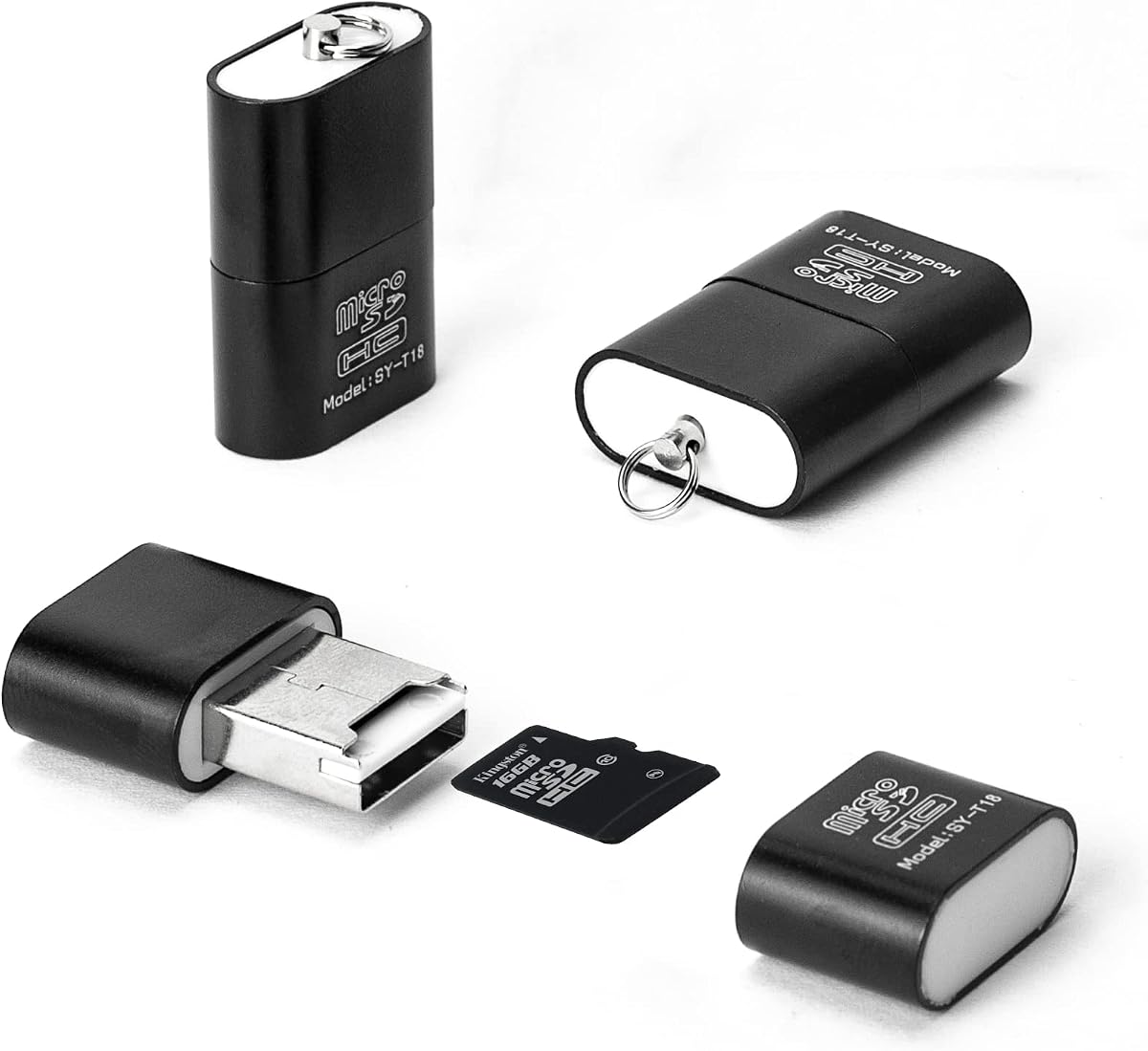
This three-pack provides a cost-effective solution for multiple devices. The aluminum alloy shell adds a level of durability that is rare at this price point.
We may earn a commission when you buy through this link, at no additional cost to you.
The lanyard hole design makes it easy to attach to a bag or keychain. This helps ensure you always have one nearby when you need it.
Speed is a limitation here, as it is limited to USB 2.0 rates. It works fine for documents and small files but not for large media.
For budget-conscious buyers, this is a smart choice. It provides reliable basic functionality for everyday tasks.
The aluminum shell offers better protection against physical damage than plastic alternatives.
The lanyard hole allows for secure attachment to keys or bags to prevent loss.
We may earn a commission when you buy through this link, at no additional cost to you.
Choosing the right adapter involves looking at several key factors. This section breaks down what to consider to ensure you get a product that meets your needs.
Transfer speed is crucial if you work with large files like 4K videos or high-resolution photos. Look for adapters that support USB 3.0 or higher for faster data rates.
Faster speeds reduce the time spent waiting for files to move, improving overall workflow efficiency.
Ensure the adapter matches your device ports. Modern laptops and phones often use USB-C, while older devices may still rely on USB-A.
Choosing a model with dual connectors can save you from needing multiple adapters for different devices.
Check which card formats the adapter supports. Common types include SD, microSD, and sometimes CF or other formats depending on your camera.
Dual-slot adapters offer more convenience by allowing you to read two cards without swapping them out.
The material of the adapter affects its durability. Aluminum casings help dissipate heat and protect against physical damage better than plastic.
A sturdy build ensures the adapter lasts longer, especially if you carry it around frequently.
Verify that the adapter is compatible with your operating system. Most support Windows and macOS, but some may have specific requirements for Linux or Android.
Plug-and-play functionality is ideal to avoid the hassle of installing extra drivers.
If you travel often, a compact design is essential. Small adapters are easier to carry and less likely to get lost or damaged in a bag.
Features like keychains or lanyards can further enhance portability and reduce the risk of losing the adapter.
Some adapters require external power, while others run solely on USB power. For most standard use, bus-powered models are sufficient.
Bus-powered adapters are more convenient as they do not need extra cables or power sources.
A good warranty can provide peace of mind. Look for brands that offer at least a year of coverage against defects.
Customer support availability is also important if you encounter issues with the product after purchase.
To start, insert your memory card into the adapter firmly. Make sure the orientation is correct to avoid damaging the contacts inside the slot.
Connect the adapter to your computer or phone. Wait for the operating system to recognize it, which usually happens instantly for plug-and-play models.
To prolong the life of your adapter, store it in a protective case or bag. Avoid exposing it to extreme temperatures or moisture during storage.
Most modern adapters are plug-and-play and do not require driver installation on Windows or macOS. However, some older or specialized models may need drivers on specific systems. Always check the product details before use.
Yes, most adapters are compatible with Mac systems. Ensure you choose a model with the correct connector type like USB-C or USB-A. Also, check that your card format is supported by your Mac.
USB 3.0 adapters offer significantly faster transfer speeds compared to USB 2.0 models. If you deal with large files frequently, opting for a USB 3.0 or higher model will save you time.
This can happen due to loose connections, incompatible card formats, or system issues. Try reconnecting the adapter, checking the port, or restarting your device. Also, ensure your card is formatted correctly.
Yes, many adapters support two-way transfer. This allows you to copy files from your phone to the memory card for backup or storage. Check if your phone supports OTG functionality.
The lifespan depends on build quality and usage frequency. Generally, metal adapters last longer than plastic ones. With proper care, you can expect several years of reliable service from a good model.
Not all adapters support every card type. Most support SD and microSD but may exclude others like CF cards. Always verify the supported formats in the product description before buying.
It is best to eject the adapter before unplugging to prevent data corruption. Leaving it connected for long periods can also cause unnecessary wear. Safely eject the device through your system settings.
We reviewed ten top adapters that cater to different needs and budgets. Whether you prioritize speed, portability, or compatibility, there is a model on this list for you.
When making your choice, consider what you need most from an adapter. Features like dual slots and heat management can make a big difference in daily use.
Prices and availability may change over time. Always check the latest offers before purchasing to ensure you get the best value for your money.