
Elikliv EDM4
4.5Editor score
4.3 Inch Display
8 Adjustable LED Lights
Rechargeable Battery
Choosing the right microscope for mobile repairing is critical for technicians who need precision on tiny circuit boards and components. A good model offers clear magnification, stable lighting, and ergonomic viewing to reduce strain during long sessions.
We evaluated ten top-rated digital microscopes based on resolution, lens options, and connectivity. Each product was analyzed for its suitability in mobile repair tasks, focusing on clarity, build quality, and ease of use.
Each pick highlights key strengths and ideal use cases. While prices may fluctuate, the specifications remain consistent. Review these details to find the tool that best fits your repair workflow and budget requirements.
4.5Editor score

4.5Editor score

4.7Editor score
As an Amazon Associate we earn from qualifying purchases.
The following table provides a side-by-side comparison of all ten digital microscopes. It highlights key specifications like resolution, magnification range, and screen size to help you decide quickly.



The Andonstar AD246S-M is a powerful digital microscope designed for adults who need high clarity in mobile repair work. It offers 2160P video recording and HDMI output, ensuring you can see minute details on circuit boards. Its rating of 4.5 reflects consistent user satisfaction regarding image quality and versatility.
We may earn a commission when you buy through this link, at no additional cost to you.
Its standout feature is the inclusion of three lenses tailored for different tasks. Lens L is specifically optimized for soldering and repairing mobile phones. The Pro Boom Arm Stand provides stability, which is crucial when handling delicate components. The adjustable LED lights allow you to eliminate shadows during inspection.
While it does not include a built-in screen, the HDMI support allows connection to larger monitors, reducing eye strain. The measurement software adds value for technicians needing precise dimensions. The only trade-off is the need to manage cables and ensure your monitor supports HDMI input for full benefits.
This model is ideal for professional technicians or serious hobbyists who want a reliable, high-performance tool. It balances cost and features effectively. If you need a microscope that adapts to various repair scenarios without compromising on clarity, this is the recommended choice.
The three lenses allow seamless switching between soldering, coin inspection, and biological observation without needing multiple devices.
The upgraded metal bracket ensures the microscope remains steady during high-temperature soldering, preventing accidental misalignment.
We may earn a commission when you buy through this link, at no additional cost to you.
The Skybasic Wireless Digital Microscope offers unparalleled portability for mobile repair tasks. It connects via WiFi to Android or iOS devices, allowing you to inspect boards directly on your smartphone screen. With a rating of 4.2, users appreciate its convenience for quick checks and field repairs.
We may earn a commission when you buy through this link, at no additional cost to you.
Its key strength lies in the wireless connectivity, enabling you to capture 1080P HD images without cables. The 8 adjustable LED lights provide sufficient illumination for small components. The included stand helps maintain stability when working on detailed soldering jobs.
However, it functions more as a fixed-focus magnifying glass, which may limit deep analysis compared to professional models. Users must ensure their device supports WiFi hotspot connectivity. Despite this, the ease of use and lightweight design make it a practical choice for on-the-go diagnostics.
This microscope suits technicians who value mobility and simplicity. It is also excellent for educational purposes or light hobbyist work. If you need a tool that fits in your pocket and connects easily to your phone, this model delivers strong value.
Connect to smartphones via WiFi to view live feeds and capture photos instantly, streamlining your workflow during mobile repairs.
Eight LED light levels ensure you can adjust brightness to avoid glare on reflective circuit boards or dark enclosures.
We may earn a commission when you buy through this link, at no additional cost to you.
The TOMLOV DM9 features a 7-inch LCD screen, providing a comfortable viewing experience without external monitors. It supports 1080P video and has a 12MP camera, ensuring clear inspection of mobile device components. Rated 4.4, it is well-regarded for its steady imaging capabilities.
We may earn a commission when you buy through this link, at no additional cost to you.
This microscope is designed with a solid metal base, reducing shaking during soldering tasks. The 1200X magnification helps inspect solder joints and tiny parts effectively. The included 16GB memory card allows you to save inspection records directly on the device.
Users may find the base somewhat large for compact workspaces, but it ensures stability. The PC connection option allows larger views if needed. While it lacks multiple lenses, the fixed configuration is optimized for close-up inspection, making it reliable for specific repair tasks.
This model is perfect for users who want an all-in-one solution with a dedicated screen. It reduces setup time and enhances ergonomics. If your priority is a clear, steady view without extra hardware, the DM9 is a solid investment.
The built-in 7-inch screen allows immediate inspection without requiring a computer or phone, saving setup time.
The heavy metal base provides stability during soldering, preventing accidental movement that could damage sensitive components.
We may earn a commission when you buy through this link, at no additional cost to you.
The 5 Inch LCD Digital Soldering Microscope provides a focused solution for PCB repair. It includes a 5-inch IPS display that reduces eye strain during long sessions. With a 4.5 rating, it is praised for its plug-and-play PC compatibility without complex software.
We may earn a commission when you buy through this link, at no additional cost to you.
The flexible goose-neck stand adapts to tight workspaces, allowing you to position the lens precisely over small parts. It supports up to 1000X digital magnification. You can connect to a computer easily, opening the camera app for a larger view if needed.
Note that you must provide your own Micro SD card to save videos. Also, manual focus requires patience to achieve sharp images. Despite these minor cons, the device's reliability and ease of use make it highly effective for quick and detailed repairs.
This microscope is ideal for technicians who need a compact tool that connects simply to a PC. It is great for quick inspections without extensive setup. If you value flexibility and straightforward operation, this model is a practical choice.
Connect to any PC via camera mode without installing drivers, ensuring instant access to live video feeds.
The flexible arm lets you reach odd angles on circuit boards, improving accessibility for soldering and component placement.
We may earn a commission when you buy through this link, at no additional cost to you.
The Elikliv EDM4 offers a compact and affordable solution for mobile repair. With a 4.3-inch display and 1000X magnification, it delivers clear views for most tasks. Rated 4.5, it is a favorite for those needing a budget-friendly portable microscope.
We may earn a commission when you buy through this link, at no additional cost to you.
It features 8 adjustable LED lights, ensuring proper illumination in any environment. The rechargeable battery supports up to 3 hours of use, enhancing portability. The height-adjustable stand provides flexibility to find the perfect viewing angle for small components.
While the battery life is limited compared to mains-powered units, it is sufficient for short repairs. The resolution is standard for this price range. Its small size makes it easy to carry in a toolkit, making it versatile for on-site jobs.
This model is perfect for beginners or hobbyists seeking high value without a high cost. It balances performance and price effectively. If you need a reliable, portable tool for light to medium mobile repair, this is a top pick.
The rechargeable battery and compact size allow you to take this microscope anywhere for quick diagnostics.
Eight LED lights let you adjust brightness to reduce glare on shiny circuit boards.
We may earn a commission when you buy through this link, at no additional cost to you.
The Bysameyee USB Digital Microscope is a straightforward tool for basic mobile repair. It supports Android via OTG and most PC systems. With a 4.0 rating, it is appreciated for its utility in quick inspections and educational use.
We may earn a commission when you buy through this link, at no additional cost to you.
The included metal stand and carrying case add value, protecting the device during transport. You can control brightness easily with a dimming knob. The 8 LED lights provide clear visibility. It works well with Windows, Linux, and Mac via USB.
Note that iOS devices are not supported. Measurement features are limited to Windows users. These limitations make it best for Android and PC users. Despite this, the simplicity and portability make it a practical option for budget-conscious technicians.
This microscope is suitable for those who need a basic, functional tool. It is easy to use and carries well. If you require a simple USB connection without complex software, this model provides good reliability.
The included carrying case keeps the microscope safe during transport, ensuring readiness for field repairs.
Compatible with multiple operating systems via USB, allowing easy integration into existing workflows.
We may earn a commission when you buy through this link, at no additional cost to you.
The USB Microscope 4-in-1 offers versatile connectivity for various devices. It includes USB, Micro USB, Type-C, and Lightning interfaces. With a 4.4 rating, users praise its compatibility with both iPhone and Android devices for mobile repair.
We may earn a commission when you buy through this link, at no additional cost to you.
It supports 1080P recording and does not require charging, as it draws power from your device. The 8-LED lights ensure clear imaging. The buttons on the USB cable minimize shaking when capturing photos, improving image stability.
The small size and lack of battery dependency make it ideal for quick use. However, it lacks a dedicated stand, which may affect stability during longer tasks. Still, its broad compatibility and convenience are significant advantages for diverse tech stacks.
This model is perfect for users working with multiple device types. It eliminates the need for multiple tools. If you need a single microscope that connects to almost anything, this is a highly flexible choice.
Supports Lightning and Type-C connections, allowing use across iPhone, Android, and PC without adapters.
Buttons on the cable allow photo capture without touching the lens, reducing blur and vibration.
We may earn a commission when you buy through this link, at no additional cost to you.
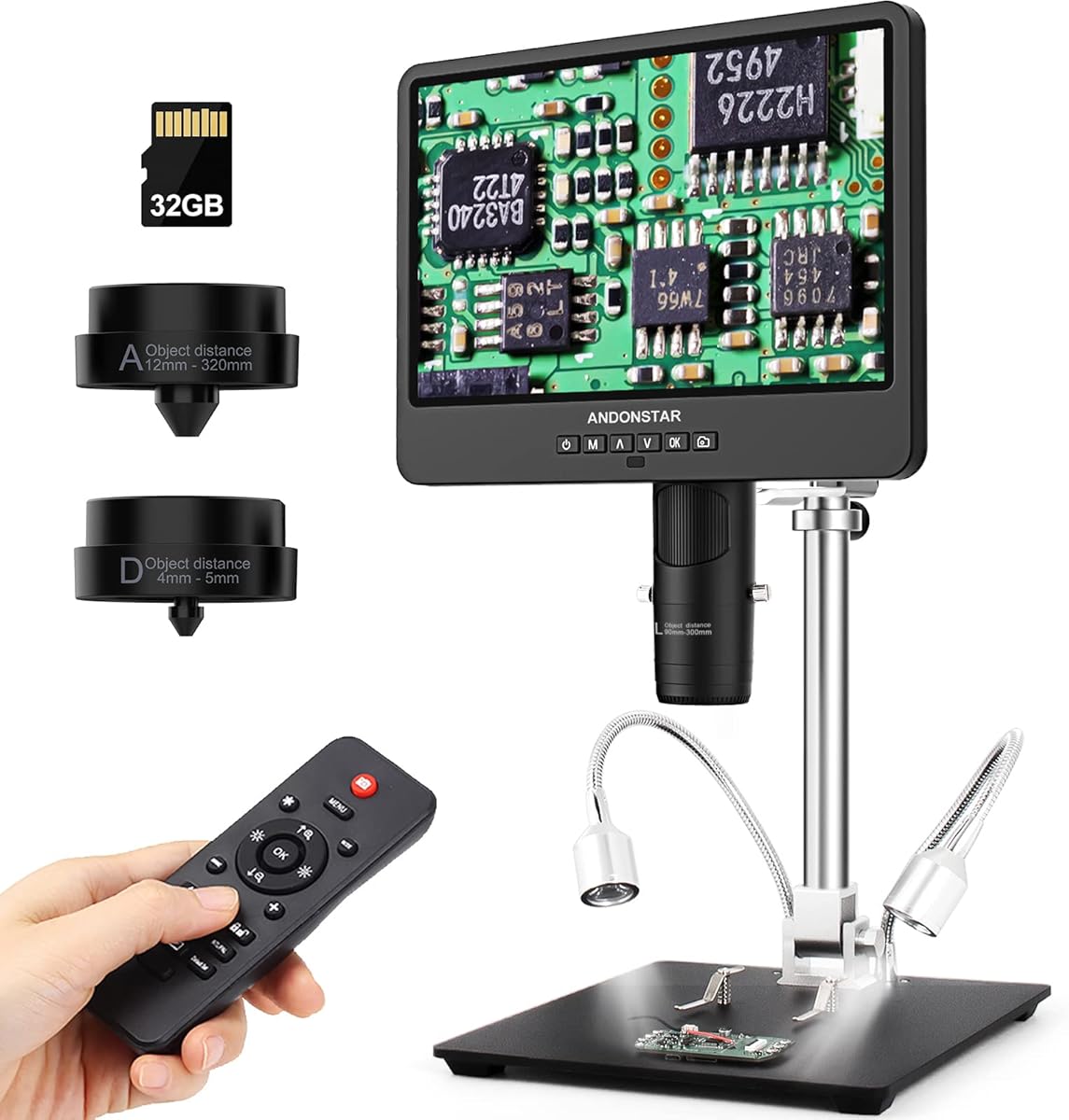
The Andonstar AD249S-M features a massive 10.1-inch screen, providing exceptional viewing comfort. It supports 2160P video recording and comes with three lenses for versatile tasks. With a 4.6 rating, it is highly regarded for professional-grade clarity and stability.
We may earn a commission when you buy through this link, at no additional cost to you.
The Pro Boom Arm Stand offers extensive adjustability, suitable for large work envelopes. It includes a remote control for easy operation from a distance. The measurement software connects to your PC, enabling precise dimensional analysis of components.
The main trade-off is the higher price and the need for adequate desk space. However, the quality of the display and build justifies the cost for professionals. It delivers a seamless workflow from inspection to documentation.
This model is ideal for technicians needing a large, clear view without relying on external monitors. It is suitable for both solo work and team demonstrations. If you want a premium experience with high-end features, this is the top choice.
The 10.1-inch screen minimizes eye strain during long sessions, allowing precise work without external monitors.
Includes professional measurement software to calculate area and length directly from the PC connection.
We may earn a commission when you buy through this link, at no additional cost to you.
The Andonstar AD249S-M Plus is the ultimate premium option for mobile repair. It includes soldering helping hands and an extension base, offering a complete workstation. With a 4.7 rating, it is the highest-rated model in this guide.
We may earn a commission when you buy through this link, at no additional cost to you.
This model upgrades the base model with component storage boxes to keep your workspace clutter-free. The 10.1-inch HDMI screen supports 2160P video. It also includes a tool holder for easy access during repairs, improving efficiency.
The cost is high, but the included accessories justify it for professionals. It reduces the need to buy separate tools. The stability and clarity ensure you can handle complex repairs with confidence. It is designed for daily professional use.
This microscope is best for technicians who need a full repair station in one unit. It saves time and effort with included accessories. If you want the best possible setup for detailed mobile repair, this is the definitive choice.
The soldering kit and extension base provide a complete workspace, including storage for components and tools.
Rotatable clamps and the Pro Boom Arm ensure steady positioning, essential for precise soldering and component alignment.
We may earn a commission when you buy through this link, at no additional cost to you.
The Andonstar AD246S-M Plus combines a 7-inch HDMI display with premium accessories. It offers 2160P recording and comes with soldering helping hands. With a 4.7 rating, it delivers excellent value for those wanting professional features in a compact format.
We may earn a commission when you buy through this link, at no additional cost to you.
The extension base increases the soldering area significantly. It includes a soldering mat and tool holder. The 7-inch screen is smaller than the 10.1-inch version but still sufficient for detailed work. The 24-month warranty adds reliability to this purchase.
The main trade-off is the smaller screen size compared to the larger model. However, if you have limited desk space, this is ideal. The included accessories make it a complete solution, reducing the need for extra buys.
This model is perfect for technicians who want a full toolkit without a massive footprint. It balances size and features well. If you need a powerful microscope with essential repair tools included, this is a smart choice.
The 7-inch screen and extension base offer professional capabilities in a more compact form factor.
Includes soldering mat, helping hands, and tool holders, providing immediate readiness for complex tasks.
We may earn a commission when you buy through this link, at no additional cost to you.
Selecting the right microscope involves evaluating several technical factors to ensure precision and comfort.
Magnification determines how much detail you can see. For mobile repairing, 1000X to 2000X is often sufficient to view solder joints and small components. Ensure the microscope offers clear magnification without distortion.
Look for adjustable magnification to adapt to different tasks. Higher magnification helps with intricate work, but lower levels provide better context.
A larger display reduces eye strain during long repairs. Models with 7-inch to 10.1-inch screens allow you to see details comfortably without leaning in. HDMI output is valuable if you prefer an external monitor.
Prioritize IPS or HD screens for accurate colors and sharp text. Good display quality ensures you do not miss critical defects on the board.
Multiple lenses provide versatility. A dedicated soldering lens is essential for mobile repair to focus on heat-sensitive areas. Other lenses may help with general inspection or biological tasks.
Check if lenses are easily interchangeable. This flexibility allows you to switch between tasks quickly without changing the entire unit.
Connectivity options like WiFi or USB determine how you interact with the microscope. Wireless models allow portability, while USB models offer stable connections for PC use. HDMI ensures real-time viewing without lag.
Choose a model that matches your workflow. If you need to save data or measure components, PC connectivity is highly beneficial.
Proper lighting is critical for seeing small components. Look for micro with adjustable LEDs to avoid glare on reflective boards. Multiple light levels help you adapt to different environments.
Adjustable lighting allows you to focus on shadows and details. Good lighting reduces eye fatigue and improves image quality.
Stable stands are necessary for precise repairs. A metal base or Pro Boom Arm prevents shaking during soldering. Flexible arms help you reach awkward angles.
Ensure the base is heavy enough to prevent movement. Stability ensures your work is accurate and prevents accidental damage.
Built-in storage or SD card slots allow you to save inspection data. Measurement software on Windows adds value for technical analysis. Check if the software is included or requires additional downloads.
Storage helps in documenting repair progress. Software tools enhance the microscope's utility beyond simple viewing.
If you work on-site, a portable model with a rechargeable battery is beneficial. Lightweight designs are easier to transport. Check if the device requires constant power.
Portable options save time on travel. Consider battery life to ensure it lasts for your expected repair sessions.
To begin, place the microscope on a stable surface and adjust the height to your eye level. Connect any necessary cables to your display or computer. Ensure the power is on and the LED lights are adjusted for bright, shadow-free illumination.
Focus on your target by moving the lens closer or further using the focusing wheel. Adjust the zoom or lens to match the component size. Use the measurement software if you need to calculate dimensions of the board parts.
After use, cover the microscope to protect the lens from dust. Store it in a cool, dry place. Clean the lens with a soft cloth and avoid using harsh chemicals. Regular maintenance ensures the device lasts for years.
For mobile repair, 1000X to 2000X is ideal. This range allows you to inspect solder joints and tiny components clearly. Higher magnification may reduce the field of view, so adjustable options are better for versatility.
Yes, WiFi microscopes like the Skybasic allow you to connect directly to smartphones. This is useful for portable setups. Ensure your phone supports the required WiFi connection or USB OTG function.
Not always. Many models have built-in screens and HDMI output, allowing use without a PC. However, PC connectivity helps with measurement software and data storage.
Yes, models with dedicated soldering lenses and stable stands are designed for soldering. Look for adjustable lighting to prevent glare on the solder joints.
Most digital microscopes use a Micro SD card to save images and videos. Ensure you insert a compatible card before use. Some models may also save directly to a connected PC.
Beginners should start with a model that is easy to set up, like the Elikliv EDM4. It offers good value and portability. For more detailed work, the Andonstar AD246S-M is recommended for its versatility.
We reviewed ten top digital microscopes tailored for mobile repair. The Andonstar AD246S-M stands out for its versatility and balance of features. The Elikliv EDM4 offers the best budget option, while the Andonstar AD249S-M Plus provides the premium experience.
Prioritize resolution, lighting, and stability when choosing a model. A stable base and adjustable lights are critical for precision work. Ensure the connectivity matches your workflow, whether WiFi or HDMI.
Prices and availability may change, so verify current specs before purchasing. Regular maintenance will keep your microscope working efficiently. Select the tool that aligns with your repair needs and budget.