Discover the top laptop stands for trucks designed for mobile work. This guide compares durability, installation, and features to help you choose the right
As an Amazon Associate we earn from qualifying purchases. We may earn a commission when you buy through links on this page, at no additional cost to you. Read our affiliate disclosure.As an Amazon Associate we earn from qualifying purchases.Purchases through our links may earn us a commission, at no extra cost to you. Read our affiliate disclosure.
Mobile professionals need reliable setups to work efficiently from their vehicles. A dedicated laptop stand transforms your truck cabin into a functional workstation for dispatch or diagnostics. Choosing the right mount ensures stability on rough roads and ergonomic comfort during long shifts.
We evaluated ten leading truck laptop mounts based on build quality, installation ease, and adjustability. Our analysis covers no-drill options that protect vehicle integrity and heavy-duty models designed for fleet use. Each product offers unique features like cooling fans and quick-release mechanisms for practical daily use.
Every pick highlights key strengths and potential trade-offs to match your specific vehicle type. We focus on stability, compatibility, and long-term value for serious mobile workers. Please note that prices and availability may change, so verify current listings before purchasing your next accessory.
Top 3 Picks for Best Laptop Stands for Trucks
Best Budget
Car Laptop Mount Steering Wheel Tray Holder, Height Adjustable Car Desk for Laptop Computer Tablet, Foldable Portable Lap Laptop Stand for Car Vehicle Workstation Accessories Truck SUV Tesla
Top 10 Best Laptop Stands for Trucks in 2026 Compared
This side-by-side comparison evaluates all ten truck laptop mounts across critical performance categories. We analyze compatibility, stability features, and adjustment options to help you find the perfect fit for your specific vehicle and work needs.
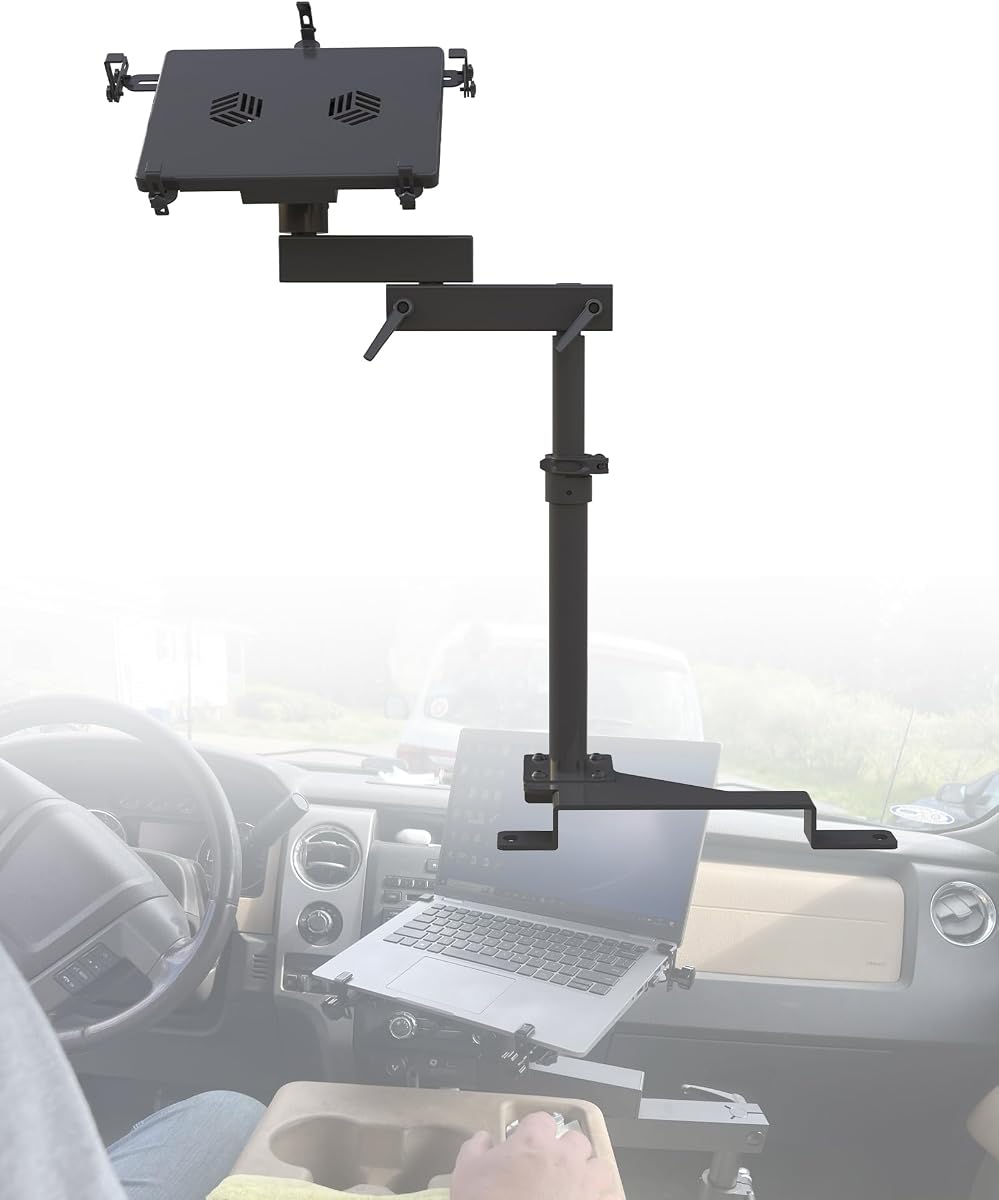
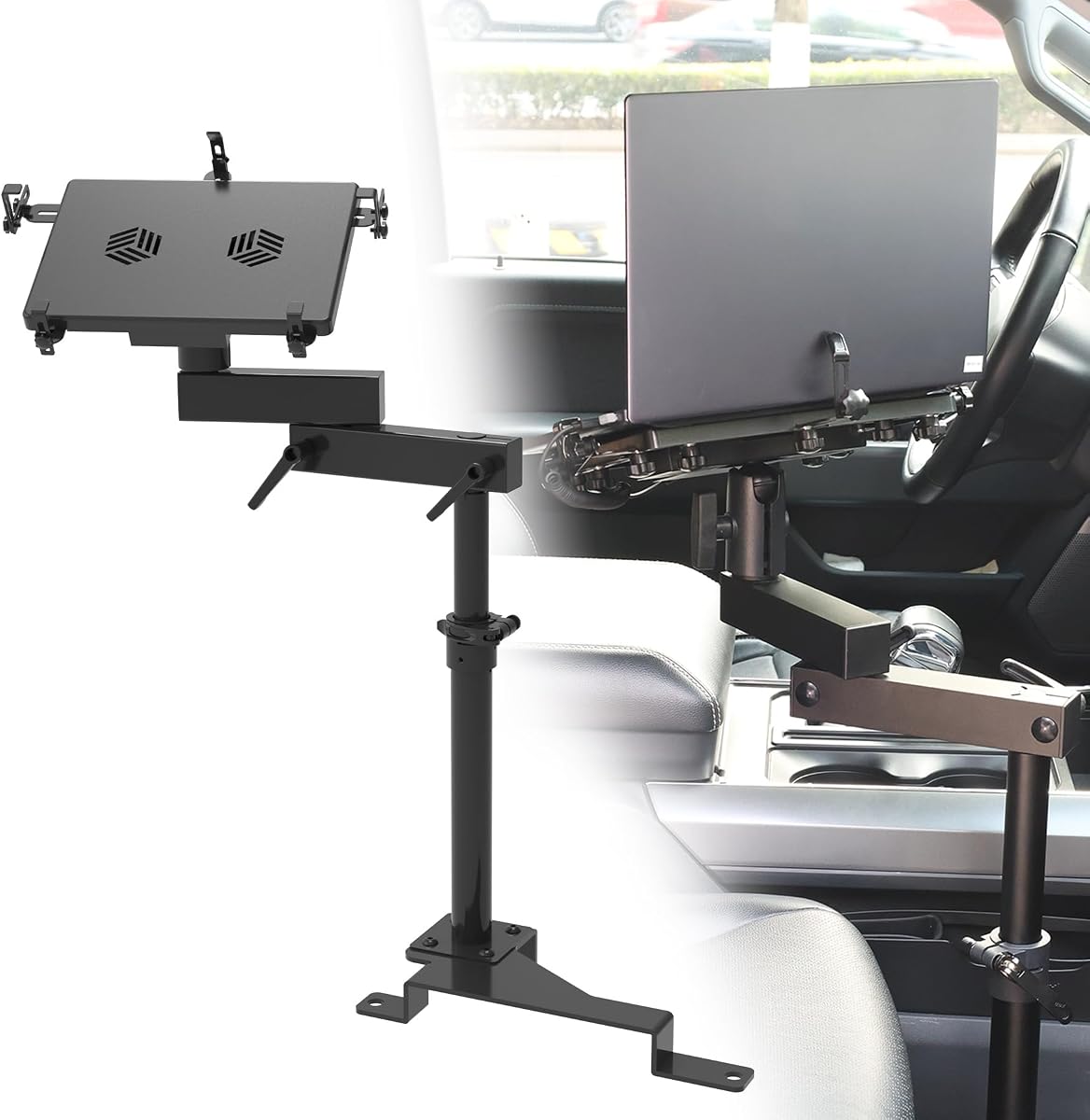
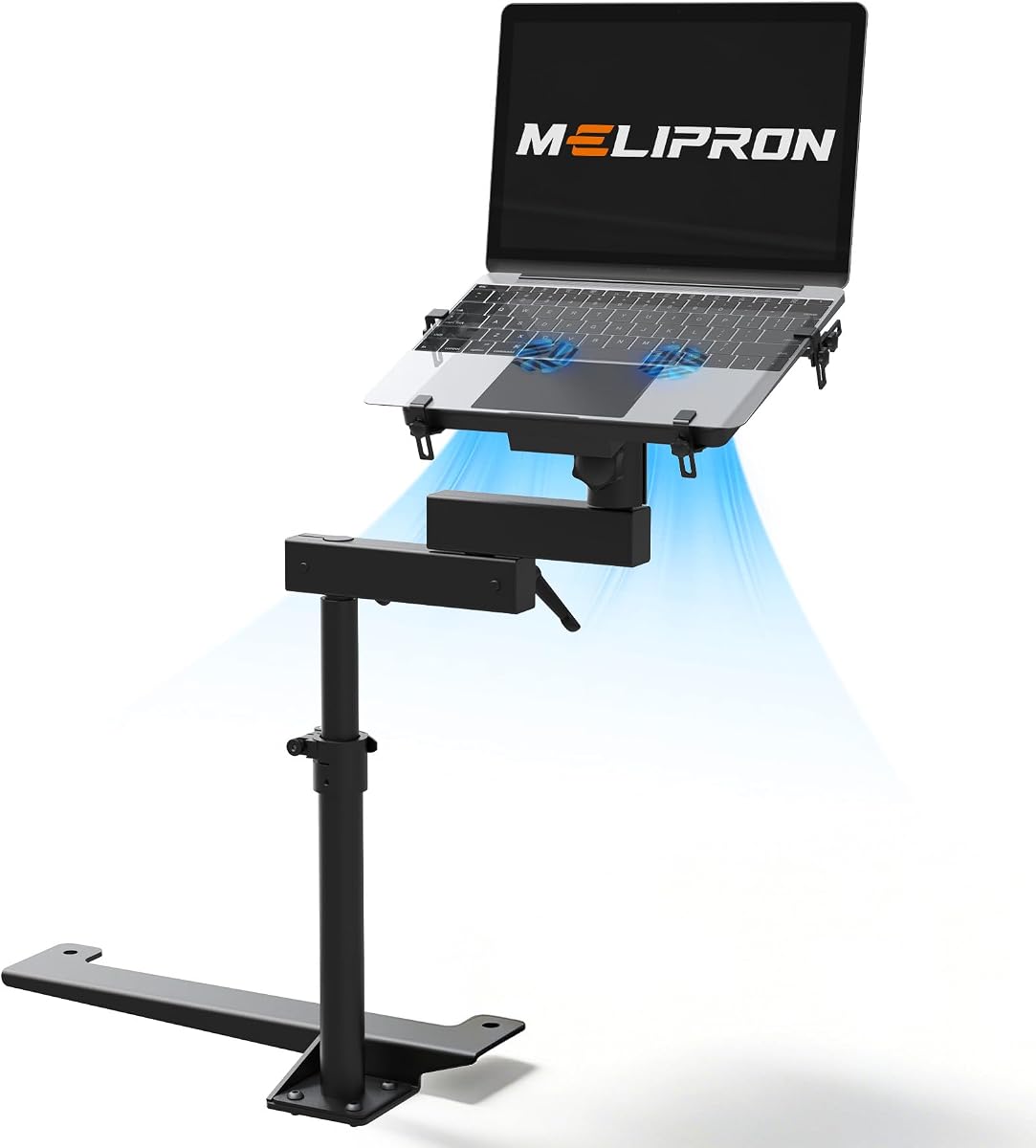
This MELIPRON mount stands out as a top choice for mobile workers seeking a reliable and versatile solution. With a 4.3 rating, it offers a balanced mix of stability and user-friendly features like cooling fans and adjustable angles. The heavy-duty aluminum and steel construction ensures it withstands daily use without wobbling during transit.
Pros
Prevents overheating with fans
Stable on rough roads
Preserves passenger space
Protects vehicle structure
2-year warranty included
Cons
Specific bolt fitment required
May block some views
We may earn a commission when you buy through this link, at no additional cost to you.
The dual USB cooling fans are a critical feature for extended work sessions in hot climates, protecting your laptop from overheating. Its no-drill installation secures directly to seat rail bolts, preserving your vehicle structure while providing a rock-solid base. The telescopic pole allows quick removal to reclaim passenger space when the stand is not in use.
While it offers excellent stability, users should verify their seat rail bolts match the mounting requirements before purchasing. The design focuses on fleet and personal vehicles alike, making it a flexible option for various use cases. Some users may find the adjustment process slightly involved compared to simpler clamp-on solutions.
Ideal for fleet managers or professionals needing a permanent yet removable workstation, this mount delivers on durability and ergonomics. The 2-year warranty and support team provide peace of mind for long-term investments. We recommend it for anyone prioritizing safety and cooling alongside a professional setup.
Thermal Management for Device Safety
Integrated fans actively circulate air to prevent thermal throttling during intensive tasks like diagnostics or navigation.
Ergonomic Adjustability
360-degree swivel and height adjustments reduce strain during long shifts by keeping screens at eye level.
Designed specifically for Ford F-Series trucks from 2015 to 2026, this mount offers tailored compatibility that general mounts often lack. The built-in cooling fans ensure your laptop stays functional even during long trips in hot vehicle environments. Its patented design balances durability with ease of use for fleet operators and owners alike.
Pros
Perfect for F150
Secure fit without drilling
Swing arms for reach
Sturdy steel build
2-year warranty support
Cons
Limited to Ford models
Higher price point
We may earn a commission when you buy through this link, at no additional cost to you.
The quick-release structure allows for fast detachment and reattachment, making it easy to switch between work and passenger modes. Dual swing arms extend your reach for comfortable use without compromising the stability provided by the aluminum and steel frame. This model prioritizes safety, ensuring the laptop stays firm on bumpy roads.
While highly effective for Ford owners, the specificity means it cannot be used with other brands or older models without modification. The price reflects the specialized fitment and durable construction, which may be a consideration for budget-conscious buyers. However, the tailored engineering often reduces installation errors and improves overall stability.
This is the ideal choice for Ford F150 or Super Duty owners who need a robust and vehicle-specific workstation. The comprehensive warranty and pre-sale support help ensure a smooth setup process. We recommend it for those who want a guaranteed fit for their specific truck model.
Vehicle-Specific Engineering
Precise bolt mapping ensures zero gaps or wobble compared to universal mounts that rely on adjustable generic clamps.
Long-Trip Reliability
Built-in cooling and secure clamping maintain device integrity even after hours of vibration and heat exposure.
Tailored for Chevy Silverado and GMC Sierra models from 2019 to 2026, this mount provides a reliable workstation for fleet workers. The heavy-duty steel base anchors directly to seat rail bolts to distribute load and prevent wobble on uneven roads. It supports laptops up to 17 inches with secure vinyl-coated clamps that protect your device from scratches.
Pros
Great for Silverado
Three-point support base
Vinyl clamps protect devices
Adjustable viewing height
Preserves vehicle integrity
Cons
Requires seat rail access
Heavy to remove often
We may earn a commission when you buy through this link, at no additional cost to you.
Integrated USB cooling fans help reduce heat during long sessions, which is essential for heavy usage like diagnostics or dispatching. The fully adjustable design with tilt and 360-degree rotation allows for precise positioning that maintains driver visibility. Installation is simple and requires no drilling, keeping the vehicle structure intact for resale or lease returns.
While the stability is excellent, the heavy steel base makes it less ideal if you frequently need to remove the stand for passenger comfort. The compatibility is strict, so double-check your model year before ordering to avoid fitment issues. However, the precision engineering justifies the effort for those who need a permanent workstation solution.
Perfect for Silverado owners working in construction or logistics, this mount delivers on stability and protection. The detailed compatibility list ensures you can confirm fitment before purchase. We recommend it for professionals who need a durable setup for daily heavy-duty use.
Load Distribution Technology
The three-point anchor system spreads weight evenly across rail bolts to prevent stress on single points.
Device Protection Features
Vinyl-coated clamps prevent scratches and secure corners firmly against vibration or sudden stops.
With a 4.6 rating, this mount is a top contender for Ford owners seeking premium stability and adjustability. It fits a wide range of Ford models including F150 through F550, ensuring broad compatibility within the brand. The 5-clamp securing system and telescopic pole provide a robust foundation that minimizes wobble and keeps your device secure.
Pros
Highest rated option
Extensive Ford compatibility
5 clamps for security
Dual articulating arms
Telescopic pole quick release
Cons
Complex installation steps
Costlier than generic options
We may earn a commission when you buy through this link, at no additional cost to you.
The dual articulating swing arm with four locking joints allows for precise height and angle adjustments. This flexibility helps keep the road visible while ensuring controls remain accessible during operation. Powder-coated alloy steel and aluminum construction guarantee long service life even under daily commercial or fleet demands.
Installation is simplified with detailed videos, but the process may still require careful alignment for optimal results. While the price is higher than basic options, the extensive features and durability justify the investment for professionals. The quick-release pole feature allows you to free up passenger space when the workstation is not needed.
This premium model is ideal for heavy-duty users who demand maximum stability and flexibility. The comprehensive warranty and support ensure any fitment questions are resolved quickly. We recommend it for those who prioritize long-term reliability and advanced ergonomic features.
Advanced Articulation System
Four locking joints on the dual arm allow micro-adjustments to find the perfect ergonomic viewing angle.
Superior Device Security
Five adjustable clamps combined with a strap prevent sliding even on the roughest construction or dirt roads.
The VIVO mount is designed for wide compatibility across cars, trucks, and SUVs with exposed floor seat bolts. It features a spacious 14.2 by 11.9-inch tray that supports laptops and tablets up to 17 inches or 11 pounds. The ventilated surface helps increase airflow for sufficient cooling during active work sessions.
Pros
Works with most vehicles
Ventilated tray cooling
Flexible tray clips
Full articulation range
Easy quick disconnect
Cons
Lower weight rating
May need extra stability
We may earn a commission when you buy through this link, at no additional cost to you.
Full articulation including tilt, swivel, and rotation allows you to find the perfect ergonomic angle quickly. The telescopic pole adjusts from 18.5 to 26.3 inches to accommodate different vehicle heights. A quick disconnect mechanism lets you return the seat to a functional passenger area by removing thumb screws effortlessly.
While versatile, the 11-pound weight limit might be restrictive for heavier laptops or setups with additional peripherals. The flexible clips are convenient but may require adjustment to secure larger devices firmly against vibration. However, its adaptability makes it a strong candidate for drivers of multiple vehicle types.
Best suited for those who need a flexible and affordable universal solution across different vehicles. The patent pending design suggests ongoing improvements to stability and fit. We recommend it for casual mobile workers or those with lighter laptop needs.
Flexible Vehicle Adaptation
Three mounting feet options allow you to adapt the base to various seat bolt angles and configurations.
Space Saving Design
Quick disconnect allows rapid conversion from work mode to standard passenger seating with minimal effort.
This mount emphasizes stability with a triangular 3-point base that limits movement even on rough terrain. It features dual USB cooling fans to reduce heat buildup during extended work sessions like diagnostics and reporting. The tray supports laptops from 9 to 17 inches and tablets up to 11 pounds comfortably.
Pros
Triangular base for stability
Dip-coated clamps
Articulating arms reach
Detachable workstation
Comprehensive support
Cons
Heavy base weight
Check bolt fitment first
We may earn a commission when you buy through this link, at no additional cost to you.
Adjustment options include height, tilt, 360-degree swivel, and two 180-degree articulating arms for up to 13 inches of reach. A dip-coated clamp contact point adds grip and helps reduce scratches on your device during transport. The upper workstation detaches at the center joint to help reduce passenger-side obstruction when not in use.
While stable, you must verify bolt types and clearance before ordering to ensure proper fitment. The 3mm steel base and aluminum body provide rugged durability for daily use but add some weight. However, the detachable design allows you to maintain the mounting position without removing the entire base.
Ideal for field technicians who need a robust and removable workstation. The 2-year warranty and support team ensure you have help if issues arise. We recommend it for those needing advanced reach and cooling features without drilling.
Enhanced Thermal Control
Dual fans actively manage heat to ensure your device performs consistently during long diagnostic sessions.
Flexible Workstation Setup
Detachable upper section lets you leave the base installed for quick reconfiguration without reinstalling the entire mount.
This innovative mount offers a compact and affordable solution for drivers who need a temporary workstation. The steering wheel bracket locks firmly for quick office setups and flips to desktop mode for stable support when parked. It features a 5-position height adjustment to help avoid neck or waist strain during use.
Pros
Very affordable price
Dual mode design
No tools needed
Easy to store
Compatible with round wheels
Cons
Not for heavy use
Limited to short trips
We may earn a commission when you buy through this link, at no additional cost to you.
Installation is simple without tools, and storage is convenient by placing it into the inner seam of the car seat. The table board supports laptops, iPads, and other devices with a size of 10.8 by 13 inches. Its versatility makes it perfect for short trips or occasional tasks while on the go.
While great for light use, it is not designed to handle heavy vibration or rough driving conditions effectively. The price point makes it accessible for casual users who do not need heavy-duty mounting capabilities. It serves well as a secondary option or for quick breaks during long drives.
Best for drivers on a budget who need a portable and versatile desk option. Its easy storage ensures it does not clutter your cabin when not in use. We recommend it for occasional use or as a supplementary workstation accessory.
Dual Mode Versatility
Flip design transforms instantly from a steering wheel lock to a desktop stand without disassembly.
Compact Portability
Fits easily into briefcases or seat seams so you can take it anywhere without hassle.
The Mobotron MS-526B provides a complete accessory package including a support brace, screen stabilizers, and a preinstalled cooling fan. It securely fits most laptops from 6 to 17 inches and tablets. The universal mounting base requires no drilling, checking only that the passenger seat rail is flat and accessible.
Pros
Complete accessory package
Universal mounting base
Quick 10 min install
Support brace included
Preinstalled cooling fan
Cons
Higher price for bundle
Older design style
We may earn a commission when you buy through this link, at no additional cost to you.
Installation is quick, taking less than 10 minutes in many cases. The ergonomic design allows easy adjustment for the driver or passenger viewing angle. The bundle saves money by including stabilizers that keep the screen in place during transit.
While comprehensive, the design is somewhat traditional compared to newer articulated systems available on the market. The accessories add value but may not match the latest features like quick-release mechanisms. However, it remains a solid choice for those needing a full solution in one box.
Best for those who want an all-in-one package without buying extra stabilizers separately. The preinstalled fan and brace enhance usability right out of the box. We recommend it for users preferring a proven and complete solution.
Value Through Bundles
Including stabilizers and a fan saves you from buying separate accessories and ensures everything works together.
Universal Application
Works across cars, trucks, and SUVs with accessible bolts, making it highly versatile.
This standard vehicle mount offers a no-drilling solution that works with flat and accessible passenger seat bolts. The fully adjustable tray moves vertically by 180 degrees and horizontally by 360 degrees for flexible viewing. It holds up to 17 pounds when parked and 11 pounds while moving for secure use.
Pros
Simple installation
Fully adjustable angles
Quick release lever
Sturdy construction
Affordable standard option
Cons
Basic functionality
Less ergonomic than newer models
We may earn a commission when you buy through this link, at no additional cost to you.
A quick-release lever and knob allow users to adjust the workstation into the best working position without tools. The build is sturdy and designed for basic daily tasks without excessive complexity. It is a reliable option for those who prefer simple mechanical adjustments over articulated arms.
While functional, it lacks advanced features like cooling fans or multi-point support systems found in newer models. The basic design may feel less refined for heavy-duty users but remains practical for occasional work. Verification of seat rail conditions is essential before installation.
Best for users seeking a straightforward and effective mounting solution without extra frills. Its simplicity ensures reliable operation with fewer parts to fail. We recommend it for budget-conscious buyers needing standard functionality.
Mechanical Reliability
Fewer moving parts mean less risk of mechanical failure over time compared to complex articulated arms.
Flexible Orientation
Horizontal and vertical adjustments allow you to adapt the screen for both driving and parked usage.
Tailored for RAM Heavy Duty and DS platforms from 2012 to 2026, this mount provides a specialized solution for fleet and commercial users. The heavy-duty steel base anchors directly to seat rail bolts to distribute load and prevent wobble. Aircraft-grade aluminum and reinforced steel ensure long-term durability for daily operations.
Pros
Fits RAM Heavy Duty
No drilling required
Heavy duty construction
Integrated cooling fans
Vinyl-coated clamps
Cons
Specific RAM models only
Higher price point
We may earn a commission when you buy through this link, at no additional cost to you.
Integrated USB-powered cooling fans reduce heat during long sessions. Five vinyl-coated tray clamps secure devices without scratching, supporting laptops up to 17 inches. The design helps maintain driver visibility with precise positioning via four locking joints for various seat heights.
While highly effective for RAM owners, it is not compatible with newer RAM 1500 DT body styles. The specialized nature means it may not transfer to other brands, but the fit quality is unmatched for compatible models. The patent certification adds confidence to its structural integrity.
Ideal for RAM 2500 or 3500 owners needing a commercial-grade workstation. The comprehensive warranty and support team help resolve any fitment questions quickly. We recommend it for professionals requiring stability and cooling in heavy-duty trucks.
Commercial Grade Build
Steel base and aircraft aluminum ensure the mount withstands daily vibration in demanding work environments.
Device Protection
Vinyl clamps secure corners firmly while preventing scratches to your expensive laptop chassis.
We may earn a commission when you buy through this link, at no additional cost to you.
Buying Guide – How to Choose the Best Laptop Stands for Trucks
Choosing the right laptop stand for your truck involves analyzing several critical factors. This guide covers essential criteria to help you find a mount that balances stability, compatibility, and usability.
Vehicle Compatibility
Ensure the mount is designed for your specific truck make and model. Some mounts are universal while others fit specific years or seat bolt configurations. Always check the compatibility list to confirm it connects securely to your vehicle without modification.
Verify that your truck model matches the mount requirements before purchase to avoid fitment issues.
Installation Method
No-drill mounts are preferred for preserving vehicle resale value and lease integrity. Look for systems that anchor directly to seat rail bolts for stability without permanent changes. Quick-release mechanisms are essential if you need to convert the space for passengers frequently.
Prioritize no-drill solutions to protect your vehicle structure and simplify removal.
Build Quality and Material
Heavy-duty aluminum or steel construction ensures the mount stays stable on rough roads. Avoid lightweight plastics that may bend under weight or vibration. Reinforced joints and durable clamps indicate long-term reliability for daily use.
Choose steel or aluminum builds to withstand daily vibration and heavy loads.
Adjustability and Ergonomics
Adjustable height, tilt, and rotation are vital for maintaining a safe viewing angle. Look for mounts with multiple locking joints to secure the screen position during movement. Proper ergonomics reduce neck and wrist strain during long work sessions.
Look for tilt swivel and height adjustments to protect your posture during work.
Device Security
Secure clamping systems prevent laptops from sliding during transit. A strap or multiple clamps help keep devices firm on uneven terrain. Ensure the tray supports your laptop size and weight to avoid accidental drops.
Ensure the mount has secure clamps and straps to hold the laptop firmly.
Cooling Features
Integrated cooling fans help prevent overheating in enclosed vehicle cabins. USB-powered fans are efficient and do not drain vehicle batteries excessively. Ventilated trays also improve airflow around your device for safer operation.
Select mounts with fans to prevent overheating during long work sessions.
Warranty and Support
Look for products offering at least a 2-year warranty to protect your investment. Access to professional support helps with fitment questions or missing parts. Check reviews for responsiveness and satisfaction ratings before buying.
Choose brands with a strong warranty policy to ensure long-term peace of mind.
How to Use and Care for Your Laptop Stands for Trucks
Install the base securely to passenger seat rail bolts following the manufacturer's instructions. Verify all knobs and locking joints are tight before placing your laptop on the tray. Ensure the mount is stable by testing gentle movement before driving.
Adjust the height and tilt to match your eye level while seated. Use the cooling fans to maintain device temperature during long work sessions. Position the laptop so controls and screens remain visible without blocking your driving path.
Regularly check all bolts and clamps for signs of wear or loosening. Clean the base and tray with a dry cloth to remove dust and debris. If using a quick-release system, ensure it is fully reattached before driving.
Frequently Asked Questions
Are laptop stands for trucks safe to use while driving?
While mounts are built to hold devices securely during transit, they should not obstruct your view of the road or controls. Use them primarily when parked or for minimal adjustments while driving. Prioritize safety and ergonomics by positioning screens low enough to avoid distraction.
Can I install a laptop stand in a leased truck?
Yes, no-drill mounts are ideal for leased vehicles because they use existing seat bolts without permanent modifications. Always verify that installation does not void your lease terms. Removing the mount before returning the vehicle restores it to its original state.
Do these mounts work with all truck models?
Many mounts are universal but fitment depends on seat rail access and bolt spacing. Some are designed specifically for brands like Ford or RAM. Always check the compatibility list provided by the manufacturer before purchasing.
Will a laptop stand affect passenger space?
High-quality mounts offer quick-release mechanisms or detachable workstations to free up passenger space when needed. The base may remain installed but is designed to be out of the way. This ensures you can comfortably seat passengers when not working.
How do I clean my laptop truck mount?
Use a soft dry cloth to wipe down the steel or aluminum base and plastic tray. Avoid harsh chemicals that could damage coatings or clamps. Regular dust removal helps maintain the mounting mechanism's smooth operation over time.
Are laptops with fans necessary for truck use?
Yes, especially in hot climates or for long sessions. Fans prevent thermal throttling and extend device lifespan by keeping temperatures safe. Look for USB-powered options that integrate directly into the mount tray.
Can I use these mounts with tablets?
Most mounts support tablets up to 17 inches or 11 pounds. Clamps and trays are generally adjustable to fit different sizes. Ensure your device is within the weight limits to maintain stability while moving.
How long does installation take?
Installation typically takes between 10 to 30 minutes depending on the model. Most require basic tools like a socket set to secure the base. Follow included guides or videos for a smooth setup process.
Final Thoughts on Choosing the Best Laptop Stands for Trucks
We have reviewed ten top laptop stands for trucks, highlighting the MELIPRON No-Drill mount as a top overall choice. Whether you need a Ford-specific solution or a budget-friendly steering wheel option, there is a product to suit your needs. Each mount offers unique features designed to transform your truck into a functional workstation.
Prioritize stability and cooling features to protect your device and ensure comfort during long shifts. A no-drill design is ideal for maintaining vehicle integrity and lease compliance. Consider your specific vehicle model and work requirements when selecting a mount.
Prices and availability may change so check current listings for the best deal. Investing in a high-quality stand ensures a secure and efficient mobile workspace. We hope this guide helps you find the perfect accessory for your daily work.