
Anti Slip Laptop Rubber Feet Pad Replacement for MacBook MacBook Pro 15PCS
4.4Editor score
Fifteen pieces per package
Universal fit for many devices
Enhanced cooling from lift
Laptop rubber feet are essential for stability, airflow, and protecting your desk surface from scratches. When these pads wear out or peel off, your device can slide around or overheat. Choosing the right replacement ensures your laptop stays secure and runs cooler during heavy use sessions.
We compared ten highly rated replacement kits based on material quality, adhesive strength, size accuracy, and customer feedback. Our selection includes options for HP, Microsoft Surface, and generic universal fits. Each product was evaluated for ease of installation and long-term durability against daily wear and tear.
Each pick shows specific model compatibility, dimensions, and key features to help you match the right strip to your device. Prices and availability change frequently, so verify details before ordering. This guide aims to simplify your search for reliable, high-quality rubber feet that restore your laptop's original performance and look.
4.4Editor score

4.4Editor score

4.5Editor score
As an Amazon Associate we earn from qualifying purchases.
This side-by-side comparison highlights the key specifications and features of all ten selected rubber foot replacement kits to help you make an informed decision based on your specific laptop model and needs.


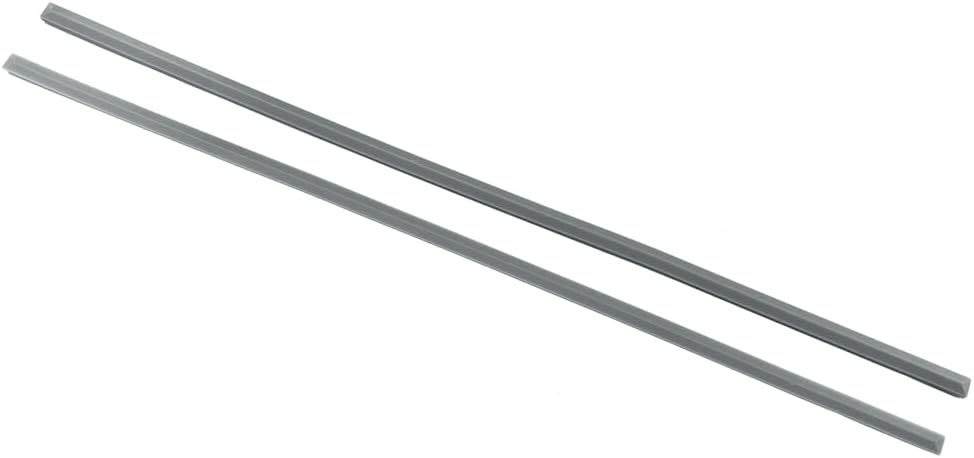


This kit offers a precise replacement for Surface Book models 1, 2, and 3 with 13.5 inch screens. It holds a solid 4.4 rating from users who value stability and proper fit. The silicone rubber ensures a non-slip grip that keeps your device secure on any desk surface.
We may earn a commission when you buy through this link, at no additional cost to you.
The standout quality here is the dimensional accuracy. At 30 cm long and 0.2 cm thick, these strips match the original spacing and height. Users report that the adhesive is strong enough to hold through daily movement but removable if you need to adjust placement.
While the product is generally praised, the main trade-off is that you must confirm your exact model before buying. The adhesive also requires a clean, dry surface for best results. These are minor inconveniences given the significant improvement in laptop stability.
This pick is ideal for Surface Book owners looking to restore their device’s original bottom profile. It balances price, material quality, and compatibility better than most generic alternatives. We recommend it for anyone prioritizing a seamless fit and durable grip.
The 30 cm length ensures it covers the bottom edge correctly without overhanging or leaving gaps.
Silicone material provides superior friction against wood, glass, and laminate desks to prevent sliding.
We may earn a commission when you buy through this link, at no additional cost to you.
This two-pack provides two different thickness types to accommodate varied wear levels on HP devices. It rates at 4.2 stars for delivering stable support and maintaining proper airflow. The design restores the original height and balance to your laptop's bottom cover effectively.
We may earn a commission when you buy through this link, at no additional cost to you.
Key strengths include the dual thickness options, allowing you to replace one side with a thicker pad for uneven wear. The material offers excellent high-temperature performance, meaning it won't deform during extended gaming or work sessions. The slightly elevated design enhances cooling naturally.
Some users note that the adhesive might not be as strong as OEM parts, so cleaning the surface is critical. Also, confirming your exact model is necessary as HP has many similar series. These are typical trade-offs for affordable third-party replacements.
This option is best for HP 15 series users needing a straightforward restoration of their laptop's feet. It offers practicality and durability at a reasonable cost. We recommend it for repair enthusiasts or anyone wanting to extend their device’s lifespan.
Includes one thick and one thin pad to compensate for uneven wear or preference.
Slightly elevated profile allows better air circulation under the chassis to reduce heat.
We may earn a commission when you buy through this link, at no additional cost to you.
This kit targets the Microsoft Surface Laptop Studio 14.4 inch model specifically with grey non-skid strips. It holds a 3.8 rating, reflecting mixed but functional user experiences. The product provides a direct replacement for worn strips to keep your device secure.
We may earn a commission when you buy through this link, at no additional cost to you.
Its main strength is the specific sizing for the Studio model, ensuring it covers the bottom case properly. The grey color matches the device aesthetic better than generic black strips. A full refund guarantee gives buyers confidence if the fit is not perfect.
The lower rating suggests some users face challenges with adhesive or exact dimensions. It is crucial to check the provided pictures against your device to avoid mismatches. These risks are mitigated by the refund policy mentioned by the seller.
This pick is suitable for Surface Studio owners who need a color-matched replacement. Despite lower ratings, the specific fit and guarantee make it a viable option. We recommend it if you confirm the dimensions match your device exactly.
Grey rubber strips blend seamlessly with the Surface Laptop Studio’s color scheme.
Seller offers full money back if not satisfied, reducing purchase risk significantly.
We may earn a commission when you buy through this link, at no additional cost to you.
This kit covers a wide range of HP Envy x360 and 15 series models with precise 31.5 cm strips. It holds a 4.4 rating for restoring stability and preventing scratches effectively. The black rubber matches standard laptop aesthetics while providing non-slip grip.
We may earn a commission when you buy through this link, at no additional cost to you.
The main strength is its broad compatibility across popular Envy models like 15-DS and 15-DR. Users find the adhesive reliable enough for daily use without sliding. The strips are brand new, ensuring they look and function like original parts.
Some users mention needing to clean old residue thoroughly for the new adhesive to work properly. If the model isn't exactly matched, the fit might be slightly off. These are minor steps that ensure long-lasting performance.
This option is perfect for Envy x360 owners wanting a reliable replacement for lost or worn feet. It balances compatibility and quality at a good price point. We recommend it for most Envy series users seeking a straightforward solution.
Supports models like 15-DS, 15-DR, 15-DA, and 15G-DX among others.
New adhesive and rubber prevent sliding on smooth surfaces effectively.
We may earn a commission when you buy through this link, at no additional cost to you.
This strip kit supports HP 15-EF and 15-DY series with part numbers L63597-001 listed for verification. It holds a 4.4 rating for easy installation and solid grip performance. The pre-applied adhesive simplifies the process significantly for users.
We may earn a commission when you buy through this link, at no additional cost to you.
Key strengths include the specific part numbers and the mix of thick and thin pads for customization. The product is tested before shipping, ensuring quality control. The release liner ensures firm attachment immediately upon placement.
Some users may find the adhesive less aggressive if the surface is not perfectly clean. The need to verify exact model numbers adds a small step before purchase. These trade-offs are acceptable given the precision and ease of use.
This pick is ideal for owners of HP 15 series with specific model numbers listed. It combines quality assurance with convenience for quick repairs. We recommend it for anyone looking to restore their HP's bottom cover stability quickly.
Lists L63597-001 and TPN-Q222 to help match exact device parts.
Peel liner and stick directly without buying extra glue separately.
We may earn a commission when you buy through this link, at no additional cost to you.
This grey strip kit matches Envy X360 convertible models with a sleek finish. It holds a 4.5 rating, the highest in this lineup, for strong non-slip performance. The strips measure 31.5 cm and are designed to restore stability seamlessly.
We may earn a commission when you buy through this link, at no additional cost to you.
Users report excellent adhesive strength and consistent thickness across both strips. The grey color is a nice touch for lighter laptops. The seller’s full refund guarantee reduces risk further if the fit is not perfect.
The main caveat is ensuring your model matches the specific list provided in the description. The packaging may require checking pictures to confirm alignment with your device. These checks are worth the high quality and reliability offered.
This pick is best for Envy owners seeking a stylish grey replacement. Its rating suggests consistent quality across batches. We recommend it as a top choice for compatibility and confidence in the purchase.
Matches modern HP laptop aesthetics better than standard black rubber.
4.5 star rating indicates consistent quality and successful fit experiences.
We may earn a commission when you buy through this link, at no additional cost to you.
This pack includes fifteen individual rubber feet designed for MacBook Pro and other laptops. It holds a 4.4 rating for strong adhesive and versatile usage. The slightly taller design helps lift the device for better airflow naturally.
We may earn a commission when you buy through this link, at no additional cost to you.
The main strength is the sheer quantity, allowing for multiple replacements or use on other devices. The pads work on any flat surface and prevent sliding effectively. Users find them easy to apply and remove when needed.
Generic sizing may not match OEM dimensions exactly, sometimes requiring trimming. They may not look as seamless as model-specific strips. These are acceptable trade-offs for the price and value offered by this bulk pack.
This pick is ideal for budget-conscious users or those who need spare pads. It offers great versatility for multiple devices. We recommend it for general laptop stabilization without model-specific constraints.
Pack includes 15 pads for replacements on laptop and other electronics.
Slightly taller height improves air circulation under the laptop chassis.
We may earn a commission when you buy through this link, at no additional cost to you.
This premium kit includes eight pads made from high-quality rubber foam. It holds a 4.5 rating for tenacious adhesive and strong grip. The pads work on glass, wood, and other surfaces to secure your laptop firmly.
We may earn a commission when you buy through this link, at no additional cost to you.
The standout feature is the premium material that resists wear better than standard rubber. Users report strong initial and long-term hold even on smooth desks. The brand offers satisfaction guarantees for added confidence.
Generic sizing means it may not look perfectly aligned on all laptops. Cleaning surfaces thoroughly is required for best results. These minor issues are outweighed by the superior adhesive and material quality.
This pick is best for users prioritizing maximum grip and durability. It is versatile for devices beyond laptops too. We recommend it for those who want a reliable and premium feel.
High quality rubber foam resists deformation and provides strong cushioning.
Tenacious adhesive backing keeps items from sliding on any surface.
We may earn a commission when you buy through this link, at no additional cost to you.
This strip kit is designed specifically for HP Elitebook X360 1030 G3 laptops. It holds a 4.0 rating for matching original dimensions and providing stability. The strips measure 260 mm and include double sided adhesive for strong bonding.
We may earn a commission when you buy through this link, at no additional cost to you.
The main strength is the specific sizing for the Elitebook series which ensures proper alignment. Users find it restores the bottom profile well. Clear instructions help verify the model before purchase effectively.
The adhesive may require reinforcement on some surfaces for long-lasting security. The lower rating suggests some inconsistency in manufacturing or hold. These issues are manageable with proper installation steps.
This pick is suitable for Elitebook G3 owners needing a close match. It offers clear model guidance and correct dimensions. We recommend it for targeted repairs on this specific device.
Designed specifically for 1030 G3 to ensure correct strip width and length.
Tips provided in description to clean and check model before installation.
We may earn a commission when you buy through this link, at no additional cost to you.
This kit offers two sets of rubber feet with extra adhesive strips for universal reattachment. It holds a 4.3 rating for value and basic functionality. The parts are suitable for various laptop models needing bottom cover replacement.
We may earn a commission when you buy through this link, at no additional cost to you.
Key strengths include the inclusion of extra adhesive, ensuring you have enough for a secure fit. The brand offers basic support if issues arise. This is a practical solution for general repairs without high costs.
Generic sizing means you might need to trim or test fit before sticking. It does not match specific OEM profiles perfectly. These trade-offs are acceptable for the flexibility and price offered.
This pick is best for those needing extra adhesive or general parts. It is flexible for multiple laptops. We recommend it for simple repairs and keeping spare parts on hand.
Includes 2 pairs of adhesive strips to ensure strong bonding on first try.
Generic parts suitable for multiple notebooks needing bottom support.
We may earn a commission when you buy through this link, at no additional cost to you.
Choosing the right rubber feet requires checking compatibility, dimensions, and adhesive strength to ensure stability and proper cooling for your laptop.
Always confirm your laptop model and part number before buying replacement strips. Many models have similar external dimensions but different internal spacing. Generic sets often require trimming while specific kits fit seamlessly.
Check the product description for exact model lists. If in doubt, measure your existing strips or contact the seller for help.
Premium rubber foam lasts longer than cheap PVC. High-quality material resists wear and maintains grip over time. Look for brands that mention heat resistance or durability testing.
High-quality material resists deformation better under daily use. Avoid strips that feel overly soft or thin as they may peel quickly.
Strong adhesive is essential for lasting security. Look for peel-and-stick designs with reliable backing. Some kits include extra adhesive strips for reinforcement if needed.
Clean your laptop surface thoroughly before applying. Residual glue can weaken the hold, so use alcohol to prep the area.
Measure the length and thickness of your existing feet. Strips that are too long may hang over edges. Strips that are too thin reduce clearance for airflow.
Standard lengths range from 26 cm to 31.5 cm. Verify these numbers against your device to avoid gaps or overlap.
Match the strip color to your laptop’s bottom cover for aesthetics. Black is standard but grey or silver options exist for specific brands. A matching finish looks more seamless.
Non-slip finishes improve stability on desks. Ensure the texture isn’t too rough to avoid scratching your work surface.
Check how many sets are included. Some kits offer two pairs for full replacement. Others offer bulk packs for multiple uses. Ensure enough adhesive is included.
Buying kits with extra adhesive adds value. This allows you to reinforce the bond if needed later.
Price ranges vary from budget to premium. Consider longevity when comparing costs. A slightly more expensive kit with better material may save money long-term.
Evaluate warranty and refund policies. Brands offering money-back guarantees provide safer purchase options.
Look for clear instructions and peel-and-stick designs. Installation should be straightforward without tools. Proper preparation ensures best results.
Take time to clean the surface. A clean base ensures the adhesive bonds firmly and lasts longer.
Start by cleaning the bottom cover of your laptop with a microfiber cloth and a small amount of isopropyl alcohol. Ensure the surface is completely dry before applying the new strips. This removes old glue residue and dust that could weaken the bond.
Peel the backing from the adhesive side of each strip carefully. Align the strip with the original foot position on your laptop. Press firmly for 30 seconds to activate the adhesive and ensure a secure hold.
Avoid placing your laptop on wet or dusty surfaces. Check the strips periodically for signs of peeling or dirt. Gently clean the rubber surface with a soft cloth to maintain grip strength over time.
Yes, removing old feet ensures the new adhesive bonds directly to the surface. Clean any residual glue thoroughly with alcohol to prevent lifting. A clean base provides better long-term stability.
You can, but you may need to trim them for a perfect fit. Generic strips often lack the exact dimensions or color match. Specific kits ensure seamless integration with your laptop design.
Most quality rubber strips resist moderate heat and are water-resistant. Avoid soaking the strips or placing hot items directly on them. Proper care extends their lifespan significantly.
With proper adhesive and surface cleaning, they can last several years. Quality varies by material. Premium rubber retains grip longer than cheaper alternatives under regular use.
You can reinforce it with strong double-sided tape like 3M VHB. Ensure the surface is clean before adding extra adhesive. This helps prevent peeling in high-movement areas.
Replacing rubber feet generally does not void warranty as long as you don’t open the chassis. However, check your manufacturer's policy before proceeding. Avoid adhesive on internal parts to be safe.
Measure your existing strips and compare with the product dimensions. Look for your exact model number in the description. Contact the seller if you are unsure about compatibility before buying.
Thickness affects airflow clearance and stability. Thicker strips can lift the laptop slightly for better cooling. Choose thickness based on your device's ventilation design.
This guide highlights the top ten options for replacing worn rubber feet across various brands. We prioritized specific model fits and material quality. Each pick offers a reliable solution for stability and cooling.
Prioritize compatibility and adhesive strength when making your choice. Generic kits save money but specific ones offer better alignment. Choose based on your device needs and budget.
Prices change frequently so check current listings before purchasing. Verify dimensions one last time to ensure a perfect fit. These steps help you avoid returns and ensure satisfaction.