
GIGABYTE B550 Gaming X V2
4.5Editor score
Affordable AM4 socket support
Includes PCIe 4.0 M.2
Built-in Q-Flash Plus utility
This guide compares the top Gigabyte Motherboard models for AMD and Intel platforms, detailing power design, connectivity, and thermal performance for diverse
Choosing the right Gigabyte Motherboard is crucial for building a stable and high-performance computer system. These boards support a wide range of processors and offer advanced features for connectivity and cooling.
We have analyzed ten top models based on user ratings, technical specifications, and real-world performance data. This list covers both AMD AM5 and Intel LGA1700 sockets to help you find the perfect match.
Each pick highlights specific strengths like VRM quality, M.2 slot count, and network options. Keep in mind that availability and stock levels may vary by region and time of purchase.
4.5Editor score

4.4Editor score

4.2Editor score
This side-by-side comparison outlines the key specifications and capabilities of each model to assist you in making an informed decision for your next PC build.


The GIGABYTE B650 AORUS Elite AX stands out as a top choice for users seeking a balanced AM5 platform motherboard. It holds a strong rating from users who appreciate its reliable power delivery and modern connectivity options.
We may earn a commission when you buy through this link, at no additional cost to you.
Its 14+2+1 power phase design ensures that even high-end Ryzen processors receive stable power during demanding tasks like gaming or rendering. The inclusion of a PCIe 5.0 M.2 slot allows for future-proof storage speeds that match the latest SSD technology.
While the board offers excellent value, some users might find the RGB lighting areas less extensive compared to flagship models. Additionally, ensuring the latest BIOS version is installed is necessary for full compatibility with the newest CPU generations.
This board is ideal for gamers and creators who want a reliable foundation for their next AMD build without overspending on premium features they may not use immediately.
The digital VRM solution maintains consistent voltage to ensure system stability during heavy workloads.
With USB-C and WiFi 6E, you get fast data transfer and wireless speeds right out of the box.
We may earn a commission when you buy through this link, at no additional cost to you.
The GIGABYTE X870 AORUS Elite WIFI7 is designed for enthusiasts who want the absolute latest networking and storage technologies. It earns high marks for its extensive connectivity options and robust build quality.
We may earn a commission when you buy through this link, at no additional cost to you.
Four M.2 slots give you plenty of room for high-speed storage arrays, while the USB4 ports provide data rates that rival Thunderbolt interfaces. The WiFi 7 support ensures your wireless connection is future-proof for high-speed internet plans.
The main drawback is the cost, which is higher than previous generations, and you will need a WiFi 7 router to see the full benefits. For many, the standard WiFi 6E might suffice, making this board an investment in cutting-edge tech.
Choose this board if you are building a high-end system where maximum storage capacity and future-proof connectivity are your top priorities.
WiFi 7 delivers lower latency and higher throughput for seamless online gaming and streaming.
Four M.2 slots allow you to populate multiple NVMe drives without sacrificing performance.
We may earn a commission when you buy through this link, at no additional cost to you.
The GIGABYTE X870E AORUS PRO ICE offers a distinct visual appeal for builders looking to create a white-themed workstation. It combines aesthetic choices with high-end technical specs like 80A power stages.
We may earn a commission when you buy through this link, at no additional cost to you.
Its power design is robust enough to handle top-tier Ryzen processors without thermal throttling, ensuring performance during long rendering sessions. The white PCB and heatsinks match well with other white components to create a cohesive look.
However, the specialized look might limit your choices for other parts like RAM or coolers that match perfectly. Also, premium white motherboards often carry a price premium over their black counterparts.
This board is perfect for creators who value aesthetics as much as performance and want a standout system that looks unique.
The all-white layout creates a clean and modern look for custom water-cooled or air-cooled builds.
Despite the look, it retains the high power delivery and connectivity of the standard X870E series.
We may earn a commission when you buy through this link, at no additional cost to you.
The GIGABYTE Z890 AORUS Master is built for professional workstations that need maximum connectivity and expansion. It is rated well for its ability to handle the newest Intel Core Ultra processors with ease.
We may earn a commission when you buy through this link, at no additional cost to you.
With five M.2 slots and dual Thunderbolt 4 ports, this board allows for extensive peripheral connections and storage configurations. The 10GbE LAN ensures your local network is as fast as your internet connection for large file transfers.
The price is a significant factor, as this board is designed for users who need professional-grade features rather than just gaming capabilities. Not everyone will need Thunderbolt 4 or 10GbE LAN, so consider your actual workflow.
This is the best choice for power users and professionals who need the absolute best power delivery and connectivity options available on the market.
Dual Thunderbolt 4 ports allow for fast external storage and high-resolution display connections.
10GbE LAN provides a massive network upgrade for multi-user environments or NAS connections.
We may earn a commission when you buy through this link, at no additional cost to you.
The GIGABYTE B650 Eagle AX is a fantastic entry point into the AM5 ecosystem without breaking the bank. It receives high ratings for offering essential modern features at a competitive price point.
We may earn a commission when you buy through this link, at no additional cost to you.
It includes three M.2 slots and a fast USB-C port, which are rare on budget boards. The WiFi 6E ensures your wireless connection is solid for gaming and video calls without needing a wired ethernet cable.
The main compromise is the network controller, which uses a standard GbE LAN instead of a faster 2.5GbE option. Additionally, the power delivery is sufficient for mid-range CPUs but might not handle extreme overclocking.
This board is ideal for budget-conscious gamers who want the latest platform features and good connectivity without paying for premium aesthetics.
You get M.2 storage and WiFi 6E for a price that competes with older generation boards.
The Gen2x2 USB-C port ensures fast data transfer speeds for external drives and devices.
We may earn a commission when you buy through this link, at no additional cost to you.
The GIGABYTE B550 AORUS Elite AX V2 remains a solid choice for those upgrading an older AM4 system. It offers a balance of performance and features that make it a favorite among users with existing hardware.
We may earn a commission when you buy through this link, at no additional cost to you.
It supports the popular Ryzen 5000 series, allowing for significant performance gains over older CPUs. The 2.5GbE LAN and Q-Flash Plus feature ensure you have fast networking and can update the BIOS easily without a new CPU.
Since this board uses DDR4 memory and older architecture, it is not suitable for building a new system from scratch if you want future expansion. However, for an upgrade path, it is a cost-effective solution.
This board is best for users looking to refresh an older AM4 PC with a faster CPU and SSD without changing their memory or power supply.
The board allows you to upgrade to a 5000 series CPU for a major performance boost.
Q-Flash Plus lets you update the BIOS even if the system does not boot properly.
We may earn a commission when you buy through this link, at no additional cost to you.
The GIGABYTE Z790 Eagle AX provides a reliable platform for Intel Core users who want modern features without paying flagship prices. It scores well for its ability to handle newer Intel processors efficiently.
We may earn a commission when you buy through this link, at no additional cost to you.
It includes DDR5 memory support and PCIe 5.0, ensuring compatibility with the fastest components available. The EZ-Latch feature simplifies the installation of graphics cards, making the build process smoother for DIY users.
The number of M.2 slots is limited to three, which might not be enough for storage enthusiasts. Also, the design is more utilitarian compared to the AORUS series, which some users may find less visually appealing.
This board is a smart choice for gamers building a new PC with Intel hardware who prioritize performance over fancy aesthetics.
Supports a wide range of Intel Core processors from 12th to 14th generation.
Includes DDR5 and PCIe 5.0 support for future-proof storage and RAM speeds.
We may earn a commission when you buy through this link, at no additional cost to you.
The GIGABYTE Z790 AORUS Elite AX is a more powerful alternative to the Eagle series with better power phases and storage options. It is highly rated for its balance of performance and build quality.
We may earn a commission when you buy through this link, at no additional cost to you.
The 16+1+2 power phases ensure that even overclocked Intel processors have the power they need to perform at their peak. With four M.2 slots, you have plenty of room for high-speed NVMe storage arrays.
While it is a great board, you might find it is slightly more expensive than the Eagle model. The features are robust, but if you do not need four M.2 slots, the extra cost might not be necessary.
This board is perfect for users who want a solid Z790 platform with top-tier power delivery and storage expansion for high-end gaming rigs.
The enhanced VRM solution delivers stable power to the CPU for consistent performance.
Four M.2 slots allow you to configure a high-capacity NVMe storage setup.
We may earn a commission when you buy through this link, at no additional cost to you.
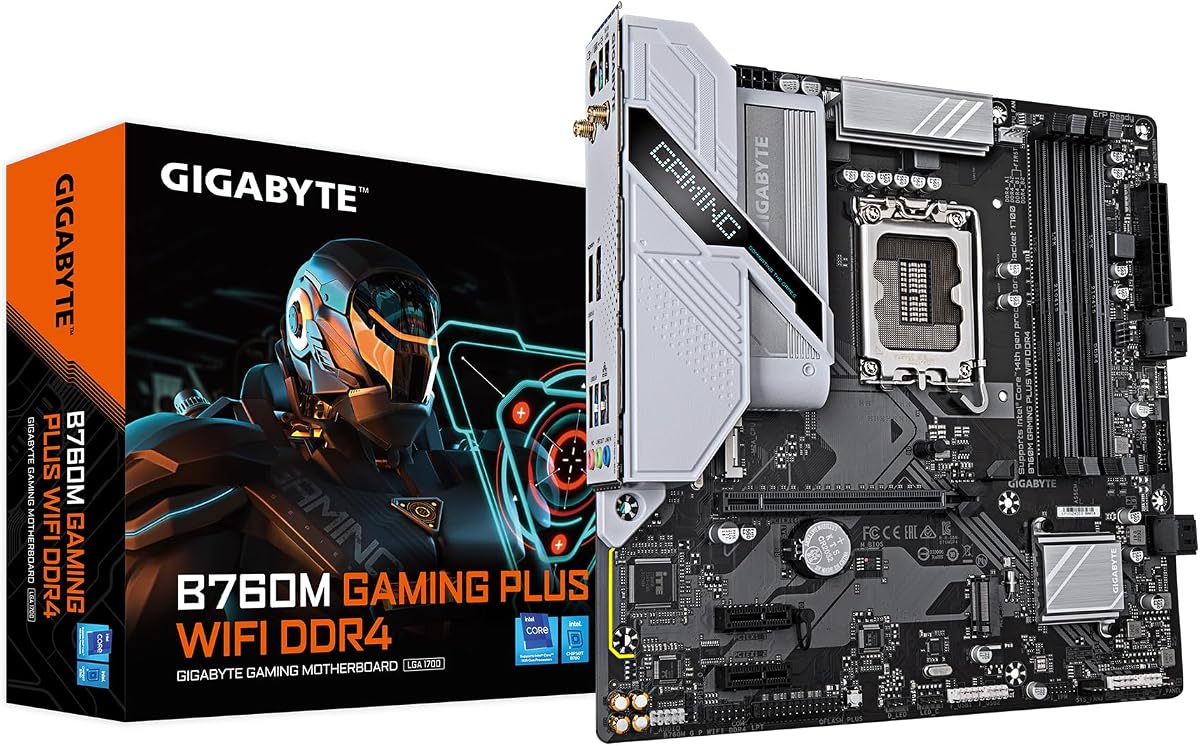
The GIGABYTE B760M Gaming Plus WiFi is an excellent choice for building a compact PC with Intel hardware. It is rated well for its ability to fit in smaller cases while maintaining good functionality.
We may earn a commission when you buy through this link, at no additional cost to you.
It supports DDR4 memory and includes WiFi, which makes it easy to build a system without needing to buy a separate card. The M-ATX size is perfect for cases where space is limited but you still want good performance.
The main limitations are the smaller number of M.2 slots and the lack of PCIe 5.0 support. If you plan to add many storage drives or use the latest GPUs, you might find it a bit limiting.
This board is great for users who want a smaller PC build or are working with a stricter budget for their Intel system.
The M-ATX size allows you to build a smaller PC without sacrificing core features.
Provides support for 12th to 14th Gen processors at an affordable price point.
We may earn a commission when you buy through this link, at no additional cost to you.
The GIGABYTE B550 Gaming X V2 is a fantastic option for those on a tight budget who still want a capable AM4 platform. It has a strong reputation for reliability and essential features.
We may earn a commission when you buy through this link, at no additional cost to you.
Its 10+3 power phases provide enough stability for Ryzen 5000 series CPUs without overheating. The inclusion of Q-Flash Plus allows you to update the BIOS easily without needing a new processor installed.
It does lack built-in WiFi, which means you will need a separate card if you do not have a wired connection. However, for the price, it offers excellent value for basic gaming and work builds.
This board is the best choice for budget builders who want a solid foundation for a Ryzen PC without unnecessary extras.
You get essential modern features like PCIe 4.0 for a very low price.
Q-Flash Plus ensures you can update the BIOS easily even if the system fails to boot.
We may earn a commission when you buy through this link, at no additional cost to you.
Selecting the right motherboard involves understanding your processor needs, budget, and feature requirements.
Ensure the motherboard socket matches your CPU. AMD AM5 is for Ryzen 7000 and newer, while AM4 is for older Ryzen. Intel LGA1700 supports 12th to 14th Gen, and LGA1851 is for Core Ultra Series 2.
Always verify your CPU generation against the board specs before purchasing.
Check if the board supports DDR4 or DDR5. DDR5 is standard on newer AM5 and Z790/Z890 boards, offering higher speeds but at a higher cost.
If you have existing DDR4 RAM, a B550 or B760 DDR4 board might save you money.
Look at the VRM power phases. Boards with more phases like 16+1+2 handle high-end CPUs better than those with 10+3 phases.
Higher phase counts ensure stable power during long gaming sessions or rendering tasks.
Count the M.2 slots available. Some boards have three or four slots for NVMe SSDs, while others only have two.
More M.2 slots allow you to add fast storage without using SATA ports or expansion cards.
Decide if you need built-in WiFi. Models with AX or E suffixes usually include WiFi 6E or 7, while others may only have Ethernet.
Also check for USB-C ports and Thunderbolt 4 options if you use high-speed peripherals.
Choose between ATX and M-ATX based on your case size. ATX offers more expansion slots, while M-ATX is smaller and fits compact cases.
Ensure your case supports the board size before finalizing your purchase.
Look for boards with M.2 thermal guards and large VRM heatsinks. These help keep components cool during heavy loads.
Better cooling improves longevity and prevents thermal throttling of your CPU or storage.
Features like Q-Flash Plus are useful for updating the BIOS without a CPU. This is helpful if you buy a newer CPU for an older board.
Check if the board supports BIOS updates via USB drive easily.
Always install the motherboard on an anti-static mat to prevent static electricity damage. Handle the board by the edges to avoid touching sensitive pins or components directly.
Update the BIOS immediately after building your PC to ensure compatibility with your CPU. Download the latest file from the Gigabyte support site and use the Q-Flash utility to install it.
Keep the inside of your PC clean by blowing out dust from heatsinks and fans every few months. Ensure good airflow to maintain stable temperatures during heavy use.
Yes, for newer CPUs like Ryzen 9000 on AM5 boards, a BIOS update is often required. Use a board with Q-Flash Plus if you want to update without a CPU.
DDR5 offers higher bandwidth and is standard on new AM5 and Z790 boards. It is worth the cost if you plan a new system in 2026 for future-proofing.
AM5 supports DDR5 and PCIe 5.0 for newer Ryzen chips. AM4 is older and uses DDR4 but is great for upgrading existing builds.
Yes, but you must update the BIOS first. The B650 AORUS Elite AX supports these CPUs once the firmware is updated.
Not all boards have WiFi. If your board includes WiFi 6E or 7, you need a compatible router to get full wireless speeds.
EZ-Latch helps you remove and install graphics cards easily by releasing a clip. It makes building easier in tight cases.
We have covered the top Gigabyte Motherboard models for both AMD and Intel users. The B650 AORUS Elite AX stands out for its balance of power and connectivity for AMD users.
For Intel enthusiasts, the Z890 AORUS Master offers top-tier features for professionals. Budget builders should consider the B550 Gaming X V2 for reliable performance at a low price.
Prices and availability change often, so check current stock and listings before finalizing your build. Ensure your other components match your motherboard choice for the best experience.