
SSK Portable SSD 1TB External Solid State Hard Drive USB C
4.5Editor score
1050MB/s read speeds
Lightweight aluminum case
SLC caching for speed
We compare the best external SSD for Linux to find top drives with fast speeds and Linux compatibility for reliable data storage and secure file transfers.
Linux users need reliable external storage that works seamlessly with open source systems and handles large files efficiently without extra configuration steps or drivers.
We evaluated ten top external SSDs based on speed compatibility durability and Linux support to help you choose the right drive for your workflow and needs.
Each pick highlights key strengths and trade-offs so you can match a drive to your budget and usage while keeping in mind that prices change often online.
4.5Editor score

4.7Editor score

4.6Editor score
This side by side comparison lists all ten drives with their key specs and features so you can quickly see differences in speed capacity and durability across models.





The Samsung T7 Portable SSD in 1TB Titan Gray stands out as a top choice for Linux users seeking fast reliable storage. It holds a 4.7 rating from thousands of buyers and delivers consistent performance for daily tasks and large file transfers.
We may earn a commission when you buy through this link, at no additional cost to you.
Its PCIe NVMe technology enables read speeds up to 1050MB/s and write speeds up to 1000MB/s which helps Linux users move big data sets quickly. The solid aluminum unibody construction provides durability against drops up to six feet while maintaining a compact form factor that fits easily in a backpack or pocket.
While the drive does not advertise water resistance its shock protection is robust for general use. The main trade off is the lack of IP rating for water or dust which may matter for outdoor or rugged field work. Still this is acceptable for most desktop or laptop workflows.
Linux users who value speed durability and broad compatibility will find this drive ideal. Its seamless plug and play operation without extra drivers makes it a reliable choice for backups or project storage.
The T7 uses PCIe NVMe technology to deliver read speeds up to 1050MB/s and write speeds up to 1000MB/s which helps Linux users move large data sets quickly during editing or development tasks.
Its solid aluminum unibody construction resists drops up to six feet while maintaining a compact form factor that fits easily in a backpack or pocket for portable workflows.
We may earn a commission when you buy through this link, at no additional cost to you.
The SSK Portable SSD 1TB delivers impressive value for Linux users seeking budget friendly high speed storage. It carries a 4.5 rating and offers read speeds up to 1050MB/s with SLC caching to keep performance steady during large file transfers.
We may earn a commission when you buy through this link, at no additional cost to you.
Its SLC caching allocates 25 percent of available capacity as high-speed cache which helps maintain consistent transfer rates. The lightweight aluminum alloy case ensures efficient heat dissipation while keeping the drive at just 36.6 grams. This portability makes it ideal for carrying between workstations or laptops.
Linux users may note that Windows often shows this 1TB drive as around 931GB due to binary calculation differences though this does not affect actual physical storage. The main limitation is less brand recognition compared to established names which could mean slightly fewer software tools.
For budget conscious Linux users who need fast reliable storage without breaking the bank this drive is a smart choice. The included cables ensure easy setup across systems with USB-C or older USB-A ports.
With SLC caching allocating 25 percent of current available capacity as high-speed cache this external SSD delivers steady 10Gbps for transfers within the cache capacity.
The 2mm thick aluminum alloy case brings superior heat dissipation and premium touch while weighing just 36.6 grams for exceptional portability.
We may earn a commission when you buy through this link, at no additional cost to you.
The Samsung T9 Portable SSD 1TB is the fastest option for Linux users who need top tier performance for video editing or large data sets. It holds a 4.6 rating and delivers sustained read and write speeds up to 2000MB/s via USB 3.2 Gen 2×2.
We may earn a commission when you buy through this link, at no additional cost to you.
Its Dynamic Thermal Guard technology controls heat during heavy use to keep the SSD at ideal temperatures. The Magician Software provides firmware updates encryption and drive health monitoring. This ensures long term reliability and optimal performance for demanding Linux workflows.
The main trade off is the need for a USB 3.2 Gen 2×2 port to reach max speeds. Older ports will limit performance. This higher cost may not fit all budgets but it is acceptable for professionals needing maximum throughput and advanced software features.
Linux professionals who work with 4K video or large datasets will benefit most from this drive. The sustained high speeds and thermal control make it ideal for long editing sessions without slowdowns.
The T9 is the fastest SSD for creators with sustained read and write speeds of up to 2000MB/s allowing you to load edit and transfer projects quickly.
Its Dynamic Thermal Guard withstands and controls heat to keep the SSD at ideal temperatures even in heavy use during long project sessions.
We may earn a commission when you buy through this link, at no additional cost to you.
The Sandisk 2TB Extreme Portable SSD offers high capacity and rugged protection for Linux users working in diverse environments. It carries a 4.6 rating and features IP65 water and dust resistance along with up to 3-meter drop protection for reliable field use.
We may earn a commission when you buy through this link, at no additional cost to you.
It supports read and write speeds up to 1050MB/s and 1000MB/s for quick transfers. The included password protection with 256-bit AES hardware encryption keeps private content secure. A handy carabiner loop allows you to secure the drive to a belt loop or backpack.
The main drawback is that the improved drop and resistance ratings required updated firmware which users may need to check. It is also slightly heavier than ultra-thin SSDs which could affect pocket portability. Still the durability features make this acceptable for rugged use.
Linux users needing large secure storage in tough conditions will find this drive well suited. Its IP rating and hardware encryption offer peace of mind for sensitive data and outdoor work.
This tough drive can take a beating with IP65 water and dust resistance and up to 3-meter drop protection making it suitable for field use.
Use the included password protection featuring 256-bit AES hardware encryption to help keep private content private during transfers or storage.
We may earn a commission when you buy through this link, at no additional cost to you.
The Lexar ES3 1TB Portable SSD Silver is a slim lightweight option for Linux users valuing portability. It holds a 4.4 rating and delivers read speeds up to 1050MB/s with a thin 10.5mm design that fits in your pocket easily.
We may earn a commission when you buy through this link, at no additional cost to you.
Its DataShield software provides 256-bit AES encryption to protect files. The drive weighs 42 grams and comes with a Type-C cable for plug-and-play convenience across devices. This makes it ideal for carrying between workstations or travel.
The main trade-off is that this version does not include Magsafe and lacks a specified shock resistance rating. Users should handle it with care compared to rugged models. This limitation is acceptable for indoor office use where weight and size matter most.
Linux users seeking a thin reliable drive for everyday transfers will appreciate its form factor. The included encryption helps keep personal data safe on shared devices or networks.
Lexar external solid state drive ES3's thin stylish and durable design weighs 42g and is only 10.5mm thick making it smaller than a card.
Lexar SSD ES3 includes Lexar DataShieldTM 256-bit AES encryption software to protect files during transfers and storage.
We may earn a commission when you buy through this link, at no additional cost to you.
The Samsung T7 Shield Portable SSD 2TB provides rugged durability and high capacity for Linux users working in harsh environments. It holds a 4.7 rating and features IP65 water and dust resistance with drop protection up to 9.8 feet.
We may earn a commission when you buy through this link, at no additional cost to you.
It delivers read speeds up to 1050MB/s and write speeds up to 1000MB/s for fast transfers. The Magician Software allows monitoring drive health and optimization. Its rugged design adds extra durability for adventurous or outdoor use.
The main trade-off is the added weight and cost compared to lighter drives. The 2TB capacity may be more than needed for some users. Still the IP rating and drop protection make this acceptable for field work or construction sites.
Linux users needing secure reliable storage in tough conditions will find this drive ideal. The combination of capacity speed and ruggedness makes it a dependable companion for outdoor projects.
With an IP65 rating for water and dust resistance this SSD is ready to rough it so you can keep your projects in perfect condition.
Its rugged design adds extra durability with protection from falls up to 9.8 feet so you can dare to reach higher.
We may earn a commission when you buy through this link, at no additional cost to you.
The Western Digital 1TB My Passport SSD offers strong security and reliable performance for Linux users valuing data protection. It holds a 4.5 rating and delivers speeds up to 1050MB/s with password enabled 256-bit AES hardware encryption.
We may earn a commission when you buy through this link, at no additional cost to you.
Its drop resistance up to 6.5 feet ensures durability against accidental falls. The USB 3.2 Gen 2 and USB-C connectivity supports both newer and older systems easily. This cross compatibility helps in mixed device environments.
The main trade-off is the lack of water resistance rating which may matter for outdoor use. Limited color options could also be a minor concern for some buyers. Still the security features and speed make this acceptable for office or personal use.
Linux users who prioritize data security and fast access will find this drive well suited. Its sturdy design ensures peace of mind for sensitive files on the go.
Password enabled 256-bit AES hardware encryption keeps your files secure during transfers and storage.
Cross Compatible USB 3.2 Gen 2 and USB-C with USB-A for older systems allows easy use across devices.
We may earn a commission when you buy through this link, at no additional cost to you.
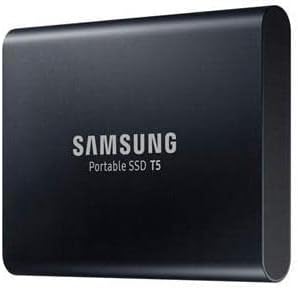
The SAMSUNG T5 Portable SSD 2TB offers reliable high capacity storage for Linux users who need space over maximum speed. It holds a 4.8 rating and delivers read speeds up to 540MB/s with a durable metal design.
We may earn a commission when you buy through this link, at no additional cost to you.
Its top to bottom metal design resists shocks and fits in the palm of your hand. Optional password protection with AES 256-bit hardware encryption keeps personal and private data more secure. Included cables support both USB-C and USB-A connections.
The main trade-off is the slower speed compared to newer USB 3.2 drives. USB 3.1 may limit throughput on modern systems. Still the high capacity and proven reliability make this acceptable for backups or large file archives.
Linux users seeking proven storage with a large capacity will find this drive suitable. Its metal design ensures durability for everyday use and safe data protection.
Top to bottom metal design that fits in the palm of your hand resists shocks and is built to last.
Optional password protection and AES 256-bit hardware encryption keeps your personal and private data more secure.
We may earn a commission when you buy through this link, at no additional cost to you.
The Samsung T7 500GB Red Portable SSD is a fast compact option for Linux students or professionals needing portable storage. It holds a 4.7 rating and delivers read speeds up to 1050MB/s with Dynamic Thermal Guard to protect from overheating.
We may earn a commission when you buy through this link, at no additional cost to you.
Its shock resistance withstands drops from 6 feet ensuring durability. The password security feature protects sensitive data during transfers. This makes it ideal for carrying large project files between workstations or classes.
The main trade-off is the 500GB capacity which may fill up quickly for video editors. The red color may not suit all aesthetics. Still the speed and thermal protection make this acceptable for student workflows or daily backups.
Linux students and professionals needing portable high-speed storage will find this drive suitable. Its compact form factor and security features add practical value for on-the-go use.
DYNAMIC THERMAL GUARD (DTG) TECHNOLOGY protects the drive from overheating by automatically slowing down data transfer if necessary to enhance safety and reliability.
Password security helps keep personal files private during transfers and storage on shared or public devices.
We may earn a commission when you buy through this link, at no additional cost to you.
The SAMSUNG T5 Portable SSD 500GB Blue offers reliable budget friendly storage for Linux users with light to moderate needs. It holds a 4.8 rating and delivers read speeds up to 540MB/s with a compact metal design.
We may earn a commission when you buy through this link, at no additional cost to you.
Its top to bottom shock resistant metal design fits in the palm of your hand for portability. Optional password protection with AES 256-bit hardware encryption keeps personal data secure. Included cables support both USB-C and USB-A connections.
The main trade-off is the lower speed and limited capacity compared to newer SSDs. USB 3.1 may limit throughput on modern systems. Still the proven reliability and low price make this acceptable for students or light backups.
Linux users seeking affordable dependable storage for daily tasks will find this drive suitable. Its compact design ensures easy carrying for essential files.
Compact and portable design with top to bottom shock resistant metal fits in the palm of your hand and easily slides in your pocket.
Optional password protection and AES 256-bit hardware encryption keeps your personal and private data more secure.
We may earn a commission when you buy through this link, at no additional cost to you.
Choosing the right external SSD for Linux involves balancing speed compatibility durability and security to match your workflow and environment.
Linux systems support USB-C and USB-A interfaces with USB 3.2 Gen 2 offering faster data transfers up to 1050MB/s or higher. Select a drive with USB 3.2 Gen 2×2 if you need speeds up to 2000MB/s for large video files or complex data projects.
For most users a USB 3.2 Gen 2 drive provides sufficient speed without extra costs. Ensure your computer has matching ports to avoid limiting throughput.
Consider your typical file sizes when selecting capacity. Linux users working with code or documents may need 500GB to 1TB while editors handling 4K footage may require 2TB or more.
Larger capacities cost more but reduce the need for multiple drives. One high capacity SSD simplifies backup management and storage organization.
Look for drives with IP ratings for water and dust resistance if you use your drive outdoors or in variable environments. Shock resistance ratings indicate drop protection which helps prevent damage during travel or daily use.
Rugged drives like those with IP65 ratings are ideal for field work. Indoor users can opt for lighter non-rugged models to save weight and cost.
Hardware encryption with AES 256-bit and password protection safeguards sensitive files during transfers and storage. Some drives include software tools to manage encryption and drive health.
Choose a drive with built-in encryption if you handle confidential data. This prevents unauthorized access if the drive is lost or stolen.
Most modern USB SSDs work with Linux via plug and play without extra drivers. Verify support for ext4 or other Linux file systems if formatting is required.
Select a drive with broad OS compatibility to ensure seamless use across devices. Linux support is common for major brands.
For travelers consider weight and dimensions. Lightweight aluminum cases reduce bulk while offering heat dissipation and durability. Compact drives fit easily in pockets or laptop bags.
Balance size with durability needs. Smaller drives may lack rugged protection so assess your environment before choosing.
Choose established brands with proven track records and strong customer support. Warranties provide security against defects and early failures.
Look for at least a three-year warranty and software tools for firmware updates. This ensures long-term reliability and maintenance.
Balance cost with required features. High speed and rugged drives cost more but may be worth it for professionals. Budget options offer good performance for general use.
Avoid sacrificing essential security or durability for price. Invest in a drive that meets your specific workflow needs.
Connect your external SSD to a Linux system using the included USB-C cable for best performance. Most drives mount automatically allowing immediate access to files. If required use the terminal or file manager to format the drive to ext4 or exFAT.
Maintain good storage practices by ejecting the drive safely before unplugging. Use the file manager eject option or the terminal sync and unmount commands to prevent data corruption. Regular backups to another drive protect against drive failure.
Keep your SSD in a cool dry place away from extreme temperatures. Avoid bending the cables or dropping the drive. Periodically check the manufacturer software for firmware updates to ensure optimal performance and compatibility.
The Samsung T7 Portable SSD works exceptionally well with Linux due to its broad compatibility and fast USB 3.2 speeds. Most modern SSDs mount automatically without extra drivers. Always verify Linux support and format to ext4 if needed.
Many external SSDs come pre-formatted for Windows or Mac. Linux users may need to reformat to ext4 or exFAT for full compatibility. Use the GParted tool or mkfs command in the terminal to format safely.
The Samsung T9 Portable SSD offers the fastest speeds up to 2000MB/s with USB 3.2 Gen 2×2. This is ideal for large file transfers. Ensure your system supports the interface to reach maximum performance.
Yes most external SSDs are plug-and-play on Linux. The system auto-detects the drive and mounts it. Some may require formatting to Linux-compatible file systems. Always use safe eject to prevent data loss.
Many drives with hardware encryption support Linux via standard mounting. Some software tools may not be fully open source. Always check documentation for Linux encryption compatibility before purchasing.
Use smartmontools or the manufacturer's software if supported. Commands like smartctl show drive status. Regular checks help anticipate failures. Keep firmware updated for reliable health monitoring.
The Samsung T7 T9 and SSK drives stand out as top choices for Linux users offering a range of speeds capacities and durability options.
Prioritize speed and compatibility for your specific workflow. Security and ruggedness matter more if you handle sensitive data or work in field conditions.
Prices and availability change frequently so review current offers and warranty details before buying to ensure the best value for your needs.