
Upgraded Watt Power Meter Plug
4.6Editor score
7 display modes for metrics
Overload protection feature
Large backlight LCD display
This guide compares ten top energy consumption monitors for PC to help you track usage, reduce bills, and optimize power efficiency with real-time data
Understanding your computer's energy draw is crucial for efficiency and cost savings. A quality monitor provides real-time insights into watts, voltage, and usage patterns. These tools help you identify power-hungry components and optimize your setup for better performance and lower electricity bills.
We evaluated ten leading energy monitors based on accuracy, ease of use, and advanced features. Our comparison covers plug-in meters, smart plugs, and whole-home systems. Each product offers unique capabilities for tracking PC consumption and managing overall household energy usage effectively.
Every pick highlights key strengths and trade-offs for different needs. Whether you need simple wattage tracking or detailed circuit analysis, there is a solution here. Note that product prices and availability change frequently, so verify current details before purchasing your ideal monitor.
4.6Editor score

4.6Editor score

4.3Editor score
Explore the side-by-side comparison of all ten energy monitors to find the perfect match for your PC tracking needs and budget constraints.


The Emporia Vue 3 stands out as the most comprehensive energy monitor available. It delivers precise real-time data and is UL certified for safety. Users gain visibility into every circuit, including solar inputs. Its app provides clear visualization of power usage trends over time.
We may earn a commission when you buy through this link, at no additional cost to you.
Its safety features and comprehensive sensor set make it ideal for whole-home analysis. The 24/7 monitoring helps prevent costly electrical issues and reduces waste. The ability to track solar generation ensures you maximize your renewable investment effectively.
While setup may require some technical skill, the long-term data accuracy is worth it. The reliance on 2.4GHz WiFi is standard but limits options in some smart home setups. These trade-offs are acceptable given the depth of insights provided.
Choose this if you want detailed, actionable energy data for your entire home or PC rig. It balances accuracy, safety, and usability better than other options. The detailed reporting tools help reduce bills and manage power loads efficiently.
UL listing ensures every component meets rigorous safety standards to prevent fire and electrical hazards.
Integrated solar monitoring tracks generation and consumption, helping you maximize renewable energy savings.
We may earn a commission when you buy through this link, at no additional cost to you.
The Upgraded Watt Power Meter Plug is an affordable entry into energy monitoring. It tracks power usage, voltage, and cost with high clarity. The large backlit screen ensures easy reading even in dim rooms. It stores data between uses for consistent tracking.
We may earn a commission when you buy through this link, at no additional cost to you.
Its simplicity makes it perfect for PC users wanting basic consumption info. The overload protection adds safety against equipment surges. Adjustable settings let you customize how often the backlight stays on.
However, it lacks smart connectivity for remote access or automation. You must read values manually from the plug. This is a minor downside given the low cost and accuracy provided.
Select this for a simple, cost-effective way to monitor a single PC or appliance. It provides essential insights without complexity. The memory function ensures you never lose progress between monitoring sessions.
Switch between seven modes to view watts, kWh, amps, volts, and more with a single button press.
Adjustable overload protection warns you immediately if your device exceeds safe power limits.
We may earn a commission when you buy through this link, at no additional cost to you.
The Meross Smart Home Energy Monitor offers advanced features for privacy-conscious users. It stores data locally without cloud dependency. Integration with Home Assistant allows deep automation of energy usage. You get accurate power and cost tracking across circuits.
We may earn a commission when you buy through this link, at no additional cost to you.
Solar surplus detection lets you divert power to EVs or appliances automatically. The open API empowers custom solutions without vendor lock-in. The detailed charts help visualize spending trends effectively.
Its higher cost and setup complexity may deter casual users. It requires network configuration and technical knowledge. However, the privacy and customization benefits outweigh this for enthusiasts.
Choose this if you want full control over your data and smart home automation. It's ideal for tech-savvy users seeking local monitoring. The privacy features ensure your energy habits stay private.
All energy data remains on your local network, avoiding cloud storage and third-party access.
Detect solar surplus and automatically power high-use appliances to maximize your solar savings.
We may earn a commission when you buy through this link, at no additional cost to you.
The SURAIELEC Outlet Watt Meter delivers exceptional accuracy with Class 1.0 standards. It covers a wide voltage range suitable for diverse international appliances. Its memory holds data for 90 days even without power. The compact design allows outlet access.
We may earn a commission when you buy through this link, at no additional cost to you.
Precision is ideal for monitoring low-power PCs efficiently. Cost calculation features help forecast bills accurately. Fire-resistant materials ensure safety during extended monitoring sessions.
It lacks connectivity for remote data access. Resetting requires physical button presses. These limitations are balanced by its robust build and accuracy.
Pick this for precise manual monitoring without smart features. It's reliable for labs or setups needing exact wattage tracking. The memory function ensures long-term trends are retained.
Class 1.0 accuracy ensures readings are within 1% of actual consumption for reliable data.
Data persists for up to 90 days during power outages so you never lose usage history.
We may earn a commission when you buy through this link, at no additional cost to you.
The SEM-Meter System provides detailed circuit-level insights for multi-room homes. It supports flexible rental billing with per-room cost tracking. The privacy mode allows local MQTT server use without cloud dependence. Sensors cover a wide range of phases and voltages.
We may earn a commission when you buy through this link, at no additional cost to you.
Landlords can allocate costs fairly using time-of-use tariffs. The system tracks PC and appliance usage accurately. Analytics are exportable for deeper analysis.
Installation is technical and may need a professional. Network configuration for local mode requires expertise. These are acceptable for the level of control offered.
Choose this for shared apartments needing fair billing and precise monitoring. The rental allocation tools simplify cost management. Local options ensure data privacy.
Track power usage for each room automatically using customizable templates for transparent billing.
Run locally on your own MQTT server without internet to maintain full data privacy.
We may earn a commission when you buy through this link, at no additional cost to you.
The HBN Watt Meter offers nine display modes covering all essential metrics. Its wide viewing angle makes data visible easily. The backlight conserves energy by turning off after use. It stores non-real-time data to prevent loss during outages.
We may earn a commission when you buy through this link, at no additional cost to you.
Users appreciate the clear interface and accurate cost calculations. The reset function is convenient for starting fresh. It fits well in tight wall outlets.
The backlight auto-off saves power but may be annoying in dark rooms. It offers no smart integration. These are minor issues for a straightforward plug-in solution.
Select this for a versatile plug-in monitor with essential features. It balances price and functionality well. The comprehensive data types support informed decisions.
The 160-degree wide angle display makes reading data easy from any position.
Calculate electricity expenses over time to identify high-consumption appliances quickly.
We may earn a commission when you buy through this link, at no additional cost to you.
The KETOTEK Meter features one-click switching between parameters for quick access. Its alarms alert you to overloads or cost thresholds. The built-in chip ensures precise storage during failures. The display supports multiple angles for convenience.
We may earn a commission when you buy through this link, at no additional cost to you.
Users benefit from immediate warnings when devices exceed limits. The cost tracking helps manage monthly spend. Its durability ensures reliable long-term use.
The alarms can be intrusive if set too low. Resetting may require holding buttons. These are trade-offs for enhanced safety features.
Choose this for safety-focused monitoring with alerts. It protects your PC from surges effectively. The switching interface simplifies daily checks.
Set thresholds for overload, KWh, and cost to receive immediate LED warnings.
Use dedicated buttons to switch between parameters without menu navigation.
We may earn a commission when you buy through this link, at no additional cost to you.
This two-pack offers two units for the price of one. It supports multiple display modes for detailed tracking. The ABS material ensures durability and fire safety. Resetting is simple without tools needed.
We may earn a commission when you buy through this link, at no additional cost to you.
Monitoring multiple PCs simultaneously is easy with this set. The backlight helps visibility at night. Data memory preserves history between uses.
It lacks connectivity and smart automation. Each unit must be configured manually. These are acceptable for a basic multi-device setup.
Pick this for monitoring multiple devices cost-effectively. The pair offers great value for small offices. Its durability ensures consistent performance.
Track two PCs simultaneously to manage power usage across different workstations easily.
High-quality ABS material protects against drops and fire for safety during use.
We may earn a commission when you buy through this link, at no additional cost to you.
The Kill A Watt remains a trusted choice for basic monitoring. It connects to any standard outlet to track consumption. The display shows energy by kWh with ease. It supports inverters for solar setups.
We may earn a commission when you buy through this link, at no additional cost to you.
Users value its straightforward operation without app setup. It assesses device efficiency effectively. The large display is readable in various conditions.
Modern monitors offer more features but this classic suffices for basics. It lacks smart integration. These are acceptable for simple needs.
Select this for reliability and simplicity. It works well for occasional checks. The established brand ensures proven performance.
Plug it in and view consumption without apps or network configurations.
Compatible with inverters for use with solar or backup power systems.
We may earn a commission when you buy through this link, at no additional cost to you.
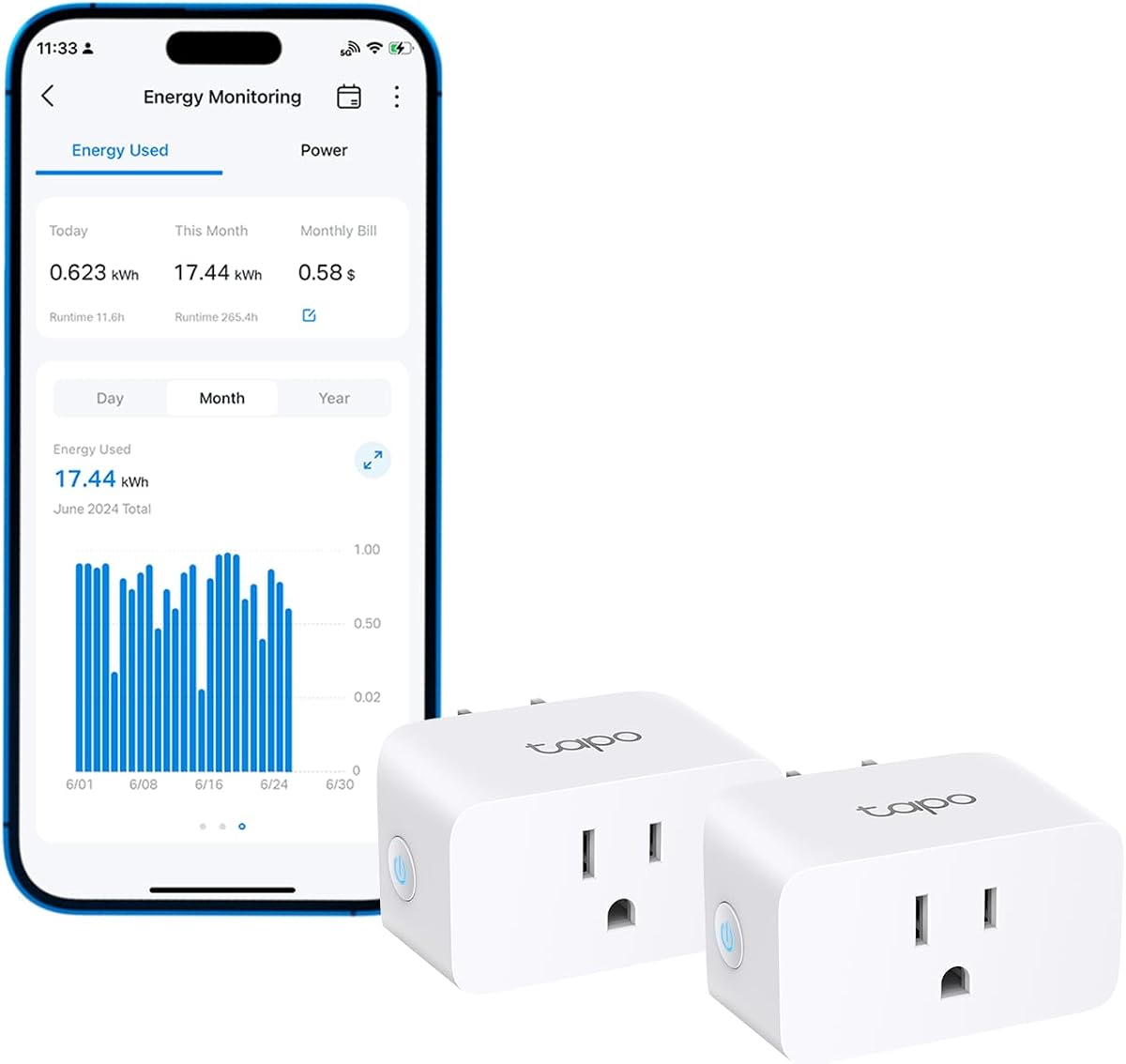
The Tapo Smart Plug provides energy monitoring via a dedicated app. It includes detailed charts for tracking usage. Voice commands allow easy control. Auto-shutoff prevents dangerous overloads.
We may earn a commission when you buy through this link, at no additional cost to you.
Scheduling high-consumption devices during off-peak hours saves costs. The app visualizes bills clearly. It works seamlessly with Alexa and Google.
It requires a network connection and may use cloud features. Advanced automation may need a subscription. These are acceptable for smart home users.
Choose this for a connected solution with automation. It fits modern smart homes. The app insights simplify usage management.
Schedule devices to run during off-peak hours to reduce energy costs automatically.
Use Alexa or Google Assistant to turn devices on or check status hands-free.
We may earn a commission when you buy through this link, at no additional cost to you.
Selecting the right energy monitor involves understanding your specific needs and the capabilities of each device.
Accuracy ensures the data you collect reflects real usage. Look for Class 1.0 or better standards. High accuracy is vital for calculating cost savings.
Prioritize meters with high-resolution readings to avoid discrepancies.
Smart plugs offer remote access and automation via apps. Plug-in meters provide standalone data. Decide if you need real-time alerts or just basic tracking.
Choose WiFi-enabled models for integration with home automation.
A clear display ensures you can read metrics easily. Backlights are useful in low-light rooms. Wide viewing angles help avoid bending over to check stats.
Look for large screens with readable fonts for comfort.
Memory allows the device to retain usage history during outages. Longer retention periods support better trend analysis. Check if the device saves data automatically.
Devices with robust memory help track progress effectively.
Safety is critical when dealing with electricity. Look for UL or ETL certifications. Overload protection features prevent device damage.
Always select certified products to ensure safety.
Prices range from affordable to premium. Balance cost against necessary features. More expensive models often offer better accuracy or smart capabilities.
Set a budget but don't sacrifice essential functionality.
Some monitors require circuit panel access while others are plug-in. Plug-ins are easier for renters. Consider the technical effort needed.
Choose plug-in types if you want quick setup.
Integration with systems like Home Assistant adds value. Smart home users benefit from automation. Check compatibility with voice assistants.
Ensure the monitor supports your existing ecosystem.
Plug the monitor between your PC and wall outlet securely. Ensure all connections are tight for accurate readings.
Check the display regularly to monitor real-time power usage. Reset the device before starting a new monitoring period.
Keep the unit clean and dust-free to prevent overheating. Store it properly when not in use.
A standard PC typically uses between 100 and 500 watts depending on usage. Gaming rigs consume more during peak load. Monitoring helps you keep usage within expected ranges.
Yes, most monitors work with gaming PCs but check the maximum wattage. High-end systems may exceed plug-in limits. Whole-home systems handle higher loads.
Check daily during initial setup to understand patterns. Monthly checks help track long-term savings. Consistent monitoring reveals spikes or inefficiencies.
Yes, they track power during idle states. This is crucial as idle draw adds up over time. Reducing idle consumption saves money.
Yes, UL certified devices are safe for long-term use. They include safety mechanisms to prevent hazards. Ensure ventilation is adequate.
Only smart plugs require internet for remote access. Basic meters work offline. Decide based on your need for automation.
We reviewed ten top monitors ranging from simple plugs to whole-home systems. Each offers unique benefits for tracking PC and home usage.
Prioritize safety and accuracy when selecting a model. Smart features add convenience if you want automation.
Check current pricing and availability before purchasing. These tools are essential for managing your power budget effectively.