
XPPen 10.95 Standalone
4.4Editor score
16K pressure sensitivity
90Hz refresh rate
Android 14 standalone
Electronic sketch pads have revolutionized how artists and students capture ideas, blending tactile pen-on-paper feels with digital versatility. These devices range from simple LCD doodle boards for kids to advanced standalone tablets for professionals, offering everything from basic drawing to complex animation workflows.
Our team evaluated ten leading models based on critical factors including pressure sensitivity, screen technology, battery life, and ecosystem compatibility. We analyzed real-world performance data, user feedback, and technical specifications to ensure every recommendation meets diverse needs across age groups and skill levels.
Each pick highlights specific strengths like offline sync, color displays, or kid-friendly durability to help you find your ideal match. Note that prices and availability fluctuate frequently on Amazon, so verify current details before purchasing to ensure you get the best value for your investment today.
4.4Editor score

4.2Editor score

4.6Editor score
As an Amazon Associate we earn from qualifying purchases.
This side-by-side comparison highlights key specifications across all ten models, helping you quickly identify which device fits your specific workflow, budget, and skill level requirements without getting lost in technical jargon.



The HUION Note Digital Notebook stands out as a unique hybrid device bridging the gap between traditional paper and digital notes. With a solid 4.2 rating from users, it offers a battery-free pen and A5 notepad that syncs notes to your phone via Bluetooth instantly.
We may earn a commission when you buy through this link, at no additional cost to you.
Its standout feature is the ability to capture vector lines and audio simultaneously, letting you relive your handwriting process later. This makes it ideal for students or professionals who need to organize ideas across devices without losing the natural feel of writing.
While the A5 size limits canvas space compared to tablets, the offline sync ensures you never miss a thought. The app provides editing tools like highlighters, making it versatile for study notes, meeting minutes, or creative brainstorming sessions.
Buy this if you value the tactile experience of paper but need digital backup. It is perfect for those who dislike screens during initial ideation but want their notes organized and shareable as PDFs or images for colleagues.
The free mobile app allows merging, splitting, and moving pages into groups, ensuring your handwritten work stays organized for easy access later.
With 18 hours of use time and a 30-day standby, you can focus on creativity without worrying about charging your pen constantly.
We may earn a commission when you buy through this link, at no additional cost to you.
The XPPen 10.95 Standalone Drawing Tablet redefines electronic sketch pads with its powerful X-Paper display and robust Android 14 system. Rated 4.4, it delivers a realistic sketching experience with 16K pressure sensitivity and anti-glare technology for long creative sessions.
We may earn a commission when you buy through this link, at no additional cost to you.
Its 90Hz refresh rate ensures smooth transitions between strokes, eliminating lag that often plagues digital tools. The three color modes allow customization for notes, sketches, or reading, while the lightweight design makes it ultra-portable for artists on the go.
Although it requires a larger investment, the pre-installed XPPen Notes app and Google Play access provide endless possibilities. It handles advanced sketching apps and PDF annotation without needing a computer, making it a true standalone creative powerhouse.
Choose this if you need a professional-grade device that works independently. It suits artists who want paper-like friction without sacrificing color accuracy or app flexibility for complex illustrations and animations.
TÜV-certified low blue light and anti-glare tech reduce eye strain during long drawing sessions, ensuring comfort for students and professionals alike.
At just 7mm thick and 495g, it slips easily into bags, ready to capture inspiration anywhere without needing extra adapters or computers.
We may earn a commission when you buy through this link, at no additional cost to you.
The Kayoubi LCD Writing Tablet offers a massive 14.5-inch screen that gives young artists endless room to doodle and write without waste. With a high 4.6 rating, it is designed to protect eyes from harsh blue light while allowing free creative exploration.
We may earn a commission when you buy through this link, at no additional cost to you.
Its one-click erase and lock features prevent accidental deletions, ensuring masterpieces are saved until you are ready to move on. This makes it an excellent educational toy for toddlers who need to develop writing and drawing skills without paper clutter.
While it lacks color and advanced tools, the simplicity is its strength. It focuses on pure creativity and practice, making it ideal for classroom settings, travel, or home use where a mess-free solution is essential.
Pick this for kids needing a durable, safe drawing board. It is perfect for ages 3 to 8 who enjoy sketching, coloring, and storytelling without the guilt of wasted paper or ink.
The reusable design saves thousands of paper sheets, promoting eco-friendly habits while providing a cleaner alternative to traditional art supplies for children.
Use it for homework, games, or travel entertainment as it keeps kids engaged quietly in cars, restaurants, or at home for hours.
We may earn a commission when you buy through this link, at no additional cost to you.
The Bravokids 10 Inch LCD Writing Tablet provides a colorful, safe drawing experience for young children. Rated 4.6, it features a radiation-free screen that protects eyes during long use, making it a trusted choice for parents seeking educational toys.
We may earn a commission when you buy through this link, at no additional cost to you.
Its lightweight design and durable plastic construction withstand drops, ensuring it lasts through active play sessions. The one-second erase feature and lock key help children focus on drawing without technical distractions or accidental data loss.
It is versatile enough for travel, school, or home use, keeping kids entertained while reducing screen time guilt. The fixed battery door adds a layer of safety, preventing small parts from being accessed by curious hands.
This device works well for preschoolers learning to write or draw. It is an excellent gift for birthdays or holidays, combining fun with learning in a compact, easy-to-carry package.
By replacing paper with a reusable board, it helps protect the environment while teaching kids that creativity does not require waste.
The silent operation makes it ideal for airplane rides or quiet times, helping noisy kids settle down with focused, productive play.
We may earn a commission when you buy through this link, at no additional cost to you.
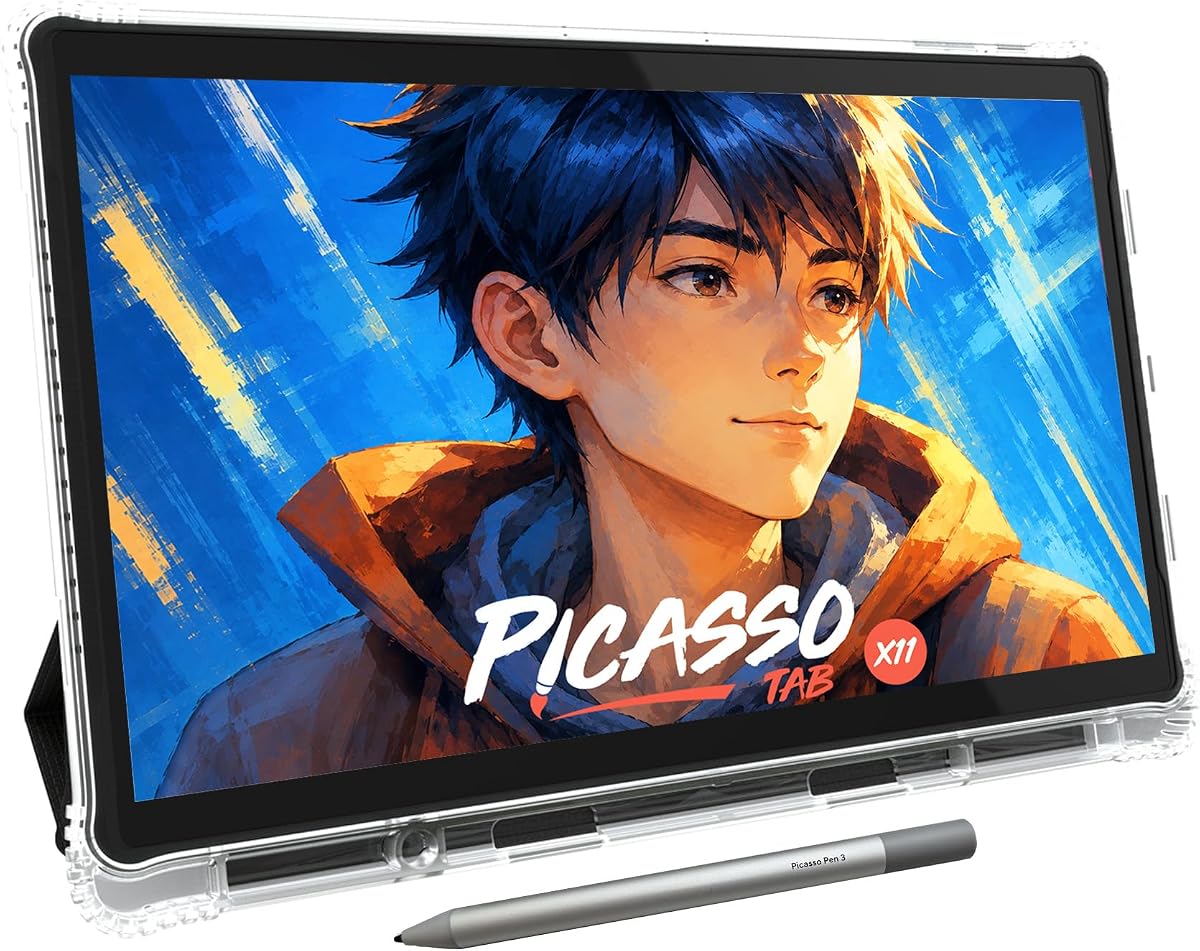
The PicassoTab X11 is a fully standalone drawing tablet designed to simplify the creative process for beginners. With a 4.2 rating, it offers a laminated 11-inch screen that reduces glare, providing a natural feel for sketching and painting without needing a PC.
We may earn a commission when you buy through this link, at no additional cost to you.
It comes with lifetime VIP tutorials and preloaded apps, guiding users through step-by-step lessons to improve skills quickly. The octa-core processor handles multitasking smoothly, allowing streaming, schoolwork, and drawing without lag.
The bonus accessories like a premium case and screen protector add value, ensuring the device is protected from day one. The expandable storage up to 1TB gives ample space for saving all your artwork and tutorials.
Choose this if you want a complete learning system in one box. It suits artists who need guidance and a reliable device to grow their skills from scratch without complex setup or extra hardware.
Artixo Lifetime VIP upgrade offers structured lessons and guided practice, ensuring you learn fundamentals effectively without feeling overwhelmed.
Certified quality standards and responsive customer support back the device, giving confidence in safety and longevity for long-term creative projects.
We may earn a commission when you buy through this link, at no additional cost to you.
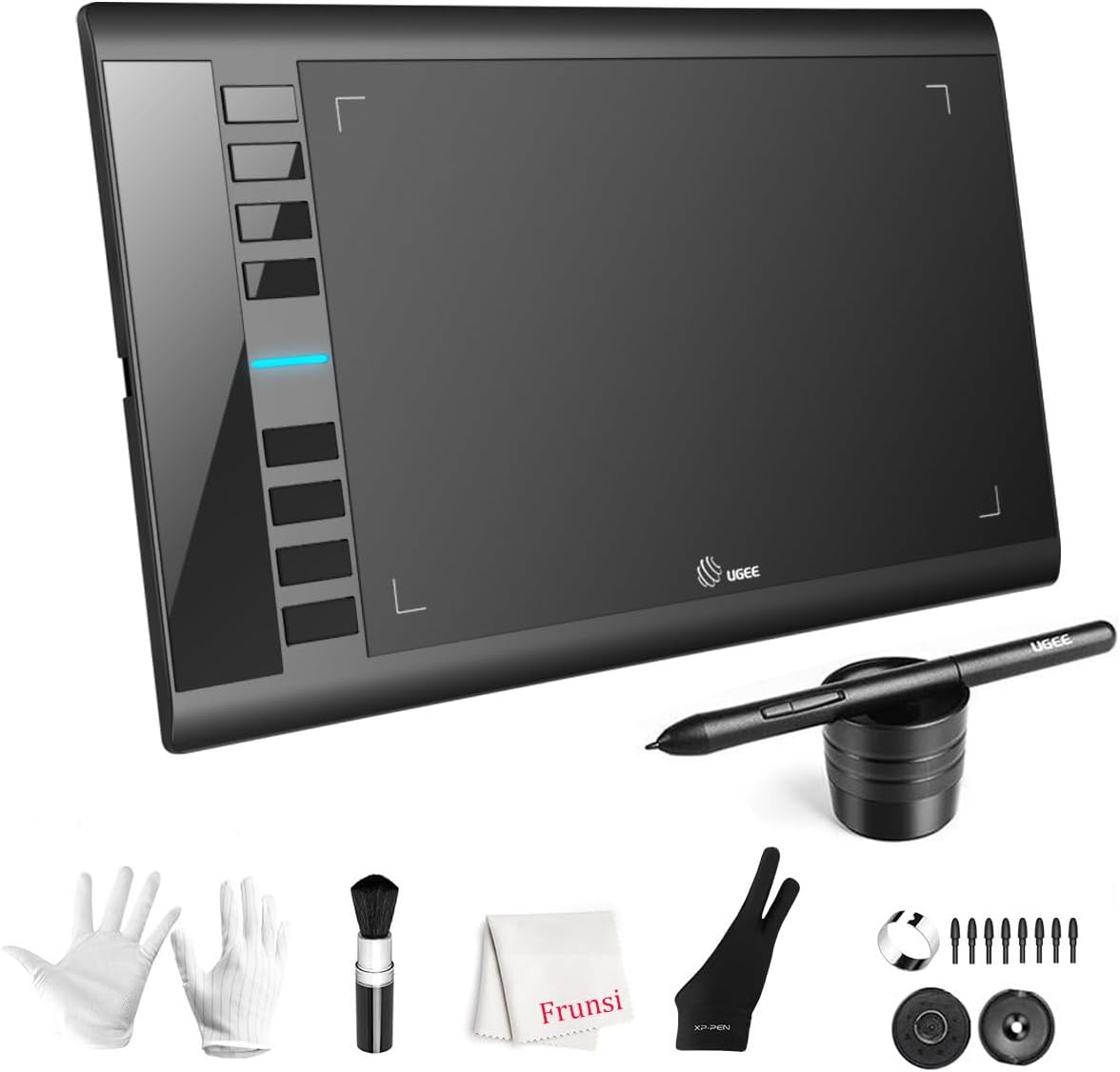
The UGEE M708 Drawing Tablet provides a large active space for digital drawing and painting. With a 4.4 rating, it features 16384 levels of pressure sensitivity and customizable express keys to improve productivity and creativity on computers.
We may earn a commission when you buy through this link, at no additional cost to you.
Its compatibility with multiple systems and creative software makes it versatile for various workflows. The USB-C connectivity ensures easy setup for beginners, while the ergonomic design supports both right and left-handed users comfortably.
The papery texture surface mimics the feel of traditional art, offering a smooth sketching experience. This model is perfect for hobbyists and professionals who need a reliable tool for photo retouching or digital illustration.
Buy this if you work primarily on a desktop or laptop. It balances performance and affordability, making it an accessible choice for anyone looking to enter digital art without breaking the bank.
Works with major software like Photoshop and SAI, ensuring your workflow stays seamless whether you are designing or editing.
Shortcuts for erasing or zooming help speed up your workflow, keeping you focused on creation rather than mouse navigation.
We may earn a commission when you buy through this link, at no additional cost to you.
The Mafiti LCD Writing Tablet is an ultra-light portable doodle board perfect for quick memos and kids' scribbles. With a 4.2 rating, its 8.5-inch screen fits in pockets, making it ideal for travel or office notes without bulk.
We may earn a commission when you buy through this link, at no additional cost to you.
It features a replaceable coin-cell battery and a kick-stand for displaying messages. The lock switch prevents accidental erasure, ensuring important notes stay safe until you need to clear the screen.
Simple to use with a thick stylus for clear writing, it saves paper and keeps spaces tidy. It is a practical tool for families who want a reusable writing surface for to-do lists or quick sketches.
This model works well for simple tasks where color is not needed. Its compact size and affordability make it a great addition to any home, office, or child's backpack.
The built-in stylus dock keeps the pen secure and handy, so you never lose the tool needed for writing on the go.
Battery replacement is simple when needed, extending the life of the device for long-term use without needing a new one.
We may earn a commission when you buy through this link, at no additional cost to you.
The TEKFUN LCD Writing Tablet offers a 10-inch colorful screen that encourages creativity without screen time guilt. Rated 4.5, it is designed for kids, providing a safe, anti-fall surface for writing and drawing anywhere.
We may earn a commission when you buy through this link, at no additional cost to you.
Its waterproof build ensures durability against spills, while the lock key prevents accidental clearing. This makes it ideal for long trips or busy household environments where accidental drops or water exposure might occur.
The included stylus and battery life offer reliable performance for hours of engagement. Parents appreciate its ability to keep children quietly occupied during travel or dinner times without requiring complex apps.
Select this for its safety features and portability. It serves as a fantastic gift for any young child needing a mess-free way to express ideas while on the move or at home.
High-quality plastic and waterproof design handle rough play, ensuring the device lasts through various adventures and activities.
Reliable after-sales support ensures you can resolve issues quickly, giving peace of mind for parents buying for their kids.
We may earn a commission when you buy through this link, at no additional cost to you.
The Wacom Intuos Small delivers industry-leading performance in a compact package. With a 4.6 rating, it features EMR battery-free technology that feels natural, making it a favorite among professional graphic designers and artists.
We may earn a commission when you buy through this link, at no additional cost to you.
Included software and online training help you maximize its potential immediately. It works with any creative program, from photo editing to document marking, offering reliable control and precision for complex tasks.
Though it requires a wired connection, its reliability and pen quality are unmatched in its class. This small size saves desk space while providing the functionality needed for detailed work.
Choose this if you need a proven professional tool. It is perfect for designers who want precision and software flexibility without investing in a large display setup.
Access to top creative software and training ensures you get started faster, reducing the learning curve for new digital artists.
As a global leader for over 40 years, Wacom provides trust and reliability, ensuring your creative tools perform consistently.
We may earn a commission when you buy through this link, at no additional cost to you.
The XP-PEN Artist12 features an 11.6-inch FHD display offering vivid colors for accurate artwork creation. With a 4.4 rating, it includes an 8192-level pressure-sensitive pen that provides a natural drawing feel without needing batteries.
We may earn a commission when you buy through this link, at no additional cost to you.
Its versatile connection options allow use as an extended display for remote work or online education. The anti-reflective screen protector and customizable shortcut keys enhance efficiency, making it suitable for teachers and professionals alike.
While it relies on a computer connection, the visual feedback it provides is essential for detailed illustration work. The included glove and holder add convenience, protecting your hands and keeping accessories organized.
This is an excellent choice for illustrators needing a screen. It bridges the gap between drawing and editing, enabling you to see your strokes exactly as they appear on the canvas.
The 100% SRGB gamut ensures colors are true to life, helping you produce professional-grade artwork without guesswork.
Compatible with major platforms like Zoom and Teams, it allows educators to teach complex concepts visually and clearly.
We may earn a commission when you buy through this link, at no additional cost to you.
Selecting the right electronic sketch pad depends on understanding your specific needs, whether for professional art, student notes, or kids' entertainment.
Larger screens offer more space for creative freedom, but smaller devices are easier to carry. Resolution determines image clarity, which is critical for detailed work or reading notes on the go.
Look for at least 10 inches if space permits, but balance this with portability requirements if you plan to travel frequently with your device.
Pressure sensitivity affects how your strokes vary in thickness and opacity based on force. Higher levels like 16K provide nuanced control, while 4096 is often sufficient for casual sketching and note-taking.
Invest in high pressure sensitivity if you need artistic shading; otherwise, standard levels work well for basic writing and simple doodles.
Standalone tablets run their own operating system and apps, allowing usage without a PC. Computer-dependent models require a connection but often offer more powerful software options for complex tasks.
Choose standalone for portability and independence, or computer-dependent for deep integration with desktop software and larger workflows.
Long battery life ensures you can use the device for extended periods without interruption. Some devices use replaceable batteries, while others require regular USB charging.
Prioritize models with at least 10 hours of use if you plan to work for long sessions without access to a power outlet.
LCD pads offer a paper-like feel but usually lack color. IPS screens provide vibrant colors and better viewing angles, making them suitable for artists who need visual accuracy.
Select LCD for writing and notes, or IPS for art requiring color fidelity and detailed visual feedback.
Ensure the device works with your existing apps and operating systems. Android devices offer flexibility through Google Play, while others require specific software or drivers to function correctly.
Check system requirements to avoid compatibility issues, especially if you rely on specific productivity or creative applications.
Rugged construction ensures the device can withstand drops and daily wear. Materials and protective cases add longevity to your investment.
For kids or travel, choose models with anti-fall and waterproof features to ensure safe and continuous use.
Prices range widely from budget-friendly LCDs to premium standalone tablets. Value comes from balancing features with long-term usability and included accessories.
Set a budget based on your needs; entry-level models are great for kids while professional tools justify higher costs with advanced capabilities.
Start by charging your device fully before first use, ensuring it lasts through initial setup and calibration. Connect it to your Wi-Fi or computer depending on the model to sync data and download required apps.
Protect the screen with a case or glove to prevent scratches from accidental impacts. Clean the surface gently with a soft cloth to maintain visibility and responsiveness over time.
Regularly update firmware and software to access new features and security patches. Store your work in cloud services or backups to prevent data loss in case of hardware failure.
It depends on the model. Standalone tablets like XPPen and PicassoTab function independently with their own OS. Others like UGEE or Wacom require a computer connection. Always check compatibility before purchasing.
Most LCD sketch pads use low blue light technology to reduce strain. Unlike traditional screens, they emit minimal radiation. Look for eye-protection certifications to ensure safety for long use by kids.
Battery life varies by usage. Some standalone tablets offer 18 hours on a full charge, while simple LCDs use replaceable batteries that last months. Check the specs for specific usage time.
Yes, many models support painting apps. Standalone tablets offer full creative suites, while others connect to software like Photoshop. Ensure the pressure levels meet your artistic needs for detailed work.
Packages often include a stylus, charging cable, and protective case. Some offer extra nibs or gloves. Verify what comes in the box to avoid extra purchases for essential accessories.
Most standalone models support Android apps. Connectivity options vary; some work with iOS via Bluetooth or USB. Always confirm compatibility with your specific phone or tablet brand.
Many models have lock features to save drawings before erasing. Always use the save function before clearing the screen if you want to keep your work for later review.
Some portable LCDs are water-resistant, but not all. Check product descriptions for waterproof ratings. If you use it around water, choose models explicitly designed for protection.
This guide covers the top electronic sketch pads for every need, from budget-friendly kids' tablets to professional standalone devices. Each model offers unique strengths like pressure sensitivity, portability, or ecosystem integration.
Prioritize features that align with your workflow. If you need color and independence, look at XPPen. If you want simple fun for kids, LCD models like Kayoubi are perfect.
Remember to verify current prices and availability on Amazon as they fluctuate frequently. Choosing the right device today ensures you have the perfect tool for creativity and productivity.