
ATSC Digital Converter Box with TV Tuner
3.8Editor score
Affordable price point
Records to USB hard drive
Clear QAM support included
Discover the top DVR recorders for TV that let you capture live broadcasts, time-shift viewing, and archive shows without subscriptions or hidden monthly fees
Finding the right DVR recorder for your television setup can transform how you enjoy live content. These devices allow you to pause, rewind, and record broadcast shows without relying on cable subscriptions. Whether you prefer over-the-air signals or analog inputs, a quality unit ensures you never miss a moment of your favorite programming again.
We compared ten highly rated DVR recorders based on tuner counts, storage capabilities, and ease of use. Our analysis covers everything from standalone capture boxes to networked systems that stream across multiple devices. Each product was evaluated for compatibility with modern TVs and legacy equipment to help you make an informed decision.
Each pick below highlights specific strengths like HDMI passthrough, USB recording limits, and app support. You will see real user ratings and detailed feature breakdowns to guide your choice. Please note that availability and specifications may vary by region and manufacturer updates so always verify details before purchasing.
3.8Editor score

3.2Editor score

4.1Editor score
The following table provides a side-by-side look at key specifications across all ten models. Use this to quickly compare tuner counts, resolution support, and storage options before diving into detailed reviews for each unit.
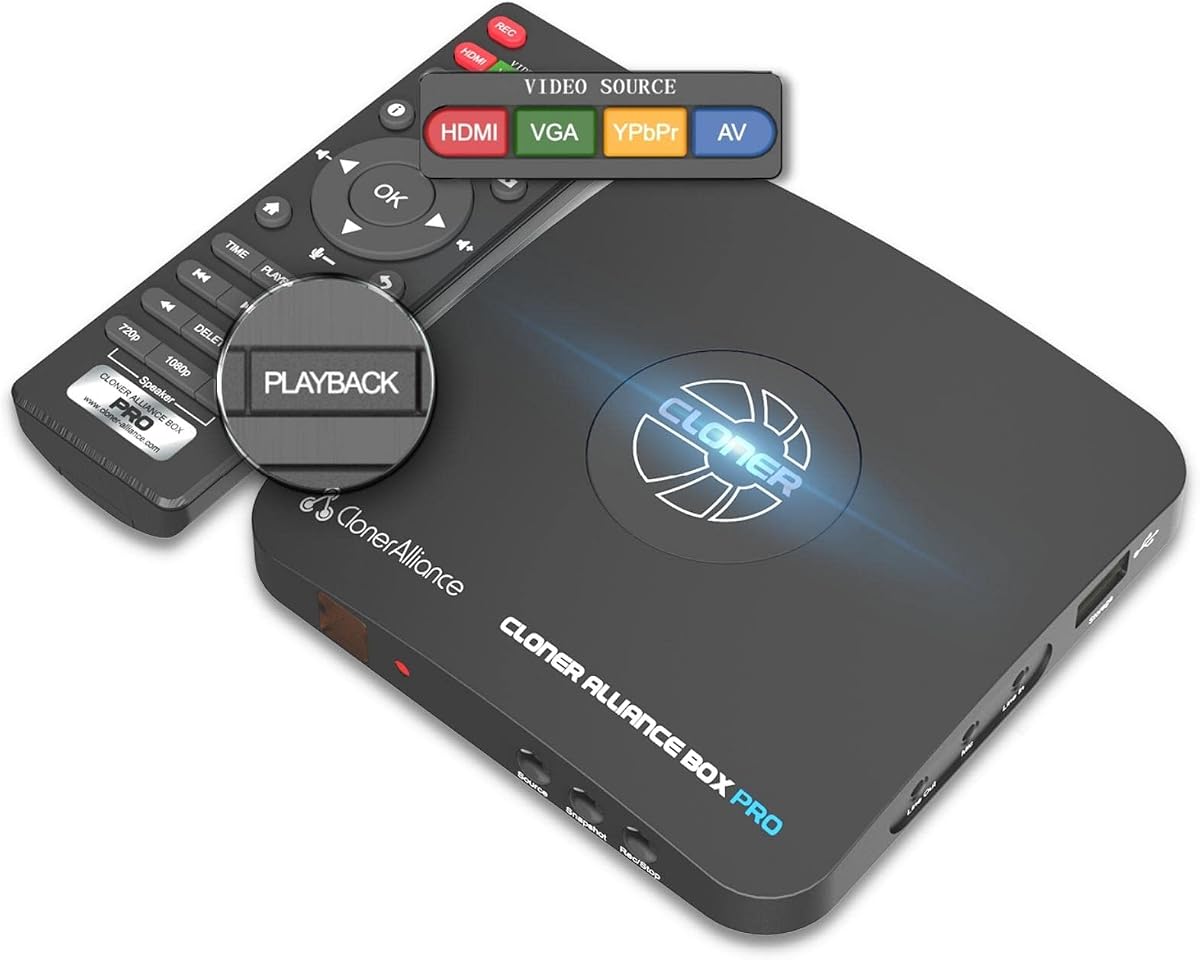


The ClonerAlliance Box Pro is a dedicated device designed to capture video from various sources without needing a computer. It has a 4.0 rating and stands out for its ability to handle HDMI RCA, and VGA inputs seamlessly. This makes it ideal for archiving old VHS tapes or recording gameplay from consoles.
We may earn a commission when you buy through this link, at no additional cost to you.
Its standout quality is the ability to record directly to a USB drive while displaying the feed on your TV simultaneously. The device supports ultra-low latency which ensures smooth live viewing. You can also schedule recordings for later viewing making it a true DVR solution for analog signals.
Trade-offs include the lack of support for HDCP protected content which means you cannot record from certain cable boxes. However for this is a common limitation for standalone capture devices. The need for an external USB drive also means you must purchase storage separately to use the full functionality.
Buy this if you need to digitize legacy media or record unencrypted signals from gaming systems. It is best suited for users who want a plug and play solution without installing software. The included remote control adds convenience for navigation and playback on your TV screen.
This unit converts analog signals to digital files allowing you to preserve old tapes permanently on modern storage devices.
You can set up automatic recording tasks so important programs are captured even when you are not present to start them manually.
We may earn a commission when you buy through this link, at no additional cost to you.
The Tablo TV 4th Gen is a network DVR that lets you watch and record over-the-air TV across your home. It has a 3.2 rating and earns high marks for its four tuners that allow recording one show while watching another. The whole home access feature means you can stream to phones tablets and smart TVs easily.
We may earn a commission when you buy through this link, at no additional cost to you.
Key strengths include the ability to record four channels at once which is rare in this price range. The device connects via Wi-Fi or Ethernet so you do not need to run cables to every TV. You can download the app to manage recordings and watch live TV on the go without extra fees.
Trade-offs involve the requirement for a robust internet connection to stream smoothly across devices. If your Wi-Fi is weak you may experience buffering during playback. Also it is not compatible with non-smart TVs which limits its use in older setups without additional adapters or streaming players.
Buy this if you want a cable-free solution that covers your entire house with recorded content. It is perfect for families who want flexibility in watching shows on different devices. The lack of subscriptions makes it a cost-effective long-term investment for local broadcast lovers.
With four tuners you can watch a live channel while recording up to three others so you never miss a premier or game.
Stream recorded shows to your tablet or phone wirelessly giving you the freedom to view content in any room.
We may earn a commission when you buy through this link, at no additional cost to you.
The Tablo TV 4th Gen 2-Tuner offers a smaller footprint with dual tuner capabilities for standard recording needs. It holds a 3.4 rating and provides similar whole-home streaming features as the larger model but at a lower entry point. This unit is great for households that do not need to record four shows simultaneously.
We may earn a commission when you buy through this link, at no additional cost to you.
Its strengths lie in the seamless integration with smart TVs and streaming players. You can watch recorded content on multiple devices without extra hardware. The setup process is straightforward using the included QR code guide. The lack of ongoing fees ensures you only pay once for the device.
Trade-offs include having only two tuners which might limit heavy users who want to record multiple shows at once. However for most casual viewers this is sufficient for typical viewing habits. The reliance on Wi-Fi means placement near your router is crucial for stable streaming performance throughout your home.
Buy this if you need a reliable OTA DVR for basic recording and streaming. It is ideal for users who want to reduce cable costs without sacrificing convenience. The app support allows easy management of your library and scheduling on your phone or tablet.
Connect the device to your network and use the mobile app to scan the QR code for instant activation and pairing.
Beyond local broadcasts you can curate a list of free streaming channels to expand your viewing options without a contract.
We may earn a commission when you buy through this link, at no additional cost to you.
The Tablo TV 4th Gen 2-Tuner Plus Antenna provides a complete kit to start recording OTA TV immediately. It has a 3.4 rating and saves you the hassle of buying a separate antenna. This bundle ensures you have everything needed to capture local channels and stream them throughout your house without delays.
We may earn a commission when you buy through this link, at no additional cost to you.
Strengths include the convenience of having a compatible antenna included in the package. The device supports whole home streaming so you can watch live or recorded shows on any connected device. It works with major networks and offers free streaming channels to enhance your viewing options significantly.
Trade-offs involve the need to position the antenna correctly for optimal signal strength. The indoor antenna may require experimentation to find the best spot near a window or wall. Also the two tuners might not be enough for large families with diverse schedules and recording needs.
Buy this if you want a hassle-free start to cutting the cord. It is perfect for users who need a ready-to-use setup without searching for compatible accessories. The value proposition is strong given the inclusion of the antenna alongside the network DVR capabilities.
Get the DVR and antenna together to simplify installation and reduce shipping costs compared to buying items separately.
Access curated free streaming channels to fill gaps in your local broadcast schedule and enjoy more entertainment variety.
We may earn a commission when you buy through this link, at no additional cost to you.
The Mediasonic HomeWorx Converter Box is an affordable unit that adds recording capabilities to any TV with HDMI. It holds a 3.8 rating and is known for supporting unscrambled cable channels via Clear QAM. This device is a practical choice for budget-conscious users who still want to pause and record live shows.
We may earn a commission when you buy through this link, at no additional cost to you.
Key strengths are its ability to connect a USB hard drive for direct recording. You can play back multimedia files directly from the drive making it a versatile media player. The front display shows channel numbers and time which adds convenience to daily use.
Trade-offs include the lack of ATSC 3.0 support which means it cannot receive next-gen broadcasts. The interface is basic and may lack advanced features found in premium models. However for basic recording and playback it performs reliably without the need for an internet connection.
Buy this if you want a simple standalone recorder without monthly fees. It is ideal for older TVs that need digital conversion and basic recording. The Clear QAM feature makes it useful for accessing basic cable channels that are not encrypted.
Receive unscrambled cable channels directly without additional equipment if your provider supports Clear QAM signals.
Play photos music and videos from your USB drive to turn your TV into a media hub easily.
We may earn a commission when you buy through this link, at no additional cost to you.
The Toshiba DVD VHS Recorder combines digital and analog recording in one unit making it a unique choice. It has a 3.9 rating and stands out for its ability to record to both DVD and VHS. This model is rare now but perfect for users who need to maintain compatibility with old tapes.
We may earn a commission when you buy through this link, at no additional cost to you.
Strengths include HDMI upconversion that lets you watch standard DVDs on high-resolution screens clearly. The built-in tuner allows direct recording from broadcast TV to DVD. You can also dub between formats to transfer old VHS tapes to DVD for better preservation.
Trade-offs involve the age of the model which may mean parts are harder to find. It might not work well with newer digital setups that lack analog inputs. However for preserving physical media it remains one of the few options that support dual recording formats natively.
Buy this if you need to digitize VHS tapes or watch DVDs on a modern TV. It is best for collectors who want to keep physical copies of recordings. The dual format support ensures you can play back recordings on almost any player.
Transfer old home videos from VHS to DVD to save space and ensure they are viewable on modern equipment.
Watch standard definition content in high definition by using the HDMI output to upscale video automatically.
We may earn a commission when you buy through this link, at no additional cost to you.
The Tablo TV 4th Gen 4-Tuner Plus Antenna is the ultimate package for OTA recording enthusiasts. It holds a 3.3 rating and offers the best of both worlds with a high range antenna and four tuners. This bundle ensures strong signal capture and maximum recording flexibility without extra fees.
We may earn a commission when you buy through this link, at no additional cost to you.
Strengths include the included antenna designed to reach up to thirty five miles for local channels. You can record four shows at once while streaming to multiple devices. The whole home access feature supports various streaming players making it easy to watch content anywhere.
Trade-offs involve the higher upfront cost compared to the standalone units. You still need a robust internet connection for streaming features. However for a comprehensive solution that requires no extra purchases this bundle offers unmatched value for power users who record heavily.
Buy this if you want a top tier OTA DVR with all accessories included. It is perfect for large households with diverse viewing needs. The included antenna and four tuners mean you will not need to buy upgrades later.
Record four shows simultaneously while watching live TV on any device to maximize your entertainment options.
The included antenna provides better range to ensure you get a stable signal even if you are far from broadcast towers.
We may earn a commission when you buy through this link, at no additional cost to you.
The ClonerAlliance UHD Pro is a powerful standalone recorder for capturing Ultra High Definition video. It has a 4.1 rating and stands out for its 4K@60fps passthrough and recording features. This device is perfect for gaming consoles and high end sources that require top tier video fidelity.
We may earn a commission when you buy through this link, at no additional cost to you.
Key strengths include support for H.265 codec which compresses large files efficiently. The pause resume recording feature helps keep important moments in a single file. You can operate it without a PC which simplifies the setup for recording live broadcasts or streaming devices.
Trade-offs include the lack of HDCP support which prevents recording from protected content sources. The price is higher than average but justified by the 4K capabilities. For users who need high quality capture for games or videos this unit is hard to beat.
Buy this if you want to record 4K content from your console or PC. It is ideal for content creators who need reliable capture without software dependencies. The standalone operation ensures you can record anytime without turning on a computer.
Pass through 4K signals to your TV while recording the feed ensuring no loss of picture quality during playback.
Use H.265 to save storage space while maintaining high quality video for long recording sessions easily.
We may earn a commission when you buy through this link, at no additional cost to you.
The Tablo TV 4th Gen 2-Tuner Renewed offers the full power of the newer generation at a lower price. It has a 3.8 rating and provides 128GB of storage for recordings right out of the box. This model brings streaming capability to your TV without the need for expensive subscriptions.
We may earn a commission when you buy through this link, at no additional cost to you.
Strengths include the 128GB onboard storage which holds up to fifty hours of content. You can access live or recorded TV from multiple devices easily. The renewed status means you get tested functionality at a significant discount compared to brand new units.
Trade-offs involve the warranty which may be shorter than a new purchase. You still need a stable internet connection for all features. However for budget buyers who want the full experience this refurbished unit delivers high value and reliability.
Buy this if you want to save money on a proven network DVR. It is great for users who want to try the Tablo ecosystem without a large investment. The storage and app integration make it a strong choice for casual viewing.
Store up to fifty hours of recordings internally without needing to buy extra USB drives immediately.
Get a fully functional unit for less money while supporting sustainable shopping with refurbished products.
We may earn a commission when you buy through this link, at no additional cost to you.
The Tablo TV 4th Gen 4-Tuner Renewed combines high tuner count with affordable pricing. It holds a 3.6 rating and is perfect for households needing to record multiple shows. The four tuners allow for simultaneous recording and playback across the network which adds significant flexibility.
We may earn a commission when you buy through this link, at no additional cost to you.
Strengths include the time-shift viewing feature which lets you start watching a recording in progress. This helps you catch the beginning of a show even if you missed the start. With 128GB storage you get ample space for your most important programs.
Trade-offs include the same limitations as other Tablo units such as internet dependency. The renewed status might mean minor cosmetic wear but the core functions are verified. This unit is ideal for heavy users who want top specs without a high price.
Buy this if you need to record several shows a week. It is best for tech-savvy users who want to maximize content control. The combination of tuners and streaming makes it a powerhouse for OTA DVR needs.
Start watching a recording that is still in progress so you never miss the action of a live game or show.
Record four different channels at once while watching any of them on another device for ultimate flexibility.
We may earn a commission when you buy through this link, at no additional cost to you.
Selecting the right DVR requires looking at several technical aspects that impact performance and usability. We outline key factors to consider before making your final purchase decision.
Tuner count determines how many shows you can record simultaneously. More tuners allow for complex schedules where you can watch one channel while recording others. For single family use two tuners are often enough but large households benefit from four.
Choose at least two tuners to avoid missing shows when schedules overlap. More tuners provide flexibility for multi-room viewing and recording.
Storage capacity affects how much content you can keep before needing to delete files. Some units have built-in storage while others rely on external USB drives. Larger capacity allows for archiving seasons of shows without constant management.
Look for units that support external drives up to several terabytes. This ensures you can expand storage as your recording needs grow over time.
Connection inputs determine what devices you can connect to the recorder. HDMI is standard for modern devices but analog inputs are vital for older VHS or game systems. Check what inputs your current devices use before buying.
Ensure the unit matches your source devices. HDMI is best for quality but analog inputs help preserve legacy content.
Network streaming allows you to watch recorded content on other devices like phones or tablets. This feature is essential if you want to take your library with you. It requires a reliable Wi-Fi connection to function properly.
Prioritize units with Wi-Fi support if you want to watch outside the living room. Streaming extends the utility of your DVR beyond one screen.
Subscription fees add to the long term cost of owning a recorder. Many modern DVRs operate with a one-time purchase model. Avoid devices that lock features behind monthly payments to keep costs low.
Choose a device with no recurring fees for best value. One-time purchases save money over several years of use.
Resolution support ensures your recordings match your TV capabilities. 1080p is standard for most broadcast signals but 4K support is emerging for high end content. Check your TV resolution to match the recorder output.
Select a recorder that matches your TV's resolution. Higher resolution support keeps recordings clear on modern displays.
Ease of setup determines how quickly you can start using the device. Units with simple on-screen guides or QR code pairing are easiest for beginners. Avoid complex setups if you are not comfortable with networking.
Look for units with intuitive guides and minimal cables. Simple setup saves time and frustration for all users.
Brand reliability ensures you get quality support and firmware updates. Established brands like Tablo or ClonerAlliance have longer track records. They offer better customer service and regular updates to maintain security.
Choose a trusted brand for long-term support. Reliable companies ensure your device remains functional and secure over time.
Begin by connecting the DVR to your TV antenna or source device using the appropriate cables. Most modern units require an HDMI connection for video. If using analog sources use RCA cables for audio and video. Connect the unit to your network using Ethernet or Wi-Fi for streaming features.
Configure your recordings through the on-screen menu or mobile app. Set schedule tasks for shows you want to capture. Use the pause and rewind function to control live viewing. For USB units ensure you format the drive correctly to avoid recording errors.
Maintain your DVR by keeping it in a well ventilated area to prevent overheating. Regularly update firmware to ensure compatibility with new sources. Clean the exterior with a dry cloth to avoid dust build up. Store your external hard drives safely to protect your recordings.
Yes if you choose a network DVR model like Tablo. These units stream recordings over your home network so you can access them from any compatible device. Standalone boxes typically only connect to one TV directly.
1080p is standard high definition suitable for most broadcast content. 4K provides higher detail for modern displays but requires more storage. Not all sources support 4K so check your input before buying a 4K unit.
No most DVR recorders are designed to work with over-the-air broadcasts or external devices. You only need a local antenna to capture free channels. No monthly fees are required for basic recording functions.
Storage needs depend on how much you record and the quality settings. An external drive of one to two terabytes can hold hundreds of hours of content. USB drives are often more cost-effective than internal storage upgrades.
Yes if your DVR has multiple tuners. A dual tuner unit lets you record one show while watching another. Units with four tuners allow for even more flexibility in viewing and recording.
Most apps included with DVRs are free to download and use. Avoid units that require subscription plans for basic playback. The best models allow full access to recordings without monthly costs.
Yes capture boxes like ClonerAlliance allow recording from HDMI sources like game consoles. Ensure the console does not use HDCP protection. Check specific model compatibility before purchasing for gaming.
Local recording still works even if the internet is offline. Streaming features will pause but your recorded shows remain safe. Standalone units do not rely on internet for basic TV recording.
The top picks like Tablo and ClonerAlliance offer distinct solutions for streaming and capture. Network DVRs provide whole home access while standalone units offer direct recording options. Choose based on whether you value flexibility or simplicity.
Prioritize tuner count and storage capacity to ensure you never miss a show. Ensure your chosen unit supports your TV resolution and input types. Check that your internet connection is stable for streaming models to work best.
Always verify the latest pricing and availability before making your final purchase. These models are subject to change so current stock may vary. Keep this guide handy as you compare options for your specific needs.