
Brother HL-L3220CDW
3.9Editor score
19 PPM color output speed
250-sheet paper tray capacity
Wireless and mobile device ready
This guide compares the top 10 duplex color laser printers for office and home use, evaluating speed, features, and value to help you choose the right model.
Finding the right duplex color laser printer can transform your workflow by enabling fast, double-sided printing with vibrant graphics. Whether you need a compact unit for a home office or a robust machine for a busy team, modern models offer wireless connectivity and efficient toner usage. Understanding key features helps you avoid overspending on capabilities you do not require while ensuring reliable performance.
We evaluated ten top-rated duplex color laser printers based on print speed, connectivity options, paper capacity, and overall reliability. Our analysis focuses on real-world performance metrics like pages per minute, first print time, and ease of setup. Each model was assessed for its ability to handle both monochrome and color documents efficiently without sacrificing quality or increasing operational costs unnecessarily.
Each pick in this guide highlights specific strengths such as budget friendliness, advanced security, or all-in-one functionality. You will see detailed reviews, pros, cons, and specifications to inform your decision. Please note that prices and availability change frequently, so verify current listings before purchasing to ensure you get the best deal available today.
3.9Editor score

4.2Editor score

4.4Editor score
The following table provides a side-by-side comparison of all ten reviewed models, highlighting their core specifications and primary functions to help you quickly identify the best fit for your specific printing needs and workspace constraints.


The Canon Color imageCLASS MF753Cdw II stands out as a top performer for modern offices needing reliable color output. With a strong rating of 4.2 stars, users praise its ability to handle print, scan, copy, and fax tasks efficiently. This model combines wireless convenience with duplex capabilities to streamline daily document workflows without cluttering your desk space.
We may earn a commission when you buy through this link, at no additional cost to you.
Its standout qualities include fast color printing speeds and an intuitive interface that simplifies complex tasks. The 4-in-1 design ensures you do not need separate devices for different functions, saving both money and space. Wireless connectivity allows seamless integration with laptops and mobile devices, ensuring productivity remains high even in busy team environments.
While the performance is excellent, the cost of replacement toner can add up over time for high-volume users. Additionally, the standard paper tray may require frequent refills if you print large batches regularly. These trade-offs are acceptable for many businesses given the overall reliability and feature set provided at this price point.
This printer is ideal for small to medium offices that require professional quality color documents and scanning capabilities. If you value versatility and speed in a compact package, the MF753Cdw II is a strong recommendation. It balances functionality and ease of use effectively to support diverse administrative needs.
Combining print, scan, copy, and fax into one unit reduces hardware costs and simplifies network management for small teams.
Seamless wireless connectivity allows employees to print from laptops or smartphones without physical cable connections.
We may earn a commission when you buy through this link, at no additional cost to you.
The Brother HL-L3220CDW offers exceptional value for those seeking a reliable color laser printer without breaking the budget. Rated at 3.9 stars, it delivers consistent quality for text and graphics while maintaining a compact form factor. Its focus on printing efficiency makes it perfect for home offices where scanning is handled separately or occasionally.
We may earn a commission when you buy through this link, at no additional cost to you.
Key strengths include a generous 250-sheet paper tray that minimizes refills and automatic duplex printing that saves paper. The wireless capabilities ensure you can print from any device on your network easily. Brother's reputation for durability shines through, with many users reporting long-term reliability even under moderate daily workloads.
The main drawback is the lack of scanning or copying functions, which means you will need a separate scanner for multifunction needs. Additionally, the 19 PPM speed is slower than high-end models but still respectable for casual to moderate printing needs. These limitations are reasonable for a unit priced at this entry-level tier.
If you need a dedicated color printer for invoices, reports, and basic marketing materials, this model fits the bill perfectly. It is particularly suitable for solopreneurs or small teams who prioritize cost-efficiency and straightforward operation over advanced multifunction features.
The 250-sheet tray reduces downtime and refilling frequency, keeping your workflow smooth during busy periods.
Built-in wireless protocols allow direct printing from smartphones and tablets without complex setup steps.
We may earn a commission when you buy through this link, at no additional cost to you.
The Canon Color imageCLASS LBP646Cdw is designed for users who primarily need fast, high-quality color printing without extra features. With a 4.1-star rating, it excels in speed and output quality, making it a favorite for offices with high-volume text and graphics needs. Its streamlined design ensures you pay only for what you use.
We may earn a commission when you buy through this link, at no additional cost to you.
Key strengths include a rapid 26 PPM speed and a quick first print time that keeps workflows moving efficiently. The 5-inch LCD screen makes navigation straightforward, and mobile device compatibility allows printing from anywhere in the office. Canon's high-capacity toner options help reduce long-term costs and frequent replacements.
Because it is a print-only unit, you must have a separate scanner for documents that need digitization. The paper capacity is standard but may require attention during heavy printing bursts. These trade-offs are acceptable if you prioritize raw printing speed and cost-efficiency over multifunction capabilities.
This model is best for businesses that outsource scanning or have dedicated scanners but need a powerful dedicated printer. It is a strong choice for professionals who want reliable performance without the clutter of unnecessary functions.
The 26 PPM speed ensures high-volume jobs are completed quickly, keeping productivity high during peak times.
High-capacity toner options extend yield and reduce the frequency of cartridge changes over time.
We may earn a commission when you buy through this link, at no additional cost to you.
The Brother MFC-L3720CDW balances functionality and price for small offices needing a complete workstation solution. Rated at 4.0 stars, it handles printing, scanning, copying, and faxing with ease. The dual-band wireless networking ensures stable connectivity even in environments with heavy network traffic.
We may earn a commission when you buy through this link, at no additional cost to you.
Its key strengths include an intuitive 3.5-inch color touchscreen that simplifies task selection and cloud integration for direct document management. The 50-sheet auto document feeder speeds up multi-page scanning tasks, making it efficient for processing invoices or contracts. Mobile app support adds flexibility for remote work needs.
While reliable, the 19 PPM speed may feel sluggish for high-volume color output compared to faster rivals. The 50-sheet ADF is adequate but might require reloading for large scanning jobs. These limitations are reasonable given the competitive pricing and robust feature set.
This model suits small businesses that need an all-in-one device without paying premium prices. It is an excellent choice for teams requiring wireless flexibility and basic cloud connectivity alongside traditional faxing capabilities.
Dual-band wireless support minimizes connection drops and ensures consistent performance in busy network environments.
Direct cloud access allows saving scanned documents to services like Google Drive without needing a PC.
We may earn a commission when you buy through this link, at no additional cost to you.
The Brother MFC-L8930CDW represents the pinnacle of business printing efficiency and security. With a strong 4.4-star rating, it offers impressive 33 PPM speeds and advanced features like NFC authentication. This model is built for demanding environments where reliability and document protection are paramount.
We may earn a commission when you buy through this link, at no additional cost to you.
Key strengths include a 7-inch color touchscreen that simplifies complex workflows and security features that protect data in transit. The high-speed scanning capabilities ensure quick digitization of physical documents, while the toner system minimizes long-term costs. Its compact design relative to output power saves valuable office space.
The price is higher than budget models, but the efficiency and security benefits justify the investment for businesses. The physical size is larger than smaller units, so desk space must be considered. These trade-offs are acceptable for organizations prioritizing performance and document safety.
This printer is ideal for medium to large offices that handle sensitive documents and require fast processing. It is a premium choice for businesses needing top-tier security and productivity features without compromises.
Triple Layer Security and NFC badge authentication protect sensitive documents from unauthorized access and printing.
The 33 PPM speed and 80-page ADF keep high-volume teams productive without waiting on slow processing times.
We may earn a commission when you buy through this link, at no additional cost to you.
The Brother HL-L3280CDW delivers impressive speed and flexibility for small offices focused on high-quality color printing. Rated at 3.9 stars, it offers 27 PPM speeds and a choice between wireless and Ethernet connectivity. This versatility ensures you can adapt to different network configurations easily.
We may earn a commission when you buy through this link, at no additional cost to you.
Its strengths include consistent output quality and cloud-based app integration for direct printing from popular services. The compact design fits well in tight spaces without sacrificing performance. Ethernet support adds stability for users who prefer wired connections over Wi-Fi.
Lack of scanning functions and smaller paper trays limit its utility for mixed workflows. However, for dedicated printing needs, it performs admirably. These trade-offs are acceptable for users who prioritize speed and network flexibility over multifunctionality.
Ideal for small businesses or home offices needing reliable, fast color prints without extra bulk. It is a solid choice for teams requiring consistent performance and flexible connectivity.
Supporting both wireless and Ethernet ensures you can choose the most stable connection for your office setup.
Integrated cloud services allow direct printing from web apps without routing through a desktop computer.
We may earn a commission when you buy through this link, at no additional cost to you.
The Canon Color imageCLASS MF665Cdw combines speed and multifunctionality at a competitive price point. Rated at 3.9 stars, it offers 26 PPM output and a full suite of features including print, scan, copy, and fax. The 3-year warranty adds significant peace of mind for long-term business use.
We may earn a commission when you buy through this link, at no additional cost to you.
Key strengths include a user-friendly touchscreen and high-capacity toner support to reduce maintenance costs. Mobile printing is straightforward via the Canon PRINT app, ensuring flexibility for remote workers. The duplex ADF simplifies scanning double-sided documents without manual intervention.
The ADF capacity is modest, which might slow down large batch scanning jobs. Initial setup can take longer than expected due to software installation. These limitations are minor compared to the overall feature set and warranty value.
This model is great for small businesses needing reliable all-in-one performance without premium costs. It balances speed and functionality well for daily administrative tasks.
A 3-year limited warranty provides added confidence in long-term performance and protection against defects.
The customizable touchscreen simplifies complex tasks and gives quick access to frequently used features.
We may earn a commission when you buy through this link, at no additional cost to you.
The Canon Color imageCLASS MF662Cdw is a reliable workhorse for offices needing print, scan, and copy functions. With a 4.0-star rating, it delivers consistent quality and speed for everyday tasks. The 3-year warranty stands out as a significant advantage for buyers seeking long-term peace of mind.
We may earn a commission when you buy through this link, at no additional cost to you.
Key strengths include fast output speeds and an intuitive touchscreen that makes task selection simple. Mobile printing capabilities allow employees to print from devices without physical connections. High-capacity toner compatibility ensures lower cost per page over time.
Lack of faxing might be a dealbreaker for some traditional businesses. The standard paper tray may require refills during high-volume periods. These are minor trade-offs given the overall reliability and warranty support provided.
Ideal for businesses requiring robust multifunction features without faxing. It is a great choice for teams prioritizing speed and warranty protection.
A 3-year limited warranty protects against defects and ensures consistent performance over several years.
Compatible with mobile apps allows employees to print from devices anywhere on the office network.
We may earn a commission when you buy through this link, at no additional cost to you.
The HP Color Laserjet Pro 3201dw offers vibrant color output and reliable performance for small teams. Rated at 3.4 stars, it is praised for its speed and professional document quality. HP's TerraJet toner technology ensures vivid colors that enhance presentations and reports.
We may earn a commission when you buy through this link, at no additional cost to you.
Key strengths include dual-band Wi-Fi with self-reset features that resolve connection issues automatically. The 250-sheet tray reduces interruptions during busy workdays. Its compact design fits easily into shared office spaces without sacrificing functionality.
HP's strict policy on toner cartridges and firmware updates can frustrate users seeking flexibility. This may increase long-term costs compared to more open systems. These constraints are acceptable if you prioritize brand reliability and ease of use.
Ideal for small offices needing professional results without complexity. It is a solid choice for teams trusting established brands for daily operations.
Dual-band Wi-Fi with self-reset capabilities minimizes downtime caused by network connection issues.
TerraJet toner delivers vivid, consistent colors that enhance the visual appeal of business documents.
We may earn a commission when you buy through this link, at no additional cost to you.
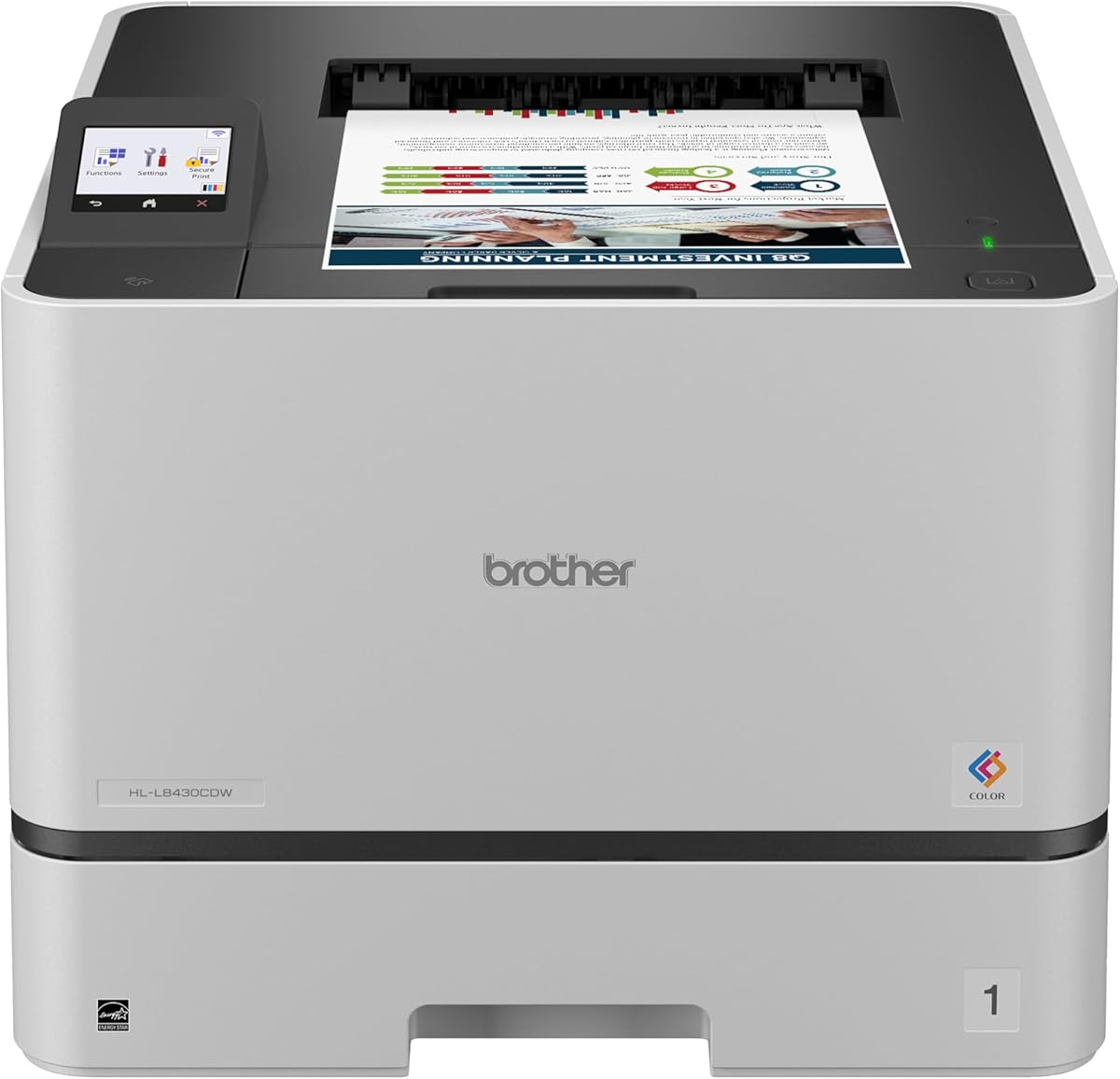
The Brother HL-L8430CDW is engineered for demanding business environments needing speed and security. Rated at 4.0 stars, it offers rapid 33 PPM output and expandable paper trays to support high-volume workflows. Its low-cost printing options help manage long-term operational expenses effectively.
We may earn a commission when you buy through this link, at no additional cost to you.
Key strengths include integrated NFC card readers for secure printing and flexible connectivity options for any office setup. The compact design minimizes desk space usage while delivering high-quality results. Wireless features ensure seamless integration with mobile devices and networked computers.
The lack of an ADF means manual scanning for multi-page documents. Higher upfront costs may deter smaller budgets but are offset by speed and efficiency. These trade-offs suit businesses prioritizing output and security over multifunction capabilities.
Ideal for medium to large offices needing speed and security. It is a strong choice for teams managing high print volumes with strict access control requirements.
Integrated NFC card readers ensure only authorized staff can release print jobs for added document security.
Optional trays expand capacity up to 1,340 sheets for uninterrupted high-volume printing tasks.
We may earn a commission when you buy through this link, at no additional cost to you.
Choosing the right duplex color laser printer involves evaluating several critical factors to ensure it meets your specific workflow needs and budget constraints.
Print speed measured in pages per minute (PPM) determines how quickly your documents are produced. For busy offices, look for models offering at least 20 to 30 PPM to prevent bottlenecks. Color quality should be sharp and vibrant, especially if you print marketing materials or presentations regularly. Check sample outputs or reviews to ensure text and images meet your standards before buying.
Prioritize models with high PPM ratings and proven color consistency to maintain efficiency.
Modern printers must integrate seamlessly with your existing network infrastructure. Look for dual-band Wi-Fi support to avoid connection drops in busy environments. Ethernet ports add stability for devices requiring a wired link. Mobile printing capabilities like AirPrint or Mopria ensure flexibility for remote work or on-the-go access. Ensure the printer supports your preferred operating systems and cloud services.
Choose printers with robust dual-band wireless and Ethernet support for reliable office connectivity.
Adequate paper capacity minimizes frequent refills that interrupt workflows. Standard trays usually hold around 250 sheets, but expandable options are available for high-volume needs. Consider if you need specialty media handling for labels, envelopes, or cardstock. Multi-purpose trays add flexibility for custom jobs without reloading the main cassette. Check maximum paper size support to accommodate legal or tabloid documents if required.
Select models with sufficient tray capacity and flexible media handling to reduce interruptions and support diverse jobs.
Decide if you need an all-in-one unit that includes scanning, copying, and faxing. Multifunction printers save space and streamline document management by combining tasks. Automatic Document Feeders (ADF) speed up scanning multi-page documents without manual reloading. Duplex printing on both sides automatically saves paper and reduces costs over time. Evaluate if these features justify the higher cost compared to single-function printers.
Invest in multifunction models with ADF and duplex support if you frequently handle mixed document types.
Security is crucial when handling sensitive business or client documents. Look for features like secure print, authentication cards, or data encryption to prevent unauthorized access. Advanced models offer layered security to protect data in transit and storage. NFC card readers add an extra layer of verification before releasing print jobs. Ensure the printer supports network security protocols compatible with your organization's standards.
Prioritize printers with secure print and encryption features to safeguard sensitive documents effectively.
The initial purchase price is only part of the total cost of ownership. Evaluate the cost per page and availability of high-yield toner cartridges for your chosen model. Some printers support third-party or compatible toners that reduce costs significantly. Check the yield of standard cartridges to estimate how long they last under typical usage. Budget accordingly for replacements to avoid unexpected operational expenses.
Choose printers with affordable high-yield toner options to keep long-term operating costs manageable.
A solid warranty provides peace of mind against manufacturing defects or unexpected failures. Look for models offering at least a one-year limited warranty with options to extend coverage. Responsive customer support helps resolve setup or maintenance issues quickly. Check availability of replacement parts and service centers in your region. Review user experiences regarding reliability and support satisfaction before committing.
Select brands offering comprehensive warranties and responsive support to minimize downtime and maintenance stress.
Printer dimensions matter if you have limited desk or office space. Compact models fit well in home offices or shared workstations without overcrowding. Ensure you have space for paper trays and ventilation to prevent overheating. Some units feature stackable designs or slim profiles to maximize available workspace. Consider height and clearance if placing the printer on shelves or cabinets.
Measure your available space and select a model with dimensions that fit comfortably without blocking pathways.
To ensure optimal performance, install drivers and software from the official manufacturer website. Connect your printer via Wi-Fi or Ethernet, following the step-by-step setup guide. Test a print job from multiple devices to confirm connectivity is working properly before daily use.
Regular maintenance includes cleaning internal components with a soft, lint-free cloth to remove dust and toner residue. Replace toner cartridges promptly when low warnings appear to prevent streaks or faded output. Keep the paper trays clean and loaded with dry, high-quality paper to reduce jams.
Update firmware periodically through the printer's settings menu or manufacturer portal to access new features and security patches. Keep the printer in a cool, dry environment to avoid overheating and moisture damage. Perform routine self-tests to identify potential issues before they impact productivity.
A duplex printer automatically prints on both sides of a sheet of paper, whereas a single-sided printer only prints on one side. Duplex printers reduce paper usage by up to 50 percent and save time during bulk printing tasks. Most modern color laser printers include automatic duplex as a standard feature for efficiency.
Most printers allow you to access network settings through the built-in touchscreen or LCD menu. Select your wireless network name from the list and enter the security password to establish a connection. Alternatively, use WPS push-button setup or USB cable to transfer network credentials initially from a computer.
Faded prints often indicate low toner levels or uneven distribution inside the cartridge. Check toner levels through the printer's menu and shake the cartridge gently to redistribute toner particles. If issues persist, clean the corona wire or perform a drum cleaning cycle available in settings.
Many printers allow third-party cartridges, but some brands enforce chip detection to block non-original toner. Using non-genuine cartridges may void warranties or cause print quality issues. Check the manufacturer's policy and compatibility information before purchasing alternative supplies to avoid compatibility errors.
Most business-grade models are designed to last three to five years with regular maintenance and moderate use. Monthly print volume limits specified by the manufacturer help extend the device's operational life. Avoid exceeding recommended page counts monthly to reduce wear on internal components like rollers and fusers.
Open all accessible doors and trays to locate and gently remove any stuck paper without tearing. Check for debris or foreign objects in the paper path before closing doors and resetting. Ensure paper is loaded correctly in trays with adjustable guides aligned to prevent uneven feeding.
Yes, many models are designed specifically for home offices with compact sizes and quiet operation. They offer cost-effective color printing for personal or small business documents. Look for units with low power consumption and easy connectivity options for laptops and mobile devices.
Mobile printing works via apps like Canon PRINT, Brother iPrint&Scan, or built-in system features like AirPrint. Ensure your device and printer are on the same Wi-Fi network for seamless communication. Select the document or photo and choose the printer from the sharing menu to send the job.
We reviewed ten top-performing duplex color laser printers ranging from budget-friendly options to premium business models. Each offers unique advantages such as speed, security, or multifunction capabilities to suit different needs. Your final choice should depend on your specific workflow requirements and long-term printing goals.
Prioritize features that align with your daily tasks like color speed, paper capacity, and connectivity needs. For busy teams, invest in high-speed models with security and automation features to maximize efficiency. Home office users may prefer compact, cost-effective units with essential wireless functionality.
Remember that prices and availability fluctuate often, so verify current listings before making a purchase. Checking for promotions or bundle deals can help you save on initial costs and toner expenses. With the right model, you can enjoy fast, reliable color printing for years to come.