
Ducky OK-M
4.4Editor score
Gasket-Mount Design
Five-Layer Acoustic Dampening
Multi-Device Connectivity
This guide compares the top ten Ducky Keyboard models to help you find the perfect mechanical typing experience for gaming, productivity, and everyday use.
Finding the right mechanical keyboard can transform your daily computing experience significantly. Ducky Keyboard offers a wide range of high-quality options designed for gamers, typists, and professionals who demand reliability and performance in their workspace setup.
We have carefully evaluated ten top models based on build quality, switch types, connectivity options, and overall user satisfaction. Each product was analyzed for its unique features, acoustic performance, and compatibility with various operating systems to ensure a comprehensive comparison for our readers.
Every pick in this list highlights specific strengths and ideal use cases to help you make an informed decision. Please note that product availability and specifications may change over time, so always verify the latest details before making your final purchase.
4.4Editor score

4.7Editor score

3.8Editor score
The following table provides a side-by-side overview of all ten models to help you quickly identify key differences in features, connectivity, and design philosophy.


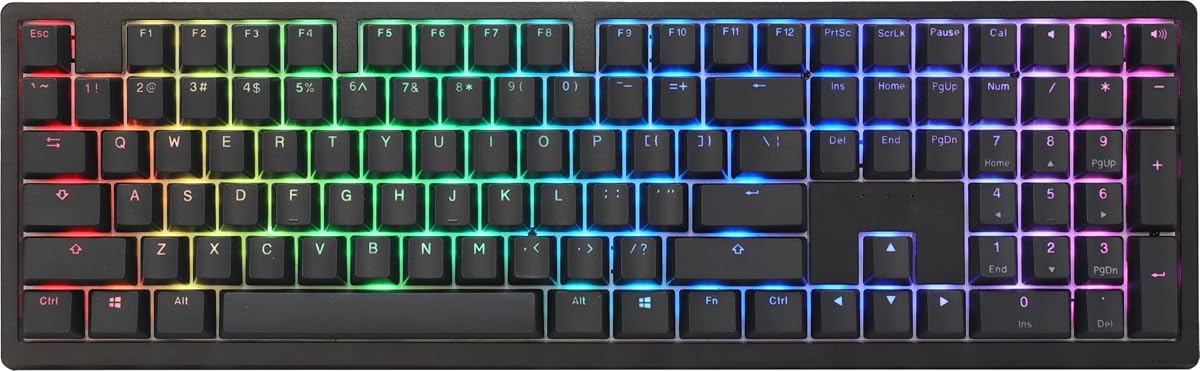


The Ducky OK-M is a fantastic entry point for those seeking a premium mechanical experience without breaking the bank. It offers a gasket-mount design and five-layer acoustic dampening that significantly reduce unwanted noise and vibration during typing sessions.
We may earn a commission when you buy through this link, at no additional cost to you.
Connectivity is a major strength here, supporting USB-C, Bluetooth, and 2.4GHz wireless for seamless switching between devices. The VIA support allows for deep customization of keys and macros, making it highly adaptable to different workflows and gaming needs.
While it lacks some of the advanced features found in higher-end models, the trade-off is a very competitive price point. The side RGB lighting adds a nice touch of style without being overly distracting, keeping the aesthetic clean and professional.
This keyboard is ideal for users who want a reliable, quiet, and versatile typing tool for both work and play. If you need a wireless solution that performs well across multiple platforms, the OK-M is a strong contender worth considering.
The five-layer acoustic dampening ensures a muted and satisfying sound profile that won't disturb others in shared spaces.
Switching between devices is effortless with support for wired, Bluetooth, and 2.4GHz wireless connections.
We may earn a commission when you buy through this link, at no additional cost to you.
The Ducky Origin stands out with its distinctive vintage design and high-quality construction. It features OEM profile Double Shot PBT keycaps that offer durability and a comfortable typing feel that improves over time with use.
We may earn a commission when you buy through this link, at no additional cost to you.
One of its standout features is the inclusion of Kailh yellow hotswap sockets on stabilizer keys, allowing for easy modifications and replacements. This level of attention to detail ensures a smooth and consistent typing experience across all keys.
The slim and narrow bezel design gives it a compact footprint on your desk, making it suitable for smaller setups. The detachable braided USB-C cable adds to the premium feel and makes transportation or storage much more convenient.
If you appreciate a retro aesthetic combined with modern mechanical performance, this keyboard is an excellent choice. It balances style and functionality well, making it a great addition to any workspace that values both form and function.
The vintage styling brings a classic look to your desk while maintaining modern mechanical switch performance.
Hotswap sockets on stabilizer keys allow for easy upgrades to reduce rattle and improve tactile feedback.
We may earn a commission when you buy through this link, at no additional cost to you.
This model brings the iconic Cherry MX Blue switches to the Origin series, delivering a highly satisfying clicky tactile feedback. The black finish complements the mechanical feel, creating a cohesive and professional look for any gaming or typing setup.
We may earn a commission when you buy through this link, at no additional cost to you.
Like its siblings, it includes Kailh yellow hotswap sockets on stabilizer keys, ensuring that the spacebar and other large keys remain smooth and rattle-free. The OEM profile Double Shot PBT keycaps ensure longevity and resistance to shine over years of use.
The slim bezel design maximizes typing area while minimizing desk space usage. The detachable braided USB-C cable ensures easy portability and a clean connection point that feels robust and well-made.
For typists who love audible feedback and want a reliable mechanical keyboard, this is a great option. Just be mindful that the clicky nature may not be suitable for quiet offices or shared environments where noise could be a distraction.
The Cherry MX Blue switches provide a distinct click that confirms every keystroke with satisfying precision.
Hotswap sockets make it easy to replace or lubricate stabilizers for an even smoother typing experience.
We may earn a commission when you buy through this link, at no additional cost to you.
The Ducky Zero 6108 is designed for gamers who want a compact footprint without sacrificing performance. Its Cherry MX2A Red switches offer a smooth linear action with a 45g actuation force, making it ideal for rapid key presses and high-speed gaming sessions.
We may earn a commission when you buy through this link, at no additional cost to you.
Tri-mode connectivity allows you to switch seamlessly between wired USB, 2.4GHz wireless, and Bluetooth for versatile usage across different devices. The RGB LED backlighting is customizable to match your style and setup, adding a vibrant touch to your desk.
Premium PBT keycaps ensure unmatched durability and a superior typing feel that withstands intense gaming sessions. Full N-Key Rollover guarantees that every keypress is registered accurately, which is critical for competitive gaming scenarios.
This keyboard is perfect for users who prioritize speed, versatility, and a compact design. If you need a reliable gaming keyboard that offers both wireless freedom and wired precision, the Zero 6108 delivers a strong performance package.
Smooth linear switches and full N-Key Rollover ensure fast and accurate inputs during intense gaming sessions.
Choose between wired, Bluetooth, or 2.4GHz wireless to fit your specific connection and latency needs.
We may earn a commission when you buy through this link, at no additional cost to you.
This variant of the Origin series combines the vintage aesthetic with the popular Cherry MX Blue switches for a robust typing experience. The PBT keycaps add a layer of durability and texture that feels excellent under the fingers during long typing sessions.
We may earn a commission when you buy through this link, at no additional cost to you.
Stabilizer keys feature Kailh yellow hotswap sockets, allowing for easy maintenance and customization to ensure smooth operation on larger keys. The slim and narrow bezel design helps keep the footprint compact while maintaining a full-function layout.
The detachable braided USB-C cable adds a premium touch and makes transport or storage easier for travel setups. This keyboard is built to last, with attention to detail in every component from the switches to the keycaps.
Ideal for enthusiasts who enjoy a clicky switch and appreciate the vintage look, this keyboard delivers both form and function. It is a solid choice for those who want a durable and reliable mechanical keyboard with classic appeal and modern features.
The combination of vintage styling and clicky switches provides a nostalgic yet efficient typing experience.
High-quality PBT keycaps resist wear and provide a consistent texture that feels great over time.
We may earn a commission when you buy through this link, at no additional cost to you.
The Ducky One 2 Pro Mini in White Edition offers a compact layout that saves desk space while maintaining premium build quality. It features Cherry Brown switches that provide a tactile bump without the noise, making it suitable for both work and gaming.
We may earn a commission when you buy through this link, at no additional cost to you.
The white case gives it a clean and modern aesthetic that stands out in any setup. True PBT keycaps ensure durability and a comfortable touch, resisting shine and wear even after extensive use over many years of daily typing.
RGB LED lighting allows you to personalize the look of your keyboard to match your theme or mood. While it lacks a number pad, the layout is optimized for efficiency, making it perfect for users who prioritize space and portability.
This is an excellent option for those who want a reliable and stylish compact keyboard with versatile tactile switches. If you value a clean design and high-quality materials in a smaller form factor, the One 2 Pro Mini is a compelling choice.
The compact Mini layout frees up valuable desk space while keeping all essential keys easily accessible.
Cherry Brown switches offer a quiet tactile feedback that suits typing and gaming equally well.
We may earn a commission when you buy through this link, at no additional cost to you.
The Ducky One X Wireless represents the cutting edge of mechanical keyboard technology with its next-generation analog switches. These inductive switches offer greater accuracy, consistency, and power efficiency compared to traditional mechanical switches, delivering an unparalleled typing and gaming experience.
We may earn a commission when you buy through this link, at no additional cost to you.
Its Quack Mechanics+ design utilizes a seven-layer dampening system and gasket-mount design to provide unprecedented sound and tactile control. The tri-mode connection allows seamless switching between USB wired, 2.4GHz RF wireless, and Bluetooth for maximum flexibility.
High-Density PBT doubleshot keycaps offer unrivalled shine resistance and durability, ensuring your keyboard looks great over years of daily use. Web-based software makes adjustments intuitive and easy without taking up space or resources on your computer.
This keyboard is perfect for professionals and gamers who demand precision and customization. If you want the latest in analog switch technology and a premium build that adapts to your needs, the One X Wireless is a top-tier investment.
Inductive switches provide variable actuation points for smoother and more accurate key control.
Seven-layer dampening and gasket-mount design deliver a premium sound profile and satisfying feel.
We may earn a commission when you buy through this link, at no additional cost to you.
The Ducky One 3 Matcha brings the QUACK Mechanics design philosophy to life with a unique colorway and exceptional build quality. It features dual-layer high-grade silicone and EVA foam sound dampeners that create a smooth and rich acoustic profile during typing.
We may earn a commission when you buy through this link, at no additional cost to you.
The exclusive Kailh yellow hotswap sockets on the dual-layer PCB make customization incredibly easy without soldering. Thick PBT Double-shot seamless keycaps ensure a durable and comfortable typing surface that resists wear and shine over time.
Improved PCB design and V2 stabilizers contribute to a stable and responsive keystroke experience. The remapped macro layout adds functionality for power users, while 3-level adjustable feet allow you to set the perfect typing angle.
This keyboard is a top choice for enthusiasts who value sound quality and build excellence. If you are looking for a keyboard that combines aesthetics with premium mechanical features and robust customization, the One 3 Matcha is a standout option.
Dual-layer dampeners deliver a deep, muted sound that enhances the typing experience significantly.
Exclusive hotswap sockets allow you to change switches easily to match your personal preference.
We may earn a commission when you buy through this link, at no additional cost to you.
The One 3 TKL Matcha offers a tenkeyless layout that balances functionality with space efficiency. It maintains the same high-quality construction as the full-size model, including dual-layer high-grade silicone and EVA foam sound dampeners for superior acoustic performance.
We may earn a commission when you buy through this link, at no additional cost to you.
Cherry MX Brown switches provide a tactile experience that is quiet enough for office environments yet responsive enough for gaming. The dual-layer PCB with exclusive Kailh yellow hotswap sockets ensures easy and convenient customization of your key layout.
Thick PBT Double Shot seamless keycaps add to the durability and tactile feel of the keyboard. Improved V2 stabilizers and 3-level adjustable feet ensure a comfortable and stable typing experience tailored to your specific desk and ergonomic needs.
This is an ideal choice for users who want a compact layout without sacrificing build quality or sound control. If you need a versatile keyboard that delivers a premium feel and efficient design, the One 3 TKL Matcha is a great fit.
The TKL layout provides all essential keys while freeing up desk space for more mouse movement.
Dual-layer dampeners ensure a smooth and satisfying typing sound that reduces unwanted noise.
We may earn a commission when you buy through this link, at no additional cost to you.
The Ducky One 2 80% provides a reliable and straightforward mechanical gaming experience. Cherry MX Red switches offer smooth linear keystrokes that are perfect for gaming and rapid typing without tactile bumps interrupting your flow.
We may earn a commission when you buy through this link, at no additional cost to you.
RGB lighting support allows you to customize the look of your keyboard to match your setup. The dual-layer PCB enhances durability and performance, while the detachable 1.5-meter USB-C cable ensures easy portability and a clean desk arrangement.
Additional PBT Double Shot colorful keycaps come included to let you personalize your board further. These extras add a fun element and allow for simple layout changes without needing extra purchases.
This keyboard is well-suited for users who want a dependable gaming keyboard with a good balance of features. If you value reliability and customization through RGB and keycaps, the One 2 80% is a solid and practical option.
Smooth linear switches allow for rapid and consistent key presses during intense gaming action.
Extra colorful keycaps and RGB support make it easy to style the keyboard to your preference.
We may earn a commission when you buy through this link, at no additional cost to you.
Selecting the right Ducky Keyboard involves understanding key features that impact performance, comfort, and usability in your specific setup and workflow.
Switch type determines tactile feedback and sound, with options like Cherry MX Red for smooth linear action, MX Brown for tactile quietness, and MX Blue for clicky feedback.
Choose a switch that matches your preference for noise and resistance during typing or gaming sessions.
Layout sizes range from full-size to 80%, TKL, and 60%, affecting available keys and desk footprint.
Select a size that balances functionality and space efficiency based on your workspace needs.
Options include wired USB-C, Bluetooth, and 2.4GHz wireless for flexible device connections.
Consider your need for portability and multi-device support when choosing connectivity modes.
High-quality materials like gasket-mount designs and PBT keycaps improve durability and typing feel.
Look for features like acoustic dampening and robust cases for long-term reliability.
Features like hotswap sockets and VIA support enable easy switch changes and advanced key mapping.
Prioritize keyboards that offer flexibility if you plan to modify your setup over time.
RGB backlighting adds visual appeal and can help identify keys in low-light environments.
Ensure the keyboard offers customizable lighting if aesthetics are important to your setup.
Acoustic dampening layers and foam reduce noise and improve the overall typing experience.
If noise control matters, choose models with multiple dampening layers and solid construction.
Prices vary widely based on features and materials, so balance cost with required functionality.
Evaluate each model's features to ensure you get the best value for your specific use case.
Connect your keyboard using the provided USB-C cable or pair it via Bluetooth or 2.4GHz dongle depending on your needs and setup.
Use software like VIA to customize key mappings, macros, and lighting settings to match your workflow and personal preferences.
Clean regularly with compressed air and a soft brush to remove debris, and avoid harsh chemicals to maintain the PBT keycaps.
Ducky stands out for its premium build quality, robust PBT keycaps, and attention to detail in acoustic design. Their keyboards often include features like hotswap sockets and superior stabilizers for a consistent typing experience.
Yes, most Ducky keyboards support Windows, Mac, and Linux via standard USB or Bluetooth connections. Some models include dedicated keycaps or software settings to switch between operating systems seamlessly.
Hotswap sockets allow you to change switches without soldering, making it easy to customize your keyboard for different preferences or replace worn switches quickly and safely.
Most models work with PC and some consoles depending on connectivity. Check specific compatibility for PlayStation or Xbox before purchasing as some wireless connections may not be supported.
PBT keycaps are highly durable and resistant to shine, lasting for years of daily use. They maintain texture and appearance longer than ABS caps due to their superior material composition.
Many models support VIA software for web-based key and macro customization without installing local software. This allows for easy and intuitive adjustments across different platforms and devices.
Yes, models with tactile or linear switches and sound dampening are great for offices. However, avoid clicky blue switches if you want to keep noise levels low in shared environments.
Yes, most keyboards feature detachable USB-C cables which allows for easy replacement or swapping with custom cables for better portability or aesthetic customization.
The top picks in this guide highlight excellent options across different needs, from the budget-friendly OK-M to the advanced One X Wireless with analog precision.
Prioritize switches, layout, and connectivity based on your daily tasks to find a keyboard that improves productivity and comfort without unnecessary features.
Check current availability and specifications before buying as models may update periodically to ensure you get the best fit for your needs.