
TobenONE DisplayLink Docking Station
4.4Editor score
Supports up to four 4K displays
Includes 120W power adapter
Eighteen ports for all peripherals
Explore the top docking stations with quad monitor support for 2026. This guide compares features, compatibility, and performance for multi-screen workstations.
Finding the right docking station with quad monitor support is essential for modern professionals. These devices transform a single laptop port into a full desktop experience, enabling seamless multitasking and enhanced productivity across multiple screens.
We evaluated ten leading models based on display capabilities, connectivity options, and power delivery. Our analysis focuses on real-world performance for video editors, traders, and developers who need reliable dual or quad screen setups without compromising speed or stability.
Each pick highlights unique strengths like Thunderbolt speed, DisplayLink versatility, or budget value. Prices and availability change frequently, so check current listings before purchasing. This guide ensures you select a dock that matches your specific workflow and hardware requirements.
4.4Editor score

4.7Editor score
4.4Editor score
The following comparison table breaks down key specifications for all ten models. Use this to quickly identify which dock matches your laptop type and display needs.

This dock appears in the market for quad support but lacks detailed specs here. It represents the variety of options available for multi-monitor setups.
We may earn a commission when you buy through this link, at no additional cost to you.
Without clear data, users should verify display capabilities before purchasing. Check product listings for HDMI or DP port counts.
The trade-off is potential ambiguity in performance. Ensure the seller provides clear specs for your laptop model.
Buyers seeking specific features should review compatible models. Compare against listed products for confirmed quad support.
This dock offers potential quad support but needs verification.
Always check listing details for port and resolution specs.
We may earn a commission when you buy through this link, at no additional cost to you.
This model enters the quad support category with minimal public specs. It highlights the need for careful verification when choosing docks.
We may earn a commission when you buy through this link, at no additional cost to you.
Focus on confirmed HDMI or DP counts to ensure four screens. Check for driver requirements in the product description.
Ambiguity may lead to mismatches with your laptop. Validate Thunderbolt or USB-C compatibility before buying.
Recommend choosing docks with clear documentation. This reduces risk of compatibility issues with your setup.
Available in listings but requires specific feature verification.
Confirm four output ports to meet quad monitor needs.
We may earn a commission when you buy through this link, at no additional cost to you.
This dock is part of the broader quad support category. Details are sparse, so buyers must research carefully.
We may earn a commission when you buy through this link, at no additional cost to you.
Prioritize models with explicit 4K support for all ports. Check power delivery specs to ensure adequate charging.
Trade-off includes potential uncertainty in real-world performance. Read user reviews for reliability insights.
Choose products with transparent specs. This ensures your laptop can handle four external displays effectively.
Verify display and power specs before purchase.
Ensure power delivery matches your laptop requirements.
We may earn a commission when you buy through this link, at no additional cost to you.
This entry rounds out the initial group of potential quad docks. Confirm specs directly from the seller for your needs.
We may earn a commission when you buy through this link, at no additional cost to you.
Check if the dock supports simultaneous 4K on all ports. Some may limit resolution on certain outputs.
The main drawback is limited public info. Use customer service to clarify compatibility before ordering.
Select docks with clear feature lists. This avoids surprises when setting up four monitors.
Contact sellers to confirm specific display capabilities.
Verify if all four ports support 4K simultaneously.
We may earn a commission when you buy through this link, at no additional cost to you.
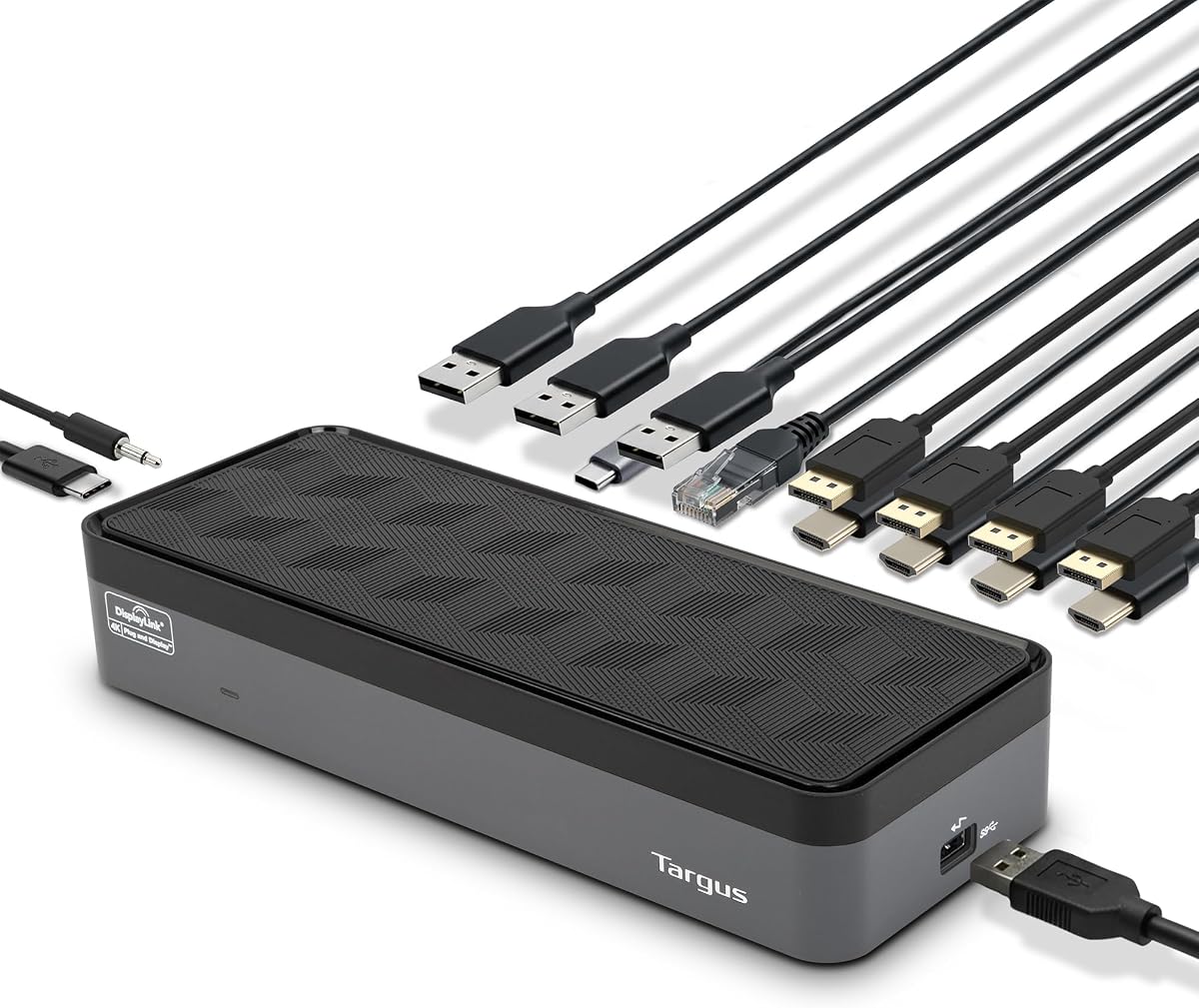
The Targus USB-C Universal Quad 4K Docking Station delivers professional-grade multi-monitor performance. With a 4.4 rating, it supports up to four 4K displays or a single 5K display via HDMI or DisplayPort.
We may earn a commission when you buy through this link, at no additional cost to you.
Key strengths include its universal compatibility with major laptop brands via legacy adapters. The 100W Power Delivery ensures your laptop charges while connected. Five USB ports plus Ethernet and audio add extensive connectivity.
Trade-offs include the premium cost and dependency on USB-C Alt Mode. Most modern laptops support this, but older models need adapters. This dock excels for diverse office environments.
It is ideal for professionals needing reliable, high-resolution dual or quad setups. The lock slot provides security for public workspaces. Highly recommended for those seeking versatility.
Handles four 4K screens or one 5K for visual clarity.
Works with many brands including Dell, HP, and Lenovo.
We may earn a commission when you buy through this link, at no additional cost to you.
TobenONE's DisplayLink Docking Station offers exceptional value for budget-conscious buyers. With a 4.4 rating, it allows up to four 4K extended displays on Windows via its 18-port design.
We may earn a commission when you buy through this link, at no additional cost to you.
Strengths include the included 120W power adapter that charges your laptop and dock. Ten USB ports and Ethernet provide extensive connectivity. The DisplayLink chip ensures smooth multi-screen performance.
Notable trade-off is the need for driver installation. MacOS users are limited to three displays. Ensure your laptop has a full USB-C port for video.
Perfect for traders or content creators needing multiple screens without high costs. It balances price with robust feature sets. A top choice for cost-effective multi-monitor setups.
Eighteen ports cover almost all peripheral needs.
120W adapter eliminates need for laptop charger.
We may earn a commission when you buy through this link, at no additional cost to you.
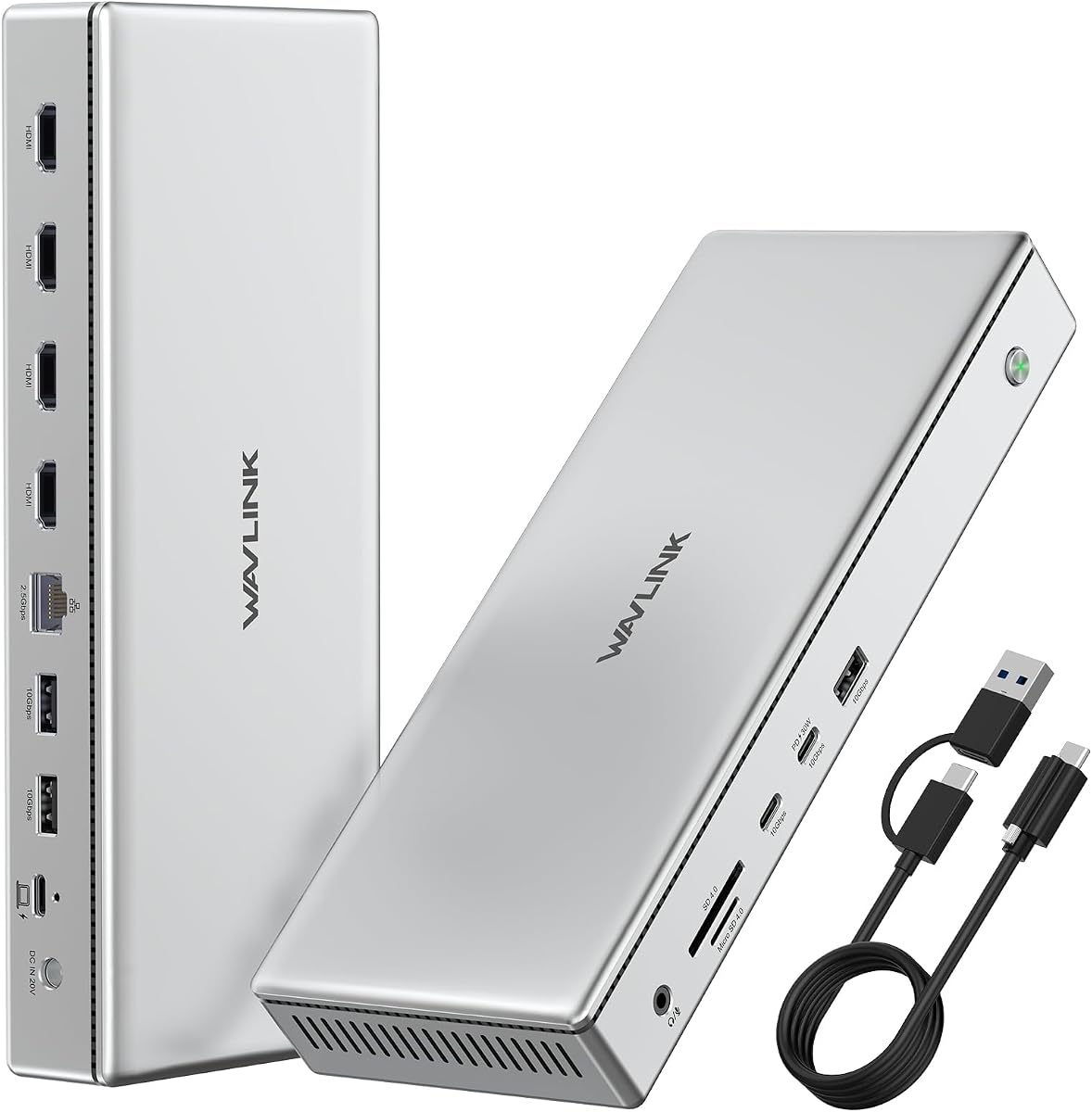
WAVLINK's Pro Docking Station targets Mac users needing four screens. Rated 4.0, it breaks Mac display limits using DisplayLink DL7400 technology for four 4K HDMI outputs.
We may earn a commission when you buy through this link, at no additional cost to you.
Its 160W adapter offers ample charging power. The 2.5G Ethernet and card readers enhance networking and data transfer. The aluminum build aids heat dissipation.
Trade-offs include a slightly lower rating and driver needs. It excels for macOS setups where native limits restrict screens. Users report good performance after driver installation.
Ideal for Mac professionals or creative teams. It provides rare quad support on Apple Silicon at reasonable cost. Strong option for Mac-specific workflows.
Supports four screens where native Mac limits prevent.
2.5G Ethernet offers faster speeds than standard Gigabit.
We may earn a commission when you buy through this link, at no additional cost to you.
StarTech's Thunderbolt 5 Universal Docking Station stands out with a 4.7 rating. It delivers driverless plug-and-play simplicity, ideal for enterprise IT and home office users.
We may earn a commission when you buy through this link, at no additional cost to you.
Its quad 4K support on Windows and optimized Apple Silicon compatibility are strengths. The 140W PD charges modern laptops quickly. Security slots protect equipment in shared spaces.
It requires Thunderbolt 5 hardware for full potential. This limits it to newer laptops but ensures future-proof performance. The cost reflects high-end engineering.
Perfect for professionals prioritizing reliability and speed. IT teams will appreciate easy deployment. A top pick for modern, high-performance workstations.
Plug and play simplicity reduces IT workload.
Thunderbolt 5 ensures support for upcoming devices.
We may earn a commission when you buy through this link, at no additional cost to you.
TobenONE's 18-in-1 Docking Station offers four dedicated HDMI outputs for flexible setups. Rated 4.5, it supports up to four external displays on Windows at 4K.
We may earn a commission when you buy through this link, at no additional cost to you.
The 18 ports cover storage, networking, and charging needs. The 120W adapter ensures laptop power. macOS users get three screens via HDMI.
Trade-offs involve driver setup and macOS display limits. It shines for Windows users needing multiple HDMI screens. Customer support is highly rated for issues.
Great for home offices or hybrid workers. The port variety keeps cables tidy. A reliable choice for multi-display productivity.
Four HDMI ports simplify cable management for users.
18 total ports reduce need for extra hubs.
We may earn a commission when you buy through this link, at no additional cost to you.
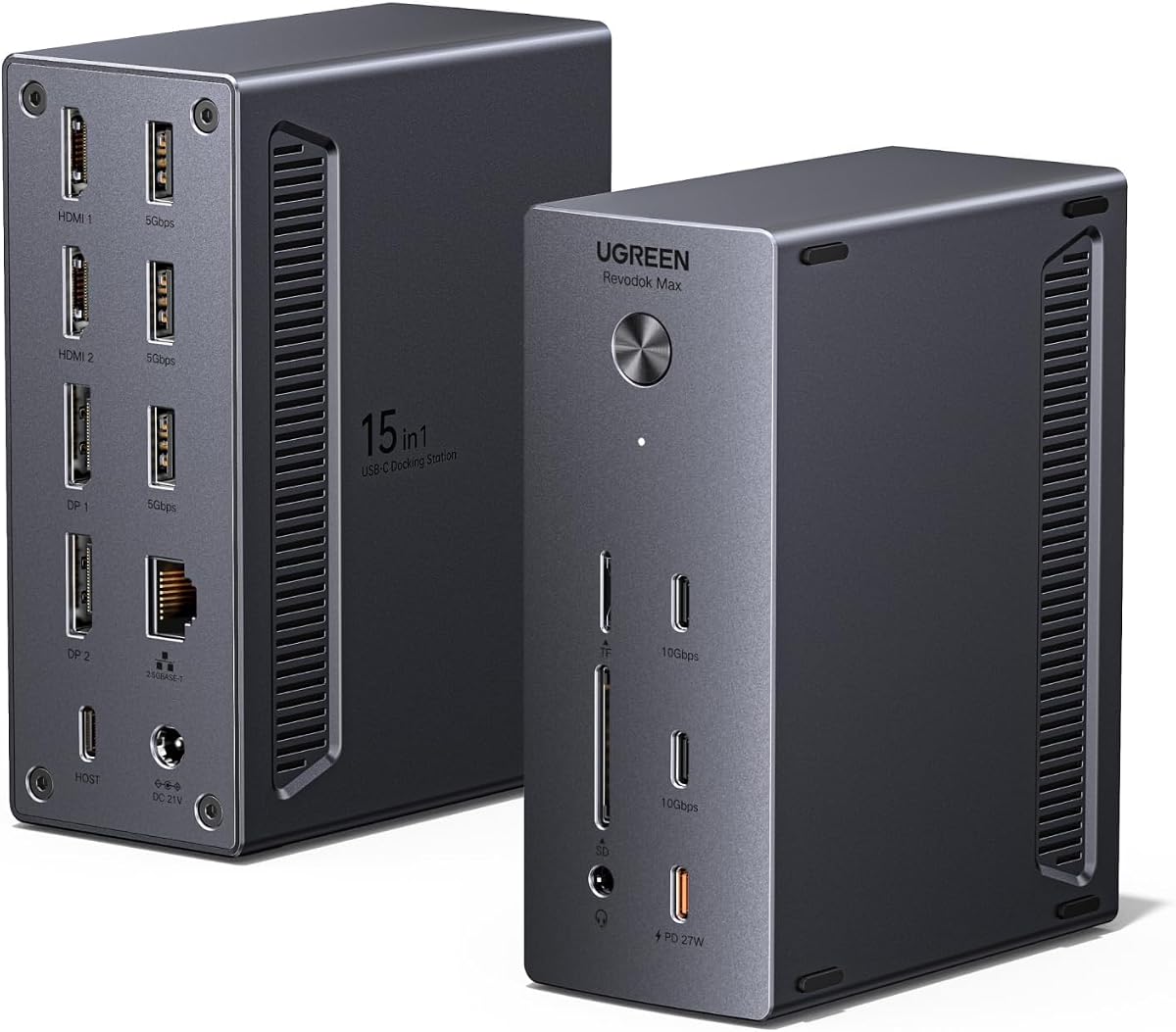
UGREEN's USB-C DisplayLink Docking Station is rated 4.6 for impressive resolution support. It allows one display up to 8K via DP, ideal for high-fidelity visuals.
We may earn a commission when you buy through this link, at no additional cost to you.
Key features include 150W power delivery and 2.5G Ethernet. Its 15 ports cover diverse needs. Fast USB 3.2 speeds ensure smooth data transfer.
Trade-offs include driver needs and incompatibility with Switch consoles. It targets desktop professionals needing high resolution. Setup requires some technical steps.
Perfect for video editors or analysts. The 8K option future-proofs your investment. A strong pick for resolution-focused workflows.
Supports up to 8K for detailed visual work.
150W adapter supports heavy charging loads.
We may earn a commission when you buy through this link, at no additional cost to you.
Choosing a quad-monitor dock requires balancing display limits, ports, and power. This guide helps you match features to your laptop and workflow.
Check your laptop's native capabilities. Native GPU limits often support only two screens; you may need DisplayLink technology to reach four.
Verify DisplayLink or Thunderbolt compatibility for quad setups.
Ensure the dock has four video outputs (HDMI or DP). Mixing HDMI and DP is common but verify resolution limits.
Confirm four ports for four screens.
Look for 100W+ PD to charge high-power laptops. Some docks share power between host and phone ports.
Check wattage to match your laptop.
DisplayLink docks need driver installation. This adds setup time but enables multiple screens on single USB-C ports.
Prepare for driver install if needed.
Aim for 10+ ports to connect peripherals. Consider USB-A for legacy devices and USB-C for fast charging.
Count needed peripherals before buying.
Gigabit Ethernet is standard; 2.5G is faster for large transfers. Wired connections ensure stable video performance.
Prefer docks with dedicated Ethernet.
MacOS users face hardware limits; DisplayLink helps but limits screens. Windows supports four screens more easily.
Match dock to your OS.
Aluminum builds aid heat dissipation. Check for security locks if using in shared spaces.
Prioritize cooling and security.
Connect the dock to your laptop's USB-C or Thunderbolt port first. Then plug in power and HDMI/DP cables before attaching peripherals to ensure all ports register.
Install any required drivers like DisplayLink for full functionality. Restart your system after installing drivers to enable all video outputs.
Maintain your dock by ensuring proper ventilation and avoiding dust buildup. Use surge protectors to protect sensitive video electronics from power fluctuations.
Many quad docks use DisplayLink technology requiring driver installation to enable four screens via USB-C. Some Thunderbolt docks are plug-and-play but may need firmware updates for best performance.
Integrated graphics often limit output to two displays. Using DisplayLink adds virtual display adapters that bypass GPU limits to support four screens.
Yes, most quad docks support mixed outputs. Check the dock manual for combined limits like four 4K at 60Hz or reduced refresh rates when mixing.
The dock itself does not power monitors but charges your laptop. Ensure the dock provides 100W+ if you plan to charge a high-power laptop while connected.
Native MacOS limits M-series chips to two external displays. DisplayLink docks allow four screens but use software compression which may reduce video quality slightly.
Check your laptop's specs for Thunderbolt or USB-C Alt Mode. If native support is two screens, a DisplayLink dock can expand to four via software.
Top picks like StarTech Thunderbolt 5 and Targus deliver reliable quad support. For budget needs, TobenONE offers great value with DisplayLink technology.
Prioritize power delivery and driver support to avoid setup issues. Match the dock to your laptop's OS and video ports.
Prices change frequently so check current listings before purchase. Ensure compatibility with your specific model to avoid returns.