
Anker Laptop Docking Station Dual Monitor
4.5Editor score
8-in-1 Connectivity
4K HDMI Output
85W Charging
Compare the top docking stations for Dell laptops including models from Dell Anker and HoDo to find the best hub for your workflow and budget needs.
Finding the right docking station for your Dell laptop can transform your workspace into a powerful productivity hub. With the right connectivity solutions you can expand your display options charge your device and manage all your peripherals through a single cable connection.
We have evaluated the leading models on the market based on port selection power delivery capabilities and compatibility with Dell systems. This guide covers ten top rated options ranging from budget friendly hubs to premium enterprise grade docking stations for various user needs.
Each pick highlights specific strengths and ideal use cases to help you make an informed decision for your setup. Please note that prices and availability may change over time so verify current details before purchasing your next accessory.
4.5Editor score

4.5Editor score

4.3Editor score
This side by side comparison breaks down the key specifications and features of each top rated docking station to help you identify the best match for your Dell laptop setup.




The Dell Pro Laptop Docking Station WD25 stands out as a top choice for Dell users seeking reliable connectivity and power delivery with a 4.5 star rating it delivers professional grade performance for modern workspaces.
We may earn a commission when you buy through this link, at no additional cost to you.
Its enhanced compatibility with Dell AI PCs and non-Dell systems ensures seamless integration while the ambidextrous USB-C cable allows flexible routing. The dock supports up to four high-res displays and provides up to 100W of power for efficient charging.
While it comes at a premium price the sustainable design and robust connector justify the investment for enterprise users. Management capabilities help IT teams maintain efficiency and reduce downtime across large fleets of devices.
Ideal for professionals who need multi-monitor setups and reliable power this dock offers a future-proof solution. It balances performance and sustainability making it a strong recommendation for Dell laptop owners.
Delivers up to 100W of power and supports four high-res displays for expanded productivity.
Built with at least 65% post-consumer recycled materials and features a durable USB-C connector.
We may earn a commission when you buy through this link, at no additional cost to you.
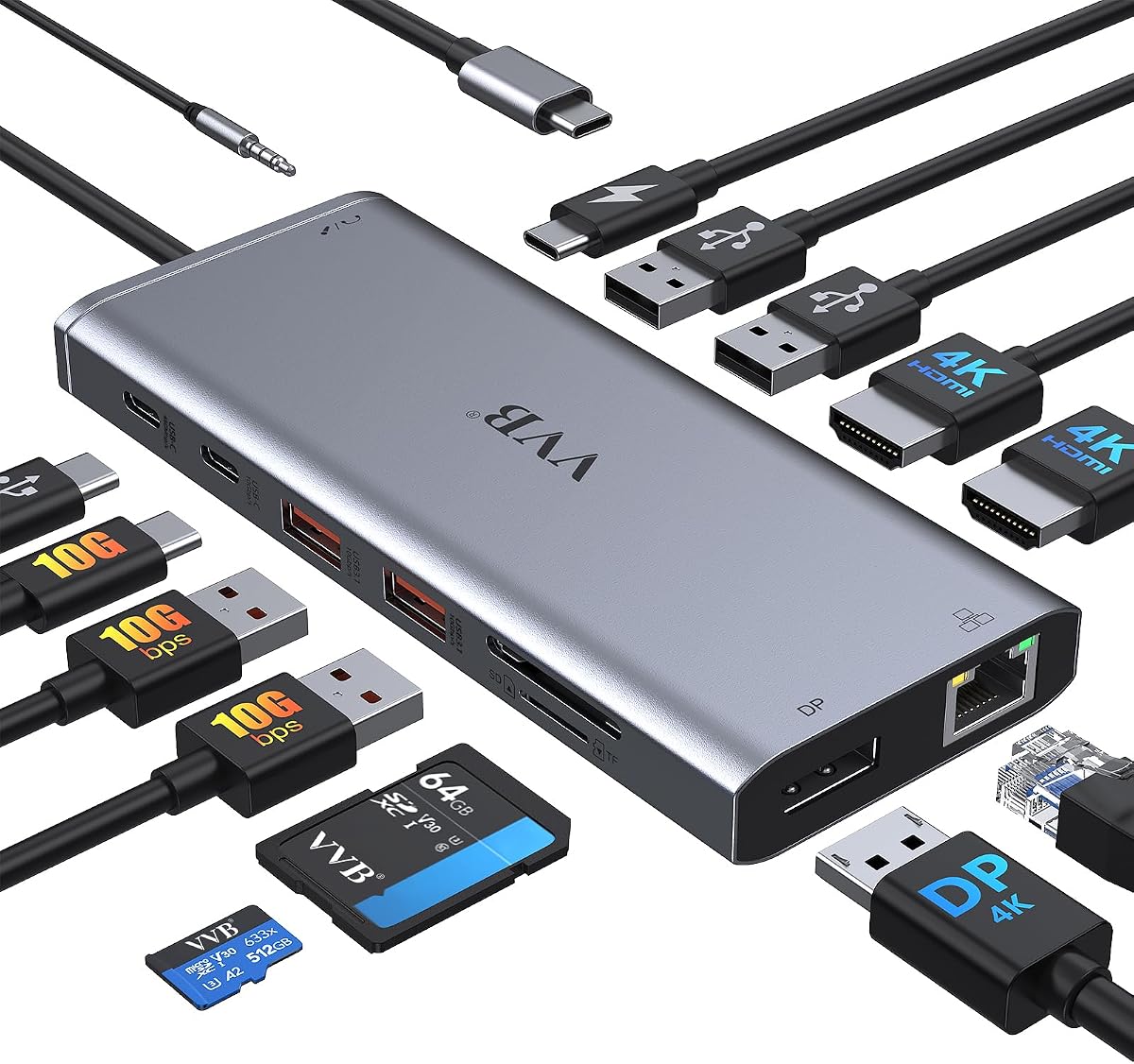
The Anker Laptop Docking Station Dual Monitor offers exceptional value for budget conscious users who need reliable dual display support. With a 4.5 star rating it balances performance and affordability effectively for everyday work tasks.
We may earn a commission when you buy through this link, at no additional cost to you.
It provides massive expansion with an 8-in-1 design including two HDMI ports for 4K output at 30Hz or 60Hz for single screens. The 85W pass-through charging keeps your laptop powered while you connect multiple peripherals.
Although it does not support Linux and is limited to dual displays it covers most common needs. The included Ethernet port and card reader add versatility for file transfers and stable internet connections.
Perfect for students and professionals on a budget this hub delivers solid performance without breaking the bank. The 18-month warranty and customer service provide peace of mind for daily use.
Supports dual HDMI displays with up to 85W Power Delivery for efficient charging.
Offers a comprehensive 8-in-1 feature set at an affordable price with strong warranty support.
We may earn a commission when you buy through this link, at no additional cost to you.
The Anker Prime Docking Station 14-in-1 delivers premium connectivity for power users who demand extensive port availability and high speed performance. Its 4.3 star rating reflects strong functionality across data transfer and display tasks.
We may earn a commission when you buy through this link, at no additional cost to you.
It offers an impressive 160W total output capable of charging up to four devices simultaneously. The dual HDMI ports support crystal-clear streaming at 2K@60Hz while USB-C ports provide speeds up to 10Gbps for rapid file movement.
While it is pricier than basic options the sheer number of ports and high wattage make it ideal for complex setups. The design efficiently manages data flow across multiple devices without bottlenecking performance.
Recommended for professionals needing robust multi-device charging and fast data transfer this dock is a powerful solution. It excels in managing diverse peripherals and offers a comprehensive hub for advanced workstations.
Delivers 160W total output to charge up to four devices at high wattage simultaneously.
Provides 10Gbps data speeds and dual display support for efficient multitasking and file transfers.
We may earn a commission when you buy through this link, at no additional cost to you.
This USB C Docking Station offers versatile triple display support that appeals to users needing extended screen real estate on a budget. With a 4.3 rating it provides a range of video outputs including HDMI DP and VGA for various monitors.
We may earn a commission when you buy through this link, at no additional cost to you.
It supports up to 4K triple display videos though connecting VGA limits resolution to 1080P. The 100W charging port ensures your laptop stays powered while running multiple peripherals without needing extra adapters.
MacOS users may experience mirrored screen limitations but the hub works well for Windows setups. It is a practical choice for those who need legacy VGA compatibility alongside modern HDMI and DP connections.
Ideal for budget focused buyers needing triple monitor capabilities this dock delivers functional versatility. The combination of video ports and charging power makes it a solid pick for home office use.
Offers 2 HDMI plus DP and VGA ports to support triple display configurations up to 4K.
Features a 100W USB-C PD charging port to keep your laptop charged during heavy use.
We may earn a commission when you buy through this link, at no additional cost to you.
The Anker Nano Laptop Docking Station introduces a unique detachable design that serves both desktop and travel needs with one device. Its 4.2 rating highlights its utility for users who want flexibility without buying multiple hubs.
We may earn a commission when you buy through this link, at no additional cost to you.
It connects up to three monitors with 4K single or 2K dual support. The detachable 6-in-1 hub allows you to take key ports on the go while leaving the main dock connected to your desk setup.
Includes a 140W adapter to ensure stable performance under full load. USB-C data ports enable 10Gbps transfers for quick file access and all necessary ports are included for a complete workstation experience.
Best for hybrid workers needing a single solution for home and travel this dock offers versatile functionality. The detachable feature and robust port selection make it a standout choice for portable productivity.
Features a detachable 6-in-1 hub for travel and a 13-in-1 dock for full desktop work.
Delivers 100W Power Delivery and supports triple displays with a included power adapter.
We may earn a commission when you buy through this link, at no additional cost to you.
This USB C Laptop Docking Station extends connectivity with a rich array of 14 ports for comprehensive peripheral support. Its 4.3 rating indicates reliable performance for users needing diverse input and output options.
We may earn a commission when you buy through this link, at no additional cost to you.
It supports triple displays with up to 4K@60Hz on single ports. The USB-C and USB-A ports enable 10Gbps transfers while the Ethernet port ensures stable wired networking for consistent performance.
While an adapter is not included the hub supports up to 100W charging with a compatible cable. The SD card reader and audio jack add convenience for media workflows and headset connections.
Ideal for users seeking extensive connectivity in one device this hub balances speed and versatility. It is a strong option for those needing both high-speed data and multi-monitor capabilities.
Supports triple displays with up to 4K resolution for expanded workspace and productivity.
Provides 10Gbps USB transfers and Gigabit Ethernet for stable and fast connectivity.
We may earn a commission when you buy through this link, at no additional cost to you.
The Dell WD19S 180W Docking Station is built for enterprise environments requiring reliable power and robust connectivity. With a 3.8 rating it delivers functional performance for users prioritizing Dell ecosystem integration.
We may earn a commission when you buy through this link, at no additional cost to you.
It provides 130W Power Delivery to charge demanding laptops while supporting dual displays via HDMI and DisplayPort. The design optimizes workspace organization with a single cable connection for multiple peripherals.
Though rated lower by some users due to compatibility nuances it remains a solid choice for specific Dell models. Its power capacity ensures your laptop performs well under heavy workloads without draining the battery.
Recommended for business users with compatible Dell laptops needing high power output this dock is a practical investment. It simplifies desk setups and supports professional workflows effectively.
Offers 180W total power with 130W delivery to support high-performance laptops under load.
Supports dual displays through HDMI and DisplayPort for flexible multi-monitor configurations.
We may earn a commission when you buy through this link, at no additional cost to you.
The Anker Laptop Docking Station 13-in-1 offers a vertical design that saves desk space while delivering extensive connectivity. Its 4.0 rating reflects reliable performance for users needing multiple ports in a compact form.
We may earn a commission when you buy through this link, at no additional cost to you.
It supports triple displays on Windows with 85W charging for your laptop. The 10Gbps USB-C port and fast SD card reader facilitate quick data transfer for content creators and professionals.
While Linux support is limited it works well for Windows ChromeOS and full-functional USB-C laptops. The compact vertical stand is ideal for crowded workspaces where surface area is at a premium.
Best for desk-conscious users needing high port counts this dock balances utility and footprint. It provides a complete set of connections while maintaining a small visual profile on your desk.
Features a vertical compact layout that saves desk space while offering 13 ports.
Enables triple displays and fast SD card reads for efficient multi-tasking workflows.
We may earn a commission when you buy through this link, at no additional cost to you.
The Dell WD19 130W Docking Station provides a reliable connection for Dell laptops with essential power and video features. With a 4.0 rating it is a consistent option for standard office setups.
We may earn a commission when you buy through this link, at no additional cost to you.
It offers 90W Power Delivery to charge compatible laptops while supporting dual displays through HDMI and DisplayPort. The dock includes audio outputs and Ethernet for comprehensive peripheral and network access.
While not the most powerful option it covers common needs for business users. Its compatibility with Dell Latitude and XPS models ensures it works smoothly without driver headaches.
Suitable for users needing basic dual monitor support and charging this dock delivers dependable performance. It simplifies connections for Dell laptops and remains a practical choice for daily work.
Delivers 90W charging and supports dual displays for a balanced workstation setup.
Includes audio outputs and Ethernet for complete peripheral and network connectivity.
We may earn a commission when you buy through this link, at no additional cost to you.
This renewed WD19 Dell Docking Station offers a cost effective way to access high quality enterprise features. With a 4.1 rating it provides reliable performance for buyers willing to consider refurbished hardware.
We may earn a commission when you buy through this link, at no additional cost to you.
It includes an 180W adapter and supports dual monitors via HDMI and DisplayPort. The dock simplifies setup with USB-C connectivity and includes essential ports for peripherals and network access.
While it is a renewed unit it is tested for functionality and comes with relevant accessories. Verifying compatibility with your specific model before purchase ensures smooth operation without issues.
Best for budget conscious buyers seeking Dell enterprise specs this dock delivers value. It balances cost savings with robust connectivity making it a smart pick for those needing reliable docking.
Offers a renewed option with 180W adapter included for significant savings.
Supports dual monitors and provides comprehensive ports for professional work setups.
We may earn a commission when you buy through this link, at no additional cost to you.
Choosing the right docking station requires understanding your specific connectivity needs power requirements and budget constraints.
Power delivery determines how much power your dock provides to charge your laptop while in use. Look for docks that offer at least 65W to 100W depending on your laptop size and performance needs.
Ensure the dock supports USB-C Power Delivery to charge your device efficiently while running all your connected peripherals without draining the battery.
Consider how many monitors you need and what resolutions you require. Modern docks support up to three displays with 4K options for detailed work and multitasking.
Check if your laptop supports DisplayPort Alt Mode or Thunderbolt to enable multiple external displays at high refresh rates.
Evaluate the number and types of ports you need for keyboards mice hard drives and other peripherals. USB-A USB-C HDMI DisplayPort and Ethernet ports are common necessities.
Select a dock with enough ports to avoid needing additional hubs and ensure USB-C ports support data transfer at fast speeds.
Not all USB-C ports support video and power delivery. Verify that your Dell laptop has a full-featured USB-C or Thunderbolt port to work with the dock.
Check manufacturer compatibility lists to avoid issues especially if using non-Dell devices or older laptop models.
Durable docks with robust connectors last longer and handle daily plugging and unplugging better. Look for models with aluminum bodies or reinforced ports.
Consider sustainable options if environmental impact matters to you and seek docks made with recycled materials.
Docking stations range from affordable hubs to premium enterprise models. Determine what features are essential and prioritize accordingly to stay within budget.
Invest more in docks with better warranties and customer support for long term reliability and service.
Horizontal docks take up more surface area while vertical designs save space. Choose based on your desk layout and whether you need portability.
Portable hubs may be better for travelers while larger docks suit stationary desktop workstations.
A good warranty protects your investment against defects or failures. Brands like Anker offer extended warranties that can add value.
Check customer support responsiveness to ensure help is available if you encounter setup or performance issues.
Begin by connecting the docking station to a power outlet and then link it to your Dell laptop via the USB-C or Thunderbolt cable. Ensure the cable is fully seated in both ports to avoid intermittent connections or charging issues.
Once connected check your operating system settings to configure external displays and verify that all ports are recognized. Install any available driver updates from the manufacturer website to maintain compatibility and performance.
To maintain longevity avoid bending the cable sharply and keep the dock in a well ventilated area to prevent overheating. Clean ports gently with a dry soft brush or compressed air to remove dust and debris.
Dell branded docks like the WD19S or WD25 offer optimal compatibility with Latitude series devices. They ensure full power delivery and support for multiple displays without requiring additional drivers. Always verify your model number against the dock's compatibility list before purchase.
Yes many Dell docking stations including the WD19 and WD25 support up to three external displays. However you must use specific combinations of HDMI and DisplayPort connectors. Check your laptop model to ensure it supports multi stream transport.
Most modern docks provide Power Delivery to charge your laptop simultaneously. The charging speed depends on the dock wattage and your laptop requirements. For best results use a dock rated at least 65W to 100W.
Thunderbolt docks offer faster data transfer speeds typically up to 40Gbps and support more displays than standard USB-C docks. USB-C docks are sufficient for most users with 10Gbps or 20Gbps transfer needs.
Some users report firmware bugs requiring updates for stable display output. Keeping your dock firmware updated via Dell Command Update helps avoid these issues. Always check compatibility notes for your specific laptop model.
Use compressed air or a soft anti-static brush to remove dust from ports gently. Avoid using liquids directly on the dock to prevent damage. Regular cleaning maintains good electrical contacts and prevents connection problems.
This guide reviewed ten top rated docking stations offering various ports and features for Dell users. The Dell Pro WD25 stands out for enterprise users while Anker models provide excellent value and versatility for home offices.
Prioritize power delivery capacity and display support based on your workflow needs. A dock with sufficient wattage and multi-monitor capabilities ensures your laptop remains a powerful desktop replacement.
Prices and availability may change so check current listings before purchasing. Verify compatibility with your specific Dell model to ensure seamless integration and reliable daily performance.