
Thermalright Assassin X120 Refined SE
4.7Editor score
Four heat pipes with AGHP tech
Quiet TL-C12C PWM fan included
Compatible with Intel and AMD sockets
This guide compares the top 10 CPU Air Cooler Fan Heatsink models for performance, noise, and compatibility to help you choose the right cooling solution.
Choosing the right CPU Air Cooler Fan Heatsink is essential for maintaining optimal system performance and longevity. High-quality coolers dissipate heat efficiently, preventing thermal throttling during intense workloads or gaming sessions. A well-designed heatsink ensures your processor runs at peak speeds without overheating issues.
We evaluated ten top-rated air coolers based on cooling efficiency, noise levels, build quality, and socket compatibility. Our analysis focuses on real-world performance metrics and user feedback to ensure you get reliable data. Each product was assessed for its ability to handle modern high-core count processors effectively.
Every pick highlights key specifications, pros, and cons to help you make an informed decision. Prices may vary over time, so check current listings before purchasing. This guide aims to simplify your search for the best thermal solution for your specific build requirements.
4.7Editor score

4.8Editor score

4.8Editor score
This side-by-side comparison highlights the key specifications and features of all ten selected air coolers to help you find the perfect match for your build.
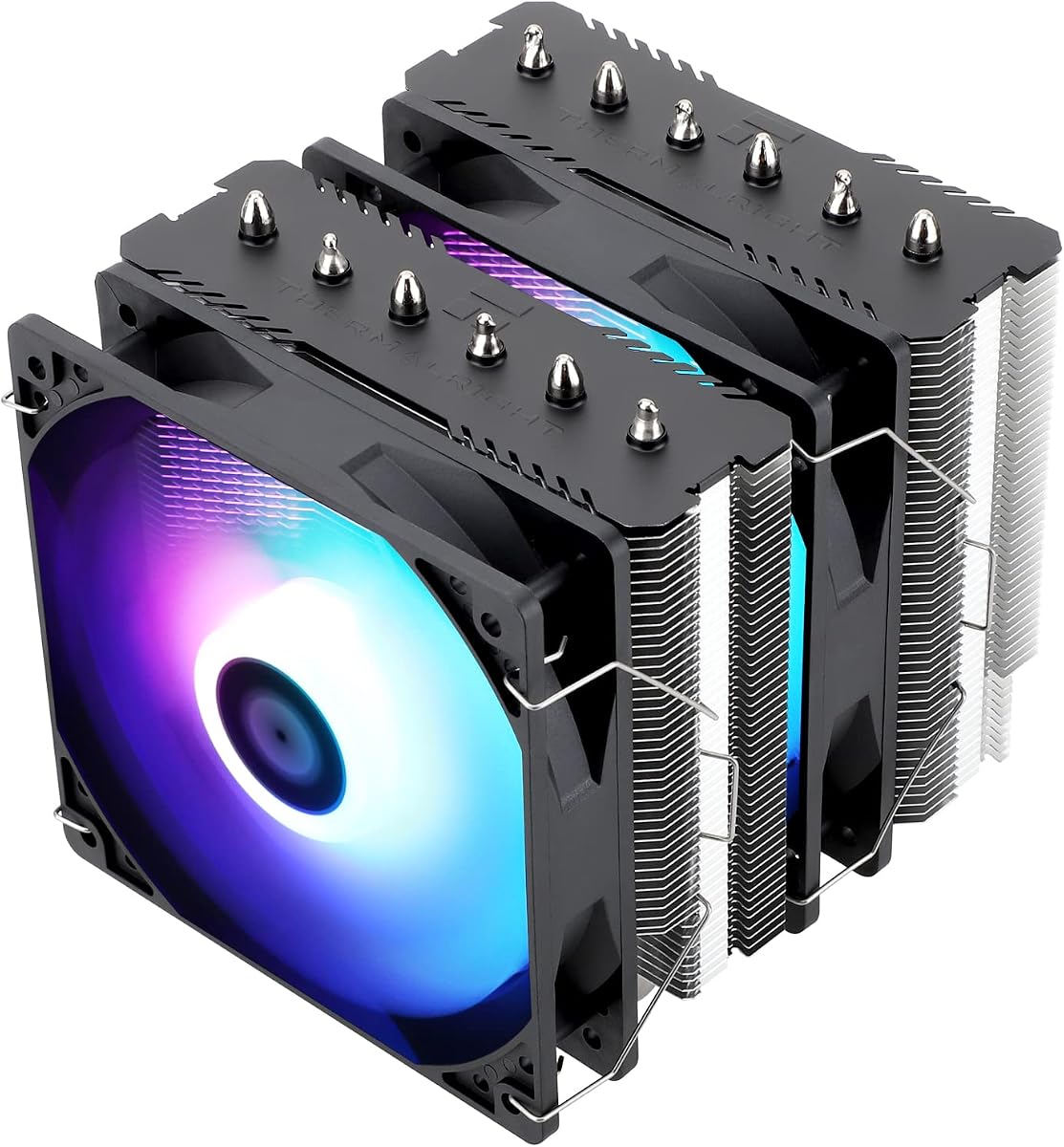


This thermalright Assassin X120 Refined SE offers exceptional value for budget-conscious builders seeking reliable cooling performance. It holds a 4.7-star rating from users who appreciate its efficient heat dissipation capabilities despite its compact footprint. The AGHP technology ensures orientation independent cooling which is a standout feature at this price point.
We may earn a commission when you buy through this link, at no additional cost to you.
The cooler utilizes four 6mm heat pipes combined with a TL-C12C PWM fan to deliver consistent airflow. Its aluminum heatsink cover helps protect the fins while maintaining a sleek appearance. The S-FDB bearings ensure long service life making it a durable choice for daily computing tasks and moderate workloads without breaking the bank.
While it lacks dual fans or RGB lighting, the performance is more than adequate for standard processors. The single fan setup keeps noise levels low which is beneficial for quiet office environments. The trade-off is less cooling capacity compared to larger models but it remains a solid pick for most mainstream systems.
Buyers looking for an efficient solution without spending much should consider this model first. It is ideal for mid-range builds where budget is a priority but reliability cannot be compromised. We recommend it for anyone needing a dependable air cooler for Intel or AMD platforms today.
AGHP technology solves the inverse gravity effect allowing flexible installation in various case orientations.
S-FDB bearings ensure the fan runs smoothly for up to 20000 hours of operation.
We may earn a commission when you buy through this link, at no additional cost to you.
The Thermalright Peerless Assassin 120 SE ARGB brings robust cooling power to enthusiasts who want dual tower performance. With a 4.7-star rating it has proven itself capable of handling demanding thermal loads. The dual TL-C12C-S PWM fans provide ample airflow to keep temperatures in check during intense gaming or rendering sessions.
We may earn a commission when you buy through this link, at no additional cost to you.
Its dual tower design features six pure copper sintered heat pipes and a full electroplating reflow welding process. This construction ensures rapid heat transfer from the CPU base to the fins. The ARGB lighting adds a vibrant touch to your build while maintaining efficient thermal management for your processor core.
The height may exceed standard clearance in some compact cases so measuring before installation is crucial. The weight is substantial due to the copper pipes and aluminum fins which requires sturdy mounting. Despite these physical considerations the cooling efficiency is outstanding for systems under heavy load conditions.
This cooler is perfect for users who prioritize performance and aesthetics in their PC build. It balances high thermal output with customizable lighting options effectively. We suggest it for gamers and creators who need reliable cooling and a striking visual presence on their desk.
Two 120mm fans work together to maximize airflow and pressure for better heat dissipation.
The design supports CPU TDP ranging from 120 to 245 watts effectively.
We may earn a commission when you buy through this link, at no additional cost to you.
The Noctua NH-D15 chromax.Black stands as a premium benchmark for air cooling performance and reliability. Boasting a 4.8-star rating it consistently ranks high for quiet efficiency and robust heat dissipation. The dual NF-A15 140mm fans are renowned for their ability to move large volumes of air silently.
We may earn a commission when you buy through this link, at no additional cost to you.
Its extra-wide dual-tower design accommodates six heatpipes which work with to minimize thermal resistance. The SecuFirm2 mounting system ensures secure installation across a wide range of sockets. This includes modern Intel and AMD platforms making it a versatile choice for upgradability over time.
The all-black aesthetic gives it a sophisticated look that fits well with many modern color schemes. While it comes at a higher price point the value provided by its performance and warranty is significant. The physical size may be challenging for smaller cases though it fits most standard towers easily.
We highly recommend this unit for those who refuse to compromise on cooling quality or noise levels. It is ideal for overclockers or anyone building a high-end system. Investing in this model ensures your CPU stays cool and quiet for years of demanding use.
NF-A15 fans use PWM and Low-Noise Adaptors for precise speed control.
SecuFirm2 provides easy and secure installation on Intel LGA and AMD AM5.
We may earn a commission when you buy through this link, at no additional cost to you.
Noctua NH-U12A chromax.Black delivers top-tier cooling in a footprint designed for better compatibility. It has earned over 100 awards and holds a 4.8-star rating from satisfied users. The dual NF-A12x25 fans offer exceptional airflow while maintaining whisper-quiet operation at idle speeds.
We may earn a commission when you buy through this link, at no additional cost to you.
This cooler is engineered to fit most tower cases without overhanging RAM slots. The offset mounting option ensures maximum efficiency while maintaining clear access to motherboard components. The SecuFirm2 mounting system makes installation straightforward and secure for various processor sockets including the latest generations.
While it carries a premium price tag the reliability and performance justify the investment for many users. The 6-year warranty provides peace of mind regarding long-term durability. The compact 120mm size makes it a versatile option for builds where clearance is a concern.
Choose this model if you need a reliable cooler that balances performance with physical constraints. It is well-suited for mid-size towers requiring robust cooling without bulk. We recommend it for professionals and enthusiasts who value space efficiency alongside quiet operation.
Design ensures no overhang on RAM slots for compatibility with high modules.
Includes NT-H1 thermal paste and a deluxe mounting hardware set.
We may earn a commission when you buy through this link, at no additional cost to you.
The Thermalright Assassin X 120R Digital ARGB combines cooling functionality with modern digital monitoring features. It holds a 4.7-star rating from users who value the visual feedback provided by its top cover. The digital screen allows you to track CPU temperature and usage without opening software.
We may earn a commission when you buy through this link, at no additional cost to you.
Its 2000RPM high-speed fan ensures strong airflow to dissipate heat effectively under load. The LCD panel can display real-time data like graphics card temperature and usage metrics. This integration of tech and cooling makes it a unique choice for enthusiasts who want to monitor their system.
The ARGB lighting syncs with motherboard headers to provide colorful and customizable effects. While the height is compatible with most cases the added complexity requires careful setup. The noise level may be slightly higher due to the high fan speed which is a trade-off for performance.
This cooler is perfect for users who enjoy visual enhancements and system diagnostics at a glance. It brings a tech-forward approach to traditional air cooling hardware. We recommend it for builders looking to add a unique touch to their workstation or gaming rig.
TRCC software enables real-time display of CPU and GPU metrics directly on the unit.
The TL-P12-S PWM fan delivers significant air volume for active cooling.
We may earn a commission when you buy through this link, at no additional cost to you.
The Noctua NH-D15 continues to be a reference point for air cooling solutions in the PC community. Its 4.8-star rating reflects consistent user satisfaction with its thermal management capabilities. The dual NF-A15 140mm fans are optimized for maximum efficiency while keeping noise levels exceptionally low.
We may earn a commission when you buy through this link, at no additional cost to you.
With six heatpipes and a dual-tower structure it handles high thermal loads with ease. The SecuFirm2 mounting system ensures compatibility across a broad range of Intel and AMD sockets. It includes high-end NT-H1 thermal paste which simplifies the installation process for all users.
The physical size is substantial meaning it may not fit every case chassis. However for most standard towers it fits perfectly without compromising airflow. The 6-year manufacturer warranty underscores the brand commitment to quality and long-term reliability for demanding workloads.
Investing in this cooler ensures your system remains cool even during overclocking or heavy rendering. It is an excellent choice for users who prioritize silence and performance equally. We recommend it for anyone seeking a top-tier air cooling solution for their desktop.
Successor to the NH-D14 with over 250 awards from hardware sites.
Includes Low-Noise Adaptors to reduce fan speed for quieter operation.
We may earn a commission when you buy through this link, at no additional cost to you.
The Noctua NH-D15S chromax.Black offers a unique asymmetrical design that enhances compatibility with high-performance memory. It has earned over 150 awards and maintains a 4.8-star rating among hardware enthusiasts. The single NF-A15 140mm fan delivers substantial cooling power despite having one fan instead of two.
We may earn a commission when you buy through this link, at no additional cost to you.
Its single-fan setup is designed to prevent blocking the PCIe slot on most motherboards. The 65mm RAM clearance allows for the use of tall memory kits without interference. The all-black finish ensures it blends seamlessly with modern system aesthetics and color themes effectively.
While the height is slightly taller than some single tower coolers it fits most cases well. The offset mounting option ensures maximum efficiency for the thermal transfer. This model is ideal for those needing the performance of a dual tower with better clearance.
We recommend this for users who need reliable cooling but require specific component clearance. It balances performance with compatibility in a refined package. Ideal for builders who want a quiet system without sacrificing RAM or GPU access options.
Offset design prevents blocking high profile RAM modules on most boards.
NF-A15 fan uses PWM and Low-Noise Adaptors for precise control.
We may earn a commission when you buy through this link, at no additional cost to you.
The Noctua NH-D9L is a compact dual-tower cooler designed for small form factor builds. It has earned over 150 awards and holds a 4.7-star rating for its reliable performance. The only 110mm height makes it ideal for HTPCs and ITX cases where space is extremely limited.
We may earn a commission when you buy through this link, at no additional cost to you.
It features a highly optimised NF-A9 92mm fan with PWM support for quiet operation. The dual-tower design combines strong cooling with excellent compatibility for RAM and PCIe slots. The SecuFirm2 mounting system ensures stable installation across a variety of Intel and AMD sockets.
While the smaller fan limits total airflow it is sufficient for most standard processors. The compact size allows it to fit in cases where full-size coolers would not. This makes it a specialized choice for builders who need reliable cooling in tight spaces.
Choose this model if you are working with a small case and need a quiet solution. It delivers high-quality performance without the bulk of larger units. We recommend it for home theater PCs and compact workstations requiring thermal efficiency.
Only 110mm height ideal for HTPC ITX or 3U builds.
NF-A9 fan uses Low-Noise Adaptor for ultra-silent performance.
We may earn a commission when you buy through this link, at no additional cost to you.
The Noctua NH-U12S is a classic slim-tower design that combines performance with excellent compatibility. It holds a 4.8-star rating from users who appreciate its reliability and efficiency. The highly optimised NF-F12 120mm fan provides focused airflow for efficient heat dissipation.
We may earn a commission when you buy through this link, at no additional cost to you.
Its slim tower design ensures it does not overhang RAM or PCIe slots on most motherboards. This makes it a versatile choice for a wide range of system configurations and builds. The SecuFirm2 mounting system ensures secure installation for various processor sockets and platforms.
The fan features a Focused Flow design that maximizes pressure for better cooling performance. It is designed to operate quietly while delivering substantial airflow for your CPU. The 6-year warranty further ensures long-term reliability and satisfaction for all users.
We recommend this cooler for those seeking a balanced solution without excessive bulk. It is ideal for standard towers needing reliable thermal management. Perfect for users who value simplicity and performance in their cooling setup today.
NF-F12 fan uses Focused Flow blades for optimized airflow and pressure.
Slim tower profile ensures compatibility with most cases and memory kits.
We may earn a commission when you buy through this link, at no additional cost to you.
The Thermalright Peerless Assassin 120 SE delivers robust cooling with a soldered heatsink base and six heat pipes. It holds a 4.8-star rating from users who value its performance and value. Dual 120mm TL-C12C PWM fans provide substantial airflow for efficient heat dissipation.
We may earn a commission when you buy through this link, at no additional cost to you.
Its offset asymmetric layout improves graphics card and motherboard compatibility. The Nickel-plated heat pipes and anodized brushed black top cover add to its stable performance output. The SS2 install system and metal pressure plate ensure better contact with the CPU for heat transfer.
AGHP technology solves the gravity effect on vertical or horizontal install orientations. This allows flexible installation without compromising cooling efficiency during varied setups. The dual high airflow fans work with the pure copper base for rapid heat exchange effectively.
This model is excellent for users who want strong cooling performance at a reasonable price. It is suitable for a wide range of sockets and build types. We recommend it for those seeking a reliable cooler with flexible installation options today.
Soldered heat sink base and pipes ensure rapid and stable heat exchange.
Solves inverse gravity effect for flexible case orientations.
We may earn a commission when you buy through this link, at no additional cost to you.
Selecting the right cooling solution requires evaluating several factors to ensure compatibility and performance.
Thermal Design Power (TDP) indicates the maximum heat a cooler can dissipate. Look for a cooler with a TDP rating higher than your CPU's requirements to ensure efficient cooling. This prevents overheating and maintains optimal performance under load.
Always check the cooler's TDP rating against your processor's specifications before purchasing.
Your cooler must support your motherboard's CPU socket type such as LGA or AM4. Manufacturers often provide mounting kits for multiple sockets but verify inclusion before buying. Compatibility ensures a secure installation and effective thermal transfer.
Verify that the cooler supports your specific socket type to avoid installation issues.
Height is a critical factor as coolers vary in size and shape. Measure your case's maximum height allowance to ensure the cooler fits properly. Some models require specific airflow paths which can affect clearance for other components.
Measure your case dimensions to confirm the cooler will fit without obstruction.
Dual tower coolers often overhang RAM slots which may block high-profile memory kits. If you have tall RAM modules check the cooler's clearance specifications to avoid interference. Some models feature offset designs to mitigate this compatibility issue.
Ensure your cooler design allows for your chosen memory modules without blocking slots.
Single or dual fans impact cooling capacity and noise levels. Dual fan setups usually offer better airflow but can be noisier or bulkier. Consider your noise tolerance and cooling needs when choosing between configurations.
Select a fan setup that balances your cooling needs with desired noise levels.
Materials like copper heat pipes and aluminum fins affect heat transfer efficiency. Premium coolers often use nickel plating to prevent corrosion and improve durability. High-quality bearings like S-FDB ensure long fan life and quiet operation.
Look for durable materials and bearings that ensure long-term reliability.
A secure mounting system ensures stable contact between the CPU and heatsink. Quality kits make installation easier and more reliable across different platforms. Check if the cooler includes all necessary mounting hardware for your socket type.
Ensure the cooler includes a secure mounting system for your specific socket type.
Warranties provide peace of mind regarding product reliability and defects. Brands like Noctua offer extensive coverage such as 6-year warranties on coolers. A strong warranty reflects confidence in the product's durability and performance.
Prefer products with strong warranty coverage to protect your investment.
Install the cooler by removing the existing thermal paste and applying a small bead of new paste on the CPU. Position the cooler carefully to ensure full contact with the heat sink base. Secure the mounting mechanism evenly to prevent warping or uneven pressure.
Regularly clean dust from the heatsink fins and fans to maintain optimal airflow. Use compressed air to remove debris without damaging the fins or bearings. This prevents overheating and prolongs the life of the cooling components.
Monitor your system temperatures using software to ensure the cooler is working properly. If temperatures rise unexpectedly check for dust buildup or mounting issues. Proper maintenance ensures long-term reliability and stable performance for your PC.
For high-end gaming systems, the Noctua NH-D15 is highly recommended due to its exceptional cooling performance and quiet operation. It handles high thermal loads effectively while maintaining low noise levels during intense gaming sessions.
Air coolers are generally more reliable and require less maintenance than liquid coolers. They do not suffer from leaks and often come with long warranties. However, liquid coolers can offer a quieter experience in some cases.
Measure the internal height clearance of your case and compare it to the cooler's specified height. Also check for compatibility with RAM height and motherboard clearance to ensure proper fit without obstruction.
Most quality coolers include high-end thermal paste such as NT-H1 in the package. Check the product specifications to confirm if paste is included before purchasing your cooler.
It is advisable to clean your cooler every six months to prevent dust buildup. Use compressed air to remove dust from the fins and fans to maintain optimal airflow and cooling efficiency.
Yes, but you must choose a compact model designed for small form factor builds. The Noctua NH-D9L is an example of a cooler optimized for ITX and HTPC cases.
AGHP technology ensures that the cooler functions effectively regardless of its orientation in the case. This solves the inverse gravity effect allowing flexible installation options for different case setups.
High-performance air coolers can handle overclocked CPUs provided they have a sufficient TDP rating. Ensure your cooler's specifications exceed your CPU's heat output to avoid thermal throttling.
Choosing the right CPU air cooler involves balancing performance, size, and budget for your specific needs. This guide highlights ten excellent models that cater to different build requirements and thermal demands effectively.
Prioritize factors such as TDP rating, socket compatibility, and case clearance when making your decision. High-quality coolers ensure your system runs quietly and efficiently for years of reliable use.
Remember that prices and availability may change so always check current listings before purchasing. Use this guide as a reliable starting point to find the perfect cooling solution for your next build.