
GIGABYTE B550M K
4.4Editor score
AMD AM4 Socket Support
PCIe 4.0 Ready
Dual M.2 Slots
Explore our expert guide on the top cheap motherboard options for 2026. We compare features, performance, and value to help you build your ideal PC system.
Building a computer on a budget requires careful component selection. A cheap motherboard can be the foundation of a reliable system without breaking the bank. We evaluate key features like socket compatibility, VRM quality, and expansion slots to ensure value.
This guide compares ten affordable motherboards across different platforms including AMD AM4, AM5, and Intel LGA1700. We analyze connectivity, memory support, and build quality to find the best options for gamers and professionals seeking cost efficiency.
Each pick highlights specific strengths such as PCIe 4.0 support, WiFi integration, or overclocking capabilities. Prices fluctuate frequently so verify current deals before purchasing. Our detailed reviews help you match the right board to your specific build needs.
4.4Editor score
4.5Editor score

4.5Editor score
We compare ten affordable motherboards across AMD and Intel platforms. This table highlights key specs like socket type, memory support, and connectivity to help you choose the right fit for your budget build.





The GIGABYTE B550M K offers essential features for budget builders. It supports Ryzen 5000 series processors and includes PCIe 4.0 for modern storage. With a rating of 4.4, it proves reliable for entry-level gaming builds.
We may earn a commission when you buy through this link, at no additional cost to you.
Its digital 3+3 VRM design ensures steady power delivery to your CPU. The board provides two M.2 slots for fast SSDs and four USB 3.2 ports for peripherals. Q-Flash allows easy BIOS updates without extra hardware.
Trade-offs include lack of onboard WiFi and limited audio features. However these are acceptable given the low cost. The heatsink is minimal but sufficient for non-overclocked CPUs in typical cases.
This board is ideal for first-time builders on tight budgets. It pairs well with Ryzen 5 5600 or similar processors. Choose this if you need a simple and functional foundation for your next PC build.
Supports latest Ryzen CPUs while keeping costs low for budget systems.
Dual M.2 slots allow fast NVMe drives without sacrificing SATA ports.
We may earn a commission when you buy through this link, at no additional cost to you.
This board targets users with older Intel processors looking for a cheap replacement. It supports 2nd and 3rd gen Core i7 i5 and i3 CPUs. While old it provides basic connectivity for retro or office PCs.
We may earn a commission when you buy through this link, at no additional cost to you.
Key features include M.2 support for SSDs which is rare on legacy boards. It offers VGA and HDMI outputs for easy display connection. The dual channel DDR3 slots support up to 16GB of RAM.
The main drawback is the obsolete LGA1155 socket. You cannot use modern CPUs or DDR4 memory. Performance will lag behind current standards so this is only for specific legacy upgrade needs.
Buy this only if you have existing compatible hardware. It is a cost effective solution for repairing old systems. Do not use it for new builds unless you have strict component constraints.
Ideal for keeping older systems running with minimal investment.
Adds modern storage speeds to otherwise dated Intel platforms.
We may earn a commission when you buy through this link, at no additional cost to you.
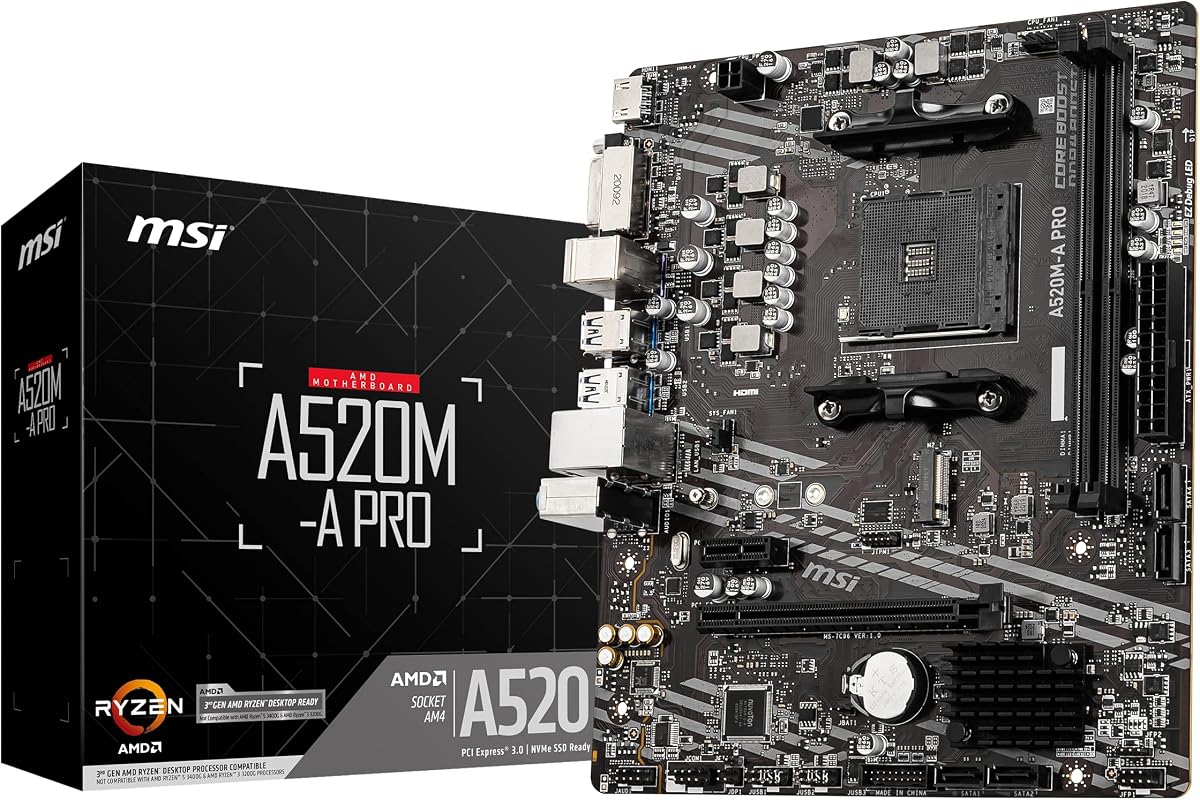
The MSI A520M-A PRO balances cost and performance well. It supports Ryzen 5000 processors and allows DDR4 speeds up to 4600 MHz. Rated 4.5 it is a popular choice for budget gaming builds.
We may earn a commission when you buy through this link, at no additional cost to you.
Key strengths include Turbo M.2 for fast SSD performance and Audio Boost for clear sound. Dragon Center software helps manage system settings easily. The board handles daily tasks and gaming without issues.
It lacks PCIe 4.0 which limits GPU and SSD bandwidth compared to B550 boards. However for most gamers this difference is negligible. The VRM is adequate for standard Ryzen 5 and Ryzen 7 CPUs.
Recommend this for entry level AMD systems. It is perfect for those wanting a reliable board without extra bells and whistles. Choose it if you prioritize value over advanced connectivity features.
Supports overclocked DDR4 for better CPU performance on budget.
Enhanced audio and thermal solutions tailor this for gaming use.
We may earn a commission when you buy through this link, at no additional cost to you.
This board brings PCIe 4.0 to a very low price point. It supports Ryzen 5000 series and allows memory overclocking up to 4733 MHz. With a 4.5 rating it offers strong value for AMD users.
We may earn a commission when you buy through this link, at no additional cost to you.
Key features include a dedicated M.2 slot for NVMe drives and three video outputs. The 6 phase power design provides stable power for most CPUs. Full Spike Protection guards against electrical surges on ports.
Audio and USB options are basic compared to higher tier boards. However the core performance remains solid. It handles modern GPUs and SSDs effectively due to PCIe 4.0 support.
Ideal for builders wanting modern specs without high costs. It suits office PCs and gaming rigs needing fast storage. Choose this if you prioritize bandwidth over premium extra features.
Delivers PCIe 4.0 speeds at a budget friendly price point.
HDMI DVI and VGA ports ensure broad monitor compatibility.
We may earn a commission when you buy through this link, at no additional cost to you.
The PRO B550M-P focuses on stability and core functionality. It supports a wide range of Ryzen processors and offers DDR4 memory boost up to 4400+ MT/s. Its 4.3 rating reflects reliable daily performance.
We may earn a commission when you buy through this link, at no additional cost to you.
Key strengths include passive and AI cooling which adjusts fans based on temps. You get two M.2 connectors one Gen4 and one Gen3 for flexible storage. Core Boost ensures steady power delivery to your CPU.
It lacks onboard WiFi which limits wireless connectivity options. The BIOS is functional but less feature rich than gaming boards. However for office or server use this reliability is beneficial.
Buy this for workstations or servers needing durability. It pairs well with mid-range Ryzen CPUs. Choose it if you prefer practical performance over flashy RGB or software suites.
Frozr AI cooling optimizes fan speeds for better thermal performance.
Dual M.2 slots allow mixed NVMe and SATA SSD configurations.
We may earn a commission when you buy through this link, at no additional cost to you.
This board combines PCIe 4.0 with built-in WiFi and Bluetooth. It supports Ryzen 5000 processors and up to 128GB DDR4 memory at 4400 MHz. Rated 4.5 it is excellent for cable-free builds.
We may earn a commission when you buy through this link, at no additional cost to you.
Features include Flash BIOS Button for easy updates and Lightning Gen 4 M.2 Shield Frozr. Core Boost technology ensures steady current delivery for stable performance. The premium thermal solution handles heat well.
Wireless connectivity saves money on adapters and simplifies setup. However port selection is standard with USB 3.2 Gen 1. Audio is good but not exceptional compared to dedicated sound cards.
Ideal for homes without Ethernet ports. Use it for gaming rigs needing reliable wireless. Select this when you want all-in-one connectivity without adding extra cards.
Built-in WiFi 6 and Bluetooth eliminate the need for adapters.
Flash BIOS Button allows updates without CPU or memory installed.
We may earn a commission when you buy through this link, at no additional cost to you.
This ATX board offers premium features for mid-range systems. It features a 10+3 power phase for overclocking and supports DDR4 with XMP profiles. With a 4.5 rating it delivers high performance.
We may earn a commission when you buy through this link, at no additional cost to you.
Key strengths include integrated I/O shield and Q-Flash Plus for BIOS upgrades. Front USB-C and RGB Fusion enhance aesthetics and connectivity. The thermal armor keeps components cool under load.
It costs more than micro-ATX options but justifies with build quality. You get more expansion slots and better VRMs for heavy CPUs. However smaller cases may not fit this standard ATX size.
Choose for gaming PCs needing extra power headroom. It suits enthusiasts wanting RGB customization and robust power delivery. Select this when you plan to upgrade CPU later.
Digital twin 10+3 phases ensure stable power for high-end CPUs.
Integrated I/O shield and Q-Flash Plus simplify assembly and updates.
We may earn a commission when you buy through this link, at no additional cost to you.
The A520M K V2 is a small micro-ATX board for tight spaces. It supports AM4 Ryzen processors and offers HDMI and D-Sub outputs. Rated 4.4 it suits basic office or home PCs.
We may earn a commission when you buy through this link, at no additional cost to you.
Key features include support for high-speed RAM upgrades and USB 3.2 ports. The layout is simple making installation straightforward. It handles daily tasks without issue.
Lacks PCIe 4.0 which limits future expansion speed. The VRM is basic so avoid high-end overclocking. It is best for standard productivity builds with modest performance needs.
Buy this for small form factor cases. It works well with lower power CPUs. Select it when space and cost matter more than high-end features.
Micro-ATX design fits compact cabinets and medium-sized builds easily.
USB 3.2 and HDMI support ensure connection to modern peripherals.
We may earn a commission when you buy through this link, at no additional cost to you.
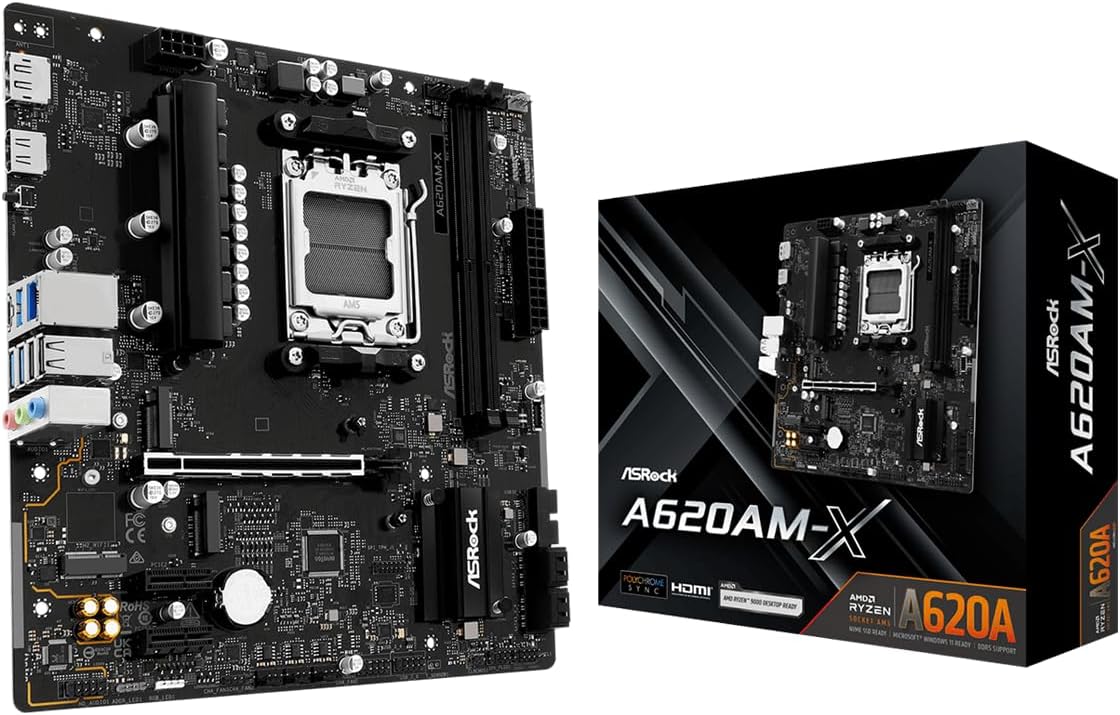
This board offers an entry point to the AM5 platform. It supports Ryzen 9000 series and DDR5 memory up to 8000+ OC. With 4.5 rating it brings future-proofing to cheap builds.
We may earn a commission when you buy through this link, at no additional cost to you.
Features include 2.5G LAN for fast networking and BIOS Flashback for easy updates. The 6+1+1 power design handles Core components well. Front USB-C adds modern connectivity.
DDR5 RAM and CPUs cost more than AM4 setups. However long-term support makes it a smart choice. The platform allows easier upgrades to newer Ryzen generations.
Ideal for those planning future upgrades. Use for gaming rigs wanting latest tech. Select this if you want longevity despite higher initial costs.
AM5 socket ensures compatibility with future Ryzen processors.
2.5G LAN provides high-speed wired connections for streaming.
We may earn a commission when you buy through this link, at no additional cost to you.
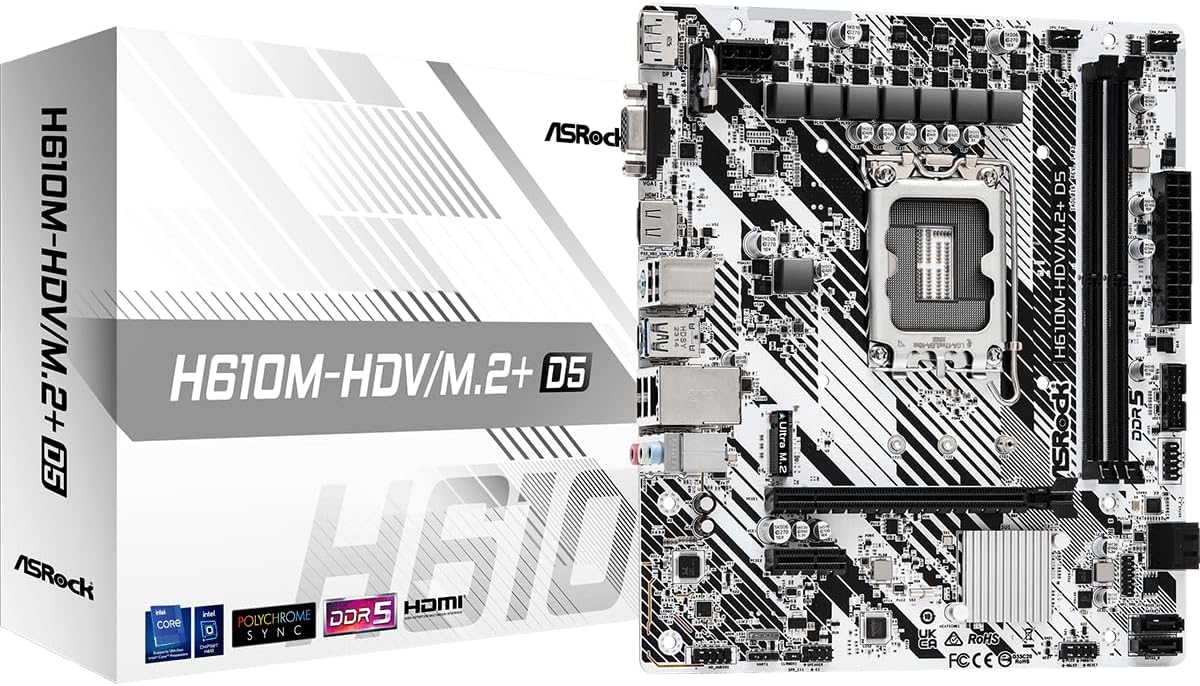
This board brings DDR5 and PCIe 4.0 to Intel builds. It supports 14th 13th and 12th gen processors. Rated 4.4 it offers a modern Intel platform at low cost.
We may earn a commission when you buy through this link, at no additional cost to you.
Key features include 6+1+1 power phase and DisplayPort HDMI output. M.2 slots support NVMe drives for fast storage. It suits office and home systems needing modern specs.
No overclocking support limits CPU tuning potential. VRM is basic so stick to non-K processors. However stability is reliable for standard usage patterns.
Buy this for Intel users wanting DDR5. It pairs well with i5 or i7 CPUs. Select when you need modern Intel support on a budget.
LGA1700 supports latest Intel Core processors efficiently.
Multiple video outputs ensure connection to various monitors.
We may earn a commission when you buy through this link, at no additional cost to you.
Selecting a budget motherboard requires balancing features with cost. We outline key factors to help you avoid compatibility issues and get the best value.
Ensure the motherboard socket matches your processor generation. AMD AM4 and AM5 sockets differ significantly. Intel LGA1700 supports 12th to 14th gen CPUs. Mismatched parts will not work together.
Always check manufacturer CPU support lists before buying.
Micro-ATX boards fit most cases and are cheaper. ATX boards offer more expansion slots. Small form factor cases need Mini-ITX which are rare in budget ranges. Measure your case before selecting size.
Verify chassis compatibility to avoid assembly issues.
DDR5 is standard for new platforms but costs more. DDR4 is cheaper for older AM4 boards. Check max supported RAM speed and capacity. Fast memory boosts gaming and application performance significantly.
Match memory type to your budget and performance needs.
Look for at least one M.2 slot for fast NVMe SSDs. Some budget boards have two slots for redundancy. Ensure they support PCIe 4.0 if you plan to use fast storage. SATA ports are secondary for drives.
Prioritize M.2 availability for modern system speeds.
Check rear I/O for USB 3.2 and video outputs. Front USB-C ports add convenience for peripherals. Gigabit LAN is standard but 2.5G is better for networking. WiFi inclusion saves adapter costs.
Ensure enough ports for your peripherals and monitors.
Voltage Regulator Modules power your CPU. More phases ensure stability under load. Cheap boards may throttle high-end CPUs. Check reviews for thermal performance and power delivery stability.
Choose boards with sufficient VRMs for your CPU class.
Look for Q-Flash or Flash BIOS buttons. These allow updates without CPU or RAM. This is vital for new CPU compatibility. Easy Mode interfaces simplify setup for beginners.
BIOS flexibility saves time and potential upgrade costs.
Reliable brands offer better longevity. Check warranty length and support options. Premium materials improve heat dissipation and durability. Read user reviews for real-world reliability.
Invest in known brands for peace of mind.
Install the board in a static-free area using anti-static wristbands. Align mounting holes correctly to prevent shorts. Connect power cables and data lines according to the manual.
Update the BIOS immediately after installation. Newer CPUs require updated firmware for compatibility. Use manufacturer tools to flash the latest version safely.
Keep dust out of heatsinks and slots using compressed air. Monitor temperatures using software tools to ensure stable operation. Regular maintenance extends component life significantly.
Cheap motherboards from reputable brands are generally reliable for daily tasks. They may lack premium features but deliver core functionality well. Check reviews for thermal and VRM quality before buying to avoid issues.
WiFi is useful if Ethernet ports are inaccessible. Built-in WiFi saves adapter costs. However most gaming PCs perform better with wired connections. Choose based on your setup needs.
AM4 supports older Ryzen CPUs with DDR4 memory. AM5 supports newer Ryzen processors with DDR5. AM5 offers better future-proofing but costs more. AM4 is better for budget builds.
Yes if you choose a platform with BIOS updates. AMD AM4 supported multiple generations. AM5 is newer so upgrade path is long. Intel LGA1700 allows 12th to 14th gen swaps.
They may have slower memory support or fewer PCIe lanes. For gaming this rarely matters significantly. Overclocking might be limited. Choose specs that match your CPU class.
M.2 NVMe drives offer much faster speeds than SATA. They reduce load times and improve system responsiveness. Most budget boards now include at least one slot.
We reviewed ten affordable boards across AMD and Intel platforms. The GIGABYTE B550M K and MSI A520M-A PRO offer best value. Top picks balance performance with cost effectively.
Prioritize socket compatibility and VRM quality for your CPU. Modern features like PCIe 4.0 and M.2 slots improve longevity. Avoid boards with poor thermal designs or limited connectivity.
Prices fluctuate frequently so check current deals before buying. Verify specifications against your case and parts. Choose the option that fits your specific budget and performance needs.