
ACMER S1 Laser Engraver Machine
4.3Editor score
2500mW Diode Laser
99 Percent Preassembled
LightBurn Compatible Software
Finding a cheap laser engraver that delivers professional results without breaking the bank can be challenging. Modern affordable units now offer impressive precision, safety features, and versatile material compatibility for creators and hobbyists.
We compared ten top-rated models based on power, speed, software support, and build quality. This list covers everything from portable pocket devices to robust desktop machines suitable for small business production.
Each pick highlights unique strengths and ideal use cases to help you decide quickly. Please note that prices and availability change frequently so verify current details before purchasing your new machine.
4.3Editor score

4.0Editor score

4.6Editor score
As an Amazon Associate we earn from qualifying purchases.
The following table provides a side-by-side comparison of all ten selected laser engravers. Review the key specifications to identify which model aligns best with your project requirements and workspace constraints.



The ACMER S1 stands out as an accessible entry point for those seeking a cheap laser engraver without compromising basic functionality. With a 4.3 rating from users, it delivers consistent performance on wood, acrylic, and leather surfaces effectively.
We may earn a commission when you buy through this link, at no additional cost to you.
Its 2500mW diode laser allows for fine detail work while maintaining speeds up to 10000mm per minute. The unit comes 99% preassembled meaning you can start crafting within minutes of unboxing without complex mechanical tuning.
While the 130x130mm work area limits large projects, the machine is ideal for small badges and personal gifts. Users note that the included software simplifies the workflow for beginners who lack technical design experience.
This model is perfect for hobbyists or parents buying a first machine for a child. Its balance of cost and capability makes it a top recommendation for anyone testing the waters of laser engraving.
The included Acmerstudio software provides intuitive controls and supports popular formats like DXF and PNG for seamless file imports.
Weighing only 2kg and built with durable aluminum alloy, this engraver fits easily on a desk and is simple to store when not in use.
We may earn a commission when you buy through this link, at no additional cost to you.
The xTool M2 redefines home safety with its Class 1 enclosed design allowing safe operation around family members. Its dual camera system offers a real time preview of your workspace to ensure precise placement of every cut.
We may earn a commission when you buy through this link, at no additional cost to you.
Users praise the customizable templates and AI image generator that simplify design creation for those with limited artistic skills. The machine supports over 300 materials including felt and fabric which are rarely supported by other diode units.
While the base price is higher than budget options, the safety and ease of use justify the investment for home crafters. The ability to add an inkjet module later offers future proofing for full color printing needs.
This model is recommended for families and serious hobbyists who prioritize safety and workflow efficiency. Its intuitive software removes barriers to entry making professional grade engraving accessible to everyone.
The Class 1 safety rating means the enclosure filters harmful radiation protecting eyes and skin without needing additional goggles during normal use.
Built-in cameras combined with motion control eliminate guesswork allowing you to place materials anywhere and start cutting immediately with high accuracy.
We may earn a commission when you buy through this link, at no additional cost to you.
The BlazeX M3 offers a comprehensive kit that includes an enclosure and honeycomb bed making it ready for serious projects out of the box. Its 0.01mm ultra precision allows for intricate designs on metal and glass that other budget models struggle to match.
We may earn a commission when you buy through this link, at no additional cost to you.
Safety is handled well with Class 1 certification and integrated fan exhaust to reduce noise and smoke during operation. Users appreciate the compatibility with industry standard software like LightBurn and LaserGRBL for flexible workflow options.
While not the cheapest option on this list, the included accessories and build quality provide excellent long term value. It bridges the gap between hobbyist toys and professional industrial machines effectively.
This is a top pick for small business owners starting their journey who need reliability and detail. The professional after sales support ensures you are never stuck if technical issues arise during production.
The bundle includes protective enclosure, tools, and 13 engraving materials so you can start testing immediately without extra purchases.
With 0.01mm repeatability and a high density beam, the machine captures fine lines and sharp edges required for jewelry and complex patterns.
We may earn a commission when you buy through this link, at no additional cost to you.
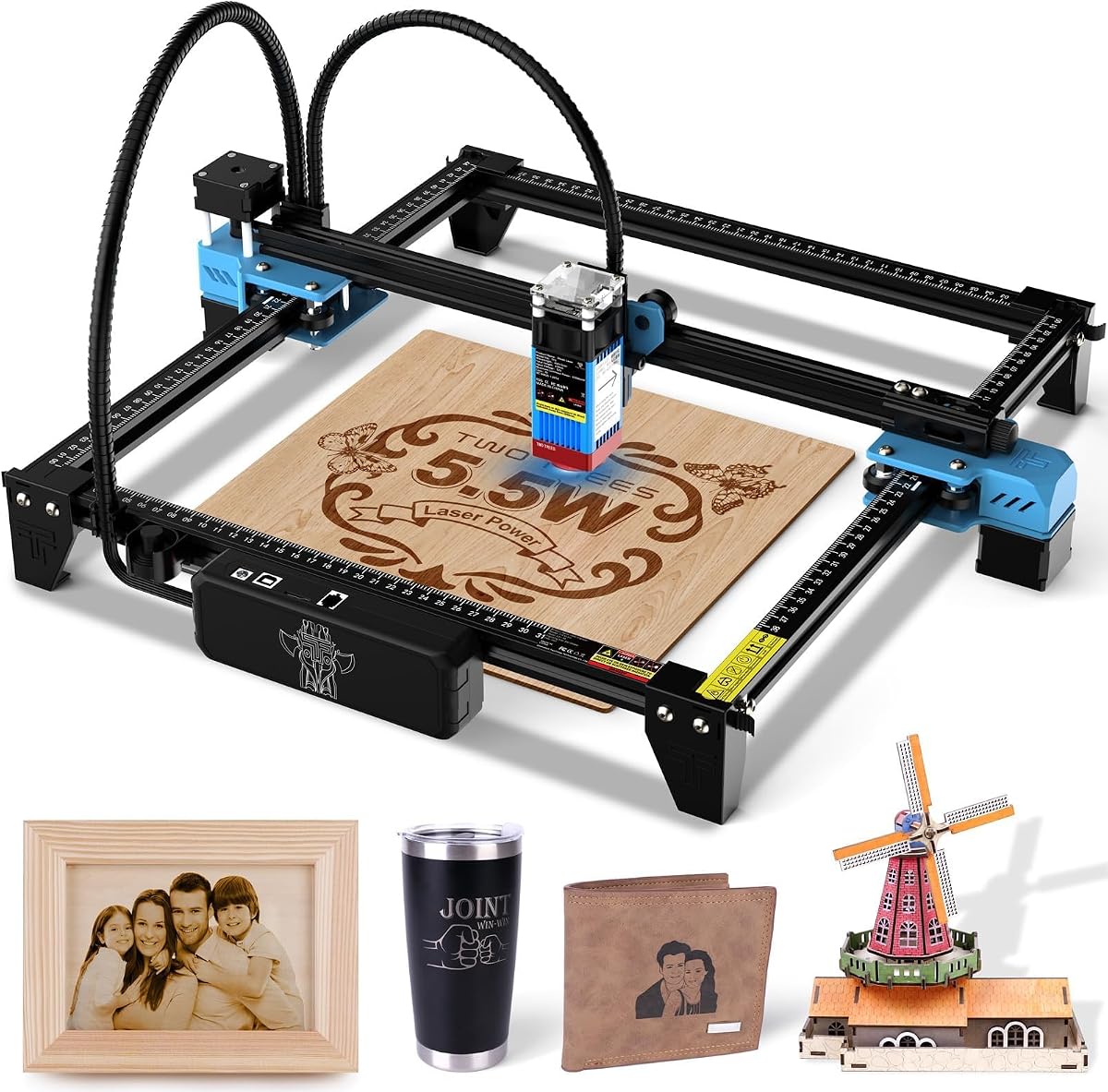
The Twotrees TTS-55 Pro stands out for its wireless connectivity options allowing you to control the machine from a mobile app or web browser. With 5500mW output it cuts through 5mm plywood and 3mm acrylic with impressive efficiency.
We may earn a commission when you buy through this link, at no additional cost to you.
Its built-in Wi-Fi module supports both online and offline TF card engraving which is useful for environments with unstable internet. The air assist support helps achieve cleaner edges on cuts while reducing smoke accumulation.
Users report that while initial setup requires attention to detail, the results justify the effort. The 300x300mm workspace is significantly larger than many budget competitors providing room for bigger signs and decor.
This machine suits makers who want modern convenience and robust cutting power. The advanced compression technology ensures the laser focus remains sharp even over extended use periods.
Built-in Wi-Fi lets you engrave without a computer connected directly to the machine which streamlines the workflow in small studios.
The 5500mW output combined with air assist support allows for deeper cuts and better edge quality on tougher materials like wood and leather.
We may earn a commission when you buy through this link, at no additional cost to you.
The xTool F2 combines a 15W diode laser with a 5W IR laser allowing for versatile operations including deep metal marking and standard engraving. Its built-in 50MP camera provides accurate positioning for small items to minimize waste.
We may earn a commission when you buy through this link, at no additional cost to you.
Speed is a key feature with 6000mm/s performance completing card engravings in just 3 seconds. The fully enclosed design ensures safety while its lightweight frame allows it to be transported to markets or fairs easily.
Users highlight the ability to create vivid color on metal as a unique selling point among portable units. Material presets and intuitive software reduce the learning curve for new operators effectively.
This model is ideal for mobile service providers or those needing metal personalization capabilities. The balance of power and portability makes it a strong contender for small business needs.
The IR laser marks metal with vivid color while the diode handles cutting allowing one machine to perform tasks usually requiring two separate tools.
A 50MP camera ensures that every engraving lands exactly where intended which is crucial for small items like rings and medals.
We may earn a commission when you buy through this link, at no additional cost to you.
The xTool S1 delivers a massive 40W power output capable of slicing through 18mm cherry wood in a single pass. This level of power allows it to handle large projects like door signs and batch production with ease.
We may earn a commission when you buy through this link, at no additional cost to you.
Its 23.93 by 15.16 inch bed offers more room than most competitors making it suitable for larger formats and rotary work without constant repositioning. Users praise the auto focus and patented positioning tech for consistent results.
Safety is ensured with Class 1 certification and flame sensors that halt operation immediately if heat is detected. The machine is fully pretested over 400 materials with optimal settings preloaded for immediate use.
This device is best for businesses that need high throughput and professional quality. Its durability and large workspace make it a reliable choice for scaling production operations significantly.
The expansive bed and auto pass-through technology allow you to engrave long items like signs or multiple smaller items at once efficiently.
Built-in flame sensors and emergency stop features ensure peace of mind for users operating in shared spaces or around family members.
We may earn a commission when you buy through this link, at no additional cost to you.
The LONGER Ray5 features a built-in 3.5 inch touch screen allowing you to run jobs without a computer connected. This independence makes it convenient for workshops where network access is limited or desired.
We may earn a commission when you buy through this link, at no additional cost to you.
Its dual beam technology provides a 0.06mm spot size and speeds up to 10000mm per minute ensuring fast turnaround for custom jobs. The 400x400mm workspace is spacious enough for medium sized signs and multiple items.
Users appreciate the offline TF card option which enables quick file uploads and operation away from a PC. Safety features include emergency stop and heat protection to prevent damage during long runs.
This model is perfect for users who prefer standalone operation and need a larger work area. The combination of connectivity options and dual beam speed offers flexibility for varied project demands.
The built-in touchscreen allows for direct control of the machine using USB or SD cards which simplifies workflow in mobile settings.
With a 400x400mm area you can engrave multiple coasters or a single large panel without needing to reposition the workpiece.
We may earn a commission when you buy through this link, at no additional cost to you.
The ELIDOR Z6 is a lightweight 2.13kg unit that balances portability with effective performance for small scale projects. Its 0.01mm accuracy delivers crisp text and detailed portraits that impress even experienced users.
We may earn a commission when you buy through this link, at no additional cost to you.
Compatible with major software platforms like LightBurn and LaserGRBL it ensures you can use your existing design tools without compatibility issues. The compact footprint means it fits on almost any desk or craft table.
Users highlight its ease of setup and consistent results on common materials like wood and leather. While it lacks an enclosure its safety goggles and protective cover provide basic protection for home users.
This model is ideal for travelers or those with limited space who still need quality output. Its reputation for reliability and user friendly design makes it a safe choice for beginners.
Weighing only 4.7 lbs this machine is easy to pack into a case for travel making it perfect for mobile crafting sessions.
Support for popular open source and professional software gives you freedom to choose tools that best fit your workflow and skill level.
We may earn a commission when you buy through this link, at no additional cost to you.
The AlgoLaser MK3 runs its own AlgoOS system on a 3.5 inch HD touchscreen allowing you to sketch and engrave without a computer. This autonomy simplifies the workflow for those who want immediate project execution.
We may earn a commission when you buy through this link, at no additional cost to you.
It includes 300+ material presets that remove guesswork from power settings and speed adjustments. The flip-down focus column makes setup fast and ensures consistent height for every run.
Users love the visual positioning feature which shows exactly where the design will land before engraving starts. Safety features like flame detection and emergency stop provide robust protection for home use.
This is a strong choice for creators who value ease of use and independence from a PC. Its generous work area and warranty make it a reliable option for growing small businesses.
The dedicated OS allows for import and editing directly on the machine which removes the need for a separate computer during operation.
Hundreds of pre-calibrated settings ensure you get consistent results on different materials without manual testing and adjustments.
We may earn a commission when you buy through this link, at no additional cost to you.
The LaserPecker LP1 Plus fits in a backpack and is ready to engrave in under two minutes using a power bank. This level of portability makes it unique for on-the-go customization at events or markets.
We may earn a commission when you buy through this link, at no additional cost to you.
Its cross platform app makes importing photos simple and fun for users with no technical background. The adjustable stand allows for 360 degree engraving which is useful for curved objects like pens and bottles.
Users note that while it is not for heavy duty cutting it excels at personalizing gifts and items quickly. The magnetic base ensures small items stay in place during the engraving process effectively.
This device is perfect for casual users and travelers who want creativity without commitment. Its simplicity and ease of use make it an excellent gift for friends and family.
So compact it fits in a backpack the machine enables creativity anywhere from parks to parties without needing a power outlet.
The app interface is designed to be as easy as posting on social media allowing anyone to start creating designs in minutes.
We may earn a commission when you buy through this link, at no additional cost to you.
Selecting the right laser engraver requires understanding key factors that impact performance and safety. This section outlines the most important features to consider before making your purchase.
Laser power measured in milliwatts or watts determines how deep and fast you can cut materials. Higher power like 10W or 40W allows for thicker cuts and faster production while lower power suits surface engraving only.
Look for higher wattage if you plan to cut wood or acrylic regularly but accept slower speeds if you only need to mark surfaces.
The working area defines the maximum size of objects you can engrave without moving them. Larger beds allow for big signs or batch production but increase the machine's physical footprint on your desk.
Choose a size that matches your most common project dimensions to avoid wasted space or constant repositioning during work.
Safety is paramount when working with lasers so look for Class 1 enclosed designs or protective covers. Enclosed machines filter harmful light and smoke making them safer for homes with kids or pets nearby.
Always verify the machine has flame sensors and emergency stops to prevent accidents during unattended operation.
Software determines how easy it is to turn your designs into machine instructions. Models supporting LightBurn or LaserGRBL offer more control while proprietary apps may be simpler for beginners with no coding knowledge.
Check if the software supports your operating system such as Windows macOS or Linux to ensure seamless integration with your current setup.
Portability matters if you plan to travel to craft fairs or move the machine between rooms. Lightweight units under 5kg with compact frames are easier to transport and store compared to heavy industrial desktop models.
Consider if the machine comes fully assembled or requires tools and time to set up before first use.
Not all lasers can handle all materials so check the specs for supported surfaces like wood leather or metal. Some units offer IR lasers for metal marking while standard diode lasers work best on organic and non reflective surfaces.
Ensure the machine can handle the specific materials you want to use to avoid frustration and wasted purchases.
Reliable customer support and a solid warranty protect your investment against defects or technical issues. Look for manufacturers offering at least one year of coverage and access to online tutorials or community forums.
A responsive support team can save hours of troubleshooting time when you encounter problems with settings or assembly.
Modern machines often offer Wi-Fi or USB connections for flexible file transfer and control. Offline capabilities like SD card support are useful if you prefer not to keep a computer running near the laser source.
Choose connectivity that matches your workflow whether you prefer app control or direct computer connection.
Always wear protective safety goggles and ensure your workspace is well ventilated to avoid inhaling fumes from burned materials. Start by securing your material on the bed using the included honeycomb structure or clamps to prevent movement.
Adjust the focal height using the provided ruler or auto focus feature to ensure the laser beam is sharp. Run a test engraving on a scrap piece of the same material to confirm settings before committing to your final design.
Regularly clean the lens with a soft cloth and remove dust from the bed to maintain consistent beam quality. Store the machine in a dry place and keep the power cord organized to avoid tripping hazards in your workspace.
Yes most cheap laser engravers with at least 10W power can cut thin plywood or basswood effectively. Higher wattage units like 20W or 40W allow for thicker cuts but speed will vary based on the thickness of the material.
It is safe if you choose a Class 1 enclosed machine or wear proper safety glasses. Ensure proper ventilation to avoid fume buildup and never leave the machine unattended while it is running.
Diode lasers typically cannot engrave clear glass or standard plastics effectively. They struggle with reflective metals unless they have a specific IR module for coating or color marking.
Not all models require a computer as many now offer touchscreen or app-based control with offline capabilities. However computers provide more design flexibility and control for advanced projects.
Clean the lens with a soft lint-free cloth and avoid touching it with bare fingers. If vision becomes blurry check for dust and gently wipe it to maintain consistent engraving quality.
Many budget models from reputable brands offer solid durability for hobbyist use if maintained properly. Check for warranty terms and build quality such as aluminum frames before purchasing to ensure longevity.
We reviewed ten affordable models ranging from pocket-sized units to powerful desktop machines. Whether you need safety features like the xTool M2 or raw power like the xTool S1 there is a fit for every budget.
Prioritize safety and material compatibility when deciding on a specific model. Ensure the machine supports your desired materials and offers adequate protection for your workspace environment.
Please check current prices and availability before purchasing as these details change frequently. With the right cheap laser engraver you can bring your creative ideas to life effortlessly.