
Creality Ender 3 V3 SE
3.8Editor score
250mm/s fast printing
CR Touch auto leveling
Sprite direct extruder
Discover the top auto bed leveling 3D printers for beginners. This guide compares speed, ease of use, and features to help you choose the perfect machine.
Starting your 3D printing journey can feel overwhelming with so many options available. Auto bed leveling technology simplifies the process by ensuring a perfect first layer every time. This feature is essential for newcomers who want reliable results without complex manual adjustments or frustration during setup.
We evaluated ten leading models based on their leveling systems, build quality, speed, and user feedback. Each product was selected for its ability to reduce setup time and improve print success rates. Our comparison focuses on features that matter most to beginners seeking consistency and ease of use in their daily projects.
Every pick highlights specific strengths like quick assembly, smart sensors, and durable construction. You will find options ranging from compact desktop units to high-speed professional machines. Prices and availability change frequently, so verify current details before purchasing to ensure you get the best value for your specific needs.
3.8Editor score

4.3Editor score

4.3Editor score
This table provides a side-by-side comparison of all ten selected models to help you quickly identify key differences in speed, leveling technology, and build materials for your specific project needs.


The FLASHFORGE Adventurer 5M stands out as a top contender for beginners seeking speed and reliability. With a 4.3 rating from users, it delivers consistent results right out of the box. Its standout feature is the fully auto one-click leveling system which eliminates the guesswork of traditional calibration methods.
We may earn a commission when you buy through this link, at no additional cost to you.
This model boasts an impressive 600mm/s maximum speed driven by a Core XY system. The acceleration from zero to top speed takes just 0.025 seconds ensuring smooth motion without vibration. The direct extruder supports various filaments including TPU and carbon fiber composites with the right nozzle.
While the open frame design limits high-temperature enclosed printing it excels at standard materials like PLA and PETG. The 280°C nozzle heats up quickly reducing wait times between prints. Users appreciate the power loss recovery feature which prevents wasted material during unexpected outages.
Beginners looking for a printer that minimizes setup time and maximizes output will find this model ideal. The flexible PEI plate allows for easy part removal without tools. It is a strong recommendation for anyone prioritizing efficiency and ease of use in their 3D printing workflow.
The 600mm/s speed allows you to complete prototypes in hours rather than days making it perfect for rapid iteration.
The auto leveling system ensures the nozzle distance is perfect for every print removing the risk of failed first layers.
We may earn a commission when you buy through this link, at no additional cost to you.
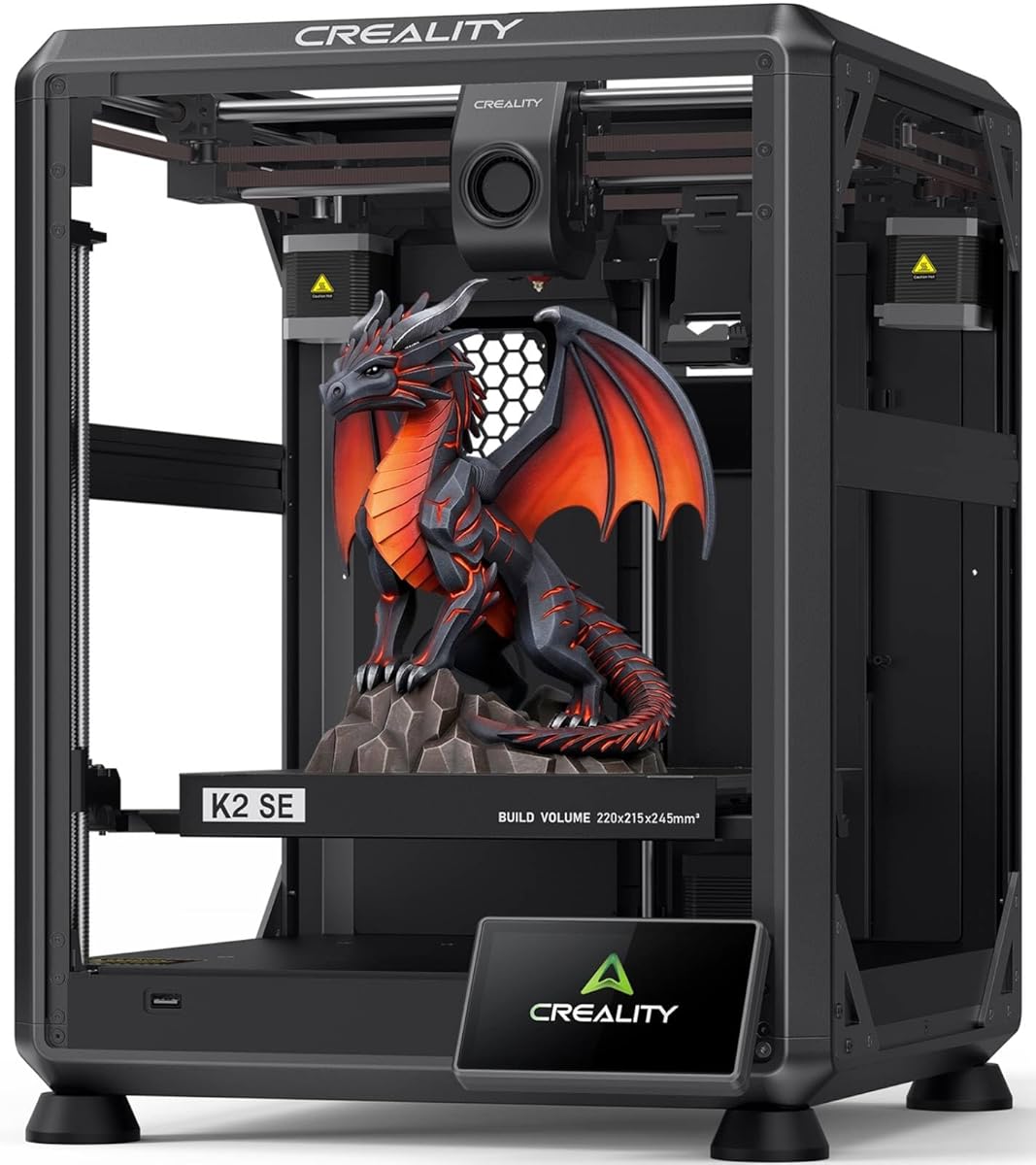
The Creality K2 SE offers a solid entry point for those wanting high-speed printing without a premium price tag. Users note its reliable metal build which reduces flex during movement. The auto leveling system simplifies the process allowing you to start printing within minutes of unboxing.
We may earn a commission when you buy through this link, at no additional cost to you.
Featuring a die-cast aluminum alloy frame this printer maintains precision even at 500mm/s speeds. The input shaping algorithm actively reduces ringing ensuring sharper details on your models. The direct drive extruder provides consistent feeding for a wide range of materials.
Although it supports multicolor printing via the CFS system this add-on is sold separately. The build volume is slightly smaller than some competitors which may limit larger projects. However for small to medium prints it delivers professional results with minimal intervention.
This printer is best suited for beginners who plan to expand into multicolor printing later. The one-tap leveling system makes it easy for new users to achieve good results. It balances performance and cost effectively for entry-level enthusiasts.
The rigid frame minimizes vibration ensuring dimensional accuracy across repeated prints.
Vibration sensors actively reduce resonance for smoother surfaces at high speeds.
We may earn a commission when you buy through this link, at no additional cost to you.
The QIDI Q2 redefines what a beginner printer can do by offering professional-grade features. With a 4.3 rating it is praised for its reliability and ability to handle tough materials like PPS-CF. The nozzle itself acts as the leveling sensor for unmatched first-layer accuracy.
We may earn a commission when you buy through this link, at no additional cost to you.
Its 65°C heated chamber minimizes warping ensuring strong layer adhesion for technical parts. The 370°C nozzle unlocks advanced materials that most printers cannot process. The dual HEPA and activated carbon filtration keeps the air clean for indoor use.
Users note that while powerful the printer requires more attention during setup than simpler models. The AI camera monitoring adds convenience but may be overwhelming for complete novices. However the precision and material versatility justify the complexity for serious learners.
This printer is ideal for those aiming to grow into advanced engineering applications. The power-loss recovery ensures long prints are not lost. It is a premium choice for beginners willing to invest in future-proof technology.
The high temperature nozzle allows printing of carbon fiber composites without special equipment.
Triple filtration reduces odors and harmful particles making it safe for homes.
We may earn a commission when you buy through this link, at no additional cost to you.
The AD5M combines brand-new technology with superior craftsmanship for both beginners and experts. Users highlight its fully automatic one-click leveling system which measures nozzle distance precisely. The all-metal CoreXY structure ensures high-speed printing without quality loss.
We may earn a commission when you buy through this link, at no additional cost to you.
The patent quick-release nozzle allows you to switch diameters in seconds without tools. This flexibility supports both high-precision and high-efficiency needs. The flexible PEI plate makes removing printed models easy by simply bending the surface.
While it lacks a heated chamber it performs well with standard filaments like PLA and ABS. The Orca-flashforge slicer enables network monitoring for remote management. Users appreciate the power-loss recovery which resumes prints automatically after outages.
This printer is a strong choice for those needing a robust machine for daily use. The silent operation mode ensures focus during work or study. It balances speed and reliability effectively for home and office environments.
Tool-free nozzle swaps allow quick changes for different print requirements.
Smart app integration allows control from anywhere ensuring convenience.
We may earn a commission when you buy through this link, at no additional cost to you.
The 5M Pro offers a versatile tool for household repairs and creative teaching. Users appreciate its closed design which optimizes air quality during operation. The automatic leveling system ensures a flawless first layer every time with minimal setup.
We may earn a commission when you buy through this link, at no additional cost to you.
It features a direct drive extruder capable of 280°C for various filaments. The dual filtration system blocks 99% of particulate matter for safe indoor use. Remote monitoring via the Flash Maker app lets you check status from anywhere.
While the advanced features offer control they may be complex for absolute beginners. The silent mode ensures focus during work or study without noise. It supports a wide range of materials from TPU to PETG-CF easily.
This printer is ideal for educational settings or home offices requiring quiet operation. The bundle includes extra nozzles for different print needs. It prioritizes safety and user experience alongside performance.
HEPA filters reduce health risks making it suitable for classrooms.
Low-speed mode ensures noise does not disturb your daily activities.
We may earn a commission when you buy through this link, at no additional cost to you.
The Ender 3 V3 SE is an upgrade of popular legacy models offering better speed and ease of use. Users praise the CR Touch auto leveling which reduces manual adjustments significantly. The Sprite direct extruder provides smooth feeding for flexible filaments.
We may earn a commission when you buy through this link, at no additional cost to you.
It achieves 250mm/s speeds which is fast for this class of printer. The dual Z-axis screws reduce wobbling for better vertical accuracy. Assembly is simplified to three steps making it ready quickly.
While it uses older technology compared to newer high-speed models it remains very reliable. The auto filament loading feature simplifies the process for users. It is a proven workhorse in the hobbyist community.
This printer is best for beginners who want a trusted brand with good support. The 24-hour response time for support adds peace of mind. It offers excellent value for learning without high investment.
Backed by over half a million units shipped worldwide ensuring reliability.
Dual Z screws ensure consistent layer alignment during long prints.
We may earn a commission when you buy through this link, at no additional cost to you.
This kit allows you to upgrade existing Ender models with auto leveling capabilities. Users find the multi-point detection creates a virtual plane for accurate compensation. It is designed specifically for V4.2.2 V4.2.7 motherboards.
We may earn a commission when you buy through this link, at no additional cost to you.
Installation requires flashing firmware but the guide simplifies this process. The sensor is stable and reliable for repeated use over time. It supports PEI and glass beds making it versatile.
While not a full printer it provides auto leveling at a low cost. You must confirm your motherboard version before purchasing to ensure compatibility. It is ideal for upgrading an older machine rather than buying new.
This kit is best for DIY enthusiasts who want to enhance their current setup. The independent research ensures stability compared to generic solutions. It adds significant value to older printers for minimal investment.
Designed for specific Creality boards ensuring reliable integration.
Records height at multiple points for accurate bed leveling.
We may earn a commission when you buy through this link, at no additional cost to you.
The AD5X allows creating vibrant designs with up to four colors simultaneously. Users appreciate the Intelligent Filament System which detects and refills automatically. This minimizes downtime during complex multi-material projects.
We may earn a commission when you buy through this link, at no additional cost to you.
With 600mm/s speed it delivers rapid turnaround for creative work. The Core XY structure minimizes vibrations ensuring accurate prints. The 300°C nozzle supports a range of materials including TPU.
While the color system is powerful it adds complexity compared to single nozzle printers. The large build size accommodates diverse project needs. It is ideal for designers wanting to produce detailed models.
This printer is best for those who value color and speed equally. The reliable system ensures productivity for creative hobbies. It stands out as a versatile option for artistic applications.
Four colors allow for stunning designs without post-processing painting.
IFS detects and refills filament automatically reducing interruptions.
We may earn a commission when you buy through this link, at no additional cost to you.
This model offers a fast setup with auto leveling to reduce manual adjustments. Users note the CR Touch system calibrates offsets automatically for a reliable first layer. The silent mainboard ensures a comfortable printing experience.
We may earn a commission when you buy through this link, at no additional cost to you.
It provides consistent results with dual synchronized Z screws and linear shafts. The flexible build plate allows removing prints quickly with minimal effort. It is designed to be straightforward for newcomers.
While it lacks high-end features it delivers consistent performance for everyday projects. The 250mm/s speed is efficient for standard prints. It is a great option for those prioritizing ease of use.
This printer is best for beginners who want a quiet reliable machine. The setup process is simplified to few steps. It balances simplicity and performance effectively for home use.
Silent mainboard keeps operation quiet for home environments.
Auto Z offset ensures perfect first layers without manual tools.
We may earn a commission when you buy through this link, at no additional cost to you.
This model features a fully automatic leveling system ensuring precise nozzle offsets. Users praise the one-click calibration for saving time during setup. The CoreXY structure enables fast printing without compromising quality.
We may earn a commission when you buy through this link, at no additional cost to you.
The quick-swap nozzle makes maintenance easy for novices. It supports various materials with different nozzle sizes. The reliable operation ensures consistent prints for multiple projects.
While it does not have a heated chamber it works well with common materials. The durable construction ensures longevity for regular use. It is a solid choice for standard printing needs.
This printer is best for those who want consistent results without complexity. The maintenance process is straightforward and quick. It delivers reliable performance for everyday printing tasks.
One-click leveling ensures perfect nozzle height every time.
CoreXY structure provides reliable performance at high speeds.
We may earn a commission when you buy through this link, at no additional cost to you.
Selecting the right 3D printer involves balancing several technical and practical factors to meet your specific needs.
Look for printers with fully automatic one-click leveling to simplify setup. Manual sensors often require additional configuration which can be frustrating for beginners. A reliable system ensures a perfect first layer every time.
Prioritize models that offer touch or optical sensors for accuracy.
Consider the size of the objects you intend to print. Standard sizes like 220x220x220mm are suitable for most beginner projects. Larger volumes increase the cost and footprint of the machine.
Ensure the build area fits your typical project size without waste.
Higher nozzle temperatures allow printing advanced materials like TPU or composites. Standard PLA printers may not need high heat but versatility is beneficial. Check the maximum temperature the nozzle can handle.
Choose a printer that supports the materials you plan to use.
Faster speeds reduce wait times but must be balanced with quality. Beginners should look for reliable acceleration to prevent printing artifacts. Speed is important for productivity but not at the cost of accuracy.
Select a printer with consistent high speeds for better efficiency.
Check which filaments the printer supports natively. Some models include direct drive extruders for flexible materials like TPU. Ensure it handles the basic materials you will use for learning.
Verify the extruder type for the materials you need.
Enclosed printers protect prints from drafts and maintain temperature. Open frame designs are more affordable and easier to access. Consider your space and safety needs when choosing a design.
Closed enclosures offer safety while open frames offer accessibility.
Modern printers often include Wi-Fi and app control for monitoring. Slicing software integration simplifies the printing process. Remote monitoring helps you manage prints without staying nearby.
Ensure the software supports your computer and network setup.
A large user community provides tutorials and troubleshooting help. Check the manufacturer warranty and customer service availability. Strong support reduces downtime when issues arise.
Choose brands with active forums and responsive service.
Start by leveling the bed using the automated system described in the manual. Allow the printer to reach the correct temperature before starting a print. Ensure the build plate is clean and free of dust or residue.
Regularly check the nozzle for clogs and clean it with a soft brush. Use a filament brush to remove dust from the spool before loading. Keep the printer covered when not in use to protect parts from dust.
Run a self test before each print session to ensure sensors are working. Replace worn nozzles when you notice poor extrusion or rough surfaces. Store filament in a dry place to prevent moisture damage and clogging.
Yes auto bed leveling saves time and ensures consistent results. It removes the guesswork from manual calibration reducing failed prints. Beginners benefit from the reliability and ease of use it provides.
Clean the probe or sensor regularly to prevent dust buildup. Check connections to ensure they are secure. Run a leveling test after moving the printer to verify accuracy.
Yes kits like the Creality CR Touch allow upgrades. You must check motherboard compatibility and update firmware. This is a cost-effective way to enhance older machines.
PLA is the easiest material for beginners to print. Auto leveling supports TPU and PETG with proper bed adhesion. Avoid highly abrasive filaments without a hardened nozzle.
Ensure the build plate is clean before every print. Use adhesive like glue sticks or hairspray if needed. Adjust the first layer height slightly if prints are loose.
Most auto leveling sensors work with glass beds. Check your sensor type to ensure compatibility with glass. Glass offers a flat surface for better leveling.
Check the probe for dust or obstructions. Run a manual leveling check to compare results. Reset the printer or update firmware if problems persist.
Auto leveling can take extra time during setup. Sensors may require calibration over time. Some models may have slower print speeds due to probing.
We reviewed ten excellent models with the FLASHFORGE Adventurer 5M leading the pack for speed and ease of use. The Creality Ender 3 V3 SE offers a great budget option while the QIDI Q2 provides premium features.
Prioritize reliability and setup time over raw power when starting out. A solid auto leveling system ensures consistent results as you learn the craft.
Prices change frequently so verify current deals and availability before purchasing. The right printer for your needs will inspire creativity and confidence.