
Nektar SE49
4.5Editor score
Comprehensive MIDI functionality
DAW integration for popular systems
Includes Bigwig Studio 8-track DAW
This guide compares the top 49 key MIDI keyboards for production and performance, evaluating features, integration, and value for musicians.
Finding the right 49 key MIDI keyboard can transform your music production workflow. These controllers offer a balanced range of notes perfect for melodies, chords, and bass lines without taking up too much desk space.
We evaluated ten leading models based on key feel, software integration, control surfaces, and overall build quality. Our analysis focuses on how well each unit integrates with major digital audio workstations and supports creative expression.
Each pick highlights specific strengths for different budgets and needs. Please note that prices and availability change frequently, so verify current details before making your final purchase decision today.
4.5Editor score

4.7Editor score

4.4Editor score
The following table provides a side-by-side comparison of all ten selected MIDI keyboards. It highlights core specifications to help you quickly identify the model that best fits your studio setup and creative goals.




The Novation Launchkey 49 MK4 stands out as a top contender for modern producers. With a 4.7 rating, it delivers premium features like FSR drum pads and seamless DAW integration. This unit ensures your workflow remains fluid whether you are recording or performing live.
We may earn a commission when you buy through this link, at no additional cost to you.
Its standout features include polyphonic aftertouch on the drum pads which allows for dynamic expression beyond simple triggering. The integration with major software like Ableton Live and Logic Pro means controls map automatically. Scale Mode helps musicians hit the right notes effortlessly which is a huge plus for beginners.
While the price is higher than budget options the value provided justifies the cost. The only minor trade-off is that software setup can vary slightly depending on your specific DAW version. However the deep integration usually resolves these quickly.
Ideal for producers who want a controller that works right out of the box. If you prioritize tactile feedback and software harmony this model is the definitive choice for a professional home studio setup.
The keyboard automatically maps controls to your digital audio workstation saving setup time and keeping you focused on creativity.
With FSR technology and polyphonic aftertouch these pads respond to touch and pressure for expressive rhythm performance.
We may earn a commission when you buy through this link, at no additional cost to you.
The M-AUDIO Keystation 49 MK3 offers a straightforward solution for musicians starting their journey. Rated 4.5 it focuses on core functionality with velocity-sensitive keys that capture performance nuances. Its plug-and-play nature means no drivers are needed to get started immediately.
We may earn a commission when you buy through this link, at no additional cost to you.
Key strengths include its ergonomic design and the inclusion of software like MPC Beats and Ableton Live Lite. The pitch and modulation wheels are well-placed for real-time tweaking. It fits perfectly into small desks making it ideal for compact home studios.
The main limitation is the lack of extra knobs or faders which limits immediate control over software parameters. However for players who use software plugins this is a minor issue. The free lessons add value for those new to production.
Buy this if you need a reliable entry-level controller without extra complexity. It delivers essential features efficiently allowing you to focus on playing music rather than configuring controls.
Connect directly to your computer via USB without needing additional power or drivers for instant setup.
Access production tools like MPC Beats and Ableton Live Lite immediately to start creating tracks right away.
We may earn a commission when you buy through this link, at no additional cost to you.
The Nektar SE49 proves you do not need to spend a fortune to get capable MIDI control. With a 4.5 rating it covers essential features for music production and songwriting. It stands out for its comprehensive MIDI functionality that works across many platforms.
We may earn a commission when you buy through this link, at no additional cost to you.
Its integration with popular DAWs allows for direct control over transport and mixing functions. The unit includes Bigwig Studio which provides an immediate production environment. It is lightweight and portable making it easy to take to different locations.
Because it focuses on cost-effectiveness the keys are not weighted which might feel less piano-like. However the price point makes it accessible for students and hobbyists. It does the job well for triggering samples and programming sequences.
This is the go-to choice for those on a tight budget who still want reliable performance. It strips away unnecessary features to deliver value where it matters most for music creation.
Nektar integration works with most major digital audio workstations for easier control over transport and mixing.
Compatible with Mac PC and iOS systems ensuring flexibility across your different music devices.
We may earn a commission when you buy through this link, at no additional cost to you.
The M-AUDIO Oxygen 49 MKV balances physical controls with modern software integration. Rated 4.6 it offers 8 knobs and 9 faders for deep parameter tweaking. It is designed for producers who want hands-on control rather than just a keyboard.
We may earn a commission when you buy through this link, at no additional cost to you.
Native Kontrol Standard integration allows you to browse sounds without touching the mouse. Smart Chord and Scale modes help create complex harmonies easily. The included software package is robust offering multiple virtual instruments and plugins.
The keybed is responsive but not weighted which might suit synth players more than pianists. Some users prefer heavier keys but the lightweight feel is fine for most tasks. It remains a strong choice for beat makers.
Choose this if you want more control knobs than most competitors. It provides a complete production environment at a reasonable price point suitable for both beginners and experienced producers.
Navigate Native Instruments sound libraries directly from the keyboard without needing to touch your computer mouse.
Smart modes help create harmonies easily by triggering complex chords from single key presses.
We may earn a commission when you buy through this link, at no additional cost to you.
Arturia brings its legendary sound library to the KeyLab Essential mk3 with Analog Lab V included. Rated 4.5 it offers a rich collection of sounds ranging from vintage synths to modern textures. This makes it a powerful tool for sound design and composition.
We may earn a commission when you buy through this link, at no additional cost to you.
The interface features a bright LCD screen that provides real-time feedback on sound parameters. RGB-backlit pads add visual flair and tactile response. Custom DAW integration ensures controls map smoothly to your software environment.
Some might find the keybed lighter than a piano but it suits electronic music production well. The software value alone is significant providing thousands of preset sounds. This makes it a strong choice for those who want variety.
If you love tweaking sounds and want a vast library out of the box this model is ideal. It bridges the gap between hardware control and software versatility effectively.
Access over 2000 presets included with Analog Lab V for instant access to unique hybrids and modern synths.
The 2.5 inch LCD screen gives real-time feedback on sound parameters while you tweak them.
We may earn a commission when you buy through this link, at no additional cost to you.
This generic 49-key controller focuses on simplicity and space saving. It is suitable for melody practice and basic composition tasks. The ABS construction ensures durability for regular handling and organization. It fits well on small desktops where space is limited.
We may earn a commission when you buy through this link, at no additional cost to you.
Key features include a compact profile measuring approximately 66 cm in length. The black finish blends into most studio aesthetics without standing out. It works for everyday creative sessions where complex controls are not needed.
It lacks advanced features like pressure-sensitive pads or extensive DAW integration. This is acceptable if you just need a keyboard to type notes into a sequencer. It is a no-frills option for budget-conscious users.
Choose this if you need a basic input device without extra features. It is best for users who prioritize desk space over advanced control options.
Its small size makes it convenient to arrange on a desktop without taking up excessive workspace.
The straightforward layout is perfect for basic music creation scenarios and practice sessions.
We may earn a commission when you buy through this link, at no additional cost to you.
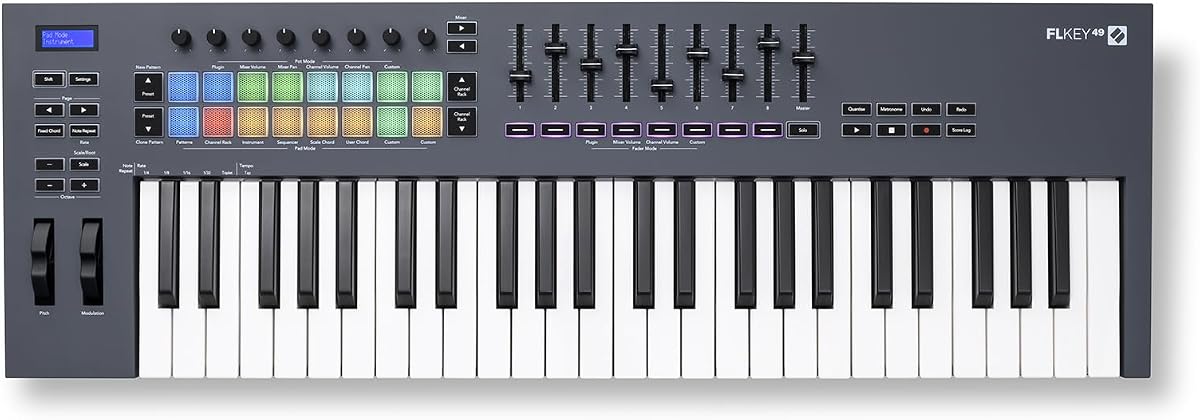
The Novation FLkey 49 is specifically designed for FL Studio users. Rated 4.6 it integrates so deeply that manual assignment is rarely needed. You can control mixer and channel rack directly from the hardware keeping hands off the mouse.
We may earn a commission when you buy through this link, at no additional cost to you.
Sequencer Mode maps pads to the step sequencer for fast beat programming. Transport and score log buttons ensure you stay in the flow. The Three Chord modes allow for harmonies without needing deep music theory knowledge.
While it works with other software its magic shines with FL Studio. The price is moderate compared to other controllers but the specialized workflow is valuable. It saves significant time on repetitive automation tasks.
If FL Studio is your DAW of choice this controller is a logical upgrade. It enhances the production experience by making controls accessible and intuitive.
Controls for mixer and channel rack are mapped automatically saving time during your production workflow.
Map the keyboard pads to the step sequencer for fast beat programming directly on the hardware.
We may earn a commission when you buy through this link, at no additional cost to you.
The M-AUDIO Oxygen Pro 49 offers advanced features like aftertouch and 16 RGB pads. Rated 4.5 it serves well for beat makers who need more trigger points. The semi-weighted keys add realism to performances without being too heavy.
We may earn a commission when you buy through this link, at no additional cost to you.
With 5-pin MIDI output you can connect external hardware synthesizers directly. The included software package is complete with expansion packs and virtual instruments. Smart Chord modes help simplify complex arrangements during writing sessions.
The footprint is larger than compact models which may impact desk space. The price reflects the added features like aftertouch and extra pads. It is a solid investment for those growing their studio setup.
Choose this if you need hardware connectivity and advanced expressive features. It bridges the gap between controller keyboards and professional synthesizers.
Pressure sensitive keys add expressive control over parameters while you play melodies.
Connect external hardware synthesizers directly using the included 5-pin MIDI output port.
We may earn a commission when you buy through this link, at no additional cost to you.
The midiplus AK490 is a fundamental tool for basic note input. Rated 4.3 it provides essential functions like pitch and modulation wheels. It includes a DIN MIDI out which is useful for connecting to older gear or standalone units.
We may earn a commission when you buy through this link, at no additional cost to you.
The layout is straightforward with no complex menus or software requirements. It supports a sustain switch jack for basic pedal use. This simplicity makes it reliable for users who just want to type notes in a DAW.
It lacks the extensive controls found in higher-end models. You will not find pads or extensive knobs for parameter control. This limits its use for performance or live production scenarios.
Buy this if you need a simple input device for a budget. It handles basic tasks well without unnecessary complexity or cost.
Includes essential pitch and modulation wheels for expressive performance without complex menus.
The MIDI out Din Jack allows connection to older hardware or standalone synthesizers easily.
We may earn a commission when you buy through this link, at no additional cost to you.
The Arturia KeyLab mk3 in white is the premium choice for dedicated producers. Rated 4.4 it offers aftertouch and 12 pressure-sensitive pads for deep expression. The build quality is solid and the white aesthetic adds a modern look.
We may earn a commission when you buy through this link, at no additional cost to you.
It supports USB-C power and includes 9 encoders for precise parameter control. The pads are highly responsive for triggering samples or launching clips. It integrates well with Arturia software providing a cohesive production environment.
The price is the highest on this list reflecting its premium features and aesthetics. It is an investment for those seeking top-tier tactile feedback. Stock may be limited due to popularity.
Choose this if budget is less important than quality and look. It is a standout for professional studios needing advanced control and style.
12 pressure-sensitive performance pads allow for dynamic triggering of samples and clips.
Aftertouch on keys lets you add expression and modulation pressure while holding a note.
We may earn a commission when you buy through this link, at no additional cost to you.
Selecting the right MIDI keyboard requires understanding your workflow needs and budget. This guide outlines key factors to consider before making your purchase.
The keybed determines how the keys respond to your touch. Semi-weighted keys offer a balance between synth and piano feel. Fully weighted keys provide more realism for pianists but add bulk and weight.
Consider if you need a piano-like touch or just a responsive synth feel. Lighter keys are easier to play fast melodies while heavier keys are better for nuanced dynamics.
Look for controllers that offer pre-mapped integration for your digital audio workstation. This allows you to control transport and mixing without manual setup. Seamless integration saves time during your production workflow.
Ensure the controller works with your specific software. Some brands specialize in one DAW which is ideal if you are locked into that ecosystem.
Knobs and faders allow you to control software parameters physically. Having more controls gives you hands-on access to effects and volume. This reduces reliance on the mouse and keeps your focus on creativity.
Decide if you need multiple faders or just a few knobs. Beat makers often need more pads while synth players may prioritize knobs for filtering.
Check for USB-C vs USB-A and MIDI output. USB-C provides faster data and often power. MIDI out is essential if you plan to connect external synthesizers.
Ensure the ports match your computer setup. If you connect multiple devices consider if a USB hub will be required for your specific needs.
Many controllers come with production software like DAWs and virtual instruments. This can save hundreds of dollars if you need these tools. Always check the value of included software before buying.
Some bundles offer limited trials or lite versions. Look for full perpetual licenses if possible to ensure long-term value for your music production.
Durability matters if you transport your gear regularly. Metal or sturdy plastic frames withstand travel wear. A lightweight unit is easier to carry but may feel less premium.
Evaluate the construction based on your usage. Home studio users might prioritize weight while touring musicians need ruggedness for protection.
Aftertouch allows you to add expression by pressing harder on the keys. This control modulates effects like vibrato or volume. It is a premium feature found on higher-end models.
If you play expressive leads or want dynamic control aftertouch is a significant benefit. Otherwise it can be skipped to save on budget.
Determine your budget early to filter options effectively. Higher price often brings more features but mid-range units can suffice. Balance cost with the specific tools you need for production.
Remember that a controller is one part of your setup. Allocating funds for software and plugins is just as important as the hardware itself.
Connect your keyboard to your computer using the provided USB cable. If needed install drivers or the specific software for your controller. Launch your DAW and enable MIDI input to start playing sounds.
Keep the keyboard covered when not in use to prevent dust buildup on keys and pads. Clean the surface with a dry soft cloth to maintain performance and appearance. Avoid using harsh chemicals that might damage the finish.
Update your controller firmware and software periodically to fix bugs and add features. Proper storage in a stable environment protects the electronics from humidity and extreme temperatures. Regular care extends the life of your gear.
Yes they are excellent for beginners because they offer enough range for chords and bass without taking up too much space. They strike a balance between functionality and desk size making them ideal for home studios. Most models are plug-and-play which simplifies the setup process.
Yes a MIDI keyboard sends signals that a computer processes into sound. Unlike synthesizers these do not have internal sound engines. You need a digital audio workstation or sound module connected to generate audio.
Velocity detects how fast a key is pressed for volume while pressure detects how hard it is pressed while held for effects. This extra control adds dynamics to performances making them sound more human. Some models support both features.
Many modern controllers are iOS compatible with the appropriate adapter. Check the product specs for support on tablets and phones. Mobile apps like GarageBand work well with these inputs for on the go music creation.
Often yes because DAWs and plugins cost significantly more than the controller itself. Many bundles include perpetual licenses for specific tools. Always verify the details to understand exactly what is included in your purchase.
Most keyboards include a sustain jack but do not include the pedal. You must purchase a standard sustain pedal separately. Check the specs to see if a switch or pedal is required for your setup.
We reviewed ten models to provide a clear overview of what is available in November 2026. The Novation Launchkey 49 MK4 stands out for integration while the Nektar SE49 offers affordability. Each unit brings unique strengths to the table.
Prioritize control features that match your workflow style. If you need pads for beats look at models with high sensitivity. If you prefer keys ensure the keybed feels natural for your playing style.
Prices fluctuate frequently so check current deals before buying. Verify that your software is supported by the controller you choose. The right keyboard will inspire creativity and streamline your music production journey.