
SANSUI 24.5 Inch 300hz 240hz
4.5Editor score
Up to 300Hz Overclock
FreeSync Premium Support
1ms MPRT Response
This guide compares the top 240Hz monitors for competitive Valorant, evaluating response times, panel types, and features to help you choose the right display
Finding the right display for competitive shooters like Valorant requires specific technical features. High refresh rates and low input lag are essential for tracking fast enemies and executing precise flick shots during intense ranked matches.
We analyzed ten top-rated monitors offering 240Hz refresh rates to identify the best options for FPS gamers. Our evaluation focused on panel technology, response times, adaptive sync support, and ergonomic designs suitable for long gaming sessions.
Each pick below highlights key strengths and potential trade-offs based on real-world performance data. Remember that availability and pricing can shift quickly, so verify current stock before making your final purchasing decision for your setup.
4.5Editor score

4.7Editor score
4.5Editor score
The following table provides a side-by-side comparison of all ten monitors selected for this guide. Use this data to quickly compare refresh rates, response times, panel types, and key connectivity options across the different models available.



The Dell SE2426HG earns our top recommendation for its consistent 240Hz performance combined with reliable IPS color accuracy. It offers a smooth 0.5ms response time that minimizes motion blur during fast-paced competitive matches.
We may earn a commission when you buy through this link, at no additional cost to you.
Its Fast IPS panel delivers vibrant visuals with wide viewing angles, ensuring target details remain clear even during dynamic camera movements. The display supports AMD FreeSync Premium to eliminate screen tearing without adding noticeable input delay.
While the stand lacks height adjustment, the tilt range is sufficient for most desk setups. The TÜV certification for eye comfort makes this monitor a solid choice for extended practice sessions without excessive strain.
If you need a dependable 240Hz monitor that balances speed and visual clarity, the Dell SE2426HG is an excellent investment. It fits well into competitive setups where consistent frame delivery matters most.
The 0.5ms response time combined with 240Hz refresh ensures that moving enemies stay sharp, giving you a distinct advantage when tracking targets across the map.
IPS technology provides 99% sRGB coverage which helps distinguish enemy outlines against various map backgrounds, improving your ability to spot opponents quickly.
We may earn a commission when you buy through this link, at no additional cost to you.
The AOC Q27G41ZE stands out for offering a QHD panel with native 240Hz performance, providing sharper visuals than standard Full HD options. Its 0.3ms MPRT response time is among the fastest available on the market.
We may earn a commission when you buy through this link, at no additional cost to you.
This monitor supports Adaptive-Sync to ensure smooth gameplay across both NVIDIA and AMD graphics cards. The IPS panel ensures colors remain accurate and viewing angles stay consistent during multi-monitor configurations.
While the stand offers tilt adjustment, it lacks height or pivot controls which may limit positioning flexibility. The higher resolution demands a powerful GPU to maintain 240Hz in competitive titles.
Gamers seeking sharper details without sacrificing refresh speed will appreciate this model. It is particularly effective if your system can drive QHD resolutions at high frame rates consistently.
The 2560×1440 resolution offers more screen real estate and sharper enemy models compared to 1080p displays, aiding in target identification at longer distances.
With a 0.3ms MPRT response, this monitor reduces blur significantly during rapid movements which helps maintain visual clarity when flicking to targets quickly.
We may earn a commission when you buy through this link, at no additional cost to you.
The SANSUI 24.5 inch model delivers impressive performance for its price with a native 240Hz rate that overclocks to 300Hz. It uses Fast IPS technology to maintain decent color quality alongside its high refresh rate.
We may earn a commission when you buy through this link, at no additional cost to you.
This monitor includes FreeSync Premium support and multiple DP and HDMI inputs, making it versatile for various setups. The 1ms MPRT response time ensures competitive performance without introducing excessive ghosting.
While it offers strong value, the brightness levels are lower than premium models and the stand adjustments are limited. These trade-offs are acceptable for budget-conscious gamers prioritizing raw speed.
If you need high refresh performance without breaking the bank, this SANSUI model provides exceptional value. It serves as an entry point into high-speed competitive gaming effectively.
The ability to overclock to 300Hz gives you extra frames per second which can reduce motion blur further on compatible high-end hardware configurations.
Having multiple DP and HDMI ports allows easy switching between different PCs or consoles without constantly replugging cables into the monitor.
We may earn a commission when you buy through this link, at no additional cost to you.
The Amzfast 24 inch curved monitor offers a unique space-saving design with an ultra-slim base that fits under keyboards. It provides 240Hz refresh and 1ms MPRT response for smooth competitive gameplay.
We may earn a commission when you buy through this link, at no additional cost to you.
Its curved VA panel delivers high contrast and wide color gamut coverage suitable for various content. The included OSD joystick simplifies setting adjustments quickly while you remain in the game.
VA panels generally have slower pixel transitions compared to IPS so ghosting may appear slightly more during rapid motion. The limited tilt adjustment also requires careful desk positioning for comfort.
This monitor is ideal for users with tight desk space who still want high refresh rates. The unique base design helps maximize valuable workspace during intense gaming sessions effectively.
The ultra-slim base allows you to slide a keyboard underneath it saving precious desk space for mouse movement in tactical shooters like Valorant.
The 5-way joystick control lets you access settings like refresh rate or game modes directly from the bezel without navigating through multiple menus.
We may earn a commission when you buy through this link, at no additional cost to you.
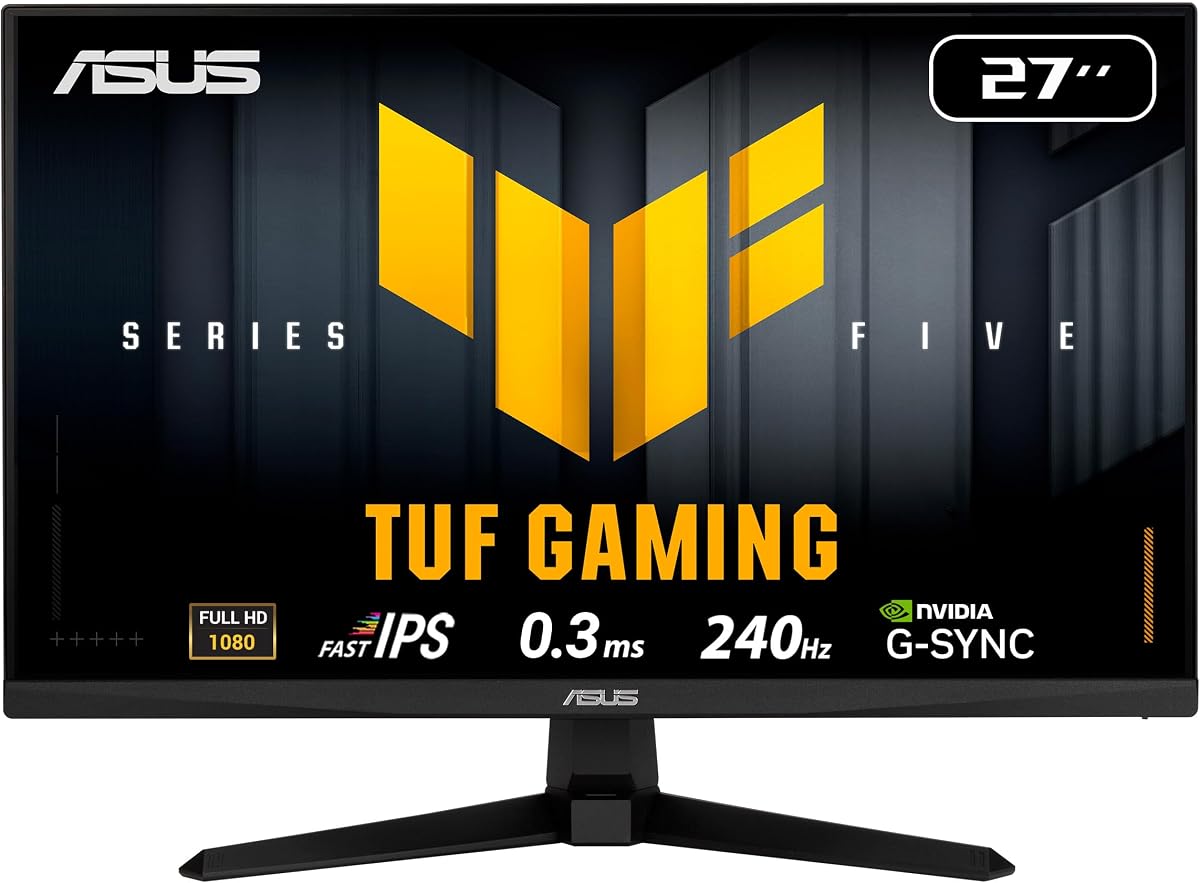
The ASUS TUF VG279QM5A delivers premium features with its 0.3ms minimum response time and G-SYNC compatibility for seamless tear-free gameplay. Its ELMB SYNC technology allows motion blur reduction alongside variable refresh rates.
We may earn a commission when you buy through this link, at no additional cost to you.
ASUS TUF Gaming AI features provide enhancements like crosshair optimization and noise reduction that can improve situational awareness. The DisplayWidget Center offers convenient mouse-driven control over monitor settings.
While the price is higher than budget options the build quality and performance justify the cost for serious competitors. The included Adobe Creative Cloud subscription adds extra value for content creation after gaming.
This monitor is a top-tier choice for those who demand the absolute fastest response possible. It offers the technological edge needed for high-stakes competitive matches.
ELMB SYNC combines backlight strobing with variable refresh rates to reduce ghosting while keeping adaptive sync active for smoother frame delivery.
The DisplayWidget Center allows you to adjust settings directly from your desktop which speeds up calibration before matches start.
We may earn a commission when you buy through this link, at no additional cost to you.
The MSI MAG 274CF X24 offers a VA panel that provides deeper blacks and higher contrast than typical IPS screens. It supports 240Hz refresh with a 0.5ms response time suitable for fast-paced shooters.
We may earn a commission when you buy through this link, at no additional cost to you.
AI Vision technology enhances brightness and details in dark areas which helps spot enemies hiding in shadows. The reduced blue light emission contributes to better comfort during long gaming sessions.
VA panels can suffer from slower pixel transitions leading to noticeable ghosting if settings are not adjusted correctly. Viewing angles are also narrower compared to IPS alternatives making placement important.
If you prioritize contrast and dark scene visibility this monitor is a strong contender. It balances speed with visual depth well for competitive gaming environments.
AI Vision technology improves visibility in dark corners of maps helping you detect enemies that might otherwise blend into shadows.
The software solution for reducing blue light helps prevent eye fatigue during extended practice sessions in competitive lobbies.
We may earn a commission when you buy through this link, at no additional cost to you.
The AOC 27G51Z provides a native 240Hz refresh rate with the ability to overclock to 260Hz for extra smoothness. It features an IPS panel for accurate colors and wide viewing angles suitable for competitive play.
We may earn a commission when you buy through this link, at no additional cost to you.
Adaptive-Sync technology works with both NVIDIA and AMD GPUs to prevent screen tearing. The frameless design facilitates multi-monitor setups seamlessly without distracting bezels between screens.
While the stand allows tilt adjustment it does not offer height or rotation controls. Power consumption is efficient which helps reduce heat generation during long sessions.
This model is ideal if you want a slightly higher refresh rate than standard options. It offers solid performance for players seeking every advantage in ranked matches.
Overclocking to 260Hz can provide marginally smoother motion if your graphics card maintains stable frame rates at that higher level.
The three-sided frameless design allows you to place multiple screens closer together minimizing visual interruption across your gaming setup.
We may earn a commission when you buy through this link, at no additional cost to you.
The SANSUI 24 inch curved monitor features a 1500R curve that enhances immersion during gameplay. It delivers 240Hz refresh with 1ms MPRT response ensuring smooth visual transitions during fast action.
We may earn a commission when you buy through this link, at no additional cost to you.
Its VA panel offers high contrast and wide color gamut coverage which improves visual fidelity for both games and media. Built-in game modes and shadow boost features optimize settings for FPS titles.
Curved screens may cause distortion at the edges depending on viewing distance. VA panels also struggle with motion clarity compared to IPS models so ghosting may be more noticeable.
If you prefer an immersive experience that wraps around your vision this monitor delivers effectively. It offers solid performance for casual and competitive play alike.
The 1500R curvature matches the human eye shape reducing eye strain during long sessions by maintaining consistent focal distance across the screen.
Built-in game modes and shadow boost tools help adjust brightness for specific game types ensuring optimal visibility during ranked matches.
We may earn a commission when you buy through this link, at no additional cost to you.
The ASUS TUF VG249QML5A provides a compact 24-inch screen with Fast IPS technology for 0.3ms response times. It supports G-SYNC compatibility and includes ELMB SYNC for advanced motion control.
We may earn a commission when you buy through this link, at no additional cost to you.
Its ergonomic stand allows full height adjustment which is rare at this price point and helps maintain a comfortable viewing angle. The 99% sRGB coverage ensures accurate colors for content creation.
While the warranty coverage is comprehensive the lack of USB ports limits peripheral connectivity. Higher cost may be a barrier for budget-focused buyers compared to similar alternatives.
This monitor is an excellent choice for those needing ergonomic flexibility in a smaller form factor. It delivers high-performance specs in a versatile package.
The height-adjustable stand allows you to align the screen precisely with your eye level reducing neck strain during long tournaments.
ELMB SYNC technology helps reduce motion blur effectively allowing sharper tracking of fast-moving targets in competitive shooters.
We may earn a commission when you buy through this link, at no additional cost to you.
The ASUS TUF VG259QM5A offers a balanced 25-inch screen with Fast IPS technology and 0.3ms response times. It ensures tear-free gameplay through G-SYNC compatibility and delivers vivid color accuracy.
We may earn a commission when you buy through this link, at no additional cost to you.
Its compact size fits well on smaller desks while still providing ample visibility for tracking targets across the map. DisplayWidget Center simplifies settings management without leaving your game client.
While it lacks USB ports and ergonomic adjustments the core performance metrics are excellent for competitive play. The 3-year warranty offers peace of mind for long-term usage.
This model is perfect for gamers wanting a middle-ground size between 24 and 27 inches. It provides a solid balance of performance and desk footprint.
The 25-inch screen provides a comfortable view without requiring excessive head movement ensuring you keep track of the entire map easily.
DisplayWidget allows you to adjust monitor settings using your mouse which speeds up the process before matches begin.
We may earn a commission when you buy through this link, at no additional cost to you.
Selecting a monitor for competitive FPS requires balancing refresh rate, response time, and panel technology. This guide covers the essential factors you must consider to optimize performance for ranked gameplay.
Refresh rate determines how many frames the screen displays per second. For Valorant, 240Hz is the standard competitive target to ensure smooth motion during tracking and flicks.
Always choose a monitor that supports at least 240Hz natively to maximize your reaction time and visual fluidity.
Response time measures how quickly pixels change color. Look for monitors with 1ms or lower response time to reduce ghosting and motion blur during fast movements.
Lower response times improve clarity when tracking targets quickly across the screen.
IPS panels offer better color accuracy and viewing angles while VA panels provide higher contrast. For competitive play, IPS is often preferred for speed and clarity.
IPS technology is generally the safer choice for fast-paced shooters where motion clarity is paramount.
Adaptive Sync technologies like FreeSync and G-SYNC prevent screen tearing by matching monitor refresh to GPU output. This reduces stutter without adding input lag.
Ensure the monitor supports the specific sync tech compatible with your graphics card.
Modern monitors should include HDMI 2.0 and DisplayPort 1.4 inputs to support high refresh rates. Verify that your cables support the bandwidth needed for 240Hz.
DisplayPort is often necessary for maximum refresh rates on most monitors.
1080p remains the standard for competitive shooters due to lower GPU load. QHD is available but requires more power to maintain 240Hz.
Stick to 1080p if your priority is highest frame rates and system compatibility.
Adjustable stands with height and tilt help maintain proper posture during long sessions. A good stand reduces strain and improves focus.
Look for ergonomic adjustments to ensure comfort during ranked matches.
Features like flicker-free and low blue light help reduce eye fatigue during extended play. Look for TÜV certifications for proven comfort technology.
Prioritize eye comfort features to maintain focus during long practice sessions.
Set the monitor to its maximum refresh rate in your graphics card control panel to ensure smooth gameplay. Enable adaptive sync if available to reduce tearing without lag.
Use the on-screen display menus to enable game modes and adjust shadow controls for better visibility in dark areas. Calibrate brightness and contrast to match your lighting environment.
Clean the screen with a soft microfiber cloth to avoid scratches. Avoid touching the panel directly to prevent oil buildup that affects image quality.
While not strictly required, a 240Hz monitor provides smoother motion and reduced input lag compared to standard 60Hz or 144Hz displays. This competitive edge helps with tracking and flick accuracy.
A 300Hz monitor offers even smoother motion than 240Hz but requires a powerful GPU to maintain high frame rates. For most players, 240Hz is sufficient for competitive Valorant performance.
NVIDIA G-SYNC can add slight input lag if V-SYNC is forced. However, FreeSync or G-SYNC Compatible modes usually provide a balance of tear-free visuals with minimal lag.
1080p is generally preferred for competitive Valorant because it requires less GPU power allowing higher frame rates. Higher resolutions like 1440p can limit FPS on most systems.
Most monitors support 240Hz via HDMI 2.0 or DisplayPort 1.4. However, DisplayPort is often more reliable for high refresh rates so check your monitor manual for specific limits.
Curved monitors can offer immersion but may introduce distortion at edges. Most competitive players prefer flat screens for consistent geometry and clearer target tracking across the display.
Enable motion blur reduction features if your monitor supports them and adjust refresh rates in graphics settings. Lower response times on the monitor also naturally reduce blur during movement.
We explored ten top monitors offering 240Hz refresh rates for competitive play. The Dell SE2426HG stands out as the Editor's Choice for balancing speed and value effectively.
Prioritize panel technology and response times when comparing models to ensure the smoothest gameplay experience. Consider your desk space and GPU capabilities before finalizing your choice.
Remember that prices and availability change frequently so verify the latest details before buying. Selecting the right monitor can significantly improve your performance in ranked matches.