
4K AI-Powered Conference Webcam with Microphones Speakers
4.1Editor score
120-degree wide angle lens
Zoom certified compatibility
Physical lens cover included
This guide compares the top 10 auto tracking conference camera models for 2026, evaluating features like 4K video, AI framing, and audio quality for seamless
Modern remote work demands high-quality video conferencing tools that keep every participant engaged. An auto tracking conference camera uses artificial intelligence to follow speakers automatically, ensuring smooth professional meetings without manual adjustment. This technology transforms ordinary rooms into dynamic collaboration spaces for teams.
We evaluated ten leading models based on video resolution, tracking accuracy, audio clarity, and ease of setup. Each product offers unique strengths for different room sizes and budgets. Our analysis focuses on real-world performance to help you choose the right system for your needs.
Every pick in this list highlights specific use cases and standout features found in today's market. Ratings reflect user satisfaction and technical capabilities verified by our research. Prices fluctuate frequently, so check current listings before purchasing to secure the best deal available now.
4.1Editor score

4.8Editor score

4.6Editor score
The following table provides a side-by-side comparison of all ten products analyzed in this guide. It highlights key specifications like zoom range, output options, and special features to help you identify the best fit for your meeting environment quickly.




The TONGVEO 4K Conference Room Camera System leads our list with its robust all-in-one design. It delivers high resolution video and audio simultaneously through an advanced AI tracking system. Users praise its ability to frame speakers automatically during dynamic presentations.
We may earn a commission when you buy through this link, at no additional cost to you.
Its 4K 30fps output ensures sharp visuals even in large meeting spaces. The 3x optical zoom maintains clarity when focusing on distant subjects. The integrated Bluetooth speakerphone supports up to twelve people with clear omnidirectional microphones.
While the speakerphone battery lasts six to eight hours, it may need recharging for longer sessions. The HDMI interface is necessary for uncompressed 4K output, adding a cable requirement for some setups.
This system is ideal for small to medium conference rooms needing professional quality without complex IT integration. Its compatibility with major platforms like Zoom and Teams makes it a versatile choice for hybrid work environments.
The improved algorithm tracks both facial and humanoid features, maintaining center framing even when subjects move quickly.
Four omnidirectional microphones capture sound up to sixteen feet, reducing background noise for clearer communication.
We may earn a commission when you buy through this link, at no additional cost to you.
This 4K AI-Powered Conference Webcam offers a cost-effective solution for small meeting spaces. Its design ensures every participant remains visible without manual adjustment during group calls. The Zoom certification guarantees reliable performance on that platform.
We may earn a commission when you buy through this link, at no additional cost to you.
It features AI auto framing that detects and frames all attendees automatically. Dual noise-canceling microphones reduce background interference for clear voice pickup across the table. A physical lens cover adds essential privacy protection.
Some users note the tracking is less precise compared to higher-end models. The lack of optical zoom may limit detail capture in larger rooms.
Best for teams needing simple setup without extra audio equipment. It provides professional video quality at a fraction of the cost of complete conference systems.
No IT setup is required; just connect via USB and start meetings instantly on supported platforms.
Includes a physical lens cover for secure use in shared office environments and meeting rooms.
We may earn a commission when you buy through this link, at no additional cost to you.
TONGVEO offers a reliable all-in-one system with full HD 1080p at 60fps. This frame rate delivers smooth motion for dynamic meetings or educational sessions. The camera supports both HDMI and USB 3.0 outputs for flexible integration.
We may earn a commission when you buy through this link, at no additional cost to you.
Its AI tracking system uses enhanced image sensors to maintain perfect subject framing. The Bluetooth speakerphone connects wirelessly and offers up to eight hours of continuous use. The 114-degree wide angle captures entire team groups easily.
While not 4K, the 1080p quality is sufficient for most standard conference needs. The wireless speakerphone battery may run out during extended multi-hour events.
This model is excellent for users prioritizing motion smoothness over maximum resolution. It balances performance and affordability for small-to-medium conference rooms needing professional audio and video.
60fps support ensures video looks fluid during presentations or moving subjects without stutter.
Simultaneous HDMI and USB output allows connecting to multiple displays or computers.
We may earn a commission when you buy through this link, at no additional cost to you.
This TONGVEO system stands out with unique gesture control features for hands-free operation. Users can activate tracking or zoom using simple hand signals like 'OK' or 'V' shapes. The 4K sensor delivers sharp images for detailed presentations.
We may earn a commission when you buy through this link, at no additional cost to you.
It supports 350-degree horizontal rotation with precise pan and tilt functions. The speakerphone offers full-duplex audio with ultra-clear sound quality. A remote control allows setting preset positions quickly.
Digital zoom may reduce detail compared to optical alternatives, but it remains functional. Gestures require practice to master during live meetings.
Ideal for tech-savvy teams wanting interactive control without touching devices. The compact design fits any desk or mount, making it versatile for various meeting setups.
Customizable gestures allow users to toggle tracking or zoom modes instantly during meetings.
Use the remote to save and recall up to nine preset camera angles for consistency.
We may earn a commission when you buy through this link, at no additional cost to you.
With 20X optical zoom, this system captures clear details from the back of large churches or conference halls. The PoE power option allows single-cable installation for reduced clutter. Bluetooth speakerphone ensures audio covers up to twelve people effectively.
We may earn a commission when you buy through this link, at no additional cost to you.
AI tracking maintains focus on pastors or presenters without manual intervention. Compatible with Windows and macOS, it works seamlessly with Zoom and Teams. Technical support is available for stable streaming reliability.
The higher investment suits organizations needing professional broadcast quality. Setup may require network knowledge for PoE switch configuration.
Best for worship venues or large conference halls where visibility from distance is critical. It provides a complete solution without extra audio hardware.
20X optical zoom brings distant subjects close without losing image quality.
Power over Ethernet simplifies installation by delivering power and data through one cable.
We may earn a commission when you buy through this link, at no additional cost to you.
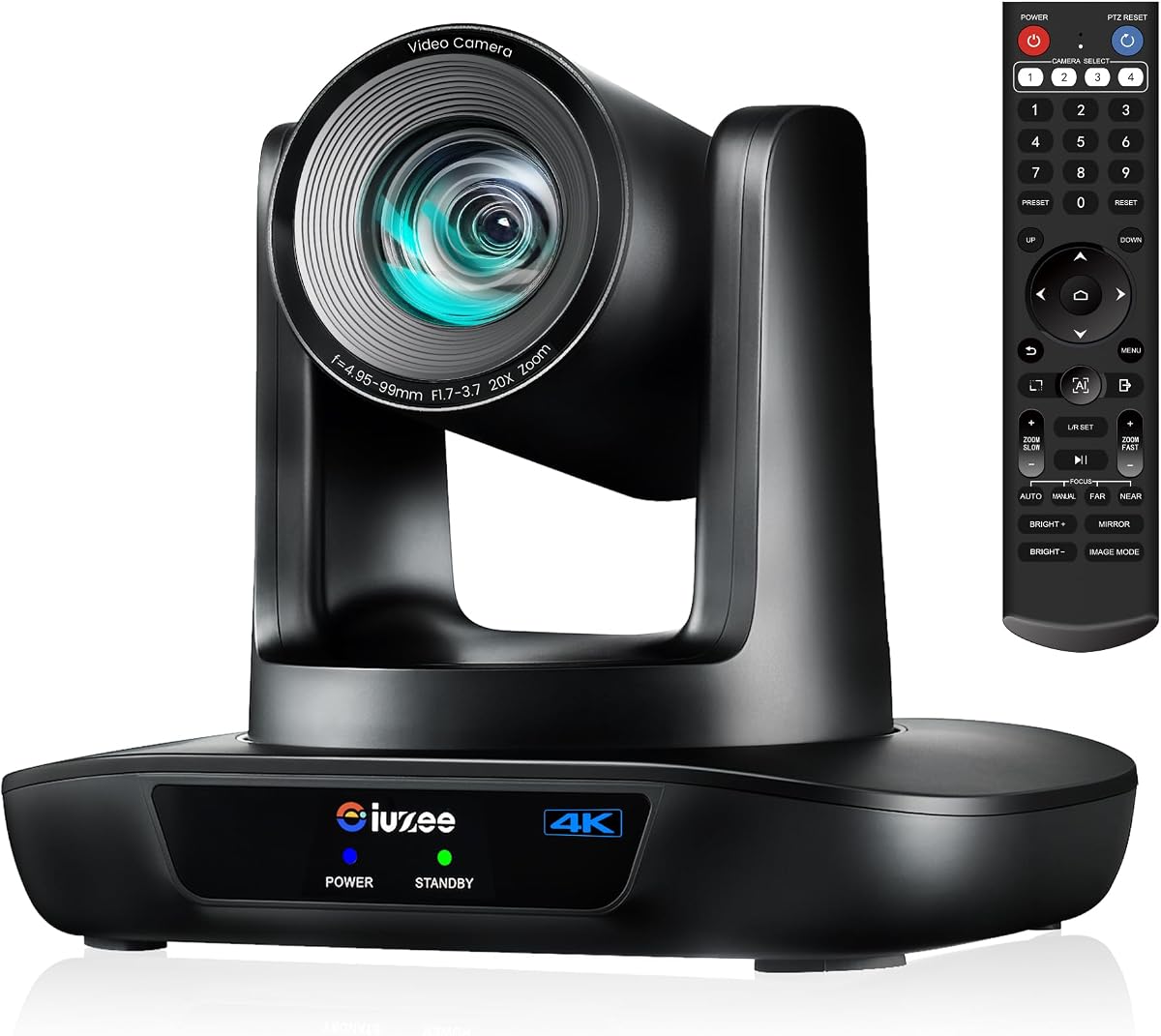
The iuZee 4K PTZ Camera is built for professional live streaming and broadcast applications. It offers three simultaneous HD outputs including LAN for IP streaming. Advanced noise reduction technology enhances image clarity in various lighting conditions.
We may earn a commission when you buy through this link, at no additional cost to you.
Facial and figure tracking provide millisecond-level response speeds for smooth framing. The 20X optical zoom ensures every detail is captured without quality loss. Support for RTMP and RTSP allows direct streaming to platforms like YouTube.
Notably, it lacks a built-in microphone, requiring an external audio source. This adds complexity to the setup compared to all-in-one kits.
Perfect for users needing professional IP streaming capabilities without compromise. It is ideal for houses of worship or education events requiring high production quality.
Support for multiple encoding formats ensures smooth performance even in low-bandwidth environments.
Three simultaneous outputs allow connecting to PCs, TVs, and networks simultaneously.
We may earn a commission when you buy through this link, at no additional cost to you.
TONGVEO's 4K NDI PTZ Camera brings professional studio features to meeting rooms. It includes an official NDI license for seamless workflow integration with software like OBS. SDI output supports long cable runs without signal degradation for broadcast setups.
We may earn a commission when you buy through this link, at no additional cost to you.
AI tracking resumes automatically when subjects reappear after obstruction, ensuring continuous framing. HDMI and USB deliver true 4K resolution for unmatched sharpness. Remote control via web browser simplifies management.
It requires network infrastructure for full NDI functionality, which may exceed basic needs. The premium price is justified by its production-grade capabilities.
Best for professional broadcasters or organizations needing top-tier video production quality. It delivers essential features and flexibility for any high-level production.
Officially licensed NDI support simplifies integration with vMix and other broadcast software.
SDI output ensures reliable signal over long distances without extra hardware converters.
We may earn a commission when you buy through this link, at no additional cost to you.
Designed for professional use, this camera offers durable construction and smooth PTZ performance. Its 20X optical zoom captures details from eighty feet away, perfect for large classrooms. Compatibility with OBS and Zoom makes it versatile for hybrid learning.
We may earn a commission when you buy through this link, at no additional cost to you.
Pan and tilt controls can be managed via software or remote for effortless operation. The plug-and-play setup ensures reliable streaming without driver issues. Users can preset views for pulpit or group shots.
Factory default 4K may require resolution changes for 2K monitors. External audio equipment is required for full communication.
Ideal for educational institutions needing clarity and reliability. It ensures stable streaming and responsive support for classroom productions.
20X optical zoom ensures every student can see the presenter clearly regardless of distance.
Multiple connection options ensure seamless integration with existing IT infrastructure.
We may earn a commission when you buy through this link, at no additional cost to you.
This system combines camera microphones and speakers into one device to reduce cable clutter. Its 120-degree lens captures full-room views without manual adjustment. AI auto framing detects participants and keeps everyone centered dynamically.
We may earn a commission when you buy through this link, at no additional cost to you.
The 4-mic array reduces background noise effectively across large spaces. Built-in dual speakers eliminate the need for external audio devices in most setups. It works seamlessly with Teams and Google Meet.
While costlier than standalone webcams, it simplifies setup for hybrid work environments. Speaker volume may need adjustment for larger audiences.
Perfect for remote collaboration and client presentations. It ensures every participant is clearly seen and heard with minimal effort.
Combines camera, microphones, and speakers into one device for a simplified setup.
Intelligently follows active speakers to ensure dynamic meetings remain focused.
We may earn a commission when you buy through this link, at no additional cost to you.
TONGVEO's 3-in-1 webcam combines lens microphone and speaker into a portable unit. Its adjustable field of view lets users switch between wide and narrow modes. Remote control allows quick settings adjustments without touching the computer.
We may earn a commission when you buy through this link, at no additional cost to you.
Voice tracking follows active speakers within seconds. Dual omnidirectional mics pick up voices up to sixteen feet away. A privacy cover protects the lens when not in use.
Digital zoom lacks the clarity of optical options. The average user rating is slightly lower than premium models.
Ideal for individuals needing a complete all-in-one solution at a lower cost. It provides professional conference quality for solo or small group calls.
Switch between 118, 100, and 88 degrees to suit any meeting type.
Plug-and-play USB setup makes it easy to carry between meetings or rooms.
We may earn a commission when you buy through this link, at no additional cost to you.
Selecting the right camera involves evaluating resolution, zoom type, audio features, and connectivity options that match your specific room size and usage needs.
Higher resolution like 4K delivers sharper images especially when zooming. Standard 1080p is sufficient for smaller spaces but 4K ensures detail for larger displays.
Prioritize 4K if you frequently present visual details or use large screens.
Optical zoom maintains image quality when enlarging distant subjects while digital zoom may blur details. Models with 20x optical zoom are ideal for big rooms.
Choose optical zoom for professional settings requiring clear close-ups from distance.
Advanced algorithms should track both facial and body features to prevent losing speakers. Some models offer preset or manual modes for flexibility.
Ensure the tracking algorithm supports both face and body recognition for smooth transitions.
Look for omnidirectional microphones with noise cancellation to capture voices across the table. Integrated speakers may suffice but check pickup range carefully.
Opt for systems with separate speakerphones if you need clearer audio coverage.
USB ensures plug-and-play ease while HDMI offers uncompressed quality. LAN or PoE supports professional streaming setups and reduces clutter.
Select outputs that match your existing display and computer setup requirements.
Small rooms need wide-angle lenses but large halls require high zoom. Consider the maximum distance participants will sit from the camera.
Match zoom and lens angle to your room dimensions for optimal visibility.
Ensure certification with your primary meeting software like Zoom or Teams. Driver-free setups save time and IT costs for businesses.
Check software compatibility lists before purchasing to avoid integration issues.
A minimum three-year warranty protects your investment against defects. Responsive technical support ensures minimal downtime if issues arise.
Prioritize brands offering clear warranty terms and accessible support teams.
Place the camera at eye level centered on the seating area for optimal framing. Use wall or ceiling mounts if desk space is limited to avoid obstruction.
Connect via USB or HDMI to your computer ensuring drivers are installed if required. Adjust settings in your meeting software to enable video and audio permissions correctly.
Clean the lens gently with a microfiber cloth to avoid smudges affecting tracking accuracy. Avoid direct sunlight or bright lights behind speakers which may confuse the camera sensors.
Optical zoom physically adjusts the lens to enlarge images without losing quality. Digital zoom crops and enlarges pixels which often reduces sharpness. For clear views of distant speakers, optical zoom is essential for quality.
Not all models require external microphones as many include built-in arrays. However, larger rooms may need speakerphones for optimal audio pickup. Check product specs to confirm audio components included.
Advanced algorithms analyze facial and body features to identify active speakers. The camera pans tilts and zooms automatically to keep subjects centered. Some systems resume tracking even if subjects move briefly.
Many high-end models support RTMP or IP streaming for platforms like YouTube. They integrate with broadcast software like OBS for professional presentations. Verify output compatibility with your streaming software.
Power over Ethernet delivers both electricity and data through one cable. This reduces clutter and simplifies installation in hard-to-reach places. It is common in professional broadcast setups.
Most kits include a wall mount bracket with screws. Use a level to ensure proper alignment before drilling holes. Secure the camera firmly to prevent movement during operation.
Yes most models support Mac OS via USB without additional drivers. Check the specific system requirements for your device before purchase. Some features may require web browser access for setup.
Most Bluetooth speakerphones last six to eight hours on a full charge. This suits standard meetings but may need recharging for longer events. Keep a USB charging cable handy for extended use.
Our top picks include the TONGVEO 4K System for overall performance, the AI-Powered Webcam for budget users, and the NDI PTZ for professional streaming. Each offers distinct strengths suited to different needs.
Prioritize optical zoom and audio clarity for larger spaces while considering plug-and-play ease for smaller offices. Verify compatibility with your existing meeting software before buying.
Check current prices and availability since deals vary often online. Investing in a reliable camera ensures smooth professional meetings and enhances remote collaboration for your team.