
USB Fast Charger Block 50% Smaller 100W Max 6-Port GaN USB Charging Station
4.3Editor score
Compact travel ready design
6 ports simultaneous charge
Lightweight portable hub
This guide compares the top charging station for multiple devices to help you organize your tech with reliable power delivery and sleek design.
Finding the right charging station for multiple devices can transform your workspace from cluttered to streamlined. With smartphones, tablets, and laptops all needing power daily, a single hub simplifies your routine significantly.
We evaluated ten leading models based on port variety, output power, build quality, and safety features. Each option offers unique strengths for different setups, from home offices to travel kits.
Every pick highlights key specs and real-world performance notes to guide your decision. Prices and availability may shift over time so verify details before purchasing your new organizer.
4.3Editor score

4.5Editor score

4.7Editor score
This side-by-side comparison highlights key differences across all ten models so you can quickly identify which fits your power needs and space constraints best.




The Zobirez 420W 10-Port Charging Station stands out as a robust solution for power-hungry households. With a rating of 4.5 stars from users, it delivers consistent power across ten ports simultaneously. Its GaN technology ensures fast charging speeds without excessive heat buildup during prolonged use.
We may earn a commission when you buy through this link, at no additional cost to you.
This model features five USB-C and five USB-A ports, accommodating both modern laptops and legacy devices. The total output reaches 420W, which is sufficient for charging a laptop alongside multiple tablets and phones. Sturdy one-piece slots with flame-retardant ABS housing protect your tech while keeping the desk tidy.
While the unit is larger than compact models, the extra space accommodates devices with thick cases securely. The included short mixed cables eliminate the need to hunt for adapters, making setup immediate. Safety features like over-current and over-voltage protection add a layer of confidence for daily charging.
This station is ideal for shared workspaces where multiple users need power at once. Its ability to handle high-wattage laptops while providing safe low-wattage ports for peripherals makes it versatile. Consider the footprint size before purchasing to ensure it fits your nightstand or desk comfortably.
Dual 65W GaN ports allow fast charging for MacBooks and other laptops without throttling speeds when other ports are in use.
The built-in short cables reduce clutter and tangles, ensuring a clean surface that is easy to wipe down or reorganize.
We may earn a commission when you buy through this link, at no additional cost to you.
The Zobirez 750W Charging Station offers the highest power capacity in this review. It supports ten devices at once with individual ports capable of delivering up to 120W per USB-C connection. This model is rated 4.6 stars by users who need to power high-performance laptops alongside smartphones simultaneously.
We may earn a commission when you buy through this link, at no additional cost to you.
Each USB-C port is designed to handle laptops like MacBook Pro or Air models efficiently. The five USB-A ports provide 30W each for phones, headphones, and other accessories. The sturdy one-piece slots ensure tablets stay upright even when wearing thick protective cases.
The included cable kit contains a 100W USB-C to C cable and various lengths for different needs. This eliminates the frustration of missing cables when setting up a new desk area. Safety features include over-current and overheat protection to maintain device health during charging.
This unit is best for power users who demand maximum output from a single hub. While the weight is higher than smaller models, the stability it provides on a desk is reassuring. It is a strong investment for offices or families with multiple heavy-duty charging needs.
Real laptop charging speed is available on all five C ports, ensuring your notebook charges rapidly without needing a separate brick.
A full set of cables is included so you can start charging immediately without purchasing additional accessories for your devices.
We may earn a commission when you buy through this link, at no additional cost to you.
Anker Prime Charging Station delivers reliable performance in a compact form factor. With a rating of 4.6 stars, it supports up to six devices simultaneously with a total output of 200W. The design focuses on efficiency, featuring GaN technology to reduce heat and size compared to older silicon chargers.
We may earn a commission when you buy through this link, at no additional cost to you.
When using two USB-C ports together, each can provide up to 100W of power. This ensures your laptop charges at full speed even while other devices draw power. The compact width matches that of an iPhone 17 making it easy to place on a crowded desk.
Built for the desk, it features a sturdy base with a weight of 1.24 pounds to prevent sliding. Safety features include continuous temperature monitoring to protect your equipment during long sessions. The 24-month warranty adds peace of mind for any long-term purchase.
This station is ideal for those who need fewer ports but higher quality assurance. While it does not offer specific case slots, it handles standard devices well. It is a solid choice for professionals who value brand reliability and compact design over raw port count.
Gallium Nitride technology allows for faster charging speeds and less heat generation compared to traditional charger designs.
The sturdy base ensures the charger stays put on your desk, even when cables are plugged or unplugged repeatedly.
We may earn a commission when you buy through this link, at no additional cost to you.
The USB Fast Charger Block offers a budget-friendly entry into multi-device charging. With a 4.3 rating, it supports up to six devices simultaneously with a total output of 100W. Its compact design makes it an excellent choice for small desks or travel bags.
We may earn a commission when you buy through this link, at no additional cost to you.
Measuring just 3.27 inches wide, this charger block is significantly smaller than standard units. It includes a 5ft detachable AC extension cord, providing flexibility to reach outlets behind desks. The design is compatible with most mobile devices and accessories rather than laptops.
Safety is maintained with intelligent circuit management that guards against over-charging and short circuits. This ensures stable power delivery which helps maintain the battery health of your gadgets over time. The lightweight build makes it easy to carry without adding bulk to your luggage.
Ideal for travelers or those with limited desk space, this unit covers basic charging needs efficiently. While it does not support high-wattage laptop charging, it is perfect for phones and tablets. Its low cost and small footprint make it a smart addition to any office setup.
Lightweight construction allows you to pack this charger easily for trips, ensuring you do not leave your devices behind.
Internal safety circuits manage power delivery to prevent overheating and protect connected devices from electrical issues.
We may earn a commission when you buy through this link, at no additional cost to you.
Anker MagGo 3-in-1 Charging Station is tailored for Apple users seeking a sleek wireless setup. With a 4.6 rating, it offers ultra-fast 15W wireless charging consistent with original MagSafe technology. It supports charging for phones, watches, and earbuds on a single compact dock.
We may earn a commission when you buy through this link, at no additional cost to you.
The unit features official certification for Apple Watch Series 10, ensuring a full charge in just over one hour. You can adjust the viewing angle up to 45 degrees vertically for optimal comfort during use. It fits perfectly on desks or nightstands without taking up much space.
A 40W USB-C adapter and 5ft cable are included for immediate setup. This makes it a complete package for bedside charging where cable clutter is a concern. The design supports StandBy mode in landscape orientation, which is useful for alarms and notifications.
This dock is best for those deeply invested in the Apple ecosystem who value wireless convenience. While it lacks USB ports for wired charging, its simplicity is a major benefit. It is a stylish and practical choice for maintaining a tidy environment.
Certified charging ensures your Apple Watch reaches full battery quickly without risking battery degradation from slow or unsafe charging.
Vertical angle adjustments let you find the perfect spot for viewing your phone or checking notifications while charging.
We may earn a commission when you buy through this link, at no additional cost to you.
Anker Desktop Charger combines a power strip with charging ports for maximum utility. Rated 4.7 stars, it features 3 AC outlets, 4 USB-C ports, and 2 USB-A ports in one unit. The included 300J surge protector adds a layer of security for sensitive electronics.
We may earn a commission when you buy through this link, at no additional cost to you.
Each USB-C port supports up to 100W when used individually, allowing for fast laptop charging. The weight of 19.75 ounces ensures the unit stays stable during desktop use. An 8-point safety system monitors for overvoltage and short circuits to keep devices safe.
This model is designed for users who need both traditional plugs and USB charging without multiple strips. The AC outlets allow for lamps or other gadgets to be powered alongside devices. It is a versatile all-in-one solution for complex desk setups.
Ideal for home offices or study areas where power demand is high, this charger handles diverse needs. The premium build quality justifies the higher price point for many users. It is a top choice for those wanting robust safety and high performance.
The 300J rating protects your expensive electronics from power spikes and surges that could cause damage over time.
Having both AC outlets and USB ports means you can plug in any device type without needing separate adapters.
We may earn a commission when you buy through this link, at no additional cost to you.
MSTJRY Charging Station is designed with family convenience in mind. It features five USB-A ports and comes with seven short cables for various devices. The unit has a 4.3 rating from users who appreciate the included accessories and simple setup process.
We may earn a commission when you buy through this link, at no additional cost to you.
The removable dividers allow you to adjust the spacing for tablets or phones with thick cases. This flexibility ensures your devices stand upright securely while charging. A visual switch on the side indicates power status, making it easy to know when it is active.
Each port automatically detects the connected device and adjusts voltage for minimal charging time. This smart feature helps prevent damage to batteries by providing the exact current needed. It is a cost-effective solution for households with multiple iPhone or Android users.
This station is great for shared spaces like kitchens or nightstands where quick charging is needed. The focus on USB-A compatibility suits older models but may lack speed for newer laptops. It remains a practical choice for basic daily charging needs.
Seven included cables mean you can start charging immediately without buying extra cords for your specific device mix.
Removable dividers let you customize the slots to fit larger tablets or protectively cased phones securely.
We may earn a commission when you buy through this link, at no additional cost to you.
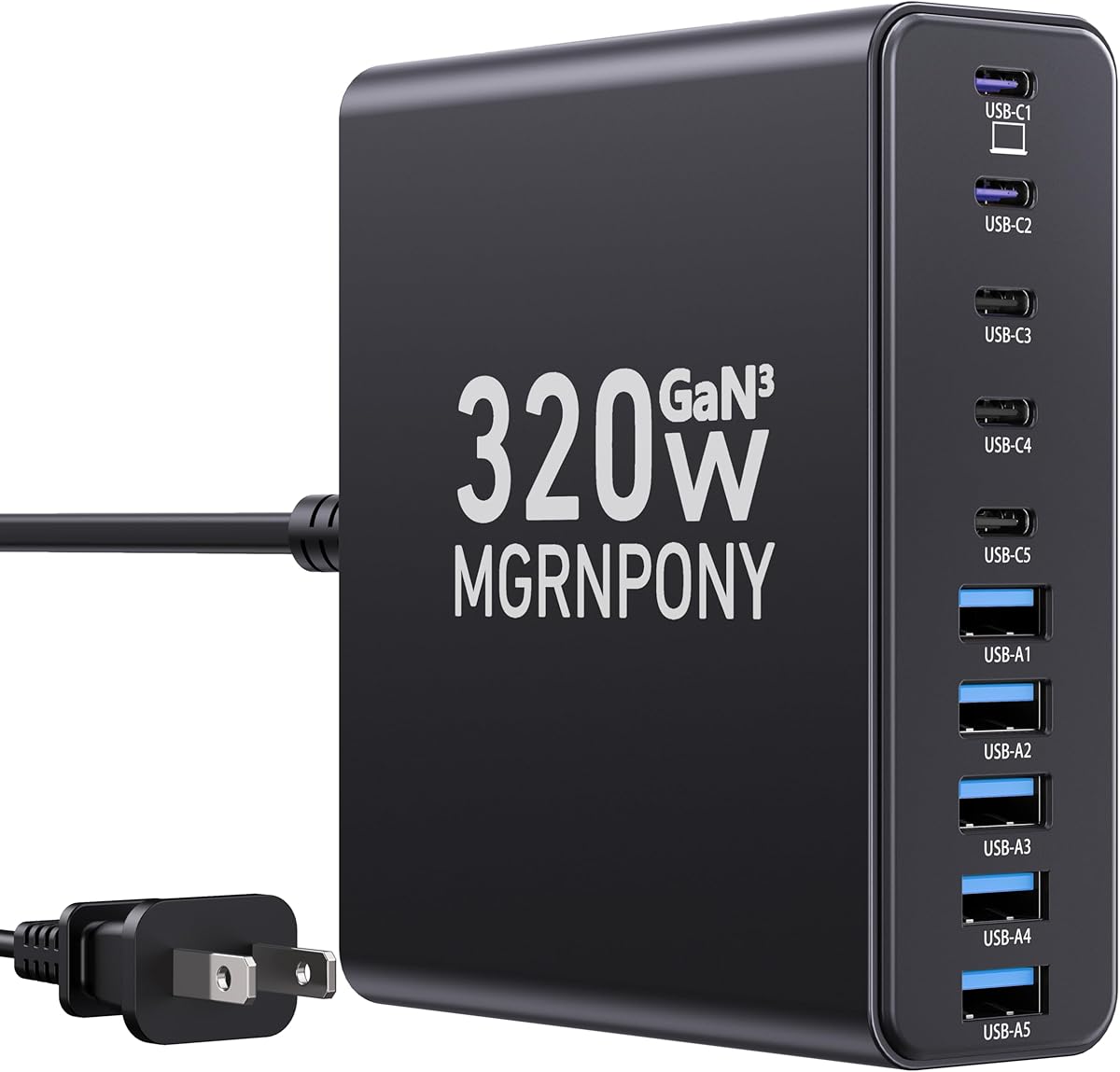
MGRNPONY 320W Charging Station uses IceShield 3.0 technology to maintain safety and speed. With a 4.5 rating, it supports ten devices at once with high-speed GaN charging. The design focuses on efficiency, offering fast power delivery without bulky hardware.
We may earn a commission when you buy through this link, at no additional cost to you.
Safety features include continuous temperature monitoring with over 3 million checks daily to prevent overheating. The unit supports both new electronics and legacy devices, making it versatile for mixed tech environments. A 5ft power cord ensures flexibility for placement near walls or outlets.
Unlike some models, this unit does not include cables so you must use your own. However, the compact design and high output make it a strong competitor for performance. It is built to handle charging for laptops and phones simultaneously without speed loss.
Ideal for travelers or office workers who want high performance in a small package, this station delivers value. It is a great alternative for those who already own the necessary cables for their devices. The balance of power and portability is a key strength.
Advanced protection systems monitor temperature constantly to ensure reliable safety for your devices during extended charging.
Gallium Nitride components allow for faster charging speeds and efficient energy use compared to standard chargers.
We may earn a commission when you buy through this link, at no additional cost to you.
The 8-in-1 Retractable Charger solves cable clutter with built-in cords that retract. With a 4.4 rating, it supports up to eight devices simultaneously using GaN technology. The maximum output power is 105W, providing fast charging for phones and tablets.
We may earn a commission when you buy through this link, at no additional cost to you.
The retractable cables extend to 80cm, which is sufficient for bedside use or desk placement. The design includes various port types to fit different devices without needing external cables. It is compatible with many smartphone models and accessories for broad usability.
Safety and efficiency are enhanced by GaN technology, which delivers superior performance. However, retractable cords can sometimes wear faster than fixed cables with frequent use. The unit also lacks included extra cables so reliance is on the built-in ones.
This model is perfect for those who hate tangled cords and want a tidy look. It works well on nightstands or office desks where space is limited. Consider the cable longevity before committing if your usage involves frequent retraction.
Retractable design hides unused cables inside the unit to keep your surface clean and reduce tangles.
The maximum cable length allows enough reach for most bedside or desk setups without needing an extension.
We may earn a commission when you buy through this link, at no additional cost to you.
Lcssio 300W Charging Station features a solid one-piece housing for durability. With a 4.5 rating, it offers eight ports with dual 65W outlets for laptops. The design avoids cheap removable dividers ensuring a longer lifespan for the unit.
We may earn a commission when you buy through this link, at no additional cost to you.
The housing includes wider and higher slots to accommodate thicker devices with cases. Anti-slip rubber pads protect your desk surface from scratches and prevent sliding. A bundle of six short cables is included to cover most common charging needs.
Safety features like flame retardant protection and overload protection ensure reliable use. It balances power and build quality to offer a robust solution for daily charging. The design is sleek and space-saving for nightstands or desks.
Ideal for users who prioritize durability and safety over extreme port counts, this station is a strong choice. It handles daily needs well with a focus on keeping your desk organized. Verify slot sizes before buying if you have large devices.
The housing is designed as a single unit to avoid weak points found in removable divider designs.
Multiple layers of protection including flame retardant materials ensure safe operation over time.
We may earn a commission when you buy through this link, at no additional cost to you.
Selecting the right charger requires analyzing your device mix, space constraints, and power requirements carefully.
The total output power determines how many devices can charge at once without slowing down. Look for at least 200W if you plan to charge a laptop plus multiple phones simultaneously to avoid throttling.
Higher total wattage ensures fast speeds even when all ports are in use.
Check the mix of USB-C and USB-A ports. Modern laptops often need USB-C with high wattage while older accessories use USB-A. A mix ensures you do not need extra dongles for your specific devices.
Ensure the port mix matches your current and future devices for longevity.
Gallium Nitride (GaN) technology reduces heat and size compared to traditional silicon. This allows for faster charging and a more compact charger. Consider this technology for efficiency and travel convenience.
GaN chargers are smaller and cooler making them better for tight spaces.
Look for sturdy one-piece slots or fixed dividers to prevent wobbling. Removable dividers often break over time so solid construction is preferable for long-term use on busy desks.
A stable base protects your desk and keeps devices upright while charging.
Safety certifications are crucial to prevent overheating and electrical fires. Features like over-voltage and short circuit protection add a layer of security for expensive devices connected to the hub.
Always verify the unit has certified safety protection before purchasing.
Some units include mixed cables to get started immediately while others require you to use your own. Check if cables are included if you do not own specific types to avoid extra purchases.
Included cables save time and cost when setting up your new station.
Measure your available space before buying to ensure the unit fits comfortably. Travel-friendly models are smaller while desktop hubs might be larger to support more ports.
Check dimensions carefully to ensure it fits your desk or nightstand.
Place the charging station on a flat, hard surface to allow for proper airflow and stability. Avoid placing it on soft surfaces like beds where heat may be trapped during operation.
Connect your devices to the correct ports based on their requirements. USB-C ports are generally for high-wattage laptops while USB-A is suitable for phones and accessories.
Regularly wipe the exterior with a dry cloth to remove dust and ensure the vents remain clear. Do not use liquid cleaners on the unit to prevent electrical damage.
Yes many models offer high-wattage USB-C ports that support laptop charging speeds. Ensure the specific port outputs at least 65W or 100W to match your laptop needs.
Most models include safety features like overcharge protection to manage power automatically. This allows for safe overnight charging without damaging the connected devices.
Some units come with cables included while others require you to supply your own. Check the product details to see what is included before purchasing.
Match the port type to your phone connector USB-C or USB-A and check wattage labels for speed. Most hubs allow any port for phone charging but specific ports are faster.
Total output is shared among active ports so speed depends on how many devices are plugged in. High-wattage models handle multiple devices better without significant speed loss.
GaN technology is efficient and generates less heat which can extend the device lifespan. Proper ventilation and care usually result in years of reliable daily use.
The top picks offer reliable performance for various needs from budget-friendly compact options to high-wattage power strips. Each model addresses different priorities such as port count build quality or wireless capabilities.
Prioritize total output and port types to match your current devices for optimal efficiency. Safety features are essential to protect your valuable electronics from electrical risks over time.
Always verify current product specifications and compatibility before making a purchase decision. Prices and availability fluctuate so review the latest details on the product pages.