
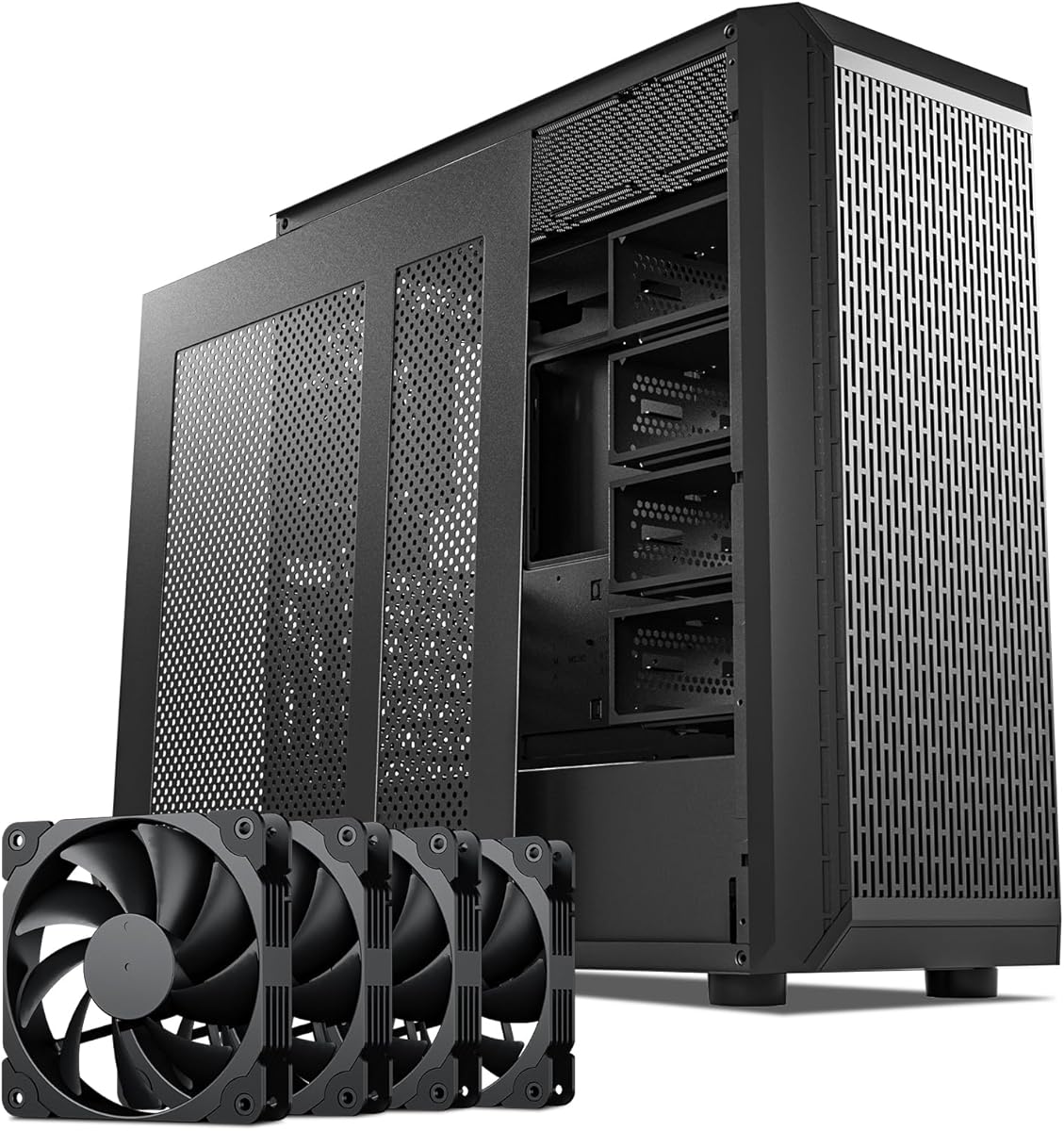
Zalman i4 ATX Mid-Tower Desktop PC Case
4.4Editor score
Includes vertical PCI slot brackets
Pre-installed six fans included
Height adjustable anti-sag bracket
This guide compares the top PC cases with vertical GPU mounts for airflow and style, helping you choose the right chassis for your high performance graphics
Building a modern gaming PC often involves showcasing your hardware. A case with a vertical GPU mount lets you display your graphics card while improving airflow. This feature is essential for enthusiasts who want both style and performance in their setup.
We evaluated ten leading products based on compatibility, cooling potential, and build quality. Each option supports vertical mounting either natively or through included kits. Our analysis focuses on how well these cases handle heat and maintain stability for heavy components.
Every pick highlights unique strengths from budget friendly designs to premium panoramic views. Prices may vary so always check current listings before purchasing. Use this guide to find the perfect match for your components and aesthetic goals today.
4.4Editor score

4.7Editor score

4.7Editor score
The following table provides a side by side comparison of all ten products. It highlights key specifications and features to help you quickly identify which case fits your specific hardware and style needs.




This case combines style with functionality. It earns a 4.7 rating for its dual chamber layout and panoramic glass. The vertical GPU mount is designed to showcase your graphics card beautifully.
We may earn a commission when you buy through this link, at no additional cost to you.
The optimized vertical airflow directs air efficiently. It includes three 120mm ARGB reverse fans. The RGB strip and controller add visual appeal. Cable hiding is supported by the dual chamber layout.
Some builders may find the RGB setup complex. Cable management requires attention. These are minor trade-offs for the visual impact and cooling performance it provides.
Ideal for builders wanting a premium look with excellent airflow. The flexible orientation supports vertical or horizontal setups. It fits ATX and hidden connector motherboards easily.
This design hides cables neatly in the rear. It separates components for better airflow and a cleaner look.
Supports GPUs up to 370mm. The upright mount displays your graphics card while improving cooling.
We may earn a commission when you buy through this link, at no additional cost to you.
This kit adds vertical mounting to compatible cases. It rates 4.4 for its robust design and 5.0 support. The riser offers high bandwidth for modern GPUs.
We may earn a commission when you buy through this link, at no additional cost to you.
The adjustable support arm holds heavy cards. Three height levels and tilt positions improve visibility. It supports GPUs up to four slots thick.
Not all ATX cases will fit this kit. Check rear slots and internal clearance first. These checks prevent compatibility issues.
Best for users who want to upgrade an existing case. It supports heavy cards and offers flexibility. Verify your case layout before purchasing.
Up to 32Gbps bandwidth supports latest cards. It maintains backward compatibility with older standards.
Holds up to 10kg. This prevents long-term sagging and protects hardware components.
We may earn a commission when you buy through this link, at no additional cost to you.
A white version of the popular VG4v4 kit. It earns 4.4 stars for build quality and support. It complements white PC builds with matching aesthetics.
We may earn a commission when you buy through this link, at no additional cost to you.
The riser supports up to 32Gbps. Adjustable positions improve visibility and airflow. It prevents GPU sagging with strong support.
You must check case compatibility first. It requires six expansion slots for vertical mounting. This limits which cases it works with.
Choose this for a clean white build. It offers the same performance as the black version. Ensure your case supports the required slots.
Matches white builds perfectly. The design maintains a consistent look with your hardware.
Supports latest PCIe standards. It ensures stable data transfer for high-end GPUs.
We may earn a commission when you buy through this link, at no additional cost to you.
This case offers vertical support at a low price. It gets 4.4 for its value. Six fans are pre-installed for immediate cooling.
We may earn a commission when you buy through this link, at no additional cost to you.
It includes vertical PCI slot brackets. An anti-sag bracket protects long GPUs. The tool-less design speeds up building.
Materials are basic compared to premium cases. It focuses on function over flash. This fits budget builders who need vertical mounting.
Great entry point for vertical mounting. It includes everything needed. Consider this if cost is your priority.
Six fans and brackets are included. This reduces the need for extra purchases.
Full mesh design promotes airflow. It keeps components cool during gaming sessions.
We may earn a commission when you buy through this link, at no additional cost to you.
This case focuses on airflow and capacity. It earns 4.7 for cooling. A six sided ventilation design maximizes performance.
We may earn a commission when you buy through this link, at no additional cost to you.
It supports E-ATX motherboards. A vertical GPU mount is ready. Back connect motherboards are compatible for clean layouts.
It lacks large glass panels. Cable management is functional but basic. These are trade-offs for maximum ventilation.
Choose this for cooling needs. It supports large motherboards and GPUs. It fits builders prioritizing performance.
Six sided design maximizes cooling. It ensures stable temperatures under load.
Supports E-ATX and ATX. It accommodates various build configurations easily.
We may earn a commission when you buy through this link, at no additional cost to you.
This case offers a stunning visual experience. It rates 4.8 for design. Three-sided panels provide 270° visibility.
We may earn a commission when you buy through this link, at no additional cost to you.
A removable GPU bracket supports up to 420mm. The anti-sag design protects hardware. Type-C connectivity is fast.
The glass requires careful handling. RGB options are minimal. These are minor for the visual experience.
Ideal for builders wanting a centerpiece. It supports high-end builds. Consider this for visual impact.
Column-free design enhances views. It displays internal lighting and hardware clearly.
Includes anti-sag bracket. It prevents long-term deformation of heavy GPUs.
We may earn a commission when you buy through this link, at no additional cost to you.
This case combines storage with gaming. It rates 4.4 for capacity. It supports thirteen hard drives for massive storage.
We may earn a commission when you buy through this link, at no additional cost to you.
A vertical GPU mount shows off cards. It supports 360mm radiators. The mesh design maximizes cooling.
It is larger than standard cases. Aesthetics focus on utility. This fits data-heavy setups.
Best for users needing storage. It includes GPU mounting. Consider if data storage is a priority.
Supports thirteen hard drives. It ensures sufficient space for data and games.
Mesh panels allow airflow. It keeps high-end components cool.
We may earn a commission when you buy through this link, at no additional cost to you.
A large case with ample cooling. It earns 4.2 for capacity. Seven RGB fans are pre-installed.
We may earn a commission when you buy through this link, at no additional cost to you.
It supports E-ATX motherboards. A vertical GPU mount is included. Six sided ventilation maximizes airflow.
It needs significant desk space. Design details are basic. This fits those needing size.
Ideal for large builds. It supports high-end cooling. Consider if size is key.
Seven fans support cooling. It ensures stable temperatures under load.
Supports E-ATX boards. It accommodates various configurations.
We may earn a commission when you buy through this link, at no additional cost to you.
This holder supports flexible mounting. It rates 4.2 for utility. It allows modular positioning for clearance.
We may earn a commission when you buy through this link, at no additional cost to you.
The riser supports 5.0. Heavy duty steel supports large cards. It is designed for easy installation.
Only available in white. It requires four slots. These limits restrict use slightly.
Best for flexible setups. It supports wide cases. Consider for clearance needs.
Tool-less adjustment allows movement. It helps fit different hardware layouts.
Heavy duty steel reduces sag. It protects hardware during use.
We may earn a commission when you buy through this link, at no additional cost to you.
A premium case with refined aesthetics. It earns 4.7 for quality. Three piece panoramic glass creates a stunning view.
We may earn a commission when you buy through this link, at no additional cost to you.
It includes a luxury riser. Dual chamber design aids cable management. It supports 10 fans.
It is a premium investment. Color options are limited. These are minor for the build quality.
Choose for a luxury build. It includes all needed. Consider for aesthetics and quality.
Finest materials are used. Tight tolerances ensure quality.
Unified modern aesthetic. The glass creates an immersive experience.
We may earn a commission when you buy through this link, at no additional cost to you.
Selecting the right case involves evaluating several factors. Below are key elements to consider for optimal performance and fit.
Ensure your case supports vertical mounting natively or via a kit. Check internal clearance for your specific GPU model. Some cases require specific slot layouts or bracket adjustments.
Always measure your components before buying. Check the case documentation for detailed clearance specifications.
Vertical mounts can impact airflow. Look for cases with ample ventilation or included fans. Mesh panels often offer better cooling than solid panels.
Prioritize cases with strong airflow design. This ensures your components stay cool during gaming.
Riser cables transmit data between GPU and motherboard. PCIe 5.0 offers higher bandwidth. Ensure the cable matches your GPU needs.
Select cables with good shielding and support. This ensures stable performance and prevents sagging.
Cases vary in materials. Steel offers durability while aluminum provides sleekness. Check reviews for long-term durability feedback.
Invest in robust build quality. This protects your expensive components over time.
Vertical mounts change cable routing. Look for cases with ample space behind the motherboard tray. Good management prevents clutter and improves airflow.
Choose cases with organized routing paths. This simplifies assembly and maintenance.
Long GPUs may sag over time. Vertical mounts reduce this risk but some cases still offer anti-sag brackets. Check if this feature is included.
Verify anti-sag provisions. This prevents hardware stress and damage.
Glass panels offer visibility while solid panels reduce dust. Consider your preferred look. RGB fans and strips add style but require controllers.
Balance visibility with utility. Choose panels that match your visual style.
Prices vary significantly. Kits are cheaper than full cases. Decide what fits your financial plan.
Compare features against cost. Aim for the best value within your range.
Start by verifying your case supports vertical GPU mounting. Check the manual or product description for compatibility details. If using a kit, ensure all mounting points are accessible.
Install the GPU bracket securely. Follow the manufacturer's instructions. Proper alignment prevents stress on the motherboard slot.
Maintain airflow by keeping vents clear. Clean dust regularly to ensure performance. Check that fans are functioning correctly.
It generally does not affect performance if airflow is maintained. Ensure the case supports proper cooling for the card.
It is a cable that connects GPU to motherboard. It supports high data speeds required for modern hardware.
No only many require specific designs. Always check compatibility details before purchasing a case.
Mount the bracket to the case rear. Connect the GPU with the riser cable. Secure with screws.
Vertical mounting often prevents sagging. Still, use anti-sag brackets if provided for extra security.
Yes but check for clearance. Ensure radiators fit near the vertical mount.
Many cases allow switching. Follow instructions for safe repositioning.
Yes, riser cables are needed. Ensure they match your GPU interface.
The top picks offer diverse solutions from budget to premium. SSUPD Xhuttle stands out for design. Zalman i4 provides affordability.
Prioritize cooling and compatibility. Your case should support your components without issues. Verify dimensions and mounting options.
Always check current prices before buying. Prices change frequently. Use this guide to find your perfect match.