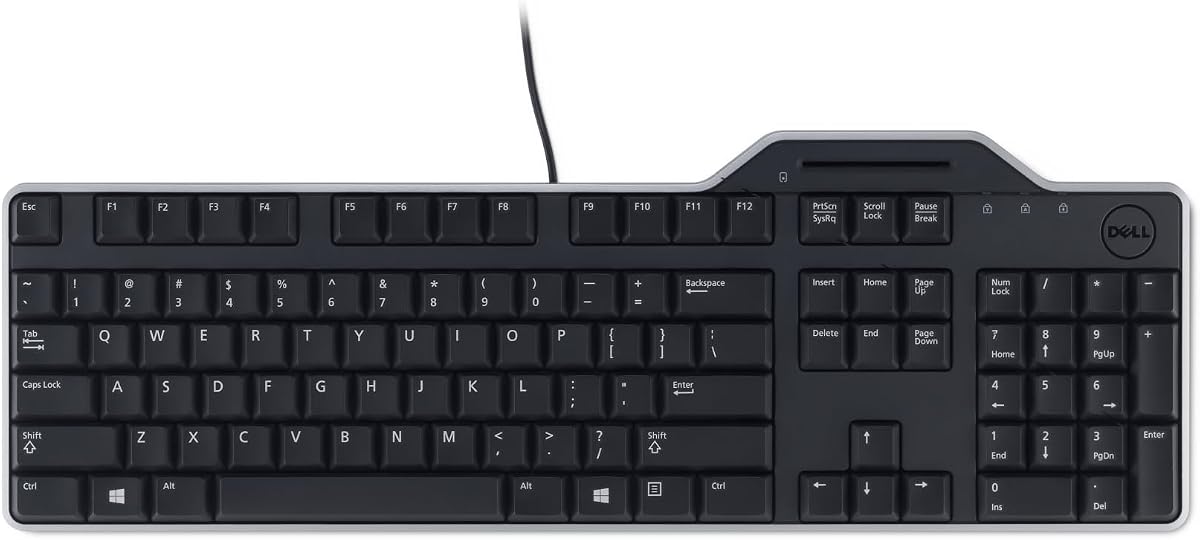
Dell KB813 Black USB English Keyboard with Smart Card Reader
4.6Editor score
Spill-Resistant Design
Integrated Smartcard Reader
Ergonomic Comfortable Keys
This guide compares the top ten keyboards with integrated smart card readers for secure authentication in enterprise environments focusing on compliance
In today’s digital landscape, security is paramount for businesses and government agencies alike. A keyboard with smart card reader functionality combines standard typing input with secure authentication capabilities, streamlining access to sensitive systems without needing separate hardware dongles or external readers. This integration reduces clutter on the desk and enhances workflow efficiency for employees who frequently log into secure networks or protected applications requiring identity verification through physical tokens.
We have evaluated a diverse selection of ten keyboards that feature built-in smart card readers to determine which models offer the best balance of security, durability, and user comfort. Our comparison considers factors such as compliance certifications including FIPS and TAA, ergonomic design elements like palm rests and split layouts, and the quality of the key switches for long-term typing satisfaction. By analyzing real-world usage scenarios, we aim to help you select the device that best fits your specific organizational requirements and budget constraints.
Each product pick below highlights specific strengths such as budget-friendly pricing, premium mechanical switches, or government compliance standards. You will find detailed breakdowns of specifications, pros, and cons to help you make an informed decision. Please note that product availability and pricing can fluctuate frequently due to market demand and supply chain conditions, so we recommend verifying current details on the retailer’s site before finalizing your purchase to ensure you get the best value.
4.6Editor score

4.1Editor score

4.6Editor score
The following table provides a side-by-side overview of all ten keyboards evaluated in this guide, allowing you to quickly compare key specifications and features across the different models to find the best match for your needs.


The Dell KB813 stands out as a reliable workhorse for organizations needing secure authentication without breaking the bank. With a solid rating of 4.6 stars, users appreciate its straightforward design and effective integration of a smart card reader directly into the keyboard frame. This model excels in environments where durability and basic security are more important than advanced features or mechanical switches.
We may earn a commission when you buy through this link, at no additional cost to you.
One of the key strengths of this keyboard is its spill-resistant design, which protects your system from accidental liquid damage—a common hazard in busy offices. The integrated smart card reader allows for seamless authentication, ensuring that authorized personnel can access secure systems quickly. Additionally, the detachable palm rest provides extra comfort for long typing sessions, reducing strain on wrists and hands during daily use.
While the keyboard performs well, it is important to note that the key switches are standard membrane types, which may not offer the tactile feedback that some enthusiasts prefer. There is also limited customization available for hotkeys or lighting, as this model focuses on functionality over flair. However, these trade-offs are acceptable for users prioritizing a no-frills, secure, and durable input device for professional settings.
This keyboard is ideal for government agencies, schools, or corporate offices that require a secure entry point via smart cards without spending excessively. If you need a dependable device that balances cost, security, and basic comfort, the Dell KB813 is a strong recommendation. It serves as a practical solution for securing workstations while maintaining productivity through an ergonomic and spill-resistant design.
The built-in smart card reader enhances security by allowing users to authenticate directly through the keyboard interface rather than managing separate dongles.
The included detachable palm rest helps maintain a natural hand position, reducing fatigue during extended work hours in demanding environments.
We may earn a commission when you buy through this link, at no additional cost to you.
The Adesso TruForm AKB-150SB-TAA is a compelling choice for organizations that require TAA compliance for government contracts. Boasting a rating of 4.1 stars, it combines security with ergonomic design, featuring a split layout that encourages a natural hand position. This keyboard is particularly suitable for environments where long typing sessions are common and user comfort is a priority alongside strict regulatory compliance.
We may earn a commission when you buy through this link, at no additional cost to you.
Its built-in smart card reader supports multiple international standards, including ISO7816 and PC/SC, ensuring interoperability across various systems. The split ergonomic design, coupled with a cushioned palm rest, helps alleviate joint pain and improve posture over time. Furthermore, the inclusion of 13 internet and multimedia hotkeys provides quick access to essential tools, enhancing productivity without needing to navigate through software menus constantly.
Despite its strengths, the membrane key switches may not appeal to users who prefer the tactile feedback of mechanical switches. The design is utilitarian and lacks the aesthetic flair found in some consumer models. However, these limitations are minor compared to the value it offers in terms of compliance and ergonomic benefits. It remains a solid option for federal agencies and enterprises needing secure, compliant hardware.
We recommend this keyboard for buyers seeking a balance between budget-friendly pricing, government compliance, and ergonomic comfort. It is an excellent fit for call centers, government offices, or corporate environments where staff spend hours typing and need secure access. The combination of TAA compliance and ergonomic features makes it a standout choice for those prioritizing user well-being and regulatory adherence.
The split key zones and gently sloped shape encourage a natural position for hands and wrists, reducing strain during long work sessions.
Designed to meet Trade Agreement Act specifications, this device is ready for use in US Federal Government institutions and agencies.
We may earn a commission when you buy through this link, at no additional cost to you.
The Cherry KC 1000 is a premium option designed for environments where security compliance is non-negotiable. With a strong rating of 4.6 stars, this keyboard meets FIPS 201 and EMV 2000 standards, making it ideal for government and financial sectors. It features a secure PIN entry mechanism and supports one-handed operation of the smart card module, which streamlines the authentication process significantly for authorized users.
We may earn a commission when you buy through this link, at no additional cost to you.
Its thin design minimizes desk footprint, and the dedicated chip card terminal ensures secure data transfer. The keyboard supports a wide range of protocols including T=0, T=1, S=8, and more, ensuring compatibility with diverse smart card infrastructures. Additionally, it offers driver support for Windows, macOS, and Linux, making it a versatile choice for heterogeneous IT environments that require robust security features.
While the price point is higher than standard models, the specialized security features justify the cost for regulated industries. However, for general office use where such stringent security is not required, it might be overkill. The specialized design means it lacks some of the consumer-friendly features found in general-purpose keyboards. Yet, for its intended audience, it is a top-tier solution that prioritizes data integrity above all else.
We recommend this keyboard for financial institutions, government agencies, and high-security corporate offices that mandate FIPS compliance. If your organization requires certified secure authentication hardware, the KC 1000 is a reliable investment. Its combination of rigorous security protocols and ergonomic efficiency makes it a standout choice for users who need to protect sensitive information while maintaining productivity.
Certified to FIPS 201 and EMV standards, this keyboard provides the highest level of assurance for secure data access and transactions.
One-handed operation of the smart card module allows users to authenticate quickly without needing to use both hands or complex gestures.
We may earn a commission when you buy through this link, at no additional cost to you.
The Adesso EasyTouch 130SB brings mechanical switch durability to the secure keyboard category. Rated at 4.6 stars, it features red mechanical switches that offer tactile feedback and a 50 million keystroke lifecycle. This model is particularly appealing to users who prefer mechanical keyboards for better typing precision and feedback. It also includes a dedicated Copilot AI hotkey, bridging the gap between traditional input and modern AI-assisted workflows.
We may earn a commission when you buy through this link, at no additional cost to you.
Security is handled via a built-in smart card reader certified to EMV 4.0 and FIPS 201 standards, ensuring safe transactions and logins. The large print keycaps improve visibility, making this keyboard suitable for users with vision challenges or those working in low-light conditions. Additionally, the full-size layout includes multimedia hotkeys for convenient access to play, pause, and volume controls without leaving the desktop environment.
However, the keyboard does not feature a split ergonomic design, which might be a drawback for users with wrist strain issues. Customization options are limited compared to high-end mechanical boards. Despite these minor limitations, the combination of mechanical durability, security compliance, and accessibility features like large print caps makes it a robust choice for demanding workstation environments where typing comfort matters.
We recommend this keyboard for users who want mechanical switch feel without sacrificing security. It fits well in financial trading desks, developer workstations, and secure government offices that need reliable hardware. If you prioritize typing experience alongside secure access, the EasyTouch 130SB delivers a balanced package of performance, durability, and necessary authentication features for professional daily use.
Red mechanical switches rated for 50 million keystrokes provide a long-lasting and tactile typing experience suitable for intensive daily use.
Large print keycaps offer excellent contrast and legibility, benefiting users with vision challenges or those typing in dimly lit rooms.
We may earn a commission when you buy through this link, at no additional cost to you.
This Dell Keyboard Smartcard USB is a straightforward solution for secure workstations needing reliable connectivity. It holds a rating of 4.7 stars, indicating strong satisfaction among users regarding its basic performance and build quality. The keyboard emphasizes a quiet typing experience, which is ideal for shared office spaces where noise distractions should be minimized. It integrates the smart card reader directly to streamline the login process.
We may earn a commission when you buy through this link, at no additional cost to you.
The full-size layout includes a numeric keypad, essential for data entry tasks involving numbers. The detachable palm rest adds comfort for extended periods, and the spill-resistant design protects against accidental liquid damage. Wired USB connectivity ensures fast data transfers without battery concerns. While it lacks modern multimedia features, its core function of providing secure, reliable input is executed very well for the price.
The simplicity of this device means it lacks advanced features like hotkeys or specialized layout variations. Users looking for ergonomic splits or wireless connectivity might find it limiting. However, for users focused on basic security and reliability, these omissions are acceptable. The design prioritizes function over form, making it a practical choice for IT departments needing straightforward, compliant hardware for large-scale deployment.
We recommend this keyboard for offices prioritizing quiet operation and basic secure access. It is ideal for call centers or administrative roles where users type for long hours and need a quiet, comfortable keyboard with secure access. The balance of comfort and security makes it a dependable tool for daily professional tasks without unnecessary complications or distractions in the workflow.
Designed to minimize noise during typing, this keyboard helps maintain a focused and peaceful workspace environment for everyone nearby.
Wired USB ensures stable and fast data transfers without the need for batteries, reducing maintenance and ensuring consistent performance.
We may earn a commission when you buy through this link, at no additional cost to you.
The Kensington KB201C is designed specifically for government and enterprise users requiring TAA compliance. While it has a rating of 3.8 stars, it fulfills a critical role in regulated environments where sourcing standards must be met. It features a reliable smart card reader supporting CAC and PIV standards, ensuring secure authentication. The keyboard is also compatible with Windows, macOS, and ChromeOS, making it versatile for different systems.
We may earn a commission when you buy through this link, at no additional cost to you.
Its quiet-click keyboard design enhances productivity by providing a peaceful typing experience without disturbing colleagues. The full-size layout with a numeric keypad supports efficient data entry. A notable advantage is the 3-year limited warranty, offering peace of mind regarding durability and support. However, the lower rating suggests some users may find the typing feel or build quality basic compared to more premium options.
Users might experience limitations in ergonomic features compared to split keyboards. The key feel is functional but not exceptional. Despite these trade-offs, the TAA compliance and warranty make it a viable choice for procurement officers managing government contracts. For those where compliance is the primary driver, the specific features and limitations are secondary to meeting regulatory requirements.
We recommend this keyboard for federal agencies and organizations that need TAA-certified hardware. If regulatory compliance is your top priority, this model ensures you meet sourcing standards. The combination of security features and warranty support makes it a practical choice for those prioritizing policy adherence over advanced typing features or premium build quality in their procurement process.
This keyboard meets TAA standards, making it ready for use in U.S. Federal Government institutions and organizations with strict sourcing requirements.
Enjoy peace of mind with a 3-year limited warranty from Kensington, ensuring coverage for any manufacturing defects or issues.
We may earn a commission when you buy through this link, at no additional cost to you.
The Lenovo Smartcard Wired Keyboard II is a no-nonsense option for secure access. With a rating of 4.4 stars, it offers a standard US English layout that users can pick up and use immediately. The integrated smart card reader allows for secure logins, making it suitable for corporate environments. It is lightweight and straightforward, ensuring ease of transport and setup for various workstation configurations.
We may earn a commission when you buy through this link, at no additional cost to you.
It includes a standard 104-key layout, providing all essential keys for daily typing. The wired connection ensures a stable link without battery concerns. However, it lacks ergonomic enhancements like a wrist rest or split design. This means it is better suited for users who prioritize basic functionality over specialized comfort features. It serves as a practical tool for temporary or standard office setups.
Some users may find the lack of multimedia keys or advanced customization limiting for complex workflows. The build feels utilitarian compared to higher-end models. Nevertheless, for organizations needing a simple secure entry point without extra complexity, it serves well. It delivers on the core promise of secure typing without unnecessary bloat, making it a good fit for standard deployment.
We recommend this keyboard for users needing a basic secure entry point without extra complexity. It fits well in standard office environments where basic secure access is sufficient and ergonomic features are not required. Its lightweight design makes it easy to move between desks, supporting flexible workspace setups where portability and straightforward functionality are more important than advanced features.
As a plug-and-play device, this keyboard requires no software installation, allowing users to start typing securely immediately after connection.
The integrated smart card reader provides secure logins for corporate environments without needing additional external hardware peripherals.
We may earn a commission when you buy through this link, at no additional cost to you.
The HP USB Business Slim Smartcard Keyboard is designed for visibility and durability. With a rating of 4.5 stars, it features LED key light indicators to show lock states clearly in dim lighting. The built-in spill drain offers protection against liquids, adding to its durability. It is slim and professional-looking, fitting well in corporate environments where desk space is at a premium and aesthetics matter.
We may earn a commission when you buy through this link, at no additional cost to you.
The membrane keyswitch provides a quiet typing experience, which is beneficial in shared workspaces. The 6ft cable length offers flexibility in placement. While the keys are thin and basic, they serve the purpose effectively. The integrated smart card reader ensures secure access without cluttering the desk. This makes it a practical option for offices prioritizing clean desk policies and reliable security.
Some users might find the thin profile limits tactile feedback compared to thicker keyboards. The build is functional rather than premium. However, for environments needing clear lock state visibility and spill protection, it excels. It balances security and usability, making it a strong contender for businesses that value neatness and straightforward functionality over advanced ergonomic features or mechanical feedback.
We recommend this keyboard for offices valuing clean desk aesthetics and clear visual indicators. If you need a slim, secure option that fits under monitors without clutter, this model delivers. The combination of visibility features and spill protection makes it a reliable choice for busy professional environments where maintaining a tidy workspace is important alongside daily typing tasks.
LED key light indicators ensure you can easily see lock states like Caps Lock and Num Lock even in low-light office conditions.
A built-in spill drain channel protects the internal electronics from accidental liquid damage, extending the device’s lifespan.
We may earn a commission when you buy through this link, at no additional cost to you.
The Cherry Secure Board 1.0 distinguishes itself with NFC interface support alongside standard smart card reading. It carries a rating of 4.2 stars, reflecting its specialized nature. This keyboard is approved by GS and designed for secure mode with encryption, making it suitable for thin client environments. The ability to read and write to ISO 7816 and ISO 14443 compliant cards broadens its utility in modern security infrastructures.
We may earn a commission when you buy through this link, at no additional cost to you.
It integrates an RF/NFC interface allowing for contactless authentication. This adds a layer of convenience and security for environments using both contact and contactless cards. The secure mode with encryption ensures data integrity during transmission. However, this specialized functionality comes at a premium price and is typically unnecessary for standard office tasks. It targets high-security niches specifically.
Users requiring standard contact-only readers may find the extra NFC capabilities redundant. It might be overkill for general use but essential for secure access points. The keyboard prioritizes security features over typing comfort or aesthetics. For those needing advanced authentication options in regulated industries, the specialized hardware provides necessary capabilities that standard keyboards cannot match in complex environments.
We recommend this keyboard for environments needing contactless and contact smart card support. If your organization uses NFC tags or requires multi-protocol authentication, this model covers both bases. The secure encryption and certified quality make it a dependable choice for high-security access control systems requiring robust and advanced hardware capabilities in critical infrastructure environments.
Supports ISO 7816 and ISO 14443 standards to handle both contact and contactless smart cards for versatile secure access options.
Encryption ensures that sensitive authentication data remains protected during transmission, safeguarding access credentials in secure modes.
We may earn a commission when you buy through this link, at no additional cost to you.
The NEW OEM Dell KB813t is a perfect replacement option for existing Dell workstation setups. It holds a rating of 4.4 stars, indicating strong compatibility and reliability. This keyboard is sold as a new OEM product ensuring it is unopened and ready for deployment. It mirrors the functionality of the KB813 model but offers a direct fit for systems expecting Dell hardware, ensuring seamless integration without driver issues.
We may earn a commission when you buy through this link, at no additional cost to you.
It includes an English layout with a built-in smart card reader, providing the same secure access features found in corporate environments. The USB connection ensures stable data transfer. While it is basic in design, its OEM quality ensures durability and proper functionality within Dell ecosystems. It avoids the uncertainty of third-party replacements which might have compatibility quirks or driver conflicts during setup.
Users should ensure their Dell system is compatible with this specific revision of the KB813t. Some packaging variations may exist depending on the supplier. However, as a direct replacement, it offers the best assurance of fit and function. It is a practical choice for IT managers refreshing hardware or replacing damaged units where consistency across workstations is critical for efficient maintenance.
We recommend this keyboard for replacing existing Dell units with minimal hassle. It guarantees compatibility and consistent security features across your organization’s Dell workstations. The reliable hardware ensures secure access remains uninterrupted while simplifying procurement by providing a direct OEM replacement that meets standard corporate deployment requirements effectively.
Selling as a new OEM product ensures you receive an unopened device that maintains the quality and compatibility standards of the manufacturer.
Designed to fit seamlessly into existing Dell workstation environments, it simplifies the replacement process by ensuring compatibility without driver issues.
We may earn a commission when you buy through this link, at no additional cost to you.
Selecting the right keyboard with a smart card reader involves evaluating compliance, ergonomics, and connectivity to match your specific security needs.
For government or regulated industries, look for certifications like FIPS 201, TAA compliance, or EMV approval. These ensure the hardware meets legal and security standards required by your organization’s procurement policies.
Always verify the required certification before purchase to avoid non-compliant devices.
Smart card readers vary in protocols supported such as ISO 7816, PC/SC, or even NFC/RF. Choose one that matches the smart cards you currently use in your infrastructure to ensure seamless authentication without extra hardware.
Check that the reader supports both your card standard and your operating system.
Consider split designs or integrated palm rests if staff type for hours daily. Standard layouts are fine for short shifts, but ergonomic features reduce strain and injury risks over time, improving productivity in long-term use scenarios.
Prioritize split or padded options for high-volume typing environments.
Membrane switches are quieter and cheaper, while mechanical switches offer tactile feedback and longer life. Decide based on user preference and usage intensity. Mechanical options often last longer in heavy-use office settings.
Select switch type based on feedback preference and expected usage volume.
Most secure keyboards are wired to reduce wireless risks. Ensure the cable length matches your desk setup or allows for flexible placement. Longer cables are useful if the USB port is far from the keyboard.
Choose a length that fits your physical workspace layout comfortably.
Verify support for your specific OS versions whether Windows, macOS, or Linux. Some readers need specific drivers or middleware to function correctly. Cross-platform support offers flexibility for mixed-OS environments.
Confirm OS compatibility before deployment to avoid driver conflicts.
Secure keyboards range from budget models to premium certified ones. Balance cost against required compliance levels. A longer warranty like 3 years can save money on replacements and provides peace of mind for business investments.
Look for warranties and pricing that fit your IT budget and risk tolerance.
Multimedia hotkeys, large print caps, or spill resistance add utility. Assess whether these extras improve workflows. While not essential for security, they can boost user satisfaction and productivity in daily operations.
Optional features should align with user needs rather than just adding cost.
Start by connecting the keyboard to a USB port on your computer. Most models are plug-and-play and will install default drivers automatically. However, for smart card functionality, you may need to install the appropriate middleware or drivers provided by your IT department or the card issuer.
Insert your smart card into the dedicated slot on the keyboard. Ensure it is oriented correctly usually with the chip facing down or up as indicated by the icon. Wait for the LED indicator to confirm detection before attempting to log into secure applications or systems.
Keep the keyboard clean by wiping it with a soft, dry cloth. Avoid spilling liquids and if spills occur immediately disconnect the device. For mechanical models, occasionally clean between keys to remove dust. Regular maintenance extends the life of the device and ensures reliable security function.
Not necessarily. You must ensure the reader supports the specific protocols of your card like ISO 7816 or ISO 14443. Check the product specs and consult your security administrator to confirm compatibility with your organization's issued smart cards before purchasing.
Basic typing works instantly but the smart card reader may need middleware or drivers installed to communicate with your security system. Some models are plug-and-play for standard cards while others require specific enterprise software to enable secure authentication features fully.
Mechanical switches offer better durability and tactile feedback but are often louder and costlier. For secure environments where typing precision matters mechanical switches are preferred. However, membrane switches are quieter and adequate for standard office use where noise levels are a concern.
TAA compliance means the product meets the U.S. Trade Agreement Act requirements allowing it to be sold to federal agencies. If you work for the government or with government contractors you must choose TAA-compliant devices to avoid procurement issues and ensure legal compliance.
Many models support Windows, macOS, and Linux but features like special hotkeys may vary across platforms. Check the manufacturer's compatibility list before buying. Cross-platform models offer flexibility for mixed environments but might require specific drivers on non-Windows systems.
Spill-resistant keyboards have channels to drain liquids away from electronics. If a spill occurs, disconnect immediately and let it dry thoroughly before reconnecting. While damage isn't guaranteed, prompt action minimizes risk. Always prioritize spill-resistant models in food or drink-heavy workspaces.
Use a soft dry cloth or compressed air to gently remove dust from the slot. Avoid liquids or abrasive tools that could scratch the contacts. Regular cleaning prevents read errors and ensures your smart card functions correctly without interruption.
Wired connections are generally preferred for secure workstations to reduce wireless interception risks. Most smart card keyboards are wired by design. If you need a wireless option ensure it uses secure encrypted protocols and complies with your security policies before considering it.
Choosing the right keyboard with a smart card reader depends on your specific security needs compliance requirements and budget constraints. The Dell KB813 offers reliable affordability while the Cherry KC 1000 excels in certified security compliance and premium features for high-risk environments.
For organizations needing TAA compliance or ergonomic comfort the Adesso TruForm and Kensington KB201C are strong choices. If typing preference is key the Adesso EasyTouch 130SB brings mechanical feel to secure hardware. Always prioritize features that align with your daily workflow and security protocols.
We recommend checking current prices and availability before making your final decision as product listings change frequently. By balancing security, comfort, and budget you can find a keyboard that not only protects your data but also enhances your daily work experience effectively.