
Mechanic Master C34Pro
3.9Editor score
Modular ATX EATX support
360mm radiator compatibility
Integrated carry handle design
Explore our expert guide comparing the top Compact E ATX Case options for high performance and space efficiency in your custom desktop build today.
Choosing the right Compact E ATX Case is essential for builders who need high performance without sacrificing desk space. These cases support large motherboards and GPUs while maintaining a small footprint for modern workstations.
We compared ten top models based on airflow, component compatibility, build quality, and portability. Each product offers unique features to meet different needs, from modular designs to premium materials and cable management solutions.
Every pick highlights key strengths and trade-offs to help you decide which case fits your build. Prices and availability change frequently, so check current listings before purchasing your next Compact E ATX Case.
3.9Editor score

4.7Editor score

4.5Editor score
This side-by-side comparison highlights the key specifications and unique features of each Compact E ATX Case to help you identify the best fit for your specific hardware needs and spatial constraints.


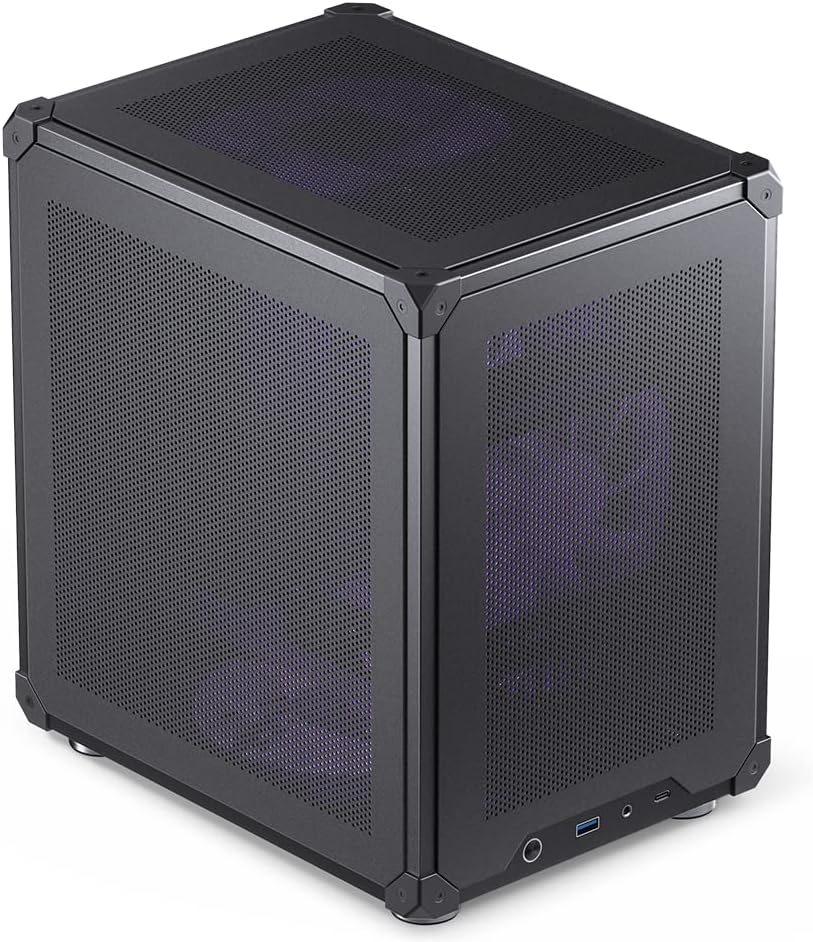

The Cooler Master QUBE 540 is a standout Compact E ATX Case that prioritizes flexibility without compromising on cooling. With a 4.4 rating, users appreciate its reversible I/O panel and movable handles that allow custom layouts.
We may earn a commission when you buy through this link, at no additional cost to you.
Its mesh-optimized airflow design maximizes ventilation, especially when paired with the included SickleFlow fan. The case supports full-size GPUs up to 415mm and even accommodates large E-ATX motherboards up to 11 inches wide.
While it is a Compact E ATX Case, the internal space remains generous for flagship components. The trade-off is that you may want to add more fans for peak thermal performance under heavy loads.
This case is ideal for builders who value modularity and modern connectivity. Its unique orientation options make it perfect for creative desk setups or unique workstation configurations.
The reversible I/O panel and movable handles let you switch between horizontal and vertical positions effortlessly, enhancing accessibility and aesthetic customization.
Despite its compact exterior, it supports large E-ATX motherboards and GPUs up to 415mm, ensuring future upgrades remain possible without replacing the chassis.
We may earn a commission when you buy through this link, at no additional cost to you.
The Lian Li O11D Mini V2 is a top-rated Compact E ATX Case known for its premium build quality and sleek design. With a 4.7 rating, it stands out for its optimized airflow and pillar-less tempered glass panels.
We may earn a commission when you buy through this link, at no additional cost to you.
The 10-degree slanted bottom enhances cold air intake, directly improving GPU cooling. Its design supports full-size ATX power supplies while maintaining a small footprint, making it a favorite for enthusiasts.
One trade-off is that it ships without fans, requiring separate purchases for optimal airflow. Additionally, the premium materials contribute to a higher cost compared to standard cases.
This case is perfect for builders who prioritize aesthetics and cooling efficiency. Its robust support for heavy GPUs ensures stability during demanding gaming or rendering tasks.
The slanted bottom design directs cold air straight to the GPU, significantly reducing temperatures during intensive workloads without needing extra modifications.
Special brackets for the 24-pin motherboard cable help maintain a tidy layout, ensuring the build looks as polished as it performs under stress.
We may earn a commission when you buy through this link, at no additional cost to you.
The Mechanic Master C34Pro is a robust Compact E ATX Case designed for high-end gaming and portable desktop needs. While its rating is 3.9, users appreciate its extensive compatibility and durable aluminum construction.
We may earn a commission when you buy through this link, at no additional cost to you.
It supports massive components including 420mm GPUs and 360mm radiators, ensuring no compromises on hardware choice. The multi-zone fan mounts allow flexible thermal management for heavy loads.
A trade-off is its price point and current rating compared to other options. The lower rating may stem from assembly complexities, but the included magnetic screwdriver kit helps simplify the process.
This case is best for users who need to transport their PC frequently. Its integrated carry handle and lightweight design make it ideal for LAN parties or mobile workstation setups.
With adjustable PCIe slots and multiple PSU mounting positions, this case adapts to various build preferences without limiting future hardware upgrades.
The 2mm aluminum shell combined with a 1mm steel frame provides a robust structure that protects internal components during transport and daily use.
We may earn a commission when you buy through this link, at no additional cost to you.
The Cooler Master Q300L V1 is an excellent entry-level Compact E ATX Case for budget-conscious builders needing quality airflow. With a 4.5 rating, it offers surprising features at an accessible price point.
We may earn a commission when you buy through this link, at no additional cost to you.
Its modular I/O panel lets you position ports at the front, top, or bottom for convenience. The edge-to-edge transparent panel showcases your build with pride while keeping dust out.
A limitation is its support for Micro-ATX boards, which may restrict large motherboards. However, for smaller builds, the ample interior allows for future expansion and easy component swaps.
This case is perfect for first-time builders or those on a tight budget. It delivers solid value without sacrificing the core functionality needed for a reliable, well-cooled desktop.
The versatile I/O panel design lets you adjust connectivity to match your desk setup, improving usability without extra extensions or adapters.
Perforated designs on all sides promote optimal heat dissipation, ensuring your system stays cool even during extended gaming or productivity sessions.
We may earn a commission when you buy through this link, at no additional cost to you.
The Mechanic Master C34 Ultra is a premium Compact E ATX Case designed for space saving without performance loss. Its 4.6 rating reflects strong build quality and portability features that appeal to LAN gamers.
We may earn a commission when you buy through this link, at no additional cost to you.
It supports standard ATX motherboards and full-size power supplies, which is rare for ultra-compact cases. The internal layout is optimized to simplify cable management and installation.
While it supports air cooling up to 162mm tall, using an SFX/L power supply yields the cleanest builds. This trade-off ensures better cable routing but may require additional investment.
Ideal for users who travel with their PC, its integrated handle makes transportation easy. The USB-C port on the front panel adds modern convenience for peripheral connectivity.
The built-in carry handle transforms your desktop PC into a portable workstation, allowing you to easily transport it between LAN events or workstations.
Thoughtful component placement simplifies the installation process, making cable management easier and ensuring a cleaner final aesthetic without excessive routing.
We may earn a commission when you buy through this link, at no additional cost to you.
The ASUS Prime AP201 is a high-airflow Compact E ATX Case engineered for thermal efficiency. With a 4.7 rating, it impresses with its quasi-filter mesh panels and spatial efficiency.
We may earn a commission when you buy through this link, at no additional cost to you.
Its mesh design includes over 57,000 precision-machined holes to maximize air intake. The case supports up to 360mm radiators and six fans for serious cooling potential.
A drawback is that fans are not included, so you need to budget for them separately. Additionally, its board support is limited to Micro-ATX and Mini-ITX sizes.
This case is perfect for builders who prioritize cooling performance and cable management. The extended motherboard tray and strategically placed cutouts make routing cables a breeze.
The quasi-filter mesh panels increase airflow significantly while providing a compelling view of internal components without blocking vital cooling intake areas.
Tool-free side panels use a simple clip mechanism, allowing quick removal for hardware changes while resisting accidental dislodging during normal use.
We may earn a commission when you buy through this link, at no additional cost to you.
The Cooler Master Q300L V3 is a refined version of a popular Compact E ATX Case. With a 4.6 rating, it delivers premium performance through flexible hardware support and robust airflow features.
We may earn a commission when you buy through this link, at no additional cost to you.
It fits modern GPUs up to 366mm and supports ATX power supplies up to 200mm long. The high airflow cooling design allows for up to six 120mm or 140mm fans.
While it supports high performance, adding extra fans is recommended to maximize the cooling potential. The moveable I/O panel adds flexibility for desk layout preferences.
This case is ideal for builders who want a high-quality Micro-ATX chassis that looks great and performs well. It pairs well with various cooling components for a complete solution.
Features like the movable I/O panel and magnetic dust filters enhance the build experience, allowing customization without requiring special tools or skills.
Support for up to 366mm GPUs ensures that even today's largest graphics cards fit comfortably, future-proofing your desktop build for upgrades.
We may earn a commission when you buy through this link, at no additional cost to you.
The Zalman CUBIX M-ATX is a budget-friendly Compact E ATX Case for basic desktop setups. With a 4.5 rating, it offers surprising durability for its small 17.1-liter volume.
We may earn a commission when you buy through this link, at no additional cost to you.
It supports standard ATX power supplies, which is rare for cases this small. The perforated front panel and pre-installed fan ensure decent airflow for entry-level components.
A limitation is its GPU support, limited to 260mm, which restricts larger graphics cards. However, for office or light gaming, it provides all the necessary basics.
This case is perfect for users needing a small, quiet PC. Its sturdy steel construction ensures longevity, making it a reliable choice for budget-conscious buyers.
Despite its small size, the sturdy 0.8T steel construction provides a robust structure that protects components and ensures a long lifespan.
The front panel includes a USB 3.0 port and audio jacks, providing easy device connections for peripherals without needing to reach behind the tower.
We may earn a commission when you buy through this link, at no additional cost to you.
The JONSBO C6 Black is a practical Compact E ATX Case focusing on easy assembly. With a 4.6 rating, it allows quick tool-free disassembly for maintenance and upgrades.
We may earn a commission when you buy through this link, at no additional cost to you.
Its heat-free all-mesh design ensures excellent ventilation. The front interface includes a Type-C port for modern device connectivity, which is rare in this price range.
A trade-off is the limited CPU cooler height of 75mm. This restricts tower coolers but suits low-profile options for compact desktops.
This case is ideal for users who value convenience and modern ports. Its simple compact design makes it perfect for small home offices or media centers.
The upper cover and side panels open without tools, allowing for faster builds and easier access for cleaning dust or swapping parts.
With mesh on the front, upper, and lower sections, air flows freely through the case, keeping temperatures stable during daily usage.
We may earn a commission when you buy through this link, at no additional cost to you.
The NZXT H5 Flow is a sleek Compact E ATX Case designed for easy high airflow. With a 4.6 rating, it includes pre-installed fans to ensure immediate performance out of the box.
We may earn a commission when you buy through this link, at no additional cost to you.
Its ultra-fine mesh panels create maximum airflow while filtering dust effectively. The perforated PSU shroud enables optimal intake from side fans, boosting overall cooling.
While the pre-installed fans are solid, they may not be the quietest for silent builds. However, they provide a strong baseline for users avoiding extra purchases.
This case is perfect for builders seeking convenience. With wide channels and hooks for cables, routing wires is effortless, resulting in a cleaner look quickly.
Equipped with two 120mm Quiet Airflow fans, this case provides immediate cooling power without requiring immediate additional purchases for basic operation.
Wide channels, hooks, and straps make routing and concealing cables effortless, ensuring your interior looks tidy without extensive effort.
We may earn a commission when you buy through this link, at no additional cost to you.
Selecting the right Compact E ATX Case involves balancing size, compatibility, and airflow. Below are key factors to help you make an informed decision.
Ensure the case supports your motherboard size. Many Compact E ATX Cases support up to 11-inch E-ATX boards, but some limit to ATX or Micro-ATX. Check dimensions carefully before buying to avoid fit issues.
Always verify the max motherboard width and form factor support listed in the product specifications.
Measure your graphics card and power supply. High-end GPUs can exceed 400mm, and standard ATX PSUs vary in length. Cases offering 400mm+ GPU clearance ensure your flagship hardware fits.
Check max GPU and PSU lengths in the specs to avoid forced installation or cable strain.
Look for mesh panels or perforated designs that maximize intake. Good airflow keeps components cool during heavy loads. Some cases include fans; others require separate purchases.
Prioritize cases with front or bottom mesh intake for best cooling performance.
Aluminum and steel shells offer better protection and durability than plastic. Thicker materials reduce vibration and improve noise dampening. Premium cases often feature tool-free panels for convenience.
Inspect material thickness and panel mechanisms for a sturdy and user-friendly experience.
Adequate cable space keeps your build tidy. Look for cases with extended trays or wide gaps behind the motherboard. Good management improves airflow and aesthetics.
Choose cases with at least 15mm clearance for easy cable routing.
If you move your PC often, integrated handles or lightweight designs are essential. Some cases offer modular parts for transport. This is key for LAN gaming or shared workspaces.
Check for handles and weight specifications if you need frequent transport.
Modern ports like USB-C offer faster transfer speeds. Ensure the I/O panel includes the ports you need. Reversible panels add flexibility for your desk layout.
Look for USB 3.2 Gen2 Type-C ports for modern device compatibility.
Consider future needs. Can the case support larger GPUs or radiators later? Modular designs allow adjustments for different hardware. This protects your investment over time.
Prioritize cases with adjustable slots and ample internal space for future upgrades.
Always check the manual for specific assembly instructions. Modular designs often require careful alignment of panels and screws. Proper assembly ensures stability and safety.
Keep dust filters clean to maintain airflow. Use a soft brush or vacuum regularly. Neglecting filters can lead to overheating and reduced performance.
Avoid placing the case in direct sunlight or near vents. Heat sources outside the case can raise internal temperatures. Ensure the desk surface is stable and level.
A Compact E ATX Case is designed to support larger E-ATX motherboards while maintaining a smaller overall footprint. These cases optimize internal space for cooling and component fit without taking up too much desk real estate.
Many do, but check radiator support carefully. Look for cases supporting at least 360mm radiators in the front or top. Proper airflow design is key to effective liquid cooling.
It depends on the model. Some include pre-installed fans for immediate use, while others require separate purchases. Always check product specs before buying to ensure adequate cooling.
Choose ATX or E-ATX cases if you need more internal space and future expansion. Micro-ATX cases are smaller and cheaper but limit motherboard sizes. Assess your hardware needs first.
Not if you choose the right case. Look for extended trays, wide gaps, and tie-down points. Proper planning and routing make even compact builds clean and efficient.
Most Compact E ATX Cases support standard ATX PSUs. Verify the max PSU length in the specs. Some designs may favor SFX units for a cleaner look and better fit.
Check filters every two to three months depending on your environment. Dust buildup blocks airflow and raises temperatures. Regular cleaning extends component life.
High-quality portable cases use strong materials like aluminum. Integrated handles and reinforced structures make them suitable for transport. Handle with care during moves to avoid damage.
Our top picks range from the flexible Cooler Master QUBE 540 to the premium Mechanic Master C34Pro. Each offers unique strengths for different needs, from portability to high airflow.
Prioritize compatibility and cooling when making your choice. A compact case should not sacrifice performance or support for your hardware. Balance size with your specific build requirements.
Remember to check current pricing and availability before purchasing. Prices change frequently, and models may update. Verify all specs match your needs before finalizing your order.