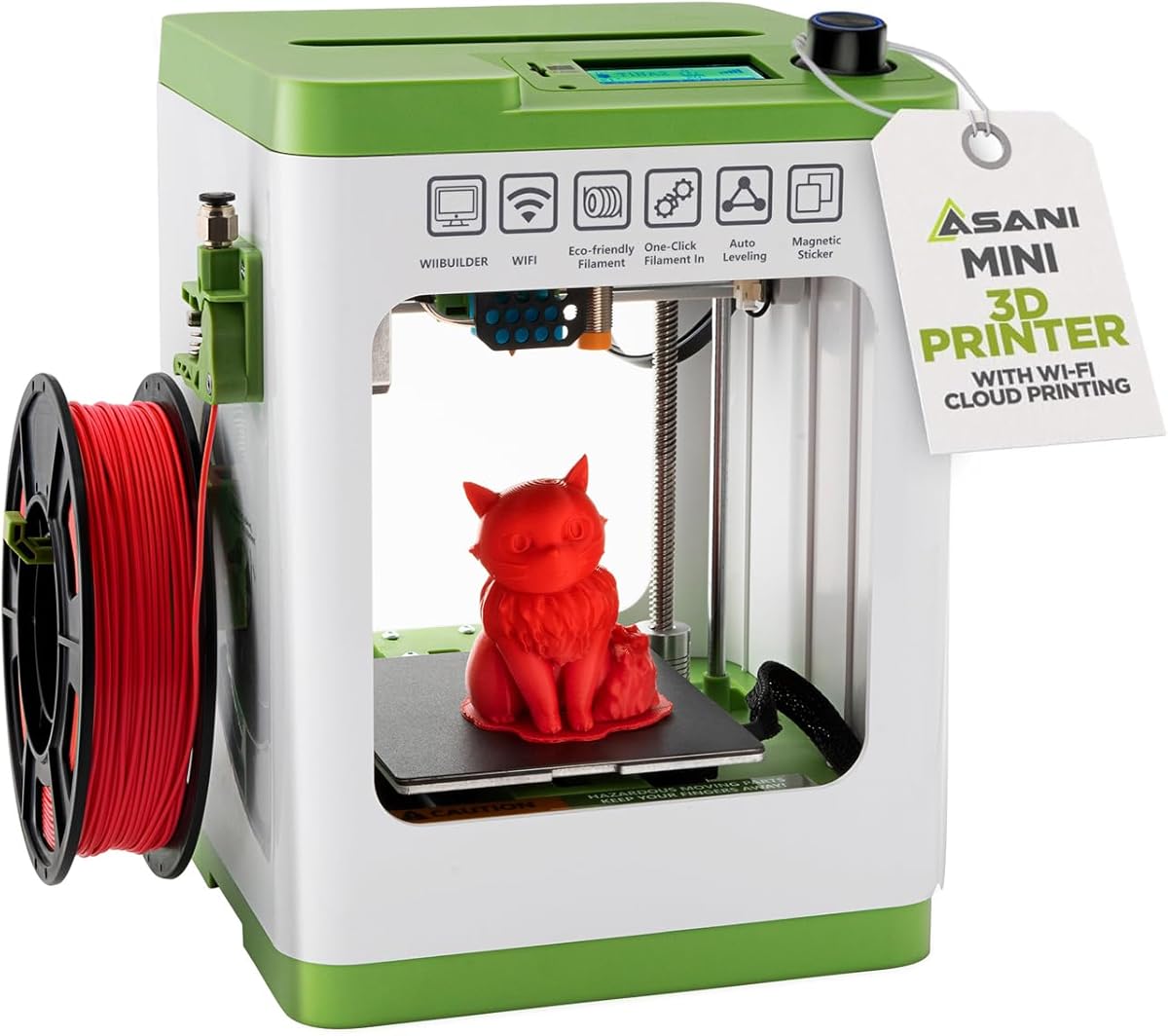
TINA2S Fully Assembled Mini 3D Printer
4.6Editor score
Fully assembled out of box
Includes starter filament and SD card
One-touch filament loading button
This guide compares the top easy to use 3D printers for beginners and families, highlighting setup speed, calibration features, and reliability.
Finding an easy to use 3D printer can transform your creative hobby into a seamless experience. Modern machines now handle calibration automatically, allowing you to focus on designing rather than troubleshooting technical issues.
We evaluated ten top models based on setup time, auto-leveling capabilities, and user interface simplicity. Each selection prioritizes reliability and ease of operation for first-time users and busy households.
Every pick below highlights key strengths and ideal use cases to help you choose the right machine. Please note that product availability and pricing may change frequently on retailer platforms.
4.6Editor score

4.7Editor score

4.5Editor score
This side-by-side comparison highlights the core specifications and unique features of each selected model to help you identify the best fit for your specific printing needs.



The Bambu Lab A1 stands out as the premier easy to use 3D printer for beginners and kids alike. It holds a strong user rating due to its seamless out-of-box experience and consistent high-quality output.
We may earn a commission when you buy through this link, at no additional cost to you.
Its standout feature is the full-auto calibration system which handles bed leveling and Z-offset adjustments without any manual intervention. This ensures every print starts perfectly right from the first layer saving significant setup time for users of all skill levels.
While the A1 excels in performance and ease of use there are minor trade-offs to consider. The optional multi-color system requires purchasing the AMS lite separately and the reliance on their ecosystem may limit third-party software flexibility for advanced users.
We recommend this printer for anyone seeking a high-performance machine that minimizes technical hurdles and maximizes creative output. It is the ideal choice for families and hobbyists who want reliability without the learning curve.
The printer performs all necessary adjustments automatically ensuring flawless first layers every single time without user input or trial and error.
Active motor noise canceling technology keeps sound levels low allowing you to print in shared spaces without disrupting work or sleep.
We may earn a commission when you buy through this link, at no additional cost to you.
The FLASHFORGE Adventurer 5M is built for users who prioritize speed without sacrificing too much ease of use. It is designed to handle rapid prototyping and high-throughput projects with minimal manual setup requirements.
We may earn a commission when you buy through this link, at no additional cost to you.
Key strengths include its one-click automatic printing feature that ensures consistent adhesion and reliable first layers. The CoreXY structure supports travel speeds up to 600mm/s while the 280°C direct extruder handles a wide variety of filament materials effectively.
However the speed-focused design may present some challenges for very new users who expect perfectly smooth results at maximum velocity. Additionally the reported user rating suggests some variability in experience compared to competitors with similar features.
This printer is best suited for makers who need to print quickly and are comfortable adjusting settings for optimal results. It offers a strong balance of performance and automation for those ready to push the limits of production.
With acceleration up to 20000mm/s² this machine drastically reduces cycle times for production runs and rapid design iterations.
Remote monitoring and instant status alerts via the Flash Studio app allow you to manage prints from anywhere in your home or office.
We may earn a commission when you buy through this link, at no additional cost to you.
The Bambu Lab A1 mini offers the same ease of use as its larger counterpart in a more compact and affordable package. It comes bundled with an LED Lamp Kit making it an excellent choice for creative beginners and hobbyists.
We may earn a commission when you buy through this link, at no additional cost to you.
Users appreciate the automatic calibration feature which simplifies the setup process significantly. The printer operates quietly and delivers fast high-quality results that fit naturally into home environments or small workspaces without disruption.
The main limitation is the smaller build volume which restricts the size of objects you can print in one go. However for most personal projects and small prototypes this footprint is a reasonable trade-off for the convenience and quality offered.
We recommend this model for those with limited desk space who still want professional-grade reliability. It is perfect for daily creativity and educational projects where a smaller form factor is a priority.
The included LED Lamp Kit provides a complete creative project right out of the box to inspire immediate engagement and fun.
Access MakerWorlds library of ready-to-print models and manage prints easily through the Bambu Handy app for seamless workflow.
We may earn a commission when you buy through this link, at no additional cost to you.
The Bambu Lab P1S is the top choice for users who need to print with advanced materials while maintaining ease of use. Its fully enclosed body improves performance for challenging filaments and the setup is remarkably quick.
We may earn a commission when you buy through this link, at no additional cost to you.
Key strengths include the ability to print at speeds up to 500mm/s with true high speed accuracy. Automatic bed leveling ensures that every print has a reliable foundation which reduces waste and increases success rates significantly.
While the P1S is powerful it comes at a higher cost compared to entry-level models. Multi-color printing also requires connecting the optional AMS system which adds to the overall investment and complexity for basic users.
This printer is ideal for professionals and serious hobbyists who demand versatility and speed. It delivers reliable results for complex projects without requiring extensive manual tuning or maintenance.
The fully enclosed design protects prints from drafts and maintains temperature stability for high-quality results on difficult materials.
Set up in just fifteen minutes thanks to a user-friendly design that ensures a hassle-free assembly experience for all skill levels.
We may earn a commission when you buy through this link, at no additional cost to you.
The AOSEED AI 3D Printer is specifically designed to make 3D printing accessible and fun for children. It features AI tools that allow kids to create custom models without any design experience.
We may earn a commission when you buy through this link, at no additional cost to you.
Its standout feature is the AI Doodle function which lets children generate 3D models using voice or text prompts. The enclosed and pinch-resistant design ensures safety while the leveling-free platform removes common setup frustrations.
The printer supports single-color printing which is a limitation for complex projects but simplifies the process for young users. Access to over 8000 human-reviewed models provides endless inspiration for age-appropriate toys and decorations.
We recommend this printer for families looking to introduce kids to STEM and creativity. It combines safety and simplicity with powerful AI tools to inspire learning and hands-on fun.
Children can use AI MiniMe to transform photos into 3D figures making personalization exciting and easy without technical skills.
A built-in camera allows families to watch printing progress remotely and create time-lapse videos to share creative journeys.
We may earn a commission when you buy through this link, at no additional cost to you.
The Entina Tina2C is designed to get users printing quickly with a fully assembled design that skips complex setup steps. It is ideal for beginners and kids who want to start projects without frustration.
We may earn a commission when you buy through this link, at no additional cost to you.
Key strengths include the ability to start a print in as fast as eight minutes thanks to guided setup through the Poloprint Cloud app. Intelligent auto-leveling and power-loss recovery ensure that prints are more likely to succeed.
The compact print volume limits the size of objects but makes the machine perfect for education and small creative builds. It works on multiple operating systems including Chromebook which adds flexibility for school or classroom use.
This printer is recommended for educational settings or households needing a quick and easy solution. It balances simplicity with essential features like LED lighting and flexible connectivity options.
Powered by the Poloprint Cloud app users can access AI-powered search and interactive tools to turn creativity into learning.
Support for both 2.4G WiFi and TF card offline mode gives users freedom to create anytime without internet constraints.
We may earn a commission when you buy through this link, at no additional cost to you.
The FLASHFORGE AD5M is engineered for precision and speed with a focus on making maintenance and calibration effortless for all users. It combines new technology with superior craftsmanship for reliable performance.
We may earn a commission when you buy through this link, at no additional cost to you.
Key strengths include the fully automatic one-click leveling system that ensures accurate offsets every time. The patented quick-release nozzle allows tool-free swaps in seconds which simplifies maintenance for novices and experts alike.
While the machine offers great precision users may need to rely on specific app support for full network monitoring and control. Additionally power resume features are valuable but depend on proper configuration during setup.
We recommend this printer for those who value precision and speed without manual calibration hassles. It is suitable for both hobbyists and professionals needing a durable and efficient solution.
The durable CoreXY structure enables high-speed printing without compromising quality or stability during complex operations.
Power loss recovery saves the ongoing layer and resumes when power is restored to save material and prevent failed prints.
We may earn a commission when you buy through this link, at no additional cost to you.
The TINA2S is an excellent entry-level option that comes fully assembled with everything needed to start printing immediately. It is perfect for classrooms dorms and homes where simplicity is key.
We may earn a commission when you buy through this link, at no additional cost to you.
Key strengths include auto leveling and a 2.4 inch LCD screen that make operation straightforward. The one-touch filament loading button simplifies maintenance and the flexible magnetic build plate ensures easy removal of prints.
Users must ensure they use the included platform plate to avoid sensor malfunctions which is a minor constraint to remember. However this requirement ensures optimal performance and prevents compatibility issues with third-party parts.
This printer is highly recommended for anyone seeking a complete and reliable starter experience. It removes the assembly barrier and offers open source flexibility for future learning.
The kit includes ten meters of filament a microSD card with designs and essential accessories to ensure you can print right away.
Auto leveling technology reduces manual adjustments to ensure high-precision prints from the very first layer consistently.
We may earn a commission when you buy through this link, at no additional cost to you.
The Creality Ender 3 V3 SE is designed for beginners who want reliability and speed without complex setups. It simplifies the process with CR Touch auto leveling and automatic Z-offset calibration.
We may earn a commission when you buy through this link, at no additional cost to you.
Key strengths include the proven Sprite direct drive extruder which ensures smooth filament feeding for common materials. The stable motion system with dual synchronized Z-axis lead screws reduces vibration for consistent print quality.
While it offers good speed and auto features users may still need to follow specific assembly steps to ensure proper function. The basic interface is straightforward but lacks some advanced customization found in higher-end models.
This printer is ideal for those starting out who value a trusted brand and consistent performance. It balances cost effective with practical features to support daily printing needs.
The upgraded Sprite direct drive extruder provides smooth and consistent filament feeding for a wide range of applications.
Dual synchronized Z-axis lead screws and precision Y-axis linear shafts work together to reduce vibration and Z wobble.
We may earn a commission when you buy through this link, at no additional cost to you.
The Anycubic Kobra X offers unique native 4-color capabilities which makes it a standout option for users seeking multicolor prints without external hardware. It emphasizes ease of setup and smart monitoring features.
We may earn a commission when you buy through this link, at no additional cost to you.
Key strengths include the LeviQ 3.0 auto bed leveling system that ensures flatness and reliable first layers quickly. The hardened steel nozzle and vibration compensation support high speeds up to 600mm/s for efficient workflows.
Filament is not included in the package which means users must purchase materials separately to get started. Additionally the color system may require some learning to optimize blending and reduce purge waste during prints.
We recommend this printer for those wanting to explore multicolor printing with minimal extra equipment. It provides strong performance and connectivity options for modern home and educational use.
Born with 4 colors built-in the Kobra X reduces travel path and saves time compared to traditional multi-color systems.
Dual-band Wi-Fi and LAN connectivity allow remote control and live status monitoring through the Anycubic App easily.
We may earn a commission when you buy through this link, at no additional cost to you.
Selecting the right printer involves considering setup ease, calibration features, and intended use cases.
Auto-leveling systems measure the distance between the nozzle and the build plate to ensure accurate first layers without manual adjustments. Look for printers that offer CR Touch or similar sensors to save time and improve print success rates significantly.
Prioritize models with reliable auto-leveling if you want to avoid manual calibration hassles and ensure consistent results from the start.
Consider the physical footprint of the printer as well as the maximum print dimensions it supports. A compact unit is ideal for small desks while a larger build volume allows for bigger projects without splitting models.
Choose a build volume that matches your typical project size to avoid unnecessary limitations or excessive workspace occupation.
Most beginner printers work with PLA and PETG but advanced models may support TPU or ASA for flexible or durable parts. Check the extruder temperature limits and nozzle options to ensure compatibility with your preferred materials.
Select a printer that supports the filaments you plan to use to prevent clogging or poor print quality due to material mismatch.
User-friendly software and mobile app support make monitoring and managing prints much easier especially when away from the machine. Look for options that allow remote control and real-time updates to simplify the workflow.
Opt for models with robust connectivity features to ensure you can track progress and manage settings conveniently from any device.
Fully assembled units eliminate the need for complex screwing and wiring tasks that can confuse first-time users. Others may require minimal assembly which can be educational but adds time before the first print.
Look for models advertised as ready to use or quick assembly to start creating projects immediately after unboxing.
Quiet operation is important if the printer will be placed in shared living or workspaces to avoid disturbance during operation. Also consider safety features like enclosed designs or pinch-resistant parts especially when printing around children.
Choose a printer with low noise and safe physical design to ensure a comfortable and secure environment for everyone.
A strong user community and responsive manufacturer support can help you troubleshoot issues and find custom parts or settings easily. Check reviews and forums to gauge how active the support network is for the model you are considering.
Prioritize brands with active communities to ensure you have access to help and resources when you need them most.
Balance the initial cost against the features included such as auto-leveling or filament kits to determine overall value. Remember that cheaper models may lack essential features that save time and effort in the long run.
Evaluate the total cost of ownership including potential accessories to find the best value for your specific needs.
Start by loading filament according to the manufacturer instructions and ensuring the bed is clean and dry for optimal adhesion. Use the auto-leveling feature to calibrate the nozzle height before starting your first print to avoid common failures.
Regularly clean the nozzle and build plate to prevent residue buildup that can affect print quality. Inspect moving parts and belts for wear periodically to maintain consistent performance and extend the life of your machine.
Store filament in a dry environment to prevent moisture absorption which can lead to poor print quality. Keep firmware updated through the manufacturer app to ensure you have the latest features and safety improvements available.
Most of the printers in this guide feature automatic leveling systems that handle bed calibration for you. This eliminates the need for manual adjustment and ensures a reliable first layer without user intervention.
PLA is generally the easiest filament to use because it prints at lower temperatures and does not warp easily. It is ideal for learning the basics of 3D printing and is available in many colors.
Most printers support Windows macOS and Linux via web browsers or dedicated apps. Some models also offer Android and iOS apps for remote control and monitoring of your prints.
Fully assembled units can be ready in minutes while others may require 15 to 30 minutes for initial calibration. Check the setup time specifications for each model to choose based on your available time.
Enclosed printers or those with pinch-resistant designs are safer for home use around children. Ensure the printer is placed in a secure area and supervised during operation to prevent accidental contact with hot parts.
Routine maintenance includes cleaning the build plate lubricating rails and checking nozzle clogs. Regular care helps maintain print quality and extends the lifespan of the machine significantly.
The top picks like the Bambu Lab A1 and TINA2S offer exceptional ease of use for a wide range of users from kids to professionals. Each model brings unique strengths that simplify the 3D printing experience significantly.
Focus on factors like auto-leveling setup time and build size to find a printer that fits your specific needs. Balancing these elements will help you enjoy the creative process without technical frustration.
Remember to check current availability and product details before making your final decision. Features and stock levels may change so verify the latest information from the retailer to ensure a smooth purchase.