
Thrustmaster T-Flight Hotas X USB Flight Sim Stick & Throttle – PC
4.5Editor score
Ergonomic HOTAS design
Detachable throttle lever
Adjustable stick resistance
Discover the top Mac game flight controllers for immersive simulation. We compare the best flight yokes, HOTAS sticks, and throttle systems for Mac users.
Flight simulation on a Mac requires precise hardware to truly feel the sky. Choosing the right controller transforms a flat screen into a cockpit. We evaluate yokes, sticks, and throttles for Mac compatibility and performance.
We analyzed build quality, software support, and real-world immersion for each model. Our team reviewed specs and user feedback to find reliable gear. This list covers options from entry level to professional grade setups.
Each pick highlights key features and ideal use cases for different pilots. Remember that stock and pricing can shift quickly. Always verify current availability before placing your order online today.
4.5Editor score

4.3Editor score

4.4Editor score
This side-by-side comparison helps you see key differences at a glance. We highlight the main strengths and technical details for each controller. Use this table to narrow down your choice based on your specific simulation needs.





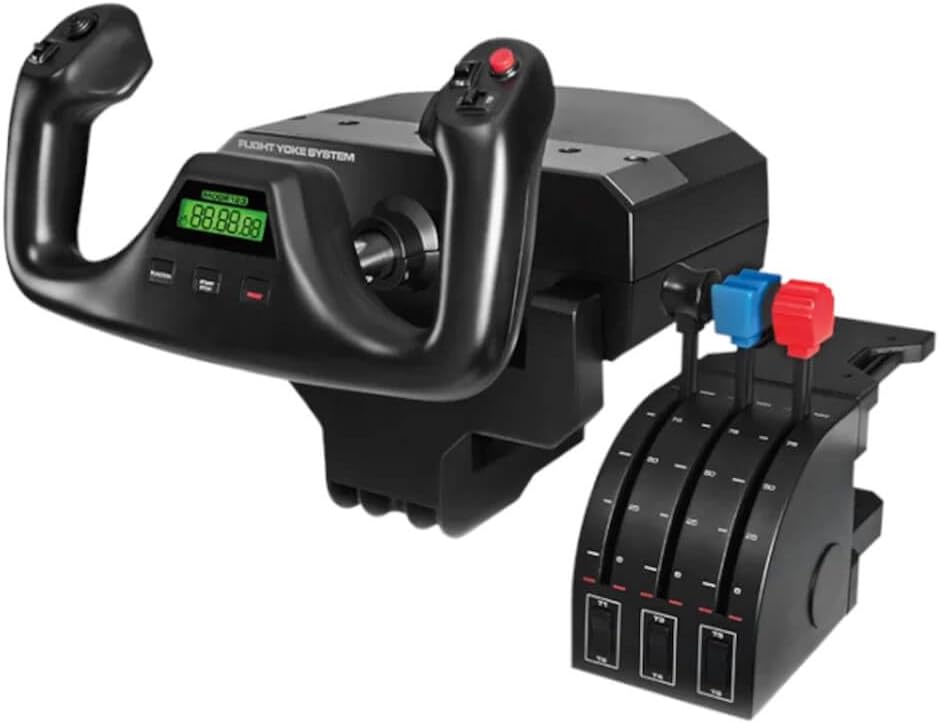

The Logitech G PRO Flight Yoke System stands out as a top choice for serious pilots. With a 4.3 rating it delivers realistic controls that build muscle memory effectively.
We may earn a commission when you buy through this link, at no additional cost to you.
Its stainless steel shaft ensures smooth pitch and roll inputs without play. The included throttle quadrant adds essential speed management. Over 50 programmable controls allow deep customization for complex sims.
The desk clamp is robust but limits use to flat surfaces. Mac users should verify software drivers before buying for full feature access. Still it offers great value for the immersion provided.
Ideal for home studios seeking a professional feel without extreme cost. This system balances quality and usability better than most competitors in this category.
The stainless steel shaft provides long lasting durability during intense sessions.
With over 50 buttons you can map essential aircraft functions to your fingertips.
We may earn a commission when you buy through this link, at no additional cost to you.
The Thrustmaster T-Flight Hotas X offers excellent value for beginners. It earns a 4.5 rating for its comfort and flexibility in various flight sim titles.
We may earn a commission when you buy through this link, at no additional cost to you.
The detachable throttle lets you adjust the layout to fit your desk. Adjustable resistance allows you to fine tune the stick tension to your preference easily.
It lacks the advanced features of premium models like extensive programmable buttons. The plastic construction is durable but feels less robust than steel alternatives.
Perfect for pilots on a budget who need reliable controls quickly. It is an ideal starting point before upgrading to more advanced hardware later.
The wide hand rest ensures comfort even during long flight sessions.
Fine tune the stick tension to match your flying style perfectly.
We may earn a commission when you buy through this link, at no additional cost to you.
The Logitech G X56 H.O.T.A.S is a powerhouse for advanced simulation users. With a 4.0 rating it delivers precision and extensive customization options for experts.
We may earn a commission when you buy through this link, at no additional cost to you.
The 189 programmable controls allow deep integration with complex flight simulators. RGB lighting adds immersion and the adjustable spring system tailors feel to your hand.
Setup can be time consuming and the price is high for casual players. Mac compatibility requires checking software support as it targets Windows primarily.
Best for enthusiasts who need every possible control option at their fingertips. It is a serious tool for building a complete cockpit environment.
With 189 buttons you can map every function required for combat flights.
Four spring options let you change the force required to move the stick.
We may earn a commission when you buy through this link, at no additional cost to you.
The Turtle Beach VelocityOne Flightstick is designed for modern univers. It has a 4.2 rating due to its innovative features like the OLED flight display.
We may earn a commission when you buy through this link, at no additional cost to you.
Non-contact sensors ensure long-term accuracy without wear over time. The touchpad allows for cursor control which is useful for menu navigation in simulators.
Mac users may face some software hurdles as it focuses on Windows. The OLED screen provides great data visibility but requires power from USB.
Ideal for pilots who want a mix of military and airliner support easily. Its universal approach makes it a flexible choice for multi-platform setups.
Use the touchpad to move the cursor without needing a separate mouse.
See flight data real-time on the integrated OLED screen directly.
We may earn a commission when you buy through this link, at no additional cost to you.
The Logitech G Saitek X52 Pro is a well-known classic in flight sims. It has a 3.9 rating and offers solid features for those who prefer tradition.
We may earn a commission when you buy through this link, at no additional cost to you.
The LCD display provides essential info without needing a second screen. Progressive throttle with resistance adjustment adds realism to engine management tasks.
As an older model it might lack some modern features found in newer sticks. Mac users need to check legacy driver support before purchasing for use.
Best for users who want a proven reliable setup without modern complexities. It remains a popular choice for those familiar with Saitek controllers.
The LCD screen shows key data for quick access during flight.
Profile software lets you save settings for multiple game titles easily.
We may earn a commission when you buy through this link, at no additional cost to you.
The Honeycomb Alpha Flight Controls Yoke offers professional-grade realism. With a 4.4 rating it is praised by real pilots for its accurate feel and quality.
We may earn a commission when you buy through this link, at no additional cost to you.
The switch panel includes essential avionics controls right on the base. The shaft uses dual linear ball bearings for ultra-smooth pitch and roll input.
The price is high and it requires significant desk space. Mac users should check specific software compatibility for full feature integration.
Top choice for those seeking the closest experience to a real cockpit. It is a significant investment but delivers unmatched quality for serious simmers.
Full 180 degree rotation mimics the movement of a real aircraft yoke.
Avionics switches are built into the base for immediate access.
We may earn a commission when you buy through this link, at no additional cost to you.
The Logitech G Pro Flight Bundle combines the yoke with pedals. It has a 4.6 rating because it offers a complete experience at a fair price.
We may earn a commission when you buy through this link, at no additional cost to you.
The rudder pedals provide precise differential toe brakes for runway control. The self-centering feature ensures natural return to center during flight.
Space requirements are significant so a dedicated desk area is needed. Mac users should verify that both units work seamlessly with their simulator.
Ideal for pilots who want a full control suite without buying separate parts. It simplifies setup and ensures compatibility between all flight components.
Toe brakes allow precise turning on the runway without extra levers.
Getting yoke and pedals together saves time and ensures compatibility.
We may earn a commission when you buy through this link, at no additional cost to you.
The Turtle Beach VelocityOne HOTAS offers extensive customization options. It has a 2.6 rating due to recent reports about driver and setup issues.
We may earn a commission when you buy through this link, at no additional cost to you.
Hall effect sensors promise high resolution input that won't wear out. The full color display provides real-time data for tuning performance quickly.
Mac users need to be cautious as recent drivers might have bugs. The complexity can be frustrating for those seeking a simple plug and play experience.
Best for users who enjoy tweaking settings and don't mind setup hurdles. It has high potential but requires patience to get running smoothly.
Hall effect sensors provide precise input without physical wear over time.
You can add pedals and mounts for a full custom cockpit setup.
We may earn a commission when you buy through this link, at no additional cost to you.
The Logitech G PRO Flight Yoke System Pro offers detailed controls. With a 4.4 rating it is highly rated for its robust features and build quality.
We may earn a commission when you buy through this link, at no additional cost to you.
An integrated USB hub simplifies connections for other peripherals like pedals. Configurable throttle knobs allow fine adjustments for speed and prop management.
The price point is high and Mac users might need extra software. Setup can be tricky but the result is a powerful simulation tool.
Recommended for users who need extra connectivity and button flexibility. It is a great upgrade if your setup requires more USB ports.
A built-in hub reduces cable clutter and simplifies connections.
Adjustable throttle knobs give precise control over aircraft systems.
We may earn a commission when you buy through this link, at no additional cost to you.
The Renewed Logitech G Saitek PRO Flight Yoke System offers value. It has a 4.2 rating for its affordable price and proven design features.
We may earn a commission when you buy through this link, at no additional cost to you.
Digital chronograph helps with timing tasks like IFR procedures. The throttle quadrant adds essential controls for prop and mixture management.
Buying renewed carries some risk but saves money. Mac compatibility requires checking system requirements before purchase as older drivers may not be supported.
Best for budget-conscious pilots who need a basic yoke and throttle. It is a solid entry point if you accept the refurbished condition.
Built-in timing tools help you track flight procedures and intervals.
Includes prop and mixture controls for realistic flight management.
We may earn a commission when you buy through this link, at no additional cost to you.
Choosing the right flight controller involves several key factors beyond just price. This guide walks you through what to consider for a smooth Mac experience.
Mac users must verify that the controller drivers work with their current operating system. Some older devices rely on Windows-only software which limits functionality. Always check the manufacturer website for Mac specific drivers or open source alternatives.
Ensure the controller is explicitly supported on your version of macOS to avoid issues.
Materials matter for durability and feel. Steel shafts offer better precision than plastic. High-end models often use metal for the stick or yoke to reduce flex.
Look for robust materials like steel or aluminum for long-term reliability during intense sessions.
More buttons mean you can map more functions to your hands. A yoke system typically offers 50 or more inputs. Simpler sticks might have only 12 to 20.
Choose a model with enough programmable buttons to cover your essential flight functions.
Clamps are common but require a flat desk edge. Suction pads offer an alternative for thicker tables. Ensure the mounting method fits your desk safely.
Verify the clamp size or suction strength matches your workspace dimensions.
Some controllers include a dedicated throttle lever while others have one on the stick. Separate throttles offer more realism. Integrated ones save space.
Decide if you need a separate throttle quadrant or a combined unit for your space.
Software like Smart Technology (SST) or similar allows profile saving. Good software lets you switch between aircraft types easily. Lack of software support limits customization.
Check that the included software supports your specific Mac simulator application fully.
Entry models are affordable but lack advanced features. Premium models cost more but offer better precision. Decide how much you are willing to spend for immersion.
Balance your budget against the features you need to avoid overspending on unused tech.
Yoke systems take up significant desk space. HOTAS sticks are smaller. Consider your available area before committing to a large setup.
Measure your desk space before buying a large yoke system.
Set up the software first to map buttons before your first flight. Connect the device to a dedicated USB port for best performance.
Clean the grips and buttons regularly with a dry cloth to remove dust. Avoid harsh chemicals that might damage plastic or coatings.
Store the controller in a cool dry place when not in use. Protect it from direct sunlight to prevent plastic from cracking.
Not all controllers work seamlessly with Mac. Some require Windows drivers which may need workarounds. Always check the product description for Mac compatibility before buying.
A HOTAS stick is usually best for beginners. It is compact and easy to setup. It provides enough controls without overwhelming complexity.
Most software has a calibration tool in settings. Follow the onscreen steps to reset center positions. Restarting the simulator can also resolve temporary glitches.
Yokes offer more realism for airliner pilots. They require more desk space and setup effort. Consider your specific flight sim interests before investing.
Yes if the pedal unit has Mac driver support. Bundle options often simplify this. Verify individual device compatibility if buying separate parts.
Many users rely on open-source tools like Joystick Mapper. Manufacturer software works if a Mac version is provided. Check community forums for tips.
We have reviewed 10 top controllers for Mac simulation users. Each option offers distinct advantages depending on your skill and space.
Prioritize Mac driver support and build quality for long-term satisfaction. A reliable device ensures a smooth simulation experience.
Prices and stock change frequently. Check current availability before making your final purchase decision today.