
NOYAFA NF-488 POE Cable Tester
4.5Editor score
Multifunctional network cable testing
Detects standard and non-standard POE
Clear LCD backlit screen
This guide compares the top ten inline POE testers for network professionals, evaluating testing modes, display quality, and reliability for accurate diagnostic
Inline POE testers are essential tools for network technicians who need to verify power delivery over Ethernet cables. These devices ensure that switches, injectors, and powered devices communicate correctly without interruption or damage during installation phases.
We compared ten real products based on their testing capabilities, display types, and support for various PoE standards. Our analysis focuses on accuracy, ease of use, and the ability to troubleshoot common power issues in modern network environments efficiently.
Each pick highlights specific strengths like OLED screens, battery-free operation, or advanced compliance features. Note that product prices and availability change frequently, so verify current details before making a final purchasing decision for your toolkit.
4.5Editor score

4.1Editor score

4.1Editor score
The following table provides a side-by-side comparison of all ten inline POE testers evaluated in this guide. Each entry lists key specifications to help you identify the right tool for your specific network testing requirements and budget constraints.
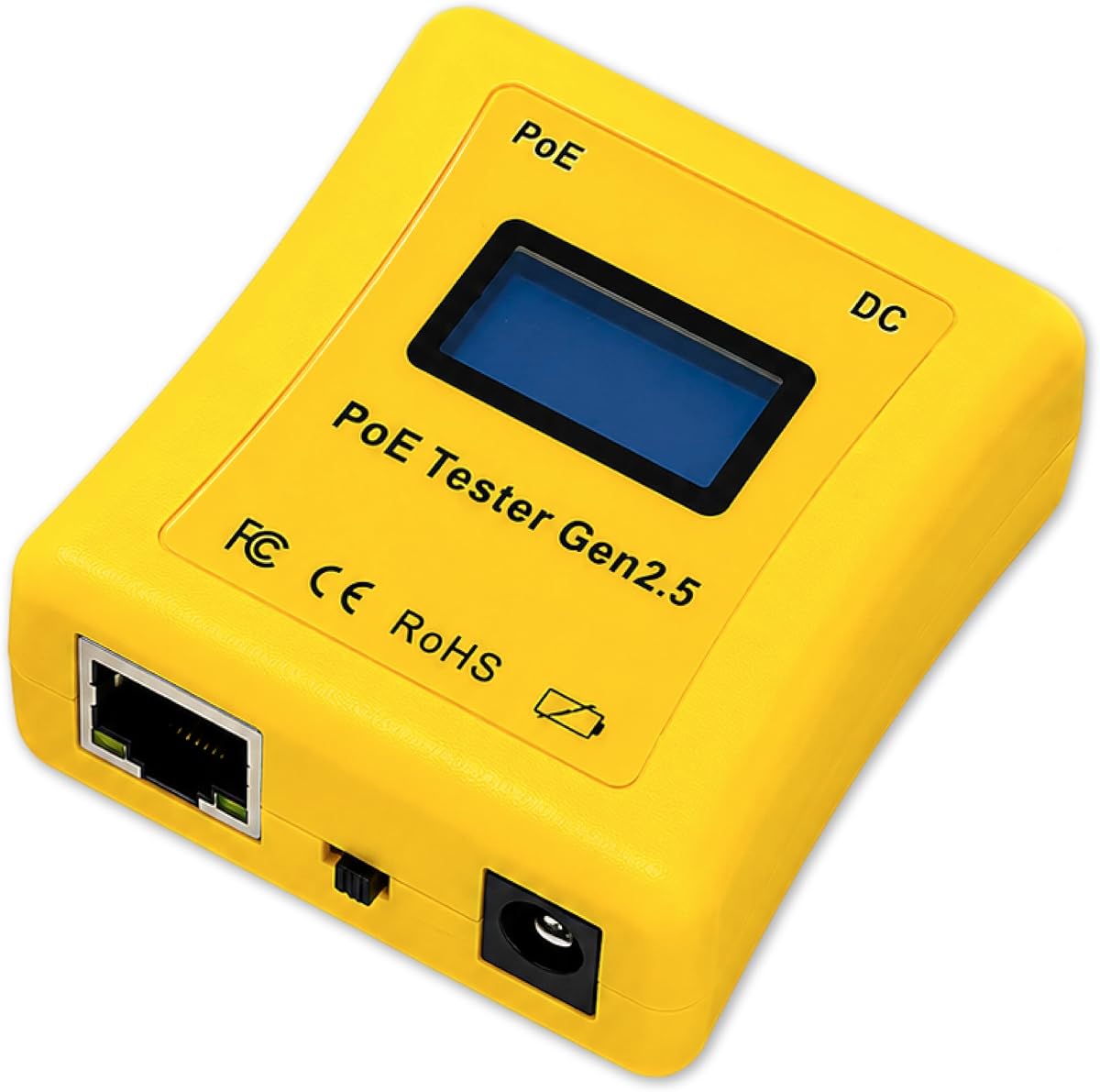


The TRENDnet TC-NTP1 is a highly rated inline POE tester designed for professional network installation and troubleshooting. With a 4.1 rating from verified users, it stands out for its compliance with government standards and robust testing capabilities.
We may earn a commission when you buy through this link, at no additional cost to you.
Its three testing modes cover T-mode for PSE devices, N-mode for non-standard passive PoE, and I-mode for inline voltage and wattage monitoring. This versatility makes it suitable for complex installations involving cameras, VoIP phones, and access points.
While it is compact and lightweight, the unit is designed for durability. The step button allows you to lock specific readings like wattage for real-time monitoring, which is essential when verifying power budgets for multiple devices.
This tool is ideal for installers who need compliance assurance and reliable data. If you prioritize NDAA compliance and detailed power metrics, this tester provides the confidence needed for critical network infrastructure projects.
Government customers demand NDAA compliant testers for security reasons, and this model meets that standard for U.S. and Canadian installations.
The lockable display feature lets you freeze wattage readouts to observe power fluctuations without cycling through other data constantly.
We may earn a commission when you buy through this link, at no additional cost to you.
The PoE-T100 offers a modern OLED display that enhances readability in various lighting conditions, making it a premium choice for network engineers. It supports a wide range of standards including 802.3af/at/bt and passive PoE.
We may earn a commission when you buy through this link, at no additional cost to you.
Its self-powered design means you never need to swap batteries; it draws energy directly from the PoE line or DC source. This ensures continuous operation during long deployment days without interruption from power failures.
The device supports three modes: PD Mode to simulate devices, Inline Mode for pass-through testing, and DC Mode for measuring non-PoE supplies. This comprehensive approach helps identify power issues quickly without needing multiple tools.
For professionals who value display clarity and uninterrupted usage, this tester is an excellent investment. The ability to view power, voltage, and current on one page simplifies diagnostics significantly in the field.
The OLED screen provides high contrast and visibility, ensuring you can read critical voltage data even in dark server rooms or outdoor setups.
By eliminating battery dependencies, this tool reduces downtime and ensures you can test multiple switches without worrying about power management.
We may earn a commission when you buy through this link, at no additional cost to you.
The PoE Texas tester is designed for professionals who want to eliminate battery dependency entirely. It draws power directly from the PoE line, ensuring it is always ready for use regardless of charging cycles.
We may earn a commission when you buy through this link, at no additional cost to you.
It supports advanced measurements including Mode A and Mode B detection and can handle power up to 280 watts at 56 volts. This makes it suitable for high-power devices like PTZ cameras or high-performance access points.
The ergonomic design is 25% smaller than previous versions, making it easy to carry in a tool bag. The LCD screen cycles through readings automatically, which is convenient for quick checks during routine maintenance.
If you frequently work with high-power devices and need a reliable tool that never needs charging, this is a strong option. Its ability to detect power loss in cables helps prevent future connectivity issues.
Handling up to 280 watts allows you to test the latest 802.3bt devices without fear of overloading the tester or damaging the equipment.
The compact design fits easily in a pocket or pouch, ensuring you have your testing tool handy whenever you visit a network site.
We may earn a commission when you buy through this link, at no additional cost to you.
The NOYAFA NF-488 is an affordable option that delivers essential testing features without breaking the bank. With a high rating from users, it proves that budget tools can still provide reliable network diagnostics.
We may earn a commission when you buy through this link, at no additional cost to you.
It identifies standard and non-standard POE information including voltage and polarity. The backlight screen ensures you can see results clearly in dimly lit areas like cable trays or basement conduits.
Beyond POE testing, it checks for open circuits, short circuits, and crossovers. This multifunctionality means you do not need a separate cable tester, saving space in your toolkit.
For small businesses or technicians starting out, this model offers excellent value. It covers the basics of POE detection and cable continuity effectively, making it a practical choice for general network maintenance.
At a lower price point than many competitors, this tool allows you to equip multiple team members without significant expense.
Testing for shorts and opens helps you confirm the physical integrity of the cable before installing expensive networking equipment.
We may earn a commission when you buy through this link, at no additional cost to you.
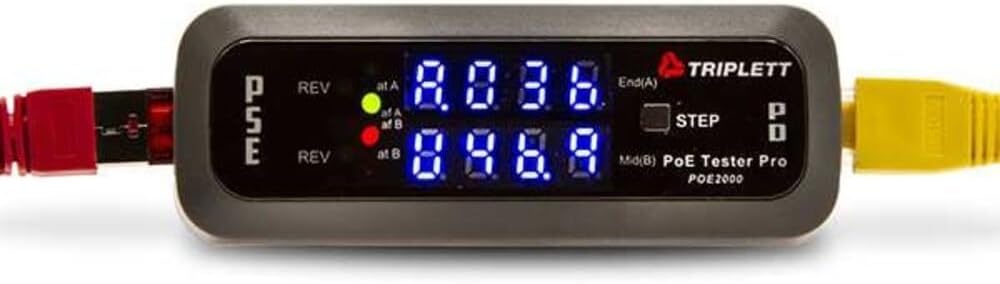
The Triplett POE2000 focuses on visual feedback with dual 7-digit LEDs that indicate the power source type. It is designed to give you a quick overview of power delivery without navigating complex menus.
We may earn a commission when you buy through this link, at no additional cost to you.
Two yellow LEDs indicate reversed polarity, which is crucial for preventing damage during installation. This simple visual cue helps prevent costly mistakes when connecting devices to switches or injectors.
When used inline, the display alternates between voltage, current, and power. The step button allows you to lock on the specific metric you need, providing flexibility in how you monitor the power.
While it has fewer advanced features than OLED models, it is effective for basic detection tasks. If you prefer physical indicators over digital numbers for quick checks, this tester meets that need.
The LED indicators allow you to assess power status instantly without needing to stare closely at a small digital screen.
Reversed polarity detection protects your equipment from damage, ensuring that connections are correct before full operation begins.
We may earn a commission when you buy through this link, at no additional cost to you.
The Triplett POE3000 builds on previous models with enhanced visual indicators to help you understand power delivery at a glance. It supports IEEE 802.3af and at/bt standards effectively.
We may earn a commission when you buy through this link, at no additional cost to you.
Visual indicators include four LEDs that show standard compliance and two yellow ones for reversed polarity. This system provides immediate feedback on whether the power source is compatible and correctly wired.
It detects PSE type and class along with power source location. The inline level monitoring alternates between voltage, current, and power, ensuring you can track changes over time.
For those who prioritize visual simplicity and brand reliability, this model is a solid contender. It is designed for professionals who need a straightforward tool without complex digital interfaces.
Four LEDs quickly confirm if the standard is 802.3af or 802.3at/bt, helping you identify compatible devices instantly.
Determining if the source is end span or midspan helps you map the network infrastructure correctly for future troubleshooting.
We may earn a commission when you buy through this link, at no additional cost to you.
The Jonard Tools POE-1 stands out by combining POE testing with cable continuity verification. It allows you to measure resistance, ensuring that the physical cable is not compromised before power testing.
We may earn a commission when you buy through this link, at no additional cost to you.
It supports various standards including passive, 802.3af, 802.3at, and 802.3bt. This breadth ensures you can handle a wide variety of devices in mixed network environments without switching tools.
The kit includes a cable remote and adapters, making it a complete solution for cabling tasks. The battery-free operation means you rely on the line power, ensuring you always have a charged tool.
For technicians who need to verify both data and power integrity, this is a comprehensive choice. It reduces the need for separate equipment, streamlining your workflow during installations.
Measuring resistance helps you identify hidden damage that might not show up during a simple continuity test.
Accessories like the remote and adapter make it ready to use for complex wiring scenarios right out of the box.
We may earn a commission when you buy through this link, at no additional cost to you.
This compliant network tester distinguishes itself with built-in cable length measurement capabilities. It measures CAT5 and CAT6 lengths from 5 to 300 meters, which is essential for verifying run compliance.
We may earn a commission when you buy through this link, at no additional cost to you.
It detects shorts, opens, and miswires up to 600m. The port flash feature helps locate active ports quickly without checking every switch panel manually during large installations.
Equipped with a rechargeable battery and auto-shutoff features, it supports long testing sessions. The customizable shut-off times help balance battery life with convenience during daily work.
If you frequently work with long cable runs and need precise distance data, this tool is highly suitable. It ensures your physical cabling meets standards before you install expensive active equipment.
Measuring cable length ensures you do not exceed distance limits that could lead to signal degradation or power loss.
Port flash detection identifies active ports instantly, saving time when tracing cables in crowded rack environments.
We may earn a commission when you buy through this link, at no additional cost to you.
The Inline Cat5/6 DVM offers a specialized combination of digital volt meter functions and network POE testing. This hybrid approach provides detailed electrical data alongside standard network connectivity checks.
We may earn a commission when you buy through this link, at no additional cost to you.
Designed for CAT5 and CAT6 cables, it supports the needs of legacy and modern networks alike. The DVM power panel allows for precise voltage measurements that go beyond typical POE testers.
It serves as a robust tool for technicians who need electrical diagnostics integrated into their network testing. The high price reflects its specialized nature compared to general purpose units.
For professionals requiring detailed electrical data, this model is a strong candidate. It bridges the gap between electrical testing and network cabling verification effectively.
Combining DVM functions with POE testing reduces the need for multiple tools on your belt during complex field tasks.
Support for both CAT5 and CAT6 ensures you can service older buildings without replacing all cabling immediately.
We may earn a commission when you buy through this link, at no additional cost to you.
This NF-488 model is a versatile tool that checks for loop issues which are common causes of network failure. The loop-back test helps diagnose problems with the switch loop configuration effectively.
We may earn a commission when you buy through this link, at no additional cost to you.
It supports current voltage and power testing for DC appliances. The LED lamp provides illumination in dark areas, which is essential when working under desks or in ceiling spaces.
Customer service is a highlighted feature with lifetime support available. This provides peace of mind when investing in technical tools that require accurate usage instructions.
For technicians who encounter loop issues frequently, this model is highly practical. The added lamp feature improves safety and visibility during field repairs.
Loop-back testing identifies switching loop problems that can cause broadcast storms and network slowdowns.
The built-in LED lamp allows you to see connectors clearly without needing a separate flashlight in dark racks.
We may earn a commission when you buy through this link, at no additional cost to you.
Selecting the right inline POE tester depends on your specific network requirements and the standards you support most often.
Ensure the device supports the PoE standards you need such as 802.3af, 802.3at, or 802.3bt. Some units also support passive PoE or DC voltage ranges for non-standard equipment.
Look for clear standard support details to avoid buying a tool that cannot read your specific switch or camera requirements.
OLED screens offer better contrast and readability than LCDs especially in low light. Consider if you need detailed numeric readouts or simple LED indicators.
Choose a display that allows you to read critical voltage and power data without straining your eyes.
Battery-free models draw power from the PoE line which eliminates charging needs. Others may use rechargeable batteries for independent testing when no power is present.
Evaluate how often you work in dead zones where PoE power is unavailable.
Some testers include cable continuity checks loop-back tests or distance measurements. Multifunctional tools reduce the need for carrying separate equipment.
Decide if you need these extra features or prefer a dedicated POE tester for simplicity.
Modern networks often use Gigabit speeds so ensure the tester supports 1000Mbps connections without interrupting data flow.
Avoid devices that limit speed to 100Mbps if you work with newer switches.
Look for rugged casings and protective features since these tools are often dropped in industrial or outdoor environments.
A durable build ensures your investment lasts through many installation jobs.
Check for manufacturer protection such as 2-year warranties. Reliable tech support can help you resolve setup issues quickly.
Prioritize brands with accessible support channels for your peace of mind.
To begin using your tester, simply plug one end of your Ethernet cable into the device and the other end into the switch or injector. Ensure the tester is powered if required.
Observe the display to read voltage current and power metrics. Use the step button to cycle through data or lock specific readings for monitoring.
Store your tester in a dry and protected case when not in use to prevent damage to the ports. Clean the connectors with a soft cloth to avoid debris buildup.
Yes, most inline testers are designed to connect to live cables without disrupting data transmission. This allows you to monitor power while devices remain operational during testing.
Not all models support passive PoE. Check the product specifications to ensure it lists compatibility with non-standard voltage ranges like 12V or 24V DC.
T-mode tests the power source device to determine supported standards. I-mode is used for inline testing to display real-time voltage and wattage of the connected device.
This may happen if the switch does not detect a device. Using a simulation mode or ensuring the connected device is active can resolve this issue.
Yes, professional testers are built to safely interface with powered devices without damaging them. They act as a passive load or transparent monitor.
Most professional-grade testers provide accurate voltage measurements within industry standard tolerances. Always compare readings with your switch documentation for best results.
The TRENDnet TC-NTP1 and PoE-T100 lead the list due to their advanced compliance and display features. These models offer the reliability needed for professional network installs.
For budget-conscious buyers, the NOYAFA NF-488 provides essential testing capabilities at an affordable price. It covers the basic needs of most technicians effectively.
Always verify current prices and availability before purchasing as they change frequently. Choose the tool that matches your specific network requirements to ensure smooth operations.