
Logitech K120 Full Size Wired Keyboard
4.6Editor score
Full size standard layout
Spill resistant design
Plug and play setup
This guide compares the best keyboard with USB port options for productivity and convenience, highlighting features like hub connectivity, compatibility, and
A keyboard with USB port adds significant convenience to your desktop setup by allowing you to connect peripherals directly without reaching behind your computer. This feature is ideal for users who frequently plug in flash drives, mice, or webcams while working on spreadsheets or documents daily.
We evaluated ten top-rated models based on hub functionality, key comfort, compatibility across operating systems, and overall build durability. Each product was reviewed for its ability to streamline workspace organization and enhance typing efficiency for both home office and professional environments effectively.
Our picks highlight specific strengths such as budget friendliness, premium mechanical switches, or broad system support to help you find the right fit. Note that availability and pricing can fluctuate quickly so verify current details before finalizing your purchase decision for your specific needs today.
4.6Editor score
4.4Editor score
4.3Editor score
The following table provides a side-by-side comparison of all ten keyboards evaluated in this guide to help you quickly identify key differences in connectivity, layout, and specialized features across various price points and user needs.






The Adesso AKB-132HB is a solid multimedia focused keyboard with three integrated USB hubs. It holds a 4.2 rating and stands out for its ability to centralize peripheral connections while offering quick access to common media and system functions without needing software.
We may earn a commission when you buy through this link, at no additional cost to you.
Its three built-in USB ports provide easy access for flash drives and mice, reducing cable clutter on your desk. The multimedia hotkeys allow one-touch control over video and music players, while the Windows One-Touch controls open apps like Calculator and Mail instantly.
While the membrane switches are quiet and comfortable for long typing sessions, the keyboard lacks backlighting which might be an issue in dim environments. The design is functional but not particularly stylish compared to more modern slim profiles available today.
This keyboard is ideal for home office users or students who need reliable USB connectivity and media shortcuts without spending much. Its durable construction and convenient hub layout make it a practical choice for everyday productivity tasks effectively.
The three USB ports let you plug in multiple devices directly at your fingertips rather than reaching behind your monitor or tower.
Dedicated keys streamline access to favorite apps and media players saving time during multitasking sessions.
We may earn a commission when you buy through this link, at no additional cost to you.
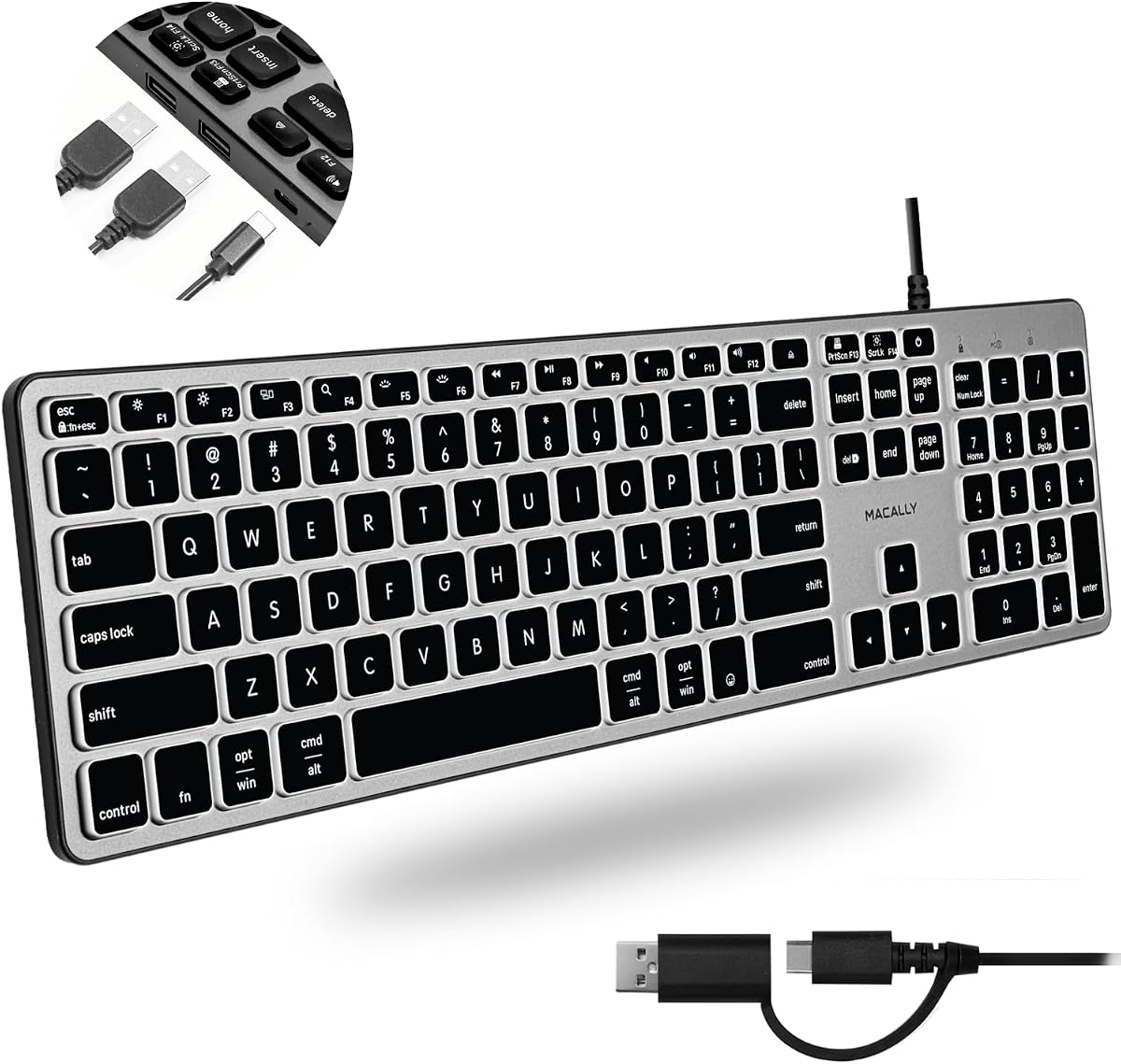
Macally delivers a premium experience with its Wired Keyboard for Mac featuring USB-C connectivity and a versatile 2-in-1 plug. It has a 4.4 rating and offers excellent adaptability across Mac and Windows systems with auto detection for seamless functionality.
We may earn a commission when you buy through this link, at no additional cost to you.
The keyboard includes three USB ports with two USB-A and one USB-C allowing direct peripheral connection. Its white LED backlit keys have three brightness levels for visibility in low light. The dual interface plug supports both older and newer laptop USB standards effectively.
While it offers great compatibility and a solid warranty, the USB hub may not support high power devices like external hard drives requiring external power. The price is higher than basic membrane options but justified by the premium materials and versatile connectivity options.
This model is perfect for Mac users on MacBook Pro or Air who want a full size keyboard with modern connectivity. Its auto OS detection and adjustable backlight make it a reliable daily driver for professionals needing efficient workspace integration.
Auto OS detection ensures all keys function correctly whether you switch between macOS Windows or Android environments.
The inclusion of both USB-A and USB-C ports future proofs your connection options for current and upcoming devices.
We may earn a commission when you buy through this link, at no additional cost to you.
The Macally Premium Wired USB C Keyboard provides a reliable solution for newer devices using Type-C connections. It rates at 4.2 and features three extra ports for peripherals along with a clean space gray finish that matches modern Apple and PC setups seamlessly.
We may earn a commission when you buy through this link, at no additional cost to you.
It connects up to three devices simultaneously with two USB-A and one USB-C port on the side. The simple USB-C wired connection ensures plug and play readiness for MacBook and iMac users. All 107 keys and 16 shortcuts work across Mac PC and Chrome OS systems.
Although it offers excellent compatibility and aesthetics, the integrated typing angle is fixed rather than adjustable for ergonomic customization. The switches are quiet and low profile but lack mechanical feedback which some typists might prefer for tactile response.
This keyboard suits users upgrading to USB-C devices who want a full size layout without sacrificing hub functionality. Its blend of practicality and style makes it a strong choice for those needing a versatile keyboard for mixed operating system use.
Connect peripherals directly to the keyboard saving USB ports on your main laptop or desktop computer.
The space gray finish complements modern laptop and monitor designs for a cohesive workstation look.
We may earn a commission when you buy through this link, at no additional cost to you.
The Logitech K120 is a durable standard keyboard designed for all-day comfort and reliability in office or home settings. It holds a 4.6 rating and focuses on practical features like spill-proofing and a full-size layout with number pad for efficient typing workflows.
We may earn a commission when you buy through this link, at no additional cost to you.
Its spill-proof design protects against accidental liquid spills while the deep-profile keys provide a comfortable typing experience. The plug and play setup requires no software installation making it instantly usable on Windows 7 8 10 or later. It also uses 51 percent recycled plastic in parts.
This keyboard lacks USB ports which limits its connectivity expansion compared to other picks on this list. While it excels in build quality and comfort, users needing integrated hubs will need to look at different models that offer additional connection capabilities for peripherals.
Ideal for businesses or home users prioritizing longevity and basic functionality this keyboard delivers consistent performance. Its sturdy tilt legs and anti-fade keys ensure it remains functional over years of regular use without significant wear or maintenance.
Spill-resistant features protect internal components from common accidents extending the keyboard life significantly.
Plug and play functionality means you can start typing immediately without drivers or configuration.
We may earn a commission when you buy through this link, at no additional cost to you.
The Perixx PERIBOARD-409H saves desk space with its compact mini design while still offering two built-in USB hubs for extra connectivity. It has a 4.4 rating and uses responsive membrane keys with a life cycle of ten million keystrokes for reliable performance.
We may earn a commission when you buy through this link, at no additional cost to you.
Its design eliminates the number pad to free up workspace on smaller desks. The two USB hubs let you connect a mouse and flash drive directly. A 5.9 foot cable ensures flexibility in connecting to computers under your desk or far away on a desk setup.
While great for space saving the lack of a number pad may not suit data entry professionals or accountants needing frequent numeric input. The UV coated keycaps resist fading but the overall build feels more utilitarian than premium which is expected at this price range.
This model is a strong choice for users with limited desk space who still need USB connectivity options. Its plug and play setup and solid durability make it a practical daily driver for general typing and peripheral management tasks.
Removing the number pad frees up valuable desk real estate for mouse movement or documents.
Built-in hubs reduce cable clutter by allowing direct device connections at your keyboard.
We may earn a commission when you buy through this link, at no additional cost to you.
The KOPJIPPOM Large Print Backlit Keyboard is designed for visibility with fonts four times larger than standard keyboards. It has a 4.5 rating and offers white LED backlit keys for typing in low light making it ideal for visually impaired users or older adults.
We may earn a commission when you buy through this link, at no additional cost to you.
Its full size layout includes a numeric keypad and ergonomic adjustable feet to reduce hand fatigue. The white LED backlight can be turned on or off with adjustable brightness for optimal visibility. A spill resistant design protects against accidental liquid spills for durability.
Although it excels in accessibility it lacks USB ports which limits its utility as a hub solution. Users may need to connect peripherals directly to the computer. Multimedia keys have limited compatibility on Mac OS which might restrict functionality for Mac users.
This keyboard is highly recommended for those needing clear key labels or better lighting conditions. Its combination of large print and backlighting makes it a valuable tool for schools libraries or home offices where visual clarity is a priority.
Larger fonts and backlighting ensure keys are easily identifiable even in dimly lit rooms.
Ergonomic feet and full size layout provide comfort during extended typing sessions without strain.
We may earn a commission when you buy through this link, at no additional cost to you.
The Dell Wired Keyboard KB216 is a convenient solution for everyday home or office computing needs. It holds a 4.6 rating and features a clean black design with multimedia functions and chiclet style keys that are comfortable and quiet for regular use.
We may earn a commission when you buy through this link, at no additional cost to you.
Its dimensions are compact enough for most desks and it weighs just under 18 ounces. The interface is USB and it works seamlessly with a wide range of Dell laptops and desktops. Multimedia keys add quick access to volume and media playback for convenience.
This keyboard does not include USB ports so it does not act as a hub for other devices. The keys are not backlit which may limit use in dark environments. It is primarily designed for reliable standard typing rather than advanced features or connectivity.
It is a solid choice for general office work where basic functionality and quiet operation are valued. Its simplicity and wide compatibility make it a cost effective option for businesses or home users needing a dependable daily keyboard.
Provides reliable typing performance for daily word processing and email tasks without complexity.
Designed to complement Dell hardware ensuring consistent performance across various Dell devices.
We may earn a commission when you buy through this link, at no additional cost to you.
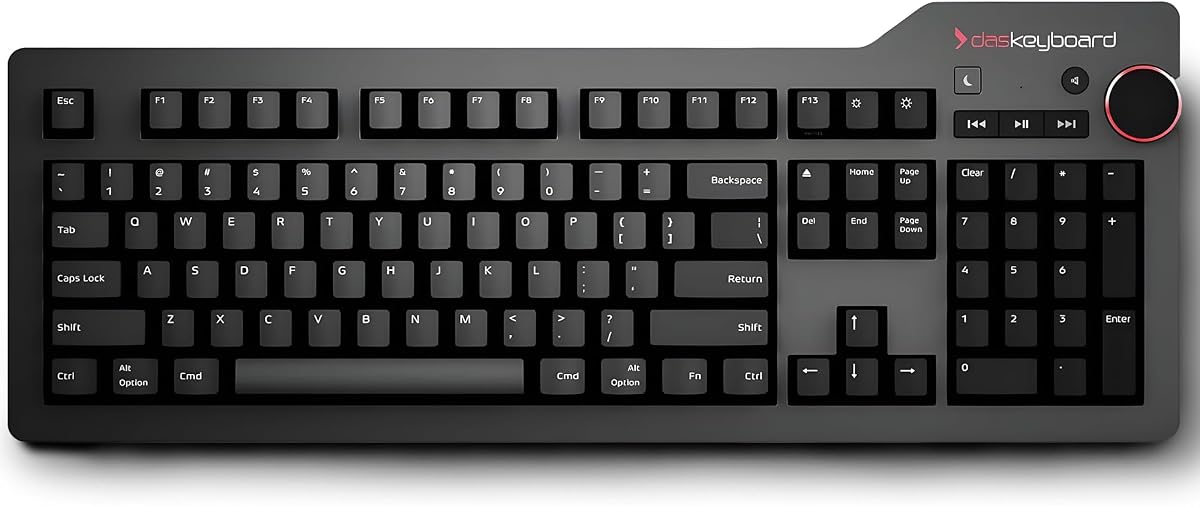
The Das Keyboard 4 Professional for Mac is the thinnest mechanical keyboard available combining tactile feel with premium craftsmanship. It has a 4.3 rating and features Cherry MX Blue switches and a blazing fast 2-port USB 3.0 hub for transferring large files efficiently.
We may earn a commission when you buy through this link, at no additional cost to you.
Its best-in-class tactile feedback allows precise keystrokes with audible clicks that satisfy mechanical keyboard enthusiasts. The USB 3.0 hub supports fast data transfer rates up to 5 gigabits per second. A large volume knob and magnetically detachable footbar ruler enhance usability and ergonomics.
While excellent for professionals the clicky switches may disturb coworkers in quiet shared spaces. The higher price reflects the premium materials but may not suit budget conscious buyers. It is also designed specifically for Mac OS which limits Windows compatibility without modification.
This keyboard is ideal for power users and developers who type extensively and value tactile precision. The combination of mechanical switches USB 3.0 speeds and durable construction makes it a high-performance tool for demanding workflows and media tasks.
Cherry MX Blue switches deliver distinct tactile and auditory feedback for confident typing.
USB 3.0 hub ensures rapid data transfer for large media files without lag.
We may earn a commission when you buy through this link, at no additional cost to you.
The Das Keyboard 4 Professional Wired Mechanical Keyboard offers an unmatched typing experience with Cherry MX Blue switches and a dedicated volume knob. It has a 4.3 rating and includes a 2-port USB 3.0 hub for fast content uploads and peripheral charging simultaneously.
We may earn a commission when you buy through this link, at no additional cost to you.
It supports full N-key rollover over USB which benefits fast typists and gamers. The laser-etched keycaps and gold-plated switches ensure high durability up to fifty million keystrokes. The aluminum top panel adds a premium feel and the magnetically detachable footbar raises the keyboard to four degrees.
The switches produce audible clicks that may not suit shared quiet workspaces. The layout is Windows focused with specific media controls like an instant sleep button. While robust the higher price point may be a consideration for budget constrained users needing basic functionality.
This keyboard is a great choice for Windows power users who demand mechanical performance and connectivity. Its durable build and high-speed hub make it suitable for both professional productivity and gaming scenarios requiring fast and reliable input.
Full N-key rollover ensures every keypress registers accurately during rapid input sessions.
Gold-plated switches and high cycle count promise years of consistent performance without wear.
We may earn a commission when you buy through this link, at no additional cost to you.
This keyboard is a genuine Dell Business Multimedia USB wired keyboard offering 14 hot keys and two USB hubs for business environments. It has a 4.6 rating and supports part numbers like 1RW52 and KB522 making it a direct replacement for existing Dell office setups.
We may earn a commission when you buy through this link, at no additional cost to you.
Its hot keys include functions for sleep Internet browsing and email which streamline daily tasks. The two USB hub ports provide convenient peripheral connection without extra dongles. A removable palm rest adds comfort and the spill resistant design protects against accidental liquid damage.
While practical this keyboard is tailored for Dell business laptops and may not fit modern slim designs. The aesthetics are more utilitarian than sleek which is acceptable for business but less for home offices. The price is competitive for an OEM replacement unit.
It is the best choice for businesses needing compatible replacements for Dell systems quickly. Its combination of multimedia functionality and durable construction ensures consistent performance for employees who rely on efficient typing and connectivity features daily.
Designed specifically for Dell business hardware ensuring perfect fit and function without adaptation.
Hot keys and USB hubs save time by reducing the need to navigate menus or plug cables elsewhere.
We may earn a commission when you buy through this link, at no additional cost to you.
Choosing the right keyboard with USB port involves evaluating connectivity options compatibility and build quality to ensure it fits your specific workflow and workspace requirements.
Count how many USB ports the keyboard provides and whether they are USB-A USB-C or both. Three ports offer more flexibility for mice drives and webcams while one or two may limit simultaneous device connection. Verify power output to ensure external drives can function without a separate power source.
Choose a hub port count that matches your typical peripheral count to avoid constant swapping or power issues.
Check that the keyboard supports your specific operating system such as macOS Windows Android or Chrome OS. Some models have dedicated OS keys or auto detection to switch layouts automatically without manual configuration. Mac users should look for Apple function key mapping and multimedia support.
Confirm OS support before purchasing to ensure all keys function as expected on your primary computer system.
Decide between membrane and mechanical switches based on tactile preference and noise tolerance. Membrane switches are quieter and cheaper while mechanical switches like Cherry MX offer durability and distinct feedback. Consider whether the click noise will disturb coworkers or family members during use.
Match switch type to your typing style and environment to balance comfort noise and long term durability needs.
Look for LED backlighting if you type in low light or at night for better key visibility. Some keyboards offer adjustable brightness levels or multiple colors while others may only have a simple on off option. This feature is especially useful for users with vision challenges or shared dark workspaces.
Prioritize adjustable backlighting if you frequently work in dim environments to reduce eye strain and typing errors.
Check the USB cable length to ensure it reaches your computer comfortably without needing extensions. Some keyboards offer detachable cables or USB-C connections for flexibility and easier travel. Longer cables around six feet provide more placement freedom than shorter integrated ones.
Select a cable length and connector type that fits your desk layout to avoid clutter and connection strain.
Decide between full size compact or mini layouts based on desk space and whether you need a numeric keypad. Full size keyboards are best for data entry while mini versions save space for mouse movement. Ergonomic features like adjustable feet help reduce wrist strain during long sessions.
Choose a layout that balances your typing needs with available desk space to maintain efficiency and comfort.
Look for spill resistant designs and sturdy materials like aluminum tops or high quality ABS plastics that last. Check switch lifespan ratings measured in millions of keystrokes to ensure the keyboard will withstand heavy daily use. A solid build ensures reliability for years of daily typing without failure.
Prioritize spill resistance and material quality to protect your investment from accidental damage and wear over time.
Check the included warranty period and whether US-based support is available for troubleshooting or returns. Brands offering two year warranties or lifetime support provide more security for your purchase against defects. Good customer service ensures faster resolution if you face connectivity or key issues later.
Verify warranty terms and support availability to ensure you have recourse if the keyboard fails or has issues.
Plug the keyboard directly into a USB port on your computer and ensure the connection is secure. If your keyboard has USB hubs connect your mouse flash drive or webcam to the ports on the keyboard itself rather than your computer.
Clean your keyboard regularly using compressed air to remove dust between keys and a microfiber cloth to wipe spills. Avoid harsh chemicals and turn off power to connected devices before cleaning to prevent electrical issues.
Adjust the tilt feet to your preferred typing angle and check that all multimedia hotkeys function for your OS. If keys are unresponsive try updating drivers or checking that the keyboard is set to the correct OS layout.
Not all USB ports on keyboards provide enough power for external hard drives. Some hubs are bus powered and may not support high draw devices. Check the product specs for power output and consider a powered USB hub if your drive requires external power.
Yes many keyboards support Mac but ensure OS compatibility before buying. Look for models with auto OS detection or Mac specific function keys to use media and system shortcuts correctly. Some Windows keyboards may not support all Mac specific shortcuts without configuration.
USB-C offers faster data transfer and modern connectivity but requires a compatible port. If your device has USB-A only you can use an adapter but direct USB-C connection is more future proof. Choose based on your current ports and upgrade path.
The flash drive may exceed the power limit of the keyboard hub. Try connecting the drive directly to the computer or use a powered hub. Check device settings to ensure USB detection is enabled and restart your computer to refresh connections.
Membrane switches typically last up to five to ten million keystrokes depending on build quality. They are generally durable enough for daily office use. Mechanical switches can last longer at fifty million or more but cost more upfront.
Most keyboards have non detachable cables for simplicity and safety. Some higher end models feature detachable USB cables but check product details before buying. If the cable is damaged you may need to replace the entire keyboard as repairs are rarely viable.
Multimedia keys often work best on Windows or the OS the keyboard is designed for. Mac users may find limited support for volume or playback shortcuts. Check product descriptions for OS specific feature lists to confirm media key functionality.
No most keyboards with USB ports are plug and play and require no software. They are detected automatically by your OS once connected. Some advanced models may have optional drivers for customizing shortcuts or lighting effects.
We covered ten diverse models from budget membrane options to premium mechanical keyboards that offer integrated USB hubs. Each pick provides unique benefits such as accessibility features Mac compatibility or durable build quality for different users.
Prioritize your specific needs like OS support hub power or key feel before making a decision. A keyboard that matches your workflow will enhance productivity more than one that simply includes extra ports.
Prices and availability change so check current listings and specs before purchasing. Verify warranty terms and return policies to ensure a smooth experience when adding a new keyboard to your workspace.