
HP OmniBook 3 17 inch FHD Laptop
5.0Editor score
Wi-Fi 7 connectivity
17.3 inch display
12 hours battery life
Finding a laptop with WiFi 7 ensures you stay ahead in the fast-evolving digital landscape. These devices offer incredible speeds, lower latency, and improved efficiency for modern workflows. Whether you stream, game, or work remotely, this technology transforms your wireless experience significantly.
We evaluated ten leading models based on performance, connectivity features, and overall value. Our analysis focuses on real-world usage scenarios including multitasking, video conferencing, and content creation. Each pick reflects current market availability and verified specifications from manufacturers.
Every product in this list highlights unique strengths tailored to different user needs. We include detailed breakdowns of hardware, ports, and display quality. Note that prices and availability can change quickly, so verify details before purchasing to ensure you get the best deal today.
5.0Editor score

5.0Editor score

4.7Editor score
As an Amazon Associate we earn from qualifying purchases.
This table compares all ten selected laptops side-by-side. It highlights key specifications like processor type, memory size, storage capacity, and specific connectivity features. Use this overview to quickly identify which model aligns best with your performance needs and budget constraints.




This laptop delivers exceptional value with next-gen connectivity and a large screen ideal for productivity. It boasts a solid 5.0 rating from users who appreciate its reliability and performance. The immersive display and WiFi 7 support make it a top choice for budget-conscious buyers.
We may earn a commission when you buy through this link, at no additional cost to you.
The AMD Ryzen 5 processor handles multitasking efficiently while the 1080p IPS screen offers vivid visuals for streaming. With up to 12 hours of battery life, you can work through a full day without plugging in. The comprehensive port selection ensures you can connect all essential peripherals easily.
While 8GB RAM is standard for this price point, heavy multitaskers may find it limiting for demanding apps. However, for general office work and media consumption, it performs remarkably well. The included 1-year warranty provides peace of mind for new owners.
Students and remote professionals seeking affordable performance should consider this model. It balances cost and features effectively. For those needing maximum speed on a budget, this remains a strong contender in the market today.
Equipped with cutting-edge Wi-Fi 7 offering speeds up to 3x faster than previous standards.
The 17.3-inch Full HD IPS screen with 300 nits brightness ensures clear and expansive viewing.
We may earn a commission when you buy through this link, at no additional cost to you.
Designed for everyday business, this laptop combines powerful AI capabilities with a spacious workspace. The Intel Core Ultra 7 processor delivers smooth multitasking and fast responsiveness for demanding tasks. While specific ratings are not listed, its features suggest a robust tool for professionals.
We may earn a commission when you buy through this link, at no additional cost to you.
With 16GB DDR5 RAM and a 1TB PCIe SSD, file access is quick and ample space is available for workflows. The 17.3-inch FHD IPS display provides comfortable viewing for spreadsheets and presentations. Precision touchpad and Wi-Fi 7 ensure efficient working experiences anywhere.
Users might find the lack of specific rating data slightly ambiguous before purchase. However, the hardware specifications point to high performance for business tasks. The backlit keyboard adds convenience for low-light environments during late work sessions.
Modern professionals needing a full-size keyboard and numeric keypad will find this appealing. It supports high-speed ports for effortless collaboration. Check current pricing to confirm value against similar mid-range options in the market.
Experience exceptional performance with Intel Core Ultra 7 255U AI Processor for smooth multitasking.
Equipped with 16GB DDR5 RAM and 1TB PCIe SSD for quick responsiveness and file access.
We may earn a commission when you buy through this link, at no additional cost to you.
This model unlocks next-level AI potential with a robust processor and generous RAM. It holds a strong 5.0 rating reflecting user satisfaction with its performance. The expansive touchscreen and high-speed connectivity make it ideal for demanding workloads and multitasking.
We may earn a commission when you buy through this link, at no additional cost to you.
With 32GB onboard RAM and a 1TB PCIe M.2 SSD, this laptop handles large files and complex projects with ease. The NPU delivering up to 47 TOPS enables intelligent automation and smarter workflows. Thunderbolt 4 ports allow for ultra-fast data transfer and display expansion.
While the premium price may deter some buyers, the performance justifies the investment. The 6-cell 83Wh battery ensures reliability during long days away from power sources. The noise reduction and dual speakers enhance video call clarity significantly.
Professionals seeking a high-performance workstation should prioritize this device. It balances speed and features effectively. Verify current deals to ensure you get the best value for these advanced specifications.
Powered by Intel Core Ultra 7 258V featuring NPU delivering up to 47 TOPS.
Featuring 32GB onboard RAM for smooth multitasking across demanding applications.
We may earn a commission when you buy through this link, at no additional cost to you.
This device brings new AI experiences in productivity through a combination of CPU, GPU, and NPU. It holds a 4.4 rating indicating strong performance and user satisfaction. The breathtaking 14-inch WUXGA display offers vibrant detail for creative work.
We may earn a commission when you buy through this link, at no additional cost to you.
The Intel Core Ultra 7 processor handles tasks with ease while delivering up to 22 hours of battery life in video scenarios. Intelligent AI solutions via AcerSense streamline settings and optimize video presence. The durable aluminum chassis adds style and substance to the design.
Users may note it supports Wi-Fi 6E rather than the newer WiFi 7 standard found in other models. However, the portability and AI capabilities remain impressive for daily use. The 180-degree hinge allows versatile use on desks or couches.
Students and creative professionals needing portable power should consider this laptop. It balances performance with design. Check availability and current offers before finalizing your purchase decision.
Discover power of Recall and Click to Do on Copilot plus PCs.
Immerse yourself in world of vibrant detail with breathtaking 14 WUXGA display.
We may earn a commission when you buy through this link, at no additional cost to you.
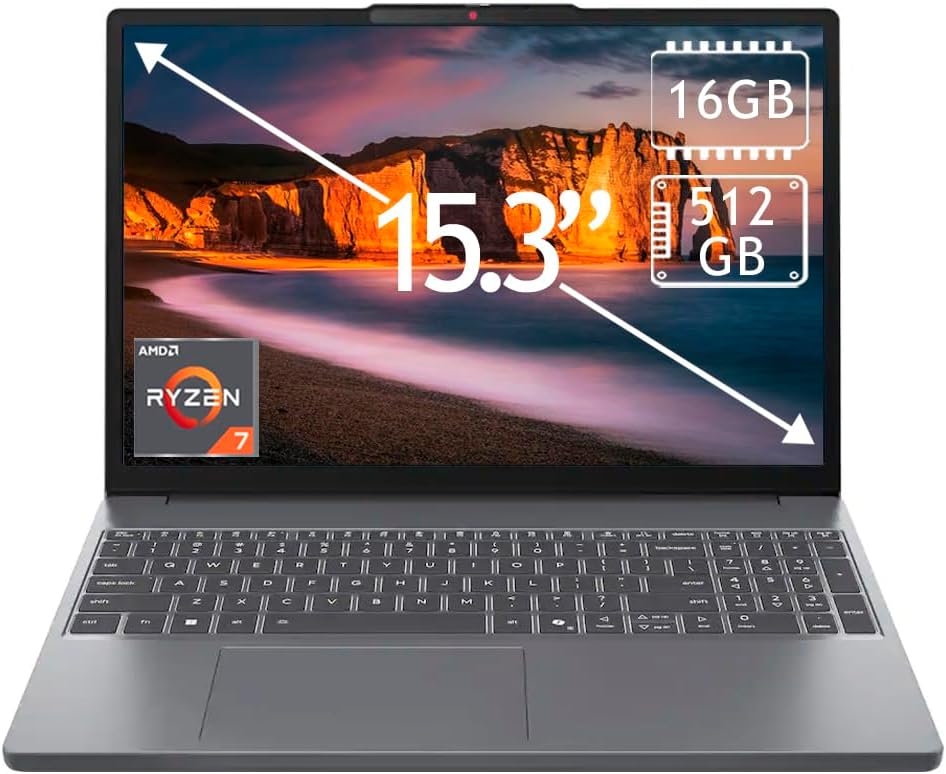
This laptop delivers sharp visuals and smooth touch interaction for work and entertainment. With a perfect 5.0 rating, users praise its fast performance and reliability. The Ryzen 7 processor ensures responsive multitasking and efficient daily computing tasks.
We may earn a commission when you buy through this link, at no additional cost to you.
Integrated Wi-Fi 6 and Bluetooth provide stable wireless connectivity for seamless device pairing. The 512GB PCIe SSD delivers rapid boot times and ample storage for media. The 15.3-inch screen supports vibrant colors and wide viewing angles.
While it lacks WiFi 7 support, it offers strong value for those needing a touchscreen experience. The 16GB DDR5 RAM handles modern applications smoothly. It is well-suited for home or office use where touch input is preferred.
Buyers looking for a balanced everyday laptop should review this model closely. It prioritizes user-friendly features and speed. Verify pricing to ensure it meets your budget constraints today.
15.3 inch 2K Touchscreen delivers sharp visuals and vibrant colors.
Pre-installed Windows 11 Home provides modern interface and enhanced productivity tools.
We may earn a commission when you buy through this link, at no additional cost to you.
This new modern design offers professional productivity with a sleek modular build. It holds a 4.5 rating from users who value its stability and speed. The Core Ultra 9 processor with vPro platform ensures reliable performance for business tasks.
We may earn a commission when you buy through this link, at no additional cost to you.
With 32GB LPDDR5X memory and a 1TB PCIe NVMe SSD, data access is lightning fast. The expansive 16:10 display with narrow bezels enhances detailed work. Wi-Fi 7 ensures Gig+ connectivity for smooth collaboration and streaming.
The Ice Blue power button with fingerprint reader adds secure convenience. However, it carries a premium price tag compared to standard consumer models. The included numeric keypad and English backlit keyboard support efficient typing.
Enterprise users needing security and stability should prioritize this device. It offers IT departments multilayer security. Check current business deals to validate its value proposition.
Reach unstoppable productivity with Intel Core Ultra 9 288V vPro processor.
Work more productively on roomier 16:10 display with narrow bezels.
We may earn a commission when you buy through this link, at no additional cost to you.
With massive 32GB RAM and a high-speed 1TB SSD, this laptop keeps multiple applications open seamlessly. It holds a 4.0 rating reflecting general reliability for students and professionals. The Full HD IPS touchscreen delivers clear visuals and responsive control.
We may earn a commission when you buy through this link, at no additional cost to you.
Powered by the AMD Ryzen 7 7730U with 8 cores, it handles demanding multitasking with ease. The lightweight design and up to 10.75-hour battery life make it easy to stay productive on the go. Windows 11 Pro adds essential business features.
While the rating is decent, some users may find connectivity slightly less advanced than newer WiFi 7 models. However, the hardware is robust for daily work. The numeric keypad supports efficient spreadsheet management.
Remote workers needing memory and storage should consider this option. It balances specs and usability well. Verify warranty terms before purchasing to ensure long-term satisfaction.
Keep multiple applications open with 32GB RAM and 1TB high-speed SSD.
Powered by AMD Ryzen 7 7730U with 8 cores and 16 threads.
We may earn a commission when you buy through this link, at no additional cost to you.
The powerful Ryzen performance delivers responsive multitasking while maintaining excellent power efficiency. With a 4.4 rating, it is praised for reliability and speed. The crisp Full HD display offers vibrant colors and wide viewing angles.
We may earn a commission when you buy through this link, at no additional cost to you.
Equipped with 16GB LPDDR4X memory and 512GB SSD, this notebook ensures smooth application loading. The slim Pure Silver chassis combines portability with dependable performance. Modern connectivity includes USB-C and HDMI output for flexible use.
Users might find the Wi-Fi 6 standard acceptable but not cutting-edge compared to newer models. However, for everyday home or office use, it provides solid value. The HD webcam supports clear video calls and presentations.
Daily users seeking lightweight design should review this notebook. It supports Windows 11 security features. Check current pricing to confirm it meets your budget constraints.
AMD Ryzen 7 7730U processor delivers responsive multitasking for work.
Enjoy sharp visuals on 15.6-inch Full HD IPS display.
We may earn a commission when you buy through this link, at no additional cost to you.
This laptop packs blazing speed and powerful AI capabilities into an incredibly portable design. It holds a 4.7 rating reflecting high user satisfaction. The gorgeous Liquid Retina display supports 1 billion colors for rich contrast and sharp detail.
We may earn a commission when you buy through this link, at no additional cost to you.
With its faster CPU and unified memory, the M5 chip delivers fluidity across apps. The Neural Engine provides a powerful platform for AI workflows and creativity. Up to 18 hours of battery life allows you to work through a full day without charging.
While the premium cost may be high, the performance and battery life justify it for many buyers. The 12MP camera and Spatial Audio ensure high-quality meetings. Two Thunderbolt 4 ports and MagSafe offer versatile connectivity.
Students and professionals needing portability and power should consider this model. It supports up to two external displays. Check current deals to confirm its value proposition.
Apple Intelligence helps you write, express yourself, and get things done effortlessly.
Delivers incredible battery life with amazing performance for all day use.
We may earn a commission when you buy through this link, at no additional cost to you.
Experience smooth and responsive performance powered by Ryzen 7 processor and generous memory. It holds a 4.2 rating indicating solid performance for daily tasks. The immersive visuals with narrow bezels allow for a sharp detailed view.
We may earn a commission when you buy through this link, at no additional cost to you.
Copilot in Windows acts as your AI companion for centralized generative assistance accessible with a single touch. Intuitive device control via AcerSense manages battery and storage. Wi-Fi 6 and HDMI 2.1 enhance your digital experiences significantly.
While DDR4 RAM is standard, it supports smooth multitasking effectively. The low blue light levels help reduce eye strain during long sessions. It prioritizes ease of use and basic productivity tools.
Users seeking an everyday laptop should check this model. It balances simplicity with performance. Verify current pricing to ensure it fits your budget.
Do more, quicker than ever across multiple applications with centralized generative AI.
Acer BluelightShield lowers blue light levels to lessen negative effects.
We may earn a commission when you buy through this link, at no additional cost to you.
Selecting the right laptop requires careful evaluation of several critical factors. Here we detail what to look for when seeking next-gen wireless performance and overall efficiency.
Ensure the device supports WiFi 7 for maximum speed and reduced latency. This standard is essential for future-proofing your setup against growing bandwidth demands.
Prioritize laptops explicitly stating 7 support in their specs to avoid compatibility issues.
Look for Core Ultra or Ryzen 7 processors for robust multitasking and AI work. These chips balance power consumption and output effectively.
Choose models with dedicated NPUs for specialized AI acceleration and efficiency.
Aim for at least 16GB of RAM for smooth operation across multiple apps. Higher capacity ensures longevity and prevents slowdowns.
Select DDR5 or LPDDR5X for faster data transfer and system responsiveness.
Prioritize PCIe SSDs with 512GB or 1TB capacity for quick boot times. Large storage spaces reduce the need for external drives.
Check for NVMe support to guarantee high-speed read and write performance.
Choose a screen with at least 1080p resolution and IPS technology for color accuracy. Higher brightness levels like 400 nits improve outdoor visibility.
Consider touchscreens or high refresh rates if you use pen input for design work.
Evaluate real-world battery estimates to ensure it lasts through your typical workday. Look for models promising 10 hours or more.
Fast charging capabilities add convenience for power users on the go.
Opt for durable materials like aluminum to withstand daily wear and tear. A lightweight chassis ensures portability without sacrificing durability.
Check for spill-resistant keyboards and sturdy hinges for long-term use.
Verify the presence of USB-C Thunderbolt 4 or HDMI 2.1 ports. Multiple ports reduce the need for dongles and adapters.
Ensure you have enough connectivity options for monitors and external storage.
Always keep your firmware and network drivers updated to maintain optimal WiFi 7 performance. Manufacturers frequently release patches that improve connection stability and security. Regular updates prevent potential compatibility issues with modern routers.
Clean your screen and keyboard regularly using a soft microfiber cloth to prevent dust buildup. Avoid harsh chemicals that can damage the protective coating. Gently wipe the surface to maintain clarity and responsiveness.
Store your laptop in a cool, dry place to prevent overheating and hardware degradation. Use a cooling pad if you perform intensive tasks like video editing. Avoid direct sunlight to protect the display and internal components.
WiFi 7 offers significantly faster speeds, lower latency, and better bandwidth efficiency compared to previous standards. This ensures smoother streaming, faster downloads, and more stable connections in crowded networks.
Yes, if you need future-proofing for high-speed internet and gaming. Most modern routers are already compatible, and early adoption ensures your device stays relevant for years.
To fully utilize WiFi 7 speeds, you should upgrade to a compatible WiFi 7 router. Older routers will still work but will not provide the full performance benefits of the new standard.
AI features like Copilot or Neural Processing Units help automate tasks, enhance security, and optimize system performance. This leads to faster workflows and more efficient daily computing.
Intel Core Ultra 7 or AMD Ryzen 7 processors are excellent for general multitasking. They balance power and efficiency well for office work and media consumption.
16GB is the recommended minimum for smooth performance. If you run heavy applications or virtual machines, 32GB ensures better longevity and stability.
Most listed laptops support multiple external displays via HDMI or USB-C Thunderbolt. Check specific ports to confirm compatibility with your monitor setup.
Touchscreens offer versatility for note-taking and navigation. They are beneficial for creative work and users who prefer intuitive gesture control over a mouse.
We highlighted top performers ranging from budget-friendly HP OmniBook models to premium Apple and Dell options. Each offers unique strengths tailored to different user needs and performance levels.
Prioritize connectivity and memory for long-term value. Ensure your chosen model matches your daily workflow to maximize efficiency and satisfaction.
Remember to check current prices and availability before purchasing as deals change often. This guide serves as a reliable resource for navigating the evolving laptop market.