
ASUS Vivobook Go 15
4.3Editor score
AMD Ryzen 3 Performance
8GB DDR5 Memory
Lightweight Portable Design
Finding a lightweight ASUS laptop means balancing portability with power. You need a machine that fits in your bag yet handles daily tasks smoothly. Today's ultralights offer great screens and long battery life for travel.
We compared ten ASUS models based on weight, specs, and real-world performance. Each device was evaluated for build quality, display clarity, and processor efficiency. Our list covers options from budget-friendly to premium ultralights.
Each pick highlights specific strengths like screen quality or battery duration. Prices and stock change frequently so verify details before buying. We focus on factual specs to ensure you get the right device for your needs.
4.3Editor score

4.8Editor score
3.7Editor score
As an Amazon Associate we earn from qualifying purchases.
This comparison table lists all ten models side by side. You can see key specs like processor type, RAM size, and storage capacity. Use this to quickly find the model matching your performance and portability needs.





This ASUS Vivobook 14 stands out as a top contender for those seeking a lightweight ASUS laptop with modern specs. It holds a strong rating reflecting user satisfaction with its balance of power and portability. The device features a Snapdragon X processor ensuring efficient performance for daily tasks.
We may earn a commission when you buy through this link, at no additional cost to you.
The key strengths lie in its 16GB RAM which handles multiple browser tabs and apps smoothly. Storage is generous at 512GB SSD allowing fast boot times and ample space for files. The 14 inch display delivers crisp visuals suitable for work and entertainment on the go.
Honest trade-offs include average display brightness compared to premium OLED models. Connectivity options are standard but might require adapters for older peripherals. These limitations are acceptable given the significant gains in battery life and processing efficiency.
Students and professionals who prioritize portability and all-day battery life should buy this model. It is ideal for those needing a reliable machine for productivity without the bulk of traditional laptops. We recommend it as the best overall choice for most users.
The Snapdragon X processor provides seamless multitasking and efficient computing for Copilot+ PC capabilities.
Enjoy multi-day battery life with optimized power consumption designed for extended use away from outlets.
We may earn a commission when you buy through this link, at no additional cost to you.
The ASUS Vivobook Go 15 offers an accessible entry into the world of lightweight ASUS laptops without sacrificing core functionality. With a rating indicating solid performance it is a favorite for budget conscious buyers. The AMD Ryzen 3 processor ensures smooth browsing and productivity tasks.
We may earn a commission when you buy through this link, at no additional cost to you.
Key strengths include the 8GB DDR5 RAM which provides faster data transfer than older memory types. The military grade durability ensures the device withstands travel wear and tear effectively. Privacy features like the webcam shield add security for remote meetings.
Trade-offs involve the 128GB storage which may fill up quickly with media files. The display is standard without high refresh rates suitable for gaming. These constraints are manageable for basic users focused on document work and web access.
Students and entry level workers should buy this model for its value and portability. It serves well as a secondary device or primary machine for light computing needs. We recommend it as the best budget option for affordability.
Faster memory that smoothly runs multiple applications at once for improved workflow efficiency.
Military grade durability ensures reliability through rigorous testing for shock vibration and temperature changes.
We may earn a commission when you buy through this link, at no additional cost to you.
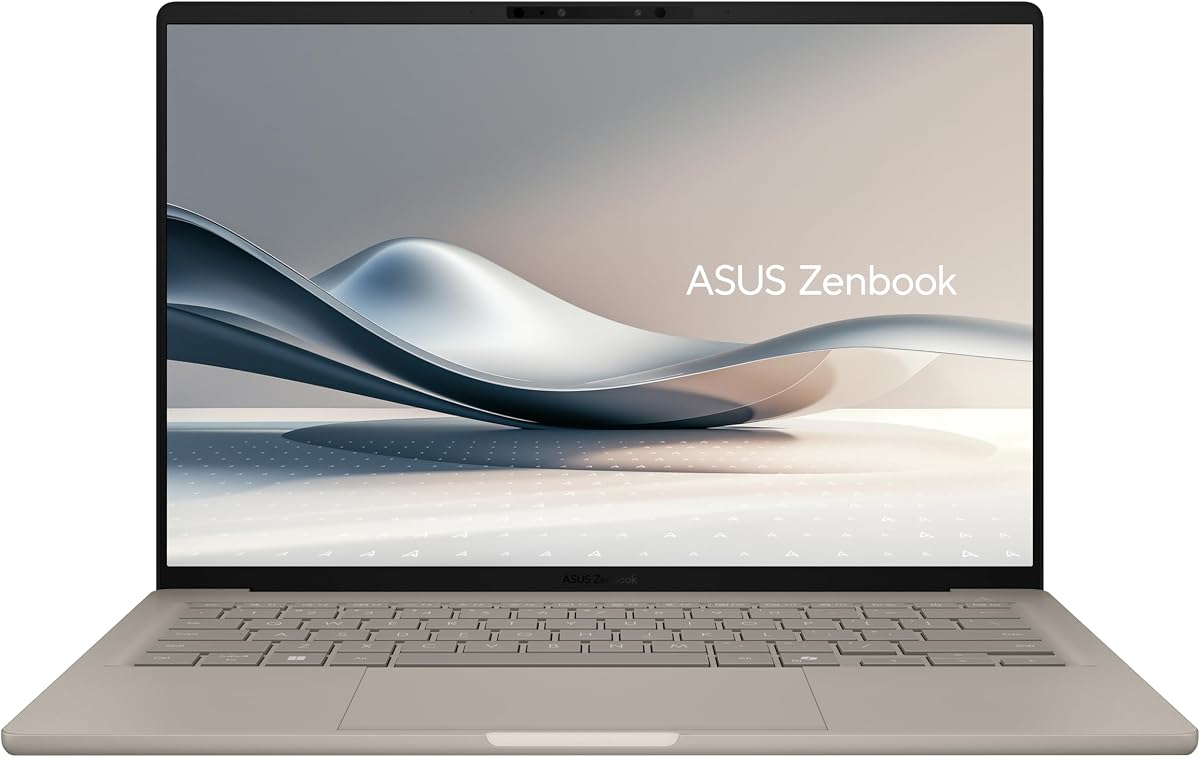
The ASUS Zenbook A14 represents the pinnacle of portable computing with its ultra lightweight design. It features an OLED display that offers vibrant colors and deep blacks for media consumption. The Ceraluminum build provides a unique texture and enhanced durability against scratches.
We may earn a commission when you buy through this link, at no additional cost to you.
Key strengths include a weight of just 980g making it exceptionally light for carry. The battery life supports all-day offline video playback without needing a charger. Snapdragon X processor delivers robust AI performance for modern productivity tasks.
Trade-offs include a lower user rating which may reflect specific software or support issues. The premium price might not suit every budget. These are acceptable given the unmatched portability and screen quality provided by this device.
Premium users and frequent travelers should buy this model for its weight and screen. It is ideal for those prioritizing design and screen quality over cost. We recommend it as the best premium choice for style seekers.
Weighing just 980g it is the lightest 14 Copilot+ AI ultra-portable laptop available in its class.
The WUXGA OLED display provides brilliant life-like colors and deep blacks for an immersive viewing experience.
We may earn a commission when you buy through this link, at no additional cost to you.
The ASUS Vivobook 16 offers a larger screen in a surprisingly portable form factor. It is suited for users needing more workspace without sacrificing portability. The 16 inch WUXGA display delivers high resolution visuals ideal for detailed work.
We may earn a commission when you buy through this link, at no additional cost to you.
Key strengths include the Snapdragon X processor which ensures high power efficiency. The 16GB RAM allows effortless multitasking across various applications. Storage capacity is generous for saving files quickly and storing vast amounts of data.
Trade-offs involve a slightly larger footprint compared to 14 inch models. The price is higher but justified by the screen size and performance. These are acceptable for professionals requiring more screen real estate for productivity.
Designers and analysts should buy this model for its screen size and power. It is ideal for those who need extra space for spreadsheets or design software. We recommend it for users needing a large portable display.
Indulge in stunning visuals in breathtaking 1920 x 1200 resolution with 16:10 aspect ratio.
Designed for AI this chipset evolves the way you create and communicate with unparalleled power efficiency.
We may earn a commission when you buy through this link, at no additional cost to you.
This ASUS Vivobook Go 15 is a budget entry point for basic computing needs. It features an Intel Celeron processor sufficient for web browsing and email. The design is thin and portable making it easy to carry for student study.
We may earn a commission when you buy through this link, at no additional cost to you.
Key strengths include the fast charge battery which gets you to 60% quickly. The ergonomic keyboard supports quiet typing for long sessions. Privacy features like the webcam shutter ensure security during video calls.
Trade-offs include 4GB RAM which may struggle with heavy multitasking. Storage is limited to 128GB eMMC. These are acceptable for basic users who do not run many apps simultaneously.
Primary school students or basic home users should buy this model. It is ideal for those needing a simple machine for documents and web. We recommend it for light usage scenarios.
Fast-Charge technology gets you to 60% in just 49 minutes for minimal downtime.
Built-in webcam with privacy shutter ensures you control when others see your video feed.
We may earn a commission when you buy through this link, at no additional cost to you.
The ASUS Vivobook 14 delivers reliable Intel performance for everyday computing tasks. It features a 12th Gen i3 processor which offers solid speed for productivity. The 16GB RAM ensures smooth operation across browser tabs and applications.
We may earn a commission when you buy through this link, at no additional cost to you.
Key strengths include Wi-Fi 6 connectivity for faster wireless speeds. The IPS level panel provides decent viewing angles and clarity. Storage is generous at 512GB allowing for quick data transfer and bootups.
Trade-offs involve average brightness compared to high-end screens. The build is standard plastic which may feel less premium. These are acceptable given the strong performance specs and portability.
Small business users should buy this model for its balance of cost and power. It is ideal for those needing reliable hardware without premium pricing. We recommend it for general office use.
Processor offers up to 4.4 GHz max turbo frequency for responsive computing.
Wi-Fi 6 ensures seamless connectivity and operation across multiple devices.
We may earn a commission when you buy through this link, at no additional cost to you.
This ASUS Vivobook 14 brings Copilot+ PC capabilities to the lightweight market. It features a Snapdragon X processor designed for AI tasks like Recall and Live Captions. The 14 inch WUXGA display offers bright visuals for work environments.
We may earn a commission when you buy through this link, at no additional cost to you.
Key strengths include the Hexagon NPU which supports up to 45 TOPS for AI. The 16GB RAM handles gaming and editing smoothly. Storage uses PCIe 4.0 SSDs for lightning-fast performance and speedy multitasking.
Trade-offs include a new platform that may require adjustment for some users. The contrast is moderate compared to OLED panels. These are acceptable for the gains in AI efficiency and battery life.
AI enthusiasts and tech adopters should buy this model. It is ideal for those wanting next-gen features in a portable chassis. We recommend it for early adopters seeking innovation.
Copilot+ PCs turn your ideas from text prompts into generated artwork and search across time.
Extensive storage and advanced communication power excel in major gaming applications.
We may earn a commission when you buy through this link, at no additional cost to you.
The ASUS VivoBook 14 offers powerful 13th Gen Intel performance in a thin chassis. It delivers fast efficient performance for everyday computing business and school tasks. The design is stylish in Quiet Blue with a lightweight profile for mobility.
We may earn a commission when you buy through this link, at no additional cost to you.
Key strengths include the 6-core processor which beats older i7 models. The 16GB RAM allows massive upgraded high-bandwidth multitasking. Wi-Fi 6E ensures next-gen connectivity for seamless operation across devices.
Trade-offs involve 256GB storage which may need external drives for large files. A mouse is not included. These are acceptable for users who prioritize raw CPU speed and portability.
Power users on a budget should buy this model for its raw power. It is ideal for those needing faster compute speed without premium cost. We recommend it for performance seekers.
Equipped with latest Intel Core i3-1315U 6-Core processor up to 4.5GHz.
Lightning-fast expanded PCIe solid-state drive for quick boot-ups and data transfer.
We may earn a commission when you buy through this link, at no additional cost to you.
This ASUS Vivobook Go 15 combines essential specs with enhanced storage capacity. It features AMD Ryzen 3 processor delivering reliable performance for multitasking. The military grade durability ensures robustness for daily travel use.
We may earn a commission when you buy through this link, at no additional cost to you.
Key strengths include the 256GB SSD for essential storage which is double the base model. Battery life reaches up to 11 hours minimizing charging downtime. The chiclet keyboard with numeric keypad supports efficient data entry.
Trade-offs include the 15 inch footprint being larger than 14 inch options. Display color is standard NTSC. These are acceptable for users needing numeric keypad and extra storage.
Data entry and basic office users should buy this model. It is ideal for those needing a numeric keypad for productivity. We recommend it for standard office tasks.
Up to 11 hours of battery life with an efficient 42Wh battery minimizes charging downtime.
Chiclet Keyboard With Numeric Keypad makes punching in numbers quiet and comfortable.
We may earn a commission when you buy through this link, at no additional cost to you.
The ASUS Zenbook A14 delivers robust performance tailored for multitasking enthusiasts. It features an OLED display with crisp clear visuals for work and entertainment. The device is certified as a Copilot+ PC for advanced AI capabilities.
We may earn a commission when you buy through this link, at no additional cost to you.
Key strengths include 32 hours battery life for offline video playback on a single charge. The Ceraluminum material is scratch resistant and smudge free. The Snapdragon X Series Processors provide superior AI performance for creation tasks.
Trade-offs include a lower rating which may reflect early adoption issues. The premium price limits accessibility. These are acceptable for the exceptional build and display quality provided.
Luxury seekers and media creators should buy this model. It is ideal for those who value screen quality and design above all. We recommend it as a premium statement piece.
Experience exceptional Ceraluminum with strength scratch resistance and lightweight elegance.
Unplugged and stayed powered up to 32 hours offline video playback on a single charge.
We may earn a commission when you buy through this link, at no additional cost to you.
Selecting the right lightweight ASUS laptop involves evaluating several critical factors to match your needs.
The processor determines how fast your laptop handles tasks. For basic browsing look for Intel i3 or AMD Ryzen 3. For heavy multitasking choose Intel i5 or Snapdragon X models.
Prioritize newer generations for better efficiency and AI support.
RAM ensures smooth multitasking across applications. Aim for 16GB if you run many tabs or creative apps. 8GB is acceptable for basic word processing and web use.
Higher RAM prevents lag when switching between apps quickly.
SSD storage offers faster boot times and file access compared to older drives. Look for at least 512GB to store documents and media comfortably.
PCIe 4.0 SSDs provide the best speed for demanding workloads.
Screen resolution affects text clarity and image detail. FHD is standard but WUXGA offers more vertical space. OLED screens deliver deeper blacks but cost more.
Choose based on whether you prioritize color accuracy or brightness.
Battery capacity defines how long you work unplugged. Target 10 hours or more for all-day travel use. Fast charging features reduce downtime significantly.
Check battery claims for offline video playback to gauge real endurance.
Weight and material determine how easy it is to carry. Aluminum or Ceraluminum builds are durable and lighter. Consider dimensions to ensure it fits in your bag.
Military grade durability adds reliability for frequent travelers.
Ports allow you to connect peripherals and displays. USB-C for power and display is essential. HDMI is useful for projectors. Check for Wi-Fi 6E for faster wireless speeds.
Ensure the model has enough ports for your daily peripherals.
Windows 11 Home provides intuitive tools and security. Copilot+ PC features offer AI assistance for productivity. Privacy webcams protect your data during calls.
Confirm the OS version suits your software requirements.
Place the laptop on a hard flat surface to prevent overheating. Air vents are often on the bottom so avoid soft fabrics that block airflow.
Use a protective sleeve when carrying the device in a backpack. This protects the chassis from scratches and minor impacts during travel.
Keep the screen clean with a microfiber cloth and avoid harsh chemicals. Clean the keyboard regularly to remove dust that may enter key mechanisms.
Yes ASUS laptops offer a range of models suitable for students with varying budgets. The Vivobook Go series provides affordable options with sufficient power for schoolwork. Students benefit from long battery life and lightweight designs for campus mobility.
Snapdragon processors excel in power efficiency and AI tasks. Intel processors offer broader software compatibility and traditional performance. Choose based on whether you prioritize battery life or legacy app support.
8GB is sufficient for basic web browsing and document work. 16GB is recommended for multitasking across many tabs or creative applications. More RAM ensures smoother performance when switching between heavy apps.
Most models come with a 1-year manufacturer warranty covering parts and labor. You can purchase extended warranties for additional coverage. Check the specific listing for warranty details and duration.
Many modern ultralights have soldered RAM so upgrades are not possible. Check the product specs to see if RAM is expandable. Plan your storage needs at purchase to avoid future limitations.
Most models in this roundup have non-touch displays for cost efficiency. Touchscreens are available in specific premium configurations. Review the product title to confirm if touch is included.
We reviewed ten models ranging from budget Vivobook Go to premium Zenbook A14. The Vivobook 14 stands out for its balance of performance and weight for most users.
Prioritize battery life and RAM if you plan to work long hours without a charger. Screen brightness and build quality matter if you travel frequently.
Check current prices and stock levels before purchasing as deals change often. Verify the warranty and return policy on the retailer site.