
eufy Security Smart Lock FamiLock C32
4.3Editor score
0.3-Second Fingerprint Unlocking
Built-in Wi-Fi for Remote Management
5-Month Battery with USB-C Backup
Compare the best Eufy door lock models for security and convenience. This guide reviews ten top-rated smart locks with features like fingerprint, video, and
Securing your home requires reliable technology that balances convenience with robust protection. Smart locks have revolutionized how we enter our properties, offering keyless entry and remote control capabilities.
This guide compares ten top-rated Eufy door lock models available today. We analyzed their unlocking methods, battery life, integration options, and overall user ratings to find the best fit.
Each pick highlights specific strengths for different households and budgets. Note that pricing and availability change frequently, so verify current details before making your final purchase decision.
4.3Editor score
4.3Editor score

4.2Editor score
The following table provides a side-by-side comparison of all ten Eufy door lock models. Review the specifications to understand which features match your specific security and automation needs.


The eufy Security Smart Lock C220 stands out as a top-rated option for modern homeowners seeking convenience and security. With a solid rating and self-learning AI, it offers reliable fingerprint recognition that adapts to your usage patterns for faster entry.
We may earn a commission when you buy through this link, at no additional cost to you.
You benefit from six distinct ways to unlock, including your phone, voice assistants, or the physical key. The built-in Wi-Fi ensures remote control without extra hubs, while the battery life is designed to run for around eight months on a single set of AA cells.
Installation is straightforward for most standard deadbolts without needing drills. The main trade-off is ensuring fingers are dry for the sensor, but this minor step is a small price to pay for the peace of mind and seamless access it provides.
This lock is ideal for families who want keyless entry without monthly fees. It delivers excellent value and robust security features, making it a highly recommended choice for anyone upgrading their front door security today.
The advanced AI algorithm improves recognition speed and accuracy with every use, ensuring you do not have to retry entry repeatedly.
Built-in Wi-Fi allows you to manage access and monitor activity directly via the app without buying a separate bridge device.
We may earn a commission when you buy through this link, at no additional cost to you.
The FamiLock S3 Max combines advanced biometrics with video capabilities for a premium front-door experience. Its unique palm vein recognition is faster and more secure than traditional fingerprints, ensuring only authorized users gain access to your home.
We may earn a commission when you buy through this link, at no additional cost to you.
A 2K HD camera and rear video screen let you see visitors clearly even without a phone, while Matter and Apple Home integration future-proofs your setup. The dual power supply keeps the system running even if the main battery depletes.
While it is a significant investment, the all-in-one functionality replaces separate devices like cameras and locks. The only limitation is that camera streams require the eufy app, but the privacy and convenience features outweigh this minor constraint for most users.
This model is perfect for those wanting top-tier security and smart home integration. It delivers robust protection and comprehensive monitoring features that justify the higher cost for serious home security enthusiasts.
Palm vein technology scans unique vein patterns under the skin, making it nearly impossible to fake or replicate your identity.
The rear video screen allows anyone in the house to check the front door instantly without needing a smartphone or app access.
We may earn a commission when you buy through this link, at no additional cost to you.
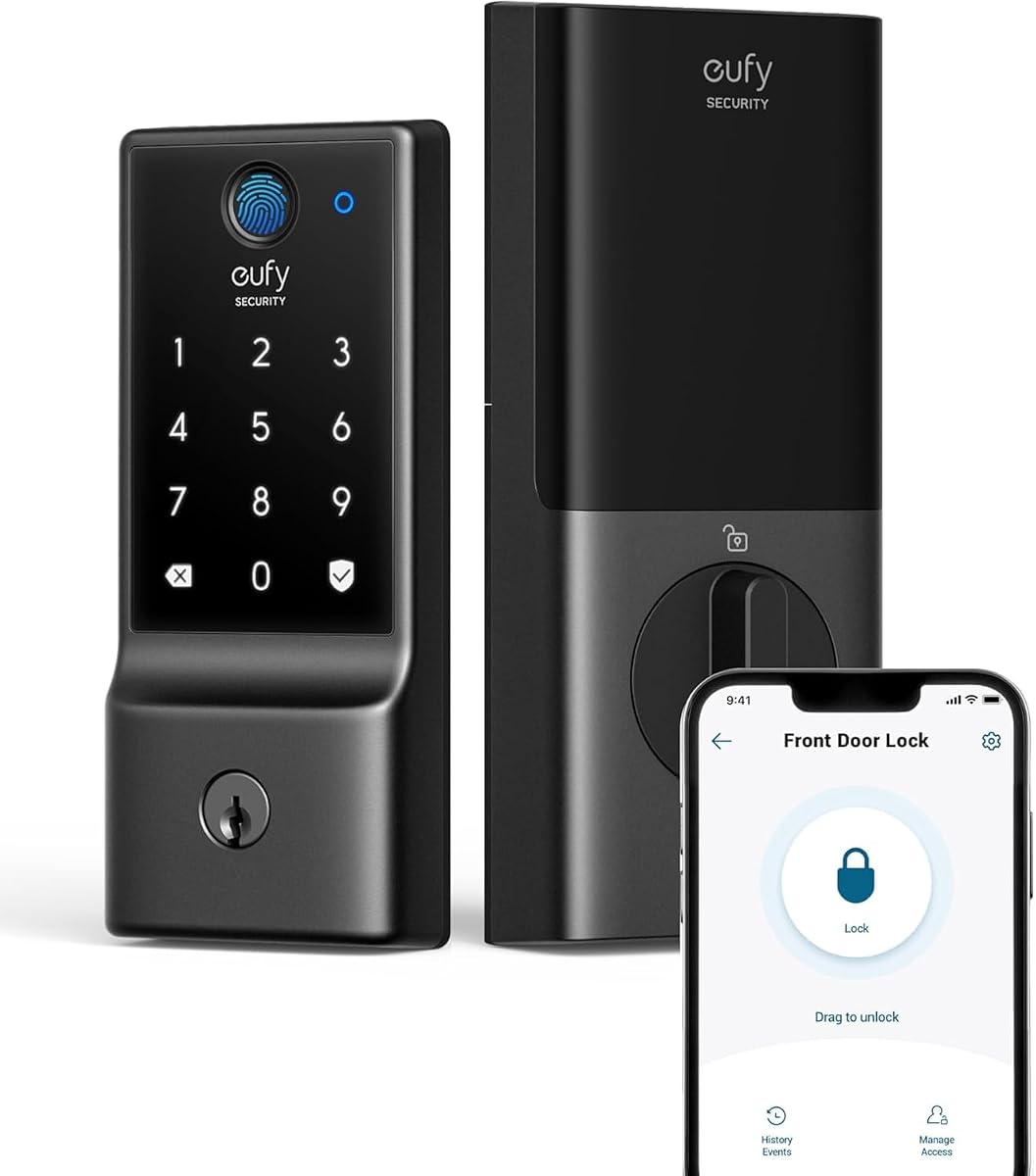
The FamiLock C32 offers excellent value for those seeking smart features on a budget. With rapid 0.3-second unlocking and built-in Wi-Fi, it provides the convenience of remote management without requiring a separate hub or expensive subscription.
We may earn a commission when you buy through this link, at no additional cost to you.
Its self-learning AI ensures the fingerprint sensor works quickly for all family members. In case of battery depletion, the USB-C emergency backup allows you to unlock the door with a power bank, keeping you from being locked out.
While noted for interior or secondary doors, it still delivers strong performance. The main limitation is the recommended use case, but for indoor or garage access, it offers a cost-effective and reliable solution for smart entry.
This lock is best for users prioritizing speed and price. It brings essential smart features like voice control and remote access to any entry point efficiently.
A large fingerprint array captures your print instantly, reducing wait times at the door significantly compared to older models.
The USB-C port lets you plug in a portable charger to open the lock instantly even if the internal batteries are dead.
We may earn a commission when you buy through this link, at no additional cost to you.
The Video Smart Lock E330 blends video monitoring with keyless entry effectively. Its camera provides clear visibility of visitors day and night, while fast fingerprint recognition ensures you can enter quickly without fumbling for keys.
We may earn a commission when you buy through this link, at no additional cost to you.
Remote control via the app keeps you connected to front-door activity. The large 10,000mAh battery supports both video and locking functions, providing consistent power for daily use and monitoring needs without frequent recharging.
Installation is simple and fits most standard deadbolts without drilling. The main limitation is reliance on HomeBase for advanced features, but basic connectivity and security remain robust for most homeowners seeking visual confirmation.
Ideal for homeowners wanting video verification with a lock, this model offers great reliability. It balances video quality and smart access well for a secure front entrance experience.
The 2K camera provides clear images of visitors and packages, helping you identify who is at the door remotely.
A substantial rechargeable battery ensures the lock stays powered for both locking and video features over extended periods.
We may earn a commission when you buy through this link, at no additional cost to you.
The Smart Lock C33 offers seamless fingerprint recognition integrated directly into the handle grip. This design allows for effortless access as you grip the handle, making entry natural and quick for every family member.
We may earn a commission when you buy through this link, at no additional cost to you.
Integrated Wi-Fi ensures you can control your doors from anywhere using the app. Powered by reliable AA batteries, the lock is designed to run consistently without needing constant recharging, making it simple to maintain.
Installation takes only 15 minutes and fits most standard setups without drilling. The main trade-off is regular battery changes, but the broad compatibility and customer support make it a practical choice for daily use.
This lock is great for users wanting handle-integrated biometrics. It offers a convenient solution for offices or homes needing reliable remote access without complex wiring.
The fingerprint scanner is built into the handle, allowing you to unlock the door simply by gripping it naturally.
Integrated Wi-Fi allows you to manage access and view event history directly through the eufy security app on your phone.
We may earn a commission when you buy through this link, at no additional cost to you.
The FamiLock C32 is a strong entry-level option with fast fingerprint recognition and remote Wi-Fi capabilities. It allows quick access without keys and keeps you connected to your home's security status from anywhere.
We may earn a commission when you buy through this link, at no additional cost to you.
Its self-learning AI optimizes for multiple users over time. The USB-C emergency backup ensures you can still unlock via a portable power source if the main batteries deplete unexpectedly, preventing lockouts.
While designed for interior use, the performance is reliable. The main limitation is the battery type, but the convenience of voice and app control makes it a versatile tool for secure access management.
Best for secondary doors or light use, this model balances speed and connectivity. It provides essential smart security features without needing complex hardware.
Large fingerprint arrays allow you to unlock in under a second, making entry seamless for busy households.
A USB-C port lets you plug in a power bank for emergency access if the internal batteries run out.
We may earn a commission when you buy through this link, at no additional cost to you.
The Smart Lock C30 offers a streamlined keyless entry experience with built-in Wi-Fi. It allows you to control your door remotely without needing a separate bridge, making setup simpler for basic smart home needs.
We may earn a commission when you buy through this link, at no additional cost to you.
Durable physical buttons and weather resistance make it reliable for outdoor use. The auto-lock function provides peace of mind by ensuring the door is always secured automatically after a set time.
While it lacks biometric sensors, keypad and voice control remain effective. The main trade-off is the reliance on manual codes, but the simplicity and low maintenance make it a solid choice for budget-conscious buyers.
Best for those wanting simple Wi-Fi smart access, this model delivers essential features. It is an affordable option for upgrading traditional deadbolts to connected ones easily.
Built-in Wi-Fi eliminates the need for extra hardware, letting you manage your lock directly via the app.
Customizable auto-lock timers ensure the door locks itself after entry, preventing accidental unlocked states.
We may earn a commission when you buy through this link, at no additional cost to you.
The Smart Lock E31 offers seamless integration with Apple Home and other smart hubs. This connectivity allows for robust automation routines and remote access, making it ideal for Apple-centric ecosystems.
We may earn a commission when you buy through this link, at no additional cost to you.
Fast fingerprint recognition ensures quick entry for everyone. The battery life is impressive, lasting up to 14 months on a single charge, reducing the need for frequent maintenance and power management.
While it requires a hub for remote features, the local control remains reliable. The main trade-off is dependency on Apple hardware, but the performance and coverage are robust for compatible users.
Best for Apple users, this lock delivers strong integration. It provides excellent value and convenience through its long battery life and quick unlocking capabilities.
Works directly with Apple Home, allowing you to manage access through Siri or the Home app easily.
Rechargeable batteries offer up to 14 months of use, minimizing maintenance needs for daily operations.
We may earn a commission when you buy through this link, at no additional cost to you.
The Smart Lock C34 provides seamless integration with the Apple Home ecosystem. It offers a perfect user experience for iPhone users, allowing them to manage access and automations directly within the familiar Home app interface.
We may earn a commission when you buy through this link, at no additional cost to you.
Multiple unlock methods including keypad and voice ensure convenience for everyone. The battery life is reliable at eight months, and no additional hub is required for local control, making setup straightforward.
While remote features require a HomePod, local functions are robust. The main limitation is ecosystem dependency, but for those invested in Apple, it delivers smooth and reliable home security management.
Best for Apple households, this lock simplifies home automation. It ensures secure access and easy guest management without extra hardware.
Designed to work with Apple Home, enabling you to manage access and settings directly on your iPhone.
Supports app, keypad, physical key, and voice commands, ensuring everyone has a convenient way to enter.
We may earn a commission when you buy through this link, at no additional cost to you.
The E40 facial recognition lock offers advanced biometric security combined with a video doorbell and camera. Its 2K camera and face unlock ensure only authorized users gain access, providing high-level protection and monitoring in one unit.
We may earn a commission when you buy through this link, at no additional cost to you.
The lever handle makes entry effortless for all ages. Local data storage ensures privacy, and the large battery supports extended use. It is built to withstand weather and varying temperatures reliably.
While installation requires compatible doors, the all-in-one design saves on hardware. The main trade-off is the size, but the comprehensive security features make it a standout choice for smart front entrances.
Ideal for high-security needs, this model delivers robust performance. It combines cutting-edge biometrics with practical monitoring features for total control.
Advanced facial unlock technology recognizes you instantly even with accessories like glasses or hats for seamless entry.
All biometric data is stored locally on the device, ensuring your personal information remains private and secure.
We may earn a commission when you buy through this link, at no additional cost to you.
Choosing the right smart lock depends on your security needs, smart home ecosystem, and budget. This guide highlights key factors to consider before purchasing.
Consider how you prefer to enter your home. Options include fingerprints, voice, codes, or face recognition. Ensure the chosen method is reliable for all household members including children and seniors.
Prioritize biometrics for speed or voice for hands-free access depending on your daily habits.
Battery life determines how often you must maintain the device. Look for locks that last at least six months to avoid frequent replacements or recharging interruptions.
Rechargeable units offer convenience while AA batteries provide reliable backup options in case of power loss.
Decide if you need remote access via Wi-Fi or just local control. Wi-Fi models allow you to manage access from anywhere but require internet stability.
Choose a hub-dependent model if you want broader smart home integration without constant internet reliance.
Ensure compatibility with your existing ecosystem like Apple Home, Google Home, or Alexa. Seamless integration allows for automation routines that trigger lights or alarms.
Select models supporting Matter or Apple Home for future-proofing and broader device compatibility.
Most Eufy locks are designed for DIY installation without drilling. Check your door thickness and existing deadbolt setup to ensure a straightforward install process.
Verify compatibility with your specific door type to avoid needing extra adapters or professional help.
Outdoor locks must withstand varying weather conditions. Look for IP-rated waterproofing and operating temperature ranges suitable for your local climate.
Robust construction ensures the device operates reliably regardless of rain or temperature extremes.
Look for BHMA or ANSI certifications that indicate durability and security standards. Certified locks are tested for resistance to forced entry and mechanical wear.
Higher certification grades offer better protection and longer device lifespan.
The companion app allows you to manage guests and view activity logs. Ensure it offers real-time notifications and intuitive control features.
Check if the app requires a subscription or offers free local storage for your peace of mind.
Start by downloading the eufy Security app and creating an account to manage the lock. Follow the setup wizard to connect the device to Wi-Fi or your smart home hub easily.
Regularly check the battery status and replace or recharge before it drops too low to ensure uninterrupted operation. Keep the sensors clean and dry for optimal fingerprint or facial recognition performance.
Use the app to add guest codes or manage access permissions as needed. Review activity logs periodically to monitor entry and maintain security awareness of your home.
Yes, many models function locally using physical keys or codes even if Wi-Fi is down. However, remote access and app features require a connection to work properly.
The sensors use advanced biometric technology with self-learning AI to improve accuracy over time. They are designed to reject unauthorized prints and ensure only registered users can unlock the door.
Models with built-in Wi-Fi allow you to control and monitor the lock remotely from anywhere. You can also use voice assistants like Alexa or Google Assistant for hands-free operation.
You can use the emergency USB-C port on many models to plug in a portable charger and unlock the door. Physical keys are also provided as a backup option for access.
No, most Eufy door locks do not require monthly subscriptions for basic functionality. Some advanced video features may offer optional cloud storage plans for extended footage.
You can register fingerprints or codes directly via the app or on the keypad. This process is simple and allows for managing multiple users and their access permissions easily.
These ten models offer diverse solutions ranging from budget-friendly keypads to premium video-enabled locks. The C220 and FamiLock S3 Max stand out for balancing performance and security for most users.
Prioritize connectivity and biometric features based on your daily habits and existing smart home ecosystem. Ensure the device fits your door type to enjoy seamless integration without extra hassle.
Remember to verify current pricing and availability as details may change. Select the lock that best matches your security needs for a convenient and reliable entry experience.