
Underwater Fishing Camera
4.2Editor score
4.3in LCD screen
12 IR LED night vision
IP68 waterproof rating
Finding the right camera for kayak fishing means balancing durability, portability, and clear underwater visibility. Anglers need equipment that handles water, wind, and movement while delivering sharp footage of fish and terrain below.
This guide compares ten real products based on waterproof ratings, battery life, screen size, and cable strength. We focused on models that work well on small boats, ice, and open water without needing complex setups or heavy gear.
Each pick shows key specs, pros, cons, and ideal use cases to help you choose quickly. Keep in mind that availability and pricing can change at any time, so check the official links before you buy your next fishing tool.
4.2Editor score

4.4Editor score

4.6Editor score
As an Amazon Associate we earn from qualifying purchases.
The table below compares key features across all ten models to help you see differences at a glance. Look for screen size, cable length, battery runtime, and waterproof depth to match your fishing style.


This action camera offers top-tier resolution for capturing fish action from your kayak. With a 4K sensor and robust waterproof case, it handles splashes and drops while keeping your footage smooth and clear in bright or low light.
We may earn a commission when you buy through this link, at no additional cost to you.
Electronic image stabilization helps reduce shake caused by paddling or waves. You can connect to your phone via Wi-Fi to frame shots remotely or review footage quickly. It is lightweight and easy to mount on rods, hatches, or side rails.
The remote control does not work underwater and may require extra accessories for full flexibility. You will need to buy a MicroSD card separately for recording. Still, its performance per dollar makes it a strong choice for most anglers.
Buy this if you want crisp video of your catch without spending a fortune. It is ideal for anglers who record trips and want reliable performance in varied water conditions.
Stabilization ensures your footage remains watchable even when your kayak rocks. This is essential for sharing clips or reviewing fish behavior later.
The wrist remote helps capture moments without touching the camera. This prevents drops and lets you start recording when a fish strikes.
We may earn a commission when you buy through this link, at no additional cost to you.
This bundle adds value by including mounting gear and cases for immediate use on the water. It shares the same 4K core as other models but gives you more mounts to secure the camera to your kayak.
We may earn a commission when you buy through this link, at no additional cost to you.
The camera delivers steady video thanks to built-in stabilization. Its wireless remote and Wi-Fi app make it simple to start recording without reaching for the unit. This saves time and keeps your hands on the rod.
Note that the remote control is not waterproof so keep it in a dry pouch. You also need to buy a MicroSD card for storage. These are small trade-offs for the complete setup you get.
Choose this if you want a ready-to-use kit that includes mounts and cases. It is great for beginners or anyone who needs extra hardware for different kayak setups.
The kit often includes adhesive and handlebar mounts. These help you position the camera on rails, seats, or rod holders.
Carry extra batteries for long trips. The unit records at 4K which drains power faster than 1080p modes.
We may earn a commission when you buy through this link, at no additional cost to you.
This camera system offers real-time viewing of fish and terrain with a large bright display. It is ideal for anglers who want to see fish before dropping a line in any lake or ice hole.
We may earn a commission when you buy through this link, at no additional cost to you.
The 220-degree lens and night vision LEDs help you detect structures in low light. A 25-meter cable lets you explore deep water while the battery lasts up to 12 hours on a single charge.
The unit is heavier than action cameras and may need a stable mount on larger boats. Setup takes a few minutes but the payoff is detailed visual data rather than sonar blips.
Buy this if you want to watch fish behavior in real time. It suits anglers who prioritize clear imaging and long battery life over compact size.
The OLED screen delivers high contrast even in sunlight. This helps you read fish outlines and structures clearly.
Adjustable IR LEDs help you see in murky or dark water. Switch modes to suit clarity and depth.
We may earn a commission when you buy through this link, at no additional cost to you.
This model provides a clear IPS display for real-time monitoring with decent depth reach. The 50-foot cable and 6000mAh battery make it reliable for extended fishing sessions in lakes or rivers.
We may earn a commission when you buy through this link, at no additional cost to you.
Sun visor and bright screen keep the image readable in daylight. IR LEDs reveal fish silhouettes at night. USB-C charging adds convenience for recharging from power banks on the water.
It does not record video so use it purely for live scouting. The cable can tangle if not managed carefully during deployment. Rinse after saltwater use to protect connectors.
Choose this if you want a reliable viewer with good battery life and charging options. It works well for anglers focused on locating fish rather than capturing clips.
IPS panels offer wider viewing angles than basic LCDs. This helps you see the image from the cockpit.
Rinse with fresh water to prevent corrosion. Salt can damage connectors and lens seals if left untreated.
We may earn a commission when you buy through this link, at no additional cost to you.
This unit offers a simple plug-and-play setup for quick deployment in kayaks or ice shelters. The IP68 rating and 30-meter cable ensure it can handle deep drops without risking damage.
We may earn a commission when you buy through this link, at no additional cost to you.
Its compact build fits easily in small tackle boxes or storage compartments. The 5000mAh battery supports up to 10 hours of continuous monitoring. Night vision lights help detect fish in low light.
The LCD screen is not as bright as IPS but remains usable indoors or in shade. It does not support recording so you rely on memory or separate cameras to document catches.
Buy this if you need a lightweight viewer for short trips. It suits anglers who value simplicity and ruggedness over advanced display features.
No drivers or software are required to operate this unit. Connect and you are ready to scout.
IR lights show silhouettes in dark water. This helps you confirm fish presence before casting.
We may earn a commission when you buy through this link, at no additional cost to you.
This premium model features a 7-inch IPS screen that shows detailed views from almost any angle. The 20-hour battery and 82-foot cable make it suited for long days on open water or deep ice.
We may earn a commission when you buy through this link, at no additional cost to you.
LED and IR light modes let you see color or silhouette views as conditions change. The magnetic spool system keeps the cable secure and makes packing faster. USB-C charging adds modern convenience.
It lacks HDMI output and video recording which limits playback options. The price is higher than basic models but the performance and durability match pro use cases.
Choose this if you want the best display and runtime available. It is ideal for serious anglers who need reliability and visibility in tough conditions.
Switch between color LED and contrast IR instantly. This flexibility improves fish detection in various water.
The magnetic connection keeps the spool and monitor secure. It reduces loss risk on a moving boat.
We may earn a commission when you buy through this link, at no additional cost to you.
This is one of the most affordable fish finder cameras with decent specs for casual use. The 50-foot cable and IP68 seal make it ready for lakes and ice without breaking the bank.
We may earn a commission when you buy through this link, at no additional cost to you.
Twelve IR LEDs provide solid night vision for detecting fish in murky water. The wide-angle lens helps you see a broader area around your bait. A rugged case and finger lights aid setup in the dark.
Battery life is about 8 hours which may require extra charging on multi-day trips. The LCD screen is not as bright as IPS but is sufficient indoors or at dawn and dusk.
Buy this if you want a low-cost viewer to start. It suits beginners or anglers who only need a secondary scouting tool.
This unit offers solid features at a low entry price. It is great for testing underwater camera use before investing more.
The included carrying case protects the camera during transport. Finger lights help you operate at night.
We may earn a commission when you buy through this link, at no additional cost to you.
This camera reaches up to 100 feet which opens deep-water spots to visual scouting. The IPS screen gives clear colors and angles that make fish easier to identify.
We may earn a commission when you buy through this link, at no additional cost to you.
The cable is built to handle strong pull and resists abrasion on rocks. Night vision lights help in dark water. A 6000mAh battery supports around 9 hours of use per charge.
It does not include a rod pulley so you may need one for smooth deployment. Recording is not supported so plan to use it for live viewing only.
Choose this if you fish deep lakes and need a bright display. It suits anglers who prioritize depth reach and clarity.
The 100ft cable reaches zones other scouts miss. This can reveal structure near drop-offs.
IPS screens show true color and wide angles. This helps you see fish shapes clearly from any seat.
We may earn a commission when you buy through this link, at no additional cost to you.
This model runs up to 15 hours which is excellent for all-day fishing trips. The 5-inch IPS screen with sunshade ensures clear images even in bright conditions on the water.
We may earn a commission when you buy through this link, at no additional cost to you.
The cable supports heavy loads and resists tangles. IR LEDs help detect fish at night or in murky water. It includes a storage bag for easy transport and organization.
It does not support HDMI output or video recording so you must rely on memory for details. The extra battery life justifies the price for multi-day users.
Buy this if you need endurance and a good screen. It suits anglers who fish long hours and want reliable performance without frequent charging.
The 8000mAh battery supports long sessions. You can skip mid-day charges during trips.
A foldable sunshade helps reduce glare on the screen. This improves visibility on sunny days.
We may earn a commission when you buy through this link, at no additional cost to you.
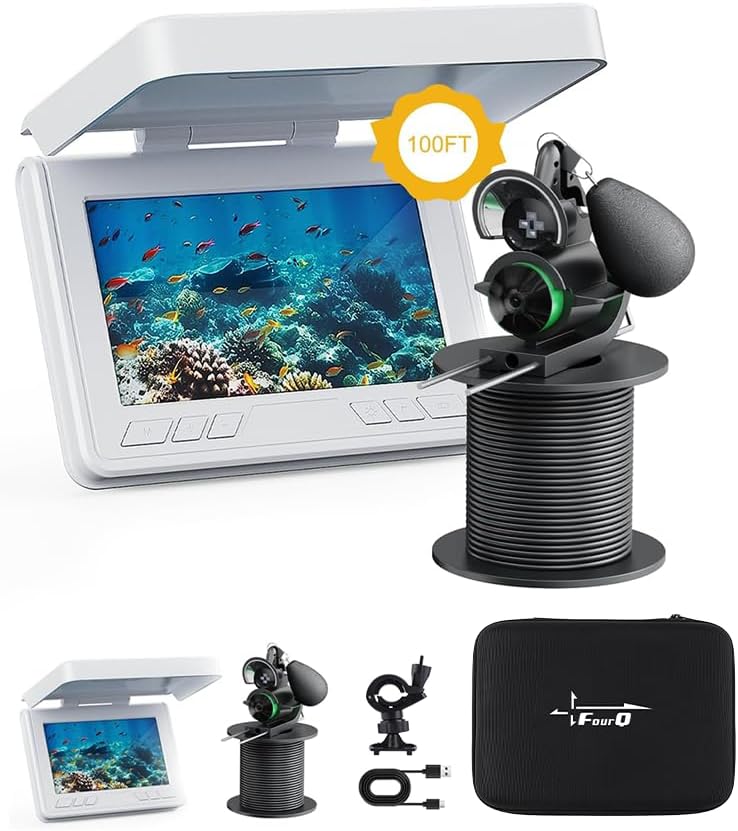
This unit provides deep-water reach with a 100-foot cable at a low price point. The IP68 rating and 5000mAh battery make it durable for repeated use in varied environments.
We may earn a commission when you buy through this link, at no additional cost to you.
Twelve IR lights help you see fish in dark or murky water. A portable box keeps everything organized and protects components during travel. It is simple to set up for quick deployment.
The screen is basic and may need sun shading for clear viewing. It does not record video so use it strictly for scouting. Still, the depth and battery are strong for the cost.
Buy this if you need deep-water capability without a large budget. It suits anglers focused on reach and endurance.
The 100ft cable reaches deep spots others miss. This expands your fishing zones.
The included box protects components from drops. It helps organize the cable and adapter.
We may earn a commission when you buy through this link, at no additional cost to you.
Selecting a camera for kayak fishing involves weighing screen size, battery life, cable length, and waterproof rating against your budget and trip length.
LCD screens are cheaper but may struggle in bright sunlight. IPS panels offer wider viewing angles and better color. Larger screens make it easier to spot fish from a distance.
Choose IPS for daylight use and larger sizes if you sit far from the monitor. Consider sunshades or glare filters if you fish mostly in bright conditions.
Cables range from 50 feet to over 100 feet. Longer cables help you reach deep holes or drop-offs near your kayak. Look for reinforced cables that resist tangles and wear.
Match cable length to your common fishing depths. Strong cables handle heavier loads and rocks without damage. Rinse after saltwater use to avoid corrosion.
Battery life ranges from 8 to 20 hours per charge. Multi-day trips need larger capacities like 8000mAh or more. USB-C charging is convenient for power banks or car outlets.
Carry spare batteries or a power bank for long sessions. Check charging time so you can recharge quickly between trips. Long runtime reduces interruptions.
IR LEDs help detect fish in dark or murky water. Some models include white LEDs for color views in low light. Adjustable brightness helps avoid spooking fish in clear water.
Look for models with dual lighting modes if you fish in varied light. IR provides contrast while white LEDs show color. Adjust intensity based on water clarity.
IP68 ratings ensure full submersion protection. The camera head and cable connectors must be sealed. Durable housings protect against drops and rocks on shallow lakes.
Check that seals are intact before each trip. Store the unit in a dry case when not in use. Avoid extreme cold that may impact battery and seals.
Kayaks need compact units that fit in small spaces. Lightweight designs and carry cases improve transport. Magnetic spools or adjustable mounts simplify setup on rods or rails.
Test mounts before you leave to avoid loss. Choose units that can be secured with straps or brackets. Portable designs reduce clutter in a small kayak.
Many fish cameras offer only real-time viewing. If you want clips for social media, consider an action camera or external recorder. Live viewing helps locate fish quickly.
Decide whether you need video logs. Live scouting is faster for finding fish while recording supports later review. Some models allow screen capture via external tools.
Prices vary from budget to premium depending on features and brand. Longer warranties offer peace of mind. Check for customer support availability for technical help.
Set a budget that fits your trip frequency. Higher costs can bring better screens and battery life. Read warranty terms for coverage on water damage.
Start by testing the camera in shallow water to confirm the screen and lights work. Secure the mount to your rod or hatch so it stays safe while you paddle. Use the sunshade in bright conditions to improve visibility.
Deploy the cable slowly to avoid tangles and let the camera settle near the bottom. Watch the screen for fish movement and adjust IR brightness to avoid spooking fish. Reel up if snagged rather than forcing it.
After each trip rinse the camera and cable with fresh water to prevent salt corrosion. Dry connectors and seals thoroughly before storage. Store in a cool dry place and charge the battery to full before long storage.
Many models are waterproof but salt can corrode connectors. Rinse with fresh water after each trip. Check the product specs for saltwater compatibility and avoid submerging electronics that are not fully sealed.
Most underwater cameras support depths from 50 to 100 feet. Some units with strong cables and housings can handle more. Check the IP rating and cable strength before deep drops.
Many fish finders only offer live viewing. Some models include recording features or support external memory. For clips, consider an action camera or screen capture via HDMI if supported.
Aim for at least 10 hours of runtime for full-day trips. Models with 8000mAh or more reduce the need for recharging. USB-C ports help you power from banks or outlets on the water.
Deploy the cable slowly and let it settle in a straight line. Avoid casting or pulling quickly. Use a magnetic spool if available to manage tension. Secure the reel when not deploying.
Most units are designed to be unobtrusive. Adjust IR brightness to avoid bright spots. Move the camera gently and let it settle before casting to reduce disturbance near fish.
Yes many models work in cold water. Batteries may drain faster in freezing temps. Keep spare batteries warm and rinse connectors after trips to prevent ice buildup on seals.
A 4 to 5-inch screen is compact and bright enough for most setups. Larger screens offer clearer views but take more space. Choose based on your cockpit layout and viewing distance.
The top picks include the AKASO EK7000 for action recording, the FishPRO HD1080P for premium viewing, and a compact budget option for quick scouting. Each brings different strengths for different anglers.
Prioritize battery life and screen quality if you fish long days. For deep water, choose models with strong cables and IP68 seals. Match the camera to your primary use case.
Check the official links before buying for availability and warranty details. Features and stock can change. Confirm current specs to ensure the model fits your needs before checkout.