
Digital Calendar 10.1 Touchscreen
4.4Editor score
No subscription fees
Interactive chore lists
Automatic grocery list generation
Finding the right digital touchscreen organizer can transform how your household manages daily tasks and schedules. These smart devices combine calendars, chore charts, and photo frames into one sleek interface that keeps everyone informed and connected without the clutter of paper planners or scattered notes across different surfaces.
We have carefully evaluated ten leading models based on screen quality, synchronization capabilities, ease of setup, and overall family functionality. Our analysis focuses on real-world usability, ensuring that every pick offers reliable performance for busy homes that need to coordinate meals, activities, and memories effortlessly throughout the week.
Each selection in this list highlights specific strengths such as subscription-free operation, intuitive touch interfaces, or advanced photo restoration features. Prices and availability change frequently so please verify current details on the product pages before making your final decision for your home or office environment.
4.4Editor score

4.4Editor score

4.6Editor score
As an Amazon Associate we earn from qualifying purchases.
The following table provides a side-by-side comparison of all ten digital touchscreen organizers reviewed in this guide. Each entry highlights key specifications such as screen size, connectivity options, and unique features to help you quickly identify which model best fits your household needs and budget constraints.


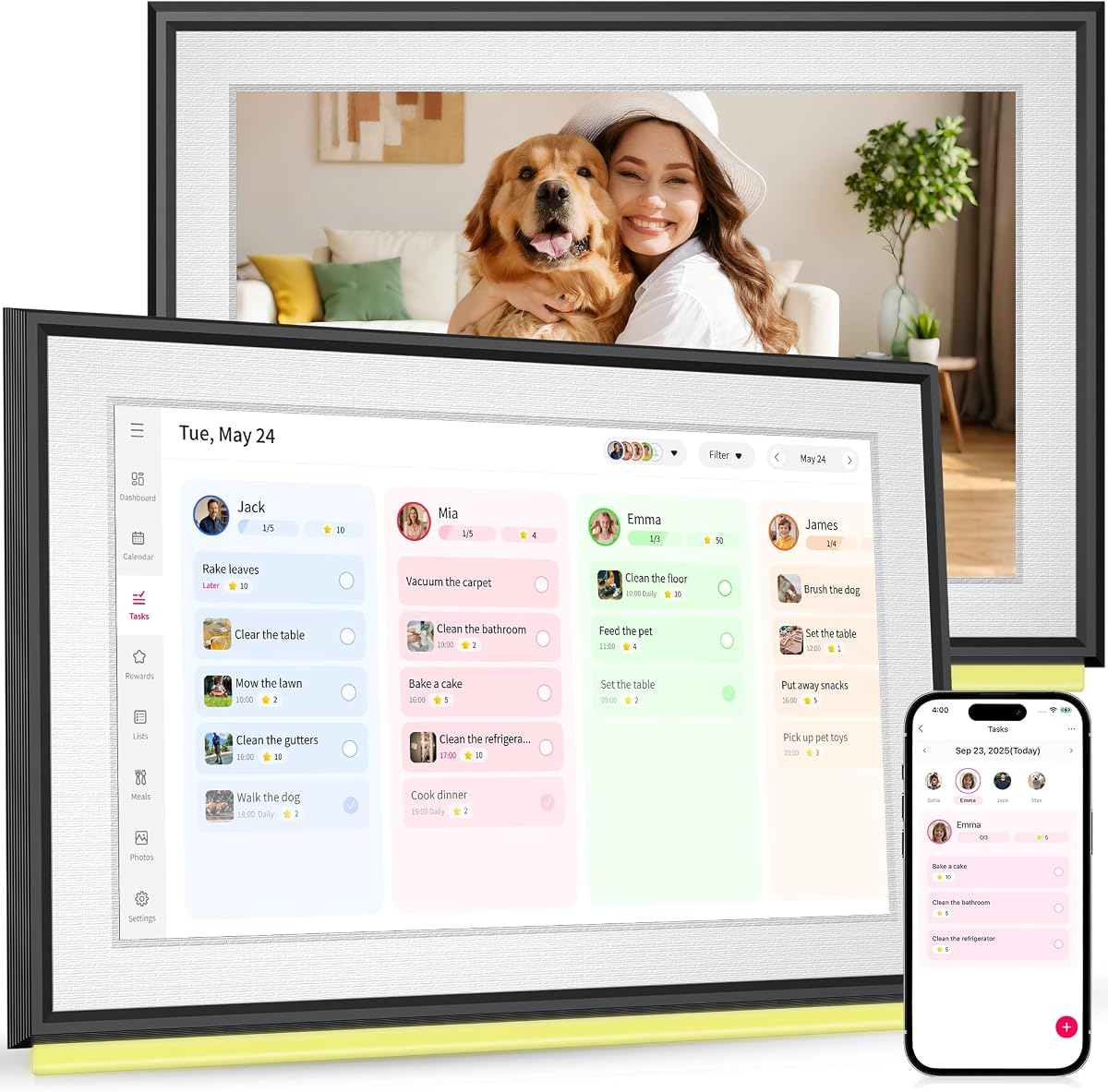

This device stands out as a comprehensive family command center that transforms daily routines through seamless integration of schedules and memories. With a strong rating of 4.4 stars users appreciate its ability to bring household organization and coordination together in one sleek place without hidden costs.
We may earn a commission when you buy through this link, at no additional cost to you.
The standout quality lies in its real-time sync capabilities that allow multiple family members to edit schedules simultaneously across Google Outlook and iCloud platforms. Parents can assign tasks while children check them off to earn reward points turning daily routines into a fun gamified experience that fosters responsibility.
Honest trade-offs include the need to purchase batteries separately and a setup phase that requires time for syncing accounts properly. These are acceptable given the robust two-year warranty and twenty-four-seven customer support ensure a lasting quality experience with your electronic planner tablet.
Busy households seeking a modern wall calendar for multi-generational use should buy this model for its intuitive interface and warm home calendar features. The recommendation is strong for families needing a central hub to keep working parents children and grandparents connected to important events and memories.
The device syncs with Google Outlook and iCloud allowing everyone to edit schedules simultaneously for better family coordination.
Children earn points for completing assigned tasks fostering responsibility and turning daily routines into engaging experiences.
We may earn a commission when you buy through this link, at no additional cost to you.
The Skylight Calendar is a premium hub designed for busy families needing a central display for shared schedules and interactive chore charts. It keeps everyone in sync by assigning colors adding events and bringing order to frantic routines all tailored for modern household management.
We may earn a commission when you buy through this link, at no additional cost to you.
Key strengths include effortless syncing with major services and a sleek smart display that mounts easily or sits on countertops. The Disney mode with iconic characters and avatars encourages family teamwork making it unique among digital organizers.
Trade-offs involve an optional premium plan for features like Magic Import and photo screensavers which are not included in the base device. These are acceptable for those wanting extra customization since the core calendar and chore functions remain fully functional without additional costs.
Families seeking a stylish display that fits naturally into kitchens and hallways should prioritize this model. The recommendation is strong for users valuing design and interactive features that keep the whole household on track with shared tasks and memories.
Available with subscription this mode uses animations and avatars to encourage family teamwork and engagement.
The display mounts to walls or sits on desks fitting any layout and family space seamlessly.
We may earn a commission when you buy through this link, at no additional cost to you.
This smart organizer syncs Google Calendar iCloud and Outlook in real time offering a smart organizer without hidden fees. Every schedule chore list and meal plan feature comes fully unlocked making it an affordable choice for families needing a central hub.
We may earn a commission when you buy through this link, at no additional cost to you.
The interactive chore list lets parents assign tasks and monitor progress while kids earn stars to unlock rewards. This gamification builds responsibility and self-discipline helping busy parents enjoy a calmer and happier home environment.
Trade-offs include a smaller screen compared to larger models and basic photo frame capabilities. These are acceptable for budget-conscious buyers who prioritize functionality and meal management features over high-end display quality.
Families looking for a practical gift for moms or busy women should buy this model. The recommendation is strong for those needing a reliable command center to manage weekly meals and schedules without ongoing costs.
Kids race to earn stars and unlock rewards turning everyday routines into fun games that build discipline.
Automatic grocery list generation and recipe uploads reduce daily stress and streamline shopping efforts.
We may earn a commission when you buy through this link, at no additional cost to you.
This all-in-one family organizer combines calendar sync chore charts and meal planning with no monthly fees. It keeps households running smoothly by allowing updates from phones or directly on the ten point one inch touchscreen for everyone to stay on the same page.
We may earn a commission when you buy through this link, at no additional cost to you.
The star-based reward system motivates kids to complete daily tasks encouraging responsibility while maintaining consistent routines. The photo frame mode with three two gigabytes of storage transforms the device into a personalized hub for cherished memories.
Trade-offs include a smaller display and lack of advanced AI features compared to larger models. These are acceptable for users prioritizing core organization tools and photo storage at a competitive price point.
Families needing a thoughtful gift for any occasion should buy this model. The recommendation is strong for those wanting a functional command center that keeps everyone organized and connected without complex setup.
Thousands of photos and videos can be stored on the device to create a vibrant display of memories.
AI powered imports streamline the process of adding schedules and tasks to your family plan.
We may earn a commission when you buy through this link, at no additional cost to you.
With a perfect five star rating this digital calendar offers a smart chore chart and home organization hub for daily routines. It allows easy task creation with color coding to track everyone activities at a glance helping families stay organized.
We may earn a commission when you buy through this link, at no additional cost to you.
The plug-and-play setup and seamless calendar sync with major platforms make it simple to connect your schedules within minutes. An intuitive interface ensures it is easy for kids seniors and every family member to use.
Trade-offs include the US plug standard and lack of a stand for desk use. These are acceptable given the device is designed primarily for wall mounting and offers a sleep wake mode to save energy.
Busy families wanting a large intuitive command center should buy this model. The recommendation is strong for those needing a reliable tool to eliminate paper planners and keep all activities clearly organized.
Assign responsibilities with color coding to help everyone track activities at a glance easily.
The device saves energy by sleeping when not in use and waking when needed.
We may earn a commission when you buy through this link, at no additional cost to you.
This device serves as a command center integrating schedule tracking chores and photo sharing to streamline scattered family matters. It helps every member enjoy a warm orderly and stress-free home life through standardization of daily routines.
We may earn a commission when you buy through this link, at no additional cost to you.
Remote photo sharing allows uploading and syncing precious family photos anytime anywhere to bond distant family relationships. This feature eases the longing of grandparents for their grandchildren by enabling them to watch growth photos at any time.
Trade-offs include a smaller screen size and basic control interface. These are acceptable for users who prioritize remote access and photo sharing capabilities over large display real estate.
Families wanting a tool to keep remote members connected should buy this model. The recommendation is strong for those valuing the ease of sharing moments without complex technical hurdles.
Upload and sync precious family photos anywhere to bond distant family relationships and share moments remotely.
Scientific family management with color markers to distinguish plans and chores for different members.
We may earn a commission when you buy through this link, at no additional cost to you.
This calendar offers a dual mode experience with Calendar Mode for scheduling and Android Mode for a customizable dashboard. Sync schedules and share calendars from major platforms without any monthly subscription fees for better organization.
We may earn a commission when you buy through this link, at no additional cost to you.
The smart dashboard supports widgets and apps from Google Play to expand functionality. Use the built-in Google Gemini voice assistant to check schedules and control smart home devices directly from the calendar.
Trade-offs include a high price point and large physical footprint. These are acceptable for users needing a versatile smart home hub with advanced customization options.
Tech-savvy households wanting a fully connected dashboard should buy this model. The recommendation is strong for those valuing voice control and extensive app integration over simpler calendar functions.
Switch easily between Calendar Mode for simple scheduling and Android Mode for a fully customizable dashboard.
Use the built-in Google Gemini voice assistant to check schedules and control smart home devices.
We may earn a commission when you buy through this link, at no additional cost to you.
Similar to the larger model this version includes a stand for desk use offering flexibility for kitchens and home offices. The dual mode system allows switching between simple scheduling and customizable dashboards with apps and widgets.
We may earn a commission when you buy through this link, at no additional cost to you.
The included stand and white finish fit naturally into home layouts without requiring wall drilling. Voice assistants and smart home controls add convenience for managing daily tasks without touching the screen.
Trade-offs include a high price and complexity in setup compared to simpler models. These are acceptable for users wanting a versatile desktop hub with advanced smart home integration.
Families needing a desktop command center with advanced features should buy this model. The recommendation is strong for those valuing flexibility and customization in their home office or kitchen.
The device comes with a stand for versatile placement on countertops or desks without wall mounting.
Control lights and cameras directly from the calendar using the built-in voice assistant.
We may earn a commission when you buy through this link, at no additional cost to you.
This WiFi-enabled smart digital calendar simplifies scheduling with color-coded tasks and weekly meal plans. It syncs automatically with internet servers for precise timekeeping and allows updates via device or app.
We may earn a commission when you buy through this link, at no additional cost to you.
The interactive chore chart helps build responsibility while the live screensaver transforms memories into a dynamic display. It is designed as a command center for a more organized stress-free home without wall mounting.
Trade-offs include lack of wall mounting and specific startup instructions to avoid rapid operations. These are acceptable for users who prefer a desktop solution and do not need permanent mounting.
Families looking for a desktop organizer with color-coded tasks should buy this model. The recommendation is strong for those wanting a simple command center for monthly and daily planning.
Color-code tasks and assign them to family members for smooth visual coordination without paper clutter.
Turn moments into memories with live screensavers that display photos and videos from your phone.
We may earn a commission when you buy through this link, at no additional cost to you.
This large device combines a wall calendar desk planner and meal planner into one elegant touchscreen for busy households. It syncs with Google iCloud and Outlook allowing free app use without monthly fees for basic features.
We may earn a commission when you buy through this link, at no additional cost to you.
The grandparent-friendly interface ensures everyone can use it with ease while the photo frame mode celebrates memories. Custom themes and font sizes suit different styles and needs for the whole family.
Trade-offs include basic features and a learning curve for some users. These are acceptable given the size and clarity of the screen for managing large family schedules.
Large families needing a visible command center should buy this model. The recommendation is strong for those wanting to display schedules clearly for multiple generations in one spot.
The interface is designed to be easy for grandparents to use ensuring everyone can view schedules.
Everything is included for wall or desk setup so you can place it wherever you need.
We may earn a commission when you buy through this link, at no additional cost to you.
Selecting the right digital touchscreen organizer requires evaluating screen size, sync capabilities, and ease of use to match your specific family needs.
Screen size determines how much information is visible at once. Larger screens like twenty-one point five inches offer clarity for multiple users while smaller screens fit tight spaces.
Choose a size that matches your available wall or desk space for optimal viewing.
Syncing with Google iCloud and Outlook ensures that all family schedules are up-to-date across devices.
Prioritize models that support real-time sync to avoid missed appointments or duplicate entries.
Many organizers charge monthly fees for premium features. Look for no-subscription models to avoid ongoing costs.
Ensure essential features like syncing and chores are fully unlocked without additional plans.
Interactive chore charts with rewards help children build responsibility. Verify that the system supports task assignment and progress tracking.
Select a model that makes task management easy for kids and parents alike.
Photo frame functionality lets you display memories when the device is idle. Check for storage capacity and slideshow customization options.
Opt for models with expandable storage to hold thousands of cherished family photos.
Quick setup saves time and reduces frustration. Look for plug-and-play designs with intuitive apps for Wi-Fi connection.
Choose a device with clear instructions and responsive support to streamline initial configuration.
Flexible mounting allows placement on walls or desks. Verify if mounting hardware is included in the package.
Decide if you prefer a permanent wall fixture or a portable desktop unit before buying.
Begin by connecting your device to a stable Wi-Fi network using the companion app. Follow the on-screen prompts to link your preferred calendar services such as Google or Outlook. Once synced you will see all shared events appear automatically within minutes.
Customize your view by adding specific calendars or meal plans to the main display. Use the touch interface to add events directly or invite family members to edit schedules. Ensure the device is placed at a comfortable viewing height for all users.
Regularly update the software to access new features like improved chore rewards or photo restoration. Clean the screen with a soft dry cloth to maintain clarity and avoid smudges that might affect touch sensitivity.
Yes most digital touchscreen organizers support syncing multiple calendars. You can link Google Outlook iCloud and other services simultaneously. This ensures every family member sees their appointments on the same screen.
Many models operate without subscription fees offering full access to core features. Some brands have optional premium plans for advanced customization. Always verify the base device capabilities before purchasing to avoid unexpected costs.
Use the interactive chore chart feature to assign tasks to specific family members. Set up a reward system with points or stars. Children can check off completed tasks on the touchscreen to earn rewards.
Yes several models allow remote photo sharing through companion apps. You can upload pictures from your phone and they will appear on the organizer. This feature is ideal for grandparents or remote family members to view updates.
The device retains stored schedules and photos offline. Most functions continue to work even without a Wi-Fi connection. However syncing new updates from online calendars will pause until the internet is restored.
Advanced models support voice assistants like Google Gemini. This allows users to ask for schedules or reminders verbally. It adds convenience for those who prefer hands-free interaction with the device.
The models highlighted in this guide offer robust solutions for families needing centralized coordination. The editor's choice excels with sync capabilities while the best budget option provides essential tools without fees.
Prioritize screen size and ease of sync based on your household needs. Ensure the model you choose supports the platforms your family already uses to minimize friction.
Remember that prices and specifications may change. Always check the current product details before purchasing to ensure the device meets your expectations.