
Mares Puck Pro EZ Wrist Underwater Scuba Dive Computer
4.8Editor score
High-contrast clear screen
Single-button interface control
Bluetooth enabled connectivity
This guide compares the top Dive Computer for Scuba Diving models of 2026 to help you choose the best gear for safety, performance, and ease of use underwater.
Finding the right Dive Computer for Scuba Diving is crucial for safety and enjoyment. A good unit tracks depth, time, and decompression limits accurately. It ensures you stay within safe zones while exploring the underwater world with confidence and peace of mind during every dive session.
We evaluated ten leading models based on display quality, battery life, and algorithm accuracy. Each product offers unique features like tank pressure monitoring, wireless connectivity, and rugged designs. Our comparison highlights the strengths of each device to help you make an informed decision for your next adventure.
Each pick showcases specific capabilities suited to different diving styles and budgets. Whether you are a beginner or a technical diver, there is a device here for you. Note that prices change frequently, so check current listings before purchasing to ensure you get the best value available today.
4.8Editor score

4.7Editor score

4.6Editor score
This table provides a side-by-side look at all ten models reviewed in this guide. Compare key specifications and features to find the perfect match for your diving style and technical requirements.



This model stands out as the top choice for divers seeking reliability and ease of use. With a 4.7 rating it offers consistent performance across various conditions. Its straightforward interface ensures you can access critical data without confusion during a dive.
We may earn a commission when you buy through this link, at no additional cost to you.
The two-button interface is designed for simplicity using a state-aware menu structure that reduces cognitive load. Battery life reaches up to 30 hours on medium brightness ensuring you are ready for extended trips. The included USB wireless charging station adds convenience to your maintenance routine.
While it commands a higher price the build quality justifies the investment for serious divers. The stainless steel buttons resist corrosion and wear in harsh saltwater environments. Some may find the feature set basic compared to smart devices but it focuses on essential safety data.
If you prioritize dependability and straightforward operation this computer is an excellent choice. It suits recreational divers who want accurate decompression tracking without unnecessary complexity. This device will serve you well on countless dives with minimal hassle or maintenance required.
The state-aware menu structure allows intuitive navigation without needing to memorize complex sequences.
Battery life supports long sessions and the wireless charging station makes recharging simple and quick.
We may earn a commission when you buy through this link, at no additional cost to you.
This device brings modern connectivity to your wrist with wireless tank pressure monitoring and mobile connections. It has a 4.0 rating reflecting solid performance for those who value digital integration. The color display enhances readability in varying light conditions underwater.
We may earn a commission when you buy through this link, at no additional cost to you.
Wireless tank pressure monitoring eliminates the need for hoses allowing a cleaner setup and less snag risk. A digital compass helps with navigation while vibration alarms alert you silently to important changes. The mobile connection allows for easy log sharing and dive planning.
Some users may find the interface less intuitive than two-button systems requiring time to master menus. The rating suggests mixed experiences regarding long-term reliability or feature depth. However the wireless features make it a strong contender for tech-focused divers.
Consider this if you want to reduce gear clutter and track tank data wirelessly. It is suitable for divers who enjoy sharing data on social media or tracking stats via smartphone. Ensure you are comfortable with the interface before committing to it for critical dives.
Wireless tank pressure and mobile connections offer a modern approach to data tracking and sharing.
Color display and vibration alarms ensure you stay aware of critical data even in noisy environments.
We may earn a commission when you buy through this link, at no additional cost to you.
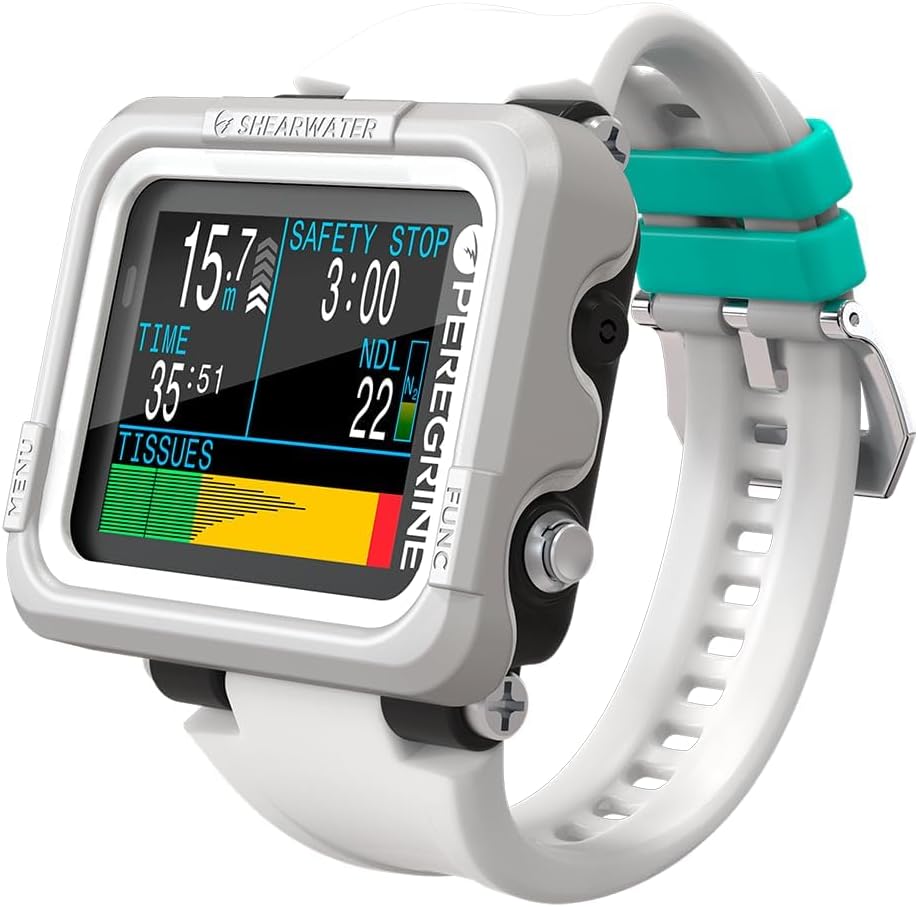
The Adventures Edition offers expanded gas management with three gas nitrox capabilities for advanced diving scenarios. It shares the reliable 4.7 rating of the standard model with added versatility for technical divers. The 2.2 inch LED LCD display provides vivid data visualization.
We may earn a commission when you buy through this link, at no additional cost to you.
Supporting multiple modes including gauge and 3 gas nitrox it adapts to different training levels. Shearwater computers never lockout for dive plan deviations giving you flexibility during complex ascents. The Buhlmann ZHL-16C algorithm ensures precise decompression calculations for safety.
The increased gas options may introduce complexity for beginners sticking to simple air dives. It is priced similarly to the standard version which might not justify the added features for recreational users. However technical divers will appreciate the granular control.
Choose this edition if you plan to progress into multi-gas diving or use enriched air frequently. The lack of lockout features provides peace of mind when deviating from pre-planned dive profiles. It is a robust tool for those ready to explore beyond basic recreational limits.
Buhlmann ZHL-16C with gradient factors delivers precise calculations without lockout restrictions during dives.
Vivid enhanced color range and saturation on the LED LCD make data easy to read underwater.
We may earn a commission when you buy through this link, at no additional cost to you.
This rugged computer stands out with surface GPS navigation to mark entry and exit points accurately. It holds a 4.7 rating indicating strong performance for divers who value precise site location. The 2.4 inch vibrant display allows multiple data fields on one page.
We may earn a commission when you buy through this link, at no additional cost to you.
Use surface GPS to navigate to dive sites and track your route on land before entering water. NDL Aware depth metrics help you plan bottom time dynamically based on specific depth changes. The recycled ocean-bound plastics housing shows commitment to environmental sustainability.
The flip-screen mode might feel unconventional at first but it helps position buttons comfortably. GPS usage can drain battery faster if used frequently across multiple days of diving. This device is bulkier than compact watches which may be an issue for small wrists.
Ideal for travelers who visit many dive sites and need to mark them quickly. It combines dive tracking with standard GPS features making it a versatile outdoor tool. If you prioritize navigation and data customization this is a leading option for active divers.
Surface GPS allows you to mark sites and navigate effectively without needing a separate device.
Housing made with recycled ocean-bound plastics reduces environmental impact while maintaining durability.
We may earn a commission when you buy through this link, at no additional cost to you.
This watch blends Italian craftsmanship with essential dive tracking for recreational divers on a budget. It carries a 4.2 rating showing it meets basic needs for air and nitrox diving. The single-button interface simplifies menu navigation significantly for new users.
We may earn a commission when you buy through this link, at no additional cost to you.
Supporting Air Nitrox and Gauge modes it offers versatile options for different setups. Critical alerts keep you informed with visual and audible signals to prevent accidents. Seamless device integration with iOS and Android allows for comprehensive dive tracking logs.
The single button may require pressing multiple times to access deeper menus compared to two-button units. Infrared transfer is functional but slower than modern Bluetooth standards for syncing data. It remains a solid choice for entry-level divers needing reliability without complexity.
Consider this if you want a simple watch-style device that focuses on core functions. It is great for divers who do not need advanced features like wireless tank pressure. The integration with smartphones makes it easy to keep records of your progress over time.
Single-button interface makes menu navigation straightforward for users new to dive computers.
Pairing with iOS and Android devices ensures you can manage dive logs easily.
We may earn a commission when you buy through this link, at no additional cost to you.
Leading with a 4.8 rating this model delivers exceptional value for recreational divers needing reliable tracking. It features a clear high-contrast screen ensuring effortless readability even in low light water conditions. The simple design focuses on essential data like depth and no-deco limits.
We may earn a commission when you buy through this link, at no additional cost to you.
Supporting single gas Nitrox it covers most recreational diving needs without unnecessary complexity. Bluetooth connectivity allows fast log uploads and tracking on smart devices. The replaceable power source ensures it is always ready for the next dive without charging hassles.
Advanced divers needing multi-gas support will find the single gas Nitrox limitation restrictive. It lacks advanced navigation or tank pressure monitoring features found in higher end units. However for standard recreational dives it provides accurate data at a competitive price.
This is the top choice for beginners or those seeking a straightforward dive computer. It simplifies the learning curve while maintaining safety standards with Buhlmann algorithms. The ease of data management and high readability make it a standout in its category.
Clear high-contrast screen keeps critical data like depth and limits visible at all times.
Replaceable power source means no need for charging stations ensuring you are always ready to dive.
We may earn a commission when you buy through this link, at no additional cost to you.
This premium unit offers top-tier features like a 3 inch vibrant color touchscreen and integrated dive light. It has a 4.6 rating reflecting its high build quality and advanced capabilities. Sapphire lens ensures durability against scratches and harsh underwater conditions over time.
We may earn a commission when you buy through this link, at no additional cost to you.
SubWave sonar allows you to exchange messages with other divers and monitor tank pressure remotely. DiveView maps provide bathymetric contours for thousands of dive sites to help you plan efficiently. Leakproof metal inductive buttons offer reliability when wearing gloves or in cold water.
The price point is significantly higher than standard models which may not suit casual divers. The array of features might overwhelm users who only need basic depth and time tracking. For professionals or technical divers however these tools are invaluable.
Invest in this if you demand the best performance and want seamless surface and underwater integration. The dive light and sonar features add layers of safety and communication rarely seen in this class. It is the ultimate tool for serious divers seeking total control.
SubWave sonar technology allows diver-to-diver messages and pressure monitoring for enhanced safety.
Sapphire lens and metal inductive buttons ensure resistance to scratches and pressure in deep dives.
We may earn a commission when you buy through this link, at no additional cost to you.
Combining dive tracking with full smartwatch capabilities this unit tracks over 30 sports and health metrics. It holds a 4.6 rating for its versatility across land and water activities. Sapphire lens protects the monochrome display while silicone bands ensure comfort during extended wear.
We may earn a commission when you buy through this link, at no additional cost to you.
Support for recreational technical and free diving means it grows with your skill level. Smart notifications and Garmin Pay turn it into a daily wear watch for land based life. Battery life in dive mode reaches up to 25 hours supporting multi-day trips.
The monochrome display lacks the vibrancy of color screens but offers excellent contrast for battery savings. Health metrics like HR and sleep score are estimates not medical devices. It may be more complex than needed for those solely focused on diving.
Select this if you want a single watch for diving running swimming and daily tracking. It simplifies your gear by combining dive logging with fitness tracking and smart features. This is a versatile choice for athletes who also enjoy scuba diving.
Tracks over 30 sports and includes smartwatch capabilities for full daily activity monitoring.
Stores up to 200 dives on wrist allowing easy review and upload later via app.
We may earn a commission when you buy through this link, at no additional cost to you.
Built for confidence this computer features a bright AMOLED display for outstanding readability in all light conditions. It offers up to 120 hours of dive time on a single charge supporting multiple dive days easily. The integrated flashlight provides extra visibility when exploring dark zones.
We may earn a commission when you buy through this link, at no additional cost to you.
Wireless tank pressure monitoring keeps your setup clean while sidemount compatibility suits technical configurations. Compact leakproof construction and glove-optimized buttons ensure comfort throughout every dive phase. It supports single and multi-gas modes for broad technical support.
Charging frequency might be higher for daily users compared to models with replaceable batteries. The price is above average for basic recreational units but justified by the screen quality. If you prioritize visibility the AMOLED display is a major plus underwater.
Choose this if you need high contrast visibility and long battery life for travel. It balances modern display tech with practical diving tools like lights and wireless pressure. This is a strong option for dedicated divers who value every moment underwater.
Bright AMOLED display offers high contrast and readability even in varying underwater light conditions.
120 hours of dive time supports multiple dive days without worrying about recharging often.
We may earn a commission when you buy through this link, at no additional cost to you.
This model features a high resolution 2.4 inch ultra-bright AMOLED display ensuring focus stays on the dive. It offers advanced features for monitoring decompression stress with updated user-interface and quick-change settings. Colour customization provides thousands of display combinations for improved readability.
We may earn a commission when you buy through this link, at no additional cost to you.
The new Big layout allows switching between standard and giant fonts for easiest viewing on the go. Faster Bluetooth connectivity ensures quicker log downloads and firmware updates than previous models. Enhanced data security features protect your personal dive history during transfers.
The price is among the highest in the market which may limit its accessibility to professionals. It is designed for those who demand precise decompression tracking and visual clarity. The layout customization is a major plus for divers with varying visual needs.
Select this for ultimate customization and visibility in challenging lighting conditions underwater. The Big layout and colour options make it adaptable for any user preference. It is a top-tier choice for technical divers needing precise data presentation.
Colour customization and Big layout fonts improve readability tailored to personal preferences.
6x faster Bluetooth enables quicker dive log downloads and seamless firmware updates.
We may earn a commission when you buy through this link, at no additional cost to you.
Selecting the right dive computer involves understanding your diving goals and technical needs. This guide covers key factors to consider when evaluating different models.
A clear display is essential for reading depth and time in low light underwater. Look for high contrast or color screens that remain visible at various depths.
Prioritize displays with high resolution to avoid squinting during critical moments of a dive.
Battery duration determines how long you can dive before recharging or replacing cells. Some models last 20 hours while others offer multi-day support on a single charge.
Choose a model that matches your typical trip length to avoid interruptions in the field.
Ensure the computer supports the gases you plan to use like Air, Nitrox, or Trimix. Advanced divers may need multi-gas support for technical diving scenarios.
Check that the device allows you to switch modes easily without confusing menu sequences.
Bluetooth or infrared connectivity allows you to sync logs with your smartphone. This feature helps in tracking progress and planning future dives based on past data.
Opt for modern connectivity standards like Bluetooth to ensure easy data transfer and app support.
Look for materials like stainless steel or reinforced plastic that resist corrosion and impacts. A high ATM rating ensures the device can withstand deep pressure.
Water-resistant housings with leakproof seals protect internal components from saltwater damage.
Simple interfaces with one or two buttons make navigation easy while underwater. Complex menus can distract from safety monitoring during a dive.
Practice navigating the menus in a safe environment before taking the device to depth.
Features like digital compass or tank pressure monitoring can simplify your gear setup. Evaluate if these extras justify the added cost for your specific diving style.
Integrated lights or wireless sensors reduce the need for separate accessories during dives.
Consider how much you are willing to spend versus the features you need. Entry level models cover basics while premium units offer advanced tracking and connectivity.
Balance your budget with the safety and convenience benefits offered by the device.
Before diving, ensure the device is charged and set to the correct gas mode. Check that all buttons are functioning and the display shows clear readings in sunlight.
After every dive, rinse the computer with fresh water to remove salt and sand. This prevents corrosion on buttons and ports that could affect performance over time.
Store the unit in a cool dry place away from direct sunlight. Regularly sync logs to your app and check for firmware updates to maintain accuracy.
A dive computer monitors depth and time to calculate no-decompression limits. It helps divers stay safe by tracking nitrogen absorption and indicating ascent rates.
Yes, it is highly recommended for accurate tracking of depth and time. It provides real-time data that tables cannot offer during dynamic underwater conditions.
Most units do not require frequent calibration but should be checked after impacts. Consult your manual for specific service intervals and reset procedures.
Yes, modern computers track surface intervals and adjust limits for subsequent dives. They help manage nitrogen loads across multiple dives in one trip.
Nitrox mode accounts for higher oxygen levels allowing longer safe bottom times. It ensures accurate decompression calculations for enriched air mixtures.
Enable Bluetooth on the device and pair it with the companion app. Follow the manufacturer's steps to sync dive logs and update settings.
Long battery life ensures the unit functions throughout your dive trip. It reduces the risk of power failure underwater which could compromise safety.
Yes, many models include digital compasses for navigation without extra gear. This simplifies your setup and improves situational awareness underwater.
We reviewed ten top models highlighting their strengths in display, battery, and connectivity. Each offers unique features to suit different needs from beginners to technical divers.
Prioritize safety features like accurate algorithms and clear displays to ensure a safe dive. Comfort and ease of use also play major roles in long-term satisfaction.
Check current prices before buying as values change frequently in the market. Investing in the right device will enhance your underwater adventures for years to come.