10 Best 4 Monitor Mount with Adjustable Arms (November 2026) Expert Guide
Written by Maya · Updated November 2026
Creating a multi-monitor workstation requires the right hardware to support your screens securely. A high-quality 4 monitor mount with adjustable arms elevates your displays to eye level, reducing neck strain and freeing up valuable desk space for productivity.
We evaluated ten top-rated models based on build quality, adjustability, and ease of assembly. Our comparison focuses on arm movement range, weight capacity, and compatibility with various screen sizes to ensure you find a reliable solution for your specific needs.
Each pick in this list highlights unique strengths for different workflows and budgets. Note that availability and pricing may fluctuate over time, so verify current details before purchasing to ensure you get the best deal for your investment.
Top 3 Picks for Best 4 Monitor Mount with Adjustable Arms
Best Budget
VIVO Pneumatic Arm Quad Ultrawide Monitor Extra Tall Desk Mount for Up to 49 inch Screens Individual Arm Capacity, Max 38 inch Screens for 4 Ultra Wides Up to 44 lbs, Black, STAND-V400D
As an Amazon Associate we earn from qualifying purchases.
Top 10 Best 4 Monitor Mount with Adjustable Arms in 2026 Compared
This side-by-side comparison outlines the key specifications and features of the top ten models. Use this table to quickly identify which mount matches your screen sizes, desk thickness, and ergonomic requirements for a seamless workspace upgrade.
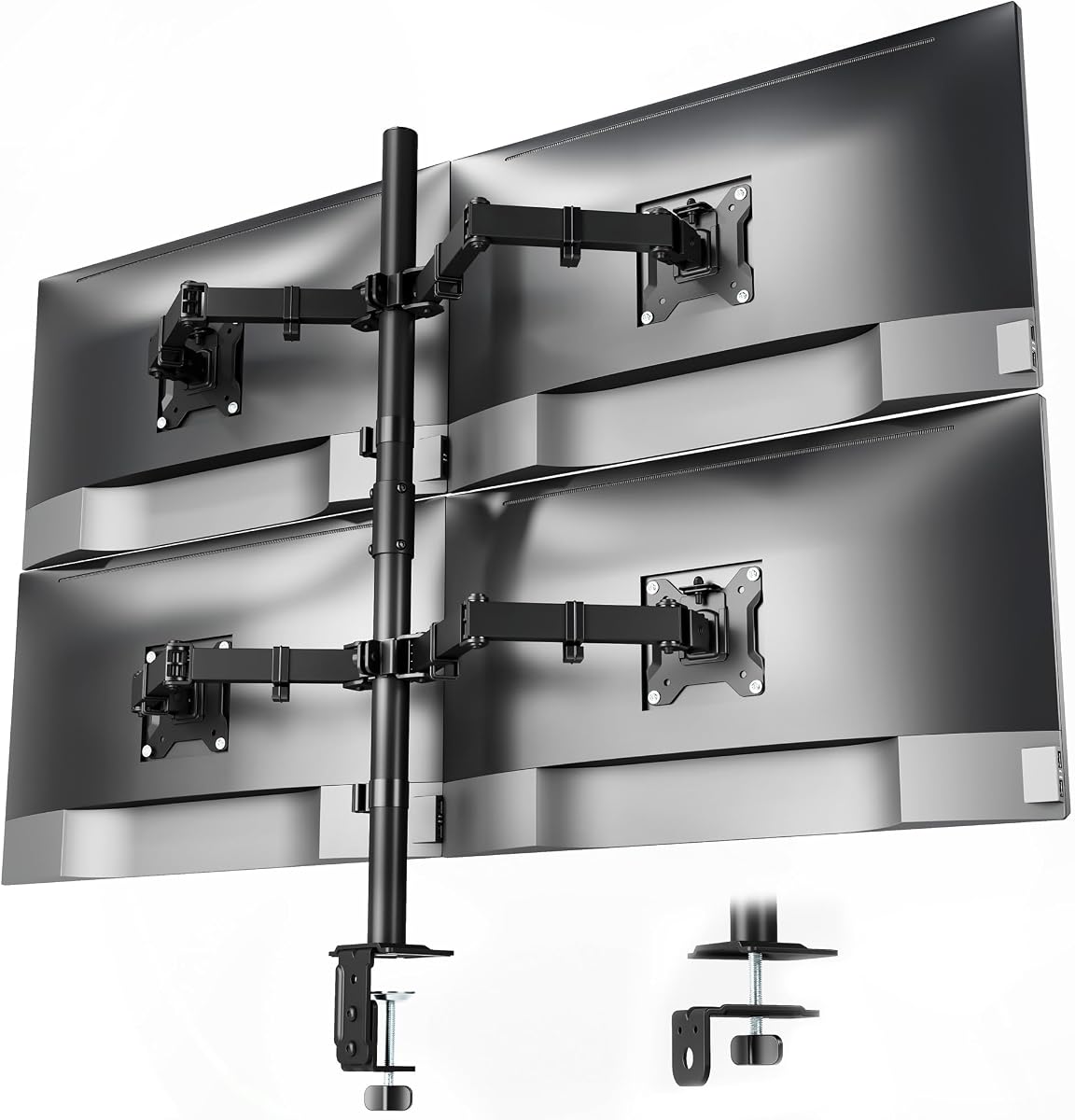
The WALI Stacked 4 Monitor Mount earns our Editor's Choice for balancing performance and versatility. With a 4.5 star rating, it supports screens from 13 to 27 inches securely while keeping your desk tidy through its built-in cable management system.
Pros
Excellent stability for multiple screens
Clean cable management design
Easy to adjust viewing angles
Fits a wide range of sizes
Sturdy steel frame construction
Cons
Assembly instructions could be clearer
Cable clips may be tight
We may earn a commission when you buy through this link, at no additional cost to you.
Its standout quality is the fully adjustable arm design that allows tilt, swivel, and rotation to any position. The steel frame ensures stability even when moving monitors, making it ideal for traders or programmers needing rapid screen adjustments.
While some users find the initial assembly slightly tricky due to multiple screws, the sturdy result is worth the effort. The cable clips work well but might require patience to route thicker HDMI cables without snagging during setup.
This mount is perfect for professionals who need a reliable multi-monitor setup without spending a fortune. If you value desk space and ergonomic flexibility, this WALI model delivers a professional finish to your workstation effectively.
Ergonomic Comfort and Productivity
Raising monitors to eye level reduces neck strain significantly during long work sessions. The ability to tilt and swivel allows you to align screens perfectly with your natural gaze.
Desk Space Optimization
Lifting four screens off the surface clears substantial room for keyboards and documents. This vertical approach maximizes usable workspace which is crucial for smaller home office environments.
The VIVO Pneumatic Arm Quad Ultrawide is the top premium choice for users with large displays. Rated 4.5 stars, it uniquely accommodates ultra-wide screens up to 49 inches while offering smooth height adjustments without manual tension screws.
Pros
Handles massive screen weights easily
Pneumatic arms feel effortless
Stable cast aluminum construction
Wide tilt and swivel range
Detachable VESA plates simplify install
Cons
Requires more desk depth
Higher price than standard models
We may earn a commission when you buy through this link, at no additional cost to you.
Its pneumatic arms counterbalance the weight of heavy monitors so you can reposition them with a light touch. The cast aluminum construction provides a robust foundation that prevents sagging even with the heaviest 44 lbs per arm capacity.
However, this setup demands more desk depth and budget compared to standard mounts. The larger footprint ensures stability for wide screens but may not fit compact desks. The higher cost reflects the specialized engineering needed for such large displays.
Invest in this if you need an ultra-wide gaming or professional setup. The smooth adjustment and durability justify the price for those prioritizing high-performance flexibility in a complex workstation environment.
Effortless Height Adjustment
The pneumatic mechanism allows smooth vertical movement without tools. You can raise or lower heavy screens effortlessly to match standing or sitting positions instantly.
Ultra-Wide Compatibility
Most quad mounts struggle with ultra-wide aspect ratios. This unit specifically supports screens up to 49 inches, offering unmatched versatility for immersive visual tasks.
The MOUNT PRO 4 Monitor Mount stands out as the best budget option. With a 4.5 rating, it offers essential features like tilt and swivel at a fraction of the cost of premium models, making multi-screen setups accessible to more people.
Pros
Very affordable price point
Vertical design saves desk space
Labeled parts simplify assembly
Fits most standard monitor sizes
Cable clips included
Cons
Weight limit restricts heavy screens
Material feels less robust
We may earn a commission when you buy through this link, at no additional cost to you.
Its vertical design and extra tall pole maximize height flexibility while keeping the base small. The included labeled parts make the assembly process significantly faster and less frustrating than competitors with generic instructions.
Users should note the weight limit is lower than top-tier models. While sufficient for most standard office monitors, heavier gaming screens might exceed the capacity. However, for typical use, it provides excellent stability and value.
This is the ideal pick for students or home users on a tight budget. If you need to mount four standard 24 or 27 inch monitors without breaking the bank, this model delivers reliable performance effectively.
Cost Effective Solutions
Achieving a quad setup doesn't require high spending. This model proves that basic ergonomic adjustments can be affordable without sacrificing essential features.
Simplified Assembly Process
Labeled parts eliminate guesswork during installation. This thoughtful design choice saves time and reduces frustration for users assembling the mount for the first time.
The PUTORSEN Quad Monitor Mount excels in versatility by accommodating a mix of screen sizes. It supports a large 49 inch ultra-wide on top while holding smaller 27 inch screens below, catering to complex setups efficiently.
Pros
Versatile screen size combination
Distributes weight efficiently
Removable arm segments
Heavy duty steel construction
Smooth gas spring movement
Cons
Installation may take time
Center bracket tilt limited
We may earn a commission when you buy through this link, at no additional cost to you.
Its three-section arm design ensures weight is distributed evenly to prevent sagging. The ability to remove segments offers customization, letting you shorten the arm for a tighter fit near the wall if needed.
The setup process involves more steps due to the multi-layer design, which might deter quick assembly seekers. While the center bracket has limited tilt, the lower arms offer ample flexibility to achieve comfortable viewing angles.
Choose this if you have a specific configuration of large and small monitors. It bridges the gap between standard quad mounts and ultra-wide solutions, providing a tailored experience for demanding users.
Adaptable Configuration
This mount adapts to various screen combinations. Whether you have one massive main screen and three smaller ones, it handles the weight distribution professionally.
Structural Integrity
Robust steel construction ensures stability for heavy loads. The design minimizes wobble even with large screens attached to the upper arm section.
The monTEK Quad Monitor Stand is designed for reliability and speed. With a 4.5 star rating, it supports heavy screens up to 22 lbs each, ensuring durability for standard monitors without complex assembly steps.
Pros
Fast and easy setup
Supports heavy 22 lbs screens
Integrated cable management
Sturdy joint design
Clean aesthetic finish
Cons
No gas spring adjustment
Clamp size fixed
We may earn a commission when you buy through this link, at no additional cost to you.
Engineered for stability, its advanced joint design keeps monitors level without sagging. The integrated cable organizers keep wires hidden and tidy, maintaining a professional look on your desk immediately after setup.
Lacking gas springs means manual adjustment is required to set tension. While the assembly is quick, users may find tightening the tension knobs slightly tedious. However, the result is a secure hold that rarely shifts.
This model suits users who want a simple, solid solution without premium features. If you need to mount four standard screens quickly and keep them organized, the monTEK offers excellent value and performance.
Speed of Setup
Assembly is streamlined to take under twenty minutes. This efficiency allows users to start working on their new setup almost immediately after unboxing.
Weight Capacity
Supporting 22 lbs per arm handles most modern gaming screens. This capacity ensures compatibility with heavier units that might sag on lighter mounts.
The MOUNTUP Quad Monitor Stand offers a durable and supported solution for quad setups. Rated 4.5 stars, it features a solid base that supports all four arms, ensuring the mount stays planted on your desk securely.
Pros
Solid base for stability
Three year support warranty
Fits standard monitor sizes
Easy assembly instructions
Cable clips included
Cons
Limited weight capacity
Basic adjustment range
We may earn a commission when you buy through this link, at no additional cost to you.
A standout feature is the three-year support guarantee which adds peace of mind to the purchase. The assembly process is straightforward with clear instructions, making it accessible for beginners building their first multi-monitor workstation.
The weight capacity is moderate at 17.6 lbs per arm which is sufficient for office screens. However, heavier gaming displays might exceed this limit. Users should check their monitor weight to avoid strain on the joints.
This stand is great for office environments needing reliable long-term support. If you prioritize stability and customer service over extreme adjustability, the MOUNTUP provides a trustworthy choice for daily workloads.
Reliable Warranty Support
The three-year guarantee highlights confidence in durability. This support ensures any potential issues are resolved quickly without extra cost to the user.
Base Design
A solid single base reduces clutter. This design choice simplifies the desk surface compared to models with multiple separate mounts.
The VIVO Quad Pneumatic Monitor Mount combines ease of use with solid support. With a 4.4 rating, it uses dual pneumatic springs to counterbalance monitors, allowing smooth height changes without heavy lifting or tools.
Pros
Smooth pneumatic movement
Versatile tension adjustment
Drill-free installation
Fits standard screen sizes
Sturdy material mix
Cons
Slightly higher price
Tension knobs require care
We may earn a commission when you buy through this link, at no additional cost to you.
Users can increase tension for heavier screens or decrease it for lighter ones. This flexibility ensures each monitor stays level without sagging over time, which is crucial for long-term ergonomic comfort during work hours.
Installation is drill-free thanks to the heavy-duty C-clamp, but tightening the tension knobs can be tricky for beginners. The mix of steel and aluminum keeps the weight down while maintaining structural integrity for daily adjustments.
This mount is ideal for those seeking fluid movement without buying ultra-premium models. If you want to adjust screen height frequently throughout the day, the pneumatic feature saves effort and protects your wrists.
Dynamic Height Control
Pneumatic springs let you move screens effortlessly. This dynamic capability encourages better posture by making adjustments natural and effortless for users.
Drill-Free Convenience
The clamp design allows quick mounting. This convenience is valuable for renters or those who want to set up quickly without damaging desk surfaces.
The Pholiten Quad Monitor Arm prioritizes compact design without sacrificing adjustability. Rated 4.4 stars, it uses gas spring technology to support screens up to 32 inches, offering smooth vertical movement for ergonomic positioning.
Pros
Minimal footprint design
Gas spring efficiency
Forward backward arm movement
Good ergonomics
VESA compatibility
Cons
Slightly lower max weight
Installation hardware varied
We may earn a commission when you buy through this link, at no additional cost to you.
A key feature is the forward and backward arm adjustment, allowing you to pull screens closer or push them away easily. This flexibility helps optimize desk depth usage especially in smaller workspaces where space is tight.
Users may find the installation hardware slightly different from standard mounts. The weight limit is reasonable for most setups but may restrict very heavy monitors. However, the build quality ensures stable daily use for typical office monitors.
This arm is perfect for users who need precise depth control. If you often need to reach behind screens or adjust viewing distance, the Pholiten offers a refined solution for comfortable multi-monitor setups.
Precision Depth Adjustment
Moving screens closer or further helps reduce eye strain. This control allows you to align displays perfectly with your workspace layout.
Space Saving Profile
Minimal footprint keeps the desk clear. This design ensures the mount does not interfere with other workspace accessories or tools.
The WALI Quad Monitor Desk Mount stands out with a high 4.6 star rating from many satisfied users. It supports screens from 13 to 32 inches and handles up to 22 lbs per arm with a robust locking mechanism for security.
Pros
High overall rating
Strong locking system
Effective cable management
Supports heavy screens
Clear user manual
Cons
Setup takes patience
Tight clamps
We may earn a commission when you buy through this link, at no additional cost to you.
Its built-in cable management guides keep wires tidy along the arms, preserving a clean look on your desk. The 31.5 inch pole allows you to raise screens to an ideal viewing height for better posture and comfort.
Installation involves multiple screws and clamps which require patience to align correctly. Some users note the clamps can be tight, needing careful adjustment to fit thick desks without damaging the surface.
This model is a classic choice for those seeking proven reliability. If you value strong support and organization features, this WALI mount delivers consistent performance for demanding work environments.
Locking Security
The two-stage locking system keeps screens secure. This feature prevents unintended movement during adjustments ensuring stability for heavy displays.
Cable Organization
Integrated guides hide unsightly wires. A clean desk setup improves focus and reduces distractions during work sessions effectively.
The VIVO Quad Monitor 13 to 32 inch model is a solid standard option for home offices. With a 4.3 rating, it supports four screens up to 22 lbs each, providing a sturdy base for typical workstation needs without premium complexity.
Pros
Strong surface protection
Articulating VESA stand
Fits standard monitor sizes
Drill-free clamp mount
Clear setup instructions
Cons
Less robust than premium
Limited tilt range
We may earn a commission when you buy through this link, at no additional cost to you.
Its longer upper bracket allows the top monitor to align better with lower ones for improved visibility. The included padding protects your desk surface from scratches during installation and use which is often overlooked by other brands.
While the tilt range is limited to plus or minus 15 degrees, it is sufficient for most seated setups. Assembly is straightforward with clear instructions, though the clamp mechanism may need periodic checks to stay tight.
This mount fits users needing a straightforward reliable solution. If you want to mount four standard screens quickly and value surface protection, this VIVO model offers a dependable entry point for multi-monitor setups.
Surface Protection
Included padding keeps your desk safe from scratches. This detail shows care for furniture integrity during installation and daily adjustments.
Bracket Alignment
The upper bracket design helps align screens. This feature improves visibility and reduces strain when switching between monitors quickly.
We may earn a commission when you buy through this link, at no additional cost to you.
Buying Guide – How to Choose the Best 4 Monitor Mount with Adjustable Arms
Selecting the right 4 monitor mount requires analyzing your workspace dimensions and screen specifications. This guide breaks down the essential factors to ensure you choose a model that balances support and flexibility.
Screen Size and Weight Capacity
Verify that the mount supports the size and weight of your monitors. Most models handle screens up to 32 inches but if you have larger or heavier displays, look for premium units rated for 40 to 49 inches.
Always check the maximum weight capacity per arm to ensure stability. Exceeding this limit can cause sagging or damage to the mount over time.
Desk Thickness and Mounting Type
Measure your desk thickness to ensure it fits within the clamp or grommet range. Standard clamps typically support thicknesses from 0.4 inches to 3.5 inches for secure installation.
Choose between C-clamp and grommet mounts based on your desk structure. C-clamps are easier for solid desks while grommets are better for tables with pre-drilled holes.
VESA Pattern Compatibility
Check the VESA mounting hole pattern on the back of your monitors. Most quad mounts require 75x75mm or 100x100mm patterns, so confirm compatibility before purchasing.
Ensure the mount includes detachable VESA plates if possible. This feature simplifies the installation process by allowing you to attach plates before mounting arms.
Adjustability and Articulation
Look for mounts offering full tilt, swivel, and rotation. A good mount should allow screens to rotate into portrait mode to help with multitasking.
Adjustable arms with multiple joints provide better positioning. This flexibility helps you align screens at varying heights for ergonomic comfort during work.
Build Material and Stability
Prioritize mounts made from steel or cast aluminum. These materials offer superior strength to prevent wobbling when you move screens frequently.
Check user reviews for feedback on long-term stability. A sturdy frame ensures that heavier monitors remain level without drooping after extended use.
Cable Management Features
Choose a mount with integrated cable clips or channels. Keeping wires organized improves aesthetics and prevents tangling during adjustments.
Effective management reduces clutter which helps maintain a clean workspace. It also protects cables from wear caused by accidental pulling.
Ease of Installation
Select a model with clear instructions and labeled parts. Complex setups can be frustrating, so look for user-friendly designs with minimal tools.
Consider assembly time before purchasing. Most standard mounts take twenty to thirty minutes, while premium pneumatic ones may require more setup effort.
Budget and Value
Determine how much you are willing to spend on your setup. Budget options are functional but may lack advanced features like gas springs.
Higher priced models often offer smoother movement and durability. If you adjust screens daily, investing in a premium unit can improve long-term comfort.
How to Use and Care for Your 4 Monitor Mount with Adjustable Arms
After installation, test the stability of each arm by gently moving screens to ensure secure locking. Adjust the tension knobs if your monitors feel too loose or too heavy to lift manually.
Regularly check all bolts and clamps for signs of looseness. Over time vibration can cause screws to loosen so tightening them every few months maintains safety.
Keep cables neatly routed through the provided channels to prevent tangling. Dust the arms and VESA plates occasionally to ensure smooth articulation during daily adjustments.
Frequently Asked Questions
Can I use a 4 monitor mount for curved screens?
Yes, most quad mounts support both flat and curved screens as long as the VESA pattern matches. Verify that the monitor weight and size fall within the arm specifications before installation.
What happens if my screens exceed the weight limit?
Exceeding the weight limit can lead to sagging or potential damage to the mount. Always check the product specifications to ensure your monitor weight is within the safe range per arm.
Is it hard to install a 4 monitor mount?
Installation is straightforward for most users but requires patience to align all four arms. Follow the included manual step-by-step and ensure the desk clamp is tightened securely.
Will a 4 monitor mount fit a glass desk?
Glass desks require special care because clamps can slip or crack the surface. It is recommended to use grommet mounting or add protective padding to avoid damage.
Can I rotate screens into portrait mode?
Yes, most models support full 360-degree rotation which allows you to switch between landscape and portrait orientations. This is useful for reading long documents or code.
Do 4 monitor mounts reduce neck strain?
Yes, raising screens to eye level significantly reduces neck strain. Proper positioning ensures you sit upright rather than looking down at the desk surface.
How do I manage cables on a quad mount?
Use the built-in cable clips or channels to route wires neatly along the arms. This keeps cables hidden and prevents them from getting caught when moving screens.
What is the best mount for ultra-wide screens?
For ultra-wide screens, choose a pneumatic mount designed for larger capacities. Models like the VIVO Pneumatic Arm are built to handle heavy ultra-wide displays securely.
Final Thoughts on Choosing the Best 4 Monitor Mount with Adjustable Arms
Choosing the right 4 monitor mount with adjustable arms depends on your specific screen needs and budget. The WALI Stacked model offers excellent versatility while the VIVO Pneumatic arm provides premium support for ultra-wide displays.
Prioritize stability and adjustability to ensure long-term comfort. A well-built mount prevents sagging and helps maintain proper posture throughout your workday effectively.
Always verify the current availability and details before purchasing. Prices may change so checking the latest product specs ensures you get the best fit for your workstation needs.