
Aurzen Roku TV E1R Smart Portable Mini Projector
4.7Editor score
Roku Smart OS built-in
180 degree stand rotation
Lightweight under one pound
We compare the best overhead TV projectors for ceiling projection smart features and brightness to help you choose the right model for home cinema setups.
Overhead TV projectors offer a unique way to enjoy movies and games by projecting directly onto your ceiling. This setup is perfect for bedrooms or small spaces where wall space is limited. Finding the right model means looking for features like auto keystone and bright lumens for clear viewing.
We evaluated ten top models based on brightness, smart system integration, and ease of setup. Each product was reviewed for its ability to handle ceiling projections smoothly. We focused on real-world performance including connectivity options and audio quality to ensure a complete entertainment solution.
Each pick below shows key strengths like built-in streaming apps or portable designs. You will find detailed specs and pros to help you decide quickly. Keep in mind that prices and availability can change so check current listings before making your final choice today.
4.7Editor score

4.3Editor score

4.8Editor score
This comparison table highlights the key technical specifications and standout features of each model to help you quickly identify which projector fits your specific ceiling viewing needs.


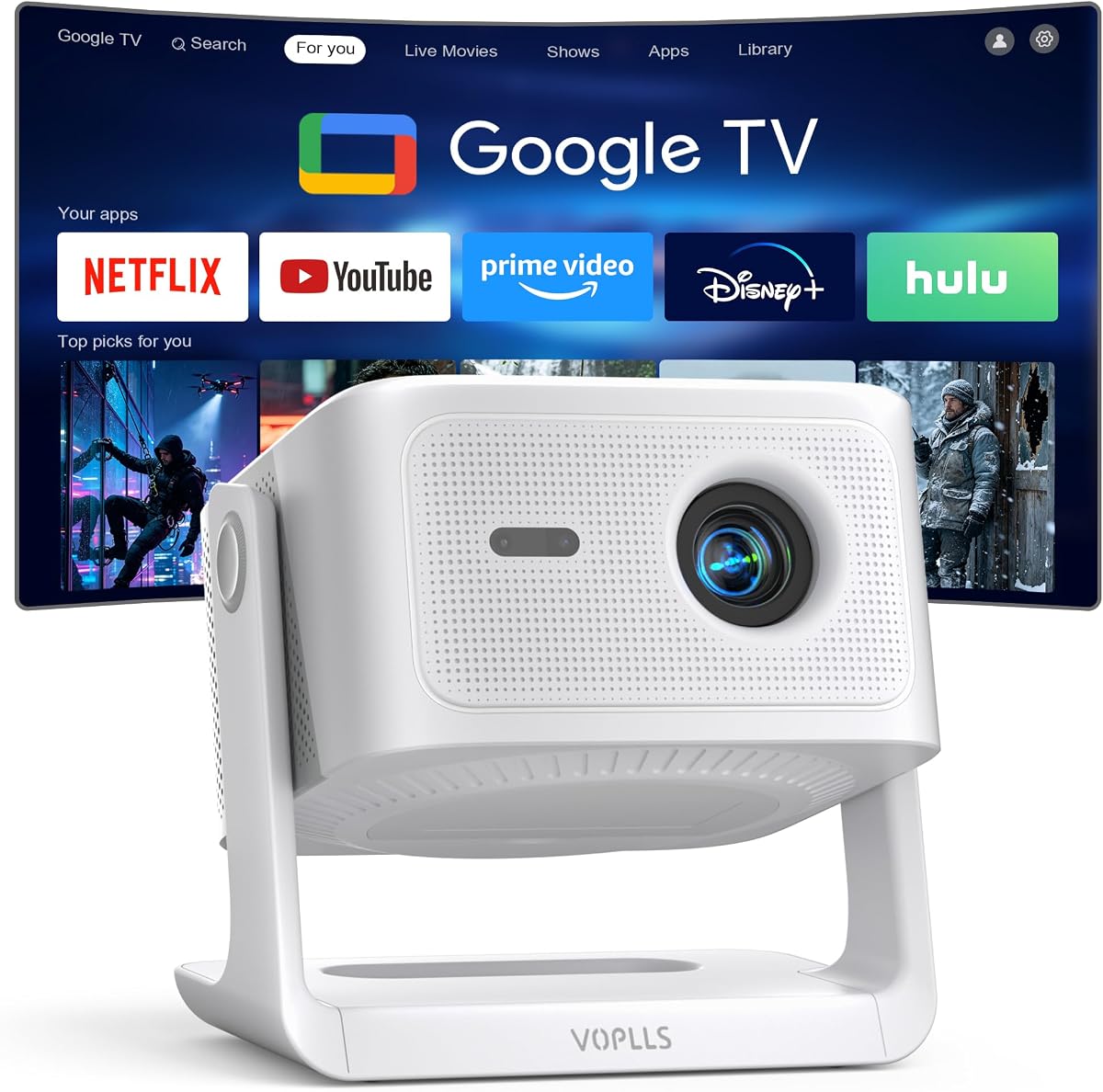


This model offers a complete entertainment experience with built-in Google TV and robust connectivity. It shines in smart features allowing easy access to apps without extra hardware. Users appreciate the auto focus for quick setup.
We may earn a commission when you buy through this link, at no additional cost to you.
The 3500 ANSI brightness ensures decent visibility even in rooms with some ambient light. The 360 degree stand makes overhead projection effortless for bedroom viewing. Voice commands streamline navigation through streaming content.
While the fan noise is present it remains acceptable during typical viewing sessions. Initial setup requires patience to align the image perfectly with the ceiling surface. These trade-offs are minor compared to the smart capabilities provided.
Buy this if you want a versatile smart projector for ceiling use. It balances price with features well for home cinema enthusiasts who value ease of use.
Built-in Google TV means you can stream directly without needing an external stick or player.
The rotating stand allows you to project comfortably from any angle including directly overhead.
We may earn a commission when you buy through this link, at no additional cost to you.
This projector delivers solid performance at a competitive price point for budget-conscious buyers. It includes essential smart features like Google TV and auto keystone which save time during setup. The brightness is sufficient for darker rooms.
We may earn a commission when you buy through this link, at no additional cost to you.
Users find the auto setup convenient as it reduces manual tweaking required for ceiling placement. The voice control feature enhances accessibility when navigating streaming apps. Connectivity options cover most modern devices easily.
However the contrast may not match higher-end models for true black levels. Initial alignment can be tricky until you find the sweet spot for the ceiling. This is acceptable given the lower price tag.
Choose this if you need an affordable overhead projector with smart basics. It is ideal for casual movie nights where cost is a primary factor.
This model offers premium features at a lower price compared to competing brands.
Google Voice Assistant makes finding and playing content hands-free and intuitive.
We may earn a commission when you buy through this link, at no additional cost to you.
This model stands out with a high user rating and strong performance metrics for overhead use. It provides 3500 ANSI brightness which ensures a vivid image in varied lighting conditions. The auto focus feature is reliable for quick deployment.
We may earn a commission when you buy through this link, at no additional cost to you.
The 4K decoding support allows for sharp details when streaming high resolution content. Voice control simplifies the user interface significantly for family members of all ages. Connectivity remains robust with WiFi 6 included.
The price reflects the premium build and features which may not suit tight budgets. Noise from the cooling system can be distracting during quiet scenes. These issues are outweighed by the overall image quality.
Invest in this if you want a high rated projector for serious viewing sessions. It is a solid choice for those who prioritize brightness and reliability.
High ANSI lumens and 4K decoding ensure clear and bright images even in bright rooms.
Voice commands let you search and control playback without reaching for the remote.
We may earn a commission when you buy through this link, at no additional cost to you.
The Aurzen Roku TV D1R offers a compact solution for users who move between rooms often. It runs on Roku OS providing access to popular apps without extra dongles. The auto focus feature helps maintain clarity during use.
We may earn a commission when you buy through this link, at no additional cost to you.
Portability is its main strength making it easy to carry for outdoor setups. The included speakers are decent for small rooms though external audio may be needed for larger spaces. AirPlay support ensures seamless iPhone integration.
Brightness is limited compared to dedicated overhead models so it performs best in dark rooms. The lack of a rotating stand limits ceiling projection capabilities to table placement. This restricts overhead viewing options somewhat.
Select this for travel or casual indoor viewing where portability matters most. It is best for users who value a lightweight footprint over ceiling projection.
Easy to carry and store this projector fits in small bags for any location.
Access thousands of channels and apps directly without needing a separate streaming stick.
We may earn a commission when you buy through this link, at no additional cost to you.
This projector is designed for those who need a tiny footprint without sacrificing key smart features. It includes a rotating bracket that helps with ceiling mounting. The auto focus ensures the image stays sharp quickly.
We may earn a commission when you buy through this link, at no additional cost to you.
Users appreciate the small form factor which allows for easy storage in drawers. Netflix is pre-installed making it ready for streaming right out of the box. The audio is decent for its size though external speakers help.
Brightness is not sufficient for day use or bright rooms. The stand is small and may require additional support for stable overhead projection. These constraints are common in ultra portable devices.
Pick this if you want a pocket projector that can still mount on ceilings. It suits travelers or dorm users needing basic streaming capabilities.
Fits easily in a bag making it the easiest to transport to any venue.
Netflix and other apps are built-in so you do not need extra hardware.
We may earn a commission when you buy through this link, at no additional cost to you.
This projector leads in brightness and audio performance which enhances the ceiling viewing experience significantly. It features VIDAA OS which runs smoothly without ads cluttering the interface. The audio system is powerful for a projector unit.
We may earn a commission when you buy through this link, at no additional cost to you.
The high ANSI lumens ensure visibility even with lights on. Dolby Audio creates a rich soundscape that rivals soundbars. ToF laser focus provides quick alignment for overhead projection.
Its size makes it less portable than smaller units so it is best for semi-permanent setups. The price is higher than average but justified by the features. This trade-off suits quality seekers.
Choose this if you want a bright and loud projector for home cinema. It is ideal for dedicated viewing rooms where size is not an issue.
6000 ANSI lumens deliver a clear image even in rooms with ambient light.
42W Dolby speakers provide rich sound that fills the room without external units.
We may earn a commission when you buy through this link, at no additional cost to you.
This model is incredibly light making it the easiest to hold and position for ceiling viewing. It runs on Roku OS for reliable streaming performance. The stand rotates 180 degrees for flexible angles.
We may earn a commission when you buy through this link, at no additional cost to you.
Users find the AirPlay feature very useful for iPhone owners who want quick casting. The design is sleek and unobtrusive on nightstands. WiFi connectivity is stable for typical streaming tasks.
Brightness is low so it works best in dark environments. The speakers are small so external audio is recommended for full experience. These limitations are expected for its weight class.
Buy this if you need a featherweight projector for casual ceiling use. It is perfect for dorms or small apartments where weight matters.
Weighing under one pound this unit is easy to hold during placement.
AirPlay mirroring allows direct screen sharing from iPhones and iPads.
We may earn a commission when you buy through this link, at no additional cost to you.
This projector is built for versatility with a rotation that supports any angle. It is certified for Google TV ensuring reliable app support. The 360 rotation is excellent for ceiling projections.
We may earn a commission when you buy through this link, at no additional cost to you.
Users appreciate the Dolby Atmos audio which provides a wide sound stage for movies. The auto focus and screen fit features automate much of the setup process. Connectivity is broad with multiple ports.
Some users report initial WiFi connection issues that require patience. Setup can be lengthy if the room has obstacles. These are minor issues compared to the flexibility offered.
Select this if you want a reliable ceiling projector for varied settings. It is great for those who value Google integration and audio quality.
Official certification ensures all Google apps work smoothly and update regularly.
360 degree rotation allows projection from any angle without extra mounts.
We may earn a commission when you buy through this link, at no additional cost to you.
This model is a top choice for users needing a bright image in ceilings. It features Google TV and auto focus for easy setup. The high lumens count ensures visibility in brighter rooms.
We may earn a commission when you buy through this link, at no additional cost to you.
The auto screen alignment helps maintain a neat image on overhead surfaces. Connectivity via WiFi 6 keeps streaming smooth without buffering. Audio is strong enough for casual use.
The base is somewhat bulky which may limit placement on small tables. Fan noise is noticeable during quiet scenes. These are minor trade-offs for the brightness levels.
Choose this if brightness is your top priority for ceiling viewing. It works well for living rooms where light control is difficult.
3000 ANSI ensures a clear image even with lights on in the room.
Automatic screen alignment saves time when setting up for ceiling projection.
We may earn a commission when you buy through this link, at no additional cost to you.
This projector offers extreme brightness that dominates in high light environments. It runs on a Linux OS that is fast and ad free. Focus speed is rapid thanks to TOF technology.
We may earn a commission when you buy through this link, at no additional cost to you.
The Dolby audio supports immersive sound for gaming and movies. Connectivity covers all bases including wireless casting. Users find the image sharp and well defined.
The OS is different from Android which may require adjustment. The price is on the higher end for entry level users. These are acceptable for the quality provided.
Pick this if you want maximum brightness and speed. It suits enthusiasts who want a high performance ceiling projector.
Linux OS ensures a clean interface without ads slowing down operation.
5000 ANSI lumens provide a powerful image visible in bright environments.
We may earn a commission when you buy through this link, at no additional cost to you.
Selecting the right overhead projector requires balancing brightness resolution and smart features. This guide breaks down the most important factors for ceiling viewing.
Brightness is critical for overhead projectors because light scatters more when projecting upwards. Look for models with at least 3000 ANSI lumens to ensure the image remains clear even with some lights on. Higher brightness helps combat washout in brighter environments.
Prioritize ANSI ratings over generic lumens claims to guarantee real world performance.
A projector designed for overhead use needs a flexible stand to tilt towards the ceiling. Models with 360-degree rotation or built-in brackets make this easier without extra mounts. Check if the stand allows locking in place for stability.
Ensure the stand supports secure ceiling angles without needing additional equipment.
Built-in smart OS options like Google TV or Roku simplify the setup by removing the need for external sticks. Verify that the OS supports your favorite streaming apps natively. This saves ports and keeps the setup clean.
Look for certified apps to ensure smooth playback and regular updates.
Auto focus and keystone correction are vital for overhead projection as manual alignment can be tricky. TOF laser or AI focus systems adjust instantly when you move the projector. Digital zoom and screen fit features further refine the image.
Choose models with automatic adjustment to avoid time-consuming manual tweaks.
Modern projectors should support WiFi 6 for stable high speed streaming. Bluetooth 5.2 allows for wireless audio pairing which is useful if the built-in speakers are insufficient. Multiple HDMI and USB ports add versatility for external devices.
Verify WiFi and Bluetooth versions to ensure smooth connectivity with modern devices.
Sound is just as important as picture for an immersive ceiling experience. Look for Dolby Audio or higher wattage speakers to fill the room. If the speakers are weak consider one with a 3.5mm or Bluetooth audio out.
Check audio power ratings to match the room size you plan to use.
If you plan to move the projector often between rooms weight matters significantly. Lightweight models under two pounds are easier to position on ceilings. However ensure the build quality is solid to prevent damage.
Balance the need for portability with durability for long term ceiling use.
Native 1080P resolution provides sharp text and clear details for ceiling viewing. Support for 4K decoding allows streaming higher resolution content even if native is 1080P. Wide color gamut ensures vibrant colors that look good from below.
Prioritize native resolution and color accuracy for a true cinematic feel.
To use your projector for ceiling viewing first place it on a stable flat surface or mount it securely. Adjust the stand to tilt the lens upward toward the ceiling. Use the auto focus feature to ensure the image is sharp and aligned.
Connect your preferred streaming device via HDMI or use the built-in smart system to access apps. If the room is bright consider darkening the curtains to enhance image contrast and clarity. Use Bluetooth headphones for late night viewing if noise is a concern.
Regularly clean the lens with a soft dry cloth to prevent dust from causing spots. Ensure the ventilation areas are clear to avoid overheating during long sessions. Store the projector in a protective case when not in use to maintain its condition.
Native 1080P resolution is generally the best balance for overhead TV projectors. It provides sharp enough detail for ceiling viewing without increasing cost significantly. Look for models that support 4K decoding to handle high resolution streaming content smoothly.
Yes but you should choose a model with at least 3000 ANSI lumens. Brightness is key to overcoming ambient light. Darkening the room with curtains helps improve image quality and contrast significantly.
Not necessarily. You can project directly onto a painted ceiling or wall. However a white or neutral colored surface yields better colors. A dedicated ceiling screen can enhance contrast if you watch often.
Use the auto keystone correction feature if your projector has it. This tool automatically aligns the image. If manual adjustment is needed adjust the stand until the image is rectangular on the ceiling.
Most models come with Google TV or Roku which support Netflix Prime Video and Disney. These platforms are optimized for smart projectors and provide a seamless experience. Verify app availability before purchasing.
Most models run at 30dB or lower which is quiet for most users. If you are noise sensitive look for a model with a quiet cooling system. Using headphones can also mask any fan noise.
We reviewed ten top models for overhead TV projectors offering a range of features and price points. The VISSPL and XuanPad models stood out for their brightness and smart capabilities suitable for ceiling use.
Prioritize brightness and stand flexibility when making your decision. These factors directly impact how well the projector performs in your specific bedroom or living room setup.
Prices change frequently so always check the current listings before buying. Ensure your final choice matches your budget and technical requirements for the best results.