TECKNET Wired Keyboard
4.5Editor score
Silent typing design
RGB backlighting modes
Spill-resistant frame
Discover the top membrane keyboards for gaming and work. We compare features, build quality, and performance to help you choose the right model today.
Membrane keyboards remain a popular choice for users seeking quiet operation and affordability. They offer a soft typing experience without the noise of mechanical switches. Finding the right model requires balancing comfort, durability, and extra features like lighting.
We evaluated ten leading options based on user feedback, build quality, and specific use cases. Our comparison covers gaming performance, typing comfort, and additional utilities like macro keys or spill resistance. Each product was assessed against real-world usage scenarios.
Every pick in this list highlights unique strengths tailored to different needs. We include detailed specs and pros to help you decide quickly. Please note that prices and availability can change frequently on retailer sites.
4.5Editor score

4.5Editor score

4.4Editor score
This side-by-side comparison highlights the key specifications and unique features of each top-rated membrane keyboard. Use this table to quickly identify which model fits your specific needs and budget.


The Razer Ornata V3 stands out as a top contender in the membrane category with its unique mecha-membrane switches. Rated 4.5 stars by users, it offers a blend of mechanical precision and membrane comfort. The low-profile keys reduce hand strain during extended typing sessions.
We may earn a commission when you buy through this link, at no additional cost to you.
Its standout feature is the mecha-membrane switch technology, which provides a snappy, clicky feel without the noise. The UV-coated keycaps ensure legends stay visible longer, resisting wear from daily use. Dedicated media keys and backlighting add convenience for gamers and workers alike.
While the keyboard excels in comfort and durability, it lacks deep software customization compared to higher-end models. Some users may find the media keys fixed in function. However, the included magnetic wrist rest adds significant ergonomic value.
This keyboard is ideal for users who want a quiet yet responsive typing experience. It suits both office environments and gaming setups. We recommend it as the best overall choice for those prioritizing comfort and build quality.
The slim keycaps and shorter switches allow for natural hand positioning. This design minimizes wrist strain during long hours of use.
UV coating protects legends from fading and shields against wear. This ensures the keyboard looks new for years of frequent use.
We may earn a commission when you buy through this link, at no additional cost to you.
The SteelSeries Apex 3 delivers an exceptionally quiet gaming experience with its whisper quiet switches. Rated 4.6 stars, it is designed for users who need silent operation without sacrificing performance. The water resistant build adds a layer of protection against spills.
We may earn a commission when you buy through this link, at no additional cost to you.
Key strengths include the 10-zone RGB illumination and the premium magnetic wrist rest. These features enhance both aesthetics and comfort. The dedicated multimedia controls allow quick adjustments without interrupting your workflow or gameplay.
However, the lack of software means lighting effects are limited to onboard presets. Users cannot customize macros extensively. Despite this, the keyboard remains a solid choice for casual gamers and shared spaces.
Choose this model if silence and spill resistance are your priorities. It works well on PCs and consoles. The included wrist rest makes it a comfortable option for long sessions.
The low friction keypresses reduce noise significantly. This is perfect for libraries, offices, or late-night gaming.
IP32 rating prevents damage from accidental spills. This ensures longevity even in messy environments.
We may earn a commission when you buy through this link, at no additional cost to you.
The Corsair K55 CORE RGB offers excellent value with its ten-zone RGB lighting and responsive switches. Rated 4.4 stars, it provides essential gaming features at a budget-friendly price. The spill resistance ensures durability against accidental drinks.
We may earn a commission when you buy through this link, at no additional cost to you.
Its media controls and 1000Hz polling rate improve responsiveness during games. The iCUE compatibility allows some customization, though it is limited compared to higher-end models. The design is straightforward and functional.
Trade-offs include a basic build feel and fewer advanced features. It lacks a wrist rest and dedicated macro keys. However, for the price, it delivers reliable performance.
This keyboard is best for budget-conscious gamers seeking RGB flair. It suits entry-level setups. The spill resistance makes it a practical choice for casual use.
Customizable lighting zones brighten your desktop. Create mesmerizing effects to match your gaming style.
1000Hz polling ensures fast keypress detection. This reduces input lag for smoother gameplay.
We may earn a commission when you buy through this link, at no additional cost to you.
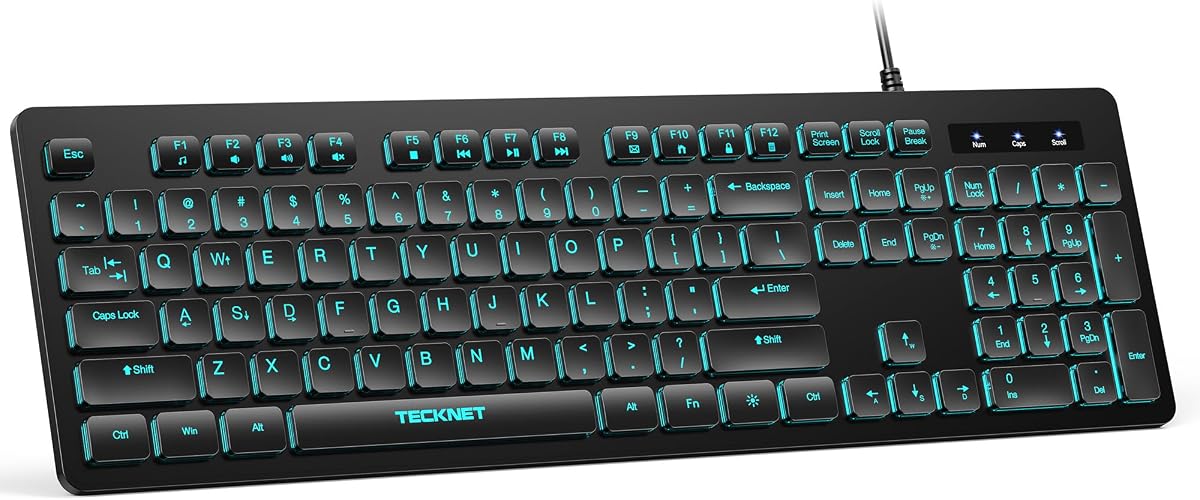
The TECKNET Wired Keyboard delivers quiet and comfortable typing with its low-profile membrane keys. Rated 4.5 stars, it features a full-size layout suitable for data entry. The RGB backlighting adds a touch of style without a high cost.
We may earn a commission when you buy through this link, at no additional cost to you.
Its standout features include the lifetime warranty and spill-resistant conductive film. This ensures long-term reliability. The adjustable tilt feet and anti-slip pads allow you to customize the typing angle for comfort.
While it lacks advanced gaming features, it excels as a workspace tool. The limited Mac functionality might be a downside for some. However, the silent operation makes it ideal for shared offices.
We recommend this keyboard for users on a strict budget. It is perfect for home offices and students. The lifetime warranty provides peace of mind for daily use.
Soft keystrokes reduce noise significantly. This creates a quiet and focused workspace environment.
Each product comes with a lifetime warranty. This ensures support and reliability for years.
We may earn a commission when you buy through this link, at no additional cost to you.
The Corsair K55 RGB PRO offers advanced features like six dedicated macro keys and dynamic RGB lighting. Rated 4.4 stars, it includes software integration for customization. The IP42 rating protects against dust and spills.
We may earn a commission when you buy through this link, at no additional cost to you.
Its premium build includes a detachable palm rest and media keys. The iCUE software allows vibrant lighting effects. This makes it ideal for streamers and gamers who need extra controls.
Trade-offs include the higher price and reliance on software for full functionality. Users without a PC might find macros limited. However, the build quality justifies the cost.
This model is best for power users needing macros. It suits gaming setups with iCUE integration. The palm rest ensures comfort during long sessions.
Activate shortcuts in one stroke. Easily set up through iCUE or stream deck software.
Program your own lighting effects across zones. Light up your desktop with vibrant colors.
We may earn a commission when you buy through this link, at no additional cost to you.
The Corsair K55 CORE TKL provides a compact layout with eight-zone RGB lighting. Rated 4.7 stars, it frees up desk space for mouse movement. The spill-resistant design ensures durability against accidents.
We may earn a commission when you buy through this link, at no additional cost to you.
Its key strengths include the tenkeyless design and media controls. The fast polling rate ensures responsive input. It works well for gamers who prefer larger mouse areas.
The lack of a numeric keypad may inconvenience data entry users. It is not suitable for accounting or heavy spreadsheet work. However, it remains a strong choice for gaming.
This keyboard is perfect for gamers with limited desk space. It offers essential features without bulk. The TKL design prioritizes mobility and comfort.
A compact layout gives more room for mouse movement. This leads to big wins in gaming.
Create dazzling lighting effects. Match your lights to your clutch plays.
We may earn a commission when you buy through this link, at no additional cost to you.
The Redragon K512 RGB offers six onboard macro keys and a media wheel without software. Rated 4.5 stars, it provides instant in-game combos. The anti-ghosting supports up to 26 keys simultaneously.
We may earn a commission when you buy through this link, at no additional cost to you.
Its standout features include the detachable wrist rest and media controls. The double-shot keycaps resist fading. The RGB modes are simple but effective for gaming.
While the lack of software is a trade-off, it makes setup easier for casual users. The build feels slightly basic. However, the included rest adds comfort.
This keyboard is ideal for gamers needing quick macros. It works well for budget setups. The media wheel offers unique control for music.
Record combos on the fly without software. Instant shortcuts improve your gameplay.
Easy media wheel controls music playback. Adjust volume without leaving your game.
We may earn a commission when you buy through this link, at no additional cost to you.
The Razer Ornata V3 TKL brings low-profile keys and Snap Tap technology to a compact layout. Rated 4.6 stars, it prioritizes quick in-game movement. The magnetic wrist rest and RGB lighting enhance comfort and style.
We may earn a commission when you buy through this link, at no additional cost to you.
Its standout feature is Snap Tap, which prioritizes inputs for faster movements. The UV-coated keycaps ensure durability. The 8-zone RGB adds visual flair.
The cost is higher than standard membrane keyboards. Some features require Razer Synapse software. However, the build quality is excellent.
This model is best for FPS gamers seeking speed. It suits setups needing RGB integration. The TKL design saves desk space.
Prioritize inputs for quick movement. Toggle this feature for competitive play.
Slimmer caps allow natural hand positioning. Reduce strain during long hours.
We may earn a commission when you buy through this link, at no additional cost to you.
The Corsair K55 RGB PRO US Layout offers Elgato integration for streaming. Rated 4.3 stars, it shares features with the Pro model. The IP42 resistance and six macro keys remain standard.
We may earn a commission when you buy through this link, at no additional cost to you.
Its strengths include seamless integration with streaming software. The RGB effects and media keys provide utility. It works across PC and Xbox platforms.
The similarity to the standard Pro model may limit appeal. Software dependency is a factor. However, streaming users benefit from the shortcuts.
This keyboard is best for content creators. It suits setups with Elgato hardware. The US layout ensures standard key placement.
Use instant streaming commands through the keyboard. Simplify your workflow during broadcasts.
Light up your desktop with vibrant colors. Program effects via iCUE software.
We may earn a commission when you buy through this link, at no additional cost to you.
The MSI Vigor GK30 RGB uses mechanical-like plunger switches for a crisp experience. Rated 4.6 stars, it features water repellent design for protection. The 6-zone RGB adds visual appeal.
We may earn a commission when you buy through this link, at no additional cost to you.
Its strengths include the sturdy gaming base and Dragon center customization. The plunger switches feel responsive without full mechanical noise. It is practical for daily use.
The customization is basic compared to high-end models. Dragon center may be less intuitive. However, the build stability is strong.
This keyboard is best for budget gamers needing stability. It suits setups requiring water protection. The plunger switches offer a unique feel.
Switches provide a crisp typing experience. Enjoy mechanical feel without the noise.
Splash-proof design guards against spills. Ensure durability in messy environments.
We may earn a commission when you buy through this link, at no additional cost to you.
Selecting the right membrane keyboard involves considering layout, durability, and special features. We break down the key factors to help you make an informed decision.
Membrane keyboards vary from standard to hybrid designs. Look for mecha-membrane switches if you want snappy feedback. Quiet switches are better for shared spaces.
Prioritize switches that match your noise tolerance and feedback preferences.
Accidental spills are common in gaming and work environments. Choose models with spill-resistant or water-repellent coatings. Higher IP ratings indicate better protection against dust and liquids.
Spill resistance extends the lifespan of your keyboard significantly.
Decide between full-size, tenkeyless, or compact layouts. Full-size includes a numeric keypad for data entry. TKL saves desk space for mouse movement.
Choose a layout that fits your available desk space.
RGB lighting ranges from static to fully customizable zones. Look for multi-zone effects if you want aesthetic flexibility. Some models offer software for detailed lighting control.
Ensure lighting options match your style without needing complex software.
Dedicated media keys simplify volume and playback control. Macro keys allow you to record complex commands for gaming or work. Check if macros require software or work onboard.
Prioritize keyboards with physical macro or media keys for convenience.
Comfort is vital for long typing sessions. Look for low-profile keys, wrist rests, or detachable palm rests. Adjustable tilt feet help customize typing angles.
Select ergonomic features to prevent strain during extended use.
Some keyboards need proprietary software for full customization. Ensure the software supports your operating system. Cross-platform compatibility is useful for multi-device setups.
Verify compatibility before purchasing to avoid software issues.
Warranty periods range from basic to lifetime coverage. A longer warranty indicates manufacturer confidence. Check support channels for quick assistance if issues arise.
Choose a model with reliable warranty and customer support.
To maximize lifespan, clean your keyboard regularly. Use compressed air to remove debris from under the keys. For spills, disconnect the keyboard and dry it immediately.
Customize your settings using included software. Learn the media key shortcuts to control audio faster. Adjust tilt feet to reduce wrist strain over time.
Store the keyboard in a dry environment when not in use. Protect it from direct sunlight to prevent keycap fading. Regular maintenance ensures consistent performance.
Membrane keyboards are quieter and more affordable. While they lack mechanical feedback, modern mecha-membrane designs offer snappy response. They are suitable for casual and competitive gaming.
Quality membrane keyboards typically last 5 to 10 years. Durability depends on usage frequency and build quality. Regular cleaning extends their lifespan significantly.
Many models support macro keys but require software. Onboard macros are available on select models. Check specifications for macro functionality before buying.
Keycaps are generally not replaceable on membrane models. If keys wear out, the keyboard may need replacement. Look for durable keycaps if longevity is a priority.
Membrane keyboards are naturally quieter than mechanical ones. Whisper quiet models reduce noise further. They are ideal for office environments.
Most models are spill-resistant rather than waterproof. Look for IP ratings to confirm protection levels. Avoid immersing the keyboard in water.
We highlighted the Razer Ornata V3, TECKNET Wired Keyboard, and Corsair K55 RGB PRO as top picks. Each offers unique strengths in design and functionality.
Prioritize features like spill resistance and ergonomics for long-term use. Choose a layout that fits your workspace and budget.
Prices and availability change frequently, so verify current options before buying. Check retailer sites for the latest deals.