
YEELIGHT Monitor Light Bar
4.5Editor score
Full-metal body design
Touch control interface
RG0 blue light safe
Late night gaming sessions demand the right lighting to protect your eyes and enhance immersion. A dedicated monitor light bar provides task lighting without screen glare, reducing strain during long hours of play.
We evaluated ten top-rated monitor light bars based on optical design, brightness control, and ergonomic features. Our analysis focuses on how each model supports focused gameplay while minimizing digital eye fatigue.
Each pick highlights key strengths like RGB ambiance, auto-dimming, or wide coverage. Prices and availability change frequently, so check current listings before making your final decision for your gaming setup.
4.5Editor score

4.7Editor score
4.6Editor score
As an Amazon Associate we earn from qualifying purchases.
The following table compares key specifications across all ten products to help you quickly identify the best fit for your monitor size and gaming preferences.


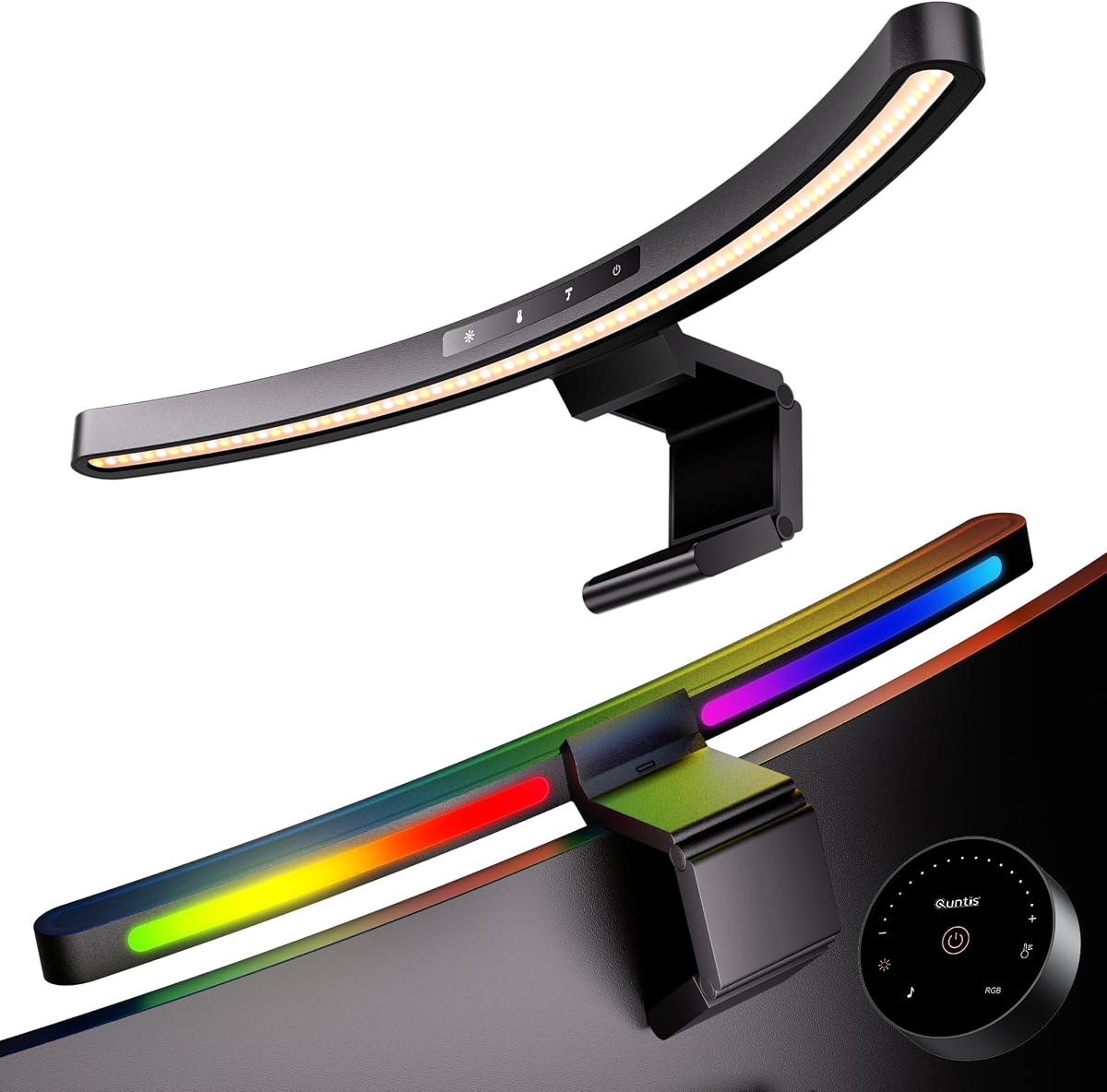
The Quntis Curved Monitor Light Bar stands out as our top choice for late-night gaming due to its exceptional balance of task lighting and ambient immersion. It earns a high rating for effectively reducing eye strain while providing customizable RGB backlighting that enhances the gaming atmosphere without distracting from gameplay.
We may earn a commission when you buy through this link, at no additional cost to you.
Its dual-light design offers both a front task light and a rear RGB backlight. The front light provides up to 1400 lux at the center with stepless dimming and color temperature control. The 45-degree asymmetrical optical design ensures light hits your desk and keyboard without reflecting off your screen, a critical feature for maintaining focus during intense sessions.
While the unit is priced higher than basic options, the investment is justified by the high CRI of 98 and the included ambient light sensor that auto-adjusts brightness. These features protect your eyes during long sessions, making it a superior choice for gamers who prioritize both performance and comfort over time.
This model is ideal for gamers using ultrawide or curved monitors who want a premium lighting solution. The flexible clamp and memory function ensure you get consistent lighting every time you power on, making it the best overall pick for enhancing your late-night gaming setup.
The 15 RGB backlight modes allow you to create a dynamic atmosphere that syncs with your game mood without competing with screen visuals.
With RG0 certification and flicker-free LEDs, this light bar minimizes harmful blue light exposure during extended late-night play sessions.
We may earn a commission when you buy through this link, at no additional cost to you.
The YEELIGHT Monitor Light Bar offers an excellent entry point for gamers seeking reliable desk lighting without breaking the bank. It focuses purely on eye comfort and task illumination, delivering high-quality light with a premium metal build that feels durable and sleek.
We may earn a commission when you buy through this link, at no additional cost to you.
Its design prioritizes eye care with RG0 certification and flicker-free technology. The stepless dimming and color temperature adjustment from 2700K to 6500K allow you to customize the light to match your environment. While it lacks RGB effects, the high CRI of 95 ensures accurate colors for any visual work or gaming.
The trade-off for the lower price is the absence of a rear RGB backlight, meaning it doesn't add ambient mood lighting. However, for gamers who prefer a clean, distraction-free setup or need a secondary monitor light, this remains a top contender due to its build quality and cost.
Ideal for budget-conscious gamers or those who prioritize functionality over flashy features, this light bar provides consistent, glare-free illumination. It is the best budget option for protecting your eyes while maintaining a professional look on your desk.
The full-metal body not only looks sleek but also aids in heat dissipation, ensuring the unit stays cool during long gaming nights.
Touch controls allow for easy adjustments without fumbling for buttons, keeping your focus on the game.
We may earn a commission when you buy through this link, at no additional cost to you.
The Quntis 17.7'' Curved Monitor Light Bar brings gaming immersion to the next level with its unique music-sync RGB backlight feature. This model is designed for gamers who want their lighting to react to their environment, enhancing the experience without distracting from the screen.
We may earn a commission when you buy through this link, at no additional cost to you.
It features 13 RGB presets and 10 music sync modes that respond to sound in real time. The front light is equally impressive, offering stepless dimming and high CRI color accuracy for your tasks. The dual control system ensures you can adjust settings via remote or touch controls on the bar itself.
While the price is higher than standard models, the included music sync functionality and premium build quality justify the cost for dedicated gamers. The webcam-friendly design also ensures your streaming setup remains unobstructed, making it a versatile tool for content creators and streamers.
This model is perfect for those seeking a dynamic lighting experience that complements their gameplay. The combination of task lighting and reactive ambiance makes it the best premium choice for creating an immersive gaming environment.
The ability to sync lights with music or game sounds adds a layer of immersion that static lighting cannot match.
Whether you prefer a remote or touch buttons, this unit ensures easy access to settings without disrupting your session.
We may earn a commission when you buy through this link, at no additional cost to you.
This model emphasizes convenience with its included remote control, allowing you to adjust brightness and color temperature from your desk. It is a solid choice for gamers who value ergonomic controls and automated lighting adjustments without needing to reach for the lamp.
We may earn a commission when you buy through this link, at no additional cost to you.
The 20.1-inch bar provides wide coverage suitable for most monitors. The auto-dimming sensor adjusts to ambient light, while the 2-hour rest timer helps you manage gaming sessions. Its patented clamp design fits irregular and curved monitors securely without damaging the screen.
Lacking RGB backlighting keeps the design focused on task lighting. While this might be a downside for immersion seekers, it makes the unit more efficient for pure eye care. The remote function is a significant convenience for adjusting settings without interrupting gameplay.
Ideal for gamers who need reliable task lighting and ergonomic control, this bar balances functionality and eye care. It is a strong contender for those who prioritize ease of use and consistent illumination over mood lighting effects.
The remote allows you to adjust settings without interrupting your gameplay or getting up from your chair.
The built-in timer helps reduce eye strain by reminding you to take regular breaks during long gaming sessions.
We may earn a commission when you buy through this link, at no additional cost to you.
This model is ideal for gamers with smaller desk setups or standard monitors. It offers dual lighting modes with 24 RGB options to create an immersive atmosphere while keeping the footprint small enough for clutter-free desks.
We may earn a commission when you buy through this link, at no additional cost to you.
The 15.7-inch length provides sufficient illumination for standard-sized monitors without overwhelming the space. The memory function automatically restores your preferred settings upon power-on. The high CRI rating ensures colors are accurate for both gaming and work tasks.
While not suitable for ultrawide monitors, its compact design and RGB capabilities make it a great choice for focused gaming. The lack of a large footprint means more desk space for peripherals and your keyboard during intense sessions.
Best for those with standard monitors who want RGB ambiance, this bar offers a balanced mix of task and mood lighting. Its compact size and high color accuracy make it a versatile option for smaller gaming environments.
The 15.7-inch design ensures your desk remains spacious for peripherals while still delivering ample task lighting.
Separate front and rear lights allow you to adjust task and ambiance independently for perfect lighting balance.
We may earn a commission when you buy through this link, at no additional cost to you.
This unit offers a straightforward and affordable solution for gamers who need basic task lighting. It focuses on simplicity with mechanical switches and USB power, making it easy to integrate into any desk setup without complex wiring.
We may earn a commission when you buy through this link, at no additional cost to you.
The 11.8-inch length covers standard monitors well, and the 800 lux brightness provides adequate light for most gaming conditions. The asymmetrical optical design ensures no glare on the screen. It is a practical choice for those who just want functional lighting.
Lacking advanced features like auto-dimming or RGB effects keeps costs low. While this limits customization, it ensures reliability and ease of use. It is a solid starting point for anyone entering the world of monitor lighting.
Best for budget-conscious gamers who prioritize function over features, this model provides essential eye comfort. Its simple design makes it easy to use for anyone looking to reduce eye strain during late-night gaming.
The straightforward mechanical switches ensure reliable operation without the need for batteries or digital interfaces.
Powered via USB from your PC or a power bank, it offers flexible placement options for your gaming setup.
We may earn a commission when you buy through this link, at no additional cost to you.
This light bar is designed for wide desk setups, offering broader coverage than smaller models. Its 15.7-inch length and extended optical design ensure even lighting across large surfaces, reducing the need for multiple light sources.
We may earn a commission when you buy through this link, at no additional cost to you.
With 900 lux brightness and stepless dimming, you can fine-tune the light to match your preferences. The memory function recalls your last settings, ensuring consistency. It provides reliable task lighting that reduces eye strain during long play sessions.
While it lacks RGB effects, the focus is on uniform and functional light. This makes it ideal for gamers who prefer a clean setup focused on the screen. The simple controls and USB power make installation quick and hassle-free.
Ideal for those with wider desks who need consistent lighting, this model provides reliable performance at a reasonable price. It is a strong choice for gamers who value uniform illumination over mood lighting features.
The widened light beam ensures even illumination across larger desks, eliminating dark spots during gaming sessions.
The memory function saves your preferred brightness and color, so you never need to adjust settings manually.
We may earn a commission when you buy through this link, at no additional cost to you.
This model combines a robust design with advanced RGB features. The 20-inch length fits larger monitors, while the 70-inch cable provides flexibility in placement. It is a strong choice for gamers who need extended reach and high-quality lighting.
We may earn a commission when you buy through this link, at no additional cost to you.
The touch remote allows precise control over 15 RGB modes and task lighting. The RG0 certification and flicker-free technology ensure eye safety during long sessions. The high CRI ensures colors remain vibrant and accurate for any content.
While the setup requires care due to the larger dimensions, the benefits are worth it for large setups. The sliding clamp design ensures stability. It is a premium solution for those who value both ambiance and precise task lighting.
Best for gamers with larger setups and premium needs, this bar offers excellent control and build quality. It stands out for its cable length and RGB capabilities, making it a top choice for immersive environments.
The 70-inch USB-C cable allows you to place your power source further away, keeping your desk organized.
The patented sliding weight design ensures the light stays secure on larger monitors without wobbling.
We may earn a commission when you buy through this link, at no additional cost to you.
This model offers independent control for both front and rear lighting via separate tactile buttons. It is a straightforward solution for gamers who want distinct control over task and ambient lighting without complex interfaces.
We may earn a commission when you buy through this link, at no additional cost to you.
The 9 RGB modes and dimmable front light allow basic customization. The USB-C power ensures compatibility with modern devices. The memory function keeps your settings consistent, ensuring you have the right lighting whenever you turn it on.
While the RGB options are limited, the independent control is a unique feature. It allows you to use RGB for ambiance while keeping the front light focused on your keyboard. It is a practical choice for balanced setups.
Best for those who want simple dual control, this bar offers functional lighting. Its tactile buttons and USB-C compatibility make it easy to integrate into modern gaming stations without complexity.
Control your RGB and task lights separately to optimize your setup for both work and play.
The USB-C connection ensures compatibility with the latest laptops and adapters for flexible power options.
We may earn a commission when you buy through this link, at no additional cost to you.
This model is a classic choice for gamers prioritizing eye health. Its auto-dimming sensor and flicker-free technology ensure comfortable lighting conditions throughout long gaming sessions. It focuses purely on reducing strain without extra RGB features.
We may earn a commission when you buy through this link, at no additional cost to you.
The asymmetrical optical design directs light onto the desk, preventing screen reflection. The weighted clamp holds securely without damaging your monitor. Its high CRI ensures color accuracy, which is useful for any visual tasks you might perform.
While it lacks RGB mood lighting, its core functionality is unmatched for eye care. The auto-dimming feature adapts to room changes, ensuring consistent comfort. It is a reliable tool for reducing fatigue during late-night play.
Best for serious gamers who prioritize eye health over ambiance, this lamp offers essential protection. Its auto-adjusting light and glare-free design make it a superior tool for long sessions where comfort is key.
The built-in sensor continuously adjusts light levels to prevent fatigue caused by sudden brightness changes.
Asymmetrical lighting ensures no light reflects off your screen, keeping your focus entirely on the game.
We may earn a commission when you buy through this link, at no additional cost to you.
Choosing the right monitor light bar depends on your specific setup and lighting needs. Here are the key factors to consider when shopping.
Ensure the light bar fits your monitor dimensions. Most models fit standard to ultrawide screens, but some have specific width limits like 34-inch curves. Check the clamp capacity to avoid damaging your screen.
Always verify the product specifications to confirm your monitor size and thickness fall within the supported range.
Look for asymmetrical optical designs that direct light downward. This prevents glare on your screen which causes eye strain during long sessions. The best models ensure no light hits the display directly.
Prioritize models that explicitly state they are glare-free to maintain visibility and comfort.
Stepless dimming allows precise control over light intensity. A range of 800 to 1400 lux is generally sufficient for desk tasks. Ensure the light offers flexibility to adjust to room conditions.
Opt for stepless dimming over fixed steps to find the perfect brightness for your eyes.
Adjustable color temperature from warm to cool helps you set the right mood. Warm light is better for relaxation while cool light aids focus. Most models offer 3000K to 6500K ranges.
Choose a model with a wide range to adapt your lighting to different times of day.
RGB backlighting adds immersion to gaming. Some models sync with music or offer preset modes. Consider if you want mood lighting or just task light.
Decide early if ambient light is a priority to narrow down your options quickly.
Controls can be touch, buttons, or remotes. Remotes are convenient for desk adjustments. Touch controls are sleek but may lack feedback. Mechanical switches are reliable.
Select a control method that matches how you interact with your desk setup.
Certifications like RG0 blue light safety and flicker-free technology protect your vision. High CRI ensures accurate colors. These features are vital for long gaming sessions.
Always check for eye care certifications to ensure the safety of your eyes during use.
A sturdy clamp and metal body ensure stability. A low profile avoids obstructing webcams. Good design keeps your desk organized and your monitor protected.
Prioritize robust build quality to ensure the device stays secure during vigorous gaming.
Attach the clamp to the top center of your monitor. Ensure the light is angled downward to avoid screen reflection. Adjust the tilt so the desk and keyboard are evenly lit.
Use the remote or touch controls to set the temperature. For gaming, a neutral white often works best. Use RGB modes to create an immersive atmosphere during downtime.
Clean the light bar with a soft dry cloth regularly. Avoid harsh chemicals that can damage the coating. Keep the sensor area clear to ensure auto-dimming works correctly.
No, high-quality models use asymmetrical optical designs to direct light onto your desk and keyboard. This specific design prevents light from reflecting off the screen and causing glare.
Yes, many models are designed for ultrawide and curved monitors. Check the product specifications to confirm the width limit and clamp fit for your specific screen size.
The built-in ambient light sensor detects changes in room brightness. It automatically adjusts the bar's brightness to maintain optimal lighting levels without manual intervention.
Yes, most bars are USB powered and work with any USB power source. You can use them with adapters, power banks, or other USB ports to illuminate any workspace.
Most high-quality models feature LEDs rated for up to 50,000 hours. This ensures years of reliable use without needing frequent replacements for your setup.
No, RGB lighting does not interfere with gaming performance. It only adds visual ambiance to your setup without affecting your PC's processing power or connection speed.
Simply set your preferred brightness and color settings. The memory function will automatically restore these last used settings when you power the bar back on.
Yes, many have RG0 blue light certification and flicker-free technology. These features reduce eye strain and protect your vision during extended gaming sessions.
The Quntis Curved Monitor Light Bar stands out for its immersive RGB features and high-quality light. It offers the best balance of performance and ambiance for most gamers.
If you are on a budget, the YEELIGHT Monitor Light Bar provides excellent eye safety and build quality. It focuses on essential task lighting without extra features.
Remember to check current listings before buying as prices and availability change. Select a model that fits your monitor and setup perfectly for the best experience.