
Lenovo ThinkPad USB4 Smart Dock 5500
4.2Editor score
Up to 40 Gbps bandwidth
Supports up to 4 displays
Integrated USB4 cable included
This guide compares the top Lenovo docking stations for connectivity and performance to help professionals choose the best device for their workspace needs.
Lenovo docking stations provide essential connectivity for modern laptops allowing seamless integration with monitors keyboards and other peripherals. These devices transform a portable machine into a full desktop workstation enhancing productivity and workspace organization significantly for users.
We evaluated ten leading Lenovo models based on port variety video output capabilities power delivery and overall build quality. Our analysis focuses on real-world performance metrics and compatibility across different operating systems to ensure you find the right fit for your specific setup.
Each pick highlights unique strengths whether you need travel portability high performance power or extensive multi-monitor support. Prices and availability can change over time so always verify current details before making your final purchase decision for your office.
4.2Editor score

4.2Editor score

4.3Editor score
The following table offers a side-by-side comparison of all ten Lenovo docking stations reviewed in this guide to help you quickly identify the model that best matches your connectivity and performance requirements.




The Lenovo USB-C Dual Display Travel Dock stands out as a versatile solution for professionals needing robust connectivity on the go. With a rating of 4.2 stars it combines portability with the ability to drive dual 4K displays making it ideal for creative workflows and remote work.
We may earn a commission when you buy through this link, at no additional cost to you.
Its seven expertly engineered ports include DP and HDMI options for visuals plus super-fast USB and ethernet ports for reliable connectivity. The dock supports up to 100W power delivery when paired with an optional 135W adapter ensuring your laptop stays charged during heavy usage.
While the included 65W adapter covers most daily needs users requiring maximum power may need to purchase the additional charger separately. The compact design is perfect for travel but might limit cable management options on larger desks compared to bulkier stationary docks.
This dock is perfect for remote professionals who need a seamless transition between office and travel environments. Its modern aesthetic and sustainable materials add value beyond pure function making it a top recommendation for those prioritizing both performance and environmental responsibility.
Dual 4K displays transform your workspace into a visual powerhouse allowing for extended productivity and multitasking without cluttering your desk.
With 66 percent Post-Consumer Recycled Content in the chassis this dock leads the portfolio as the greenest offering yet from Lenovo.
We may earn a commission when you buy through this link, at no additional cost to you.
The Lenovo ThinkPad Thunderbolt 3 Dock Gen 2 delivers high-performance connectivity for ThinkPad users needing extensive port options. With a rating of 4.1 stars it supports dual UHD 4K displays and includes a robust 135W power adapter to keep your system running efficiently.
We may earn a commission when you buy through this link, at no additional cost to you.
This dock features 2 HDMI and 2 DisplayPort ports alongside multiple USB 3.1 connections ensuring you can attach all your peripherals without dongles. The 135W power adapter provides ample energy for demanding workloads while an always-on USB port keeps mobile devices charged even when the laptop is disconnected.
Compatibility is currently limited to Windows 7 and 10 systems which may restrict use for users on other platforms. The larger form factor makes it less ideal for frequent travelers but excellent for stationary desk setups where performance is the priority.
Ideal for enterprise environments this dock supports PXE Boot and Wake-on-LAN features essential for IT management. It remains a strong choice for ThinkPad owners requiring reliable high-bandwidth connections for multiple monitors and peripherals.
The Thunderbolt 3 Gen 2 connection ensures lightning-fast data transfers and high-bandwidth video output for demanding professional workflows.
With 2 HDMI and 2 DisplayPort ports plus multiple USB options you can connect a wide variety of devices simultaneously.
We may earn a commission when you buy through this link, at no additional cost to you.
The Lenovo ThinkPad USB-C Dock Gen 2 offers versatile connectivity with a strong 4.3 star rating making it a reliable choice for multi-monitor setups. It supports up to three external monitors via HDMI and DisplayPort allowing for expansive workspace configurations.
We may earn a commission when you buy through this link, at no additional cost to you.
This dock includes three USB 3.1 and two USB 2.0 ports providing ample connections for legacy and modern peripherals. A 90W AC power adapter ensures stable power delivery to your devices while connected to the docking station for consistent performance.
Real video output capabilities may vary depending on the system's hardware which is an important consideration before purchase. While it supports DisplayPort 1.4 and HDMI 2.0 the actual resolution and refresh rates will depend on your laptop's output limits.
For users needing a balance of port count and display support this dock is an excellent middle ground. Its ability to support multiple monitors makes it suitable for financial traders or data analysts who need extensive screen real estate.
The dock supports up to three external monitors enabling users to maximize productivity with extended screen real estate.
Included 90W AC power adapter ensures your devices receive stable power while connected to the docking station.
We may earn a commission when you buy through this link, at no additional cost to you.
The Lenovo ThinkPad USB4 Smart Dock 5500 delivers cutting-edge connectivity with up to 40 Gbps bandwidth quadrupling standard USB-C performance. With a rating of 4.2 stars it supports up to four displays and provides 100W power to your laptop for a complete computing platform.
We may earn a commission when you buy through this link, at no additional cost to you.
Its USB4 technology enhances connectivity and productivity by allowing connections to high-performance peripherals and multiple monitors simultaneously. The included 135W adapter supports PD 3.1 ensuring your laptop charges quickly while connected eliminating the need for separate power adapters.
This dock works seamlessly across different operating systems making it versatile for various work environments and laptop brands. Cloud-based fleet management allows IT administrators to configure and diagnose dock fleets remotely which is ideal for enterprise deployments.
Premium features like cloud management and extreme bandwidth justify the higher cost for power users and IT managers. It is best suited for those who need maximum display support and future-proof connectivity for high-end workstations.
USB4 technology delivers up to 40 Gbps bandwidth for enhanced connectivity and productivity compared to standard USB-C.
Cloud-based Lenovo Accessories Fleet Manager allows IT administrators to manage and diagnose dock fleets remotely.
We may earn a commission when you buy through this link, at no additional cost to you.
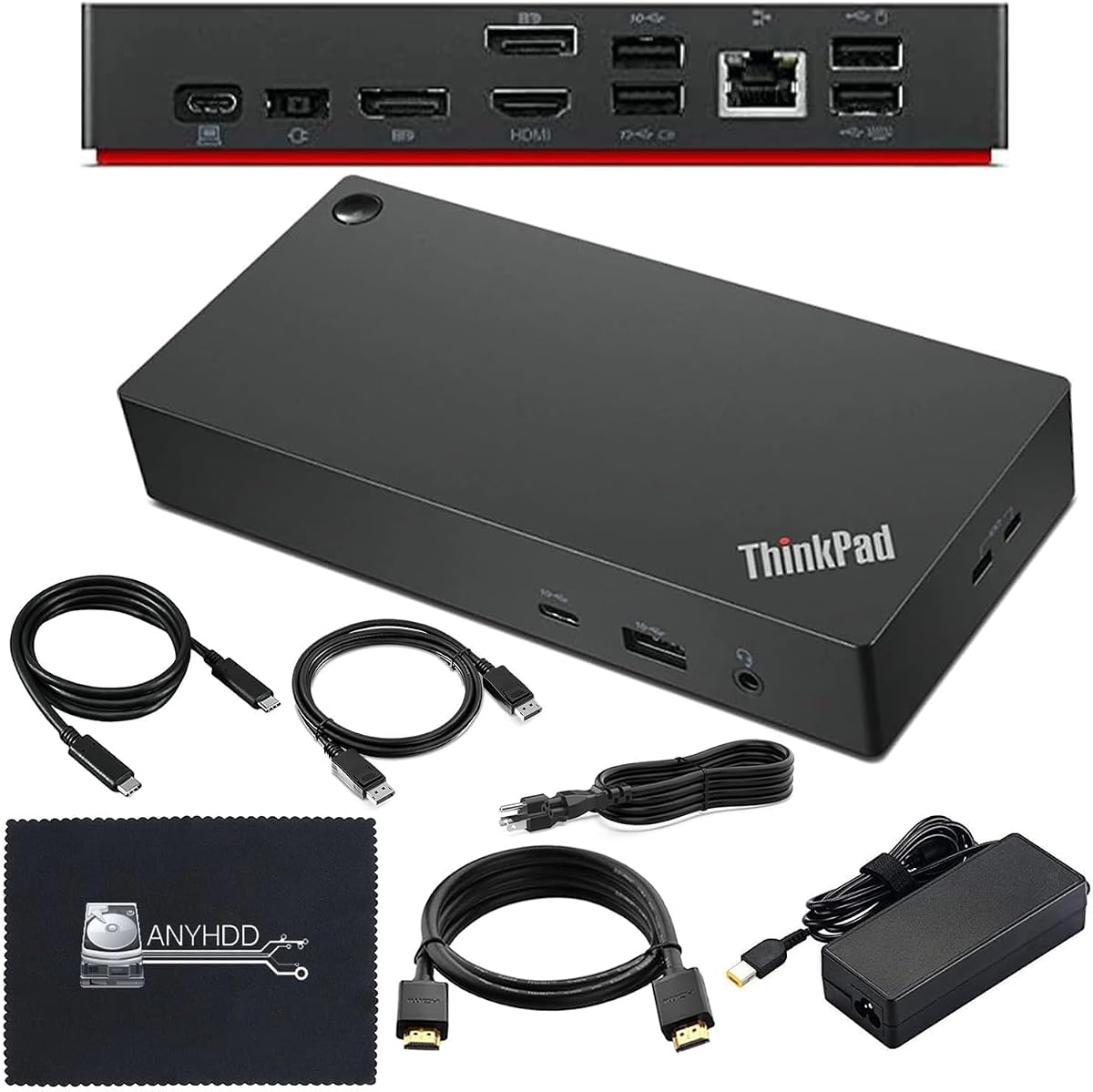
The Lenovo Thinkpad Docking Station Dual Monitor is designed for seamless connectivity with a high 4.6 star rating indicating strong user satisfaction. It supports 4K display output and includes HDMI and DisplayPort cables for crisp and clear visuals on external monitors.
We may earn a commission when you buy through this link, at no additional cost to you.
Efficient power delivery is ensured by a 90W AC adapter included in the package. This dock supports 4K displays and comes with a microfiber cloth to help keep your setup clean and professional looking at all times.
Before purchasing ensure your computer is USB-C or Thunderbolt compatible as noted by the manufacturer. If issues arise updating the dock firmware may be necessary to ensure full compatibility with your specific system.
This package is perfect for users who want a complete solution without needing to buy extra cables separately. Its high rating suggests reliable performance and ease of setup for most ThinkPad owners.
The package includes HDMI and DisplayPort cables ensuring you can set up your monitors immediately without extra purchases.
Included 90W AC adapter ensures stable power delivery to your devices while they are connected to the docking station.
We may earn a commission when you buy through this link, at no additional cost to you.
The Lenovo ThinkPad USB-C Dock Gen 2 focuses on reliable connectivity with features like 10Gbps data transfers and a stable wired network connection. It has a rating of 3.8 stars and supports vivid 4K visuals or multiple displays for your command.
We may earn a commission when you buy through this link, at no additional cost to you.
This dock allows you to control your ThinkPad systems with PXE Boot and System Wake-on-LAN which are essential for remote management. It also supports passing the ThinkPad MAC address through the dock which simplifies network configurations.
While it supports DisplayPort 1.4 and HDMI 2.0 the actual video output depends on your system capabilities. This dependency means you should verify your laptop's capabilities to ensure you get the expected resolution and performance.
Ideal for enterprise users this dock offers a 3 Year worldwide warranty ensuring long-term peace of mind. It is a solid choice for those prioritizing reliability and network features over premium multimedia capabilities.
PXE Boot and Wake-on-LAN support allow for advanced remote management capabilities essential in enterprise environments.
A 3 Year worldwide warranty provides assurance of durability and support for your investment over time.
We may earn a commission when you buy through this link, at no additional cost to you.
The Lenovo ThinkPad Universal USB-C Dock offers a one-cable solution that eliminates clutter and maximizes desk space. With a rating of 4.1 stars it is ideal for both office and remote working allowing users to enjoy blazing-fast data transfers.
We may earn a commission when you buy through this link, at no additional cost to you.
IT managers can remotely gather key information about the dock and its attached devices with minimal interruption. Firmware updates are installed automatically ensuring you always have the latest features and security patches without manual intervention.
The dock supports Plug and Play for displays and PC accessories making it easy to set up for hot-desking or working from home. It is a versatile tool for users who value convenience and simplicity in their daily workflow.
This dock is a great choice for modern offices where desk space is limited and cable management is a priority. Its automatic updates and remote management capabilities make it a practical solution for IT teams.
One cable solution reduces clutter and gives you more desk space to work and play with comfortably.
IT managers can remotely gather key information and ensure firmware updates are installed automatically for security.
We may earn a commission when you buy through this link, at no additional cost to you.
The Lenovo USB-C Slim Travel Dock is designed for the modern professional needing hybrid productivity anywhere. With a rating of 4.3 stars it is an 8-port device that supports up to 65W PD pass through ensuring smooth multi-device connections.
We may earn a commission when you buy through this link, at no additional cost to you.
Visual brilliance is guaranteed with 4K at 60Hz resolution support for high-quality lag-free visuals during video conferences. The dock features a sleek compact form with a 66 percent Post-Consumer Recycled Content exterior combining performance with environmental consciousness.
Integrated USB-C cable adds convenience but the compact design may limit options for users needing multiple high-power devices. It is a powerful tool for every location from coffee shops to client offices ensuring you connect and create more effectively.
This dock is perfect for budget-conscious professionals who still demand high performance and sustainability. Its small footprint and robust port selection make it an ideal travel companion for daily commuters.
Designed for the modern professional this dock enables smooth multi-device connection wherever you need to work.
Combining high performance with environmental consciousness it leads as the greenest dock offering from Lenovo.
We may earn a commission when you buy through this link, at no additional cost to you.
The Lenovo 40B30090US Docking Station boasts a perfect 5.0 star rating reflecting high user satisfaction with its dual 4K display support. It includes USB-C and HDMI cables to allow you to drive two external monitors at up to 4K resolution at 60Hz.
We may earn a commission when you buy through this link, at no additional cost to you.
It features a total of five USB ports for connecting peripherals and a combo audio jack for your audio needs. Some sources note it has a Gigabit Ethernet port which ensures a stable wired network connection for your business environment.
This dock can provide up to 65W of power to a connected notebook using its standard 90W power adapter. For systems requiring more power an optional 135W adapter can boost the output to 100W for charging needs.
Business professionals will appreciate the modern storm-gray exterior and included security lock slot for equipment protection. The perfect rating suggests it is a reliable choice for daily office use.
Dual 4K display support provides a high-resolution multi-monitor setup for increased productivity throughout the day.
Designed for a hassle-free plug-and-play experience it works with notebooks supporting industry-standard USB-C protocols.
We may earn a commission when you buy through this link, at no additional cost to you.
The Lenovo 7-in-1 Portable USB-C Mini Dock offers ultimate convenience for travelers needing reliable connectivity. With a rating of 4.3 stars it allows you to connect to an external 4K or 1080p display using HDMI or VGA while accessing a wired network.
We may earn a commission when you buy through this link, at no additional cost to you.
Its compact design makes it the perfect travel companion ensuring you are always ready for productive moments anywhere. The dock is compatible with Lenovo branded and other USB-C laptops including Apple and Dell making it a versatile choice.
Enhanced enterprise capabilities include PXE boot Wake-On-LAN and MAC address passthrough for a robust secure connection. The included power adapter provides 45W pass-through charging which is sufficient for light usage but may be limited for heavy workloads.
This dock is ideal for frequent travelers who value a slim and stylish design that declutters their workspace. Its wide laptop compatibility ensures it works across multiple brands without issues.
Compatible with Lenovo Apple Dell and other USB-C laptops ensuring hassle-free connectivity regardless of your brand.
Takes up minimal space on your desk helping you declutter and create a more organized workspace.
We may earn a commission when you buy through this link, at no additional cost to you.
Selecting the right docking station requires understanding your specific connectivity power and display needs. This guide outlines key factors to consider to ensure you find the perfect match for your setup.
Assess the number and type of ports you need including USB-A USB-C HDMI DisplayPort and Ethernet. A good dock should accommodate all your essential peripherals without requiring additional dongles.
Look for docks that offer a mix of legacy and modern ports to ensure long-term usability as your device library evolves.
Check the maximum resolution and number of external monitors the dock supports. High-performance users should look for options supporting dual or triple 4K displays for enhanced productivity.
Ensure the dock's video output capabilities match your laptop's GPU to avoid bottlenecks in performance or resolution.
Verify the wattage of the power adapter to ensure it can adequately charge your laptop while connected. Look for docks that support at least 65W to 100W power delivery for most ultrabooks and workstations.
Higher wattage adapters are essential for performance laptops that require more energy during intensive tasks.
Ensure the dock is compatible with your operating system whether Windows macOS or Linux. Some docks have firmware updates or drivers specifically tailored for certain platforms.
Check vendor documentation for confirmed OS support to avoid driver issues or feature limitations after purchase.
Consider the physical size and aesthetic of the dock to ensure it fits your workspace and style preferences. Durable materials and cable management features contribute to a clean and professional look.
Look for docks made with recycled materials if sustainability is a priority for your purchasing decisions.
Evaluate extra features like Always-On USB charging network security options or fleet management tools. These can add significant value for enterprise users or those with specific security requirements.
Features like cloud management or remote diagnostics can save time for IT administrators managing large deployments.
Check the warranty length and coverage offered by the manufacturer. A longer warranty period indicates confidence in the product's durability and reliability.
Look for customer support options that provide timely assistance should you encounter any technical issues.
Determine your budget range and compare models based on features offered. Higher price tags often reflect advanced capabilities like USB4 or Thunderbolt connectivity.
Balance cost with necessary features to avoid overspending on capabilities you will not utilize in your daily workflow.
Begin by connecting the power adapter to the dock and then to a power source. This ensures the dock receives stable power before connecting your laptop or other devices.
Connect your peripherals such as monitors keyboards and mice to the appropriate ports on the dock. Then plug the USB-C or Thunderbolt cable into your laptop to establish the connection.
To maintain performance keep the dock free from dust and debris by occasionally wiping it with a soft cloth. Avoid bending cables excessively to prevent damage to internal wiring over time.
Yes many Lenovo docking stations are designed to work with any USB-C compatible laptop including Apple and Dell models. However some advanced features may only work with Lenovo systems so always check compatibility.
Thunderbolt docks offer faster data transfer speeds and higher bandwidth compared to standard USB-C docks. This makes them ideal for high-performance tasks such as video editing or using multiple high-resolution monitors.
Most Lenovo docking stations include power delivery capabilities to charge your laptop while connected. Look for models with at least 65W power delivery to ensure adequate charging for most devices.
The number of supported monitors varies by model with some supporting dual 4K displays and others up to four. Always check the specific video output capabilities listed in the product details.
Yes Lenovo often provides firmware updates to improve compatibility and performance. You can download these from the Lenovo support website or use their fleet management tools for enterprise updates.
Many Lenovo docks work well with Linux but driver support may vary. Check specific compatibility lists or community forums to ensure all features are supported on your distribution.
The Lenovo USB-C Dual Display Travel Dock and ThinkPad USB4 Smart Dock 5500 stand out as top picks for versatility and future-proof performance respectively.
Prioritize your specific needs such as display count port variety and power delivery to find the perfect fit for your workspace.
Always check current availability and pricing details before purchasing to ensure you get the best value for your setup.