
Integral 4GB Crypto-197
4.1Editor score
FIPS 197 Certified
Brute Force Protection
Waterproof Double Layer Design
This guide compares the top encrypted USB flash drives for 2026, evaluating hardware security, encryption standards, and durability for sensitive data
Secure data storage is essential in today's digital landscape. Encrypted USB flash drives offer hardware-level protection to safeguard sensitive files from unauthorized access and physical theft.
We analyzed ten leading models based on encryption standards, build quality, compatibility, and user experience. Our evaluation focuses on FIPS validation, brute force protection, and real-world usability.
Each pick highlights key strengths and ideal use cases for different needs. Please note that product availability and pricing fluctuate frequently, so verify details before purchasing.
4.1Editor score
4.6Editor score

4.5Editor score
The following table provides a side-by-side comparison of all ten models evaluated in this guide, highlighting their core specifications and security features.


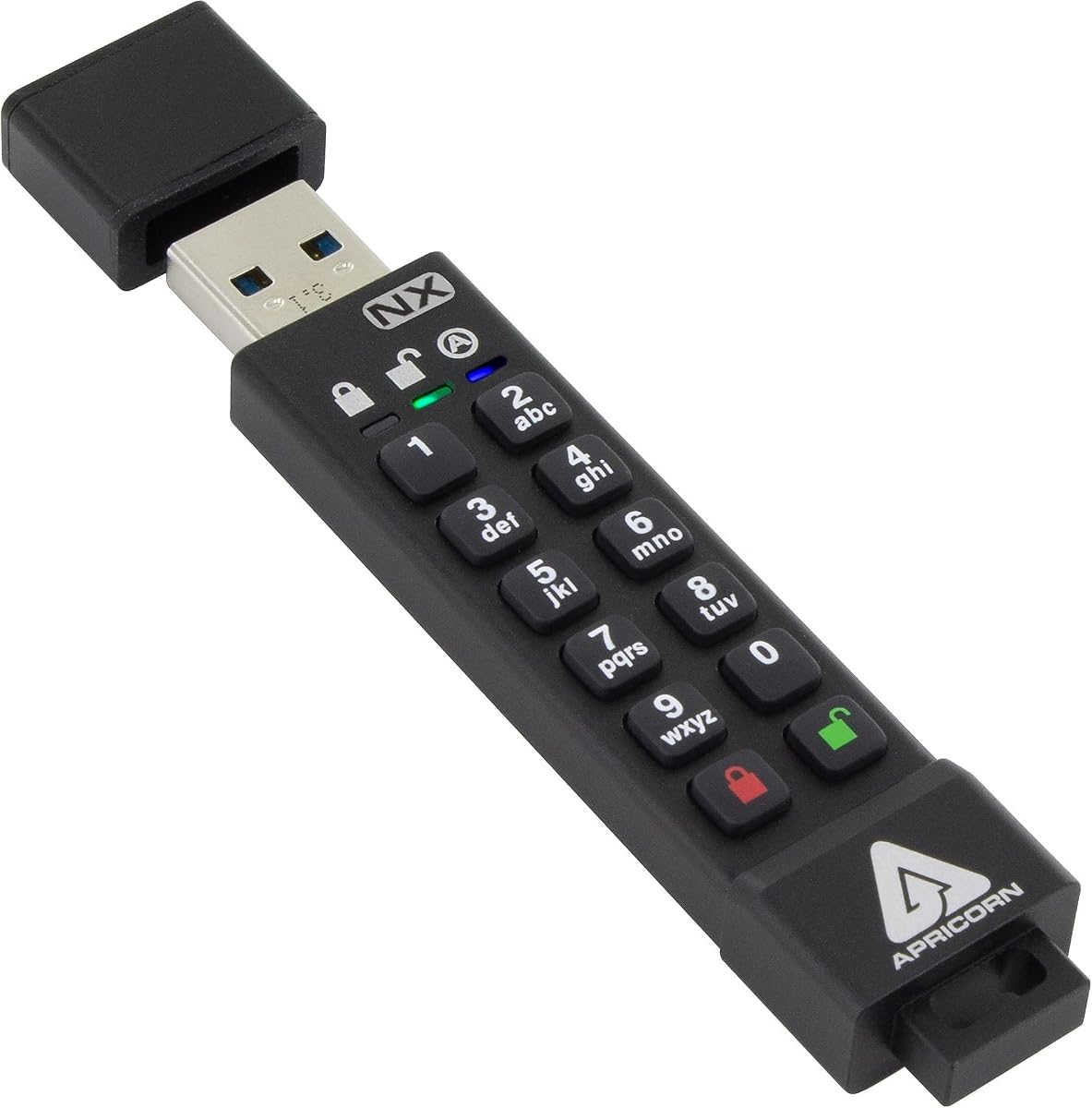
The Apricorn 8GB Aegis Secure Key 3 NX stands out as a top choice for secure data storage. It holds FIPS 140-2 Level 3 validation, ensuring robust hardware encryption for sensitive information without needing external software.
We may earn a commission when you buy through this link, at no additional cost to you.
Its design includes separate admin and user modes, allowing administrators to manage security settings while users access data securely. The drive supports two read-only modes and offers data recovery PINs for added safety against lost access credentials.
While it carries a higher price tag compared to standard drives, the enterprise-grade security justifies the investment for businesses and individuals handling confidential data. The lack of software requirements simplifies deployment across various operating systems.
This drive is ideal for government contractors, corporate employees, and privacy-conscious users who need reliable protection. Its rugged build and advanced security features make it a trustworthy companion for critical data transfers.
FIPS 140-2 Level 3 validation ensures the drive meets strict federal security standards, providing confidence in its encryption integrity against physical and logical attacks.
Separate admin and user modes allow organizations to enforce security policies while maintaining ease of use for daily operations without compromising data safety.
We may earn a commission when you buy through this link, at no additional cost to you.
The Kingston IronKey Vault Privacy 50 delivers premium security with hardware-based 256-bit encryption and FIPS 197 certification. It includes advanced features like brute force and BadUSB attack protection to safeguard against sophisticated threats.
We may earn a commission when you buy through this link, at no additional cost to you.
Its multi-password option with complex and passphrase modes offers flexibility for security preferences. The new passphrase mode allows for longer, memorable phrases, enhancing usability without sacrificing protection. Dual read-only settings prevent accidental data modification.
The cost reflects its enterprise-grade capabilities and large 256GB capacity. Users should be prepared for a slightly more involved setup process compared to simpler drives, but the security benefits are significant for high-stakes environments.
This model is perfect for enterprises, government agencies, and professionals managing large volumes of sensitive data. Its TAA compliance meets procurement standards, making it suitable for public sector deployments requiring strict adherence to security protocols.
Built-in defenses against brute force and BadUSB attacks ensure that the drive remains secure even when connected to compromised or malicious systems.
TAA compliance ensures the drive meets Trade Agreements Act requirements, simplifying procurement for government and enterprise buyers needing certified hardware.
We may earn a commission when you buy through this link, at no additional cost to you.
The Apricorn 128GB Aegis Secure Key 3 NXC bridges modern connectivity with robust security. Featuring USB 3.2 Type-C connectivity, it suits newer laptops and mobile devices while maintaining FIPS 140-2 Level 3 validated encryption standards.
We may earn a commission when you buy through this link, at no additional cost to you.
Its hardware-based 256-bit AES encryption ensures data remains protected without requiring software installation. Separate admin and user modes provide flexible access control, and the drive operates with zero footprint across various platforms.
The Type-C interface may limit compatibility with older USB-A ports without adapters. However, its high capacity and security rating make it a compelling choice for users transitioning to modern hardware ecosystems.
Ideal for tech professionals, mobile workers, and organizations adopting USB-C standards. This drive offers the balance of speed, security, and modern form factor needed for contemporary data management workflows.
USB 3.2 Type-C connector ensures fast data transfer speeds and compatibility with the latest laptops and mobile devices, future-proofing your secure storage investments.
Supports both USB port power and internal battery options, enhancing versatility for use across different devices without relying on external power sources.
We may earn a commission when you buy through this link, at no additional cost to you.
The Integral 4GB Crypto-197 offers a budget-friendly entry into hardware encryption. Certified to FIPS 197 standards, it provides U.S. Government-approved security without requiring software installation or complex configurations.
We may earn a commission when you buy through this link, at no additional cost to you.
Its waterproof double-layer design protects against physical damage, while brute force attack protection automatically erases data after failed access attempts. Auto-lock ensures data remains encrypted when the drive is removed from a computer.
While the 4GB capacity is limited, it is sufficient for essential documents or small files. The lack of advanced features like admin modes keeps costs down, making it accessible for individual users.
This drive suits students, casual users, or small businesses needing basic protection for light data transfer. Its durability and compliance certifications make it a practical choice for on-the-go security needs.
The waterproof double-layer design safeguards the electronics against water immersion, drops, and daily wear, ensuring data integrity even in demanding environments.
No software installation is required, allowing immediate use across operating systems without consuming disk space or creating security vulnerabilities.
We may earn a commission when you buy through this link, at no additional cost to you.
The iStorage datAshur PRO provides robust security with FIPS 140-2 Level 3 certification and AES-XTS 256-bit hardware encryption. It works seamlessly across Windows, macOS, Linux, and mobile platforms without requiring specialized software.
We may earn a commission when you buy through this link, at no additional cost to you.
Its PIN-authenticated design allows users to enter a 7-15 digit PIN directly on the drive keypad for quick access. The IP57 certified casing ensures dust and water resistance, enhancing durability during travel or fieldwork.
The physical PIN entry is straightforward but requires manual input each time. While the 4GB capacity is limited, the drive offers exceptional versatility for users needing reliable security across diverse devices.
This model is ideal for healthcare workers, IT professionals, and travelers who need compliant storage on various systems. Its rugged design and broad compatibility ensure consistent performance in professional environments.
Compatible with MS Windows, macOS, Linux, Chrome, Android, and more, ensuring seamless integration across virtually any device with a USB port.
Helps ensure compliance with GDPR, CCPA, and HIPAA regulations, making it a suitable choice for industries with strict data protection requirements.
We may earn a commission when you buy through this link, at no additional cost to you.
This encrypted USB drive features built-in AES256-bit hardware encryption with an automatic lock function. After unlocking, the drive locks if disconnected within 30 seconds or unplugged, protecting data from theft.
We may earn a commission when you buy through this link, at no additional cost to you.
Its aluminum alloy shell provides durability, while the 64GB capacity offers ample space for large files. If passwords are entered wrongly ten times, the drive resets and wipes data to prevent unauthorized access.
Compatibility is focused on specific Windows and Linux versions, which may limit flexibility. However, the high speed and security features make it a practical option for users prioritizing capacity and convenience.
Best suited for general users needing secure storage for multimedia or backups. The automatic lock feature adds a layer of safety for those who might forget to manually secure their devices during use.
Automatic locking after inactivity ensures data remains protected even if the user forgets to manually lock the device, reducing human error risks.
The 64GB storage capacity provides room for more extensive datasets compared to budget models, balancing security with practical storage needs.
We may earn a commission when you buy through this link, at no additional cost to you.
The Lexar JumpDrive F35 PRO introduces biometric security with fingerprint authentication. This allows for quick access without typing passwords, while 256-bit AES encryption keeps files safe from unauthorized viewing.
We may earn a commission when you buy through this link, at no additional cost to you.
Its ultra-fast recognition in less than one second and speeds up to 400MB/s read make it efficient for large file transfers. Users can save up to 10 different fingerprints for convenient sharing among colleagues.
Reliance on software for initial setup may complicate use on restricted systems. Additionally, biometric data can sometimes struggle with wet or damaged fingers. However, the convenience factor is significant for frequent users.
Ideal for professionals who need quick access to large datasets on shared computers. The blend of speed, capacity, and biometric security makes it a modern choice for efficient workflow integration.
Fingerprint authentication eliminates the need for complex passwords, speeding up access times and reducing friction in daily data retrieval tasks.
USB 3.2 Gen 1 interface supports fast read and write speeds, saving valuable time when moving large files or performing regular backups.
We may earn a commission when you buy through this link, at no additional cost to you.
The iStorage datAshur PRO2 improves on its predecessor with IP68 certification, offering dust and water resistance even when submerged. It features FIPS 140-2 Level 3 certified hardware encryption for robust data protection.
We may earn a commission when you buy through this link, at no additional cost to you.
Like the original, it uses PIN authentication without requiring software, ensuring compatibility with Windows, macOS, Linux, and mobile devices. Transfer speeds reach up to 168MB/s read and 116MB/s write for quick operations.
The upgrade in durability and pricing may not appeal to budget users, but it is necessary for extreme environments. The physical keypad ensures security remains hardware-based and immune to software exploits.
Perfect for field engineers, military personnel, and emergency responders who require durable, compliant storage. Its resilience ensures data remains secure regardless of physical conditions or accidental exposure to elements.
IP68 certification guarantees protection against dust and water immersion, making this drive suitable for outdoor and industrial applications where standard drives might fail.
No software is required to operate the drive, ensuring seamless compatibility across operating systems and preventing potential vulnerabilities from external applications.
We may earn a commission when you buy through this link, at no additional cost to you.
The Kingston Ironkey D500S targets flagship military-grade security with pending FIPS 140-3 Level 3 certification. It features an industry-first dual hidden partition option for organizing sensitive and standard data separately.
We may earn a commission when you buy through this link, at no additional cost to you.
Brute force and BadUSB attack protection safeguard against sophisticated cyber threats. A crypto-erase password allows emergency data wiping if the device is compromised. The rugged zinc casing protects against physical penetration attempts.
While the 16GB capacity is modest, the security features are unmatched for high-risk scenarios. The multi-pin option provides flexibility for password complexity without requiring software installation.
Ideal for defense contractors, law enforcement, and corporate security teams. This drive delivers the highest level of protection available for users prioritizing extreme data integrity and threat resilience.
The dual hidden partition allows users to segregate sensitive data from everyday files, enhancing organization and security protocols within a single device.
Crypto-erase functionality enables immediate data deletion via a separate password, providing a critical safety net against unauthorized physical access.
We may earn a commission when you buy through this link, at no additional cost to you.
The Kingston D300S offers reliable AES 256 XTS encryption in a compact 8GB form factor. It uses software for configuration, which simplifies the physical design but requires installation for initial setup.
We may earn a commission when you buy through this link, at no additional cost to you.
Its rugged design ensures durability during transport, while USB 3.0 speeds facilitate efficient data transfer. The hardware-based encryption ensures that data remains protected even if the host system is compromised.
Without a physical keypad, users rely on software passwords for access, which may be less convenient than hardware PINs. However, the drive remains a solid choice for those preferring software-managed security.
Best for small business users and individuals needing portable, secure storage. The combination of speed, encryption, and reliability makes it a practical option for everyday secure data handling.
Software configuration allows flexible security settings tailored to user needs, though it requires initial setup before the drive becomes fully functional.
AES 256 XTS hardware encryption ensures that data remains secure at the drive level, protecting against unauthorized access regardless of host system security.
We may earn a commission when you buy through this link, at no additional cost to you.
Selecting the right encrypted USB flash drive requires evaluating several technical and practical factors to ensure security matches your specific needs.
Look for drives offering 256-bit AES encryption, which is the current industry standard for protecting sensitive data against brute force attacks. Higher standards like FIPS 140-2 or 140-3 Level 3 validation provide government-approved security.
Prioritize hardware-based encryption over software solutions to ensure data remains protected even if the host computer is compromised.
Drives may use hardware keypads, software passwords, or biometrics for access. Hardware keypads prevent keyloggers, while software passwords may be easier to manage on specific systems.
Choose a method that balances security with convenience, considering whether you need physical PIN entry or prefer password management via software.
Waterproof and dust-resistant ratings such as IP57 or IP68 indicate how well the drive can withstand environmental exposure. Rugged casings protect against drops and physical damage during travel.
Invest in durable builds if you frequently transport the drive in demanding environments like outdoor sites or industrial zones.
Capacity ranges from 4GB to over 256GB depending on the model. Select a size that accommodates your typical file sizes while maintaining portability and cost efficiency.
Ensure the chosen capacity matches your data needs without exceeding budget constraints, as larger storage often comes with higher prices.
USB 3.0 and USB-C interfaces offer faster transfer speeds compared to older USB 2.0 connections. Ensure the drive's interface matches your current devices to avoid compatibility issues.
Consider dual-connectivity models if you need to use the drive across both legacy USB-A ports and modern USB-C ports.
Organizations often require drives that meet specific standards like FIPS, TAA, or GDPR compliance. Check if the drive holds certifications necessary for your industry regulations.
Certified drives provide assurance that security measures have been independently verified for reliability and integrity.
Many secure drives automatically erase data or reset after a set number of failed password attempts. This feature prevents attackers from guessing passwords indefinitely.
Prioritize drives with built-in protection against brute force attacks to safeguard against persistent unauthorized access attempts.
Ensure the drive supports the operating systems you use, including Windows, macOS, Linux, and mobile devices. Some models require specific drivers or software for full functionality.
Choose universally compatible drives to avoid access issues when sharing files across different systems or devices.
When setting up a new encrypted drive, carefully follow the manufacturer's instructions to initialize encryption and create a strong password or PIN. Store your credentials securely to avoid permanent data loss due to forgetting access details.
To access data, connect the drive to a computer and enter the authentication credentials on the device or via installed software. Once unlocked, the drive appears as a normal storage volume for copying or retrieving files.
Protect the drive from extreme temperatures, moisture, and physical impact. Always safely eject the drive before unplugging to prevent data corruption. Regularly update any associated software to maintain optimal security and performance.
Hardware encryption encrypts data within the drive itself, making it immune to host system compromises. Software encryption relies on programs installed on the computer, which can be bypassed if the system is infected with malware. Hardware-based solutions generally offer higher security.
Most secure drives do not allow password recovery to maintain security. Some models offer data recovery PINs, but generally, forgetting the password means the data is permanently inaccessible. Always store backup credentials safely.
While encryption protects data from being read, it does not prevent viruses from infecting the drive. Always scan files before opening them on other systems. Some drives offer additional protection against BadUSB attacks.
Hardware encrypted drives typically do not require software as they authenticate directly. However, drives relying on software encryption need specific applications to be installed on the host computer for access and management.
FIPS validation is a U.S. government standard that ensures the encryption module meets strict security requirements. FIPS 140-2 or 140-3 Level 3 validated drives are often required for government and enterprise security compliance.
Check the product specifications for macOS support. Most modern encrypted drives support both Windows and Mac, but some may require specific drivers or software versions. Cross-platform compatibility is common among leading brands.
We have highlighted ten top models ranging from budget-friendly options to enterprise-grade solutions. The Apricorn Aegis Secure Key 3 NX stands out for overall balance, while Kingston offers premium features for high-security needs.
Prioritize hardware encryption and FIPS validation if data confidentiality is critical. Consider physical durability and compatibility with your devices to ensure seamless daily operation without compromising protection.
Prices and availability change frequently so verify current details before purchasing. Selecting the right encrypted drive is a vital step toward securing your digital assets against theft and unauthorized access.