
Lenovo USB-C Slim Travel Dock
4.4Editor score
Compact eight port design
4K at 60Hz support
65W power pass through
Discover the top docking station for Lenovo Yoga Laptop models in this expert guide comparing features, ports, and compatibility to find your perfect match.
Finding the right docking station for Lenovo Yoga Laptop models can transform your workspace into a productive hub. These devices expand connectivity options significantly allowing you to connect multiple monitors peripherals and chargers through a single cable.
We compared ten real products based on port variety video support power delivery and build quality. Our analysis focuses on how well each dock integrates with Yoga series devices ensuring seamless performance for work and creative tasks.
Each pick highlights specific strengths like dual display support travel readiness or high power output. Please note that pricing and availability may change frequently so verify current details before making your final purchase decision.
4.4Editor score

4.2Editor score
4.6Editor score
This side by side comparison table lists all ten products with their key specifications to help you quickly identify which docking station meets your specific connectivity and power requirements for your Lenovo Yoga device.




This Lenovo USB-C Dual Display Travel Dock stands out as a top choice for Lenovo Yoga users seeking reliable dual screen setups. With a strong rating it delivers robust connectivity through seven expertly engineered ports designed for modern workflows.
We may earn a commission when you buy through this link, at no additional cost to you.
The dock supports two displays at 4K resolution transforming your workspace into a visual powerhouse. Its integrated cable keeps clutter minimal while the DP and HDMI ports ensure entertainment and productivity stay within easy reach.
While an additional adapter is needed for full 100W power delivery the included 65W option covers most Yoga models. The Always-On USB port keeps mobile devices charged even when the laptop is disconnected adding practical value.
For remote professionals needing a green minimalist dock this model shines. Its sustainable design with 66% post-consumer recycled content makes it an eco-friendly choice that doesn't compromise on performance or connectivity versatility.
Connect dual 4K displays easily with included DP and HDMI ports to maximize screen real estate for multitasking.
The chassis features 66% post-consumer recycled content reflecting Lenovo's commitment to environmental sustainability without sacrificing performance.
We may earn a commission when you buy through this link, at no additional cost to you.
The Lenovo ThinkPad Thunderbolt 3 Dock Gen 2 is a powerhouse for users needing extensive connectivity. It features multiple HDMI and DisplayPort outputs along with Thunderbolt 3 for high-speed data transfer and video.
We may earn a commission when you buy through this link, at no additional cost to you.
Powered by a 135W adapter it ensures stable power delivery for demanding setups. The inclusion of RJ-45 Ethernet provides reliable network access which is crucial for stable internet connections during critical tasks.
Security enthusiasts will appreciate the built-in security-lock slot allowing physical protection of the dock. While larger than travel options this dock is ideal for a permanent office desk setup requiring maximum port variety.
Compatibility with older ThinkPad models makes it a versatile legacy solution. Users seeking a robust all-in-one hub for dual UHD 4K displays will find this dock meets their high-performance needs effectively.
The 135W adapter ensures your laptop and all connected peripherals receive ample power even under heavy load conditions.
Features like the security-lock slot and RJ-45 port make this dock suitable for professional office environments.
We may earn a commission when you buy through this link, at no additional cost to you.
This compact 7-in-1 hub is perfect for travelers who need essential ports without bulk. It supports 4K HDMI video and includes dual SD/TF card readers which is excellent for photographers or content creators on the go.
We may earn a commission when you buy through this link, at no additional cost to you.
The single cable solution simplifies connectivity significantly. By combining video data and power pass-through it eliminates cable clutter making your workspace look cleaner and more organized wherever you work.
Plug-and-play functionality ensures instant setup without needing driver installations. This saves time and reduces technical friction allowing you to focus on your work immediately after connecting the device to your laptop.
With reliable power pass-through support it works seamlessly with external chargers. The elegant design and travel-ready features make it a top contender for those prioritizing portability and versatile connectivity options.
Access photos and videos instantly with two SD and TF card reader slots built directly into the hub.
Instant synchronization with USB-C systems means no drivers or complex setup processes are required.
We may earn a commission when you buy through this link, at no additional cost to you.
This slim travel dock offers incredible value with its 8-port design. It supports 4K at 60Hz ensuring smooth visuals for video conferences or creative work while remaining budget-friendly for students and casual users.
We may earn a commission when you buy through this link, at no additional cost to you.
The integrated USB-C cable simplifies setup and reduces the risk of losing connectors. Its sleek Eclipse Black design matches modern laptops well while the sustainable materials reflect environmental consciousness without extra cost.
Although the power pass-through is limited to 65W it handles most light to medium laptop needs. For users who do not require heavy charging loads this dock provides excellent connectivity for everyday tasks.
Its compact size makes it easy to slip into a bag. Whether you are commuting or working from a cafe this dock ensures you stay connected without sacrificing desk space or portability.
Constructed with 66% post-consumer recycled content this dock aligns with eco-friendly practices without compromising performance.
4K at 60Hz support ensures fluid visuals which is critical for video calls and creative applications.
We may earn a commission when you buy through this link, at no additional cost to you.
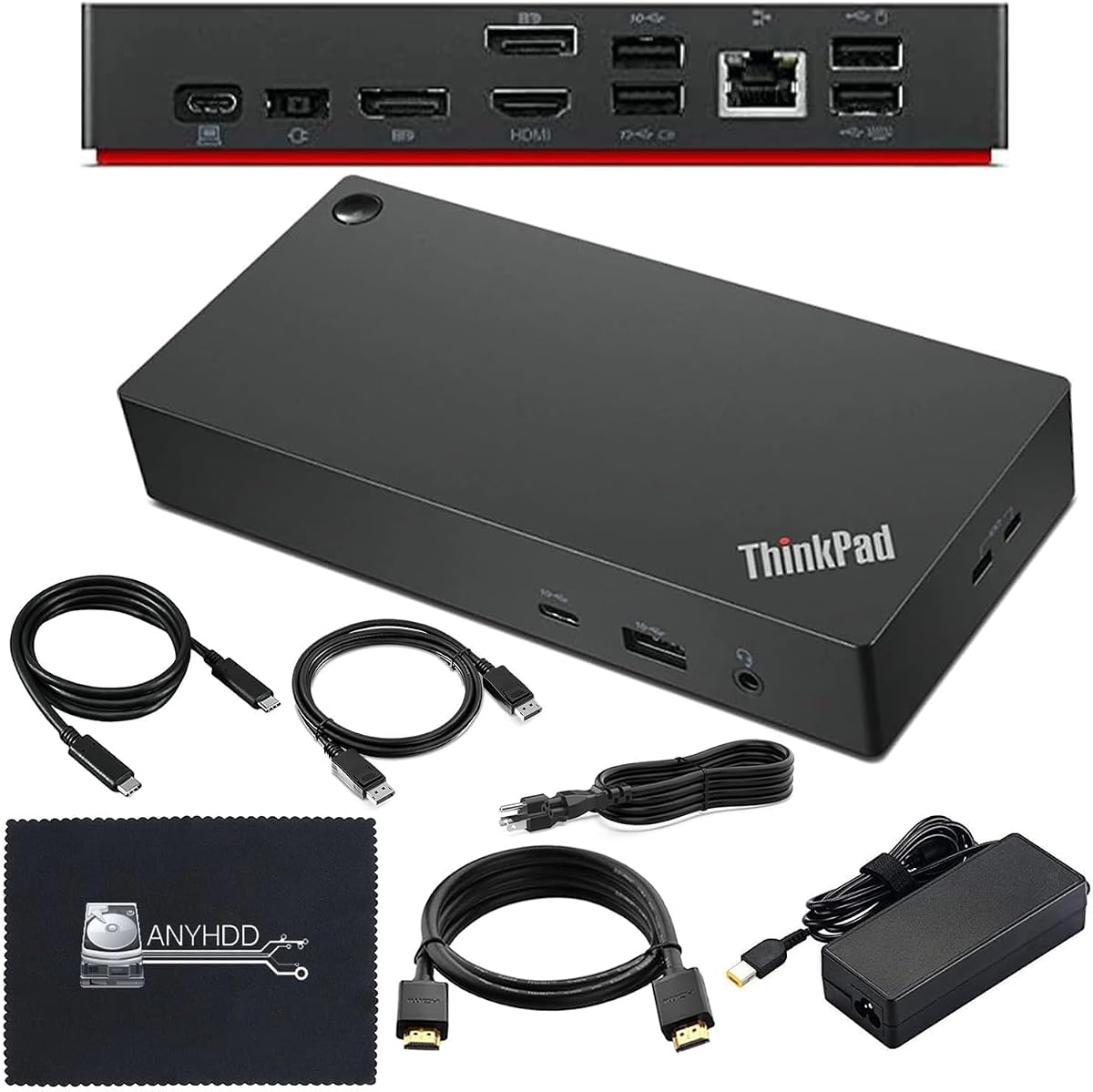
This premium docking station is designed for ThinkPad users needing robust workstation capabilities. With Thunderbolt 4 support it offers high-speed data transfer and reliable connectivity for multiple high-resolution monitors.
We may earn a commission when you buy through this link, at no additional cost to you.
The package includes HDMI and DisplayPort cables which saves you from buying extras separately. A 90W AC adapter ensures stable power delivery allowing your laptop to perform efficiently while connected to external devices.
Users should verify their computer compatibility before purchasing to ensure a seamless experience. Keeping your device updated with the latest firmware helps maintain compatibility and performance with this advanced docking solution.
The inclusion of a microfiber cloth shows attention to detail making setup clean and easy. For professionals needing a reliable dual monitor setup this dock delivers the quality and features necessary for demanding workflows.
Includes HDMI DisplayPort cables and a microfiber cloth providing everything you need for a clean setup immediately.
Thunderbolt 4 support ensures maximum speed and connectivity for high-performance workstation needs.
We may earn a commission when you buy through this link, at no additional cost to you.
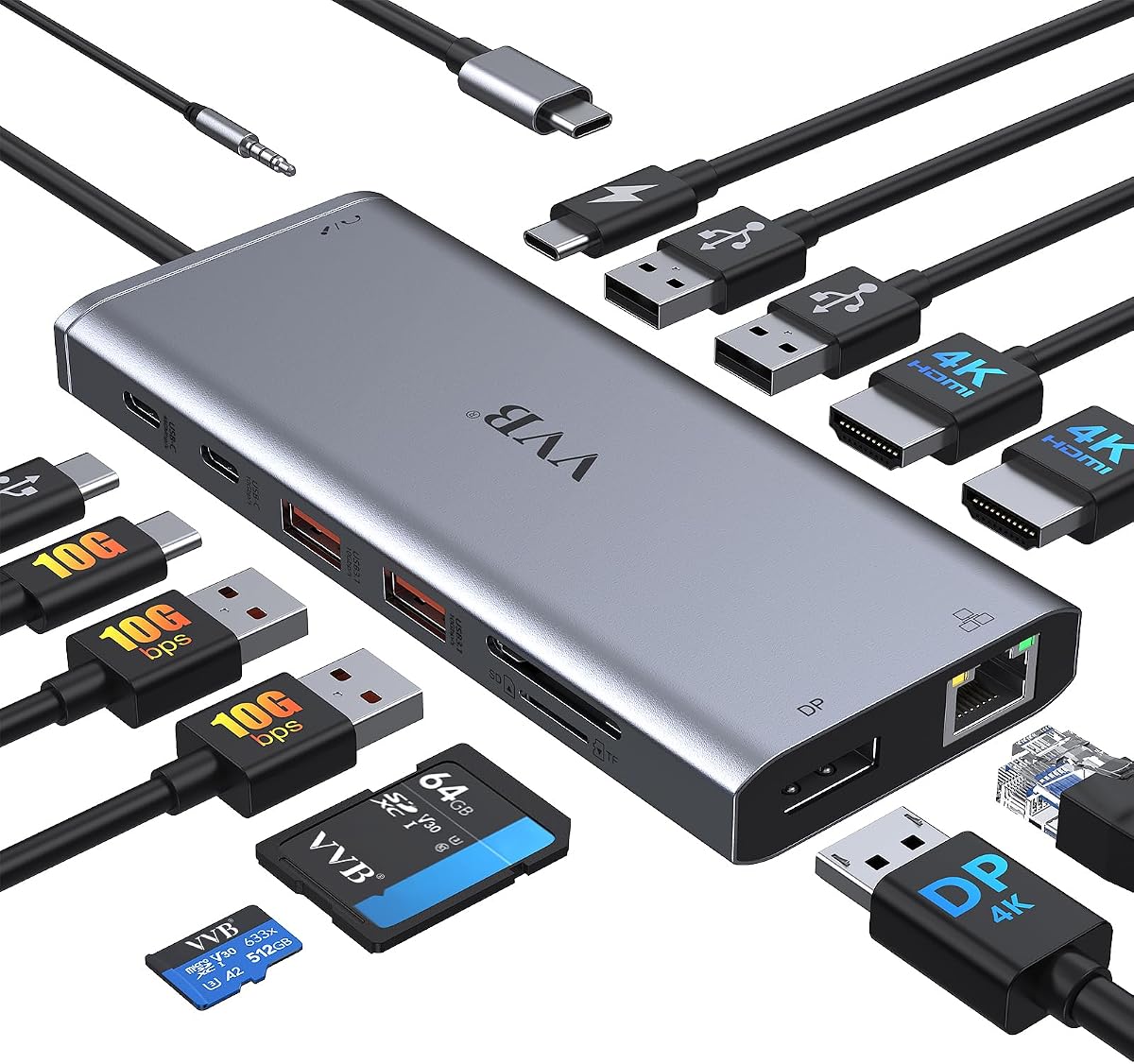
This 14-in-1 docking station offers extensive connectivity options for users needing many connections. It supports triple displays on Windows systems making it ideal for multitasking setups requiring multiple screens simultaneously.
We may earn a commission when you buy through this link, at no additional cost to you.
The 100W power delivery port ensures your laptop charges quickly while using all other ports. Gigabit Ethernet provides a stable network connection which is essential for reliable internet access during online work or gaming.
Note that macOS users may experience display mirroring across external monitors instead of extended desktops. This limitation is common in hubs using DisplayPort 1.4 technology and users should check system compatibility first.
Fast data transfer speeds via USB 3.1 ports allow efficient file management. Whether you are a data analyst or content creator this hub offers the versatility to handle complex connectivity needs.
Connect up to three monitors on Windows for maximum screen real estate and productivity gains.
USB 3.1 ports offer up to 10Gbps speeds for rapid file transfers between laptop and external drives.
We may earn a commission when you buy through this link, at no additional cost to you.
The Anker Nano Docking Station combines desktop power with travel convenience through its detachable design. You get a 13-in-1 dock at home and a portable 6-in-1 hub on the go saving money on two devices.
We may earn a commission when you buy through this link, at no additional cost to you.
It supports triple displays which is rare in smaller docks allowing for expansive screen setups. The 100W charging ensures your laptop stays powered up even when running all connected peripherals simultaneously under load.
Fast data transfer at 10Gbps means moving large files takes just minutes. The comprehensive port selection includes Ethernet and audio ensuring all your needs are met through a single upstream cable.
Note that the dock only activates when connected to a laptop which conserves power. This thoughtful design ensures efficiency while providing a versatile solution for both home office and mobile work needs.
One dock replaces two devices offering full desktop functionality and portable hub capabilities in one package.
Support for three external monitors makes this dock a powerful tool for data analysts and creators.
We may earn a commission when you buy through this link, at no additional cost to you.
This Gen 2 USB-C dock is a reliable choice for ThinkPad users seeking standard office expansion. It supports up to three external monitors allowing for versatile multi-screen setups without sacrificing performance or stability.
We may earn a commission when you buy through this link, at no additional cost to you.
The package includes a 90W AC adapter ensuring your device receives consistent power. With a combo audio jack and Gigabit Ethernet it covers essential connectivity needs for both communication and network access.
Video output capabilities are robust with HDMI and DisplayPort options providing flexibility. Always check system output compatibility to ensure you get the desired resolution and refresh rate for your setup.
For professionals needing a straightforward upgrade this dock delivers essential ports without unnecessary complexity. It is a solid investment for anyone looking to expand their workspace efficiently with Lenovo hardware.
Support for up to three monitors allows flexible screen arrangements for increased productivity.
Includes Ethernet and audio jacks ensuring all standard connection types are covered in one dock.
We may earn a commission when you buy through this link, at no additional cost to you.
This renewed hybrid dock offers significant power with a 135W adapter. The combination of USB-C and USB-A ports provides flexibility for connecting a wide range of devices regardless of their interface type.
We may earn a commission when you buy through this link, at no additional cost to you.
Included HDMI and DisplayPort cables allow for immediate dual monitor setup. The package also comes with a microfiber cloth and USB-C cable ensuring you have all necessary accessories to get started quickly.
Users should verify their notebook compatibility as hardware or software changes may affect functionality. However if your device is supported you gain a robust workstation dock with a one-year warranty for peace of mind.
The hybrid nature of this dock makes it versatile for both new and legacy peripherals. It is an excellent choice for users needing high power output without buying a brand new workstation dock.
Connects both legacy USB-A devices and modern USB-C peripherals seamlessly in one station.
Includes cables and cloth so you can set up your dual monitor workspace immediately.
We may earn a commission when you buy through this link, at no additional cost to you.
Anker's 8-in-1 hub offers massive expansion in a compact form factor. Dual HDMI ports allow you to mirror or stream content to two displays making it versatile for presentations and extended work.
We may earn a commission when you buy through this link, at no additional cost to you.
The power delivery port supports pass-through charging up to 85W which keeps your laptop powered during use. Ethernet and SD card reader inclusion ensures you are ready for both network and storage needs.
Mac users should note that external monitors will show identical displays rather than extended screens. This limitation is common in multi-HDMI setups but works well for presentations or mirrored content needs.
Compatibility with Windows 10 and 11 ChromeOS ensures broad usability. Joining millions who trust Anker technology you get a reliable hub that expands your laptop's capabilities without adding bulk or complexity.
Eight functions in one device let you connect monitors drives and networks with a single cable.
Up to 85W pass-through charging keeps your laptop powered even while using all other ports.
We may earn a commission when you buy through this link, at no additional cost to you.
Choosing the right docking station involves understanding your specific connectivity power and port needs. This guide breaks down the essential factors to consider before making your purchase.
Identify exactly how many USB ports HDMI or DisplayPort connections you need for your daily workflow. Some docks offer extensive connectivity while others focus on portability with fewer options.
Ensure the dock has enough ports for your monitor mouse keyboard and any other peripherals you plan to connect simultaneously.
Check if the dock supports dual displays and the maximum resolution it can handle such as 4K. Not all docks support multi-monitor setups at high refresh rates.
For professionals needing multiple screens verify HDMI and DisplayPort specifications to ensure smooth visual performance for your tasks.
Confirm the wattage the dock can pass through to your laptop to ensure it meets your charging needs. Higher wattage is essential for performance laptops that consume more power during operation.
A dock with sufficient PD support eliminates the need for a separate charger keeping your desk clutter-free and organized.
Always verify that the dock is compatible with your specific Lenovo Yoga model and operating system. Some docks have specific requirements for Thunderbolt versus standard USB-C ports.
Check manufacturer documentation for a list of supported devices to avoid connectivity issues after purchasing.
Decide if you need a travel-friendly slim dock or a desktop workstation with more ports. Portability is key if you move between locations frequently.
Compact docks save desk space and fit easily into bags making them ideal for commuters and remote workers.
Look for durable materials and reputable brands that ensure longevity and reliable performance over time. Poor build quality can lead to connection failures or overheating.
High-quality construction protects your investment and ensures consistent performance during heavy daily usage.
If you rely on stable internet speeds ensure the dock includes a Gigabit Ethernet port. Wireless connections may not always meet your bandwidth needs for critical tasks.
A wired Ethernet connection provides consistent network performance essential for video conferences and large file transfers.
Check if the package includes necessary cables like USB-C HDMI or DisplayPort to save money and hassle. Missing cables can add unexpected costs to your setup.
Complete kits ensure you can start using the dock immediately without extra trips to the store for missing accessories.
Connect your Lenovo Yoga laptop to the dock using the included USB-C or Thunderbolt cable to establish communication. Ensure the connection is secure to prevent any intermittent display or data transfer issues.
Power on the dock and ensure it is receiving sufficient power from its adapter to avoid underpowering connected devices. Most docks have indicators showing power status so verify this before connecting peripherals.
Regularly clean the ports with compressed air to remove dust and debris that can cause connection failures. Avoid moving the dock while connected to prevent cable strain and damage over time.
Yes most docking stations include Power Delivery capabilities that charge your laptop simultaneously. Ensure the dock's wattage matches or exceeds your laptop's power requirements to maintain battery levels during use.
Most Lenovo docks are plug-and-play and work instantly without driver installation. However updating firmware via Lenovo Vantage can improve compatibility and performance with newer Yoga models.
Thunderbolt docks offer higher bandwidth and faster data transfer speeds compared to standard USB-C docks. This makes them ideal for high-speed external drives and multiple high-resolution displays.
Some higher-end docks support three or more monitors depending on your laptop's graphics capabilities. Check specific port specs to verify triple monitor support for your exact model.
Check the manufacturer's compatibility list or your laptop's port specifications for USB-C or Thunderbolt support. Ensuring your port supports video output is crucial for external display functionality.
Yes docking stations are designed for regular use and provide stable power and data connections. Always use the provided power adapter to ensure safe power delivery to your laptop.
Many travel docks now support 4K via HDMI or DisplayPort but refresh rates may vary. Check specs for 4K at 60Hz support if you need smooth visuals for media.
Most docks allow you to disconnect safely without damaging the laptop or peripherals. Some USB ports on docks keep charging connected devices even when the laptop is disconnected.
Selecting the perfect docking station depends on your specific mix of port needs power requirements and budget. Whether you choose a budget-friendly travel hub or a premium workstation dock each option expands your laptop's potential significantly.
Prioritize factors like video output resolution compatibility with your exact Yoga model and reliable power delivery to ensure smooth performance. A well-matched dock can transform your laptop into a versatile workstation.
Always check current pricing and availability before finalizing your decision as deals change frequently. Investing in the right docking station ensures your Lenovo Yoga remains a powerful tool for productivity.