
ASRock Intel Arc A580 Challenger 8GB OC
4.6Editor score
Strong value for 1440p gaming
8GB GDDR6 high speed memory
Factory overclocked out of box
This guide compares the best Intel Arc GPU options for gaming, AI, and professional workloads to help you choose the right graphics card for your system.
The Intel Arc GPU lineup has expanded significantly, offering diverse options for gamers, creators, and AI enthusiasts. Whether you need high frame rates or massive VRAM for local models, there is a card designed for your specific workflow and budget constraints.
We analyzed performance metrics, cooling efficiency, and software compatibility across ten distinct models. Our selection process prioritized real-world usability, driver maturity, and value proposition to ensure every recommendation meets the demands of modern computing tasks effectively.
Each pick highlights unique strengths and trade-offs to guide your purchase decision. Please note that specifications and availability can change, so verifying current details before buying is always recommended to ensure compatibility with your existing hardware setup.
4.6Editor score

4.7Editor score

3.9Editor score
This side-by-side comparison highlights the key specifications and capabilities of each Intel Arc GPU model to help you identify the best fit for your specific performance needs and budget constraints.



This ASRock Intel Arc B570 Challenger offers a compelling balance of performance and efficiency for modern gaming and content creation. With a strong 4.7 rating from users, it stands out as a reliable choice for those seeking 1440p gaming capabilities without overspending on higher-end cards.
We may earn a commission when you buy through this link, at no additional cost to you.
The Intel Xe2-HPG architecture delivers impressive AI acceleration through Xe Matrix Extensions, enhancing upscaling via XeSS 2. The 10GB GDDR6 memory on a 160-bit bus provides ample bandwidth for high-resolution textures, ensuring smooth gameplay in demanding titles like Alan Wake 2 and Cyberpunk 2077.
While the card features advanced media encoding with AV1 support, users should note that ray tracing performance lags behind competitors. However, for rasterization-focused gaming and professional video editing, the trade-offs are acceptable given the efficient thermal design and modern connectivity options.
This GPU is ideal for gamers upgrading from older mid-range cards who want to embrace future-proof features like PCIe 5.0 and DisplayPort 2.1. It is also suitable for creators needing reliable transcoding tools. We recommend it for balanced system builds where power efficiency and performance per dollar are priorities.
The Xe2-HPG architecture improves compute throughput significantly over previous generations, enabling faster rendering in creative applications and better frame rates in games supporting DirectX 12 Ultimate.
With three DisplayPort 2.1 and one HDMI 2.1a output, you can connect to high-refresh-rate monitors or 8K displays, ensuring your setup remains compatible with the latest display technology for years to come.
We may earn a commission when you buy through this link, at no additional cost to you.
The ASRock Intel Arc A580 Challenger provides an affordable entry point into the Arc ecosystem without sacrificing core performance features. Rated 4.6 by users, it is a popular choice for budget-conscious gamers looking to play modern titles at 1440p with acceptable frame rates.
We may earn a commission when you buy through this link, at no additional cost to you.
Powered by the Xe HPG microarchitecture, this card features 384 XMX engines for AI tasks. The factory overclocked 2000 MHz clock speed boosts gaming performance significantly. Its 8GB GDDR6 memory on a 256-bit bus ensures sufficient bandwidth for high-fidelity textures and smooth multitasking during creative workflows.
The dual-fan cooling system with 0dB Silent Cooling ensures the GPU remains quiet during light loads. While it requires two 8-pin power connectors and a robust power supply, the efficiency per watt is competitive. Some users may need to adjust settings for optimal compatibility in specific older games.
This card is perfect for DIY PC builders on a strict budget who still want access to features like XeSS and AV1 encoding. It serves well as a secondary card for rendering or as a primary GPU for 1080p to 1440p gaming. We recommend verifying PSU capacity before purchase to ensure stable operation.
The factory overclock delivers higher clock speeds than reference designs, offering immediate performance gains without requiring manual tweaking or advanced cooling solutions from the user.
Equipped with multiple DisplayPort 2.0 and HDMI 2.0b outputs, this card supports up to four displays simultaneously, making it ideal for multi-monitor trading setups or digital signage applications.
We may earn a commission when you buy through this link, at no additional cost to you.
The ASRock Intel Arc Pro B60 Creator is a specialized workstation GPU designed for professional workflows requiring significant memory and compute power. With a 3.9 rating, it appeals to AI researchers and 3D artists who need stable performance for complex inference tasks and rendering projects.
We may earn a commission when you buy through this link, at no additional cost to you.
Its standout feature is the 24GB GDDR6 memory with 456 GB/s bandwidth, allowing large language models like Llama 2 to run locally. The Xe2-HPG architecture provides 20 Xe cores and 160 XMX engines, delivering substantial AI acceleration for generative design and video processing tasks.
The blower-style cooling ensures efficient thermal management in multi-GPU setups, though it may generate more noise than open designs. ISV certification guarantees compatibility with professional software like Adobe and Autodesk. While not primarily for gaming, it offers exceptional value for specific high-performance computing needs.
This card is ideal for users deploying local LLMs or running heavy simulations on workstation platforms. It supports up to four 8K displays via DisplayPort 2.1, making it great for professional visualization. We recommend this for technical professionals prioritizing memory capacity over raw gaming performance.
The massive 24GB VRAM allows users to load large quantized models entirely on the GPU, reducing reliance on cloud services and maintaining data privacy during inference tasks.
ISV certified drivers are validated against leading creative software, minimizing crashes and ensuring predictable performance during critical professional deadlines and complex project workflows.
We may earn a commission when you buy through this link, at no additional cost to you.
The Sparkle Intel Arc B580 Titan OC brings high clock speeds and robust cooling to the mid-range segment. Rated 4.5 by users, it is designed to offer competitive gaming performance at 1440p, leveraging the efficiency of the Intel Arc B580 architecture with a factory overclocked boost.
We may earn a commission when you buy through this link, at no additional cost to you.
With a boost clock of 2760MHz, this card pushes performance boundaries for its price class. The TORN Cooling 2.0 system with axial fans and a metal backplate ensures heat is dissipated effectively, maintaining stable boost clocks during extended gaming sessions without thermal throttling issues.
The breathing light feature adds a touch of aesthetic customization, appealing to users who value visual appeal alongside raw power. While it may run slightly louder than competitors due to the aggressive cooling, the performance gains justify the trade-off for enthusiasts seeking maximum frames per watt.
This GPU is suitable for gamers looking for a reliable upgrade path without breaking the bank. It supports modern APIs and media codecs effectively. We recommend pairing it with a quality power supply to handle the transient power spikes typical of high-clock speed configurations.
The 2760MHz boost clock provides a noticeable edge in games sensitive to frequency, allowing for higher minimums and smoother gameplay in competitive titles.
The TORN Cooling 2.0 design uses optimized fan blades to direct airflow precisely over the heatsink, keeping the GPU cool even in cramped mid-tower cases.
We may earn a commission when you buy through this link, at no additional cost to you.
This unique WEELIAO MAXSUN card offers an unprecedented 48GB of VRAM by combining two Arc Pro B60 GPUs into one form factor. It is a niche product designed for AI researchers who need to run massive models like 70B-class LLMs locally without resorting to cloud services or expensive server hardware.
We may earn a commission when you buy through this link, at no additional cost to you.
Each GPU operates at 2400 MHz with 20 Xe cores, delivering a combined total of 394 TOPS of AI compute power. The PCIe 5.0 x8 + x8 configuration allows for significant bandwidth, enabling faster data transfer between memory cores and accelerators during complex inference workloads.
The turbo cooling system with triple thermal design ensures stable temperatures during long inference tasks. However, the physical size and power requirements are substantial. Users must verify motherboard bifurcation support to utilize the full bandwidth potential of this dual-GPU solution.
This card is a specialized tool for machine learning practitioners and large-scale content creators. It eliminates the need for multi-card setups, simplifying system management. We recommend it only for those with dedicated workstations and specific high-memory AI requirements.
With 48GB of dedicated memory, users can load multiple large models simultaneously or handle complex datasets entirely on the GPU, avoiding system memory bottlenecks.
The dual-GPU design allows each chip to be recognized separately by the system, offering flexible task assignment and better resource allocation across different AI tasks.
We may earn a commission when you buy through this link, at no additional cost to you.
The MAXSUN Intel Arc Pro B60 Dual 48G Turbo offers a similar high-capacity solution to its competitor, focusing on professional workloads requiring massive memory. Rated similarly to other workstation cards, it provides a robust platform for rendering and AI inference tasks that exceed standard consumer VRAM limits.
We may earn a commission when you buy through this link, at no additional cost to you.
Its dual-GPU design delivers exceptional parallel processing power, ideal for multi-tasking environments. The 48GB VRAM ensures ample headroom for large-scale rendering jobs and complex visual computing tasks. The turbo fan system exhausts heat efficiently, maintaining stability during sustained heavy loads typical in professional workflows.
While the dual-slot design is compact compared to traditional server GPUs, it still demands adequate chassis clearance. Users should verify their power supply can handle the combined load. This card is not for casual gaming but for dedicated professional stations needing high throughput.
We recommend this for professionals involved in CGI, architectural rendering, or data science who need a single-card solution for high memory demands. It simplifies system cabling compared to multi-card setups. Check specific software compatibility before deployment for critical projects.
The dual-GPU architecture allows simultaneous processing of different tasks, increasing overall throughput for users running multiple AI models or rendering sequences concurrently.
The dual-slot form factor ensures it fits in standard workstations without taking up excessive expansion slots, keeping the rest of the system accessible for upgrades.
We may earn a commission when you buy through this link, at no additional cost to you.
This bundle combines the ASRock Intel Arc B570 Challenger with a PRO-650G 80 PLUS Gold certified power supply. Rated 5.0, it offers exceptional value for users needing a complete upgrade solution without sourcing compatible components separately. It is designed for smooth 1440p gaming experiences right out of the box.
We may earn a commission when you buy through this link, at no additional cost to you.
The inclusion of an ATX3.1 ready 650W PSU ensures stable, clean power delivery for the GPU and system components. This eliminates compatibility headaches regarding power connectors and wattage. The GPU features XeSS 2 for advanced upscaling, boosting frame rates while maintaining image quality in supported titles.
The dual striped axial fans on the GPU provide effective heat dissipation with silent operation at low loads. While the PSU is not modular, it offers enough capacity for most mid-range gaming builds. Users should verify their current system compatibility before purchasing this all-in-one package.
This bundle is perfect for budget-conscious upgraders seeking a hassle-free path to 1440p gaming. It provides essential components at a competitive price point. We recommend it for anyone looking to streamline their PC upgrade process with verified compatible parts.
Purchasing the GPU and PSU together often costs less than buying them separately, providing significant savings for system rebuilds and ensuring component compatibility.
The 80 PLUS Gold certified PSU operates at higher efficiency levels, reducing electricity costs and heat output within the case for better overall thermal management.
We may earn a commission when you buy through this link, at no additional cost to you.
The GUNNIR Intel ARC PRO B50 LP is designed for small form factor workstations requiring professional compute power in a compact chassis. Rated 3.9, it stands out for its low-profile single-slot design and massive 16GB memory capacity in a card that draws only 70W without external power connectors.
We may earn a commission when you buy through this link, at no additional cost to you.
This card features the Xe2 architecture with 16 Xe-cores and 128 XMX engines, delivering up to 170 TOPS of INT8 compute power. It is ideal for edge computing, AI inference, and professional creative applications in SFF builds where space is at a premium.
The 16GB GDDR6 memory allows for loading larger datasets or models locally. The turbo fan ensures efficient heat dissipation in confined spaces. While not designed for gaming, it offers excellent value for specialized workloads needing high bandwidth in a low-power package.
We recommend this for IT professionals managing mini-tower or mini-ITX workstations. It is suitable for tasks like video transcoding and machine learning inference. Ensure your case supports the low-profile bracket and that airflow is adequate for the turbo cooling.
The 70W power draw without external connectors simplifies installation in small cases and reduces dependency on high-wattage power supplies, making it ideal for SFF systems.
Despite its small size, the 16GB VRAM and Xe2 architecture deliver significant compute power, enabling complex tasks like 3D rendering and AI processing in small enclosures.
We may earn a commission when you buy through this link, at no additional cost to you.
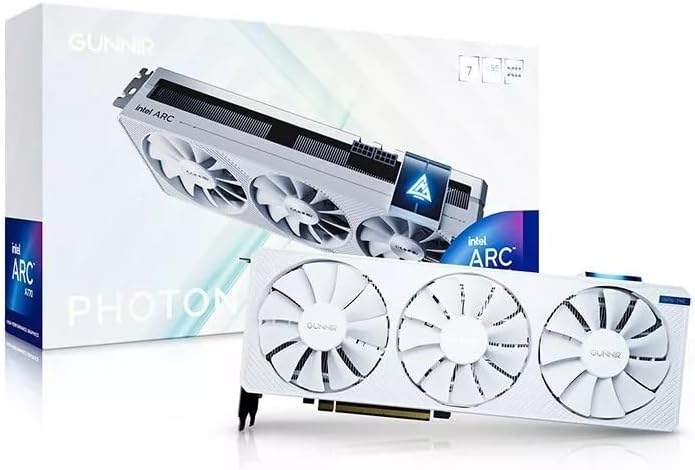
This WEELIAO GUNNIR Intel Arc A770 Photon offers a white aesthetic and robust cooling for 4K enthusiasts. Rated 4.5, it provides a strong foundation for high-resolution gaming and content creation with its 8GB GDDR6 memory and 256-bit bus interface ensuring high bandwidth for texture streaming.
We may earn a commission when you buy through this link, at no additional cost to you.
The triple fan design with white accents ensures efficient cooling to maintain stable temperatures during intense workloads. It supports future-proof connectivity via HDMI and DisplayPort, ready to connect to 4K monitors. The 2400MHz core clock provides excellent performance for a range of demanding graphics workloads.
While it performs well in games, users should keep drivers updated for optimal stability. The card's physical size and cooling capacity make it suitable for standard gaming cases. Its design appeals to those building white-themed rigs without sacrificing raw computational power.
We recommend this card for gamers building a white-themed PC or those needing reliable 4K performance. The combination of features and aesthetics offers a balanced option for modern gaming rigs. Verify your case clearance before purchase to ensure the triple fan fits.
The white triple fan design appeals to users building custom white builds, offering visual cohesion without compromising on thermal performance or core hardware specifications.
The 256-bit bus interface delivers high memory bandwidth, crucial for maintaining performance at 4K resolutions where texture data demands are significantly higher.
We may earn a commission when you buy through this link, at no additional cost to you.
The Sparkle Intel Arc A310 Omni View is a specialized card designed for multi-monitor setups like digital signage or trading desks. Rated 4.6, it excels in low-power environments with a 50W TBP and a single-slot, single-fan design that fits easily into any desktop case.
We may earn a commission when you buy through this link, at no additional cost to you.
Its most distinct feature is the four HDMI outputs, allowing connection to multiple displays simultaneously without needing splitters or adapters. While gaming performance is limited due to 4GB VRAM, its capability to drive multiple monitors makes it a unique utility card for specific business use cases.
The low power draw means it often does not require external power connectors, simplifying installation. It supports modern video decoding, ensuring smooth media playback across screens. This makes it an ideal choice for office upgrades or media centers where visual output is prioritized over raw compute.
We recommend this for businesses needing multi-display support or users setting up home offices. It is not for gaming but for specific visual workloads. Check your monitor inputs to ensure compatibility with the HDMI-only output configuration before purchasing.
With four HDMI outputs, this card enables extensive multi-monitor setups for productivity or digital signage without requiring complex cabling or additional hardware.
The 50W power draw ensures it can run efficiently on systems with lower wattage power supplies, making it perfect for compact desktops and older hardware upgrades.
We may earn a commission when you buy through this link, at no additional cost to you.
Selecting the right Intel Arc GPU requires understanding your specific needs regarding performance, memory, and software compatibility. This guide covers key factors to consider.
VRAM (Video Random Access Memory) is critical for gaming and creative tasks. Higher resolutions like 1440p and 4K require more VRAM to store textures and frame buffers. For AI and professional workloads, massive VRAM like 24GB or 48GB is essential.
Choose at least 8GB for gaming and 16GB or more for professional tasks.
Intel's Xe2-HPG architecture offers significant improvements in performance and AI capabilities over previous generations. Newer cards benefit from more mature drivers and better optimization for modern games and applications.
Prioritize cards with newer architecture for long-term software support and performance gains.
Cooling systems impact noise levels and sustained performance. Cards with dual fans or triple fan designs typically run cooler and quieter than blower styles. Ensure your case has adequate airflow to dissipate heat effectively.
Select a cooling solution that matches your case size and noise tolerance.
Higher-end cards require more power and specific connectors like 8-pin or 12VHPWR. Always check your power supply unit (PSU) wattage and connector availability before buying.
Verify your PSU supports the GPU's TDP and connector types.
Modern GPUs support HDMI 2.1 and DisplayPort 2.1 for high refresh rates and resolutions. If you use multiple monitors or high-end displays, ensure the card has enough outputs and the correct standards.
Check the ports match your monitor inputs for the best experience.
For gaming, prioritize rasterization performance and ray tracing support. For professionals, look for ISV certification and large VRAM. For SFF builds, consider low-profile designs with low power draw.
Match the card to your primary workload to avoid over or under-specifying.
A wider memory bus allows faster data transfer between the GPU and VRAM. This impacts performance at high resolutions where bandwidth is a bottleneck. Cards with 256-bit or 192-bit buses generally perform better than 128-bit equivalents.
Look for wider bus widths when comparing cards with similar VRAM capacities.
Intel Arc cards often offer better performance per dollar compared to competitors. Compare the raw specs against the price to find the best value. Bundles with PSUs can also provide significant savings for system rebuilds.
Consider total cost of ownership including power and accessories.
Install the card securely in the PCIe x16 slot and connect the necessary power cables. Ensure the metal brackets are fixed with screws to prevent sagging and maintain proper grounding.
Download the latest drivers from Intel's official website or use the manufacturer's software utility. Keeping drivers updated ensures compatibility with the latest games and applications while fixing known bugs.
Monitor temperatures using software like HWMonitor or GPU-Z during heavy use. Clean dust from fans and heatsinks regularly to prevent overheating and maintain consistent performance over time.
Intel Arc GPUs require a motherboard with UEFI and Resizable BAR support for optimal performance. Most modern motherboards support this, but older systems may experience reduced performance. Check your motherboard manual for REBAR compatibility before installing.
Yes, all current Intel Arc GPUs support ray tracing via DirectX 12 Ultimate. However, performance may vary compared to competitors. Newer drivers have significantly improved ray tracing performance in supported titles.
Intel Arc GPUs are excellent for content creation due to their AV1 encoding capabilities and XeSS upscaling. They offer strong performance in video editing and 3D rendering applications that support open standards.
Resizable BAR allows the CPU to access the entire VRAM buffer at once, improving performance in supported games. Intel Arc cards require this feature for best results. Enable it in your BIOS settings if available.
We recommend updating Intel drivers monthly or whenever a major game release occurs. Frequent updates often include new feature optimizations and bug fixes that improve stability and frame rates.
Yes, Intel Arc supports OpenVINO and oneAPI libraries for machine learning workloads. They are suitable for running AI inference tasks and model training locally, especially on models optimized for Intel hardware.
The Intel Arc lineup offers a compelling range of options for every user. Whether you need the raw performance of the B570 or the massive VRAM of the Pro B60, there is a suitable card for your workflow.
Prioritize VRAM capacity and thermal design based on your specific needs. Gamers should focus on clock speeds and cooling, while professionals should look for memory capacity and ISV certification.
Always verify current compatibility and prices before making your final purchase decision. Technology evolves quickly, and checking the latest reviews and software updates ensures you get the best value for your system.