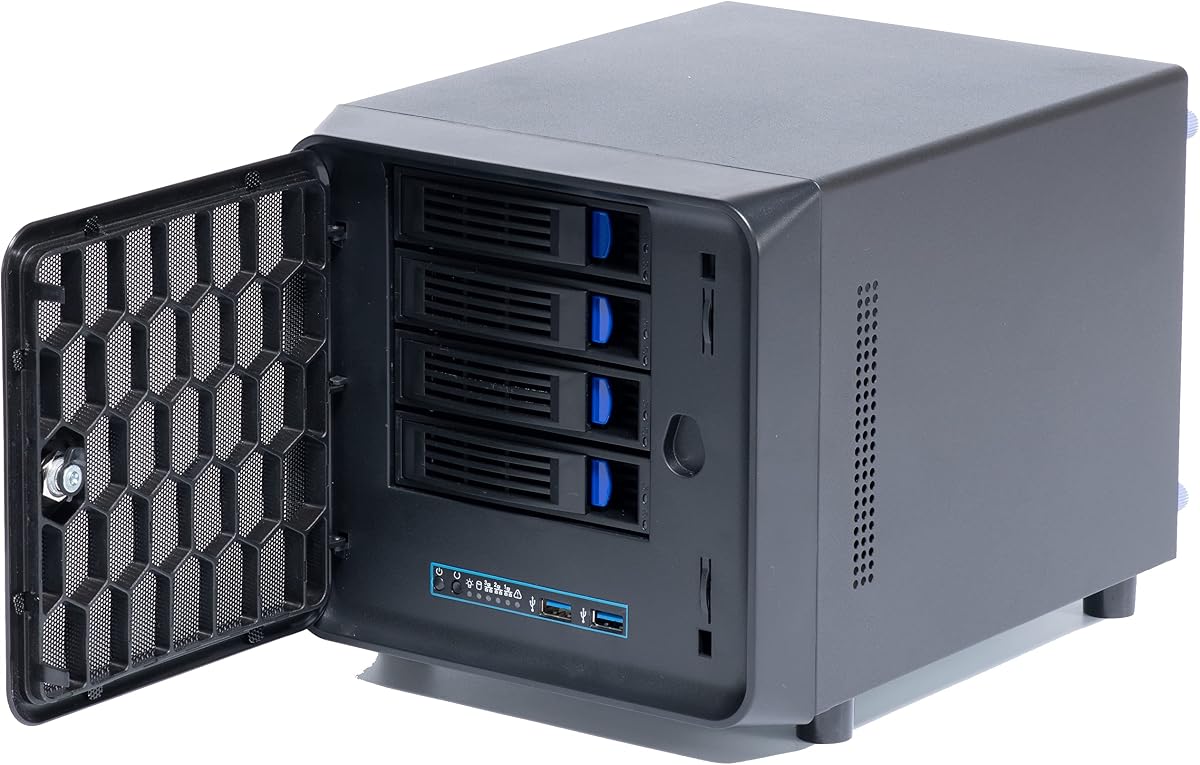
4 + 1 Bay DIY NAS Case
4.0Editor score
Affordable entry price
Flex PSU compatible
Five total drive bays
Finding the right mini NAS enclosure is crucial for building a reliable home server without sacrificing desk space. These compact cases support multiple drives and offer efficient cooling for 2477 operation.
We evaluated ten top models based on drive capacity, build quality, airflow design, and compatibility with common motherboard and power supply standards. Each option serves different storage needs.
Each pick highlights key strengths and trade-offs to help you match the case to your specific project. Prices and availability change frequently, so check current listings before purchasing any unit.
4.0Editor score

4.6Editor score

4.5Editor score
As an Amazon Associate we earn from qualifying purchases.
The following comparison table outlines the key specifications and features of each mini NAS enclosure to help you quickly identify the model that fits your hardware requirements.


The JONSBO N2 Black is a premium mini NAS enclosure designed for builders who value aesthetics and solid build quality. It holds six drives and supports Mini ITX boards with SFX power supplies. Its aluminum chassis ensures durability and heat dissipation while keeping the unit compact for desktop placement. The design includes a removable upper cover for easy access to components and cables.
We may earn a commission when you buy through this link, at no additional cost to you.
This case features a well-thought-out layout that separates the motherboard compartment from the drive bays. A built-in 12cm fan provides dedicated cooling for the drives to ensure long-term reliability. The front panel offers modern connectivity including USB 3.2 Gen 2 Type-C and USB 3.0 ports. The aluminum finish gives it a sleek look that blends well in home offices or living rooms.
While the aluminum build adds weight and cost compared to steel alternatives it provides better heat management. The case supports a max CPU cooler height of 65mm and limits GPU length to 197mm for low-profile cards. These limits are acceptable for most home server builds where storage and efficiency matter more than raw graphical power.
This unit is ideal for users building a dedicated home server or media center that needs to look good on a desk. It balances capacity and size well while offering quality materials and thoughtful ventilation. For those who prioritize design and thermal performance, the N2 Black stands out as a top choice in its class.
Users wanting maximum storage density should consider larger options but for a compact six-bay solution this case excels. The integration of front USB ports and audio makes it versatile beyond just storage tasks. Its build quality justifies the investment for anyone planning a long-term server deployment in a visible location.
The aluminum chassis combined with a dedicated fan helps dissipate heat effectively to maintain drive health and system stability.
Front USB 3.2 Type-C and 3.0 ports allow quick peripheral connections without reaching behind the unit.
We may earn a commission when you buy through this link, at no additional cost to you.
The JONSBO N4 Black offers generous storage capacity with eight drive bays and a distinctive walnut wood front panel that blends home tech with warm aesthetics. It supports both Micro ATX and Mini ITX motherboards making it flexible for various builds. Four drives are hot-swap compatible while two are standard offering convenience for maintenance. A built-in 120mm fan ensures consistent cooling for all drives.
We may earn a commission when you buy through this link, at no additional cost to you.
This chassis features a split compartment design separating the motherboard area from drive storage to improve thermal performance. The front panel uses authentic North American black walnut to create a premium look that complements living spaces. Connectivity includes USB 3.2 Gen 2 Type-C and USB 3.0 for modern peripheral access. The steel and wood combination provides sturdy protection for internal components.
Its larger size accommodates more drives but requires sufficient desktop or shelf space compared to smaller enclosures. The wood veneer adds visual appeal but should be kept away from direct sunlight to prevent discoloration. Hot-swap bays reduce downtime when swapping drives making it suitable for home office or enterprise storage setups.
This enclosure suits users needing significant storage without moving to full rackmount systems. The design balances professional utility with home decor considerations well. It is a strong choice for media libraries or backup arrays where capacity and look matter equally.
For those who value unique finishes and high drive counts this model stands out. The integration of hot-swap capability and solid airflow makes it practical for daily use. Its build quality ensures long service life while the wood panel offers a distinctive style rarely found in tech cases.
The walnut wood front panel allows the case to blend into home decor rather than looking like standard office hardware.
Compatible with both Micro ATX and Mini ITX boards to give builders more options for their system layout.
We may earn a commission when you buy through this link, at no additional cost to you.
The 4 + 1 Bay DIY NAS Case provides an affordable entry point for building a custom network attached storage server. It supports Mini ITX motherboards and Flex power supplies keeping the total system footprint small. With four 3.5 or 2.5 inch bays and one internal bay it offers flexible drive configurations. A front USB 3.0 port and 8cm fan aid connectivity and cooling.
We may earn a commission when you buy through this link, at no additional cost to you.
This case includes a hot swap backplane allowing drives to be changed without powering off the system. The compact design uses space efficiently making it suitable for tight desks or shelves. Build materials are functional steel focusing on utility over premium finishes. The front panel layout is simple yet practical for common access needs.
Flex power supplies are smaller but may limit power headroom compared to standard SFX units. The case accommodates single slot expansion cards for network or storage controllers. Its lower price makes it attractive for hobbyists or small setups that do not require industrial-grade aesthetics.
This enclosure is perfect for DIY enthusiasts who prioritize function and cost over fancy design. It supports common NAS operating systems well and offers solid drive access features. For budget builders the feature set is strong relative to the investment required.
Users can expand their storage gradually by adding drives over time. The hot swap capability reduces downtime during maintenance tasks. While not as polished as premium options it delivers reliable performance for personal or small office use.
Focuses on essential features to keep costs low while supporting a full NAS build.
Small dimensions allow placement on crowded desks without taking up much space.
We may earn a commission when you buy through this link, at no additional cost to you.
The GeeekPi N07 MiniTower is a specialized enclosure designed for the Raspberry Pi 5 to create a compact and efficient network attached storage node. It supports M.2 NVMe SSDs and includes a tower case with an Ice Tower cooler for stable operation. An OLED display shows real-time system metrics. The kit also includes GPIO boards and cables for full assembly.
We may earn a commission when you buy through this link, at no additional cost to you.
This package simplifies building a Pi based NAS by providing compatible parts in one box. The NVMe support offers faster performance than standard USB drives. The tower form factor and fan improve airflow significantly. A Python library allows customizing the OLED screen to display useful data like memory usage or network load.
The system is limited to the Raspberry Pi 5 hardware so expansion depends on Pi capabilities. Storage is restricted to SSDs rather than multiple mechanical drives. While this limits total capacity it reduces power consumption and noise for quiet environments. It works well for light file serving or small media tasks.
This kit is ideal for makers and hobbyists who want a low-power efficient server without complex cabling. The included cooling and display add value beyond a basic case. For those comfortable with Pi software this delivers a complete experience for home cloud storage.
Users seeking a silent and compact solution for personal data access will appreciate this setup. The NVMe speed ensures quick transfers even with a low-power CPU. Its design and accessories make it accessible for beginners new to single-board computer projects.
Includes all necessary parts like cooler and expansion boards to simplify assembly for a server build.
The OLED display lets you check system status at a glance without needing a remote monitor.
We may earn a commission when you buy through this link, at no additional cost to you.
The JONSBO N3 Mini-ITX NAS PC Chassis offers the highest drive count in this review with nine bays for storage expansion. It features an aluminum and steel plate build for robust protection and heat transfer. A removable top cover and hot-swap backplane make maintenance easy. Two 10cm fans provide direct airflow to hard drives for long-term reliability.
We may earn a commission when you buy through this link, at no additional cost to you.
Front connectivity includes USB 3.0 and USB 3.2 Gen 2 Type-C plus audio for versatile use. The case supports SFX power supplies up to 105mm and coolers up to 130mm. Its split compartment design isolates heat sources to keep components cool. The design maintains a compact look despite the high capacity.
Nine bays exceed most home needs but support large media collections or backup arrays. The aluminum finish resists scratches and looks professional on desks. Dual fans may produce more noise than single fan cases but ensure drives stay within safe operating temperatures.
This chassis suits power users who need massive storage in a small form factor. The hot-swap feature allows replacing failed drives without rebooting. It is a premium option for those who want high reliability and capacity in a home setting.
The balance of capacity build quality and cooling makes it a standout for serious home servers. Users will appreciate the ease of drive management and clean aesthetics. It represents a significant upgrade for anyone outgrowing smaller five or six bay units.
Nine drive bays provide ample space for growing media or backup needs without expanding racks.
Dual fans and split airflow paths maintain safe drive temperatures during continuous operation.
We may earn a commission when you buy through this link, at no additional cost to you.
The CENMATE Aluminum 2 Bay Hard Drive Enclosure provides a simple external storage solution that supports 2.5 or 3.5 inch SATA drives. It uses a tool-free tray design for quick drive installation and removal. USB 3.0 ports offer fast data transfer rates. A built-in fan prevents overheating during heavy use.
We may earn a commission when you buy through this link, at no additional cost to you.
This device functions as a DAS or direct attached storage unit rather than a full NAS server. It supports up to 20TB per drive and daisy chaining for future expansion. The aluminum casing dissipates heat well and feels durable. It is ideal for backing up PCs or sharing media across a network.
The unit does not include RAID functionality so users must rely on software for redundancy. Fan noise is around 40 to 50 decibels which may be noticeable in quiet rooms. Still the hot swap feature allows drive changes without powering down the enclosure.
For users needing extra space without building a full server this enclosure is practical and efficient. Its simplicity reduces setup time and maintenance effort. It works with major operating systems out of the box for immediate use.
This is a great choice for photographers or home users who want to expand storage easily. The tool-free design speeds up maintenance tasks significantly. While not a full NAS it fulfills the role of secure accessible external storage well.
Tool-free trays allow swapping drives in seconds without screws or extra tools.
USB 3.0 speeds ensure quick file access and backup operations for daily needs.
We may earn a commission when you buy through this link, at no additional cost to you.
The JONSBO N4 White NAS Pc Case combines storage capacity with a distinctive white finish and walnut wood accents for a stylish home server. It supports Micro ATX and Mini ITX motherboards with eight total drive bays. Four drives are hot-swap compatible for convenience. A built-in 120mm fan keeps temperatures stable for long operation.
We may earn a commission when you buy through this link, at no additional cost to you.
This chassis uses a split compartment layout to separate drive heat from motherboard heat effectively. The white color and wood veneer help it stand out as a decor piece. Front USB 3.2 Gen 2 Type-C and 3.0 ports provide versatile connectivity. Its steel and wood construction feels durable and premium.
The larger dimensions accommodate eight drives but need sufficient shelf space. The white panel may show dust more than darker finishes but looks modern. Hot-swap capability reduces downtime when managing storage arrays. It suits users who value both performance and home-friendly aesthetics.
This case is ideal for those building a server that sits visibly in living spaces. It balances utility with design choices that avoid looking like industrial hardware. For style conscious home office setups it offers a rare combination of looks and function.
Users will appreciate the drive access convenience and airflow design. The wood front adds warmth to tech-heavy rooms. It is a strong choice for anyone seeking high capacity with a refined appearance.
White finish and walnut wood create a modern look suitable for living rooms or offices.
Split compartments direct cooling air to separate areas to reduce thermal interference.
We may earn a commission when you buy through this link, at no additional cost to you.
The 8 Bay Mini ITX Micro ATX NAS Case provides solid hardware support for building a DIY storage server with eight hot-swap drive bays. It features dual independent air channels to keep drives and motherboard separate. Three temperature controlled silent fans maintain low noise. The case fits Mini ITX or Micro ATX boards and Flex or 1U power supplies.
We may earn a commission when you buy through this link, at no additional cost to you.
Indicator lights on each drive bay let you monitor disk status at a glance. Front USB 3.0 and a power button add practical access points. The steel chassis offers shockproof durability to protect stored data. It is suited for home media servers or small business backups requiring high capacity.
Its size and weight reflect the high capacity design which needs a stable surface. Assembly requires attention to airflow direction and cable routing. The included accessories simplify setup. Its cooling system ensures stable operation even during heavy file loads.
This case fits users who want maximum drive flexibility without enterprise complexity. The dual air channel design improves efficiency compared to shared airflow cases. It supports various hardware choices giving freedom to tailor the system to needs.
For DIY builders the feature set delivers strong value and expandability. Hot-swap slots enable maintenance without powering down. It is a reliable choice for those planning a robust local storage solution at home.
Separate channels prevent heat from drives affecting the motherboard components during operation.
Each drive has indicator lights to show power and activity status for easy diagnosis.
We may earn a commission when you buy through this link, at no additional cost to you.
The CENMATE Aluminum 8 Bay Hard Drive Enclosure delivers high external storage capacity with eight tool-free drive bays for fast expansion. It uses USB 3.0 for quick data transfers and supports hot-swapping drives. A built-in fan helps manage heat during heavy use. The aluminum casing is sturdy and resists heat buildup.
We may earn a commission when you buy through this link, at no additional cost to you.
This DAS unit supports up to 160TB total with 20TB drives and allows daisy chaining for more storage. It connects to Windows Mac and Linux systems without extra drivers. The 12V adapter ensures stable power for all drives. It is useful for large media archives or backup pools.
Its limitations are typical of DAS units as it does not handle RAID or network sharing independently. Fan noise ranges from 40 to 50 decibels which is acceptable in workspaces. Hot swap lets users replace drives without powering off the enclosure.
This device suits users needing massive external storage without building a full server. Its simplicity and capacity make it ideal for studios or offices with large data needs. The tool-free design reduces maintenance time significantly.
For those who value raw storage in a portable form factor this enclosure performs well. It offers reliable performance for file sharing or backup tasks. The high drive count ensures room to grow over time.
Eight bays support up to 160TB for extensive media or backup needs.
Tool-free trays allow quick drive changes without screws or tools.
We may earn a commission when you buy through this link, at no additional cost to you.
The K3 4 Bay Mini ITX NAS Case is a starter option for building a private cloud with four hot-swap drive bays. It supports Mini ITX motherboards and Flex power supplies to keep the unit compact. A rear 12cm silent fan manages cooling for drives and CPU. Front USB 2.0 and a power button provide easy access.
We may earn a commission when you buy through this link, at no additional cost to you.
This case uses 1mm thick steel plate for stability and shock protection. Indicator lights on drives show real time status. Its dimensions allow placement on crowded desks. It is designed for TrueNAS OpenMediaVault and similar systems.
Four bays suit small homes or light office use. The USB 2.0 front ports are slower but enough for flash drive access. It offers a good balance of simplicity and capacity for DIY beginners. The build is sturdy for daily use.
Ideal for those starting their first server build this case is practical and reliable. It includes necessary accessories for hassle-free installation. The design supports silent 24/7 operation well.
Users can grow into higher capacity models later if needed. Its focus on function and cost makes it a solid entry point. The silent fan ensures quiet operation in living spaces.
Small dimensions save space on desks while supporting full Mini ITX builds.
Includes mounting brackets and screws to simplify assembly for new users.
We may earn a commission when you buy through this link, at no additional cost to you.
Selecting the right enclosure depends on drive count motherboard type power supply and cooling needs for your home server project.
Consider how many hard drives you need now and in the future. Some cases support two or four drives for light use while others offer six to nine for larger media libraries or backups. More bays mean higher total storage but often require more desk space.
Choose a case with enough bays to meet your current and near future needs to avoid replacing the enclosure later.
Mini NAS enclosures usually support Mini ITX boards but some accept Micro ATX as well. Check the maximum GPU length and CPU cooler height allowed to ensure your components will fit. These limits affect thermal performance and expandability.
Confirm your motherboard and components fit the case dimensions before purchase to prevent compatibility issues.
Cases may require SFX SFX-L Flex or 1U power supplies which have different sizes and wattage. Flex units save space but may limit power output. Ensure your supply matches the case requirements for stable operation.
Match your power supply type to the case specifications for reliable power delivery and proper airflow.
Proper cooling protects hard drives from heat damage. Look for dedicated drive fans or airflow paths that separate drive heat from the motherboard. More fans often mean better cooling but may add noise.
Prioritize cases with direct drive cooling to extend drive lifespan during continuous use.
Hot-swap bays allow replacing drives without shutting down the system. This is useful for maintenance or upgrading storage without downtime. Not all cases include this feature.
Choose hot-swap bays if you need quick drive changes or run critical systems requiring uptime.
Aluminum cases dissipate heat better and feel more premium than steel ones. Steel is affordable and sturdy. Wood panels add style but require care. Consider the trade-off between price durability and aesthetics.
Select materials that match your budget and environment for long-term satisfaction.
USB ports on the front allow quick access for flash drives and peripherals. USB 3.0 or Type-C offers faster speeds than older versions. Audio jacks add convenience for desktop users.
Look for modern front USB ports for flexible connectivity without reaching behind the case.
Larger enclosures hold more drives but require more shelf or desk space. Weight affects portability and stability. Measure your intended space before buying.
Ensure the case fits your available area while providing enough drive capacity.
Install drives into trays before mounting the backplane and secure them with screws if not tool-free. Ensure SATA data and power cables are connected firmly to the motherboard or backplane.
Place the enclosure on a flat stable surface with enough room around it for airflow. Avoid covering intake vents or placing it near heat sources to maintain safe internal temperatures.
Regularly check indicator lights and listen for unusual drive noises to catch issues early. Update your server software periodically to ensure security and performance.
A mini NAS enclosure is a compact computer case designed to house a motherboard power supply and multiple hard drives for building a network attached storage server at home. It typically supports Mini ITX boards and offers cooling and drive access features.
Most mini NAS enclosures require smaller power supplies like SFX or Flex instead of standard ATX units. Check the case specifications for the correct size and power rating to ensure stable operation of all drives.
Yes most enclosures support both 3.5 inch hard drives and 2.5 inch SSDs. Some models even include dedicated M.2 slots for NVMe SSDs offering faster storage options for applications and caching.
Hot swap is useful if you need to replace drives without powering off the system. For home backups or media servers it is optional but adds convenience when managing drive arrays or upgrading capacity.
Noise levels depend on fan count and speed. Cases with larger slower fans or multiple fans can produce 40 to 50 decibels. Look for silent fan options if you plan to place the server in quiet living spaces.
Mini NAS enclosures are hardware agnostic and support any OS that runs on compatible motherboards. Popular NAS systems include TrueNAS OpenMediaVault Unraid or even standard Windows or Linux distributions.
Yes if you buy a case with available drive bays. Most models include empty slots or trays that can be filled later. Check that your power supply has enough connectors to support added drives.
We reviewed ten mini NAS enclosures ranging from compact four-bay starters to nine-bay powerhouses. The JONSBO N2 Black stands out for build quality and design while the JONSBO N3 offers maximum drive capacity for advanced users.
Prioritize drive count motherboard fit and cooling when choosing your unit. A well-ventilated case with hot-swap support ensures reliability and easier maintenance over time.
Prices and stock change often so verify current listings before purchasing. Select the model that matches your storage needs and space constraints for a smooth home server experience.