
USB Fingerprint Reader for Windows 10/11 ONLY
4.3Editor score
Windows Hello Fingerprint Login
Match-in-Sensor Security
True Plug & Play Setup
This guide compares the top fingerprint readers for Windows 10 and 11, evaluating security features, compatibility, and ease of use to help you choose the
Finding the right fingerprint reader for your Windows PC can significantly enhance security and convenience. These devices allow you to unlock your computer with a simple touch, replacing complex passwords with reliable biometric authentication that keeps your data safe.
We have carefully evaluated ten top-rated fingerprint readers available for Windows systems. Our comparison focuses on compatibility with Windows Hello, sensor accuracy, build quality, and additional security features like FIDO certification to ensure you get the most secure option.
Each product pick below highlights specific strengths and ideal use cases for different users. Please note that availability and pricing can change frequently, so checking the latest details on the product pages is recommended before making your final purchase decision.
4.3Editor score

4.1Editor score

4.1Editor score
The following table provides a side-by-side comparison of the ten selected fingerprint readers. Each entry highlights key specifications to help you quickly identify the features that matter most for your specific Windows setup and security requirements.

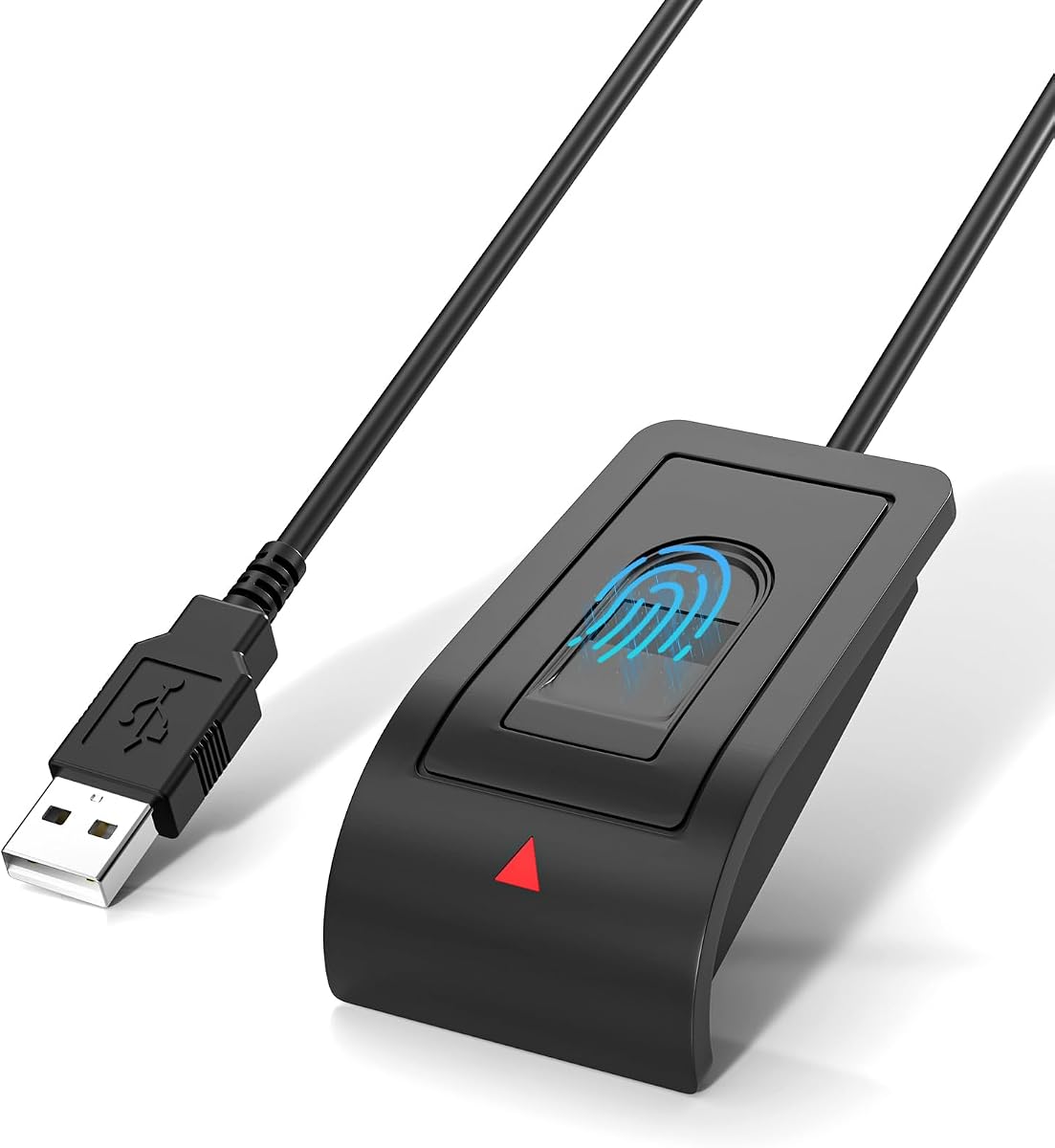



This USB fingerprint reader stands out as a top budget option for users seeking reliable Windows Hello integration. With a rating of 4.3, it offers essential biometric login capabilities without requiring expensive hardware or complex setups. Its primary strength lies in its strict adherence to Windows security standards while maintaining an accessible price.
We may earn a commission when you buy through this link, at no additional cost to you.
The device utilizes Match-in-Sensor security technology, ensuring fingerprint data is processed locally and never leaves your PC. This approach aligns with modern privacy expectations by keeping biometric templates stored only on your device. Additionally, the inclusion of a 4ft extension cable provides flexibility for desktop placement, making it easy to position the sensor for comfortable daily use.
While it lacks advanced features like FIDO certification or RGB lighting, these omissions help keep costs down for casual users. The compatibility is strictly limited to Windows 10 and 11 systems, which may not appeal to multi-OS users. However, for those focused solely on securing a Windows PC, these trade-offs are minimal given the functionality provided.
This reader is ideal for home users or small offices needing an inexpensive way to upgrade security. It works best with genuine Windows systems where Hello is enabled. We recommend this model for anyone prioritizing basic, secure login over advanced features or multi-platform support.
Fingerprint matching occurs inside the sensor, ensuring your biometric data never leaves your device or gets stored on external servers.
The included 4ft extension cable allows you to position the reader exactly where it is most convenient for your workflow.
We may earn a commission when you buy through this link, at no additional cost to you.
The ineo USB Fingerprint Reader earns the Editor's Choice award for its blend of practical features and ease of use. Rated at 4.1, it focuses on streamlining the login process while adding a unique one-touch lock feature. This makes it an attractive option for users who frequently step away from their desks and need quick security.
We may earn a commission when you buy through this link, at no additional cost to you.
It features a high-precision optical sensor that delivers reliable recognition with a quick response time. The plug-and-play nature means you can start using it within minutes without installing complex drivers. The 5ft cable ensures it fits comfortably in various setups, while the compact design prevents desk clutter.
However, the optical sensor technology may be less secure against spoofing attempts compared to capacitive alternatives. Additionally, the lack of FIDO certification means it cannot function as a security key for websites. These factors limit its appeal for users needing broader authentication options beyond Windows Hello.
This reader is best suited for individuals who value speed and simplicity in their daily workflow. It works well for home users who want to secure their computers and lock screens instantly. If you prioritize a compact design and quick setup, this model is a strong contender.
The one-touch lock feature allows you to instantly lock your computer using the Win plus L shortcut for enhanced privacy.
Simple USB connection ensures easy setup without complex installation steps, getting you started within minutes.
We may earn a commission when you buy through this link, at no additional cost to you.
This Kensington VeriMark Desktop represents a premium choice for users requiring enterprise-grade security. With a 4.1 rating, it offers dual certification for Windows Hello and FIDO standards, allowing for robust authentication across multiple platforms. This versatility makes it ideal for both personal security and professional environments.
We may earn a commission when you buy through this link, at no additional cost to you.
The device features Match-in-Sensor fingerprint technology combined with anti-spoofing capabilities to ensure high accuracy. It exceeds industry standards for false rejection and acceptance rates, providing reliable performance. The 360-degree readability ensures that fingerprints can be scanned from almost any angle, enhancing usability.
While the price is higher than basic models, the security benefits justify the investment for many users. However, it currently does not support ARM-based computers, which may be a limitation for some newer laptop models. Additionally, the lack of direct support for non-Windows systems like macOS limits its portability.
We recommend this reader for business users or anyone needing secure, passwordless login across browsers and services. It supports major Microsoft services and adheres to privacy regulations like GDPR. If you need top-tier biometric security with broad compatibility, this is a leading option.
FIDO U2F and FIDO2 certification enables strong single-factor and multi-factor authentication across major web browsers.
Built-in anti-spoofing technology ensures that only genuine fingerprints can authenticate, protecting against counterfeit attempts.
We may earn a commission when you buy through this link, at no additional cost to you.
This reader combines functionality with a unique aesthetic appeal through its RGB lighting effects. With a 3.0 rating, it offers both Windows Hello login and FIDO U2F capabilities. The inclusion of a long 5FT cable and support for Windows 12 suggests forward-thinking design, though user feedback indicates some reliability issues.
We may earn a commission when you buy through this link, at no additional cost to you.
The RGB lighting allows for customization, which can enhance desktop aesthetics. It supports up to 10 fingerprints, making it suitable for shared devices. However, the lower rating suggests that some users may experience connectivity or accuracy problems during initial setup or daily use.
While it offers advanced features like FIDO certification, the user experience may not be as polished as competitors. The RGB lights might be a distraction for users focused purely on utility. These factors should be weighed against the need for customization and future-proofing.
This device is best for tech enthusiasts who want to personalize their security setup. It may be suitable for those willing to troubleshoot potential issues in exchange for unique features. Consider it if you value style alongside security features.
Touch control allows you to adjust RGB lighting effects to match your desktop aesthetic or personal preference.
Explicitly supports Windows 10, 11, and 12, ensuring longevity as operating systems update and evolve over time.
We may earn a commission when you buy through this link, at no additional cost to you.
This generic USB fingerprint reader offers a straightforward approach to Windows Hello security. Rated at 4.1, it focuses on core functionality without extra frills. It is designed to replace passwords with fast one-touch biometric access on Windows 10 and 11 PCs, making it a practical choice for general users.
We may earn a commission when you buy through this link, at no additional cost to you.
The device uses Match-in-Sensor security to keep biometric data local and protected. It connects via USB with no need for third-party apps, ensuring a smooth setup process. The included 4ft cable provides flexible placement options for desktops and workstations.
However, it lacks FIDO certification, limiting its use to Windows login only. The packaging and design are generic, which may not appeal to users seeking a branded product. Despite this, its performance and reliability are comparable to more expensive options for basic tasks.
This model is ideal for users who simply want to enable Windows Hello on a device without it sensor. It is cost-effective and easy to use for daily login and screen locking. Choose this if you prioritize simplicity and functionality over brand name or advanced features.
Fingerprint information is stored locally on your device, ensuring privacy by not uploading data externally.
No complicated drivers or third-party apps are required for this solution, allowing quick connection and use.
We may earn a commission when you buy through this link, at no additional cost to you.
The Verifi P2000 is an established option known for its compatibility with PASSKEY and Windows Hello. With a rating of 3.9, it offers high-definition fingerprint imaging based on 3D Touch Capacitance technology. This makes it a strong candidate for users looking to transition to passwordless authentication on websites.
We may earn a commission when you buy through this link, at no additional cost to you.
Its ability to integrate with leading password management software enhances its utility. The Windows Hello certification ensures seamless operation with business and personal Windows systems. However, the rating suggests that some users may find the sensor less responsive compared to newer models.
While it supports modern PASSKEY standards, the design and technology are older than competitors. This may mean longer recognition times or less durability over time. The aesthetic design is functional but may not match modern minimalistic setups as well as newer models.
This reader is recommended for users who prioritize PASSKEY support for web login. It works well alongside password managers for enhanced account security. Consider it if you are already in the Windows ecosystem and want a reliable desktop reader.
PASSKEY compatibility allows you to start enjoying passwordless login to all available websites that support the standard.
Compatible with all leading password management software to streamline your authentication process further.
We may earn a commission when you buy through this link, at no additional cost to you.
This second-generation Kensington reader focuses on passwordless experiences through Tap and Go technology. With a rating of 3.7, it offers strong biometric performance and anti-spoofing features. It is designed for both Windows Hello and business environments, making it a versatile choice for corporate security.
We may earn a commission when you buy through this link, at no additional cost to you.
The device supports popular password managers like LastPass and Dashlane to streamline account access. Its 360-degree readability ensures quick recognition from any angle. However, the rating indicates some users have experienced compatibility or durability issues over time.
While it meets enterprise cybersecurity measures and privacy laws, it is not compatible with macOS or ChromeOS. This limits its utility for multi-platform users. The focus on enterprise deployment means it might be overkill for simple home use.
We recommend this model for businesses implementing passwordless standards across their workforce. It is suitable for users who need secure authentication with multiple password managers. If you value Tap and Go features, this is a solid option.
Designed to support Passkey Access with Tap and Go CTAP2 protocol to help you and your business move to passwordless experiences.
Compatible with popular password managers like Dashlane and LastPass to authenticate and fill usernames automatically.
We may earn a commission when you buy through this link, at no additional cost to you.
This upgraded reader emphasizes speed with an ultra-fast 0.05-second response time. Rated at 4.2, it utilizes capacitive fingerprint technology for reliable 360-degree detection. Its focus on rapid access makes it ideal for users who prioritize efficiency in their login routines.
We may earn a commission when you buy through this link, at no additional cost to you.
The device supports multi-user access with personalized IDs for up to 10 users, making it great for shared PCs. It includes a 1.5m extension cable for flexible placement. However, it is limited to Windows 10 and 11, and lacks broader FIDO certification.
Despite the high rating, the compact design may feel less durable to some users. The lack of FIDO support means you will still rely on passwords for some website logins. These limitations are acceptable if speed is your primary concern for local PC access.
This model is perfect for shared family computers or offices needing fast user switching. We recommend it for those who value quick unlock times and multi-user support. If you need speed above all else, this reader delivers effectively.
Advanced capacitive technology delivers an ultra-fast 0.05-second response for quick, password-free access every time.
Supports up to 10 user IDs to provide personalized secure access for everyone on a shared PC environment.
We may earn a commission when you buy through this link, at no additional cost to you.
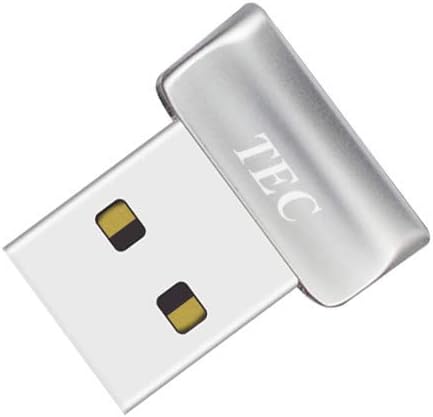
The TEC Mini USB Fingerprint Reader focuses on file encryption alongside standard Windows Hello login. Rated at 4.2, it offers a compact design with speedy matching capabilities. Its ability to encrypt documents and folders adds an extra layer of security beyond simple login.
We may earn a commission when you buy through this link, at no additional cost to you.
With support for multiple fingerprints and 360-degree recognition, it ensures convenient access for various users. However, it is not compatible with ARM-based chipsets, which may affect modern laptops. Some users have reported driver installation issues that require troubleshooting.
While the file encryption feature is unique, the incompatibility with ARM devices limits its applicability. The compact design makes it portable but might feel less substantial for desktop use. These trade-offs are worth considering based on your device architecture.
This model is recommended for users needing extra file encryption features on standard x86 systems. It is suitable for personal use where portable security is valued. If you need to encrypt folders, this is a practical tool.
Supports documents and folder encryption to add an extra layer of security to your private data storage.
Mini design ensures it is easy to store and use as a portable security key on compatible Windows systems.
We may earn a commission when you buy through this link, at no additional cost to you.
This Yoidesu reader offers a straightforward plug-and-play experience for Windows Hello users. With a 3.9 rating, it supports fast 0.5s recognition and multi-user accounts. Its lightweight design makes it a convenient choice for those who want to add biometrics without complex installations.
We may earn a commission when you buy through this link, at no additional cost to you.
It supports up to 10 fingerprints per user account and includes Smart-ID security to protect saved passwords. However, it does not work with streamlined Windows versions or Linux systems. Users have noted that it should be plugged into USB 2.0 ports for stability.
The lack of FIDO support limits its utility to local Windows login only. While it offers Smart-ID features, the reliance on specific USB ports may be inconvenient. These limitations make it less versatile than premium models.
We recommend this model for home users needing basic Windows login upgrades. It is best used on original system versions with standard USB ports. If you need a simple, cost-effective solution, this is a viable option.
Smart-ID security helps protect saved passwords and encrypted folders with simple fingerprint access.
Supports multiple Windows accounts and up to 10 fingerprints per user for flexible shared use.
We may earn a commission when you buy through this link, at no additional cost to you.
Selecting the right fingerprint reader depends on your specific security needs and system compatibility. Consider these factors to ensure the device works seamlessly with your Windows setup and provides the level of protection you require.
Most modern fingerprint readers are designed to work with Windows Hello, allowing you to log in without a password. Ensure the device you choose explicitly states compatibility with your version of Windows, whether it is Windows 10, 11, or newer versions like 12.
Always check the product description for mentions of Windows Hello certification to avoid setup issues or driver conflicts.
If you want to use your fingerprint reader for website logins and online services, look for FIDO U2F or FIDO2 certification. This feature expands the device beyond PC login, allowing it to act as a security key for browsers and applications.
Choose FIDO-certified models if you need stronger authentication for accounts like Google, Microsoft, or financial services.
Match-in-Sensor technology ensures that your fingerprint data is processed and stored locally on the device rather than on a server. This adds a layer of privacy and security, as your biometric template never leaves your computer.
Prioritize readers with Match-in-Sensor capabilities to protect your personal biometric data from external access.
A longer USB cable provides flexibility in placing the reader where it is most convenient for your workspace. Most readers include cables ranging from 3 to 5 feet, which is ideal for desktops.
Ensure the cable is long enough to reach your preferred position without causing a mess or restricting movement.
For shared computers or family setups, check how many fingerprints the reader can store. Many devices support up to 10 fingerprints, allowing multiple users to have their own profiles and accounts.
Verify the number of supported fingerprints to ensure the device can handle all the users who access your computer regularly.
Optical sensors are common and affordable, while capacitive sensors often offer better accuracy and speed. Look for response times under one second to ensure a smooth login experience.
Consider your priority for speed and accuracy when choosing between optical and capacitive sensor types.
Advanced readers include anti-spoofing technology to detect and prevent unauthorized access using fake fingerprints. This security measure adds protection against sophisticated attempts to bypass biometric locks.
Look for mentions of anti-spoofing or liveness detection in the product specifications for enhanced security.
Some readers are not compatible with ARM-based chipsets found in certain newer laptops. Always check if the device supports your processor architecture before purchasing to ensure full functionality.
Review system requirements carefully to avoid incompatibility issues with ARM-based Windows devices.
To get started, plug the USB fingerprint reader into an available USB port on your computer. Once connected, navigate to Windows Settings and select Accounts. From there, choose Sign-in options and follow the prompts to set up Windows Hello, where you will register your fingerprints by touching the sensor several times.
For best performance, ensure your fingers are clean and dry before scanning. If the sensor does not recognize your print immediately, try adjusting the angle or lifting your finger slightly to register it from a different position. If you encounter issues, restarting the computer or checking for system updates can often resolve driver or compatibility problems.
To maintain the device, regularly clean the sensor with a soft, dry cloth to remove dust and oils. Avoid using harsh chemicals or liquids that could damage the sensor surface. Store the device in a safe place when not in use to prevent physical damage to the USB connector or internal components.
Yes, fingerprint readers are generally safe when they use Match-in-Sensor security. This means your biometric data is processed locally on your device and never uploaded to external servers. Ensure the device supports Windows Hello standards for secure integration.
No, most USB fingerprint readers designed for Windows are not compatible with macOS or Linux. They rely on Windows Hello and Windows-specific drivers to function. If you need cross-platform support, look for devices with specific macOS compatibility, which are rare.
Most modern readers are plug-and-play and do not require manual driver installation on genuine Windows systems. The operating system automatically recognizes them through Windows Hello. If issues arise, ensure your system is updated to the latest Windows version.
If Windows Hello is missing, your system may lack necessary updates or hardware support. Check Windows Settings to enable biometric login and update your drivers. Some older PCs may not support the feature without additional configuration.
Most of the readers reviewed can store up to 10 fingerprints, allowing for multiple user accounts or multiple fingers per user. This capacity is sufficient for personal computers and small shared home or office setups.
For Windows login, yes, they can replace passwords with fingerprint authentication. However, for websites, you may still need a password or rely on FIDO standards. Some readers with FIDO2 support allow for passwordless website login.
We have reviewed ten distinct options ranging from budget-friendly models to premium enterprise solutions. Whether you need basic Windows Hello login or advanced FIDO features, there is a device in this list to suit your needs.
Prioritize Match-in-Sensor security and FIDO certification if data privacy and broad authentication capabilities are important to you. For those focused solely on desktop convenience, a budget model with a long cable will serve you well.
Please remember that product availability and technical requirements may vary. Check the latest details on the manufacturer pages to ensure the device matches your specific Windows system and security needs before purchasing.